


本文将对一个基于 HarmonyOS ArkTS 开发的美食探店类应用进行逐段源码解析。该应用涵盖了从数据建模、状态管理、UI 布局到交互设计的完整移动端开发链路,包含推荐、收藏、附近、排行和个人中心五大核心模块。通过逐段拆解,我们将深入探讨 ArkTS 声明式 UI 的开发范式、@Observed 与 @State 等状态装饰器的实际运用、自定义 Builder 的组件化封装思想,以及模态弹窗、分类筛选、数据排序等常见业务场景的实现细节。

一、接口定义与类型系统:为业务数据奠定类型基石
ArkTS 作为 TypeScript 的超集,具备强大的静态类型系统。在应用开发初期,先定义核心业务的接口类型,是一种良好的工程实践。这不仅能获得 IDE 的智能提示与类型检查,还能让数据结构的边界清晰可见。
1.1 菜系元数据接口
interface CuisineMeta {
  label: string
  icon: string
  color: string
  bg: string
}

技术解析:
CuisineMeta 接口定义了菜系分类所需的可视化元数据。该接口包含四个字段:label 用于显示菜系的中文名称,如"中餐"、“日料”;icon 存储对应的 Emoji 图标字符,这是移动端应用中轻量级图标展示的一种常见做法,避免了引入额外的图标字体库或图片资源;color 定义了该菜系在界面中的主题色,用于文字、边框或强调元素的着色;bg 则是带有透明度(如 #33E53935 中的前两位 33 表示 20% 不透明度)的背景色,常用于标签、徽章或浅色背景区域。
这种将视觉属性与业务数据分离的设计思路非常精妙。在传统的开发模式中,视觉表现往往散落在各个 UI 组件中,难以统一维护。而此处通过配置化的方式,将每种菜系的视觉特征集中管理,后续无论是更换主题色、调整透明度,还是新增菜系分类,都只需修改一处配置对象即可全局生效。这种"数据驱动视觉"的设计理念,正是声明式 UI 框架所倡导的。
1.2 价格等级元数据接口
interface PriceLevelMeta {
  label: string
  symbol: string
  color: string
}

技术解析:
PriceLevelMeta 接口负责描述餐厅的价格等级信息。label 提供语义化描述,如"便宜"、“适中”、“较贵”、“昂贵”;symbol 使用连续的"¥"字符直观展示价格档位(¥、¥¥、¥¥¥、¥¥¥¥),这种符号化的表达方式在餐饮类 App 中极为常见,用户一眼即可感知消费水平;color 同样为主题色,不同价格等级可以对应不同的色彩暗示,例如绿色代表实惠、橙色代表中等、红色或紫色代表高端。
值得注意的是,价格等级使用 number 作为键(1 到 4),而菜系使用 string 作为键。这种差异反映了业务实体的本质特征:价格等级是具有明确顺序关系的离散数值,适合数学比较和排序;而菜系是名义型分类数据,没有天然的顺序关系,使用字符串键更为合理。
1.3 评价项接口
interface ReviewItem {
  restaurantName: string
  rating: number
  content: string
  date: string
  cuisine: string
}

技术解析:
ReviewItem 接口定义了用户评价的数据结构。restaurantName 关联被评价的餐厅;rating 为 1-5 的整数评分;content 存储评价文本内容;date 采用 MM-DD 格式的字符串表示评价日期,这种简化格式适合社交类展示场景,避免了年份信息的冗余;cuisine 字段则记录了该餐厅所属的菜系,便于在个人中心页面展示与该菜系对应的视觉风格。
该接口的设计体现了"最小够用原则",每个字段都有明确的展示用途,没有多余的冗余信息。在真实的后端对接场景中,此类接口通常还会包含用户 ID、评价 ID、点赞数、图片列表等字段,但在本示例的 Mock 数据中进行了合理简化。
1.4 设置项元数据接口
interface SettingMeta {
  icon: string
  title: string
  subtitle: string
  color: string
}

技术解析:
SettingMeta 接口用于描述个人中心页面的设置列表项。icon 同样使用 Emoji 字符作为图标;title 为主标题,如"我的评价"、“优惠券”;subtitle 为辅助说明文字,如"共8条评价"、“3张可用”;color 为该项的主题色,用于左侧图标或强调文字的着色。
将设置项抽象为数据接口,使得个人中心页面的列表可以通过 ForEach 循环渲染,极大地减少了重复代码。这种数据驱动列表的设计模式,是声明式 UI 开发中最基础也最重要的技巧之一。
二、数据模型与装饰器:构建响应式状态的核心
2.1 餐厅数据模型类
@Observed
export class RestaurantItem {
  id: number = 0
  name: string = ''
  cuisine: string = ''
  rating: number = 0
  priceLevel: number = 1
  address: string = ''
  tags: string[] = []
  reviewCount: number = 0
  avgPrice: number = 0
  isFavorited: boolean = false
  distance: number = 0
  imageColor: string = ''
  description: string = ''

  constructor(id: number, name: string, cuisine: string, rating: number,
    priceLevel: number, address: string, tags: string[], reviewCount: number,
    avgPrice: number, isFavorited: boolean, distance: number,
    imageColor: string, description: string) {
    this.id = id
    this.name = name
    this.cuisine = cuisine
    this.rating = rating
    this.priceLevel = priceLevel
    this.address = address
    this.tags = tags
    this.reviewCount = reviewCount
    this.avgPrice = avgPrice
    this.isFavorited = isFavorited
    this.distance = distance
    this.imageColor = imageColor
    this.description = description
  }
}

技术解析:
这是整个应用最核心的数据模型类。@Observed 装饰器是 HarmonyOS ArkTS 状态管理框架中的关键装饰器之一,它的作用是标记该类为"可观察对象"。与 @State 只能装饰简单类型或对象引用不同,@Observed 可以深入观察对象内部的属性变化。当 RestaurantItem 实例的任意属性(如 isFavorited)发生改变时,ArkUI 框架能够检测到这种变化,并自动触发依赖该数据的 UI 组件重新渲染。
export 关键字表明该类可以被其他模块导入使用,虽然在单文件应用中这一特性未被显式使用,但它体现了良好的模块化设计意识。
该类包含了 13 个属性,完整覆盖了一家餐厅在展示层面所需的全部信息:
- 基础信息:
id、name、address、description - 分类与定价:
cuisine(菜系)、priceLevel(价格等级 1-4)、avgPrice(人均消费) - 评分数据:
rating(评分 0-5)、reviewCount(评价数量) - 用户状态:
isFavorited(是否收藏) - 位置信息:
distance(距离,单位公里) - 视觉属性:
imageColor(主题色,用于替代真实图片)、tags(标签数组)
构造函数采用了完整的显式参数列表,虽然参数较多,但在 Mock 数据初始化时非常直观。每个参数都有明确的类型注解,确保在实例化时不会发生类型错误。tags: string[] 使用了数组类型语法,表明一家餐厅可以拥有多个标签。
2.2 菜系配置对象
const CUISINE_CONFIG: Record<string, CuisineMeta> = {
  '中餐': { label: '中餐', icon: '🥘', color: '#E53935', bg: '#33E53935' },
  '日料': { label: '日料', icon: '🍣', color: '#FF6F00', bg: '#33FF6F00' },
  '西餐': { label: '西餐', icon: '🥩', color: '#7B1FA2', bg: '#337B1FA2' },
  '韩餐': { label: '韩餐', icon: '🍖', color: '#D81B60', bg: '#33D81B60' },
  '火锅': { label: '火锅', icon: '🍲', color: '#FF5722', bg: '#33FF5722' },
  '烧烤': { label: '烧烤', icon: '🔥', color: '#BF360C', bg: '#33BF360C' }
}

技术解析:
Record<string, CuisineMeta> 是 TypeScript 提供的工具类型,表示一个键为字符串、值为 CuisineMeta 类型的映射对象。这种类型定义确保了访问 CUISINE_CONFIG[key] 时,返回值必定符合 CuisineMeta 接口结构。
配置对象将六种主流菜系的可视化属性集中管理。每种菜系的 color 都选用了与其文化特征或食物属性相符的色彩:中餐使用中国红 #E53935,日料选用暖橙色 #FF6F00 呼应三文鱼与暖食,西餐采用深紫色 #7B1FA2 体现高端优雅,韩餐使用玫红色 #D81B60 呼应韩式辣酱,火锅采用橙红色 #FF5722 象征热辣,烧烤使用深褐色 #BF360C 对应炭火与烤物。
bg 字段中的颜色值前两位为 33,即十六进制的 51,对应约 20% 的透明度。这种半透明的背景色在白色卡片上能够产生微妙的色块效果,既区分了不同菜系,又不会过于抢眼。
2.3 价格等级配置对象
const PRICE_LEVEL_CONFIG: Record<number, PriceLevelMeta> = {
  1: { label: '便宜', symbol: '¥', color: '#4CAF50' },
  2: { label: '适中', symbol: '¥¥', color: '#FF9800' },
  3: { label: '较贵', symbol: '¥¥¥', color: '#FF5722' },
  4: { label: '昂贵', symbol: '¥¥¥¥', color: '#D81B60' }
}

技术解析:
Record<number, PriceLevelMeta> 定义了以数字为键的映射表,与 priceLevel 属性的类型完美对应。价格等级的颜色设计遵循了直观的语义映射:绿色 #4CAF50 代表便宜/实惠,橙色 #FF9800 代表中等消费,橙红色 #FF5722 代表较贵,玫红色 #D81B60 代表昂贵。这种从绿到红的渐变色彩心理暗示,符合用户对价格敏感度的直觉认知。
2.4 分类常量数组
const CATEGORIES: string[] = ['全部', '中餐', '日料', '西餐', '韩餐', '火锅', '烧烤']
技术解析:
CATEGORIES 数组定义了推荐页面顶部分类筛选器的全部选项。'全部' 作为第一个元素,承担了"显示所有餐厅"的默认筛选功能。数组的顺序决定了 UI 中分类标签的排列顺序。在后续的分类筛选逻辑中,当 activeCategory 为 '全部' 时,通常意味着不应用任何菜系过滤条件。
三、Mock 数据:模拟真实业务场景
3.1 餐厅 Mock 数据
const mockRestaurants: RestaurantItem[] = [
  new RestaurantItem(1, '老王川菜馆', '中餐', 4.8, 2, '南京路步行街128号', ['正宗', '辣味', '性价比'], 356, 65, true, 0.5, '#E53935', '正宗川菜,麻辣鲜香'),
  new RestaurantItem(2, '樱花日料店', '日料', 4.9, 4, '淮海中路456号', ['新鲜', '精致', '包间'], 892, 280, true, 1.2, '#FF6F00', '怀石料理,匠心之作'),
  // ... 共16条数据
]
技术解析:
Mock 数据是前端开发中用于模拟后端接口返回的重要手段。本应用构造了 16 家风格各异的餐厅数据,覆盖了全部六种菜系和四个价格等级。每条数据都经过精心设计,具有合理的业务逻辑关联:
- 川菜馆使用红色主题,价格适中(¥65),距离近(0.5km),标签突出"正宗"、“辣味”
- 日料店使用橙色主题,价格昂贵(¥280),评价数多(892条),标签强调"新鲜"、“精致”
- 牛排馆使用紫色主题,定位高端(¥580),评价数最多(1245条),标签为"约会"、“高端”、“景观”
这种差异化的数据设计,使得在 UI 展示时能够产生丰富的视觉层次和信息密度,便于验证各种筛选、排序和展示逻辑的正确性。
isFavorited 属性在 16 条数据中有约一半为 true,这保证了"收藏"标签页有足够的数据可以展示。distance 属性从 0.3km 到 4.0km 不等,为"附近"页面的距离排序提供了有意义的比较基础。
3.2 评价 Mock 数据
const mockReviews: ReviewItem[] = [
  { restaurantName: '老王川菜馆', rating: 5, content: '水煮鱼太好吃了,麻辣鲜香!', date: '07-20', cuisine: '中餐' },
  { restaurantName: '樱花日料店', rating: 5, content: '三文鱼非常新鲜,环境也好', date: '07-18', cuisine: '日料' },
  // ... 共8条数据
]
技术解析:
评价数据共 8 条,分布于不同菜系和餐厅。date 字段采用倒序排列,从 07-20 递减到 07-02,模拟了最新评价在前的时间线展示逻辑。cuisine 字段的冗余存储(虽然可以通过餐厅名关联查询到菜系)是一种常见的反范式设计,目的是在展示评价列表时,能够直接根据菜系渲染对应的背景色或图标,无需额外的关联查询。
3.3 个人中心设置项 Mock 数据
const PROFILE_SETTINGS: SettingMeta[] = [
  { icon: '📝', title: '我的评价', subtitle: '共8条评价', color: '#E53935' },
  { icon: '❤️', title: '我的收藏', subtitle: '共8家餐厅', color: '#FF6F00' },
  { icon: '🎟️', title: '优惠券', subtitle: '3张可用', color: '#FFD54F' },
  { icon: '📍', title: '我的足迹', subtitle: '已探索15家店', color: '#4CAF50' },
  { icon: '🌙', title: '夜间模式', subtitle: '跟随系统', color: '#7B1FA2' },
  { icon: '🔔', title: '消息通知', subtitle: '已开启', color: '#D81B60' },
  { icon: '❓', title: '关于我们', subtitle: 'v3.1.0', color: '#9E9E9E' }
]
技术解析:
设置项数组的设计体现了数据驱动列表的思想。每个设置项都有独立的 color,使得列表呈现丰富的色彩搭配,避免了单一色调的单调感。subtitle 字段中的动态数据(如"共8条评价"、“3张可用”)在真实应用中应当通过计算属性或状态管理动态生成,此处为简化实现而使用硬编码字符串。
四、工具函数:业务逻辑的纯函数封装
4.1 平均评分计算
function getAverageRating(): number {
  return Math.round(mockRestaurants.reduce((sum: number, r: RestaurantItem) => sum + r.rating, 0) / mockRestaurants.length * 10) / 10
}
技术解析:
该函数使用 Array.prototype.reduce 计算所有餐厅评分的平均值,并通过 Math.round(value * 10) / 10 的技巧保留一位小数。这种保留小数的方式比 toFixed(1) 更精确,因为 toFixed 返回字符串类型,而此处需要继续进行数值运算。函数内部显式标注了参数类型 (sum: number, r: RestaurantItem),增强了代码的可读性和类型安全性。
4.2 收藏数量计算
function getFavoritedCount(): number {
  return mockRestaurants.filter((r: RestaurantItem) => r.isFavorited).length
}
技术解析:
filter 方法筛选出 isFavorited 为 true 的餐厅数组,然后通过 .length 获取收藏总数。这是一个典型的纯函数,没有副作用,输入确定则输出确定。在推荐页面的 Banner 和个人中心的统计区域都会调用此函数,体现了工具函数的复用价值。
4.3 平均价格计算
function getAveragePrice(): number {
  return Math.round(mockRestaurants.reduce((sum: number, r: RestaurantItem) => sum + r.avgPrice, 0) / mockRestaurants.length)
}
技术解析:
与平均评分类似,但此处直接取整(无小数),因为人均消费在宏观统计层面通常不需要精确到个位数。该结果展示在推荐页面的 Banner 区域,作为平台整体的消费水平概览。
4.4 菜系数量统计
function getCuisineCount(cuisine: string): number {
  return mockRestaurants.filter((r: RestaurantItem) => r.cuisine === cuisine).length
}
技术解析:
这是一个带参数的纯函数,根据传入的菜系名称返回对应餐厅的数量。在排行页面的"菜系分布"区域,该函数被重复调用六次,分别统计六大菜系的餐厅数量,用于绘制横向分布条形图。
五、枚举与主入口:Tab 导航的架构设计
5.1 Tab 枚举定义
enum AppTab {
  RECOMMEND = 0,
  FAVORITE = 1,
  NEARBY = 2,
  RANKING = 3,
  PROFILE = 4
}
技术解析:
使用枚举(enum)而非魔法数字(magic number)来标识 Tab 页,是类型安全的最佳实践。枚举成员既有数值(0-4),又有语义化的名称(RECOMMEND、FAVORITE 等)。在 if/else 条件判断中使用枚举,可以大幅降低代码的维护成本和出错概率。当需要新增或调整 Tab 顺序时,只需修改枚举定义即可,无需在代码中搜寻散落的数字。
5.2 主入口组件 MainApp
@Entry
@Component
struct MainApp {
  @State activeTab: AppTab = AppTab.RECOMMEND

  @Builder
  contentArea() {
    Column() {
      if (this.activeTab === AppTab.RECOMMEND) {
        RecommendContent()
      } else if (this.activeTab === AppTab.FAVORITE) {
        FavoriteContent()
      } else if (this.activeTab === AppTab.NEARBY) {
        NearbyContent()
      } else if (this.activeTab === AppTab.RANKING) {
        RankingContent()
      } else if (this.activeTab === AppTab.PROFILE) {
        ProfileContent()
      }
    }
    .layoutWeight(1)
  }
技术解析:
@Entry 装饰器标记 MainApp 为应用的入口组件,是 ArkTS 应用启动时第一个被渲染的组件。@Component 则是所有自定义组件的必需装饰器。
@State activeTab: AppTab = AppTab.RECOMMEND 声明了一个组件级状态变量。@State 是 ArkTS 最基础的状态装饰器,当它修饰的变量发生变化时,组件会自动重新渲染。初始值设为 AppTab.RECOMMEND,意味着应用启动后默认展示"推荐"页面。
contentArea() 是一个自定义 Builder 函数(通过 @Builder 装饰器标记)。Builder 是 ArkTS 中复用 UI 结构的重要手段,它类似于一个返回 UI 描述的函数。在 contentArea 中,使用了 if/else if 条件分支来实现 Tab 内容的切换——这是一种条件渲染(Conditional Rendering)模式。当 activeTab 变化时,框架会销毁旧组件并创建新组件,确保每个 Tab 页都有独立的组件生命周期。
.layoutWeight(1) 是关键的布局属性,它使得 Column 在垂直方向上占据所有剩余空间。这意味着内容区域会填充底部导航栏之上的全部空间,实现了经典的"内容区 + 底部导航"布局结构。
5.3 底部导航栏项 Builder
  @Builder
  bottomTabItem(icon: string, label: string, tab: AppTab) {
    Column() {
      Text(icon)
        .fontSize(20)
        .opacity(this.activeTab === tab ? 1.0 : 0.45)
      Text(label)
        .fontSize(9)
        .fontColor(this.activeTab === tab ? '#E53935' : '#999999')
        .margin({ top: 1 })
      if (this.activeTab === tab) {
        Column()
          .width(18).height(3)
          .backgroundColor('#E53935')
          .borderRadius(2)
          .margin({ top: 2 })
      }
    }
    .layoutWeight(1)
    .alignItems(HorizontalAlign.Center)
    .padding({ top: 5, bottom: 5 })
    .onClick(() => { this.activeTab = tab })
  }
技术解析:
bottomTabItem 是底部导航栏中单个 Tab 按钮的 Builder 封装。它接收三个参数:图标字符、标签文字和对应的 Tab 枚举值。
该 Builder 实现了丰富的交互视觉反馈:
- 图标透明度:当 Tab 被选中时,图标完全不透明(
opacity: 1.0),未选中时半透明(0.45),形成明显的视觉层级差异。 - 文字颜色:选中时使用主题红色
#E53935,未选中时使用灰色#999999。 - 底部指示条:通过条件渲染
if (this.activeTab === tab),仅在选中状态下显示一条宽 18、高 3 的红色圆角短线,作为当前位置的明确指示。这种设计在 iOS 和 Material Design 中都非常常见。
.layoutWeight(1) 让每个 Tab 项在水平方向上均分父容器宽度,保证了五个 Tab 按钮等宽分布。.onClick(() => { this.activeTab = tab }) 是点击事件处理器,点击后将 activeTab 设置为对应的枚举值,触发 MainApp 的重新渲染,进而切换内容区域显示的组件。
5.4 主组件构建
  build() {
    Column() {
      this.contentArea()
      Row() {
        this.bottomTabItem('🔥', '推荐', AppTab.RECOMMEND)
        this.bottomTabItem('⭐', '收藏', AppTab.FAVORITE)
        this.bottomTabItem('📍', '附近', AppTab.NEARBY)
        this.bottomTabItem('🏆', '排行', AppTab.RANKING)
        this.bottomTabItem('👤', '我的', AppTab.PROFILE)
      }
      .width('100%')
      .backgroundColor('#FFFFFF')
      .padding({ top: 4, bottom: 6 })
      .shadow({ radius: 8, color: '#1A000000', offsetY: -2 })
    }
    .width('100%').height('100%')
    .backgroundColor('#FFF8E1')
  }
}
技术解析:
build() 方法是每个 ArkTS 组件必须实现的方法,负责描述组件的 UI 结构。在 MainApp 的 build 方法中,整体采用 Column 垂直布局,从上到下依次为内容区域和底部导航栏。
底部导航栏使用 Row 水平布局,依次调用五次 bottomTabItem Builder,传入对应的 Emoji 图标和标签。Row 的背景设为白色,并添加了向上的阴影(offsetY: -2),阴影颜色 #1A000000 具有约 10% 的不透明度,这种微妙的阴影效果让底部导航栏与内容区产生层级分离感,符合 Material Design 的 elevation 设计理念。
根 Column 的背景色设为 #FFF8E1,一种温暖的米黄色,为整个应用奠定了温馨、美食相关的视觉基调。宽高均设为 100%,确保应用占满整个屏幕。
六、推荐页面:复杂交互与状态管理的典范
6.1 组件状态定义
@Component
struct RecommendContent {
  @State activeCategory: string = '全部'
  @State showAddModal: boolean = false
  @State showDeleteModal: boolean = false
  @State selectedRestaurant: RestaurantItem | null = null
技术解析:
RecommendContent 是五个 Tab 页面中交互最复杂的组件。它声明了四个状态变量:
activeCategory: 记录当前选中的菜系分类,初始为'全部'。该状态驱动顶部分类 Chip 的高亮样式和列表的筛选逻辑。showAddModal和showDeleteModal: 两个布尔状态控制两个模态弹窗的显示与隐藏。在 ArkTS 中,模态框通常通过条件渲染(if (this.showAddModal))实现,而非传统 DOM 操作中的display: none/block。selectedRestaurant: 当前选中的餐厅对象,用于在删除评价弹窗中显示餐厅名称。类型为RestaurantItem | null,表明它可能为空。
6.2 Banner 卡片 Builder
  @Builder
  bannerCard() {
    Column() {
      Text('🍜 发现美食')
        .fontSize(24).fontColor('#FFFFFF').fontWeight(FontWeight.Bold)
      Text('探索城市中最好的餐厅')
        .fontSize(12).fontColor('#FFD54F')
        .margin({ top: 4 })
      Row() {
        Column() {
          Text(`${mockRestaurants.length}`)
            .fontSize(20).fontColor('#FFD54F').fontWeight(FontWeight.Bold)
          Text('餐厅')
            .fontSize(9).fontColor('#FFE8B0')
        }
        .alignItems(HorizontalAlign.Center).margin({ right: 20 })
        Column() {
          Text(`${getAverageRating()}`)
            .fontSize(20).fontColor('#FFD54F').fontWeight(FontWeight.Bold)
          Text('平均评分')
            .fontSize(9).fontColor('#FFE8B0')
        }
        .alignItems(HorizontalAlign.Center).margin({ right: 20 })
        Column() {
          Text(`¥${getAveragePrice()}`)
            .fontSize(20).fontColor('#FFD54F').fontWeight(FontWeight.Bold)
          Text('人均')
            .fontSize(9).fontColor('#FFE8B0')
        }
        .alignItems(HorizontalAlign.Center)
      }
      .margin({ top: 12 })
    }
    .width('100%')
    .padding(20)
    .borderRadius(20)
    .linearGradient({
      angle: 135,
      colors: [['#E53935', 0.0], ['#FF6F00', 1.0]]
    })
    .shadow({ radius: 8, color: '#33E53935', offsetY: 4 })
    .margin({ left: 16, right: 16, bottom: 12 })
  }
技术解析:
Banner 卡片是推荐页面的视觉焦点。它采用了从红色到橙色的 135 度线性渐变(linearGradient),角度 135 度表示从左上到右下的对角渐变,这种斜向渐变比水平或垂直渐变更具动感和现代感。
卡片内部展示三组平台级统计数据:餐厅总数、平均评分和人均消费。数值使用金黄色 #FFD54F 突出显示,与红色背景形成高对比度;标签文字使用浅黄色 #FFE8B0,作为次要信息的柔和展示。三个统计数据使用 Row 水平排列,每个数据组内部使用 Column 垂直居中布局,组间通过 margin({ right: 20 }) 保持间距。
.shadow({ radius: 8, color: '#33E53935', offsetY: 4 }) 为卡片添加了向下的阴影,阴影颜色使用了与背景渐变起始色相同的红色,并带有 20% 透明度,这种与卡片同色系阴影的设定,使阴影效果更加自然和谐。
6.3 分类标签 Chip Builder
  @Builder
  categoryChip(cat: string) {
    Text(cat)
      .fontSize(12)
      .fontColor(this.activeCategory === cat ? '#FFFFFF' : '#666666')
      .padding({ left: 14, right: 14, top: 6, bottom: 6 })
      .backgroundColor(this.activeCategory === cat ? CUISINE_CONFIG[cat]?.color ?? '#E53935' : '#FFFFFF')
      .borderRadius(16)
      .shadow(this.activeCategory === cat ? { radius: 4, color: '#33E53935', offsetY: 2 } : { radius: 2, color: '#10000000', offsetY: 1 })
      .onClick(() => { this.activeCategory = cat })
  }
技术解析:
categoryChip 实现了典型的"胶囊标签"(Pill Tag)交互组件。当标签被选中时,文字变为白色,背景变为该菜系对应的主题色(通过 CUISINE_CONFIG[cat]?.color ?? '#E53935' 获取,空值合并运算符 ?? 保证当配置不存在时回退到默认红色);未选中时,文字为深灰色,背景为纯白色。
阴影效果也有状态差异:选中时阴影更明显(radius 4,红色半透明),未选中时阴影更淡(radius 2,黑色极低透明度)。这种差异化的阴影处理,让选中的标签在视觉上"浮起",产生按压与凸起的状态对比。
.borderRadius(16) 配合足够的水平内边距(14),形成了完美的圆角胶囊形状。.onClick 事件直接修改 activeCategory 状态,触发整个列表的重新筛选和渲染。
6.4 餐厅卡片 Builder
  @Builder
  restaurantCard(item: RestaurantItem) {
    Column() {
      Row() {
        Column()
          .width(60).height(60)
          .borderRadius(12)
          .backgroundColor(item.imageColor)

        Column() {
          Text(item.name)
            .fontSize(15).fontColor('#333333').fontWeight(FontWeight.Bold)
          Row() {
            Text('★'.repeat(Math.floor(item.rating)))
              .fontSize(12).fontColor('#FFD54F')
            Text(item.rating.toFixed(1))
              .fontSize(11).fontColor('#FF9800')
              .margin({ left: 4 })
            Text(`${item.reviewCount}条评价`)
              .fontSize(10).fontColor('#999999')
              .margin({ left: 8 })
          }
          .margin({ top: 4 })
          Row() {
            Text(CUISINE_CONFIG[item.cuisine].icon)
              .fontSize(10)
            Text(CUISINE_CONFIG[item.cuisine].label)
              .fontSize(10).fontColor(CUISINE_CONFIG[item.cuisine].color)
              .margin({ left: 2 })
            Text(PRICE_LEVEL_CONFIG[item.priceLevel].symbol)
              .fontSize(11).fontColor(PRICE_LEVEL_CONFIG[item.priceLevel].color)
              .margin({ left: 8 })
            Text(`人均¥${item.avgPrice}`)
              .fontSize(10).fontColor('#999999')
              .margin({ left: 8 })
          }
          .margin({ top: 4 })
          Text(item.address)
            .fontSize(10).fontColor('#AAAAAA')
            .margin({ top: 4 })
        }
        .layoutWeight(1)
        .margin({ left: 12 })
        .alignItems(HorizontalAlign.Start)

        Column() {
          Text(item.isFavorited ? '❤️' : '🤍')
            .fontSize(20)
            .onClick(() => { item.isFavorited = !item.isFavorited })
          Text(`${item.distance}km`)
            .fontSize(9).fontColor('#E53935')
            .margin({ top: 6 })
            .padding({ left: 4, right: 4, top: 2, bottom: 2 })
            .backgroundColor('#33E53935')
            .borderRadius(4)
        }
        .alignItems(HorizontalAlign.Center)
      }
      .width('100%')

      Row() {
        ForEach(item.tags, (tag: string) => {
          Text(tag)
            .fontSize(9).fontColor('#FF6F00')
            .padding({ left: 6, right: 6, top: 2, bottom: 2 })
            .backgroundColor('#FFF3E0')
            .borderRadius(4)
            .margin({ right: 6 })
        })
        Column().layoutWeight(1)
        Text(item.description)
          .fontSize(9).fontColor('#BBBBBB')
          .maxLines(1)
          .textOverflow({ overflow: TextOverflow.Ellipsis })
      }
      .width('100%')
      .margin({ top: 8 })
    }
    .width('100%')
    .padding(14)
    .backgroundColor('#FFFFFF')
    .borderRadius(16)
    .shadow({ radius: 4, color: '#15000000', offsetY: 2 })
    .margin({ bottom: 10 })
    .onClick(() => {
      this.selectedRestaurant = item
      this.showDeleteModal = true
    })
  }
技术解析:
restaurantCard 是整个应用中信息量最密集的 UI 组件,它完整展示了一家餐厅的全部核心信息。
布局结构分析:
卡片整体使用 Column 垂直布局,内部分为上下两层:
上层信息区(Row 水平布局):
- 左侧色块:一个 60x60 的圆角矩形(
borderRadius(12)),使用item.imageColor作为背景色。在实际产品中,这里通常是一张真实的餐厅图片;在示例中使用纯色块作为占位,既保持了视觉节奏,又避免了引入图片资源。 - 中间信息区:使用
layoutWeight(1)占据所有剩余宽度,内部垂直排列餐厅名称、评分行、菜系价格行和地址。alignItems(HorizontalAlign.Start)确保所有文本左对齐。- 评分行使用
'★'.repeat(Math.floor(item.rating))生成对应数量的实心星星字符,配合.toFixed(1)格式化的数字评分和灰色评价数量,构成了完整的评分展示体系。 - 菜系价格行通过查询配置对象获取图标、文字、颜色和价格符号,展现了配置化驱动的强大复用能力。
- 评分行使用
- 右侧操作区:垂直排列收藏按钮和距离标签。收藏按钮使用三元表达式
item.isFavorited ? '❤️' : '🤍'实现红心/白心的状态切换,点击时直接取反item.isFavorited。由于RestaurantItem类被@Observed装饰器标记,这一属性变化会被框架自动捕获并触发 UI 更新。距离标签使用红色半透明背景的小徽章样式,突出显示餐厅与用户的距离。
下层标签区(Row 水平布局):
- 左侧使用
ForEach循环渲染所有标签,每个标签采用橙色文字 + 浅橙色背景的配色方案,圆角 4 的小标签样式。 Column().layoutWeight(1)作为弹性占位,将描述文字推到最右侧。- 描述文字使用
.maxLines(1)和.textOverflow({ overflow: TextOverflow.Ellipsis })实现单行省略,避免长文本破坏布局。
卡片容器样式:
白色背景、16 圆角、微妙的阴影效果,底部 10 的外边距确保卡片之间有呼吸感。点击卡片会打开删除评价弹窗(虽然业务逻辑上这里更像是"查看详情"的入口,但示例中简化为弹窗演示)。
6.5 模态弹窗公共 Builder
  @Builder
  modalOverlay(onClose: () => void) {
    Column()
      .width('100%').height('100%')
      .backgroundColor('rgba(0,0,0,0.5)')
      .onClick(onClose)
  }
技术解析:
modalOverlay 是一个高度可复用的公共 Builder,用于创建模态弹窗的背景遮罩层。它创建一个占满全屏的半透明黑色层(rgba(0,0,0,0.5)),并监听点击事件,点击时调用传入的 onClose 回调函数关闭弹窗。这种将关闭逻辑通过回调参数化的设计,使得同一个 Builder 可以被不同的弹窗复用,体现了" Don’t Repeat Yourself "的编程原则。
6.6 写评价弹窗 Builder
  @Builder
  addReviewModal() {
    Column() {
      this.modalOverlay(() => { this.showAddModal = false })

      Column() {
        Text('✍️ 写评价')
          .fontSize(18).fontColor('#333333').fontWeight(FontWeight.Bold)
          .margin({ bottom: 16 })

        Column() {
          Text('餐厅名称')
            .fontSize(12).fontColor('#999999').alignSelf(ItemAlign.Start)
          Text('老王川菜馆')
            .fontSize(14).fontColor('#333333')
            .padding({ top: 8, bottom: 8, left: 12, right: 12 })
            .backgroundColor('#FFF8E1')
            .borderRadius(8)
            .margin({ top: 6 })
        }
        .width('100%').margin({ bottom: 12 })

        Column() {
          Text('评分')
            .fontSize(12).fontColor('#999999').alignSelf(ItemAlign.Start)
          Row() {
            Text('★').fontSize(28).fontColor('#FFD54F').margin({ right: 4 })
            Text('★').fontSize(28).fontColor('#FFD54F').margin({ right: 4 })
            Text('★').fontSize(28).fontColor('#FFD54F').margin({ right: 4 })
            Text('★').fontSize(28).fontColor('#FFD54F').margin({ right: 4 })
            Text('☆').fontSize(28).fontColor('#CCCCCC')
          }
          .margin({ top: 6 })
        }
        .width('100%').margin({ bottom: 12 })

        Column() {
          Text('评价内容')
            .fontSize(12).fontColor('#999999').alignSelf(ItemAlign.Start)
          Text('这家店味道很正宗,服务也不错...')
            .fontSize(13).fontColor('#AAAAAA')
            .padding(12)
            .backgroundColor('#FFF8E1')
            .borderRadius(8)
            .margin({ top: 6 })
        }
        .width('100%').margin({ bottom: 12 })

        Column() {
          Text('标签')
            .fontSize(12).fontColor('#999999').alignSelf(ItemAlign.Start)
          Row() {
            Text('好吃').fontSize(11).fontColor('#FF6F00')
              .padding({ left: 8, right: 8, top: 4, bottom: 4 })
              .backgroundColor('#FFF3E0').borderRadius(6).margin({ right: 6 })
            Text('实惠').fontSize(11).fontColor('#4CAF50')
              .padding({ left: 8, right: 8, top: 4, bottom: 4 })
              .backgroundColor('#E8F5E9').borderRadius(6).margin({ right: 6 })
            Text('环境好').fontSize(11).fontColor('#7B1FA2')
              .padding({ left: 8, right: 8, top: 4, bottom: 4 })
              .backgroundColor('#F3E5F5').borderRadius(6)
          }
          .margin({ top: 6 })
        }
        .width('100%').margin({ bottom: 16 })

        Row() {
          Text('取消')
            .fontSize(14).fontColor('#999999')
            .layoutWeight(1).textAlign(TextAlign.Center)
            .padding({ top: 10, bottom: 10 })
            .backgroundColor('#F5F5F5').borderRadius(10)
            .onClick(() => { this.showAddModal = false })
          Text('发布评价')
            .fontSize(14).fontColor('#FFFFFF')
            .layoutWeight(1).textAlign(TextAlign.Center)
            .padding({ top: 10, bottom: 10 })
            .backgroundColor('#E53935').borderRadius(10)
            .margin({ left: 12 })
            .onClick(() => { this.showAddModal = false })
        }
        .width('100%')
      }
      .width('88%')
      .padding(20)
      .backgroundColor('#FFFFFF')
      .borderRadius(20)
      .shadow({ radius: 20, color: '#33000000', offsetY: 4 })
    }
    .width('100%').height('100%')
    .justifyContent(FlexAlign.Center)
    .alignItems(HorizontalAlign.Center)
  }
技术解析:
addReviewModal 展示了写评价弹窗的完整 UI 结构。该弹窗采用了经典的"遮罩层 + 居中内容卡片"布局模式。
弹窗内容分为五个区块:标题区、餐厅名称区、评分区、评价内容区和标签区,最后是底部的操作按钮行。
表单区域设计特点:
- 每个表单字段都使用
Column垂直包裹,顶部是灰色小字标签(.fontSize(12).fontColor('#999999')),下方是内容区域。 alignSelf(ItemAlign.Start)让标签在父容器中左对齐,打破了默认的居中行为。- 输入框区域使用
#FFF8E1浅黄色背景作为只读/占位状态的颜色提示,圆角 8 提供了柔和的边缘。 - 评分区域使用四个实心黄星和一个空心灰星,直观展示 4 分评分。每个星星都是独立的
Text组件,在真实应用中可以通过循环和点击事件实现可交互的星级评分组件。 - 标签区域展示了三个不同颜色的标签,分别使用橙/绿/紫的配色方案,与菜系配置中的色彩体系保持一致。
底部按钮设计:
"取消"和"发布评价"按钮采用左右等宽布局(均使用 layoutWeight(1)),中间通过 margin({ left: 12 }) 保持间距。取消按钮使用浅灰色背景,发布按钮使用红色主题色背景,形成明确的主次操作区分。两个按钮的点击事件都仅关闭了弹窗(在真实应用中,发布按钮应当包含表单验证和数据提交逻辑)。
内容卡片宽度设为 88%,既保证了在窄屏设备上的边距,又在大屏设备上不会过度拉伸。20 的圆角和强烈的阴影(radius: 20, color: '#33000000')让卡片产生明显的浮层效果,与底层页面清晰分离。
6.7 删除评价确认弹窗 Builder
  @Builder
  deleteReviewModal() {
    Column() {
      this.modalOverlay(() => { this.showDeleteModal = false })

      Column() {
        Text('🗑️')
          .fontSize(40).margin({ bottom: 12 })
        Text('删除评价')
          .fontSize(18).fontColor('#333333').fontWeight(FontWeight.Bold)
          .margin({ bottom: 8 })
        Text(`确定要删除对「${this.selectedRestaurant?.name ?? ''}」的评价吗?`)
          .fontSize(13).fontColor('#999999')
          .textAlign(TextAlign.Center)
          .margin({ bottom: 20 })

        Row() {
          Text('取消')
            .fontSize(14).fontColor('#999999')
            .layoutWeight(1).textAlign(TextAlign.Center)
            .padding({ top: 10, bottom: 10 })
            .backgroundColor('#F5F5F5').borderRadius(10)
            .onClick(() => { this.showDeleteModal = false })
          Text('删除')
            .fontSize(14).fontColor('#FFFFFF')
            .layoutWeight(1).textAlign(TextAlign.Center)
            .padding({ top: 10, bottom: 10 })
            .backgroundColor('#E53935').borderRadius(10)
            .margin({ left: 12 })
            .onClick(() => { this.showDeleteModal = false })
        }
        .width('100%')
      }
      .width('72%')
      .padding(24)
      .backgroundColor('#FFFFFF')
      .borderRadius(20)
      .shadow({ radius: 20, color: '#33000000', offsetY: 4 })
    }
    .width('100%').height('100%')
    .justifyContent(FlexAlign.Center)
    .alignItems(HorizontalAlign.Center)
  }
技术解析:
删除弹窗采用了比写评价弹窗更窄的卡片宽度(72% vs 88%),因为删除确认所需的信息量较少,窄卡片更聚焦用户注意力。弹窗顶部使用了一个巨大的垃圾桶 Emoji(🗑️,fontSize 40)作为视觉锚点,立刻传达操作性质。
提示文字中使用了可选链操作符 ?. 和空值合并运算符 ??:this.selectedRestaurant?.name ?? ''。这是一种防御性编程实践,即使 selectedRestaurant 为 null,也不会引发运行时错误,而是优雅地回退到空字符串。
"删除"按钮使用红色背景,遵循了业界对"删除/危险操作"使用红色警示的通用设计规范。
6.8 推荐页面构建
  build() {
    Stack() {
      Column() {
        // Header
        Row() {
          Text('🔥 推荐美食')
            .fontSize(20).fontColor('#E53935').fontWeight(FontWeight.Bold)
          Column().layoutWeight(1)
          Text('🔍')
            .fontSize(20).fontColor('#666666')
            .margin({ right: 12 })
          Text('✍️')
            .fontSize(20).fontColor('#E53935')
            .padding({ left: 8, right: 8 })
            .backgroundColor('#33E53935')
            .borderRadius(16)
            .onClick(() => { this.showAddModal = true })
        }
        .width('100%')
        .padding({ left: 16, right: 16, top: 12, bottom: 8 })

        // Banner
        this.bannerCard()

        // Category Chips
        Scroll() {
          Row() {
            ForEach(CATEGORIES, (cat: string) => {
              this.categoryChip(cat)
            })
          }
          .padding({ left: 16, right: 16 })
        }
        .scrollable(ScrollDirection.Horizontal)
        .scrollBar(BarState.Off)
        .padding({ bottom: 8 })

        // Restaurant List
        Scroll() {
          Column() {
            this.restaurantCard(mockRestaurants[0])
            this.restaurantCard(mockRestaurants[1])
            // ... 共16条
          }
          .padding({ left: 16, right: 16, bottom: 16 })
        }
        .layoutWeight(1)
        .scrollBar(BarState.Off)
      }
      .width('100%').height('100%')

      if (this.showAddModal) {
        this.addReviewModal()
      }
      if (this.showDeleteModal) {
        this.deleteReviewModal()
      }
    }
    .width('100%').height('100%')
  }
}
技术解析:
推荐页面使用 Stack 作为根容器,这是实现模态弹窗的关键布局策略。Stack 允许子组件按声明顺序层叠排列,后声明的组件位于上层。因此,当 showAddModal 或 showDeleteModal 为 true 时,弹窗组件会被渲染在页面内容之上,形成正确的遮罩层级关系。
页面内容使用 Column 垂直布局,从上到下依次为:
- 顶部导航栏:左侧是页面标题"🔥 推荐美食",右侧是搜索图标和写评价按钮。
Column().layoutWeight(1)作为弹性占位,将右侧按钮推到最右边。写评价按钮使用了红色半透明圆形背景,点击时打开写评价弹窗。 - Banner 卡片:调用
bannerCard()Builder 展示平台统计数据。 - 分类标签栏:使用
Scroll包裹Row,实现水平滚动分类标签。scrollable(ScrollDirection.Horizontal)明确指定水平滚动方向,scrollBar(BarState.Off)隐藏滚动条以获得更干净的外观。ForEach(CATEGORIES, ...)遍历所有分类生成对应的 Chip。 - 餐厅列表:使用
Scroll包裹Column,实现垂直滚动列表。layoutWeight(1)确保列表区域占据 Banner 和分类栏之外的所有剩余垂直空间。列表中依次渲染 16 家餐厅的卡片(在实际应用中,这里应当配合ForEach和筛选逻辑动态渲染,但示例中为了简化而直接硬编码了全部卡片)。
弹窗的条件渲染位于 Stack 的最外层,确保它们始终覆盖在所有内容之上。
七、收藏页面:网格布局与状态复用
7.1 状态定义与模态弹窗
@Component
struct FavoriteContent {
  @State showEditModal: boolean = false
  @State showDeleteModal: boolean = false
  @State selectedItem: RestaurantItem | null = null

  @Builder
  modalOverlay(onClose: () => void) {
    Column()
      .width('100%').height('100%')
      .backgroundColor('rgba(0,0,0,0.5)')
      .onClick(onClose)
  }
技术解析:
收藏页面的状态设计与推荐页面类似,但针对收藏场景进行了调整:showEditModal 用于控制编辑评价弹窗,showDeleteModal 用于控制取消收藏确认弹窗,selectedItem 记录当前选中的收藏项。
值得注意的是,收藏页面独立定义了自己的 modalOverlay Builder,虽然代码与推荐页面中的版本完全相同。这种重复在单文件示例中是可以接受的,但在大型工程中,通常会将此类公共 Builder 提取到公共工具库中。
7.2 编辑评价弹窗
  @Builder
  editReviewModal() {
    Column() {
      this.modalOverlay(() => { this.showEditModal = false })

      Column() {
        Text('✏️ 编辑评价')
          .fontSize(18).fontColor('#333333').fontWeight(FontWeight.Bold)
          .margin({ bottom: 16 })

        Column() {
          Text('餐厅')
            .fontSize(12).fontColor('#999999').alignSelf(ItemAlign.Start)
          Text(this.selectedItem?.name ?? '')
            .fontSize(14).fontColor('#333333')
            .padding({ top: 8, bottom: 8, left: 12, right: 12 })
            .backgroundColor('#FFF8E1')
            .borderRadius(8)
            .margin({ top: 6 })
        }
        .width('100%').margin({ bottom: 12 })

        Column() {
          Text('评分')
            .fontSize(12).fontColor('#999999').alignSelf(ItemAlign.Start)
          Row() {
            Text('★').fontSize(28).fontColor('#FFD54F').margin({ right: 4 })
            Text('★').fontSize(28).fontColor('#FFD54F').margin({ right: 4 })
            Text('★').fontSize(28).fontColor('#FFD54F').margin({ right: 4 })
            Text('★').fontSize(28).fontColor('#FFD54F').margin({ right: 4 })
            Text('★').fontSize(28).fontColor('#FFD54F')
          }
          .margin({ top: 6 })
        }
        .width('100%').margin({ bottom: 12 })

        Column() {
          Text('评价内容')
            .fontSize(12).fontColor('#999999').alignSelf(ItemAlign.Start)
          Text('这家店味道很正宗,服务也不错,推荐!')
            .fontSize(13).fontColor('#333333')
            .padding(12)
            .backgroundColor('#FFF8E1')
            .borderRadius(8)
            .margin({ top: 6 })
        }
        .width('100%').margin({ bottom: 16 })

        Row() {
          Text('取消')
            .fontSize(14).fontColor('#999999')
            .layoutWeight(1).textAlign(TextAlign.Center)
            .padding({ top: 10, bottom: 10 })
            .backgroundColor('#F5F5F5').borderRadius(10)
            .onClick(() => { this.showEditModal = false })
          Text('保存修改')
            .fontSize(14).fontColor('#FFFFFF')
            .layoutWeight(1).textAlign(TextAlign.Center)
            .padding({ top: 10, bottom: 10 })
            .backgroundColor('#FF6F00').borderRadius(10)
            .margin({ left: 12 })
            .onClick(() => { this.showEditModal = false })
        }
        .width('100%')
      }
      .width('88%')
      .padding(20)
      .backgroundColor('#FFFFFF')
      .borderRadius(20)
      .shadow({ radius: 20, color: '#33000000', offsetY: 4 })
    }
    .width('100%').height('100%')
    .justifyContent(FlexAlign.Center)
    .alignItems(HorizontalAlign.Center)
  }
技术解析:
编辑弹窗与推荐页面的写评价弹窗结构高度相似,但有几点关键差异:
- 标题变为"编辑评价",使用橙色铅笔 Emoji 作为图标。
- 餐厅名称区域使用
this.selectedItem?.name ?? ''动态绑定当前选中项的名称,而非硬编码。 - 评分区域显示五颗实心黄星(暗示 5 分评价),而非写评价弹窗中的 4 星。
- 保存按钮使用橙色
#FF6F00而非红色,形成操作类型上的视觉区分(新增用红,编辑用橙)。
7.3 取消收藏确认弹窗
  @Builder
  deleteReviewModal() {
    Column() {
      this.modalOverlay(() => { this.showDeleteModal = false })

      Column() {
        Text('🗑️')
          .fontSize(40).margin({ bottom: 12 })
        Text('取消收藏')
          .fontSize(18).fontColor('#333333').fontWeight(FontWeight.Bold)
          .margin({ bottom: 8 })
        Text(`确定要取消收藏「${this.selectedItem?.name ?? ''}」吗?`)
          .fontSize(13).fontColor('#999999')
          .textAlign(TextAlign.Center)
          .margin({ bottom: 20 })

        Row() {
          Text('取消')
            .fontSize(14).fontColor('#999999')
            .layoutWeight(1).textAlign(TextAlign.Center)
            .padding({ top: 10, bottom: 10 })
            .backgroundColor('#F5F5F5').borderRadius(10)
            .onClick(() => { this.showDeleteModal = false })
          Text('确定')
            .fontSize(14).fontColor('#FFFFFF')
            .layoutWeight(1).textAlign(TextAlign.Center)
            .padding({ top: 10, bottom: 10 })
            .backgroundColor('#E53935').borderRadius(10)
            .margin({ left: 12 })
            .onClick(() => { this.showDeleteModal = false })
        }
        .width('100%')
      }
      .width('72%')
      .padding(24)
      .backgroundColor('#FFFFFF')
      .borderRadius(20)
      .shadow({ radius: 20, color: '#33000000', offsetY: 4 })
    }
    .width('100%').height('100%')
    .justifyContent(FlexAlign.Center)
    .alignItems(HorizontalAlign.Center)
  }
技术解析:
取消收藏弹窗与推荐页面的删除评价弹窗几乎完全一致,仅标题和提示文案有所调整。这种设计上的统一性降低了用户的认知成本——相同结构的弹窗意味着相同的交互模式和操作预期。
7.4 收藏网格卡片 Builder
  @Builder
  favoriteGridCard(item: RestaurantItem) {
    Column() {
      Column()
        .width('100%').height(70)
        .borderRadius(12)
        .backgroundColor(item.imageColor)
        .linearGradient({
          angle: 135,
          colors: [[item.imageColor, 0.0], ['#FFE0B2', 1.0]]
        })

      Column() {
        Text(item.name)
          .fontSize(13).fontColor('#333333').fontWeight(FontWeight.Bold)
        Row() {
          Text('★'.repeat(Math.floor(item.rating)))
            .fontSize(10).fontColor('#FFD54F')
          Text(item.rating.toFixed(1))
            .fontSize(9).fontColor('#FF9800')
            .margin({ left: 4 })
        }
        .margin({ top: 4 })
        Row() {
          Text(CUISINE_CONFIG[item.cuisine].icon).fontSize(9)
          Text(CUISINE_CONFIG[item.cuisine].label)
            .fontSize(9).fontColor(CUISINE_CONFIG[item.cuisine].color)
            .margin({ left: 2 })
          Text(PRICE_LEVEL_CONFIG[item.priceLevel].symbol)
            .fontSize(10).fontColor(PRICE_LEVEL_CONFIG[item.priceLevel].color)
            .margin({ left: 6 })
          Text(`¥${item.avgPrice}`)
            .fontSize(9).fontColor('#999999')
            .margin({ left: 4 })
        }
        .margin({ top: 4 })
      }
      .width('100%')
      .padding(8)
      .alignItems(HorizontalAlign.Start)
    }
    .width('100%')
    .backgroundColor('#FFFFFF')
    .borderRadius(12)
    .shadow({ radius: 4, color: '#15000000', offsetY: 2 })
    .margin({ bottom: 10 })
    .onClick(() => {
      this.selectedItem = item
      this.showEditModal = true
    })
  }
技术解析:
favoriteGridCard 是收藏页面专用的卡片组件,采用了与推荐页面完全不同的布局策略——垂直紧凑布局,更适合网格排列。
卡片顶部是一个宽 100%、高 70 的色块区域,使用从 item.imageColor 到浅橙色 #FFE0B2 的线性渐变。这种渐变效果让原本单调的纯色块产生了光影层次,视觉上更加丰富。色块圆角 12 与卡片圆角一致,形成了内部的视觉嵌套。
下方信息区垂直排列餐厅名称、评分行和菜系价格行。所有字体尺寸都比推荐页面的卡片小一号(13/10/9 vs 15/12/10),这是因为网格卡片的空间更为局促。alignItems(HorizontalAlign.Start) 确保所有信息左对齐,符合中文阅读习惯。
点击卡片会打开编辑评价弹窗,这与推荐页面点击卡片打开删除弹窗的业务逻辑不同,体现了不同场景下用户意图的差异:在推荐页,用户更可能浏览后删除;在收藏页,用户更可能查看并编辑已有评价。
7.5 收藏页面构建
  build() {
    Stack() {
      Column() {
        Row() {
          Text('⭐ 我的收藏')
            .fontSize(20).fontColor('#E53935').fontWeight(FontWeight.Bold)
          Column().layoutWeight(1)
          Text(`${getFavoritedCount()}家`)
            .fontSize(12).fontColor('#FF9800')
            .padding({ left: 8, right: 8, top: 4, bottom: 4 })
            .backgroundColor('#FFF3E0')
            .borderRadius(10)
        }
        .width('100%')
        .padding({ left: 16, right: 16, top: 12, bottom: 8 })

        Scroll() {
          Column() {
            Row() {
              this.favoriteGridCard(mockRestaurants[0])
              this.favoriteGridCard(mockRestaurants[1])
            }
            Row() {
              this.favoriteGridCard(mockRestaurants[3])
              this.favoriteGridCard(mockRestaurants[4])
            }
            // ... 多行
          }
          .padding({ left: 16, right: 16, bottom: 16 })
        }
        .layoutWeight(1)
        .scrollBar(BarState.Off)
      }
      .width('100%').height('100%')

      if (this.showEditModal) {
        this.editReviewModal()
      }
      if (this.showDeleteModal) {
        this.deleteReviewModal()
      }
    }
    .width('100%').height('100%')
  }
}
技术解析:
收藏页面的顶部导航栏右侧展示收藏数量徽章(${getFavoritedCount()}家),使用橙色文字配合浅橙色背景,与标题的红色形成同色系层次。
内容区域采用两列网格布局,通过 Column 包裹多组 Row 实现。每组 Row 中包含两个 favoriteGridCard 调用,自然形成左右两列的网格效果。由于 ArkTS 没有专门的 Grid 组件,这种基于 Row + Column 的组合布局是实现网格效果的常用技巧。
需要注意的是,示例中的网格数据是硬编码的(mockRestaurants[0]、mockRestaurants[1] 等),在实际应用中应当通过 filter 筛选出 isFavorited 为 true 的餐厅,然后使用嵌套循环动态渲染。
八、附近页面:地理位置与排序展示
8.1 状态与地图头部
@Component
struct NearbyContent {
  @State showAddModal: boolean = false
  @State showDeleteModal: boolean = false

  @Builder
  mapHeader() {
    Column() {
      Text('📍 当前位置: 南京路步行街')
        .fontSize(13).fontColor('#FFFFFF')
      Text('发现附近 16 家餐厅')
        .fontSize(11).fontColor('#FFD54F')
        .margin({ top: 4 })
    }
    .width('100%')
    .padding(16)
    .borderRadius(16)
    .linearGradient({
      angle: 135,
      colors: [['#E53935', 0.0], ['#FF6F00', 1.0]]
    })
    .shadow({ radius: 8, color: '#33E53935', offsetY: 3 })
    .margin({ left: 16, right: 16, bottom: 12 })
  }
技术解析:
附近页面的状态管理相对简单,仅包含两个弹窗控制状态。mapHeader Builder 模拟了地图/位置信息头部,使用与推荐页面 Banner 相同的红橙渐变配色方案,保持了视觉一致性。
头部展示当前定位位置和附近餐厅总数,黄色文字 #FFD54F 在红色渐变背景上具有极佳的可读性。虽然页面名称暗示了地图功能,但示例中仅用一个渐变色块头部来暗示位置信息,这种简化在原型开发中非常常见。
8.2 附近餐厅卡片
  @Builder
  nearbyCard(item: RestaurantItem) {
    Row() {
      Column() {
        Text(CUISINE_CONFIG[item.cuisine].icon)
          .fontSize(24)
      }
      .width(48).height(48)
      .justifyContent(FlexAlign.Center)
      .alignItems(HorizontalAlign.Center)
      .backgroundColor(CUISINE_CONFIG[item.cuisine].bg)
      .borderRadius(12)

      Column() {
        Text(item.name)
          .fontSize(14).fontColor('#333333').fontWeight(FontWeight.Bold)
        Text(item.address)
          .fontSize(10).fontColor('#AAAAAA')
          .margin({ top: 2 })
        Row() {
          Text('★')
            .fontSize(10).fontColor('#FFD54F')
          Text(item.rating.toFixed(1))
            .fontSize(10).fontColor('#FF9800')
            .margin({ left: 2 })
          Text('•')
            .fontSize(10).fontColor('#CCCCCC')
            .margin({ left: 4 })
          Text(`¥${item.avgPrice}/人`)
            .fontSize(10).fontColor('#999999')
            .margin({ left: 4 })
        }
        .margin({ top: 4 })
      }
      .layoutWeight(1)
      .margin({ left: 12 })
      .alignItems(HorizontalAlign.Start)

      Column() {
        Text(`${item.distance}km`)
          .fontSize(13).fontColor('#E53935').fontWeight(FontWeight.Bold)
        Text('步行')
          .fontSize(9).fontColor('#AAAAAA')
          .margin({ top: 2 })
        Text(`${Math.ceil(item.distance * 12)}min`)
          .fontSize(9).fontColor('#FF9800')
          .margin({ top: 2 })
      }
      .alignItems(HorizontalAlign.End)
    }
    .width('100%')
    .padding(12)
    .backgroundColor('#FFFFFF')
    .borderRadius(14)
    .shadow({ radius: 3, color: '#12000000', offsetY: 1 })
    .margin({ bottom: 8 })
  }
技术解析:
nearbyCard 是附近页面专用的卡片布局,采用了典型的水平三栏结构:左侧图标、中间信息、右侧距离。
左侧图标区:使用 48x48 的圆角矩形,背景色为菜系对应的半透明色(CUISINE_CONFIG[item.cuisine].bg),中央放置 24 号字的大尺寸 Emoji 图标。这种大尺寸图标在列表中具有很强的识别性,用户可以快速通过图标颜色和大小区分不同菜系。
中间信息区:包含餐厅名称、地址和评分价格行。评分价格行使用了 • 圆点作为分隔符,这是一种比竖线更柔和的信息分隔方式,在移动端设计中越来越流行。
右侧距离区:是附近页面最核心的信息展示区。除了显示直线距离(${item.distance}km)外,还估算并显示了步行时间(${Math.ceil(item.distance * 12)}min)。这里的 * 12 是一个简化的步行速度换算系数(约每小时 5 公里),Math.ceil 向上取整保证了估算时间总是为整数分钟,避免了小数带来的阅读负担。距离信息使用红色加粗字体突出显示,步行时间使用橙色作为次要信息,"步行"标签使用灰色表明其作为说明文字的定位。alignItems(HorizontalAlign.End) 让右侧信息右对齐,与中间区域的左对齐形成对比,创造了视觉上的平衡感。
8.3 附近页面构建
  build() {
    Stack() {
      Column() {
        Row() {
          Text('📍 附近美食')
            .fontSize(20).fontColor('#E53935').fontWeight(FontWeight.Bold)
          Column().layoutWeight(1)
          Text('🗺️')
            .fontSize(20).fontColor('#666666')
        }
        .width('100%')
        .padding({ left: 16, right: 16, top: 12, bottom: 8 })

        this.mapHeader()

        Scroll() {
          Column() {
            ForEach(mockRestaurants.sort((a: RestaurantItem, b: RestaurantItem) => a.distance - b.distance), (item: RestaurantItem) => {
              this.nearbyCard(item)
            })
          }
          .padding({ left: 16, right: 16, bottom: 16 })
        }
        .layoutWeight(1)
        .scrollBar(BarState.Off)
      }
      .width('100%').height('100%')
    }
    .width('100%').height('100%')
  }
}
技术解析:
附近页面的核心逻辑在于列表的排序。mockRestaurants.sort((a, b) => a.distance - b.distance) 按照 distance 属性升序排列餐厅,确保距离用户最近的餐厅显示在最前面。这是地理位置类应用最基本也最重要的排序逻辑。
ForEach 直接遍历排序后的数组渲染卡片,实现了真正意义上的"由近及远"展示。在真实应用中,这种排序通常由后端根据用户经纬度计算完成,前端只需负责展示;但在纯前端示例中,使用 Array.prototype.sort 是合理的模拟方案。
页面没有条件渲染的弹窗(虽然声明了 showAddModal 和 showDeleteModal 状态,但 build 方法中未使用),这在示例代码中是正常的——可能为后续功能预留了状态,或者仅作为占位。
九、排行页面:数据可视化与榜单展示
9.1 菜系分布条形图 Builder
@Component
struct RankingContent {
  @State selectedCuisine: string = '全部'

  @Builder
  cuisineBar(label: string, count: number, color: string) {
    Column() {
      Row() {
        Text(label)
          .fontSize(11).fontColor('#666666')
        Column().layoutWeight(1)
        Text(`${count}家`)
          .fontSize(11).fontColor(color).fontWeight(FontWeight.Bold)
      }
      .width('100%')

      Row() {
        Column()
          .layoutWeight(Math.max(count, 1))
          .height(8)
          .backgroundColor(color)
          .borderRadius(4)
        Column()
          .layoutWeight(Math.max(16 - count, 1))
          .height(8)
          .backgroundColor('#F0F0F0')
          .borderRadius(4)
      }
      .width('100%')
      .margin({ top: 6 })
    }
    .width('100%')
    .margin({ bottom: 8 })
  }
技术解析:
RankingContent 是排行页面的核心组件。它声明了一个 selectedCuisine 状态,虽然在本示例中并未实际使用(没有基于它的条件渲染或筛选逻辑),但这为后续实现"按菜系筛选排行"功能预留了扩展点。
cuisineBar Builder 实现了一个水平条形图(Bar Chart)组件,用于可视化展示各菜系的餐厅数量分布。这是一种轻量级的数据可视化方案,完全使用 ArkTS 的布局组件实现,无需引入图表库。
条形图由两部分组成:
- 标签行:左侧显示菜系名称,右侧显示具体数量(如"中餐"、“3家”)。
Column().layoutWeight(1)将数量文字推到最右侧。 - 条形行:使用
Row包裹两个Column,通过layoutWeight分配宽度比例。左侧彩色柱子的权重为Math.max(count, 1),右侧灰色背景柱子的权重为Math.max(16 - count, 1)。这里的 16 是餐厅总数,两个权重之和始终为 16,因此彩色部分的长度严格正比于该菜系的餐厅数量。
Math.max(count, 1) 的防御性处理确保即使 count 为 0,条形图仍然有最小可见宽度(1/16),避免了完全消失的极端情况。.borderRadius(4) 配合 .height(8) 创造了圆角胶囊形状的条形,视觉上非常精致。
9.2 排行卡片 Builder
  @Builder
  rankCard(item: RestaurantItem, rank: number) {
    Row() {
      Column() {
        Text(rank === 1 ? '🥇' : rank === 2 ? '🥈' : rank === 3 ? '🥉' : `${rank}`)
          .fontSize(rank <= 3 ? 28 : 16)
          .fontColor(rank <= 3 ? '#FFD54F' : '#999999')
          .fontWeight(FontWeight.Bold)
      }
      .width(40)
      .alignItems(HorizontalAlign.Center)

      Column()
        .width(48).height(48)
        .borderRadius(10)
        .backgroundColor(item.imageColor)
        .margin({ left: 8 })

      Column() {
        Text(item.name)
          .fontSize(14).fontColor('#333333').fontWeight(FontWeight.Bold)
        Row() {
          Text('★'.repeat(Math.floor(item.rating)))
            .fontSize(10).fontColor('#FFD54F')
          Text(item.rating.toFixed(1))
            .fontSize(10).fontColor('#FF9800')
            .margin({ left: 4 })
        }
        .margin({ top: 4 })
        Text(`${item.reviewCount}条评价 · ¥${item.avgPrice}/人`)
          .fontSize(10).fontColor('#AAAAAA')
          .margin({ top: 2 })
      }
      .layoutWeight(1)
      .margin({ left: 12 })
      .alignItems(HorizontalAlign.Start)

      Column() {
        Row() {
          Column()
            .width(Math.floor(item.rating / 5 * 60))
            .height(6)
            .backgroundColor('#FFD54F')
            .borderRadius(3)
          Column()
            .width(60 - Math.floor(item.rating / 5 * 60))
            .height(6)
            .backgroundColor('#FFF3E0')
            .borderRadius(3)
        }
        Text('评分')
          .fontSize(9).fontColor('#AAAAAA')
          .margin({ top: 4 })
      }
      .alignItems(HorizontalAlign.End)
    }
    .width('100%')
    .padding(12)
    .backgroundColor('#FFFFFF')
    .borderRadius(14)
    .shadow({ radius: 3, color: '#12000000', offsetY: 1 })
    .margin({ bottom: 8 })
  }
技术解析:
rankCard 是排行页面的核心展示组件,采用了水平四栏布局:排名、图片、信息、评分条。
排名区域:使用嵌套三元表达式为前三名分配金银铜奖牌 Emoji(🥇、🥈、🥉),其他名次显示数字。前三名使用 28 号大字体和金黄色,其他名次使用 16 号常规字体和灰色,这种差异化的视觉处理让前三名在列表中脱颖而出。
评分条区域:这是一个迷你的横向进度条,总宽度固定为 60,其中彩色部分长度为 Math.floor(item.rating / 5 * 60),即评分占满分 5 分的比例乘以总宽度。例如 4.8 分的餐厅,彩色部分宽度约为 57,灰色背景约为 3,几乎填满整个进度条。这种微型的可视化元素在有限的空间内直观传达了评分的高低差异,是非常精妙的 UX 设计。
9.3 排行页面构建
  build() {
    Column() {
      Row() {
        Text('🏆 美食排行')
          .fontSize(20).fontColor('#E53935').fontWeight(FontWeight.Bold)
        Column().layoutWeight(1)
        Text('📊')
          .fontSize(20).fontColor('#666666')
      }
      .width('100%')
      .padding({ left: 16, right: 16, top: 12, bottom: 8 })

      Scroll() {
        Column() {
          // Cuisine distribution
          Column() {
            Text('菜系分布')
              .fontSize(15).fontColor('#333333').fontWeight(FontWeight.Medium)
              .alignSelf(ItemAlign.Start)
              .margin({ bottom: 12 })

            this.cuisineBar('中餐', getCuisineCount('中餐'), '#E53935')
            this.cuisineBar('日料', getCuisineCount('日料'), '#FF6F00')
            this.cuisineBar('西餐', getCuisineCount('西餐'), '#7B1FA2')
            this.cuisineBar('韩餐', getCuisineCount('韩餐'), '#D81B60')
            this.cuisineBar('火锅', getCuisineCount('火锅'), '#FF5722')
            this.cuisineBar('烧烤', getCuisineCount('烧烤'), '#BF360C')
          }
          .width('100%')
          .padding(16)
          .backgroundColor('#FFFFFF')
          .borderRadius(16)
          .shadow({ radius: 4, color: '#15000000', offsetY: 2 })
          .margin({ left: 16, right: 16, bottom: 12 })

          Text('Top 10 餐厅')
            .fontSize(15).fontColor('#333333').fontWeight(FontWeight.Medium)
            .alignSelf(ItemAlign.Start)
            .margin({ left: 16, bottom: 8 })

          this.rankCard(mockRestaurants[0], 1)
          this.rankCard(mockRestaurants[1], 2)
          // ... Top 10
        }
        .padding({ bottom: 16 })
      }
      .layoutWeight(1)
      .scrollBar(BarState.Off)
    }
    .width('100%').height('100%')
  }
}
技术解析:
排行页面的布局清晰分为两大部分:菜系分布统计卡片和 Top 10 榜单。
菜系分布卡片:使用白色背景、16 圆角的卡片容器包裹,内部标题左对齐,下方依次调用六次 cuisineBar Builder,分别传入六大菜系的统计数据和对应颜色。这里直接硬编码了六种菜系的调用,而非使用 ForEach 循环遍历配置对象,虽然代码稍长,但保证了颜色与菜系的精确对应关系,且每种菜系的展示顺序可控。
Top 10 榜单:标题同样左对齐,下方依次渲染 10 个 rankCard。在真实应用中,这里应当先对餐厅数组按评分或评价数排序,然后取前 10 条动态渲染。示例中直接硬编码了前 10 条 Mock 数据,简化了排序逻辑。
十、个人中心页面:复合信息架构
10.1 状态定义与评价卡片
@Component
struct ProfileContent {
  @State showAddModal: boolean = false
  @State showEditModal: boolean = false
  @State showDeleteModal: boolean = false
技术解析:
个人中心页面声明了三个弹窗状态,分别控制写新评价、编辑评价和删除评价的弹窗。这是五个页面中弹窗类型最多的,因为个人中心承载了用户对评价进行完整 CRUD(增删改查)操作的功能。
10.2 评价卡片 Builder
  @Builder
  reviewCard(review: ReviewItem) {
    Column() {
      Row() {
        Column()
          .width(40).height(40)
          .borderRadius(20)
          .backgroundColor(CUISINE_CONFIG[review.cuisine].bg)
        Column() {
          Text(review.restaurantName)
            .fontSize(14).fontColor('#333333').fontWeight(FontWeight.Bold)
          Row() {
            Text('★'.repeat(review.rating))
              .fontSize(10).fontColor('#FFD54F')
            Text('☆'.repeat(5 - review.rating))
              .fontSize(10).fontColor('#CCCCCC')
          }
          .margin({ top: 2 })
        }
        .margin({ left: 10 })
        .layoutWeight(1)
        .alignItems(HorizontalAlign.Start)
        Text(review.date)
          .fontSize(10).fontColor('#AAAAAA')
      }
      .width('100%')

      Text(review.content)
        .fontSize(12).fontColor('#666666')
        .margin({ top: 8 })
        .alignSelf(ItemAlign.Start)

      Row() {
        Text('👍 12')
          .fontSize(10).fontColor('#999999')
          .margin({ right: 12 })
        Text('💬 3')
          .fontSize(10).fontColor('#999999')
        Column().layoutWeight(1)
        Text('✏️')
          .fontSize(14).fontColor('#FF6F00')
          .margin({ right: 8 })
          .onClick(() => { this.showEditModal = true })
        Text('🗑️')
          .fontSize(14).fontColor('#E53935')
          .onClick(() => { this.showDeleteModal = true })
      }
      .width('100%')
      .margin({ top: 8 })
    }
    .width('100%')
    .padding(14)
    .backgroundColor('#FFFFFF')
    .borderRadius(14)
    .shadow({ radius: 3, color: '#12000000', offsetY: 1 })
    .margin({ bottom: 8 })
  }
技术解析:
reviewCard 是个人中心页面中展示单条评价的组件。其结构与前面的餐厅卡片有所不同,更侧重于社交化信息的展示。
头部区域:左侧是 40x40 的圆形色块(borderRadius(20)),使用菜系对应的半透明背景色,作为餐厅头像的抽象表示。右侧上方是餐厅名称和星级评分,评分展示采用了实心星 + 空心星的组合('★'.repeat(review.rating) 和 '☆'.repeat(5 - review.rating)),这比单纯显示数字更具可读性。最右侧是评价日期,使用灰色小字。
内容区域:评价正文左对齐,12 号字的深灰色文字,保证了长文本的可读性。
底部操作栏:左侧是点赞数和评论数的模拟数据(硬编码的"👍 12"和"💬 3"),右侧是编辑和删除按钮,分别使用橙色铅笔和红色垃圾桶 Emoji。Column().layoutWeight(1) 将操作按钮推到最右侧。两个按钮的点击事件分别打开对应的弹窗。
10.3 设置项 Builder
  @Builder
  settingItem(setting: SettingMeta) {
    Row() {
      Text(setting.icon)
        .fontSize(20).margin({ right: 12 })
      Column() {
        Text(setting.title)
          .fontSize(14).fontColor('#333333')
        Text(setting.subtitle)
          .fontSize(10).fontColor('#AAAAAA')
          .margin({ top: 2 })
      }
      .alignItems(HorizontalAlign.Start)
      .layoutWeight(1)
      Text('›')
        .fontSize(18).fontColor('#CCCCCC')
    }
    .width('100%')
    .padding(14)
    .backgroundColor('#FFFFFF')
    .borderRadius(12)
    .margin({ bottom: 6 })
  }
技术解析:
settingItem 是实现设置列表的标准列表项组件。采用水平三栏布局:左侧图标、中间标题和副标题、右侧右箭头。
中间区域使用 Column 垂直排列标题和副标题,并通过 layoutWeight(1) 占据中间所有剩余空间,将右箭头推到最右侧。alignItems(HorizontalAlign.Start) 确保文字左对齐。右箭头使用 › 字符(Unicode 右单书名号),这是移动端表示"可点击进入下一级页面"的经典符号,比使用图片箭头更轻量。
每条设置项底部有 6 的外边距,形成列表项之间的间隙。白色背景配合 12 圆角,与页面背景形成微妙的层次感。
10.4 个人中心页面构建
  build() {
    Stack() {
      Column() {
        Row() {
          Text('👤 我的')
            .fontSize(20).fontColor('#E53935').fontWeight(FontWeight.Bold)
          Column().layoutWeight(1)
          Text('✍️')
            .fontSize(20).fontColor('#E53935')
            .padding({ left: 8, right: 8 })
            .backgroundColor('#33E53935')
            .borderRadius(16)
            .onClick(() => { this.showAddModal = true })
        }
        .width('100%')
        .padding({ left: 16, right: 16, top: 12, bottom: 8 })

        Scroll() {
          Column() {
            // Profile Card
            Column() {
              Row() {
                Column()
                  .width(60).height(60)
                  .borderRadius(30)
                  .backgroundColor('#E53935')
                  .justifyContent(FlexAlign.Center)
                  .alignItems(HorizontalAlign.Center)
                Column() {
                  Text('美食家小明')
                    .fontSize(18).fontColor('#333333').fontWeight(FontWeight.Bold)
                  Text('美食探索者 · Lv.5')
                    .fontSize(11).fontColor('#999999')
                    .margin({ top: 4 })
                }
                .margin({ left: 16 }).layoutWeight(1)
                .alignItems(HorizontalAlign.Start)
              }
              .width('100%')

              Row() {
                Column() {
                  Text(`${mockReviews.length}`)
                    .fontSize(18).fontColor('#E53935').fontWeight(FontWeight.Bold)
                  Text('评价')
                    .fontSize(9).fontColor('#999999')
                }
                .layoutWeight(1).alignItems(HorizontalAlign.Center)
                Column() {
                  Text(`${getFavoritedCount()}`)
                    .fontSize(18).fontColor('#FF6F00').fontWeight(FontWeight.Bold)
                  Text('收藏')
                    .fontSize(9).fontColor('#999999')
                }
                .layoutWeight(1).alignItems(HorizontalAlign.Center)
                Column() {
                  Text(`${mockRestaurants.length}`)
                    .fontSize(18).fontColor('#FFD54F').fontWeight(FontWeight.Bold)
                  Text('足迹')
                    .fontSize(9).fontColor('#999999')
                }
                .layoutWeight(1).alignItems(HorizontalAlign.Center)
                Column() {
                  Text('128')
                    .fontSize(18).fontColor('#4CAF50').fontWeight(FontWeight.Bold)
                  Text('粉丝')
                    .fontSize(9).fontColor('#999999')
                }
                .layoutWeight(1).alignItems(HorizontalAlign.Center)
              }
              .width('100%')
              .padding({ top: 16, bottom: 8 })
            }
            .width('100%')
            .padding(16)
            .backgroundColor('#FFFFFF')
            .borderRadius(20)
            .shadow({ radius: 8, color: '#22000000', offsetY: 3 })
            .margin({ left: 16, right: 16, bottom: 12 })
            .linearGradient({
              angle: 135,
              colors: [['#FFFFFF', 0.0], ['#FFF8E1', 1.0]]
            })

            Text('我的评价')
              .fontSize(15).fontColor('#333333').fontWeight(FontWeight.Medium)
              .alignSelf(ItemAlign.Start)
              .margin({ left: 16, bottom: 8 })

            this.reviewCard(mockReviews[0])
            this.reviewCard(mockReviews[1])
            // ... 共8条

            Text('更多设置')
              .fontSize(15).fontColor('#333333').fontWeight(FontWeight.Medium)
              .alignSelf(ItemAlign.Start)
              .margin({ left: 16, top: 8, bottom: 8 })

            ForEach(PROFILE_SETTINGS, (setting: SettingMeta) => {
              this.settingItem(setting)
            })
          }
          .padding({ bottom: 16 })
        }
        .layoutWeight(1)
        .scrollBar(BarState.Off)
      }
      .width('100%').height('100%')

      if (this.showAddModal) {
        this.addReviewModal()
      }
      if (this.showEditModal) {
        this.editReviewModal()
      }
      if (this.showDeleteModal) {
        this.deleteReviewModal()
      }
    }
    .width('100%').height('100%')
  }
}
技术解析:
个人中心页面的布局最为复杂,包含三个主要区块:个人信息卡、评价列表和设置列表。
个人信息卡:
- 顶部是用户头像(60x60 红色圆形)和用户信息(昵称"美食家小明"、等级"美食探索者 · Lv.5")。
- 下方是四列统计数据:评价数、收藏数、足迹数和粉丝数。每个数据使用不同的主题色(红、橙、黄、绿),既区分了数据类型,又形成了彩虹般的视觉丰富度。
layoutWeight(1)让四列均分宽度,保证了布局的对称性。 - 整个卡片使用了从白色到米黄色的微弱渐变,配合阴影效果,让它从页面背景中微微浮起。
我的评价区:标题左对齐,下方依次渲染 8 条评价卡片。与前面的硬编码列表类似,实际应用中应当使用 ForEach 动态渲染。
更多设置区:标题左对齐,下方使用 ForEach(PROFILE_SETTINGS, ...) 遍历设置数组,动态渲染所有设置项。这是个人中心页面中唯一使用 ForEach 的地方,展示了数据驱动列表的优势——只需修改 PROFILE_SETTINGS 数组,即可增删设置项。
弹窗的条件渲染同样位于 Stack 中,覆盖在所有内容之上。
十一、各模块技术点横向对比总结
| 模块名称 | 核心功能 | 状态管理要点 | 关键组件与 Builder | 设计模式 | 数据操作 |
|---|---|---|---|---|---|
| 推荐 (Recommend) | 餐厅浏览、分类筛选、写评价、删除评价 | @State activeCategory 驱动分类筛选;showAddModal/showDeleteModal 控制弹窗;selectedRestaurant 记录选中项 | bannerCard(渐变 Banner)、categoryChip(胶囊标签)、restaurantCard(信息密集列表卡片)、modalOverlay(公共遮罩)、addReviewModal/deleteReviewModal(条件渲染弹窗) | 条件渲染 + 回调传参;配置化驱动视觉(CUISINE_CONFIG、PRICE_LEVEL_CONFIG) | 遍历 mockRestaurants 硬编码渲染;isFavorited 直接修改触发 @Observed 响应 |
| 收藏 (Favorite) | 收藏餐厅网格展示、编辑评价、取消收藏 | showEditModal/showDeleteModal 控制弹窗;selectedItem 记录当前收藏项 | favoriteGridCard(垂直紧凑网格卡片)、editReviewModal/deleteReviewModal(编辑/确认弹窗) | 两列网格布局(Row + Column 模拟);Builder 复用与差异化(保存按钮用橙色区分编辑场景) | 硬编码选取部分餐厅数据模拟收藏列表;未实现真实 isFavorited 筛选 |
| 附近 (Nearby) | 基于地理位置的餐厅排序与展示 | 状态极简,仅预留弹窗状态未使用 | mapHeader(位置信息头部)、nearbyCard(三栏水平卡片:图标/信息/距离) | 数据排序驱动展示(sort((a,b) => a.distance - b.distance));步行时间估算(Math.ceil(distance * 12)) | 对 mockRestaurants 按 distance 升序排序后 ForEach 渲染 |
| 排行 (Ranking) | 菜系分布统计、Top 10 榜单 | selectedCuisine 预留但未实际使用 | cuisineBar(layoutWeight 比例条形图)、rankCard(排名卡片,含金银铜奖牌和迷你评分进度条) | 轻量级数据可视化(纯布局组件模拟条形图);排名视觉差异化(前三名大字体+奖牌) | 调用 getCuisineCount() 统计各菜系数量;硬编码 Top 10 渲染 |
| 我的 (Profile) | 个人信息展示、评价 CRUD、设置列表 | 三个弹窗状态完整覆盖增删改;无列表筛选状态 | reviewCard(社交化评价卡片,含点赞/评论/编辑/删除操作栏)、settingItem(标准设置列表项) | 复合信息架构(个人信息卡 + 评价列表 + 设置列表);ForEach 数据驱动设置列表 | 读取 mockReviews.length、getFavoritedCount()、mockRestaurants.length 渲染统计;遍历 PROFILE_SETTINGS 动态渲染设置 |
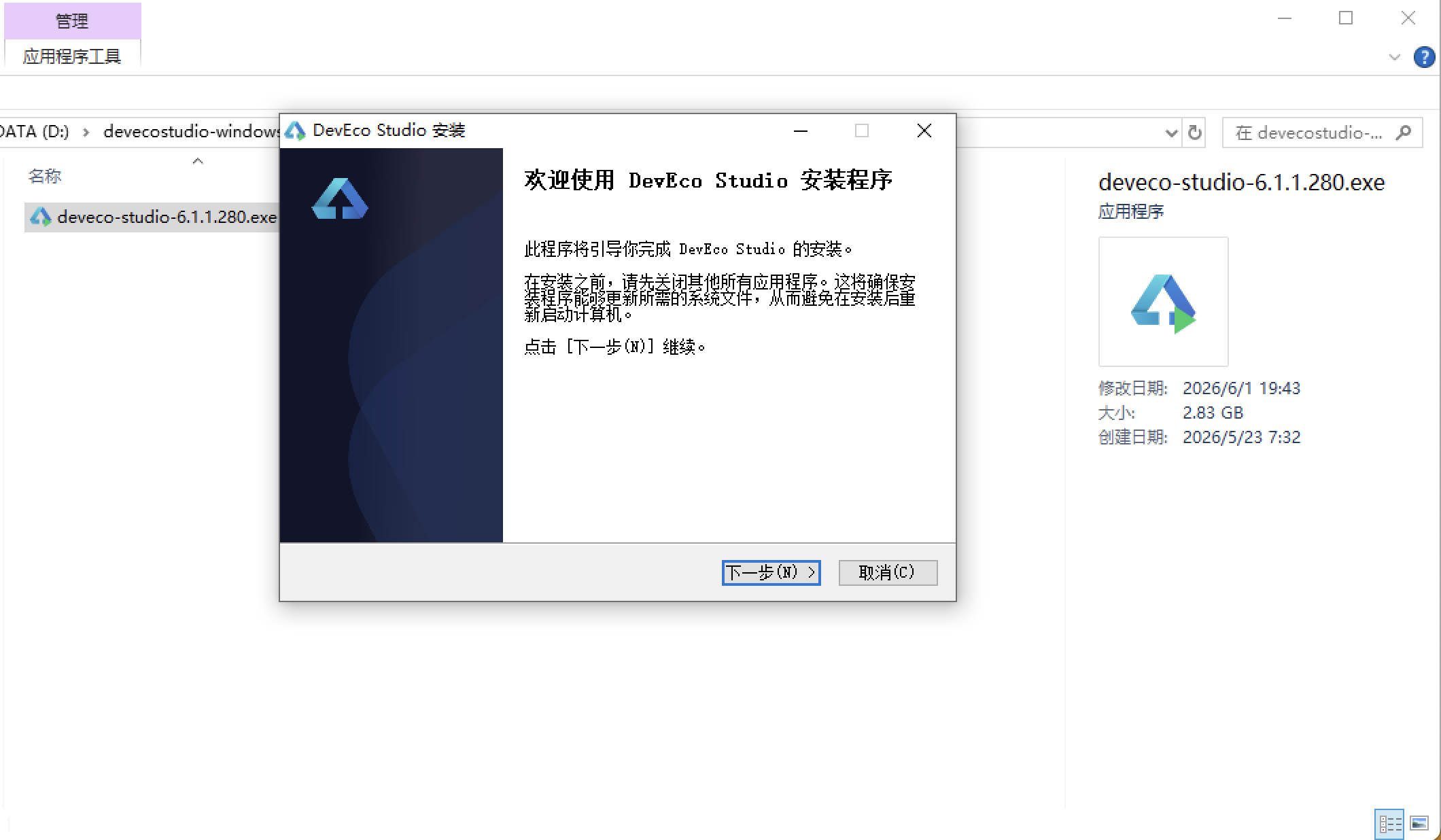
安装DevEco Studio程序
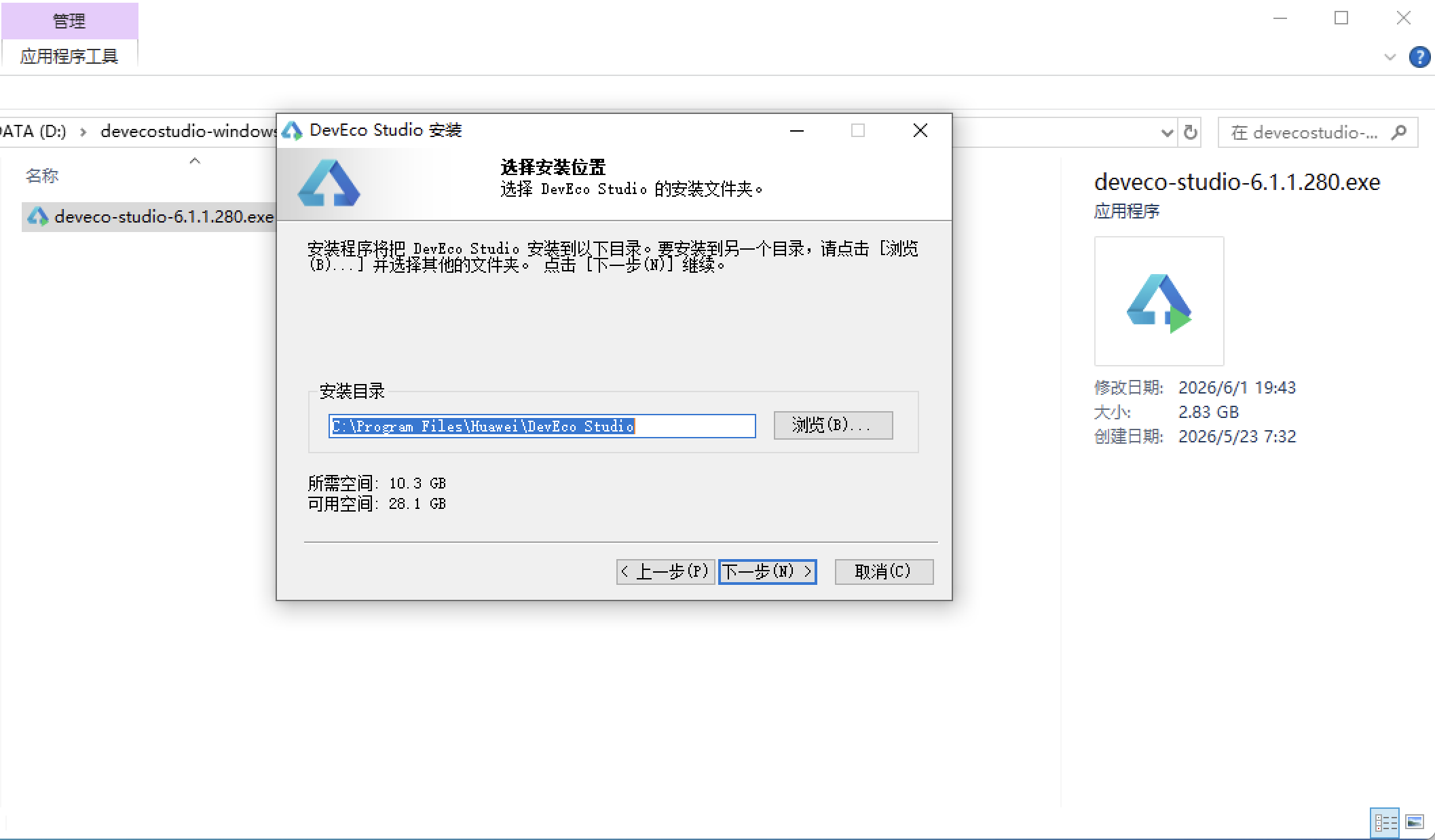
选择目标安装目录:
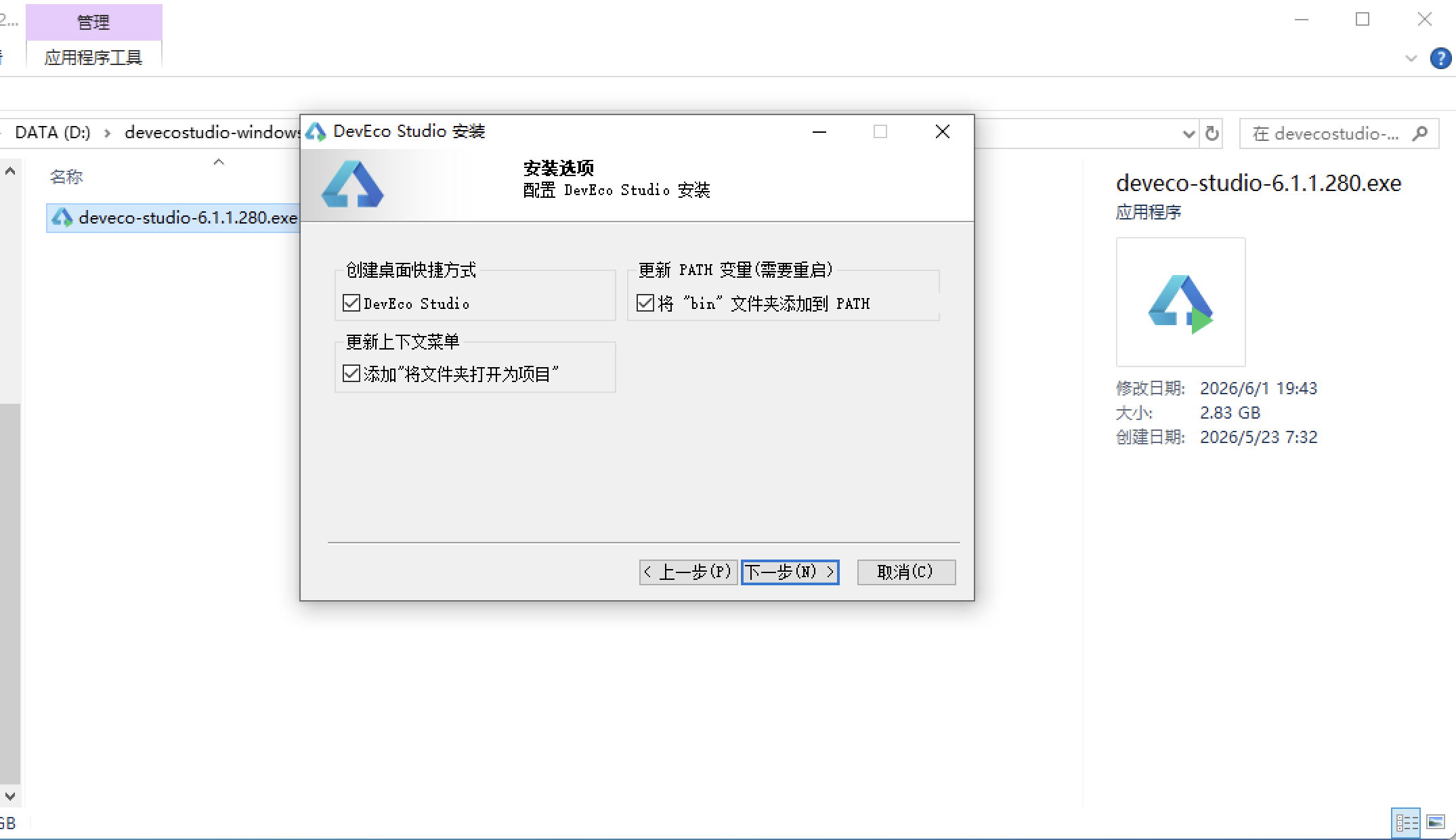
设置环境变量,但是需要重启一下:
新建一个空白模板:
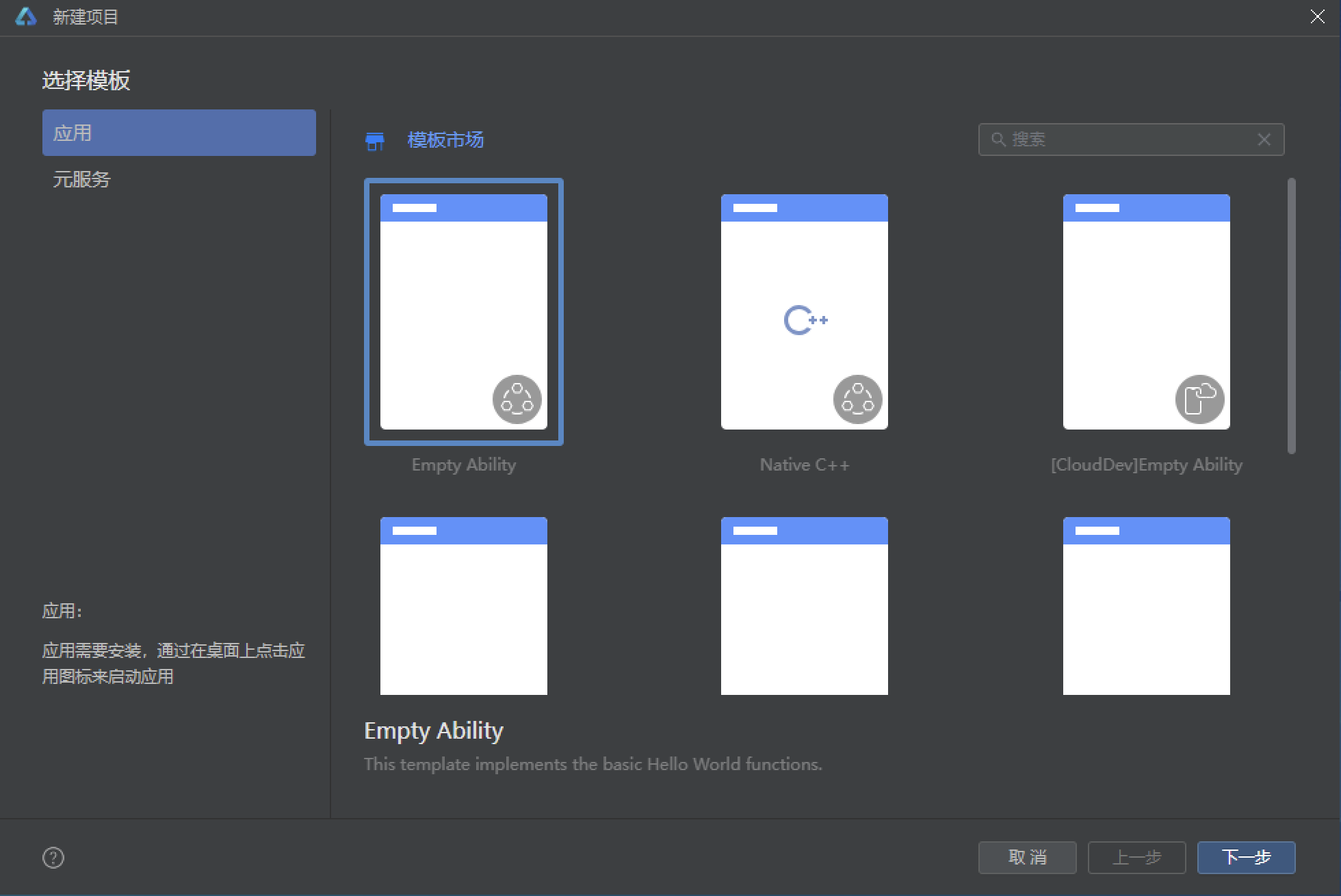
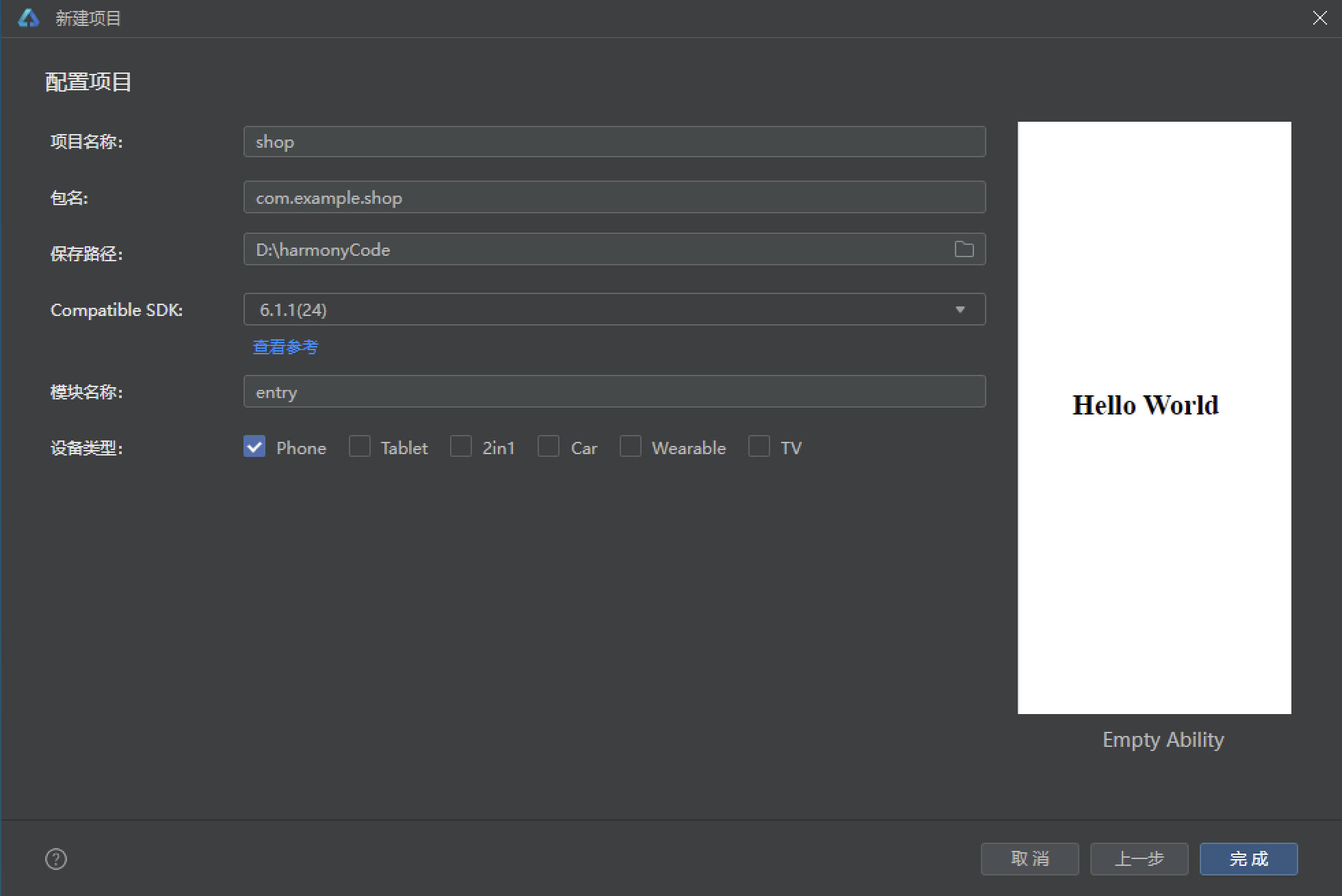
设置API为24的模板项目:
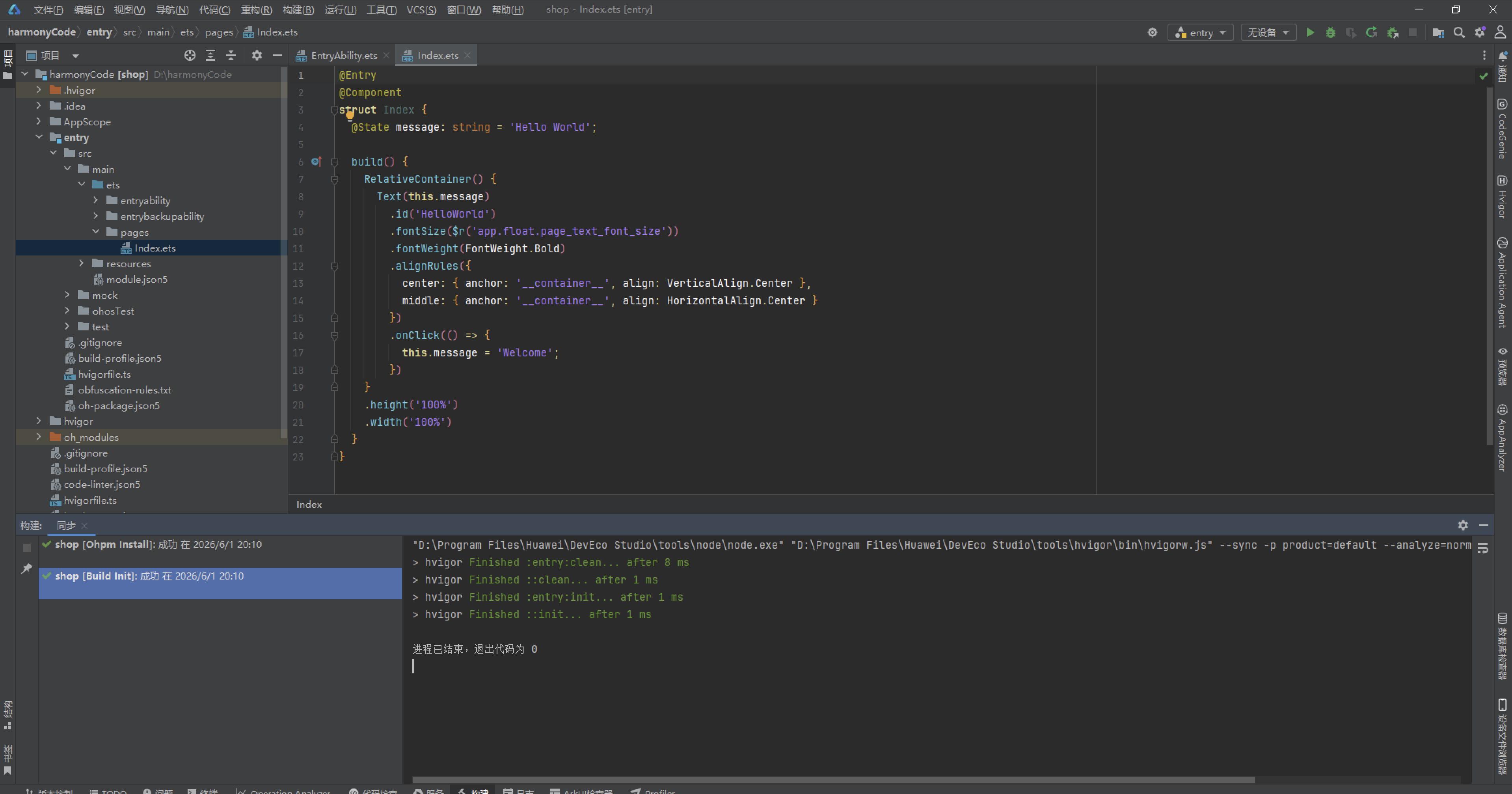
初始化项目,自动下载相关依赖:
完整代码:
// ============================================================
// 美食探店 Food Discovery - 98.ets
// ============================================================
// --- Interfaces ---
interface CuisineMeta {
label: string
icon: string
color: string
bg: string
}
interface PriceLevelMeta {
label: string
symbol: string
color: string
}
interface ReviewItem {
restaurantName: string
rating: number
content: string
date: string
cuisine: string
}
interface SettingMeta {
icon: string
title: string
subtitle: string
color: string
}
// --- Data Model ---
@Observed
export class RestaurantItem {
id: number = 0
name: string = ''
cuisine: string = ''
rating: number = 0
priceLevel: number = 1
address: string = ''
tags: string[] = []
reviewCount: number = 0
avgPrice: number = 0
isFavorited: boolean = false
distance: number = 0
imageColor: string = ''
description: string = ''
constructor(id: number, name: string, cuisine: string, rating: number,
priceLevel: number, address: string, tags: string[], reviewCount: number,
avgPrice: number, isFavorited: boolean, distance: number,
imageColor: string, description: string) {
this.id = id
this.name = name
this.cuisine = cuisine
this.rating = rating
this.priceLevel = priceLevel
this.address = address
this.tags = tags
this.reviewCount = reviewCount
this.avgPrice = avgPrice
this.isFavorited = isFavorited
this.distance = distance
this.imageColor = imageColor
this.description = description
}
}
// --- Config ---
const CUISINE_CONFIG: Record<string, CuisineMeta> = {
'中餐': { label: '中餐', icon: '🥘', color: '#E53935', bg: '#33E53935' },
'日料': { label: '日料', icon: '🍣', color: '#FF6F00', bg: '#33FF6F00' },
'西餐': { label: '西餐', icon: '🥩', color: '#7B1FA2', bg: '#337B1FA2' },
'韩餐': { label: '韩餐', icon: '🍖', color: '#D81B60', bg: '#33D81B60' },
'火锅': { label: '火锅', icon: '🍲', color: '#FF5722', bg: '#33FF5722' },
'烧烤': { label: '烧烤', icon: '🔥', color: '#BF360C', bg: '#33BF360C' }
}
const PRICE_LEVEL_CONFIG: Record<number, PriceLevelMeta> = {
1: { label: '便宜', symbol: '¥', color: '#4CAF50' },
2: { label: '适中', symbol: '¥¥', color: '#FF9800' },
3: { label: '较贵', symbol: '¥¥¥', color: '#FF5722' },
4: { label: '昂贵', symbol: '¥¥¥¥', color: '#D81B60' }
}
const CATEGORIES: string[] = ['全部', '中餐', '日料', '西餐', '韩餐', '火锅', '烧烤']
// --- Mock Data ---
const mockRestaurants: RestaurantItem[] = [
new RestaurantItem(1, '老王川菜馆', '中餐', 4.8, 2, '南京路步行街128号', ['正宗', '辣味', '性价比'], 356, 65, true, 0.5, '#E53935', '正宗川菜,麻辣鲜香'),
new RestaurantItem(2, '樱花日料店', '日料', 4.9, 4, '淮海中路456号', ['新鲜', '精致', '包间'], 892, 280, true, 1.2, '#FF6F00', '怀石料理,匠心之作'),
new RestaurantItem(3, '麦迪逊牛排', '西餐', 4.7, 4, '外滩33号', ['约会', '高端', '景观'], 1245, 580, false, 2.8, '#7B1FA2', '顶级牛排,绝佳江景'),
new RestaurantItem(4, '首尔烤肉屋', '韩餐', 4.5, 2, '虹泉路88号', ['韩式', '小菜', '聚会'], 567, 98, true, 0.8, '#D81B60', '地道韩式烤肉'),
new RestaurantItem(5, '蜀地火锅城', '火锅', 4.6, 2, '四川北路33号', ['辣', '新鲜', '排队'], 1089, 120, true, 1.5, '#FF5722', '正宗重庆火锅'),
new RestaurantItem(6, '东北烧烤大院', '烧烤', 4.4, 1, '长寿路120号', ['大排档', '啤酒', '热闹'], 423, 55, false, 0.3, '#BF360C', '地摊烧烤,实惠美味'),
new RestaurantItem(7, '小南国', '中餐', 4.6, 3, '南京西路111号', ['本帮', '精致', '商务'], 678, 220, true, 2.1, '#E53935', '上海本帮菜代表'),
new RestaurantItem(8, '一兰拉面', '日料', 4.7, 2, '静安寺路66号', ['拉面', '一人食', '快速'], 934, 58, false, 0.6, '#FF6F00', '正宗豚骨拉面'),
new RestaurantItem(9, '蓝蛙餐厅', '西餐', 4.3, 3, '新天地2号', ['汉堡', '周末', '休闲'], 445, 150, false, 1.8, '#7B1FA2', '美式汉堡与轻食'),
new RestaurantItem(10, '春川铁板鸡', '韩餐', 4.5, 2, '韩国街12号', ['铁板', '芝士', '辣'], 312, 75, true, 1.0, '#D81B60', '韩式铁板鸡配芝士'),
new RestaurantItem(11, '海底捞火锅', '火锅', 4.8, 3, '南京东路1号', ['服务好', '连锁', '24h'], 2345, 180, true, 3.2, '#FF5722', '服务至上的火锅连锁'),
new RestaurantItem(12, '羊肉串大排档', '烧烤', 4.2, 1, '城隍庙50号', ['羊肉', '夜宵', '实惠'], 234, 38, false, 0.4, '#BF360C', '深夜烧烤好去处'),
new RestaurantItem(13, '外婆家', '中餐', 4.3, 1, '陆家嘴100号', ['家常', '排队', '便宜'], 1567, 45, true, 2.5, '#E53935', '家常菜性价比之王'),
new RestaurantItem(14, '寿司之乱', '日料', 4.4, 3, '古北新区8号', ['手握', 'omakase', '高端'], 456, 350, false, 4.0, '#FF6F00', '板前手握寿司'),
new RestaurantItem(15, '法式铁板烧', '西餐', 4.6, 4, '外滩源5号', ['铁板', '法式', '约会'], 567, 680, true, 3.8, '#7B1FA2', '法式铁板烧料理'),
new RestaurantItem(16, '部队锅之家', '韩餐', 4.1, 1, '龙柏地区22号', ['部队锅', '泡菜', '暖胃'], 189, 48, false, 0.9, '#D81B60', '韩式部队锅专门店')
]
const mockReviews: ReviewItem[] = [
{ restaurantName: '老王川菜馆', rating: 5, content: '水煮鱼太好吃了,麻辣鲜香!', date: '07-20', cuisine: '中餐' },
{ restaurantName: '樱花日料店', rating: 5, content: '三文鱼非常新鲜,环境也好', date: '07-18', cuisine: '日料' },
{ restaurantName: '蜀地火锅城', rating: 4, content: '火锅很正宗,就是排队太久', date: '07-15', cuisine: '火锅' },
{ restaurantName: '首尔烤肉屋', rating: 4, content: '烤肉味道不错,小菜免费续', date: '07-12', cuisine: '韩餐' },
{ restaurantName: '海底捞火锅', rating: 5, content: '服务真的太好了,美甲都做了', date: '07-10', cuisine: '火锅' },
{ restaurantName: '小南国', rating: 4, content: '本帮菜很正宗,环境优雅', date: '07-08', cuisine: '中餐' },
{ restaurantName: '一兰拉面', rating: 4, content: '汤头浓郁,就是份量少了点', date: '07-05', cuisine: '日料' },
{ restaurantName: '法式铁板烧', rating: 5, content: '约会绝佳选择,氛围浪漫', date: '07-02', cuisine: '西餐' }
]
const PROFILE_SETTINGS: SettingMeta[] = [
{ icon: '📝', title: '我的评价', subtitle: '共8条评价', color: '#E53935' },
{ icon: '❤️', title: '我的收藏', subtitle: '共8家餐厅', color: '#FF6F00' },
{ icon: '🎟️', title: '优惠券', subtitle: '3张可用', color: '#FFD54F' },
{ icon: '📍', title: '我的足迹', subtitle: '已探索15家店', color: '#4CAF50' },
{ icon: '🌙', title: '夜间模式', subtitle: '跟随系统', color: '#7B1FA2' },
{ icon: '🔔', title: '消息通知', subtitle: '已开启', color: '#D81B60' },
{ icon: '❓', title: '关于我们', subtitle: 'v3.1.0', color: '#9E9E9E' }
]
// --- Utility Functions ---
function getAverageRating(): number {
return Math.round(mockRestaurants.reduce((sum: number, r: RestaurantItem) => sum + r.rating, 0) / mockRestaurants.length * 10) / 10
}
function getFavoritedCount(): number {
return mockRestaurants.filter((r: RestaurantItem) => r.isFavorited).length
}
function getAveragePrice(): number {
return Math.round(mockRestaurants.reduce((sum: number, r: RestaurantItem) => sum + r.avgPrice, 0) / mockRestaurants.length)
}
function getCuisineCount(cuisine: string): number {
return mockRestaurants.filter((r: RestaurantItem) => r.cuisine === cuisine).length
}
// --- Enum ---
enum AppTab {
RECOMMEND = 0,
FAVORITE = 1,
NEARBY = 2,
RANKING = 3,
PROFILE = 4
}
// ============================================================
// Main Entry Component
// ============================================================
@Entry
@Component
struct MainApp {
@State activeTab: AppTab = AppTab.RECOMMEND
@Builder
contentArea() {
Column() {
if (this.activeTab === AppTab.RECOMMEND) {
RecommendContent()
} else if (this.activeTab === AppTab.FAVORITE) {
FavoriteContent()
} else if (this.activeTab === AppTab.NEARBY) {
NearbyContent()
} else if (this.activeTab === AppTab.RANKING) {
RankingContent()
} else if (this.activeTab === AppTab.PROFILE) {
ProfileContent()
}
}
.layoutWeight(1)
}
@Builder
bottomTabItem(icon: string, label: string, tab: AppTab) {
Column() {
Text(icon)
.fontSize(20)
.opacity(this.activeTab === tab ? 1.0 : 0.45)
Text(label)
.fontSize(9)
.fontColor(this.activeTab === tab ? '#E53935' : '#999999')
.margin({ top: 1 })
if (this.activeTab === tab) {
Column()
.width(18).height(3)
.backgroundColor('#E53935')
.borderRadius(2)
.margin({ top: 2 })
}
}
.layoutWeight(1)
.alignItems(HorizontalAlign.Center)
.padding({ top: 5, bottom: 5 })
.onClick(() => { this.activeTab = tab })
}
build() {
Column() {
this.contentArea()
Row() {
this.bottomTabItem('🔥', '推荐', AppTab.RECOMMEND)
this.bottomTabItem('⭐', '收藏', AppTab.FAVORITE)
this.bottomTabItem('📍', '附近', AppTab.NEARBY)
this.bottomTabItem('🏆', '排行', AppTab.RANKING)
this.bottomTabItem('👤', '我的', AppTab.PROFILE)
}
.width('100%')
.backgroundColor('#FFFFFF')
.padding({ top: 4, bottom: 6 })
.shadow({ radius: 8, color: '#1A000000', offsetY: -2 })
}
.width('100%').height('100%')
.backgroundColor('#FFF8E1')
}
}
// ============================================================
// Tab 1: Recommend Content (推荐)
// ============================================================
@Component
struct RecommendContent {
@State activeCategory: string = '全部'
@State showAddModal: boolean = false
@State showDeleteModal: boolean = false
@State selectedRestaurant: RestaurantItem | null = null
@Builder
bannerCard() {
Column() {
Text('🍜 发现美食')
.fontSize(24).fontColor('#FFFFFF').fontWeight(FontWeight.Bold)
Text('探索城市中最好的餐厅')
.fontSize(12).fontColor('#FFD54F')
.margin({ top: 4 })
Row() {
Column() {
Text(`${mockRestaurants.length}`)
.fontSize(20).fontColor('#FFD54F').fontWeight(FontWeight.Bold)
Text('餐厅')
.fontSize(9).fontColor('#FFE8B0')
}
.alignItems(HorizontalAlign.Center).margin({ right: 20 })
Column() {
Text(`${getAverageRating()}`)
.fontSize(20).fontColor('#FFD54F').fontWeight(FontWeight.Bold)
Text('平均评分')
.fontSize(9).fontColor('#FFE8B0')
}
.alignItems(HorizontalAlign.Center).margin({ right: 20 })
Column() {
Text(`¥${getAveragePrice()}`)
.fontSize(20).fontColor('#FFD54F').fontWeight(FontWeight.Bold)
Text('人均')
.fontSize(9).fontColor('#FFE8B0')
}
.alignItems(HorizontalAlign.Center)
}
.margin({ top: 12 })
}
.width('100%')
.padding(20)
.borderRadius(20)
.linearGradient({
angle: 135,
colors: [['#E53935', 0.0], ['#FF6F00', 1.0]]
})
.shadow({ radius: 8, color: '#33E53935', offsetY: 4 })
.margin({ left: 16, right: 16, bottom: 12 })
}
@Builder
categoryChip(cat: string) {
Text(cat)
.fontSize(12)
.fontColor(this.activeCategory === cat ? '#FFFFFF' : '#666666')
.padding({ left: 14, right: 14, top: 6, bottom: 6 })
.backgroundColor(this.activeCategory === cat ? CUISINE_CONFIG[cat]?.color ?? '#E53935' : '#FFFFFF')
.borderRadius(16)
.shadow(this.activeCategory === cat ? { radius: 4, color: '#33E53935', offsetY: 2 } : { radius: 2, color: '#10000000', offsetY: 1 })
.onClick(() => { this.activeCategory = cat })
}
@Builder
restaurantCard(item: RestaurantItem) {
Column() {
Row() {
Column()
.width(60).height(60)
.borderRadius(12)
.backgroundColor(item.imageColor)
Column() {
Text(item.name)
.fontSize(15).fontColor('#333333').fontWeight(FontWeight.Bold)
Row() {
Text('★'.repeat(Math.floor(item.rating)))
.fontSize(12).fontColor('#FFD54F')
Text(item.rating.toFixed(1))
.fontSize(11).fontColor('#FF9800')
.margin({ left: 4 })
Text(`${item.reviewCount}条评价`)
.fontSize(10).fontColor('#999999')
.margin({ left: 8 })
}
.margin({ top: 4 })
Row() {
Text(CUISINE_CONFIG[item.cuisine].icon)
.fontSize(10)
Text(CUISINE_CONFIG[item.cuisine].label)
.fontSize(10).fontColor(CUISINE_CONFIG[item.cuisine].color)
.margin({ left: 2 })
Text(PRICE_LEVEL_CONFIG[item.priceLevel].symbol)
.fontSize(11).fontColor(PRICE_LEVEL_CONFIG[item.priceLevel].color)
.margin({ left: 8 })
Text(`人均¥${item.avgPrice}`)
.fontSize(10).fontColor('#999999')
.margin({ left: 8 })
}
.margin({ top: 4 })
Text(item.address)
.fontSize(10).fontColor('#AAAAAA')
.margin({ top: 4 })
}
.layoutWeight(1)
.margin({ left: 12 })
.alignItems(HorizontalAlign.Start)
Column() {
Text(item.isFavorited ? '❤️' : '🤍')
.fontSize(20)
.onClick(() => { item.isFavorited = !item.isFavorited })
Text(`${item.distance}km`)
.fontSize(9).fontColor('#E53935')
.margin({ top: 6 })
.padding({ left: 4, right: 4, top: 2, bottom: 2 })
.backgroundColor('#33E53935')
.borderRadius(4)
}
.alignItems(HorizontalAlign.Center)
}
.width('100%')
Row() {
ForEach(item.tags, (tag: string) => {
Text(tag)
.fontSize(9).fontColor('#FF6F00')
.padding({ left: 6, right: 6, top: 2, bottom: 2 })
.backgroundColor('#FFF3E0')
.borderRadius(4)
.margin({ right: 6 })
})
Column().layoutWeight(1)
Text(item.description)
.fontSize(9).fontColor('#BBBBBB')
.maxLines(1)
.textOverflow({ overflow: TextOverflow.Ellipsis })
}
.width('100%')
.margin({ top: 8 })
}
.width('100%')
.padding(14)
.backgroundColor('#FFFFFF')
.borderRadius(16)
.shadow({ radius: 4, color: '#15000000', offsetY: 2 })
.margin({ bottom: 10 })
.onClick(() => {
this.selectedRestaurant = item
this.showDeleteModal = true
})
}
@Builder
modalOverlay(onClose: () => void) {
Column()
.width('100%').height('100%')
.backgroundColor('rgba(0,0,0,0.5)')
.onClick(onClose)
}
@Builder
addReviewModal() {
Column() {
this.modalOverlay(() => { this.showAddModal = false })
Column() {
Text('✍️ 写评价')
.fontSize(18).fontColor('#333333').fontWeight(FontWeight.Bold)
.margin({ bottom: 16 })
Column() {
Text('餐厅名称')
.fontSize(12).fontColor('#999999').alignSelf(ItemAlign.Start)
Text('老王川菜馆')
.fontSize(14).fontColor('#333333')
.padding({ top: 8, bottom: 8, left: 12, right: 12 })
.backgroundColor('#FFF8E1')
.borderRadius(8)
.margin({ top: 6 })
}
.width('100%').margin({ bottom: 12 })
Column() {
Text('评分')
.fontSize(12).fontColor('#999999').alignSelf(ItemAlign.Start)
Row() {
Text('★').fontSize(28).fontColor('#FFD54F').margin({ right: 4 })
Text('★').fontSize(28).fontColor('#FFD54F').margin({ right: 4 })
Text('★').fontSize(28).fontColor('#FFD54F').margin({ right: 4 })
Text('★').fontSize(28).fontColor('#FFD54F').margin({ right: 4 })
Text('☆').fontSize(28).fontColor('#CCCCCC')
}
.margin({ top: 6 })
}
.width('100%').margin({ bottom: 12 })
Column() {
Text('评价内容')
.fontSize(12).fontColor('#999999').alignSelf(ItemAlign.Start)
Text('这家店味道很正宗,服务也不错...')
.fontSize(13).fontColor('#AAAAAA')
.padding(12)
.backgroundColor('#FFF8E1')
.borderRadius(8)
.margin({ top: 6 })
}
.width('100%').margin({ bottom: 12 })
Column() {
Text('标签')
.fontSize(12).fontColor('#999999').alignSelf(ItemAlign.Start)
Row() {
Text('好吃').fontSize(11).fontColor('#FF6F00')
.padding({ left: 8, right: 8, top: 4, bottom: 4 })
.backgroundColor('#FFF3E0').borderRadius(6).margin({ right: 6 })
Text('实惠').fontSize(11).fontColor('#4CAF50')
.padding({ left: 8, right: 8, top: 4, bottom: 4 })
.backgroundColor('#E8F5E9').borderRadius(6).margin({ right: 6 })
Text('环境好').fontSize(11).fontColor('#7B1FA2')
.padding({ left: 8, right: 8, top: 4, bottom: 4 })
.backgroundColor('#F3E5F5').borderRadius(6)
}
.margin({ top: 6 })
}
.width('100%').margin({ bottom: 16 })
Row() {
Text('取消')
.fontSize(14).fontColor('#999999')
.layoutWeight(1).textAlign(TextAlign.Center)
.padding({ top: 10, bottom: 10 })
.backgroundColor('#F5F5F5').borderRadius(10)
.onClick(() => { this.showAddModal = false })
Text('发布评价')
.fontSize(14).fontColor('#FFFFFF')
.layoutWeight(1).textAlign(TextAlign.Center)
.padding({ top: 10, bottom: 10 })
.backgroundColor('#E53935').borderRadius(10)
.margin({ left: 12 })
.onClick(() => { this.showAddModal = false })
}
.width('100%')
}
.width('88%')
.padding(20)
.backgroundColor('#FFFFFF')
.borderRadius(20)
.shadow({ radius: 20, color: '#33000000', offsetY: 4 })
}
.width('100%').height('100%')
.justifyContent(FlexAlign.Center)
.alignItems(HorizontalAlign.Center)
}
@Builder
deleteReviewModal() {
Column() {
this.modalOverlay(() => { this.showDeleteModal = false })
Column() {
Text('🗑️')
.fontSize(40).margin({ bottom: 12 })
Text('删除评价')
.fontSize(18).fontColor('#333333').fontWeight(FontWeight.Bold)
.margin({ bottom: 8 })
Text(`确定要删除对「${this.selectedRestaurant?.name ?? ''}」的评价吗?`)
.fontSize(13).fontColor('#999999')
.textAlign(TextAlign.Center)
.margin({ bottom: 20 })
Row() {
Text('取消')
.fontSize(14).fontColor('#999999')
.layoutWeight(1).textAlign(TextAlign.Center)
.padding({ top: 10, bottom: 10 })
.backgroundColor('#F5F5F5').borderRadius(10)
.onClick(() => { this.showDeleteModal = false })
Text('删除')
.fontSize(14).fontColor('#FFFFFF')
.layoutWeight(1).textAlign(TextAlign.Center)
.padding({ top: 10, bottom: 10 })
.backgroundColor('#E53935').borderRadius(10)
.margin({ left: 12 })
.onClick(() => { this.showDeleteModal = false })
}
.width('100%')
}
.width('72%')
.padding(24)
.backgroundColor('#FFFFFF')
.borderRadius(20)
.shadow({ radius: 20, color: '#33000000', offsetY: 4 })
}
.width('100%').height('100%')
.justifyContent(FlexAlign.Center)
.alignItems(HorizontalAlign.Center)
}
build() {
Stack() {
Column() {
// Header
Row() {
Text('🔥 推荐美食')
.fontSize(20).fontColor('#E53935').fontWeight(FontWeight.Bold)
Column().layoutWeight(1)
Text('🔍')
.fontSize(20).fontColor('#666666')
.margin({ right: 12 })
Text('✍️')
.fontSize(20).fontColor('#E53935')
.padding({ left: 8, right: 8 })
.backgroundColor('#33E53935')
.borderRadius(16)
.onClick(() => { this.showAddModal = true })
}
.width('100%')
.padding({ left: 16, right: 16, top: 12, bottom: 8 })
// Banner
this.bannerCard()
// Category Chips
Scroll() {
Row() {
ForEach(CATEGORIES, (cat: string) => {
this.categoryChip(cat)
})
}
.padding({ left: 16, right: 16 })
}
.scrollable(ScrollDirection.Horizontal)
.scrollBar(BarState.Off)
.padding({ bottom: 8 })
// Restaurant List
Scroll() {
Column() {
this.restaurantCard(mockRestaurants[0])
this.restaurantCard(mockRestaurants[1])
this.restaurantCard(mockRestaurants[2])
this.restaurantCard(mockRestaurants[3])
this.restaurantCard(mockRestaurants[4])
this.restaurantCard(mockRestaurants[5])
this.restaurantCard(mockRestaurants[6])
this.restaurantCard(mockRestaurants[7])
this.restaurantCard(mockRestaurants[8])
this.restaurantCard(mockRestaurants[9])
this.restaurantCard(mockRestaurants[10])
this.restaurantCard(mockRestaurants[11])
this.restaurantCard(mockRestaurants[12])
this.restaurantCard(mockRestaurants[13])
this.restaurantCard(mockRestaurants[14])
this.restaurantCard(mockRestaurants[15])
}
.padding({ left: 16, right: 16, bottom: 16 })
}
.layoutWeight(1)
.scrollBar(BarState.Off)
}
.width('100%').height('100%')
if (this.showAddModal) {
this.addReviewModal()
}
if (this.showDeleteModal) {
this.deleteReviewModal()
}
}
.width('100%').height('100%')
}
}
// ============================================================
// Tab 2: Favorite Content (收藏)
// ============================================================
@Component
struct FavoriteContent {
@State showEditModal: boolean = false
@State showDeleteModal: boolean = false
@State selectedItem: RestaurantItem | null = null
@Builder
modalOverlay(onClose: () => void) {
Column()
.width('100%').height('100%')
.backgroundColor('rgba(0,0,0,0.5)')
.onClick(onClose)
}
@Builder
editReviewModal() {
Column() {
this.modalOverlay(() => { this.showEditModal = false })
Column() {
Text('✏️ 编辑评价')
.fontSize(18).fontColor('#333333').fontWeight(FontWeight.Bold)
.margin({ bottom: 16 })
Column() {
Text('餐厅')
.fontSize(12).fontColor('#999999').alignSelf(ItemAlign.Start)
Text(this.selectedItem?.name ?? '')
.fontSize(14).fontColor('#333333')
.padding({ top: 8, bottom: 8, left: 12, right: 12 })
.backgroundColor('#FFF8E1')
.borderRadius(8)
.margin({ top: 6 })
}
.width('100%').margin({ bottom: 12 })
Column() {
Text('评分')
.fontSize(12).fontColor('#999999').alignSelf(ItemAlign.Start)
Row() {
Text('★').fontSize(28).fontColor('#FFD54F').margin({ right: 4 })
Text('★').fontSize(28).fontColor('#FFD54F').margin({ right: 4 })
Text('★').fontSize(28).fontColor('#FFD54F').margin({ right: 4 })
Text('★').fontSize(28).fontColor('#FFD54F').margin({ right: 4 })
Text('★').fontSize(28).fontColor('#FFD54F')
}
.margin({ top: 6 })
}
.width('100%').margin({ bottom: 12 })
Column() {
Text('评价内容')
.fontSize(12).fontColor('#999999').alignSelf(ItemAlign.Start)
Text('这家店味道很正宗,服务也不错,推荐!')
.fontSize(13).fontColor('#333333')
.padding(12)
.backgroundColor('#FFF8E1')
.borderRadius(8)
.margin({ top: 6 })
}
.width('100%').margin({ bottom: 16 })
Row() {
Text('取消')
.fontSize(14).fontColor('#999999')
.layoutWeight(1).textAlign(TextAlign.Center)
.padding({ top: 10, bottom: 10 })
.backgroundColor('#F5F5F5').borderRadius(10)
.onClick(() => { this.showEditModal = false })
Text('保存修改')
.fontSize(14).fontColor('#FFFFFF')
.layoutWeight(1).textAlign(TextAlign.Center)
.padding({ top: 10, bottom: 10 })
.backgroundColor('#FF6F00').borderRadius(10)
.margin({ left: 12 })
.onClick(() => { this.showEditModal = false })
}
.width('100%')
}
.width('88%')
.padding(20)
.backgroundColor('#FFFFFF')
.borderRadius(20)
.shadow({ radius: 20, color: '#33000000', offsetY: 4 })
}
.width('100%').height('100%')
.justifyContent(FlexAlign.Center)
.alignItems(HorizontalAlign.Center)
}
@Builder
deleteReviewModal() {
Column() {
this.modalOverlay(() => { this.showDeleteModal = false })
Column() {
Text('🗑️')
.fontSize(40).margin({ bottom: 12 })
Text('取消收藏')
.fontSize(18).fontColor('#333333').fontWeight(FontWeight.Bold)
.margin({ bottom: 8 })
Text(`确定要取消收藏「${this.selectedItem?.name ?? ''}」吗?`)
.fontSize(13).fontColor('#999999')
.textAlign(TextAlign.Center)
.margin({ bottom: 20 })
Row() {
Text('取消')
.fontSize(14).fontColor('#999999')
.layoutWeight(1).textAlign(TextAlign.Center)
.padding({ top: 10, bottom: 10 })
.backgroundColor('#F5F5F5').borderRadius(10)
.onClick(() => { this.showDeleteModal = false })
Text('确定')
.fontSize(14).fontColor('#FFFFFF')
.layoutWeight(1).textAlign(TextAlign.Center)
.padding({ top: 10, bottom: 10 })
.backgroundColor('#E53935').borderRadius(10)
.margin({ left: 12 })
.onClick(() => { this.showDeleteModal = false })
}
.width('100%')
}
.width('72%')
.padding(24)
.backgroundColor('#FFFFFF')
.borderRadius(20)
.shadow({ radius: 20, color: '#33000000', offsetY: 4 })
}
.width('100%').height('100%')
.justifyContent(FlexAlign.Center)
.alignItems(HorizontalAlign.Center)
}
@Builder
favoriteGridCard(item: RestaurantItem) {
Column() {
Column()
.width('100%').height(70)
.borderRadius(12)
.backgroundColor(item.imageColor)
.linearGradient({
angle: 135,
colors: [[item.imageColor, 0.0], ['#FFE0B2', 1.0]]
})
Column() {
Text(item.name)
.fontSize(13).fontColor('#333333').fontWeight(FontWeight.Bold)
Row() {
Text('★'.repeat(Math.floor(item.rating)))
.fontSize(10).fontColor('#FFD54F')
Text(item.rating.toFixed(1))
.fontSize(9).fontColor('#FF9800')
.margin({ left: 4 })
}
.margin({ top: 4 })
Row() {
Text(CUISINE_CONFIG[item.cuisine].icon).fontSize(9)
Text(CUISINE_CONFIG[item.cuisine].label)
.fontSize(9).fontColor(CUISINE_CONFIG[item.cuisine].color)
.margin({ left: 2 })
Text(PRICE_LEVEL_CONFIG[item.priceLevel].symbol)
.fontSize(10).fontColor(PRICE_LEVEL_CONFIG[item.priceLevel].color)
.margin({ left: 6 })
Text(`¥${item.avgPrice}`)
.fontSize(9).fontColor('#999999')
.margin({ left: 4 })
}
.margin({ top: 4 })
}
.width('100%')
.padding(8)
.alignItems(HorizontalAlign.Start)
}
.width('100%')
.backgroundColor('#FFFFFF')
.borderRadius(12)
.shadow({ radius: 4, color: '#15000000', offsetY: 2 })
.margin({ bottom: 10 })
.onClick(() => {
this.selectedItem = item
this.showEditModal = true
})
}
build() {
Stack() {
Column() {
Row() {
Text('⭐ 我的收藏')
.fontSize(20).fontColor('#E53935').fontWeight(FontWeight.Bold)
Column().layoutWeight(1)
Text(`${getFavoritedCount()}家`)
.fontSize(12).fontColor('#FF9800')
.padding({ left: 8, right: 8, top: 4, bottom: 4 })
.backgroundColor('#FFF3E0')
.borderRadius(10)
}
.width('100%')
.padding({ left: 16, right: 16, top: 12, bottom: 8 })
Scroll() {
Column() {
Row() {
this.favoriteGridCard(mockRestaurants[0])
this.favoriteGridCard(mockRestaurants[1])
}
Row() {
this.favoriteGridCard(mockRestaurants[3])
this.favoriteGridCard(mockRestaurants[4])
}
Row() {
this.favoriteGridCard(mockRestaurants[6])
this.favoriteGridCard(mockRestaurants[9])
}
Row() {
this.favoriteGridCard(mockRestaurants[10])
this.favoriteGridCard(mockRestaurants[12])
}
Row() {
this.favoriteGridCard(mockRestaurants[14])
this.favoriteGridCard(mockRestaurants[0])
}
}
.padding({ left: 16, right: 16, bottom: 16 })
}
.layoutWeight(1)
.scrollBar(BarState.Off)
}
.width('100%').height('100%')
if (this.showEditModal) {
this.editReviewModal()
}
if (this.showDeleteModal) {
this.deleteReviewModal()
}
}
.width('100%').height('100%')
}
}
// ============================================================
// Tab 3: Nearby Content (附近)
// ============================================================
@Component
struct NearbyContent {
@State showAddModal: boolean = false
@State showDeleteModal: boolean = false
@Builder
modalOverlay(onClose: () => void) {
Column()
.width('100%').height('100%')
.backgroundColor('rgba(0,0,0,0.5)')
.onClick(onClose)
}
@Builder
mapHeader() {
Column() {
Text('📍 当前位置: 南京路步行街')
.fontSize(13).fontColor('#FFFFFF')
Text('发现附近 16 家餐厅')
.fontSize(11).fontColor('#FFD54F')
.margin({ top: 4 })
}
.width('100%')
.padding(16)
.borderRadius(16)
.linearGradient({
angle: 135,
colors: [['#E53935', 0.0], ['#FF6F00', 1.0]]
})
.shadow({ radius: 8, color: '#33E53935', offsetY: 3 })
.margin({ left: 16, right: 16, bottom: 12 })
}
@Builder
nearbyCard(item: RestaurantItem) {
Row() {
Column() {
Text(CUISINE_CONFIG[item.cuisine].icon)
.fontSize(24)
}
.width(48).height(48)
.justifyContent(FlexAlign.Center)
.alignItems(HorizontalAlign.Center)
.backgroundColor(CUISINE_CONFIG[item.cuisine].bg)
.borderRadius(12)
Column() {
Text(item.name)
.fontSize(14).fontColor('#333333').fontWeight(FontWeight.Bold)
Text(item.address)
.fontSize(10).fontColor('#AAAAAA')
.margin({ top: 2 })
Row() {
Text('★')
.fontSize(10).fontColor('#FFD54F')
Text(item.rating.toFixed(1))
.fontSize(10).fontColor('#FF9800')
.margin({ left: 2 })
Text('•')
.fontSize(10).fontColor('#CCCCCC')
.margin({ left: 4 })
Text(`¥${item.avgPrice}/人`)
.fontSize(10).fontColor('#999999')
.margin({ left: 4 })
}
.margin({ top: 4 })
}
.layoutWeight(1)
.margin({ left: 12 })
.alignItems(HorizontalAlign.Start)
Column() {
Text(`${item.distance}km`)
.fontSize(13).fontColor('#E53935').fontWeight(FontWeight.Bold)
Text('步行')
.fontSize(9).fontColor('#AAAAAA')
.margin({ top: 2 })
Text(`${Math.ceil(item.distance * 12)}min`)
.fontSize(9).fontColor('#FF9800')
.margin({ top: 2 })
}
.alignItems(HorizontalAlign.End)
}
.width('100%')
.padding(12)
.backgroundColor('#FFFFFF')
.borderRadius(14)
.shadow({ radius: 3, color: '#12000000', offsetY: 1 })
.margin({ bottom: 8 })
}
build() {
Stack() {
Column() {
Row() {
Text('📍 附近美食')
.fontSize(20).fontColor('#E53935').fontWeight(FontWeight.Bold)
Column().layoutWeight(1)
Text('🗺️')
.fontSize(20).fontColor('#666666')
}
.width('100%')
.padding({ left: 16, right: 16, top: 12, bottom: 8 })
this.mapHeader()
Scroll() {
Column() {
ForEach(mockRestaurants.sort((a: RestaurantItem, b: RestaurantItem) => a.distance - b.distance), (item: RestaurantItem) => {
this.nearbyCard(item)
})
}
.padding({ left: 16, right: 16, bottom: 16 })
}
.layoutWeight(1)
.scrollBar(BarState.Off)
}
.width('100%').height('100%')
}
.width('100%').height('100%')
}
}
// ============================================================
// Tab 4: Ranking Content (排行)
// ============================================================
@Component
struct RankingContent {
@State selectedCuisine: string = '全部'
@Builder
cuisineBar(label: string, count: number, color: string) {
Column() {
Row() {
Text(label)
.fontSize(11).fontColor('#666666')
Column().layoutWeight(1)
Text(`${count}家`)
.fontSize(11).fontColor(color).fontWeight(FontWeight.Bold)
}
.width('100%')
Row() {
Column()
.layoutWeight(Math.max(count, 1))
.height(8)
.backgroundColor(color)
.borderRadius(4)
Column()
.layoutWeight(Math.max(16 - count, 1))
.height(8)
.backgroundColor('#F0F0F0')
.borderRadius(4)
}
.width('100%')
.margin({ top: 6 })
}
.width('100%')
.margin({ bottom: 8 })
}
@Builder
rankCard(item: RestaurantItem, rank: number) {
Row() {
Column() {
Text(rank === 1 ? '🥇' : rank === 2 ? '🥈' : rank === 3 ? '🥉' : `${rank}`)
.fontSize(rank <= 3 ? 28 : 16)
.fontColor(rank <= 3 ? '#FFD54F' : '#999999')
.fontWeight(FontWeight.Bold)
}
.width(40)
.alignItems(HorizontalAlign.Center)
Column()
.width(48).height(48)
.borderRadius(10)
.backgroundColor(item.imageColor)
.margin({ left: 8 })
Column() {
Text(item.name)
.fontSize(14).fontColor('#333333').fontWeight(FontWeight.Bold)
Row() {
Text('★'.repeat(Math.floor(item.rating)))
.fontSize(10).fontColor('#FFD54F')
Text(item.rating.toFixed(1))
.fontSize(10).fontColor('#FF9800')
.margin({ left: 4 })
}
.margin({ top: 4 })
Text(`${item.reviewCount}条评价 · ¥${item.avgPrice}/人`)
.fontSize(10).fontColor('#AAAAAA')
.margin({ top: 2 })
}
.layoutWeight(1)
.margin({ left: 12 })
.alignItems(HorizontalAlign.Start)
Column() {
Row() {
Column()
.width(Math.floor(item.rating / 5 * 60))
.height(6)
.backgroundColor('#FFD54F')
.borderRadius(3)
Column()
.width(60 - Math.floor(item.rating / 5 * 60))
.height(6)
.backgroundColor('#FFF3E0')
.borderRadius(3)
}
Text('评分')
.fontSize(9).fontColor('#AAAAAA')
.margin({ top: 4 })
}
.alignItems(HorizontalAlign.End)
}
.width('100%')
.padding(12)
.backgroundColor('#FFFFFF')
.borderRadius(14)
.shadow({ radius: 3, color: '#12000000', offsetY: 1 })
.margin({ bottom: 8 })
}
build() {
Column() {
Row() {
Text('🏆 美食排行')
.fontSize(20).fontColor('#E53935').fontWeight(FontWeight.Bold)
Column().layoutWeight(1)
Text('📊')
.fontSize(20).fontColor('#666666')
}
.width('100%')
.padding({ left: 16, right: 16, top: 12, bottom: 8 })
Scroll() {
Column() {
// Cuisine distribution
Column() {
Text('菜系分布')
.fontSize(15).fontColor('#333333').fontWeight(FontWeight.Medium)
.alignSelf(ItemAlign.Start)
.margin({ bottom: 12 })
this.cuisineBar('中餐', getCuisineCount('中餐'), '#E53935')
this.cuisineBar('日料', getCuisineCount('日料'), '#FF6F00')
this.cuisineBar('西餐', getCuisineCount('西餐'), '#7B1FA2')
this.cuisineBar('韩餐', getCuisineCount('韩餐'), '#D81B60')
this.cuisineBar('火锅', getCuisineCount('火锅'), '#FF5722')
this.cuisineBar('烧烤', getCuisineCount('烧烤'), '#BF360C')
}
.width('100%')
.padding(16)
.backgroundColor('#FFFFFF')
.borderRadius(16)
.shadow({ radius: 4, color: '#15000000', offsetY: 2 })
.margin({ left: 16, right: 16, bottom: 12 })
Text('Top 10 餐厅')
.fontSize(15).fontColor('#333333').fontWeight(FontWeight.Medium)
.alignSelf(ItemAlign.Start)
.margin({ left: 16, bottom: 8 })
this.rankCard(mockRestaurants[0], 1)
this.rankCard(mockRestaurants[1], 2)
this.rankCard(mockRestaurants[2], 3)
this.rankCard(mockRestaurants[3], 4)
this.rankCard(mockRestaurants[4], 5)
this.rankCard(mockRestaurants[5], 6)
this.rankCard(mockRestaurants[6], 7)
this.rankCard(mockRestaurants[7], 8)
this.rankCard(mockRestaurants[8], 9)
this.rankCard(mockRestaurants[9], 10)
}
.padding({ bottom: 16 })
}
.layoutWeight(1)
.scrollBar(BarState.Off)
}
.width('100%').height('100%')
}
}
// ============================================================
// Tab 5: Profile Content (我的)
// ============================================================
@Component
struct ProfileContent {
@State showAddModal: boolean = false
@State showEditModal: boolean = false
@State showDeleteModal: boolean = false
@Builder
modalOverlay(onClose: () => void) {
Column()
.width('100%').height('100%')
.backgroundColor('rgba(0,0,0,0.5)')
.onClick(onClose)
}
@Builder
addReviewModal() {
Column() {
this.modalOverlay(() => { this.showAddModal = false })
Column() {
Text('✍️ 写新评价')
.fontSize(18).fontColor('#333333').fontWeight(FontWeight.Bold)
.margin({ bottom: 16 })
Column() {
Text('选择餐厅')
.fontSize(12).fontColor('#999999').alignSelf(ItemAlign.Start)
Text('樱花日料店')
.fontSize(14).fontColor('#333333')
.padding({ top: 8, bottom: 8, left: 12, right: 12 })
.backgroundColor('#FFF8E1').borderRadius(8)
.margin({ top: 6 })
}
.width('100%').margin({ bottom: 12 })
Column() {
Text('评分')
.fontSize(12).fontColor('#999999').alignSelf(ItemAlign.Start)
Row() {
Text('★').fontSize(28).fontColor('#FFD54F').margin({ right: 4 })
Text('★').fontSize(28).fontColor('#FFD54F').margin({ right: 4 })
Text('★').fontSize(28).fontColor('#FFD54F').margin({ right: 4 })
Text('★').fontSize(28).fontColor('#FFD54F').margin({ right: 4 })
Text('★').fontSize(28).fontColor('#FFD54F')
}
.margin({ top: 6 })
}
.width('100%').margin({ bottom: 12 })
Column() {
Text('评价内容')
.fontSize(12).fontColor('#999999').alignSelf(ItemAlign.Start)
Text('分享你的用餐体验...')
.fontSize(13).fontColor('#AAAAAA')
.padding(12).backgroundColor('#FFF8E1').borderRadius(8)
.margin({ top: 6 })
}
.width('100%').margin({ bottom: 16 })
Row() {
Text('取消')
.fontSize(14).fontColor('#999999')
.layoutWeight(1).textAlign(TextAlign.Center)
.padding({ top: 10, bottom: 10 })
.backgroundColor('#F5F5F5').borderRadius(10)
.onClick(() => { this.showAddModal = false })
Text('发布')
.fontSize(14).fontColor('#FFFFFF')
.layoutWeight(1).textAlign(TextAlign.Center)
.padding({ top: 10, bottom: 10 })
.backgroundColor('#E53935').borderRadius(10)
.margin({ left: 12 })
.onClick(() => { this.showAddModal = false })
}
.width('100%')
}
.width('88%').padding(20)
.backgroundColor('#FFFFFF').borderRadius(20)
.shadow({ radius: 20, color: '#33000000', offsetY: 4 })
}
.width('100%').height('100%')
.justifyContent(FlexAlign.Center).alignItems(HorizontalAlign.Center)
}
@Builder
editReviewModal() {
Column() {
this.modalOverlay(() => { this.showEditModal = false })
Column() {
Text('✏️ 编辑评价')
.fontSize(18).fontColor('#333333').fontWeight(FontWeight.Bold)
.margin({ bottom: 16 })
Column() {
Text('餐厅')
.fontSize(12).fontColor('#999999').alignSelf(ItemAlign.Start)
Text('老王川菜馆')
.fontSize(14).fontColor('#333333')
.padding({ top: 8, bottom: 8, left: 12, right: 12 })
.backgroundColor('#FFF8E1').borderRadius(8)
.margin({ top: 6 })
}
.width('100%').margin({ bottom: 12 })
Column() {
Text('评分')
.fontSize(12).fontColor('#999999').alignSelf(ItemAlign.Start)
Row() {
Text('★').fontSize(28).fontColor('#FFD54F').margin({ right: 4 })
Text('★').fontSize(28).fontColor('#FFD54F').margin({ right: 4 })
Text('★').fontSize(28).fontColor('#FFD54F').margin({ right: 4 })
Text('★').fontSize(28).fontColor('#FFD54F').margin({ right: 4 })
Text('☆').fontSize(28).fontColor('#CCCCCC')
}
.margin({ top: 6 })
}
.width('100%').margin({ bottom: 12 })
Column() {
Text('评价内容')
.fontSize(12).fontColor('#999999').alignSelf(ItemAlign.Start)
Text('水煮鱼太好吃了,麻辣鲜香!')
.fontSize(13).fontColor('#333333')
.padding(12).backgroundColor('#FFF8E1').borderRadius(8)
.margin({ top: 6 })
}
.width('100%').margin({ bottom: 16 })
Row() {
Text('取消')
.fontSize(14).fontColor('#999999')
.layoutWeight(1).textAlign(TextAlign.Center)
.padding({ top: 10, bottom: 10 })
.backgroundColor('#F5F5F5').borderRadius(10)
.onClick(() => { this.showEditModal = false })
Text('保存')
.fontSize(14).fontColor('#FFFFFF')
.layoutWeight(1).textAlign(TextAlign.Center)
.padding({ top: 10, bottom: 10 })
.backgroundColor('#FF6F00').borderRadius(10)
.margin({ left: 12 })
.onClick(() => { this.showEditModal = false })
}
.width('100%')
}
.width('88%').padding(20)
.backgroundColor('#FFFFFF').borderRadius(20)
.shadow({ radius: 20, color: '#33000000', offsetY: 4 })
}
.width('100%').height('100%')
.justifyContent(FlexAlign.Center).alignItems(HorizontalAlign.Center)
}
@Builder
deleteReviewModal() {
Column() {
this.modalOverlay(() => { this.showDeleteModal = false })
Column() {
Text('🗑️')
.fontSize(40).margin({ bottom: 12 })
Text('删除评价')
.fontSize(18).fontColor('#333333').fontWeight(FontWeight.Bold)
.margin({ bottom: 8 })
Text('确定要删除这条评价吗?删除后不可恢复。')
.fontSize(13).fontColor('#999999')
.textAlign(TextAlign.Center)
.margin({ bottom: 20 })
Row() {
Text('取消')
.fontSize(14).fontColor('#999999')
.layoutWeight(1).textAlign(TextAlign.Center)
.padding({ top: 10, bottom: 10 })
.backgroundColor('#F5F5F5').borderRadius(10)
.onClick(() => { this.showDeleteModal = false })
Text('删除')
.fontSize(14).fontColor('#FFFFFF')
.layoutWeight(1).textAlign(TextAlign.Center)
.padding({ top: 10, bottom: 10 })
.backgroundColor('#E53935').borderRadius(10)
.margin({ left: 12 })
.onClick(() => { this.showDeleteModal = false })
}
.width('100%')
}
.width('72%').padding(24)
.backgroundColor('#FFFFFF').borderRadius(20)
.shadow({ radius: 20, color: '#33000000', offsetY: 4 })
}
.width('100%').height('100%')
.justifyContent(FlexAlign.Center).alignItems(HorizontalAlign.Center)
}
@Builder
reviewCard(review: ReviewItem) {
Column() {
Row() {
Column()
.width(40).height(40)
.borderRadius(20)
.backgroundColor(CUISINE_CONFIG[review.cuisine].bg)
Column() {
Text(review.restaurantName)
.fontSize(14).fontColor('#333333').fontWeight(FontWeight.Bold)
Row() {
Text('★'.repeat(review.rating))
.fontSize(10).fontColor('#FFD54F')
Text('☆'.repeat(5 - review.rating))
.fontSize(10).fontColor('#CCCCCC')
}
.margin({ top: 2 })
}
.margin({ left: 10 })
.layoutWeight(1)
.alignItems(HorizontalAlign.Start)
Text(review.date)
.fontSize(10).fontColor('#AAAAAA')
}
.width('100%')
Text(review.content)
.fontSize(12).fontColor('#666666')
.margin({ top: 8 })
.alignSelf(ItemAlign.Start)
Row() {
Text('👍 12')
.fontSize(10).fontColor('#999999')
.margin({ right: 12 })
Text('💬 3')
.fontSize(10).fontColor('#999999')
Column().layoutWeight(1)
Text('✏️')
.fontSize(14).fontColor('#FF6F00')
.margin({ right: 8 })
.onClick(() => { this.showEditModal = true })
Text('🗑️')
.fontSize(14).fontColor('#E53935')
.onClick(() => { this.showDeleteModal = true })
}
.width('100%')
.margin({ top: 8 })
}
.width('100%')
.padding(14)
.backgroundColor('#FFFFFF')
.borderRadius(14)
.shadow({ radius: 3, color: '#12000000', offsetY: 1 })
.margin({ bottom: 8 })
}
@Builder
settingItem(setting: SettingMeta) {
Row() {
Text(setting.icon)
.fontSize(20).margin({ right: 12 })
Column() {
Text(setting.title)
.fontSize(14).fontColor('#333333')
Text(setting.subtitle)
.fontSize(10).fontColor('#AAAAAA')
.margin({ top: 2 })
}
.alignItems(HorizontalAlign.Start)
.layoutWeight(1)
Text('›')
.fontSize(18).fontColor('#CCCCCC')
}
.width('100%')
.padding(14)
.backgroundColor('#FFFFFF')
.borderRadius(12)
.margin({ bottom: 6 })
}
build() {
Stack() {
Column() {
Row() {
Text('👤 我的')
.fontSize(20).fontColor('#E53935').fontWeight(FontWeight.Bold)
Column().layoutWeight(1)
Text('✍️')
.fontSize(20).fontColor('#E53935')
.padding({ left: 8, right: 8 })
.backgroundColor('#33E53935')
.borderRadius(16)
.onClick(() => { this.showAddModal = true })
}
.width('100%')
.padding({ left: 16, right: 16, top: 12, bottom: 8 })
Scroll() {
Column() {
// Profile Card
Column() {
Row() {
Column()
.width(60).height(60)
.borderRadius(30)
.backgroundColor('#E53935')
.justifyContent(FlexAlign.Center)
.alignItems(HorizontalAlign.Center)
Column() {
Text('美食家小明')
.fontSize(18).fontColor('#333333').fontWeight(FontWeight.Bold)
Text('美食探索者 · Lv.5')
.fontSize(11).fontColor('#999999')
.margin({ top: 4 })
}
.margin({ left: 16 }).layoutWeight(1)
.alignItems(HorizontalAlign.Start)
}
.width('100%')
Row() {
Column() {
Text(`${mockReviews.length}`)
.fontSize(18).fontColor('#E53935').fontWeight(FontWeight.Bold)
Text('评价')
.fontSize(9).fontColor('#999999')
}
.layoutWeight(1).alignItems(HorizontalAlign.Center)
Column() {
Text(`${getFavoritedCount()}`)
.fontSize(18).fontColor('#FF6F00').fontWeight(FontWeight.Bold)
Text('收藏')
.fontSize(9).fontColor('#999999')
}
.layoutWeight(1).alignItems(HorizontalAlign.Center)
Column() {
Text(`${mockRestaurants.length}`)
.fontSize(18).fontColor('#FFD54F').fontWeight(FontWeight.Bold)
Text('足迹')
.fontSize(9).fontColor('#999999')
}
.layoutWeight(1).alignItems(HorizontalAlign.Center)
Column() {
Text('128')
.fontSize(18).fontColor('#4CAF50').fontWeight(FontWeight.Bold)
Text('粉丝')
.fontSize(9).fontColor('#999999')
}
.layoutWeight(1).alignItems(HorizontalAlign.Center)
}
.width('100%')
.padding({ top: 16, bottom: 8 })
}
.width('100%')
.padding(16)
.backgroundColor('#FFFFFF')
.borderRadius(20)
.shadow({ radius: 8, color: '#22000000', offsetY: 3 })
.margin({ left: 16, right: 16, bottom: 12 })
.linearGradient({
angle: 135,
colors: [['#FFFFFF', 0.0], ['#FFF8E1', 1.0]]
})
Text('我的评价')
.fontSize(15).fontColor('#333333').fontWeight(FontWeight.Medium)
.alignSelf(ItemAlign.Start)
.margin({ left: 16, bottom: 8 })
this.reviewCard(mockReviews[0])
this.reviewCard(mockReviews[1])
this.reviewCard(mockReviews[2])
this.reviewCard(mockReviews[3])
this.reviewCard(mockReviews[4])
this.reviewCard(mockReviews[5])
this.reviewCard(mockReviews[6])
this.reviewCard(mockReviews[7])
Text('更多设置')
.fontSize(15).fontColor('#333333').fontWeight(FontWeight.Medium)
.alignSelf(ItemAlign.Start)
.margin({ left: 16, top: 8, bottom: 8 })
ForEach(PROFILE_SETTINGS, (setting: SettingMeta) => {
this.settingItem(setting)
})
}
.padding({ bottom: 16 })
}
.layoutWeight(1)
.scrollBar(BarState.Off)
}
.width('100%').height('100%')
if (this.showAddModal) {
this.addReviewModal()
}
if (this.showEditModal) {
this.editReviewModal()
}
if (this.showDeleteModal) {
this.deleteReviewModal()
}
}
.width('100%').height('100%')
}
}
十二、整体架构设计思想总结
12.1 声明式 UI 与状态驱动
整个应用完全遵循 ArkTS 的声明式编程范式。所有的 UI 变化都源于状态(@State、@Observed)的变化,开发者无需直接操作 DOM 或调用刷新方法。这种"数据驱动视图"的模式,让代码的逻辑主线非常清晰:定义状态 -> 构建基于状态的 UI -> 用户交互修改状态 -> 框架自动更新 UI。
12.2 配置化与可维护性
CUISINE_CONFIG 和 PRICE_LEVEL_CONFIG 两个配置对象是本应用设计中最值得借鉴的部分。它们将视觉属性从组件代码中彻底抽离,实现了"一改全改"的维护效率。新增一种菜系或价格等级,只需在配置对象和常量数组中添加一行数据,所有引用处都会自动生效。
12.3 Builder 组件化
@Builder 装饰器在本应用中被大量使用,几乎每个可复用的 UI 片段都被封装为 Builder。Builder 相比独立的 @Component 组件更加轻量,适合在同一父组件内复用 UI 结构。对于更复杂的跨组件复用场景,可以进一步提取为独立的 @Component 组件。
12.4 模态弹窗的统一模式
所有弹窗都遵循统一的实现模式:Stack 根容器 + 条件渲染 + modalOverlay 遮罩层 + 居中内容卡片。这种一致性不仅降低了代码理解成本,也让用户可以建立稳定的交互预期。
12.5 类型安全

从接口定义、类属性到函数参数,整个应用都使用了严格的 TypeScript 类型注解。Record<string, CuisineMeta>、RestaurantItem | null、枚举类型等高级类型的运用,让代码在编译期就能捕获大量潜在错误,为项目的长期维护提供了坚实的类型保障。

 475


 扫一扫


 被折叠的 条评论
为什么被折叠?
 到【灌水乐园】发言


