




 该博客介绍了如何在Java中利用Apache POI库生成Excel文件,以及使用Freemarker模板引擎创建Word文档。通过示例代码展示了如何设置Excel的样式、创建工作簿和工作表,以及如何处理Word模板和数据映射。测试类中提供了导出Excel和Word的接口,可以下载包含标题和内容的文件。
第一步:引入依赖包
<properties>
    <java.version>1.8</java.version>
    <poi.version>3.15</poi.version>
</properties>
<!--        word相关-->
        <dependency>
            <groupId>org.freemarker</groupId>
            <artifactId>freemarker</artifactId>
            <version>2.3.20</version>
        </dependency>
<!--        poi相关-->
        <dependency>
            <groupId>org.apache.poi</groupId>
            <artifactId>poi</artifactId>
            <version>3.10-FINAL</version>
        </dependency>
        <dependency>
            <groupId>com.thoughtworks.xstream</groupId>
            <artifactId>xstream</artifactId>
            <version>1.4.10</version>
        </dependency>
        <dependency>
            <groupId>org.apache.poi</groupId>
            <artifactId>poi</artifactId>
            <version>${poi.version}</version>
        </dependency>
        <dependency>
            <groupId>org.apache.poi</groupId>
            <artifactId>poi-ooxml</artifactId>
            <version>${poi.version}</version>
        </dependency>

        <dependency>
            <groupId>org.apache.poi</groupId>
            <artifactId>poi-ooxml-schemas</artifactId>
            <version>${poi.version}</version>
        </dependency>

        <dependency>
            <groupId>org.apache.poi</groupId>
            <artifactId>poi-scratchpad</artifactId>
            <version>${poi.version}</version>
        </dependency>
写好word工具类和excel工具类:
ExcelUtils工具类:
package com.example.demo.util;//
// Source code recreated from a .class file by IntelliJ IDEA
// (powered by Fernflower decompiler)
//


import java.io.IOException;
import java.net.URLEncoder;
import javax.servlet.ServletOutputStream;
import javax.servlet.http.HttpServletResponse;
import org.apache.poi.hssf.usermodel.HSSFCellStyle;
import org.apache.poi.hssf.usermodel.HSSFFont;
import org.apache.poi.hssf.usermodel.HSSFWorkbook;
import org.apache.poi.ss.usermodel.BorderStyle;
import org.apache.poi.ss.usermodel.HorizontalAlignment;
import org.apache.poi.ss.usermodel.VerticalAlignment;

public class ExcelUtils {
    public ExcelUtils() {
    }

    public static HSSFFont getFont(HSSFWorkbook workbook, String name, short size, boolean bold) {
        HSSFFont font = workbook.createFont();
        font.setFontName(name);
        font.setFontHeightInPoints(size);
        font.setBold(bold);
        return font;
    }

    public static HSSFCellStyle getTitleStyle(HSSFWorkbook workbook, HSSFFont font, HorizontalAlignment alignment) {
        HSSFCellStyle style = workbook.createCellStyle();
        style.setFont(font);
        style.setAlignment(alignment);
        style.setVerticalAlignment(VerticalAlignment.CENTER);
        style.setLocked(true);
        style.setWrapText(true);
        return style;
    }

    public static HSSFCellStyle getStyle(HSSFWorkbook workbook, HSSFFont font, HorizontalAlignment alignment) {
        HSSFCellStyle style = workbook.createCellStyle();
        style.setFont(font);
        style.setAlignment(alignment);
        style.setVerticalAlignment(VerticalAlignment.CENTER);
        style.setLocked(true);
        style.setWrapText(true);
        style.setBorderBottom(BorderStyle.THIN);
        style.setBorderTop(BorderStyle.THIN);
        style.setBorderLeft(BorderStyle.THIN);
        style.setBorderRight(BorderStyle.THIN);
        return style;
    }

    public static void doDownload(HSSFWorkbook workbook, String fileName, HttpServletResponse response) {
        response.setContentType("application/x-download;charset=UTF-8");

        try {
            fileName = URLEncoder.encode(fileName, "UTF-8");
        } catch (Exception var15) {
            var15.printStackTrace();
        }

        response.addHeader("Content-Disposition", "attachment;filename*=utf-8'zh_cn'" + fileName + ".xls");
        ServletOutputStream out = null;

        try {
            out = response.getOutputStream();
            workbook.write(out);
            out.flush();
        } catch (IOException var14) {
            var14.printStackTrace();
        } finally {
            if (out != null) {
                try {
                    out.close();
                } catch (IOException var13) {
                    var13.printStackTrace();
                }
            }

        }

    }
}
Word工具类:
package com.example.demo.util;

import freemarker.template.Configuration;
import freemarker.template.Template;

import javax.servlet.http.HttpServletResponse;
import java.io.File;
import java.io.OutputStreamWriter;
import java.net.URLEncoder;
import java.util.Map;

/**
 * world工具类
 *
 * @author cheny
 * @version 1.0
 * @create 2019-02-13 17:13
 **/
public class WorldUtil {

    /**
     * 导出world
     * @param dataMap 数据集
     * @param templateName 模板名称
     * @param filePath 模板路径
     * @param fileName 文件名
     * @param response
     */
    public static void exportDoc(Map dataMap, String templateName, String filePath, String fileName, HttpServletResponse response){
        try {
            Configuration configuration = new Configuration();
            configuration.setDefaultEncoding("UTF-8");
            //设置模板所在文件夹
            configuration.setDirectoryForTemplateLoading(new File(filePath));
            //获取模板
            Template template = configuration.getTemplate(templateName);
            // 告诉浏览器用什么软件可以打开此文件
            response.setHeader("Content-disposition",
                    "attachment;filename=" + URLEncoder.encode(fileName + ".doc", "UTF-8"));
            response.setContentType("application/msword");// 定义输出类型
            template.process(dataMap, new OutputStreamWriter(response.getOutputStream()));
        } catch (Exception e){
            e.printStackTrace();
        }
    }
}
第三步:测试类
package com.example.demo.util;

import org.apache.poi.hssf.usermodel.*;
import org.apache.poi.ss.usermodel.HorizontalAlignment;
import org.apache.poi.ss.util.CellRangeAddress;
import org.springframework.web.bind.annotation.RequestMapping;
import org.springframework.web.bind.annotation.RestController;

import javax.servlet.http.HttpServlet;
import javax.servlet.http.HttpServletResponse;
import java.util.ArrayList;
import java.util.HashMap;
import java.util.List;
import java.util.Map;

/**
 * @Author: xushuqiu
 * @Description:
 * @Date: Create in 0:24 2020/11/14
 */
@RestController
public class MyTest {

    @RequestMapping("/trDownLoadWord")
    public void trDownLoad(HttpServletResponse response){
        HashMap<Object, Object> map = new HashMap<>();
        map.put("title","测试标题");
        map.put("name","测试姓名");
        map.put("age","测试年龄");
        map.put("gender","测试性别");
        WorldUtil.exportDoc(map,"test_templates.ftl","D:\\IDEA\\ideaprojects\\wordandexcelexport\\src\\main\\resources\\templates\\","测试模板",response);
    }

    @RequestMapping("/trDownLoadExcel")
    public void trDownLoadExcel(HttpServletResponse response){
        String[] titles = new String[]{"序号","档号","文号","责任者","题名","日期","密级","页数","备注"};
        String[] titlesvar = new String[]{"order","dh","wh","zrz","tm","rq","mj","ys","bz"};
        List<Map<String,String>> rows = new ArrayList<>();
        Map<String, String> rowItem = null;
                rowItem = new HashMap<>();
                rowItem.put("order", String.valueOf(1));
                rowItem.put("dh", "111");
                rowItem.put("wh", "111");
                rowItem.put("zrz", "111");
                rowItem.put("tm", "111");
                rowItem.put("rq", "111");
                rowItem.put("bz", "111");
                rowItem.put("mj", "111");
                rowItem.put("ys", "");
                rows.add(rowItem);
        //创建工作簿对象
        HSSFWorkbook workbook = new HSSFWorkbook();
        //创建工作表对象
        HSSFSheet sheet = workbook.createSheet();
        //列表头样式
        HSSFFont font = ExcelUtils.getFont(workbook, "宋体", (short)20, false);
        HSSFCellStyle titleStyle = ExcelUtils.getTitleStyle(workbook, font, HorizontalAlignment.CENTER);
        //列表体样式
        font = ExcelUtils.getFont(workbook, "宋体", (short)14, false);
        HSSFCellStyle bodyStyle = ExcelUtils.getStyle(workbook, font,HorizontalAlignment.LEFT);
        //工作表对象设置宽度setColumnWidth这个方法宽度的单位是字符数的256分之一
        sheet.setColumnWidth(0,  20*256+184);
        //设置表格最上面标题
        HSSFRow row1 = sheet.createRow(0);
        HSSFCell cell_10 = row1.createCell(0);
        row1.setHeightInPoints(40);
        cell_10.setCellStyle(titleStyle);
        cell_10.setCellValue("归档文件目录");
        CellRangeAddress region = new CellRangeAddress(0, 0, 0,titles.length-1 );
        sheet.addMergedRegion(region);
        for (int i = 0; i < titles.length ; i++) {
            //设置列宽
            sheet.setColumnWidth(i, 20*256+184);
            //设置表头
            HSSFRow row = sheet.getRow(1);
            if (row == null) {
                row = sheet.createRow(1);
            }
            //设置行高度
            row.setHeightInPoints(20);
            //创建单元格
            HSSFCell cell = row.createCell(i);
            cell.setCellValue(titles[i]);
            cell.setCellStyle(bodyStyle);
            //设置内容
            for (int j = 0; j < rows.size(); j++) {
                //数据内容从第三行开始
                row = sheet.getRow(j + 2);
                if (row == null) {
                    row = sheet.createRow(j + 2);
                }
                row.setHeightInPoints(20);
                //在当前行创建第i个单元格
                cell = row.createCell(i);
                //rows.get(i)为第几行;rows.get(j).get(titles.get(i))为第几行的啥字段 这里可以考虑用对象反射
                cell.setCellValue(rows.get(j).get(titlesvar[i]));
                cell.setCellStyle(bodyStyle);
            }
        }
        ExcelUtils.doDownload(workbook, "归档文件目录下载", response);
    }

}
第四步:访问http://localhost:8080//trDownLoadWord和http://localhost:8080//trDownLoadExcel
得到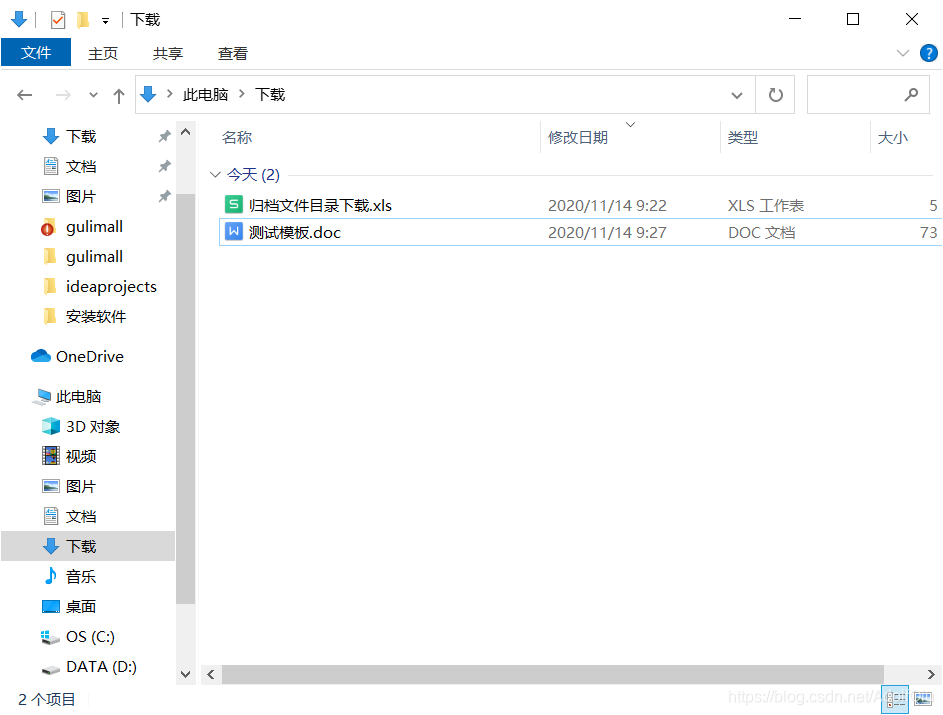





 扫一扫
扫一扫


 6703
6703

 被折叠的 条评论
为什么被折叠?
被折叠的 条评论
为什么被折叠?
 到【灌水乐园】发言





