解析pcap文件及读取实现源码

MATLAB对pcap文件抓包的读取 应用范围 常用的雷达信号,无线网通信信号的格式大多为pcap、wj文件,这里记录一下MATLAB读取pcap文件的方法,具体处理过程及读取协议针对不同的雷达有不同的处理方式,在这里不做说明。 程序 clc;clear;close all; %% 文件位置 filename= 'E:\File\JOB\JOB_1\data.pcap'; fid = fopen(filename,'r'); % 打开包 tmpPack = fread(fid,1350); % 只读前1350个数 读到 阅读详情

下面pcap文件格式介绍是在网上转的,根据理解,写了个程序来进行解析pcap文件,后续再实现合并pcap功能(wireshark已经自带命令行合并pcap文件工具,在这里只是为了分析pcap文件和学习)。
==========================
默认的*.pcap文件保存格式。
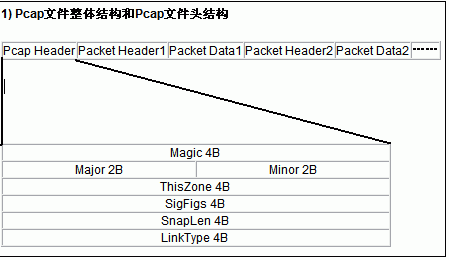
Pcap文件头24B各字段说明:

Magic:4B:0x1A 2B 3C 4D:用来标示文件的开始
Major:2B,0×02 00:当前文件主要的版本号
Minor:2B,0×04 00当前文件次要的版本号
ThisZone:4B当地的标准时间;全零
SigFigs:4B时间戳的精度;全零
SnapLen:4B最大的存储长度
LinkType:4B链路类型
常用类型:
0                       BSD loopback devices, except for later OpenBSD
1                       Ethernet, and Linux loopback devices
6                       802.5 Token Ring
7                       ARCnet
8                       SLIP
9                       PPP
10                     FDDI
100                 LLC/SNAP-encapsulated ATM
101                 “raw IP”, with no link
102                 BSD/OS SLIP
103                 BSD/OS PPP
104                 Cisco HDLC
105                 802.11
108                 later OpenBSD loopback devices (with the AF_value in network byte order)
113                 special Linux “cooked” capture
114                 LocalTalk
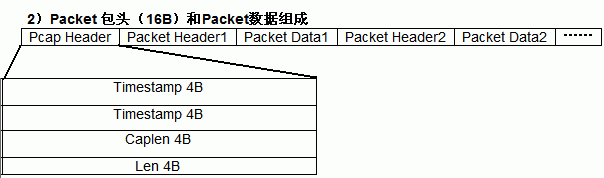
Packet 包头和Packet数据组成
字段说明:
Timestamp:时间戳高位,精确到seconds
Timestamp:时间戳低位,精确到microseconds
Caplen:当前数据区的长度,即抓取到的数据帧长度,由此可以得到下一个数据帧的位置。
Len:离线数据长度 :网络中实际数据帧的长度,一般不大于caplen,多数情况下和Caplen数值相等。
Packet 数据: 即 Packet(通常就是链路层的数据帧)具体内容,长度就是Caplen,这个长度的后面,就是当前PCAP文件中存放的下一个Packet数据包,也就 是说:PCAP文件里面并没有规定捕获的Packet数据包之间有什么间隔字符串,下一组数据在文件中的起始位置。我们需要靠第一个Packet包确定。 最后,Packet数据部分的格式其实就是标准的网路协议格式了可以任何网络教材上找得到。
//
//  pcap.h
//  pcaptest
//
//  Created by zc on 12-1-24.
//  Copyright 2012年 __MyCompanyName__. All rights reserved.
//
 
#ifndef pcaptest_pcap_h
#define pcaptest_pcap_h
 
typedef unsigned int  bpf_u_int32;
typedef unsigned short  u_short;
typedef int bpf_int32;
 

typedef struct pcap_file_header {
        bpf_u_int32 magic;
        u_short version_major;
        u_short version_minor;
        bpf_int32 thiszone;    
        bpf_u_int32 sigfigs;   
        bpf_u_int32 snaplen;   
        bpf_u_int32 linktype;  
}pcap_file_header;


typedef struct  timestamp{
        bpf_u_int32 timestamp_s;
        bpf_u_int32 timestamp_ms;
}timestamp;
 
typedef struct pcap_header{
        timestamp ts;
        bpf_u_int32 capture_len;
        bpf_u_int32 len;
 
}pcap_header;
 
 
void prinfPcapFileHeader(pcap_file_header *pfh);
void printfPcapHeader(pcap_header *ph);
void printPcap(void * data,size_t size);
 
#endif

//
//  pcap.c
//  pcaptest
//
//  Created by zc on 12-1-24.
//  Copyright 2012年 __MyCompanyName__. All rights reserved.
//
 
#include 
#include "pcap.h"
 
void prinfPcapFileHeader(pcap_file_header *pfh){
        if (pfh==NULL) {
                return;
        }
        printf("=====================\n"
                   "magic:0x%0x\n"
                   "version_major:%u\n"
                   "version_minor:%u\n"
                   "thiszone:%d\n"
                   "sigfigs:%u\n"
                   "snaplen:%u\n"
                   "linktype:%u\n"
                   "=====================\n",
                   pfh->magic,
                   pfh->version_major,
                   pfh->version_minor,
                   pfh->thiszone,
                   pfh->sigfigs,
                   pfh->snaplen,
                   pfh->linktype);
}
 
void printfPcapHeader(pcap_header *ph){
        if (ph==NULL) {
                return;
        }
        printf("=====================\n"
                   "ts.timestamp_s:%u\n"
                   "ts.timestamp_ms:%u\n"
                   "capture_len:%u\n"
                   "len:%d\n"
                   "=====================\n",
                   ph->ts.timestamp_s,
                   ph->ts.timestamp_ms,
                   ph->capture_len,
                   ph->len);
 
 
}
 
void printPcap(void * data,size_t size){
        unsigned  short iPos = 0;
        //int * p = (int *)data;
        //unsigned short* p = (unsigned short *)data;
        if (data==NULL) {
                return;
        }
 
        printf("\n==data:0x%x,len:%lu=========",data,size);
 
        for (iPos=0; iPos <</span> size/sizeof(unsigned short); iPos++) {
                //printf(" %x ",(int)( * (p+iPos) ));
                //unsigned short a = ntohs(p[iPos]);
 
                unsigned short a = ntohs( *((unsigned short *)data + iPos ) );
                if (iPos%8==0) printf("\n");
                if (iPos%4==0) printf(" ");
 
                printf("x",a);
 
 
        }
        
        printf("\n============\n");
}

//
//  main.c
//  pcaptest
//
//  Created by zc on 12-1-24.
//  Copyright 2012年 __MyCompanyName__. All rights reserved.
//
 
#include 
#include 
#include "pcap.h"
 
#define PCAP_FILE "ping.pcap"
#define MAX_ETH_FRAME 1514
#define ERROR_FILE_OPEN_FAILED -1
#define ERROR_MEM_ALLOC_FAILED -2
#define ERROR_PCAP_PARSE_FAILED -3
 
 
int main (int argc, const char * argv[])
{
 
        printf("sizeof:int %lu,unsigned int %lu,char %lu,unsigned char %lu,short:%lu,unsigned short:%lu\n",
                    sizeof(int),sizeof(unsigned int),sizeof(char),sizeof(unsigned char),sizeof(short),sizeof(unsigned short));
 
        pcap_file_header  pfh;
        pcap_header  ph;
        int count=0;
        void * buff = NULL;
        int readSize=0;
        int ret = 0;
 
        FILE *fp = fopen(PCAP_FILE, "rw");
 
        if (fp==NULL) {
                fprintf(stderr, "Open file %s error.",PCAP_FILE);
                ret = ERROR_FILE_OPEN_FAILED;
                goto ERROR;
        }
 
        fread(&pfh, sizeof(pcap_file_header), 1, fp);   
        prinfPcapFileHeader(&pfh);
        //fseek(fp, 0, sizeof(pcap_file_header));
 
        buff = (void *)malloc(MAX_ETH_FRAME);
        for (count=1; ; count++) {
                memset(buff,0,MAX_ETH_FRAME);
                //read pcap header to get a packet
                //get only a pcap head count .
                readSize=fread(&ph, sizeof(pcap_header), 1, fp);
                if (readSize<=0) {
                        break;
                }
                printfPcapHeader(&ph);
 
 
                if (buff==NULL) {
                        fprintf(stderr, "malloc memory failed.\n");
                        ret = ERROR_MEM_ALLOC_FAILED;
                        goto ERROR;
                }
 
                //get a packet contents.
                //read ph.capture_len bytes.
                readSize=fread(buff,1,ph.capture_len, fp);
                if (readSize != ph.capture_len) {
                        free(buff);
                        fprintf(stderr, "pcap file parse error.\n");
                        ret = ERROR_PCAP_PARSE_FAILED;
                        goto ERROR;
                }
                printPcap(buff, ph.capture_len);
 
 
                printf("===count:%d,readSize:%d===\n",count,readSize);
 
                if (feof(fp) || readSize <=0 ) { 
                        break;
                }
        }
 
ERROR:
        //free
        if (buff) {
                free(buff);
                buff=NULL;
        } 
        if (fp) {
                fclose(fp);
                fp=NULL;
        }       
 
    return ret;
}



C语言解析pcap数据包格式 通过tcpdump命令或者wireshark抓取数据包。 如下图所示: pcap文件格式: 24字节pcap文件头+(16字节pcap数据包头+数据包)*n 解析源码如下: #include<stdio.h> #include<string.h> #include<stdlib.h> #include<netinet/in.h> ... 阅读详情

相关推荐

C语言解析pcap文件得到HTTP信息实例(原创,附源码)

程序功能为解析由Wireshark生成的pcap文件。 实现步骤: 1)用Wireshark软件抓包得到test.pcap文件 2)程序:分析pcap文件头 -> 分析pcap_pkt头 -> 分析帧头 -> 分析ip头 -> 分析tcp头 -> 分析http信息 #include #include #include #include #include #define BUFSIZE 10

晴天的专栏 1万+

Python解析PCAP文件(从原始数据出发)

使用python解析pcap文件原始数据

2301_76214708的博客 4773

网络安全系列-二十五: PCAP文件格式详解及读取PCAP文件源码示例

在Linux里,pcap是一种通用的数据流格式,是用于保存捕获的网络数据的一种非常基本的格式。 很多开源的项目都使用这种数据格式,如wireshark、tcpdump、scapy、snort 本文针对pcap的文件格式进行详解,并提供读取pcap文件的源代码示例

penriver的博客 6921

pcap(cap)包文件解析

https://blog.csdn.net/m0_37710388/article/details/89217421 pcap文件是常用的数据报存储格式,可以理解为就是一种文件格式,只不过里面的数据是按照特定格式存储的,所以我们想要解析里面的数据,也必须按照一定的格式。普通的记事本打开pcap文件显示的是乱码,用Ultra Edit能够以16进制数据的格式显示,用wireshark这种抓...

buside的博客 4万+

实现网络抓包功能的Winpcap工具开发指南

Winpcap是一个强大的网络分析工具库,广泛应用于Windows平台上网络通信数据包的捕获和分析。它的核心功能允许用户无需依赖特定的操作系统协议实现即可直接访问网络层数据。数据链路层是OSI模型的第二层,主要负责网络中相邻节点之间的数据传输。在这一层面上,网络抓包工具可以捕获到帧(Frames),这是网络接口卡(NIC)之间传输的最基本的数据单元。每个数据帧都包含了源地址、目的地址以及数据载荷。

weixin_42511373的博客 2156

Wireshark-win64网络抓包分析工具实战指南

Wireshark-win64是一款专为Windows 64位操作系统优化的网络协议分析工具,支持实时捕获、深度解析和可视化展示网络流量。它基于开源项目开发,集成了Npcap驱动,能够在不干扰正常网络通信的前提下,捕获并分析各类协议数据包。其核心特性包括:支持多种网络接口、提供详细的协议解码、内置强大的过滤语言(显示和捕获过滤器),以及支持离线分析与数据导出功能。

weixin_42613018的博客 1069

pcapng 文件解析_解析pcap文件及读取实现源码

下面pcap文件格式介绍是在网上转的,根据理解,写了个程序来进行解析pcap文件,后续再实现合并pcap功能(wireshark已经自带命令行合并pcap文件工具,在这里只是为了分析pcap文件和学习)。==========================默认的*.pcap文件保存格式。Pcap文件头24B各字段说明:Magic:4B:0x1A 2B 3C 4D:用来标示文件的开始Major:2B...

weixin_39781209的博客 2515

pcap-ng-parser:Node.js模块,用于解析.pcapng文件和tcpdump输出

概述 PCAP-NG-Parser是基于流的模块,用于解码,打印和分析网络流量数据包。 使用此模块,您可以读取现有的.pcapng文件或将其连接到活动流。 PCAP-NG-Parser目前正在积极开发中。 目前,它仅支持来自输出的以太网协议。 为什么要用JavaScript捕获数据包 摘录自: : There are already many tools for capturing, decoding, and analyzing packets. Many of them are thoroughly tested and very fast. Why would anybody want to do such low level things like packet capture and analysis in JavaScript? A few reasons: * Ja

linux pcap 报文 解析 报头剥离

#########################功能说明################## pcapedit 程序可对pcap报文进行报文过滤,剥离部分包头及打标签功能。 支持通过pcap.conf配置文件设置标签内容及长度。 程序启动时,会导入配置文件中的标签内容,之后会将pcap包中的每个数据包末尾都打上该标签。标签内容填充不足,自动补0. ################################################## *************************可处理报文格式说明******** 可处理的报文格式需如下:ETH格式 --》ipv4 --> udp --> gtp_2152 --> ipv4 -->tcp -->http 剥离特殊包头后的帧格式:ETH格式 --》ipv4 --> tcp -->http *************************************************** @@@@@@@@@@@@@@@@@@@@@@@@@使用说明@@@@@@@@@@@@@@@@@ 将pcapedit 和 配置文件放到用一路径下,处理处的结果文件保存在当前路径。 [root@localhost cll]# ./pcapedit Input the pcap file name:3g_ctrl_data.pcap //符合帧格式的pcap文件处理结果 starting parse pcap file... 3g_ctrl_data.pcap input mark success! Input the pcap file name:aagxxx_data.pcap //符合帧格式的pcap文件处理结果 starting parse pcap file... aagxxx_data.pcap input mark success! Input the pcap file name:new3g_user.pcap //不符合帧格式的pcap文件处理结果 starting parse pcap file... cann't find target format packet. new3g_user.pcap input mark fail! Input the pcap file name:exit //exit 退出程序 [root@localhost cll]# @@@@@@@@@@@@@@@@@@@@@@@@@@@@@@@@@@@@@@@@@@@@@@@@@@

PCAP文件的解析软件

具备WIRESHARK的大部分功能,主要是指针的偏移来完成的。对初学者有一定的帮助。

libpcap(winpcap)捕获数据包与存储和读取

libpcap(winpcap)捕获数据包与存储和读取 环境 libpcap + Qt Creator

用PCL直接读取并显示PCAP文件

项目用到了Velodyne的16线激光雷达。雷达产生的数据保存为PCAP格式,解析起来相当麻烦。 查了一下PCL的文档,发现PCL专门为Velodyne的雷达提供了支持,提供了HDLGrabber和VLDGrabber两个类。然而PCL官方文档表示要想用这些接口直接读取PCAP,需要重新编译PCL。无奈只好照办。 重新编译前,看了一下PCL的bin目录,其实是有pcl_hdl_viewer_sim...

zhou_x11的博客 5107

c# 读取 wireshark pcap文件 官方源码

官方源码 来源于github,解析tcp ,udp等数据包

上一篇: 网络字节顺序与主机字节顺序
下一篇: [转]浅析 Linux 中的时间编程和实现原理,第 1 部分: Linux 应用层的时间编程
__Andy
博客等级 码龄14年 2粉丝 1原创
评论
成就一亿技术人!
拼手气红包6.0元
还能输入1000个字符
 
 条评论被折叠 查看
添加红包

请填写红包祝福语或标题

个

红包个数最小为10个

元

红包金额最低5元

当前余额3.43元 前往充值 >
需支付:10.00元
成就一亿技术人!
领取后你会自动成为博主和红包主的粉丝 规则
hope_wisdom
发出的红包
实付元
使用余额支付
点击重新获取
扫码支付
钱包余额 0

抵扣说明:

1.余额是钱包充值的虚拟货币,按照1:1的比例进行支付金额的抵扣。
2.余额无法直接购买下载,可以购买VIP、付费专栏及课程。

余额充值