


 超级会员免费看
osgEarth目标拾取
本文展示了一种目标选择的方法。通过将osg::Node注册到osgEarth的对象管理器中,利用osgEarth的RTTPicker类以及重写的RTTPicker::Callback类,实现目标的选中,最后利用osgEarth::VirtualProgram类,将拾取的对象高亮显示。
本文主要解决以下问题:
- osgEarth::RTTPicker实现目标拾取
- RTTPicker::Callback回调解析
- osgEarth::VirtualProgram目标高亮显示
目录
- 1 前言
- 2 osgEarth::RTTPicker与RTTPicker::Callback实现目标拾取
- 3 osgEarth::VirtualProgram目标高亮显示
内容
- 1 前言
osgEarth中标注之类的鼠标拾取操作和普通的碰撞检测拾取不太一样,PlaceNode和其它的标注类型不是在通常的场景空间中渲染的,而是作为屏幕空间的叠加层来渲染的,不能通过碰撞检测获取求交的对象。
osgEarth中有一个例子Sample osgearth_pick,演示了如何通过RTTPicker技术实现场景中对象的选取。加入到场景中的矢量和注记都能用鼠标拾取到,但对于普通的模型数据却获取不到。可以通过注册的方式,将加入到场景中的osg::Node进行注册,osgEarth中ObjectIndex类管理着对象的注册,其提供了接口用于加入到场景中的osg::Node进行注册。
- 2 osgEarth::RTTPicker与RTTPicker::Callback实现目标拾取
首先osgEarth解析.earth文件从而构建场景,场景中可以有地形、影像、矢量、模型等数据,而本篇文章主要实现对模型数据的拾取;接着将拾取的节点进行注册;然后由鼠标进行目标拾取。
从外部earth文件导入节点:
<Map name="Demo: simple model layer">

    <Model name="Cow in the Hudson">
        <url>C:/Geoway/SVN/gwEarth/trunk/osgearth/data/streetlight.osgb.(0,0,3.14).trans.100.scale</url>
        <location lat="40.717" long="-74.018"/>
    </Model>

    <viewpoints>
        <viewpoint name="Test" heading="0" lat="40.717" long="-74.018" height="1500" pitch="-90" range="1500" />
    </viewpoints>
</Map>
如上为.earth文件中的内容,包含两个部分:模型图层和视点图层。模型图层采用Model关键字,其中url字段表示模型的位置路径,location字段表示模型上球的位置和viewpoints图层;视点图层用viewpoints关键字来表示,其包含了 name、heading、lat、long、height、pitch和range七个参数,分别表示图层名称、方位角、位置纬度、经度、高度、俯仰角、范围。
ui::VBox* uiContainer = new ui::VBox();
    uiContainer->setAlign( ui::Control::ALIGN_LEFT, ui::Control::ALIGN_TOP );
    uiContainer->setAbsorbEvents( true );
    uiContainer->setBackColor(0,0,0,0.8);

    uiContainer->addControl( new ui::LabelControl("RTT Picker Test", osg::Vec4(1,1,0,1)) );
    uiContainer->addControl( new ui::ButtonControl("Toggle picker", new TogglePicker(app)) );
    app.fidLabel = new ui::LabelControl("---");
    uiContainer->addControl( app.fidLabel );
    app.nameLabel = uiContainer->addControl( new ui::LabelControl( "---" ) );

    // Load up the earth file.
    osg::Node* node = MapNodeHelper().load( arguments, &app.viewer, uiContainer );
代码段2为从外部earth文件导入得到osg::Node的代码,得到的osg::Node包含两个子节点,分别为MapNode和Controls::ControlCanvas, ControlCanvas包含四个LabelControl和一个ButtonControl,用来控制对象拾取的开启与关闭,以及对象信息的展示。
接下来是开启目标拾取功能,同时实现对象的注册:
struct App
{
    App(osg::ArgumentParser& args) : viewer(args), mainView(NULL),
       mapNode(NULL), picker(NULL), fidLabel(NULL),
       nameLabel(NULL), highlightUniform(NULL)
    { }

    osgViewer::CompositeViewer viewer;
    osgViewer::View* mainView;
    osgEarth::MapNode* mapNode;
    osgEarth::Util::RTTPicker* picker;

    ui::LabelControl* fidLabel;
    ui::LabelControl* nameLabel;
    osg::Uniform*     highlightUniform;
};
void startPicker(App& app)
{
    // Note! Must stop and restart threading when removing the picker
    // because it changes the OSG View/Slave configuration.
    app.viewer.stopThreading();

    app.picker = new RTTPicker();
    app.mainView->addEventHandler(app.picker);

	ResistryNodeVisitor rn;
	app.mapNode->accept(rn);

    // add the graph that will be picked.
    app.picker->addChild(app.mapNode);

    // install a callback that controls the picker and listens for hits.
    app.picker->setDefaultCallback(new MyPickCallback(app));

    app.viewer.startThreading();
}
代码段1为一结构体,主要包含一视图、主视图、MapNode以及Util::RTTPicker;代码段2为开启节点拾取功能,RTTPicker继承自osgGA::GUIEventHandler,可将其作为事件直接加入到视图中;ResistryNodeVisitor为一访问器,实现节点的注册,其核心代码为:osgEarth::Registry::objectIndex()->tagNode(&node, &node); tageNode的英文解释为:
/**
* Inserts the object into the index, and tags the Node with a uniform containing
* the object id. Returns the Object ID.
*/
即将一对象(第二个参数)插入到index表中,同时将 一osg::Uniform对象写入到节点中(第一个参数)。
最后设置RTTPicker的CallBack。RTTPicker类继承自osgGA::GUIEventHandler,其重写了handle函数,handle函数中调用了runPicks函数,runPicks调用了checkForPickResult函数,checkForPickResult函数调用了RTTPlicker::CallBack中的onHit函数,本文通过重写RTTPicker::CallBack中的onHit()函数实现拾取对象的获取:
struct MyPickCallback : public RTTPicker::Callback
{
    App& _app;
    MyPickCallback(App& app) : _app(app) { }

    void onHit(ObjectID id)
    {
        // First see whether it's a feature:
        FeatureIndex* index = Registry::objectIndex()->get<FeatureIndex>(id).get();
        Feature* feature = index ? index->getFeature( id ) : 0L;

        if ( feature )
        {
            _app.fidLabel->setText( Stringify() << "Feature ID = " << feature->getFID() << " (oid = " << id << ")" );
            _app.nameLabel->setText( Stringify() << "Name = " << feature->getString("name") );
        }

        else
        {
            // Check whether it's an annotation:
            AnnotationNode* anno = Registry::objectIndex()->get<AnnotationNode>(id).get();
            if ( anno )
            {
                _app.fidLabel->setText( Stringify() << "ObjectID = " << id );
                _app.nameLabel->setName( Stringify() << "Name = " << anno->getName() );
            }

            // None of the above.. clear.
            else
            {
                _app.fidLabel->setText( Stringify() << "unknown oid = " << id );
                _app.nameLabel->setText( " " );
            }
        }

        _app.highlightUniform->set( id );
    }

    void onMiss()
    {
        _app.fidLabel->setText( "No pick." );
        _app.nameLabel->setText( " " );
        _app.highlightUniform->set( 0u );
    }

    // pick whenever the mouse moves.
    bool accept(const osgGA::GUIEventAdapter& ea, const osgGA::GUIActionAdapter& aa)
    {
        return ea.getEventType() == ea.PUSH;
    }
};
其中onHit函数通过objectId获取对应的节点,最后将高亮显示的节点设置为对应的id(_app.highlightUniform->set( id ))。
-
3 osgEarth::VirtualProgram目标高亮显示
const char* highlightVert =
    "#version " GLSL_VERSION_STR "\n"
    "uniform uint objectid_to_highlight; \n"
    "uint oe_index_objectid;      // Stage global containing object id \n"
    "flat out int selected; \n"
    "void checkForHighlight(inout vec4 vertex) \n"
    "{ \n"
    "    selected = (objectid_to_highlight > 1u && objectid_to_highlight == oe_index_objectid) ? 1 : 0; \n"
    "} \n";

const char* highlightFrag =
    "#version " GLSL_VERSION_STR "\n"
    "flat in int selected; \n"
    "void highlightFragment(inout vec4 color) \n"
    "{ \n"
    "    if ( selected == 1 ) \n"
    "        color.rgb = mix(color.rgb, clamp(vec3(0.5,2.0,2.0)*(1.0-color.rgb), 0.0, 1.0), 0.5); \n"
    "} \n";

void installHighlighter(App& app)
{
    osg::StateSet* stateSet = app.mapNode->getOrCreateStateSet();
    int attrLocation = Registry::objectIndex()->getObjectIDAttribLocation();

    // This shader program will highlight the selected object.
    VirtualProgram* vp = VirtualProgram::getOrCreate(stateSet);
    vp->setFunction( "checkForHighlight",  highlightVert, ShaderComp::LOCATION_VERTEX_CLIP );
    vp->setFunction( "highlightFragment",  highlightFrag, ShaderComp::LOCATION_FRAGMENT_COLORING );

    // Since we're accessing object IDs, we need to load the indexing shader as well:
    Registry::objectIndex()->loadShaders( vp );

    // A uniform that will tell the shader which object to highlight:
    app.highlightUniform = new osg::Uniform("objectid_to_highlight", 0u);
    stateSet->addUniform(app.highlightUniform );
}
通过VirtualProgram设置节点着色器和片元着色器,实现对特定ID的节点,高亮显示。
最后完整代码如下:
/* -*-c++-*- */
/* osgEarth - Geospatial SDK for OpenSceneGraph
* Copyright 2020 Pelican Mapping
* http://osgearth.org
*
* osgEarth is free software; you can redistribute it and/or modify
* it under the terms of the GNU Lesser General Public License as published by
* the Free Software Foundation; either version 2 of the License, or
* (at your option) any later version.
*
* THE SOFTWARE IS PROVIDED "AS IS", WITHOUT WARRANTY OF ANY KIND, EXPRESS OR
* IMPLIED, INCLUDING BUT NOT LIMITED TO THE WARRANTIES OF MERCHANTABILITY,
* FITNESS FOR A PARTICULAR PURPOSE AND NONINFRINGEMENT. IN NO EVENT SHALL THE
* AUTHORS OR COPYRIGHT HOLDERS BE LIABLE FOR ANY CLAIM, DAMAGES OR OTHER
* LIABILITY, WHETHER IN AN ACTION OF CONTRACT, TORT OR OTHERWISE, ARISING
* FROM, OUT OF OR IN CONNECTION WITH THE SOFTWARE OR THE USE OR OTHER DEALINGS
* IN THE SOFTWARE.
*
* You should have received a copy of the GNU Lesser General Public License
* along with this program.  If not, see <http://www.gnu.org/licenses/>
*/

#include <osgEarth/Registry>
#include <osgEarth/ShaderGenerator>
#include <osgEarth/ObjectIndex>
#include <osgEarth/GLUtils>
#include <osgEarth/EarthManipulator>
#include <osgEarth/ExampleResources>
#include <osgEarth/Controls>
#include <osgEarth/RTTPicker>
#include <osgEarth/Feature>
#include <osgEarth/FeatureIndex>
#include <osgEarth/AnnotationNode>

#include <osgEarth/IntersectionPicker>

#include <osgViewer/CompositeViewer>
#include <osgGA/TrackballManipulator>
#include <osg/BlendFunc>

#define LC "[rttpicker] "

using namespace osgEarth;
using namespace osgEarth::Util;

namespace ui = osgEarth::Util::Controls;

//-----------------------------------------------------------------------

//! Application-wide data.
struct App
{
    App(osg::ArgumentParser& args) : viewer(args), mainView(NULL),
       mapNode(NULL), picker(NULL), fidLabel(NULL),
       nameLabel(NULL), highlightUniform(NULL)
    { }

    osgViewer::CompositeViewer viewer;
    osgViewer::View* mainView;
    osgEarth::MapNode* mapNode;
    osgEarth::Util::RTTPicker* picker;

    ui::LabelControl* fidLabel;
    ui::LabelControl* nameLabel;
    osg::Uniform*     highlightUniform;
};


//! Callback that you install on the RTTPicker.
struct MyPickCallback : public RTTPicker::Callback
{
    App& _app;
    MyPickCallback(App& app) : _app(app) { }

    void onHit(ObjectID id)
    {
        // First see whether it's a feature:
        FeatureIndex* index = Registry::objectIndex()->get<FeatureIndex>(id).get();
        Feature* feature = index ? index->getFeature( id ) : 0L;

        if ( feature )
        {
            _app.fidLabel->setText( Stringify() << "Feature ID = " << feature->getFID() << " (oid = " << id << ")" );
            _app.nameLabel->setText( Stringify() << "Name = " << feature->getString("name") );
        }

        else
        {
            // Check whether it's an annotation:
            AnnotationNode* anno = Registry::objectIndex()->get<AnnotationNode>(id).get();
            if ( anno )
            {
                _app.fidLabel->setText( Stringify() << "ObjectID = " << id );
                _app.nameLabel->setName( Stringify() << "Name = " << anno->getName() );
            }

            // None of the above.. clear.
            else
            {
                _app.fidLabel->setText( Stringify() << "unknown oid = " << id );
                _app.nameLabel->setText( " " );
            }
        }

        _app.highlightUniform->set( id );
    }

    void onMiss()
    {
        _app.fidLabel->setText( "No pick." );
        _app.nameLabel->setText( " " );
        _app.highlightUniform->set( 0u );
    }

    // pick whenever the mouse moves.
    bool accept(const osgGA::GUIEventAdapter& ea, const osgGA::GUIActionAdapter& aa)
    {
        return ea.getEventType() == ea.PUSH;
    }
};

//-----------------------------------------------------------------------

// Shaders that will highlight the currently "picked" feature.

const char* highlightVert =
    "#version " GLSL_VERSION_STR "\n"
    "uniform uint objectid_to_highlight; \n"
    "uint oe_index_objectid;      // Stage global containing object id \n"
    "flat out int selected; \n"
    "void checkForHighlight(inout vec4 vertex) \n"
    "{ \n"
    "    selected = (objectid_to_highlight > 1u && objectid_to_highlight == oe_index_objectid) ? 1 : 0; \n"
    "} \n";

const char* highlightFrag =
    "#version " GLSL_VERSION_STR "\n"
    "flat in int selected; \n"
    "void highlightFragment(inout vec4 color) \n"
    "{ \n"
    "    if ( selected == 1 ) \n"
    "        color.rgb = mix(color.rgb, clamp(vec3(0.5,2.0,2.0)*(1.0-color.rgb), 0.0, 1.0), 0.5); \n"
    "} \n";

void installHighlighter(App& app)
{
    osg::StateSet* stateSet = app.mapNode->getOrCreateStateSet();
    int attrLocation = Registry::objectIndex()->getObjectIDAttribLocation();

    // This shader program will highlight the selected object.
    VirtualProgram* vp = VirtualProgram::getOrCreate(stateSet);
    vp->setFunction( "checkForHighlight",  highlightVert, ShaderComp::LOCATION_VERTEX_CLIP );
    vp->setFunction( "highlightFragment",  highlightFrag, ShaderComp::LOCATION_FRAGMENT_COLORING );

    // Since we're accessing object IDs, we need to load the indexing shader as well:
    Registry::objectIndex()->loadShaders( vp );

    // A uniform that will tell the shader which object to highlight:
    app.highlightUniform = new osg::Uniform("objectid_to_highlight", 0u);
    stateSet->addUniform(app.highlightUniform );
}


class ResistryNodeVisitor : public osg::NodeVisitor
{
public:
	ResistryNodeVisitor()
		: osg::NodeVisitor(TRAVERSE_ALL_CHILDREN)
	{
	}

	~ResistryNodeVisitor()
	{
	}

	void apply(osg::Geometry& node)
	{
		osgEarth::Registry::objectIndex()->tagNode(&node, &node);
		//_geometries.push_back(&node);
		traverse(node);
	}


public:
	/*const std::vector<osg::ref_ptr<osg::PagedLOD> >& pagedlods()
	{
		return _pagedlods;
	}

	const std::vector<osg::ref_ptr<osg::Geometry> >& geometries()
	{
		return _geometries;
	}

	void clear()
	{
		_geometries.clear();
		_pagedlods.clear();
	}*/

private:
	/*std::vector<osg::ref_ptr<osg::Geometry> > _geometries;
	std::vector<osg::ref_ptr<osg::PagedLOD> > _pagedlods;*/
};

//------------------------------------------------------------------------

// Configures a window that lets you see what the RTT camera sees.
//void
//setupRTTView(osgViewer::View* view, osg::Texture* rttTex)
//{
//    view->setCameraManipulator(0L);
//    view->getCamera()->setName( "osgearth_pick RTT view" );
//    view->getCamera()->setViewport(0,0,256,256);
//    view->getCamera()->setClearColor(osg::Vec4(1,1,1,1));
//    view->getCamera()->setProjectionMatrixAsOrtho2D(-.5,.5,-.5,.5);
//    view->getCamera()->setViewMatrixAsLookAt(osg::Vec3d(0,-1,0), osg::Vec3d(0,0,0), osg::Vec3d(0,0,1));
//    view->getCamera()->setProjectionResizePolicy(osg::Camera::FIXED);
//
//    osg::Vec3Array* v = new osg::Vec3Array(6);
//    (*v)[0].set(-.5,0,-.5); (*v)[1].set(.5,0,-.5); (*v)[2].set(.5,0,.5); (*v)[3].set((*v)[2]); (*v)[4].set(-.5,0,.5);(*v)[5].set((*v)[0]);
//
//    osg::Vec2Array* t = new osg::Vec2Array(6);
//    (*t)[0].set(0,0); (*t)[1].set(1,0); (*t)[2].set(1,1); (*t)[3].set((*t)[2]); (*t)[4].set(0,1); (*t)[5].set((*t)[0]);
//
//    osg::Geometry* g = new osg::Geometry();
//    g->setUseVertexBufferObjects(true);
//    g->setUseDisplayList(false);
//    g->setVertexArray( v );
//    g->setTexCoordArray( 0, t );
//    g->addPrimitiveSet( new osg::DrawArrays(GL_TRIANGLES, 0, 6) );
//
//    osg::Geode* geode = new osg::Geode();
//    geode->addDrawable( g );
//
//    osg::StateSet* stateSet = geode->getOrCreateStateSet();
//    stateSet->setDataVariance(osg::Object::DYNAMIC);
//
//    stateSet->setTextureAttributeAndModes(0, rttTex, 1);
//    rttTex->setUnRefImageDataAfterApply( false );
//    rttTex->setResizeNonPowerOfTwoHint(false);
//
//    GLUtils::setLighting(stateSet, 0);
//    stateSet->setMode(GL_CULL_FACE, 0);
//    stateSet->setAttributeAndModes(new osg::BlendFunc(GL_ONE, GL_ZERO), 1);
//
//    const char* fs =
//    "#version " GLSL_VERSION_STR "\n"
//    "void swap(inout vec4 c) { c.rgba = c==vec4(0)? vec4(1) : vec4(vec3((c.r+c.g+c.b+c.a)/4.0),1); }\n";
//    osgEarth::Registry::shaderGenerator().run(geode);
//    VirtualProgram::getOrCreate(geode->getOrCreateStateSet())->setFunction("swap", fs, ShaderComp::LOCATION_FRAGMENT_COLORING);
//
//    view->setSceneData( geode );
//}

void startPicker(App& app)
{
    // Note! Must stop and restart threading when removing the picker
    // because it changes the OSG View/Slave configuration.
    app.viewer.stopThreading();

    app.picker = new RTTPicker();
    app.mainView->addEventHandler(app.picker);

	ResistryNodeVisitor rn;
	app.mapNode->accept(rn);

    // add the graph that will be picked.
    app.picker->addChild(app.mapNode);

    // install a callback that controls the picker and listens for hits.
    app.picker->setDefaultCallback(new MyPickCallback(app));

    // Make a view that lets us see what the picker sees.
   /* if (app.rttView == NULL)
    {
        app.rttView = new osgViewer::View();
        app.rttView->getCamera()->setGraphicsContext(app.mainView->getCamera()->getGraphicsContext());
        app.rttView->getCamera()->setSmallFeatureCullingPixelSize(-1.0f);
        app.viewer.addView(app.rttView);
    }
    setupRTTView(app.rttView, app.picker->getOrCreateTexture(app.mainView));
    app.rttView->getCamera()->setNodeMask(~0);*/

    app.viewer.startThreading();
}

void stopPicker(App& app)
{
    // Note! Must stop and restart threading when removing the picker
    // because it changes the OSG View/Slave configuration.
    app.viewer.stopThreading();

    //app.viewer.removeView(app.rttView);
    //app.rttView->getCamera()->setNodeMask(0);
    app.mainView->removeEventHandler(app.picker);
    app.picker = 0L;

    app.viewer.startThreading();
}

struct TogglePicker : public ui::ControlEventHandler
{
    App& _app;
    TogglePicker(App& app) : _app(app) { }
    void onClick(Control* button)
    {
        if (_app.picker == 0L)
            startPicker(_app);
        else
            stopPicker(_app);
    }
};

//-----------------------------------------------------------------------

int
usage(const char* name)
{
    OE_NOTICE
        << "\nUsage: " << name << " file.earth" << std::endl
        << MapNodeHelper().usage() << std::endl;
    return 0;
}

int
main(int argc, char** argv)
{
    osg::ArgumentParser arguments(&argc,argv);
    if ( arguments.read("--help") )
        return usage(argv[0]);

    App app(arguments);

    app.mainView = new osgViewer::View();
    app.mainView->setUpViewInWindow(30, 30, 1024, 1024, 0);
    app.mainView->getCamera()->setSmallFeatureCullingPixelSize(-1.0f);

    app.viewer.addView(app.mainView);

    app.mainView->getDatabasePager()->setUnrefImageDataAfterApplyPolicy( false, false );
    app.mainView->setCameraManipulator( new EarthManipulator() );

    // Made some UI components:
    ui::VBox* uiContainer = new ui::VBox();
    uiContainer->setAlign( ui::Control::ALIGN_LEFT, ui::Control::ALIGN_TOP );
    uiContainer->setAbsorbEvents( true );
    uiContainer->setBackColor(0,0,0,0.8);

    uiContainer->addControl( new ui::LabelControl("RTT Picker Test", osg::Vec4(1,1,0,1)) );
    uiContainer->addControl( new ui::ButtonControl("Toggle picker", new TogglePicker(app)) );
    app.fidLabel = new ui::LabelControl("---");
    uiContainer->addControl( app.fidLabel );
    app.nameLabel = uiContainer->addControl( new ui::LabelControl( "---" ) );

    // Load up the earth file.
    osg::Node* node = MapNodeHelper().load( arguments, &app.viewer, uiContainer );

    if ( node )
    {
        app.mainView->setSceneData( node );

        app.mapNode = MapNode::get(node);

        // start with a picker running
        startPicker(app);

        // Highlight features as we pick'em.
        installHighlighter(app);

        app.mainView->getCamera()->setName( "Main view" );

        return app.viewer.run();
    }
    else
    {
        return usage(argv[0]);
    }
}
运行的结果如下:
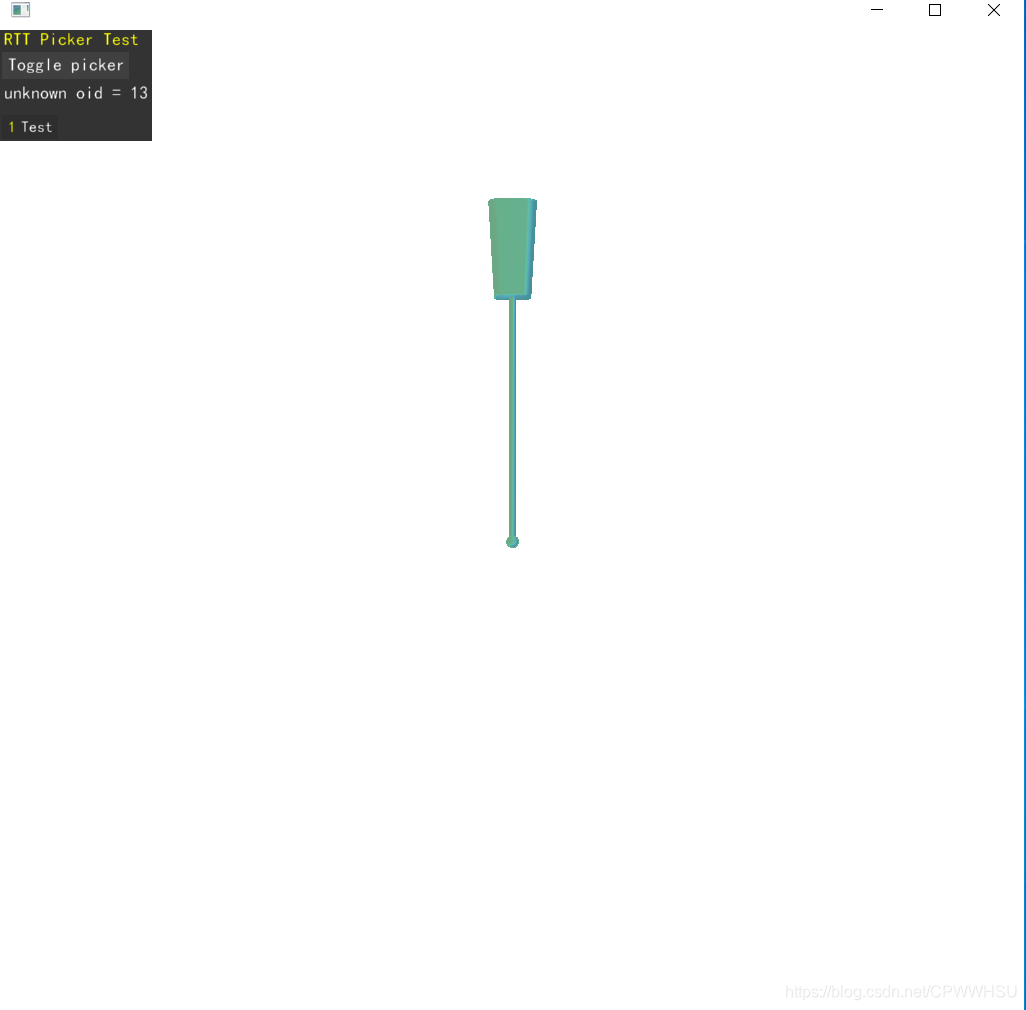
总结:
本文介绍了osgEarth中目标拾取的用法,通过重写RTTPicker::CallBack,获取拾取的对象,然后借用shader将拾取的对象高亮。本文只介绍了osgEarth目标拾取的用法,接下来会进一步分析其原理,研究RTTPicker类及osgEarth的注册系统。
 1705


 扫一扫


 被折叠的 条评论
为什么被折叠?
 到【灌水乐园】发言


