Install Adobe Flash Player on Ubuntu

Cursor 使用教程(2025年更新版) 官方Cursor详细使用教程在“扩展学习” 阅读详情

Step 1: Enable Ubuntu Canonical Partners Repository

In order to install the latest Flash plugin, you need to have the Canonical Partners repository enabled on your system. Open your Ubuntu Terminal. Then enter the following command as root in order to enable the repository:

$ sudo add-apt-repository "deb http://archive.canonical.com/ $(lsb_release -sc) partner"


The next step is to update your system repositories so that the latest available version of a software can be installed. Run the following command as root in order to do so:

$ sudo apt update

Now, your repository is in line with the latest package available in the Internet’s Canonical Partners’ repository.

Step 2: Install the Flash Plugin through the apt package

You can install the Flash Plugin easily by running the following command as sudo in your Linux Terminal:

$ sudo apt install flashplugin-installer


Step 3: Enable the Flash Player through the Adobe website

Open one of the available web browsers on your system. Restart the web browser if it is already open and then open the following link on the official Adobe website.

https://helpx.adobe.com/flash-player.html

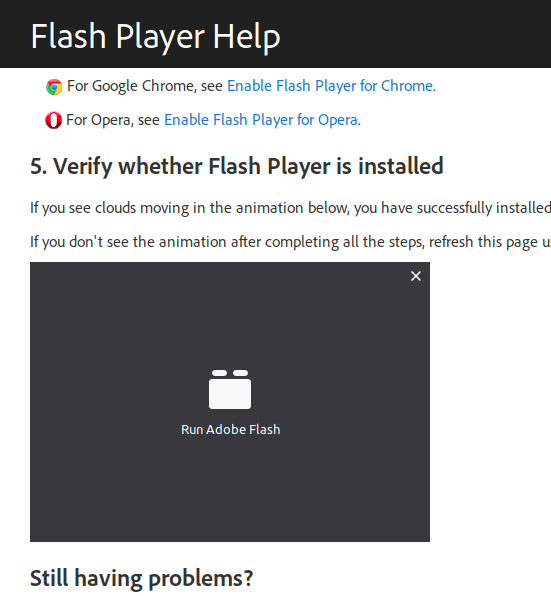
You will see a few points in the Flash Player Help. Move to point number 5 and see if you can view an animation running in the window:

Enable Flash Player

If not, click on the Run Adobe Flash link on the animation window in order to allow Adobe Flash to run on the browser.


See original article contains more details on https://vitux.com/how-to-install-adobe-flash-player-on-ubuntu/

Android 13.0 双屏时触摸失效问题排查与修复 摘要:本文记录了RK3588 Android12开发板上主屏触摸失效问题的排查与解决过程。通过分析发现,USB触摸设备被错误关联到辅屏(displayId=3)而非主屏(displayId=0)。解决方案是修改TouchInputMapper.cpp,强制触摸设备使用INTERNAL viewport(主屏),并保持设备在viewport不活跃时仍启用。该修改涉及约40行代码,有效解决了多显示器环境下触摸设备错误映射的问题,同时提供了详细的调试方法和注意事项。 阅读详情

相关推荐

Altium Designer操作技巧(4)——如何利用嘉立创EDA来输出3D封装到AD封装库?

本文介绍了利用嘉立创EDA和FreeCAD软件为PCB元件添加3D模型的方法。首先在嘉立创EDA中搜索元件编号并导出3D模型,然后使用FreeCAD删除3D模型中的PCB基板部分,最后将处理后的3D模型导入PCB封装库并更新到PCB设计中。文章详细讲解了每个步骤的操作流程,包括模型导出、基板删除、位置调整等关键环节,并提供了解决常见问题的方法。通过这种方法,电子工程师可以快速获得元器件的3D模型,提高PCB设计的准确性。

u012526819的博客 2615

Ubuntu 18.04安装 Adob Flash player

1.Ctrl + Alt + T 打开命令终端,启用Canonical Partners Repository存储库 (最新的Flash插件位于Canonical Partners的存储库中,默认情况下它是处于禁用状态,必须在尝试安装Flash插件之前启用此存储库。) sudo add-apt-repository "deb http://archive.canonical.com/ $(lsb...

2022年7月6日从博客园https://www.cnblogs.com/hugboy/ 学习记录博客。 175

OFDM基本原理

OFDM基础介绍,包括OFDM的核心思想,数学推导了OFDM信号的调制解调过程。

伊丽莎白的学习之路 8926

linux/ubuntu mozilla install adobe flash player 简明教程

1. http://get.adobe.com/cn/flashplayer/ 选择.tar.gz下载 2. j

u012525920的专栏 575

量子磁场测量技术在生物磁场成像领域的应用现状与产业趋势

首先对量子磁场测量技术的发展进行了简述,然后介绍了量子磁场测量技术在生物磁场成像领域的应用,最后分析了量子磁场测量技术的两大重要应用方向(心磁图仪和脑磁图仪)及其产业现状和未来发展趋势。美国普林斯顿大学在《自然》上公布了目前人类磁场测量灵敏度最高的基于量子磁场测量技术的零场原子磁力计。拥有巨大的发展潜力及庞大的市场空间。因此其数千万元的高昂售价及每年数百万元的超导维护成本限制了超导式心磁图仪的发展和临床应用。而基于超导式脑磁图仪的癫痫、阿尔兹海默症、抑郁症等脑疾病患者的临床研究也取得丰富的研究成果。

罗伯特技术屋 1534

SCHUNK SVH五指灵巧手 | 熵洛智能

雄克仿真五指机械手产品系列可以如人手操作那般完美地完成抓取操作。电子装置完全集成于腕关节中,使五指机械手几乎可以完成所有的人体手部动作。凭借带有9个驱动器的运动指骨,机械手可高精度地 执行多种抓取操作。富有弹性的抓取表面确保了对物体的可靠抓取。除了开启抓取和操作任务的全新领域之外,雄克还为在五指机械手的手势基础上进行人与机器人的交流开创了无限可能。编辑切换为居中添加图片注释,不超过 140 字(可选)产品特点:机械手有左手或右手两种版本适合移动应用耗能低,使用 24 V DC 在腕关节处完整集成了控制、调节

ShannonTech的博客 1341

Install adobe flash-plugin in Fedora 13_x64

Refer to:http://fedoraproject.org/wiki/Flashhttp://bbs.fedora-zh.org/showthread.php?5222-Fedora-X86_64%E5%AE%89%E8%A3%85flash-pluginsu -c 'yum install nspluginwrapper.{x86_64,i686} alsa-plugins-pulseaudio.i686 --disablerepo=adobe-linux-i386' su -c 'yum in

有朋自远方来... 1853

Unity布娃娃系统 Ragdoll Mecanim Mixer使用

6. 选完之后,左键下面的hip等角色各个部位不松开鼠标,拖拽连接到上面Amature的各个部位,如图,下面所有部位都连接完之后,第二步点击Configure Selected Bones确认你的部位连接选择。要做一个布娃娃和动画混合的项目,这个插件是比较不错的,搜了一圈文章教程也是抄来抄去,抄的没有头没有尾,自己摸索着用了一下,记录使用过程吧。8. 之后就点击步骤7图一中的Create Ragdoll,会发现player结构发生变化,如图。4. 添加完脚本之后会显示你的player结构,如图。

SuShengQuanshiW的博客 1652

Ubuntu16.04LTS 安装flash player

最近重新安装了Ubuntu系统,因此flash play需要重新安装。本文就是记录firefox和Chromium安装flash player的过程.

x13945的专栏 4571

022、Conv-BN-SiLU 基础卷积块:构造函数参数计算,前向传播的 PyTorch 逐行实现

本文详细解析了Conv-BN-SiLU卷积块的实现细节与注意事项。作者从调试经历出发,指出bias参数冗余会导致数值不稳定,强调卷积层应设置bias=False。文章对比了SiLU与ReLU的特性差异,逐行分析了构造函数参数计算(包括自动填充、分组卷积等)和前向传播过程,特别讲解了BN层与SiLU激活的数值特性。最后分享了三个实践中的常见问题:BN的momentum设置、SiLU输出范围的影响,以及分组卷积的通道对齐要求,并提供了卷积与BN融合的推理优化技巧。全文聚焦实际工程实现中的关键细节,具有较强实操指

ai技术增长的博客 223

提示工程架构师干货:AI上下文工程在社交媒体舆情溯源中的应用

在舆情溯源中,“上下文”不是单一的“文本内容”,而是多维度、多源的信息集合溯源时间:从事件爆发到找到源头,只用了24小时(传统方法需要3-5天);溯源准确性:100%(通过人工验证确认);后续行动:品牌X发布了澄清声明,揭露了品牌Y的恶意行为,舆情在48小时内平息。社交媒体舆情溯源是一个“复杂的系统工程”,需要结合数据、模型、上下文理解。AI上下文工程的出现,让我们从“被动应对”转向“主动溯源”,从“模糊判断”转向“精准分析”。

Java大师兄的博客 817

Ubuntu16.04安装flash_player插件

记录在ubuntu下安装flash player包: 1.下载相应的flash player的tar.gz包。 2.打开终端,进入到相应目录,执行命令,tar -zxvf 包名。 3.复制相应的so包到FireFox浏览器的插件目录中, sudo cp libflashplayer.so /usr/lib/mozilla/plugins或/usr/lib64/mozilla/plugins

阿杜 3万+

【YOLOv11改进- 主干网络】YOLOv11+RepViT: 从ViT的角度重新审视Mobile的CNN助力YOLOv11有效涨点;

本文给大家带来的改进内容是在YOLOv11中更换主干网络为RepViT,助力YOLOv11有效涨点,论文通过集成轻量级 ViT 的高效架构设计,逐步增强了标准轻量级 CNN(即 MobileNetV3)的移动友好性。这最终产生了一个新的纯轻量级 CNN 系列的主干网络。

qq_41304809的博客 792

Install Adobe Flash Player 10 on Ubuntu

Adobe recently launched Flash Player 10 Beta codenamed "Astro". Great news, as it supports a bunch of new features, but as usually nothing yet for the 64 bit users. I'm going to show you how to get fl...

狙击手 251

文档:亲测可用解决vnc灰屏,黑屏,鼠标大黑叉情况

主要解决vnc-viewer灰屏,黑屏,鼠标大黑叉等现象,详细见文档。

深度学习工具包 DeepLearningToolbox

深度学习工具包Deprecation notice.-----This toolbox is outdated and no longer maintained.There are much better tools available for deep learning than this toolbox, e.g. [Theano](http://deeplearning.net/software/theano/), [torch](http://torch.ch/) or [tensorflow](http://www.tensorflow.org/)I would suggest you use one of the tools mentioned above rather than use this toolbox.Best, Rasmus.DeepLearnToolbox================A Matlab toolbox for Deep Learning.Deep Learning is a new subfield of machine learning that focuses on learning deep hierarchical models of data.It is inspired by the human brain's apparent deep (layered, hierarchical) architecture.A good overview of the theory of Deep Learning theory is[Learning Deep Architectures for AI](http://www.iro.umontreal.ca/~bengioy/papers/ftml_book.pdf)For a more informal introduction, see the following videos by Geoffrey Hinton and Andrew Ng.* [The Next Generation of Neural Networks](http://www.youtube.com/watch?v=AyzOUbkUf3M) (Hinton, 2007)* [Recent Developments in Deep Learning](http://www.youtube.com/watch?v=VdIURAu1-aU) (Hinton, 2010)* [Unsupervised Feature Learning and Deep Learning](http://www.youtube.com/watch?v=ZmNOAtZIgIk) (Ng, 2011)If you use this toolbox in your research please cite [Prediction as a candidate for learning deep hierarchical models of data](http://www2.imm.dtu.dk/pubdb/views/publication_details.php?id=6284)```@MASTERSTHESIS\{IMM2012-06284, author = "R. B. Palm", title = "Prediction as a candidate for learning deep hierarchical models of data", year = "2012",}```Contact: rasmusbergpalm at gmail dot comDirectories included in the toolbox-----------------------------------`NN/` - A library for Feedforward Backpropagation Neural Networks`CNN/` - A library for Convolutional Neural Networks`DBN/` - A library for Deep Belief Networks`SAE/` - A library for Stacked Auto-Encoders`CAE/` - A library for Convolutional Auto-Encoders`util/` - Utility functions used by the libraries`data/` - Data used by the examples`tests/` - unit tests to verify toolbox is workingFor references on each library check REFS.mdSetup-----1. Download.2. addpath(genpath('DeepLearnToolbox'));Example: Deep Belief Network---------------------```matlabfunction test_example_DBNload mnist_uint8;train_x = double(train_x) / 255;test_x = double(test_x) / 255;train_y = double(train_y);test_y = double(test_y);%% ex1 train a 100 hidden unit RBM and visualize its weightsrand('state',0)dbn.sizes = [100];opts.numepochs = 1;opts.batchsize = 100;opts.momentum = 0;opts.alpha = 1;dbn = dbnsetup(dbn, train_x, opts);dbn = dbntrain(dbn, train_x, opts);figure; visualize(dbn.rbm{1}.W'); % Visualize the RBM weights%% ex2 train a 100-100 hidden unit DBN and use its weights to initialize a NNrand('state',0)%train dbndbn.sizes = [100 100];opts.numepochs = 1;opts.batchsize = 100;opts.momentum = 0;opts.alpha = 1;dbn = dbnsetup(dbn, train_x, opts);dbn = dbntrain(dbn, train_x, opts);%unfold dbn to nnnn = dbnunfoldtonn(dbn, 10);nn.activation_function = 'sigm';%train nnopts.numepochs = 1;opts.batchsize = 100;nn = nntrain(nn, train_x, train_y, opts);[er, bad] = nntest(nn, test_x, test_y);assert(er < 0.10, 'Too big error');```Example: Stacked Auto-Encoders---------------------```matlabfunction test_example_SAEload mnist_uint8;train_x = double(train_x)/255;test_x = double(test_x)/255;train_y = double(train_y);test_y = double(test_y);%% ex1 train a 100 hidden unit SDAE and use it to initialize a FFNN% Setup and train a stacked denoising autoencoder (SDAE)rand('state',0)sae = saesetup([784 100]);sae.ae{1}.activation_function = 'sigm';sae.ae{1}.learningRate = 1;sae.ae{1}.inputZeroMaskedFraction = 0.5;opts.numepochs = 1;opts.batchsize = 100;sae = saetrain(sae, train_x, opts);visualize(sae.ae{1}.W{1}(:,2:end)')% Use the SDAE to initialize a FFNNnn = nnsetup([784 100 10]);nn.activation_function = 'sigm';nn.learningRate = 1;nn.W{1} = sae.ae{1}.W{1};% Train the FFNNopts.numepochs = 1;opts.batchsize = 100;nn = nntrain(nn, train_x, train_y, opts);[er, bad] = nntest(nn, test_x, test_y);assert(er < 0.16, 'Too big error');```Example: Convolutional Neural Nets---------------------```matlabfunction test_example_CNNload mnist_uint8;train_x = double(reshape(train_x',28,28,60000))/255;test_x = double(reshape(test_x',28,28,10000))/255;train_y = double(train_y');test_y = double(test_y');%% ex1 Train a 6c-2s-12c-2s Convolutional neural network %will run 1 epoch in about 200 second and get around 11% error. %With 100 epochs you'll get around 1.2% errorrand('state',0)cnn.layers = { struct('type', 'i') %input layer struct('type', 'c', 'outputmaps', 6, 'kernelsize', 5) %convolution layer struct('type', 's', 'scale', 2) %sub sampling layer struct('type', 'c', 'outputmaps', 12, 'kernelsize', 5) %convolution layer struct('type', 's', 'scale', 2) %subsampling layer};cnn = cnnsetup(cnn, train_x, train_y);opts.alpha = 1;opts.batchsize = 50;opts.numepochs = 1;cnn = cnntrain(cnn, train_x, train_y, opts);[er, bad] = cnntest(cnn, test_x, test_y);%plot mean squared errorfigure; plot(cnn.rL);assert(er<0.12, 'Too big error');```Example: Neural Networks---------------------```matlabfunction test_example_NNload mnist_uint8;train_x = double(train_x) / 255;test_x = double(test_x) / 255;train_y = double(train_y);test_y = double(test_y);% normalize[train_x, mu, sigma] = zscore(train_x);test_x = normalize(test_x, mu, sigma);%% ex1 vanilla neural netrand('state',0)nn = nnsetup([784 100 10]);opts.numepochs = 1; % Number of full sweeps through dataopts.batchsize = 100; % Take a mean gradient step over this many samples[nn, L] = nntrain(nn, train_x, train_y, opts);[er, bad] = nntest(nn, test_x, test_y);assert(er < 0.08, 'Too big error');%% ex2 neural net with L2 weight decayrand('state',0)nn = nnsetup([784 100 10]);nn.weightPenaltyL2 = 1e-4; % L2 weight decayopts.numepochs = 1; % Number of full sweeps through dataopts.batchsize = 100; % Take a mean gradient step over this many samplesnn = nntrain(nn, train_x, train_y, opts);[er, bad] = nntest(nn, test_x, test_y);assert(er < 0.1, 'Too big error');%% ex3 neural net with dropoutrand('state',0)nn = nnsetup([784 100 10]);nn.dropoutFraction = 0.5; % Dropout fraction opts.numepochs = 1; % Number of full sweeps through dataopts.batchsize = 100; % Take a mean gradient step over this many samplesnn = nntrain(nn, train_x, train_y, opts);[er, bad] = nntest(nn, test_x, test_y);assert(er < 0.1, 'Too big error');%% ex4 neural net with sigmoid activation functionrand('state',0)nn = nnsetup([784 100 10]);nn.activation_function = 'sigm'; % Sigmoid activation functionnn.learningRate = 1; % Sigm require a lower learning rateopts.numepochs = 1; % Number of full sweeps through dataopts.batchsize = 100; % Take a mean gradient step over this many samplesnn = nntrain(nn, train_x, train_y, opts);[er, bad] = nntest(nn, test_x, test_y);assert(er < 0.1, 'Too big error');%% ex5 plotting functionalityrand('state',0)nn = nnsetup([784 20 10]);opts.numepochs = 5; % Number of full sweeps through datann.output = 'softmax'; % use softmax outputopts.batchsize = 1000; % Take a mean gradient step over this many samplesopts.plot = 1; % enable plottingnn = nntrain(nn, train_x, train_y, opts);[er, bad] = nntest(nn, test_x, test_y);assert(er < 0.1, 'Too big error');%% ex6 neural net with sigmoid activation and plotting of validation and training error% split training data into training and validation datavx = train_x(1:10000,:);tx = train_x(10001:end,:);vy = train_y(1:10000,:);ty = train_y(10001:end,:);rand('state',0)nn = nnsetup([784 20 10]); nn.output = 'softmax'; % use softmax outputopts.numepochs = 5; % Number of full sweeps through dataopts.batchsize = 1000; % Take a mean gradient step over this many samplesopts.plot = 1; % enable plottingnn = nntrain(nn, tx, ty, opts, vx, vy); % nntrain takes validation set as last two arguments (optionally)[er, bad] = nntest(nn, test_x, test_y);assert(er < 0.1, 'Too big error');```[![Bitdeli Badge](https://d2weczhvl823v0.cloudfront.net/rasmusbergpalm/deeplearntoolbox/trend.png)](https://bitdeli.com/free "Bitdeli Badge")

Install Adobe Flash Player 10 on Ubuntu 64bit

By Romeo Adrian Cioaba on May 18, 2008 2:59 AM  Adobe recently launched Flash Player 10 Beta codenamed "Astro". Great news, as it supports a bunch of new features, but as usually nothi...

weixin_34152820的博客 175

STM32F407中文手册

STM32f407中文手册 本参考手册面向应用开发人员,提供有关使用 STM32F405xx/07xx、STM32F415xx/17xx、 STM32F42xxx 和 STM32F43xxx 微控制器存储器与外设的完整信息。STM32F405xx/07xx、STM32F415xx/17xx、STM32F42xxx 和 STM32F43xxx 构成一个微 控制器系列,各产品具有不同的存储器大小、封装和外设。有关订购信息以及器件的机械与电气特性,请参见数据手册。有关 ARM Cortex™-M4F 内核的信息,请参见《Cortex™-M4F 技术参考手册》。

Ubuntu下为Firefox安装Adobe Flash Player

使用环境: OS:Ubuntu 12.04 LTS Browser: Firefox 12.0 Adobe Flash Player: install_flash_player_11_linux.x86_64.tar.gz 安装方法: 1. 下载Adobe Flash Player: 请从Adobe官方下载,也可以从这个URL下载,这个URL也是官方的链接: get.adobe.co

coco_ethan的专栏 739

Probability and Statistics - 4th edition

Probability and Statistics - 4th edition

Ubuntu14.04下安装Flash Player

Ubuntu14.04下安装Flash Player youhaidong@youhaidong:~$ sudo apt-get install flashplugin-nonfree [sudo] password for youhaidong: 对不起,请重试。 [sudo] password for youhaidong: 正在读取软件包列表... 完成 正在分析软件

游海东的技术专栏 3570

Ubuntu 16.04 安装 player Install Flash Player for Watching Video in Ubuntu 16.04 X

  Install Flash Player for Watching Video in Ubuntu 16.04 Xenial Xerus (LTS), Ubuntu 15.10 wily werewolf, Ubuntu 15.04 vivid Vervet, ubuntu 14.10 Utopic Unicorn, Ubuntu 14.04 Trusty Tahr (LTS) and ...

Just Code 522

ubuntu 使用Pepper Flash Player代替adobe Flash player

在使用网页浏览视频时一般要安装adobe Flash player,

youngyang的专栏 2482

ubuntu18.04 安装Adobe Flash Player

直接下载Adobe Flash Player安装报错“Unknown bionic-partner",命令行一行安装,重启浏览器成功。 sudo apt install flashplugin-installer

gengli2017的博客 3433

Ubuntu14.04 安装Adobe flash player

去get.adobe.com下载安装文件install_flash_player_11_linux.x86_64.tar.gz。 將下载好的包解压得到libflashplayer.so文件,usr文件夹以及reademe.txt: tar -zvxf install_flash_player_11_linux.x86_64.tar.gz 将libflashplayer.so拷到firefox的插件

持久决心的博客 2263

linux位系统安装官方install_flash_player_npapi_linux.x86_64.tar.gz插件包的方法

首先到adobe flash player的官方下载install_flash_player_11_linux.x86_64.tar.gz安装包,下载地址是:http://fpdownload.macromedia.com/get/flashplayer/pdc/11.1.102.55/install_flash_player_11_linux.x86_64.tar.gz 我喜欢用64位的goo

中国程序员的希望 7357

How To Install Flash Player In Ubuntu 10.04 Lucid Lynx,install firefox flash plugin addon for ubuntu

How To Install Flash Player In Ubuntu 10.04 Lucid Lynx,install firefox flash plugin addon for ubuntu How To Install Flash Player In U...

170

One Line Command to Install Adobe Flash Player in Ubuntu

sudo apt-get install flashplugin-installer 参考资料: http://www.liberiangeek.net/2011/11/one-line-command-to-install-adobe-flash-player-in-ubuntu/

【昆山人在上海】 582

How to install Flash player on Ubuntu?

2019独角兽企业重金招聘Python工程师标准>>> ...

weixin_34409741的博客 181

Ubuntu Install Adobe Flash Player

Reference: http://jingyan.baidu.com/article/fea4511a523d18f7bb912535.html Tested by myself. Works. 1. Download:  install_flash_player_11_linux.x86_64.tar.gz Here is link:

steven_xiu的博客 342
上一篇: As One Is: To Free the Mind from All Conditioning by J. Krishnamurti
下一篇: 在Ubuntu系统下安装搜狗输入法
CodingIsFun
博客等级 码龄8年 37粉丝 240原创
评论
成就一亿技术人!
拼手气红包6.0元
还能输入1000个字符
 
 条评论被折叠 查看
添加红包

请填写红包祝福语或标题

个

红包个数最小为10个

元

红包金额最低5元

当前余额3.43元 前往充值 >
需支付:10.00元
成就一亿技术人!
领取后你会自动成为博主和红包主的粉丝 规则
hope_wisdom
发出的红包
实付元
使用余额支付
点击重新获取
扫码支付
钱包余额 0

抵扣说明:

1.余额是钱包充值的虚拟货币,按照1:1的比例进行支付金额的抵扣。
2.余额无法直接购买下载,可以购买VIP、付费专栏及课程。

余额充值