


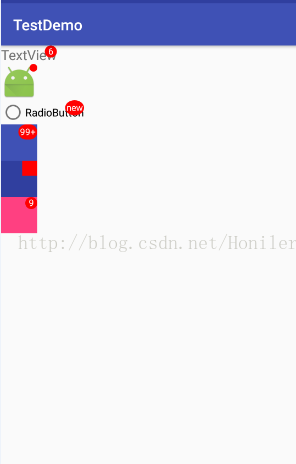
本人分享一下,自己写的一个消息提醒小红点控件,支持圆、矩形、椭圆、圆角矩形、正方形五种图形样式,可带文字,支持链式操作。
先看一下实现效果,随便测了几个控件(TextView、ImageView、RadioButton、LinearLayout、RelativeLayout、FrameLayout),不确定其他会不会有问题。
import android.content.Context;
import android.graphics.Canvas;
import android.graphics.Color;
import android.graphics.Paint;
import android.graphics.RectF;
import android.util.AttributeSet;
import android.util.Log;
import android.view.Gravity;
import android.view.View;
import android.view.ViewGroup;
import android.widget.FrameLayout;
import android.widget.TabWidget;

public class BadgeView extends View {
	protected static final String LOG_TAG = "BadgeView";
	// 该控件的背景图形类型
	public static final int SHAPE_CIRCLE = 1;
	public static final int SHAPE_RECTANGLE = 2;
	public static final int SHAPE_OVAL = 3;
	public static final int SHAPTE_ROUND_RECTANGLE = 4;
	public static final int SHAPE_SQUARE = 5;
	// 该框架内容的文本画笔
	private Paint mTextPaint;
	// 该控件的背景画笔
	private Paint mBgPaint;

	private int mHeight = 0;
	private int mWidth = 0;
	private int mBackgroundShape = SHAPE_CIRCLE;
	private int mTextColor = Color.WHITE;
	private int mTextSize;
	private int mBgColor = Color.RED;
	private String mText = "";
	private int mGravity = Gravity.RIGHT | Gravity.TOP;
	private RectF mRectF;
	private float mtextH;
	private boolean mIsShow = false;

	public BadgeView(Context context) {
		this(context, null);
	}

	public BadgeView(Context context, AttributeSet attrs) {
		this(context, attrs, 0);
	}

	public BadgeView(Context context, AttributeSet attrs, int defStyleAttr) {
		super(context, attrs, defStyleAttr);

		mRectF = new RectF();

		mTextSize = dip2px(context, 1);
		mTextPaint = new Paint(Paint.ANTI_ALIAS_FLAG);
		mTextPaint.setColor(mTextColor);
		mTextPaint.setStyle(Paint.Style.FILL);
		mTextPaint.setTextSize(mTextSize);
		mTextPaint.setTextAlign(Paint.Align.CENTER);
		mBgPaint = new Paint(Paint.ANTI_ALIAS_FLAG);
		mBgPaint.setColor(mBgColor);
		mBgPaint.setStyle(Paint.Style.FILL);
		FrameLayout.LayoutParams params = new FrameLayout.LayoutParams(
				FrameLayout.LayoutParams.WRAP_CONTENT,
				FrameLayout.LayoutParams.WRAP_CONTENT);
		params.gravity = mGravity;
		setLayoutParams(params);
	}

	@Override
	protected void onDraw(Canvas canvas) {
		super.onDraw(canvas);
		mRectF.set(0, 0, getMeasuredWidth(), getMeasuredHeight());
		Paint.FontMetrics fontMetrics = mTextPaint.getFontMetrics();
		mtextH = fontMetrics.descent - fontMetrics.ascent;
		switch (mBackgroundShape) {
			case SHAPE_CIRCLE:
				canvas.drawCircle(getMeasuredWidth() / 2f,
						getMeasuredHeight() / 2f, getMeasuredWidth() / 2, mBgPaint);
				canvas.drawText(mText, getMeasuredWidth() / 2f, getMeasuredHeight()
						/ 2f + (mtextH / 2f - fontMetrics.descent), mTextPaint);
				break;
			case SHAPE_OVAL:

				canvas.drawOval(mRectF, mBgPaint);
				canvas.drawText(mText, getMeasuredWidth() / 2f, getMeasuredHeight()
						/ 2f + (mtextH / 2f - fontMetrics.descent), mTextPaint);
				break;
			case SHAPE_RECTANGLE:
				canvas.drawRect(mRectF, mBgPaint);
				canvas.drawText(mText, getMeasuredWidth() / 2f, getMeasuredHeight()
						/ 2f + (mtextH / 2f - fontMetrics.descent), mTextPaint);
				break;
			case SHAPE_SQUARE:
				int sideLength = Math.min(getMeasuredHeight(), getMeasuredWidth());
				mRectF.set(0, 0, sideLength, sideLength);
				canvas.drawRect(mRectF, mBgPaint);
				canvas.drawText(mText, sideLength / 2f, sideLength / 2f
						+ (mtextH / 2f - fontMetrics.descent), mTextPaint);
				break;
			case SHAPTE_ROUND_RECTANGLE:
				canvas.drawRoundRect(mRectF, dip2px(getContext(), getMeasuredWidth()/2),
						dip2px(getContext(), getMeasuredWidth()/2), mBgPaint);
				canvas.drawText(mText, getMeasuredWidth() / 2f, getMeasuredHeight()
						/ 2f + (mtextH / 2f - fontMetrics.descent), mTextPaint);
				break;
		}

	}

	/**
	 * 设置该控件的背景颜色
	 *
	 * @param color
	 *            背景颜色
	 * @return BadgeView
	 */
	public BadgeView setBadgeBackgroundColor(int color) {
		mBgColor = color;
		mBgPaint.setColor(color);
		invalidate();
		return this;
	}

	/**
	 * 设置该控件的背景图形
	 *
	 * @param shape
	 *            图形
	 * @return
	 */
	public BadgeView setBackgroundShape(int shape) {
		mBackgroundShape = shape;
		invalidate();
		return this;
	}

	/**
	 * 设置该控件的宽
	 *
	 * @param width
	 *            宽
	 * @return BadgeView
	 */
	public BadgeView setWidth(int width) {
		this.mWidth = width;
		this.setBadgeLayoutParams(width, mHeight);
		return this;

	}

	/**
	 * 设置该控件的高
	 *
	 * @param height
	 *            高
	 * @return BadgeView
	 */
	public BadgeView setHeight(int height) {
		this.mHeight = height;
		this.setBadgeLayoutParams(mWidth, height);
		return this;
	}

	/**
	 * 设置该控件的高和宽
	 *
	 * @param width
	 *            宽
	 * @param height
	 *            高
	 * @return
	 */
	public BadgeView setBadgeLayoutParams(int width, int height) {
		this.mWidth = width;
		this.mHeight = height;
		FrameLayout.LayoutParams params = (FrameLayout.LayoutParams) getLayoutParams();
		params.width = dip2px(getContext(), width);
		params.height = dip2px(getContext(), height);
		setLayoutParams(params);
		return this;
	}

	/**
	 * 设置该控件的位置
	 *
	 * @param gravity
	 *            位置
	 * @return BadgeView
	 */
	public BadgeView setBadgeGravity(int gravity) {
		mGravity = gravity;
		FrameLayout.LayoutParams params = (FrameLayout.LayoutParams) getLayoutParams();
		params.gravity = gravity;
		setLayoutParams(params);
		return this;
	}

	/**
	 * 设置该控件的高和宽、位置
	 *
	 * @param width
	 *            宽
	 * @param height
	 *            高
	 * @param gravity
	 *            位置
	 * @return BadgeView
	 */
	public BadgeView setBadgeLayoutParams(int width, int height, int gravity) {
		FrameLayout.LayoutParams params = (FrameLayout.LayoutParams) getLayoutParams();
		params.width = dip2px(getContext(), width);
		params.height = dip2px(getContext(), height);
		setLayoutParams(params);
		setBadgeGravity(gravity);
		return this;
	}

	/**
	 * 设置该控件的文本大小
	 *
	 * @param size
	 *            文本大小(sp)
	 * @return
	 */
	public BadgeView setTextSize(int size) {
		mTextSize = sp2px(getContext(), size);
		mTextPaint.setTextSize(sp2px(getContext(), size));
		invalidate();
		return this;
	}

	/**
	 * 设置该控件的文本颜色
	 *
	 * @param color
	 *            文本颜色
	 * @return BadgeView
	 */
	public BadgeView setTextColor(int color) {
		mTextColor = color;
		mTextPaint.setColor(color);
		invalidate();
		return this;
	}

	/**
	 * 设置该控件的文本是否为粗体
	 *
	 * @param flag
	 */
	public void setBadgeBoldText(boolean flag) {
		mTextPaint.setFakeBoldText(flag);
		invalidate();
	}

	/**
	 * 设置该控件要显示的整数文本
	 *
	 * @param count
	 *            要显示的整数文本
	 * @return BadgeView
	 */
	public BadgeView setBadgeText(int count) {
		mText = String.valueOf(count);
		invalidate();
		return this;
	}

	/**
	 * 设置该控件要显示的整数文本数字,超过指定上限显示为指定的上限内容
	 *
	 * @param count
	 *            要显示的整数文本
	 * @param maxCount
	 *            数字上限
	 * @param text
	 *            超过上限要显示的字符串文本
	 * @return BadgeView
	 */
	public BadgeView setBadgeText(int count, int maxCount, String text) {
		if (count <= maxCount) {
			mText = String.valueOf(count);
		} else {
			mText = text;
		}
		invalidate();
		return this;
	}

	/**
	 * 设置该控件要显示的字符串文本
	 *
	 * @param text
	 *            要显示的字符串文本
	 * @return BadgeView
	 */
	public BadgeView setBadgeText(String text) {
		mText = text;
		invalidate();
		return this;
	}

	/**
	 * 设置绑定的控件
	 *
	 * @param view
	 *            要绑定的控件
	 * @return BadgeView
	 */
	public BadgeView setBindView(View view) {
		mIsShow = true;
		if (getParent() != null)
			((ViewGroup) getParent()).removeView(this);
		if (view == null)
			return this;
		if (view.getParent() instanceof FrameLayout) {
			((FrameLayout) view.getParent()).addView(this);
		} else if (view.getParent() instanceof ViewGroup) {
			ViewGroup parentContainer = (ViewGroup) view.getParent();
			int viewIndex = ((ViewGroup) view.getParent()).indexOfChild(view);
			((ViewGroup) view.getParent()).removeView(view);
			FrameLayout container = new FrameLayout(getContext());
			ViewGroup.LayoutParams containerParams = view.getLayoutParams();
			container.setLayoutParams(containerParams);
			container.setId(view.getId());
			view.setLayoutParams(new ViewGroup.LayoutParams(
					ViewGroup.LayoutParams.MATCH_PARENT,
					ViewGroup.LayoutParams.MATCH_PARENT));
			container.addView(view);
			container.addView(this);
			parentContainer.addView(container, viewIndex);
		} else if (view.getParent() == null) {
			Log.e(LOG_TAG, "View must have a parent");
		}
		return this;
	}

	/**
	 * 设置绑定的控件
	 *
	 * @param view 要绑定的控件
	 * @param tabIndex 要绑定的控件的子项
	 */
	public void setBindView(TabWidget view, int tabIndex) {
		View tabView = view
				.getChildTabViewAt(tabIndex);
		this.setBindView(tabView);
	}

	/**
	 * 移除绑定的控件
	 *
	 * @return BadgeView
	 */
	public boolean removebindView() {
		if (getParent() != null) {
			mIsShow = false;
			((ViewGroup) getParent()).removeView(this);
			return true;
		}
		return false;
	}

	/**
	 * @return 改控件的显示状态
	 */
	public boolean isShow() {
		return mIsShow;
	}

	/**
	 * @return 控件的字符串文本
	 */
	public String getBadgeText() {
		return mText;
	}

	private int dip2px(Context context, int dip) {
		return (int) (dip
				* getContext().getResources().getDisplayMetrics().density + 0.5f);
	}

	private int sp2px(Context context, float spValue) {
		final float fontScale = context.getResources().getDisplayMetrics().scaledDensity;
		return (int) (spValue * fontScale + 0.5f);
	}

}
import android.content.Context;
import android.view.Gravity;

public class BadgeFactory {

	public static BadgeView create(Context context) {
		return new BadgeView(context);
	}

	public static BadgeView createDot(Context context) {
		return new BadgeView(context).setBadgeLayoutParams(10, 10)
				.setTextSize(0)
				.setBadgeGravity(Gravity.RIGHT | Gravity.TOP)
				.setBackgroundShape(BadgeView.SHAPE_CIRCLE);
	}

	public static BadgeView createCircle(Context context) {
		return new BadgeView(context).setBadgeLayoutParams(16, 16)
				.setTextSize(12)
				.setBadgeGravity(Gravity.RIGHT | Gravity.TOP)
				.setBackgroundShape(BadgeView.SHAPE_CIRCLE);
	}

	public static BadgeView createRectangle(Context context) {
		return new BadgeView(context).setBadgeLayoutParams(2, 20)
				.setTextSize(12)
				.setBadgeGravity(Gravity.RIGHT | Gravity.TOP)
				.setBackgroundShape(BadgeView.SHAPE_RECTANGLE);
	}

	public static BadgeView createOval(Context context) {
		return new BadgeView(context).setBadgeLayoutParams(25, 20)
				.setTextSize(12)
				.setBadgeGravity(Gravity.RIGHT | Gravity.TOP)
				.setBackgroundShape(BadgeView.SHAPE_OVAL);
	}

	public static BadgeView createSquare(Context context) {
		return new BadgeView(context).setBadgeLayoutParams(20, 20)
				.setTextSize(12)
				.setBadgeGravity(Gravity.RIGHT | Gravity.TOP)
				.setBackgroundShape(BadgeView.SHAPE_SQUARE);
	}

	public static BadgeView createRoundRect(Context context) {
		return new BadgeView(context).setBadgeLayoutParams(25, 20)
				.setTextSize(12)
				.setBadgeGravity(Gravity.RIGHT | Gravity.TOP)
				.setBackgroundShape(BadgeView.SHAPTE_ROUND_RECTANGLE);
	}

}
源码传送门

 933


 扫一扫


 被折叠的 条评论
为什么被折叠?
 到【灌水乐园】发言


