


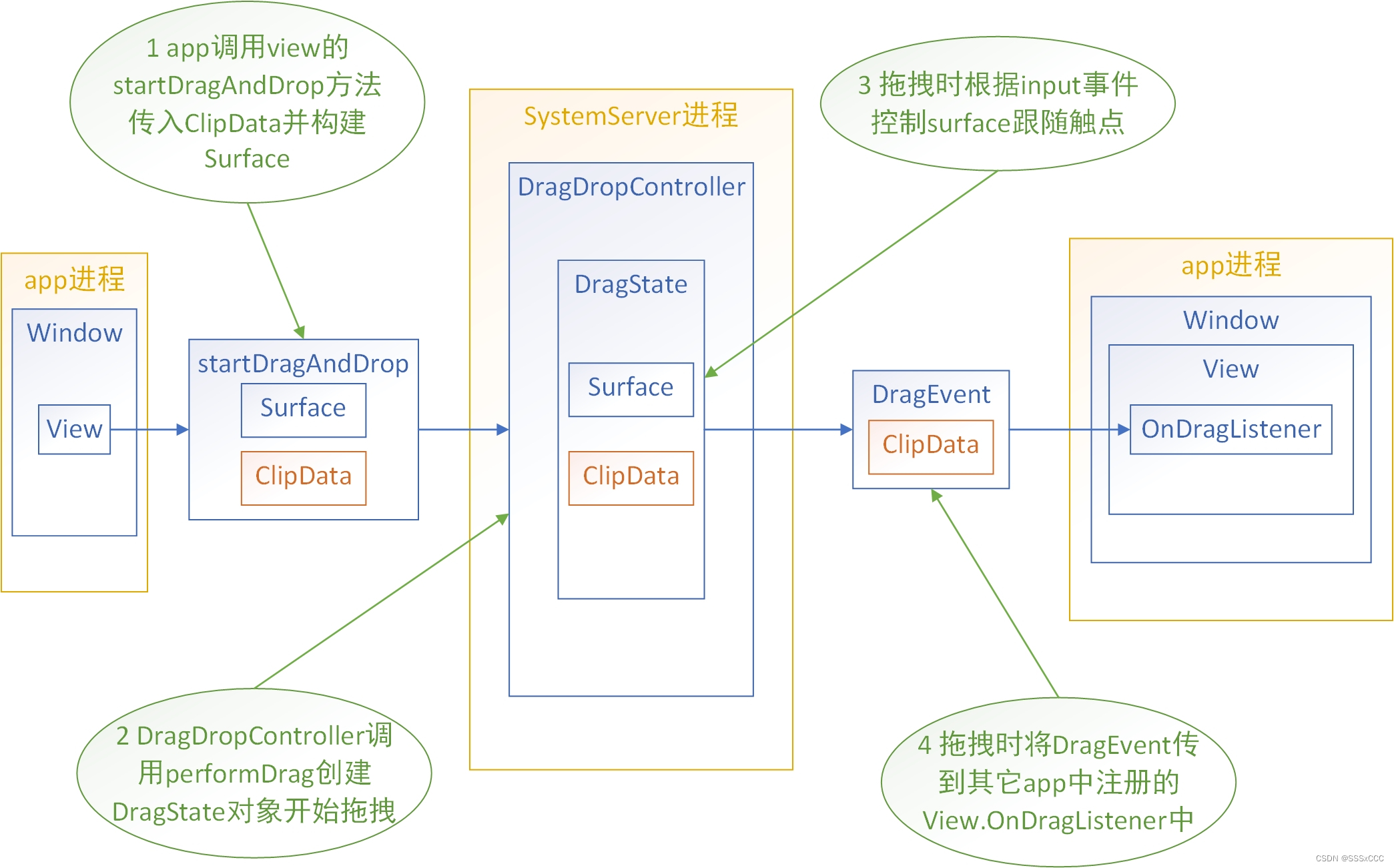
1 App层实现
这里以两个ImageView为例,实现从一个ImageView将图片拖拽到另一个ImageView的功能
1.1 拖拽开始ImageView
        Uri imageUri = getFileUri(R.drawable.image, "image.png");  // 构建图像的uri
        ImageView imageView = (ImageView) view.findViewById(R.id.image_source);
        setUpDraggableImage(imageView, imageUri);  // 让imageView可以响应长按并开始拖拽
        imageView.setImageURI(imageUri);
这里有两个重要的方法:
1 getFileUri:构建图像的uri
2 setUpDraggableImage:让imageView可以响应长按并开始拖拽
接下来分别介绍这两个方法。
1.1.1 构建图像的uri
getFileUri方法如下:
    /**
     * Copy a drawable resource into local storage and makes it available via the
     * {@link FileProvider}.
     *
     * @see Context#getFilesDir()
     * @see FileProvider
     * @see FileProvider#getUriForFile(Context, String, File)
     */
    private Uri getFileUri(int sourceResourceId, String targetName) {
        // Create the images/ sub directory if it does not exist yet.
        File filePath = new File(getContext().getFilesDir(), "images");
        if (!filePath.exists() && !filePath.mkdir()) {
            return null;
        }

        // Copy a drawable from resources to the internal directory.
        File newFile = new File(filePath, targetName);
        if (!newFile.exists()) {
            copyImageResourceToFile(sourceResourceId, newFile);
        }

        // Make the file accessible via the FileProvider and retrieve its URI.
        return FileProvider.getUriForFile(getContext(), CONTENT_AUTHORITY, newFile);
    }


    /**
     * Copy a PNG resource drawable to a {@File}.
     */
    private void copyImageResourceToFile(int resourceId, File filePath) {
        Bitmap image = BitmapFactory.decodeResource(getResources(), resourceId);

        FileOutputStream out = null;
        try {
            out = new FileOutputStream(filePath);
            image.compress(Bitmap.CompressFormat.PNG, 100, out);
        } catch (Exception e) {
            e.printStackTrace();
        } finally {
            try {
                if (out != null) {
                    out.close();
                }
            } catch (IOException e) {
                e.printStackTrace();
            }
        }
    }
这个方法首先将图像保存到文件中,再通过FileProvider生成其uri,其中FileProvider需要在AndroidManifest.xml中注册:
        <provider
            android:name="androidx.core.content.FileProvider"
            android:authorities="com.example.android.dragsource.fileprovider"
            android:exported="false"
            android:grantUriPermissions="true">
            <meta-data
                android:name="android.support.FILE_PROVIDER_PATHS"
                android:resource="@xml/file_paths" />
        </provider>
其中@xml/file_paths是res/xml/file_paths.xml文件:
<?xml version="1.0" encoding="utf-8"?>

<paths>
    <files-path name="my_images" path="images" />
</paths>
1.1.2 让imageView可以响应长按并开始拖拽
setUpDraggableImage方法如下:
    private void setUpDraggableImage(ImageView imageView, final Uri imageUri) {

        // Set up a listener that starts the drag and drop event with flags and extra data.
        DragStartHelper.OnDragStartListener listener = new DragStartHelper.OnDragStartListener() {
            @Override
            public boolean onDragStart(View view, final DragStartHelper helper) {
                Log.d(TAG, "Drag start event received from helper.");

                // Use a DragShadowBuilder
                View.DragShadowBuilder shadowBuilder = new View.DragShadowBuilder(view);

                // Set up the flags for the drag event.
                // Enable drag and drop across apps (global)
                // and require read permissions for this URI.
                int flags = View.DRAG_FLAG_GLOBAL | View.DRAG_FLAG_GLOBAL_URI_READ;

                // Add an optional clip description that that contains an extra String that is
                // read out by the target app.
                final ClipDescription clipDescription = new ClipDescription("", new String[]{
                        getContext().getContentResolver().getType(imageUri)});
                // Extras are stored within a PersistableBundle.
                PersistableBundle extras = new PersistableBundle(1);
                // Add a String that the target app will display.
                extras.putString(EXTRA_IMAGE_INFO,
                        "Drag Started at " + new Date());
                clipDescription.setExtras(extras);

                // The ClipData object describes the object that is being dragged and dropped.
                final ClipData clipData =
                        new ClipData(clipDescription, new ClipData.Item(imageUri));

                Log.d(TAG, "Created ClipDescription. Starting drag and drop.");
                // Start the drag and drop event.
                return view.startDragAndDrop(clipData, shadowBuilder, null, flags);
            }
        };

        // Use the DragStartHelper to detect drag and drop events and use the OnDragStartListener
        // defined above to start the event when it has been detected.
        DragStartHelper helper = new DragStartHelper(imageView, listener);
        helper.attach();
        Log.d(TAG, "DragStartHelper attached to view.");
    }
这个方法:
1 创建了类型为DragStartHelper.OnDragStartListener的对象listener;
2 创建了类型为DragStartHelper的对象helper,同时将imageView和listener传给其构造器;
3 调用helper.attach()方法,使得imageView可以响应长按事件并调用listener的onDragStart方法;
4 在onDragStart方法中首先创建了类型为View.DragShadowBuilder的对象shadowBuilder;
5 在onDragStart方法中然后创建了类型为ClipData的对象clipData,其构造器传入了一个ClipDescription对象和带有imageUri的ClipData.Item对象;
6 在onDragStart方法中最后调用了view.startDragAndDrop方法,传入了clipData,shadowBuilder和flags。
1.2 拖拽目标ImageView
    final ImageView localImageTarget = (ImageView) view.findViewById(R.id.local_target);
    localImageTarget.setOnDragListener(new ImageDragListener());
作为拖拽分享目标的imageView只需要通过setOnDragListener方法设置一个类型为View.OnDragListener的对象即可,这里的ImageDragListener的实现如下所示:
/**
 * OnDragListener for ImageViews.
 * Sets colors of the target when DragEvents fire. When a drop is received, the {@link Uri} backing
 * the first {@link android.content.ClipData.Item} in the {@link DragEvent} is set as the image
 * resource of the ImageView.
 */
public class ImageDragListener implements View.OnDragListener {

    private static final int COLOR_INACTIVE = 0xFF888888;
    private static final int COLOR_ACTIVE = 0xFFCCCCCC;
    private static final int COLOR_HOVER = 0xFFEEEEEE;

    @Override
    public boolean onDrag(View view, DragEvent event) {
        // Change the color of the target for all events.
        // For the drop action, set the view to the dropped image.
        switch (event.getAction()) {
            case DragEvent.ACTION_DRAG_STARTED:
                setTargetColor(view, COLOR_ACTIVE);
                return true;
            case DragEvent.ACTION_DRAG_ENTERED:
                setTargetColor(view, COLOR_HOVER);
                return true;
            case DragEvent.ACTION_DRAG_LOCATION:
                processLocation(event.getX(), event.getY());
                return true;
            case DragEvent.ACTION_DRAG_EXITED:
                setTargetColor(view, COLOR_ACTIVE);
                return true;
            case DragEvent.ACTION_DROP:
                return processDrop(view, event);
            case DragEvent.ACTION_DRAG_ENDED:
                setTargetColor(view, COLOR_INACTIVE);
                return true;
            default:
                break;
        }
        return false;
    }

    private void setTargetColor(View view, int color) {
        view.setBackgroundColor(color);
    }

    private boolean processDrop(View view, DragEvent event) {
        ClipData clipData = event.getClipData();
        if (clipData == null || clipData.getItemCount() == 0) {
            return false;
        }
        ClipData.Item item = clipData.getItemAt(0);
        if (item == null) {
            return false;
        }
        Uri uri = item.getUri();
        if (uri == null) {
            return false;
        }
        return setImageUri(view, event, uri);
    }

    protected void processLocation(float x, float y) {
    }

    protected boolean setImageUri(View view, DragEvent event, Uri uri) {
        if (!(view instanceof ImageView)) {
            return false;
        }
        ((ImageView) view).setImageURI(uri);
        return true;
    }
}
ImageDragListener继承了View.OnDragListener接口并实现了onDrag方法,当DragEvent的Action为DragEvent.ACTION_DROP时:
1 拿出DragEvent的ClipData;
2 拿出ClipData的第一个ClipData.Item;
3 拿出ClipData.Item的Uri;
4 通过ImageView的setImageURI方法将Uri所代表的图像显示到自己的imageView中。
2 Framework层实现
从开始拖拽时调用的frameworks/base/core/java/android/view/View.java的startDragAndDrop方法开始:
    /**
     * Starts a drag and drop operation. When your application calls this method, it passes a
     * {@link android.view.View.DragShadowBuilder} object to the system. The
     * system calls this object's {@link DragShadowBuilder#onProvideShadowMetrics(Point, Point)}
     * to get metrics for the drag shadow, and then calls the object's
     * {@link DragShadowBuilder#onDrawShadow(Canvas)} to draw the drag shadow itself.
     * <p>
     *  Once the system has the drag shadow, it begins the drag and drop operation by sending
     *  drag events to all the View objects in your application that are currently visible. It does
     *  this either by calling the View object's drag listener (an implementation of
     *  {@link android.view.View.OnDragListener#onDrag(View,DragEvent) onDrag()} or by calling the
     *  View object's {@link android.view.View#onDragEvent(DragEvent) onDragEvent()} method.
     *  Both are passed a {@link android.view.DragEvent} object that has a
     *  {@link android.view.DragEvent#getAction()} value of
     *  {@link android.view.DragEvent#ACTION_DRAG_STARTED}.
     * </p>
     * <p>
     * Your application can invoke {@link #startDragAndDrop(ClipData, DragShadowBuilder, Object,
     * int) startDragAndDrop()} on any attached View object. The View object does not need to be
     * the one used in {@link android.view.View.DragShadowBuilder}, nor does it need to be related
     * to the View the user selected for dragging.
     * </p>
     * @param data A {@link android.content.ClipData} object pointing to the data to be
     * transferred by the drag and drop operation.
     * @param shadowBuilder A {@link android.view.View.DragShadowBuilder} object for building the
     * drag shadow.
     * @param myLocalState An {@link java.lang.Object} containing local data about the drag and
     * drop operation. When dispatching drag events to views in the same activity this object
     * will be available through {@link android.view.DragEvent#getLocalState()}. Views in other
     * activities will not have access to this data ({@link android.view.DragEvent#getLocalState()}
     * will return null).
     * <p>
     * myLocalState is a lightweight mechanism for the sending information from the dragged View
     * to the target Views. For example, it can contain flags that differentiate between a
     * a copy operation and a move operation.
     * </p>
     * @param flags Flags that control the drag and drop operation. This can be set to 0 for no
     * flags, or any combination of the following:
     *     <ul>
     *         <li>{@link #DRAG_FLAG_GLOBAL}</li>
     *         <li>{@link #DRAG_FLAG_GLOBAL_PERSISTABLE_URI_PERMISSION}</li>
     *         <li>{@link #DRAG_FLAG_GLOBAL_PREFIX_URI_PERMISSION}</li>
     *         <li>{@link #DRAG_FLAG_GLOBAL_URI_READ}</li>
     *         <li>{@link #DRAG_FLAG_GLOBAL_URI_WRITE}</li>
     *         <li>{@link #DRAG_FLAG_OPAQUE}</li>
     *     </ul>
     * @return {@code true} if the method completes successfully, or
     * {@code false} if it fails anywhere. Returning {@code false} means the system was unable to
     * do a drag because of another ongoing operation or some other reasons.
     */
    public final boolean startDragAndDrop(ClipData data, DragShadowBuilder shadowBuilder,
            Object myLocalState, int flags) {
        if (ViewDebug.DEBUG_DRAG) {
            Log.d(VIEW_LOG_TAG, "startDragAndDrop: data=" + data + " flags=" + flags);
        }
        if (mAttachInfo == null) {
            Log.w(VIEW_LOG_TAG, "startDragAndDrop called on a detached view.");
            return false;
        }
        if (!mAttachInfo.mViewRootImpl.mSurface.isValid()) {
            Log.w(VIEW_LOG_TAG, "startDragAndDrop called with an invalid surface.");
            return false;
        }

        if (data != null) {
            data.prepareToLeaveProcess((flags & View.DRAG_FLAG_GLOBAL) != 0);
        }

        Point shadowSize = new Point();
        Point shadowTouchPoint = new Point();
        shadowBuilder.onProvideShadowMetrics(shadowSize, shadowTouchPoint);

        if ((shadowSize.x < 0) || (shadowSize.y < 0)
                || (shadowTouchPoint.x < 0) || (shadowTouchPoint.y < 0)) {
            throw new IllegalStateException("Drag shadow dimensions must not be negative");
        }

        // Create 1x1 surface when zero surface size is specified because SurfaceControl.Builder
        // does not accept zero size surface.
        if (shadowSize.x == 0  || shadowSize.y == 0) {
            if (!sAcceptZeroSizeDragShadow) {
                throw new IllegalStateException("Drag shadow dimensions must be positive");
            }
            shadowSize.x = 1;
            shadowSize.y = 1;
        }

        if (ViewDebug.DEBUG_DRAG) {
            Log.d(VIEW_LOG_TAG, "drag shadow: width=" + shadowSize.x + " height=" + shadowSize.y
                    + " shadowX=" + shadowTouchPoint.x + " shadowY=" + shadowTouchPoint.y);
        }

        final ViewRootImpl root = mAttachInfo.mViewRootImpl;
        final SurfaceSession session = new SurfaceSession();
        final SurfaceControl surfaceControl = new SurfaceControl.Builder(session)
                .setName("drag surface")
                .setParent(root.getSurfaceControl())
                .setBufferSize(shadowSize.x, shadowSize.y)
                .setFormat(PixelFormat.TRANSLUCENT)
                .setCallsite("View.startDragAndDrop")
                .build();
        final Surface surface = new Surface();
        surface.copyFrom(surfaceControl);
        IBinder token = null;
        try {
            final Canvas canvas = surface.lockCanvas(null);
            try {
                canvas.drawColor(0, PorterDuff.Mode.CLEAR);
                shadowBuilder.onDrawShadow(canvas);
            } finally {
                surface.unlockCanvasAndPost(canvas);
            }

            // repurpose 'shadowSize' for the last touch point
            root.getLastTouchPoint(shadowSize);

            token = mAttachInfo.mSession.performDrag(
                    mAttachInfo.mWindow, flags, surfaceControl, root.getLastTouchSource(),
                    shadowSize.x, shadowSize.y, shadowTouchPoint.x, shadowTouchPoint.y, data);
            if (ViewDebug.DEBUG_DRAG) {
                Log.d(VIEW_LOG_TAG, "performDrag returned " + token);
            }
            if (token != null) {
                if (mAttachInfo.mDragSurface != null) {
                    mAttachInfo.mDragSurface.release();
                }
                mAttachInfo.mDragSurface = surface;
                mAttachInfo.mDragToken = token;
                // Cache the local state object for delivery with DragEvents
                root.setLocalDragState(myLocalState);
            }
            return token != null;
        } catch (Exception e) {
            Log.e(VIEW_LOG_TAG, "Unable to initiate drag", e);
            return false;
        } finally {
            if (token == null) {
                surface.destroy();
            }
            session.kill();
        }
    }
在这个方法中:
1 通过shadowBuilder的onProvideShadowMetrics方法确定了拖拽图像的尺寸;
2 创建了显示拖拽图像的SurfaceControl对象;
3 通过shadowBuilder的onDrawShadow方法绘制了拖拽图像;
4 通过View.mAttachInfo.mSession的performDrag方法binder调用到system_server进程发起拖拽,并通过返回值得到了token;
5 将拖拽图像的surface和token保存到了View.mAttachInfo的mDragSurface和mDragToken中。
继续看system_server进程中frameworks/base/services/core/java/com/android/server/wm/Session.java的performDrag方法:
    @Override
    public IBinder performDrag(IWindow window, int flags, SurfaceControl surface, int touchSource,
            float touchX, float touchY, float thumbCenterX, float thumbCenterY, ClipData data) {
        final long ident = Binder.clearCallingIdentity();
        try {
            return mDragDropController.performDrag(mSurfaceSession, mPid, mUid, window,
                    flags, surface, touchSource, touchX, touchY, thumbCenterX, thumbCenterY, data);
        } finally {
            Binder.restoreCallingIdentity(ident);
        }
    }
直接调用了frameworks/base/services/core/java/com/android/server/wm/DragDropController.java的performDrag方法:
    IBinder performDrag(SurfaceSession session, int callerPid, int callerUid, IWindow window,
            int flags, SurfaceControl surface, int touchSource, float touchX, float touchY,
            float thumbCenterX, float thumbCenterY, ClipData data) {
        if (DEBUG_DRAG) {
            Slog.d(TAG_WM, "perform drag: win=" + window + " surface=" + surface + " flags=" +
                            Integer.toHexString(flags) + " data=" + data);
        }

        final IBinder dragToken = new Binder();
        final boolean callbackResult = mCallback.get().prePerformDrag(window, dragToken,
                touchSource, touchX, touchY, thumbCenterX, thumbCenterY, data);
        try {
            synchronized (mService.mGlobalLock) {
                try {
                    if (!callbackResult) {
                        Slog.w(TAG_WM, "IDragDropCallback rejects the performDrag request");
                        return null;
                    }

                    if (dragDropActiveLocked()) {
                        Slog.w(TAG_WM, "Drag already in progress");
                        return null;
                    }

                    final WindowState callingWin = mService.windowForClientLocked(
                            null, window, false);
                    if (callingWin == null || callingWin.cantReceiveTouchInput()) {
                        Slog.w(TAG_WM, "Bad requesting window " + window);
                        return null;  // !!! TODO: throw here?
                    }

                    // !!! TODO: if input is not still focused on the initiating window, fail
                    // the drag initiation (e.g. an alarm window popped up just as the application
                    // called performDrag()

                    // !!! TODO: extract the current touch (x, y) in screen coordinates.  That
                    // will let us eliminate the (touchX,touchY) parameters from the API.

                    // !!! FIXME: put all this heavy stuff onto the mHandler looper, as well as
                    // the actual drag event dispatch stuff in the dragstate

                    // !!! TODO(multi-display): support other displays

                    final DisplayContent displayContent = callingWin.getDisplayContent();
                    if (displayContent == null) {
                        Slog.w(TAG_WM, "display content is null");
                        return null;
                    }

                    final float alpha = (flags & View.DRAG_FLAG_OPAQUE) == 0 ?
                            DRAG_SHADOW_ALPHA_TRANSPARENT : 1;
                    final IBinder winBinder = window.asBinder();
                    IBinder token = new Binder();
                    mDragState = new DragState(mService, this, token, surface, flags, winBinder);
                    surface = null;
                    mDragState.mPid = callerPid;
                    mDragState.mUid = callerUid;
                    mDragState.mOriginalAlpha = alpha;
                    mDragState.mToken = dragToken;
                    mDragState.mDisplayContent = displayContent;

                    final Display display = displayContent.getDisplay();
                    if (!mCallback.get().registerInputChannel(
                            mDragState, display, mService.mInputManager,
                            callingWin.mInputChannel)) {
                        Slog.e(TAG_WM, "Unable to transfer touch focus");
                        return null;
                    }

                    mDragState.mData = data;
                    mDragState.broadcastDragStartedLocked(touchX, touchY);
                    mDragState.overridePointerIconLocked(touchSource);
                    // remember the thumb offsets for later
                    mDragState.mThumbOffsetX = thumbCenterX;
                    mDragState.mThumbOffsetY = thumbCenterY;

                    // Make the surface visible at the proper location
                    final SurfaceControl surfaceControl = mDragState.mSurfaceControl;
                    if (SHOW_LIGHT_TRANSACTIONS) Slog.i(TAG_WM, ">>> OPEN TRANSACTION performDrag");

                    final SurfaceControl.Transaction transaction = mDragState.mTransaction;
                    transaction.setAlpha(surfaceControl, mDragState.mOriginalAlpha);
                    transaction.setPosition(
                            surfaceControl, touchX - thumbCenterX, touchY - thumbCenterY);
                    transaction.show(surfaceControl);
                    displayContent.reparentToOverlay(transaction, surfaceControl);
                    callingWin.scheduleAnimation();

                    if (SHOW_LIGHT_TRANSACTIONS) {
                        Slog.i(TAG_WM, "<<< CLOSE TRANSACTION performDrag");
                    }

                    mDragState.notifyLocationLocked(touchX, touchY);
                } finally {
                    if (surface != null) {
                        surface.release();
                    }
                    if (mDragState != null && !mDragState.isInProgress()) {
                        mDragState.closeLocked();
                    }
                }
            }
            return dragToken;    // success!
        } finally {
            mCallback.get().postPerformDrag();
        }
    }
这里mCallback类型为AtomicReference,IDragDropCallback是frameworks/base/services/core/java/com/android/server/wm/WindowManagerInternal.java的内部接口,调用了其registerInputChannel方法:
        default boolean registerInputChannel(
                DragState state, Display display, InputManagerService service,
                InputChannel source) {
            state.register(display);
            return service.transferTouchFocus(source, state.getInputChannel());
        }
调用了frameworks/base/services/core/java/com/android/server/wm/DragState.java的register方法:
    /**
     * @param display The Display that the window being dragged is on.
     */
    void register(Display display) {
        display.getRealSize(mDisplaySize);
        if (DEBUG_DRAG) Slog.d(TAG_WM, "registering drag input channel");
        if (mInputInterceptor != null) {
            Slog.e(TAG_WM, "Duplicate register of drag input channel");
        } else {
            mInputInterceptor = new InputInterceptor(display);
            showInputSurface();
        }
    }
InputInterceptor是DragState的内部类,其构造函数:
        InputInterceptor(Display display) {
            InputChannel[] channels = InputChannel.openInputChannelPair("drag");
            mServerChannel = channels[0];
            mClientChannel = channels[1];
            mService.mInputManager.registerInputChannel(mServerChannel);
            mInputEventReceiver = new DragInputEventReceiver(mClientChannel,
                    mService.mH.getLooper(), mDragDropController);

            mDragApplicationHandle = new InputApplicationHandle(new Binder(), "drag",
                    WindowManagerService.DEFAULT_INPUT_DISPATCHING_TIMEOUT_NANOS);

            mDragWindowHandle = new InputWindowHandle(mDragApplicationHandle,
                    display.getDisplayId());
            mDragWindowHandle.name = "drag";
            mDragWindowHandle.token = mServerChannel.getToken();
            mDragWindowHandle.layoutParamsFlags = 0;
            mDragWindowHandle.layoutParamsType = WindowManager.LayoutParams.TYPE_DRAG;
            mDragWindowHandle.dispatchingTimeoutNanos =
                    WindowManagerService.DEFAULT_INPUT_DISPATCHING_TIMEOUT_NANOS;
            mDragWindowHandle.visible = true;
            mDragWindowHandle.canReceiveKeys = false;
            mDragWindowHandle.hasFocus = true;
            mDragWindowHandle.hasWallpaper = false;
            mDragWindowHandle.paused = false;
            mDragWindowHandle.ownerPid = Process.myPid();
            mDragWindowHandle.ownerUid = Process.myUid();
            mDragWindowHandle.inputFeatures = 0;
            mDragWindowHandle.scaleFactor = 1.0f;

            // The drag window cannot receive new touches.
            mDragWindowHandle.touchableRegion.setEmpty();

            // The drag window covers the entire display
            mDragWindowHandle.frameLeft = 0;
            mDragWindowHandle.frameTop = 0;
            mDragWindowHandle.frameRight = mDisplaySize.x;
            mDragWindowHandle.frameBottom = mDisplaySize.y;

            // Pause rotations before a drag.
            ProtoLog.d(WM_DEBUG_ORIENTATION, "Pausing rotation during drag");
            mDisplayContent.getDisplayRotation().pause();
        }
创建了一个frameworks/base/services/core/java/com/android/server/wm/DragInputEventReceiver.java对象,通过其onInputEvent方法接收输入:
    @Override
    public void onInputEvent(InputEvent event) {
        boolean handled = false;
        try {
            if (!(event instanceof MotionEvent)
                    || (event.getSource() & SOURCE_CLASS_POINTER) == 0
                    || mMuteInput) {
                return;
            }
            final MotionEvent motionEvent = (MotionEvent) event;
            final float newX = motionEvent.getRawX();
            final float newY = motionEvent.getRawY();
            final boolean isStylusButtonDown =
                    (motionEvent.getButtonState() & BUTTON_STYLUS_PRIMARY) != 0;

            if (mIsStartEvent) {
                // First event and the button was down, check for the button being
                // lifted in the future, if that happens we'll drop the item.
                mStylusButtonDownAtStart = isStylusButtonDown;
                mIsStartEvent = false;
            }

            switch (motionEvent.getAction()) {
                case ACTION_DOWN:
                    if (DEBUG_DRAG) Slog.w(TAG_WM, "Unexpected ACTION_DOWN in drag layer");
                    return;
                case ACTION_MOVE:
                    if (mStylusButtonDownAtStart && !isStylusButtonDown) {
                        if (DEBUG_DRAG) {
                            Slog.d(TAG_WM, "Button no longer pressed; dropping at " + newX + ","
                                    + newY);
                        }
                        mMuteInput = true;
                    }
                    break;
                case ACTION_UP:
                    if (DEBUG_DRAG) {
                        Slog.d(TAG_WM, "Got UP on move channel; dropping at " + newX + "," + newY);
                    }
                    mMuteInput = true;
                    break;
                case ACTION_CANCEL:
                    if (DEBUG_DRAG) Slog.d(TAG_WM, "Drag cancelled!");
                    mMuteInput = true;
                    break;
                default:
                    return;
            }

            mDragDropController.handleMotionEvent(!mMuteInput /* keepHandling */, newX, newY);
            handled = true;
        } catch (Exception e) {
            Slog.e(TAG_WM, "Exception caught by drag handleMotion", e);
        } finally {
            finishInputEvent(event, handled);
        }
    }
调用了DragDropController的handleMotionEvent方法:
    /**
     * Handles motion events.
     * @param keepHandling Whether if the drag operation is continuing or this is the last motion
     *          event.
     * @param newX X coordinate value in dp in the screen coordinate
     * @param newY Y coordinate value in dp in the screen coordinate
     */
    void handleMotionEvent(boolean keepHandling, float newX, float newY) {
        synchronized (mService.mGlobalLock) {
            if (!dragDropActiveLocked()) {
                // The drag has ended but the clean-up message has not been processed by
                // window manager. Drop events that occur after this until window manager
                // has a chance to clean-up the input handle.
                return;
            }

            if (keepHandling) {
                mDragState.notifyMoveLocked(newX, newY);
            } else {
                mDragState.notifyDropLocked(newX, newY);
            }
        }
    }
如果继续移动拖拽的图像则调用了DragState的notifyMoveLocked方法:
    void notifyMoveLocked(float x, float y) {
        if (mAnimator != null) {
            return;
        }
        mCurrentX = x;
        mCurrentY = y;

        // Move the surface to the given touch
        if (SHOW_LIGHT_TRANSACTIONS) {
            Slog.i(TAG_WM, ">>> OPEN TRANSACTION notifyMoveLocked");
        }
        mTransaction.setPosition(mSurfaceControl, x - mThumbOffsetX, y - mThumbOffsetY).apply();
        ProtoLog.i(WM_SHOW_TRANSACTIONS, "DRAG %s: pos=(%d,%d)", mSurfaceControl,
                (int) (x - mThumbOffsetX), (int) (y - mThumbOffsetY));

        notifyLocationLocked(x, y);
    }
这个方法首先更新了拖拽图像的位置,然后调用了DragState的notifyLocationLocked方法:
    void notifyLocationLocked(float x, float y) {
        // Tell the affected window
        WindowState touchedWin = mDisplayContent.getTouchableWinAtPointLocked(x, y);
        if (touchedWin != null && !isWindowNotified(touchedWin)) {
            // The drag point is over a window which was not notified about a drag start.
            // Pretend it's over empty space.
            touchedWin = null;
        }

        try {
            final int myPid = Process.myPid();

            // have we dragged over a new window?
            if ((touchedWin != mTargetWindow) && (mTargetWindow != null)) {
                if (DEBUG_DRAG) {
                    Slog.d(TAG_WM, "sending DRAG_EXITED to " + mTargetWindow);
                }
                // force DRAG_EXITED_EVENT if appropriate
                DragEvent evt = obtainDragEvent(mTargetWindow, DragEvent.ACTION_DRAG_EXITED,
                        0, 0, null, null, null, null, false);
                mTargetWindow.mClient.dispatchDragEvent(evt);
                if (myPid != mTargetWindow.mSession.mPid) {
                    evt.recycle();
                }
            }
            if (touchedWin != null) {
                if (false && DEBUG_DRAG) {
                    Slog.d(TAG_WM, "sending DRAG_LOCATION to " + touchedWin);
                }
                DragEvent evt = obtainDragEvent(touchedWin, DragEvent.ACTION_DRAG_LOCATION,
                        x, y, null, null, null, null, false);
                touchedWin.mClient.dispatchDragEvent(evt);
                if (myPid != touchedWin.mSession.mPid) {
                    evt.recycle();
                }
            }
        } catch (RemoteException e) {
            Slog.w(TAG_WM, "can't send drag notification to windows");
        }
        mTargetWindow = touchedWin;
    }
在这里通过WindowState.mClient.dispatchDragEvent的binder方法调用通知了app进程相应的拖拽事件,app进程对其的处理稍后分析。
回到DragDropController的handleMotionEvent方法中,如果停止拖拽则调用了DragState的notifyDropLocked方法:
    /**
     * Finds the drop target and tells it about the data. If the drop event is not sent to the
     * target, invokes {@code endDragLocked} immediately.
     */
    void notifyDropLocked(float x, float y) {
        if (mAnimator != null) {
            return;
        }
        mCurrentX = x;
        mCurrentY = y;

        final WindowState touchedWin = mDisplayContent.getTouchableWinAtPointLocked(x, y);

        if (!isWindowNotified(touchedWin)) {
            // "drop" outside a valid window -- no recipient to apply a
            // timeout to, and we can send the drag-ended message immediately.
            mDragResult = false;
            endDragLocked();
            return;
        }

        if (DEBUG_DRAG) Slog.d(TAG_WM, "sending DROP to " + touchedWin);

        final int targetUserId = UserHandle.getUserId(touchedWin.getOwningUid());

        final DragAndDropPermissionsHandler dragAndDropPermissions;
        if ((mFlags & View.DRAG_FLAG_GLOBAL) != 0 && (mFlags & DRAG_FLAGS_URI_ACCESS) != 0
                && mData != null) {
            dragAndDropPermissions = new DragAndDropPermissionsHandler(
                    mData,
                    mUid,
                    touchedWin.getOwningPackage(),
                    mFlags & DRAG_FLAGS_URI_PERMISSIONS,
                    mSourceUserId,
                    targetUserId);
        } else {
            dragAndDropPermissions = null;
        }
        if (mSourceUserId != targetUserId){
            if (mData != null) {
                mData.fixUris(mSourceUserId);
            }
        }
        final int myPid = Process.myPid();
        final IBinder token = touchedWin.mClient.asBinder();
        final DragEvent evt = obtainDragEvent(touchedWin, DragEvent.ACTION_DROP, x, y,
                null, null, mData, dragAndDropPermissions, false);
        try {
            touchedWin.mClient.dispatchDragEvent(evt);

            // 5 second timeout for this window to respond to the drop
            mDragDropController.sendTimeoutMessage(MSG_DRAG_END_TIMEOUT, token);
        } catch (RemoteException e) {
            Slog.w(TAG_WM, "can't send drop notification to win " + touchedWin);
            endDragLocked();
        } finally {
            if (myPid != touchedWin.mSession.mPid) {
                evt.recycle();
            }
        }
        mToken = token;
    }
这里也是通过WindowState.mClient.dispatchDragEvent的binder方法调用通知了app进程相应的拖拽事件,具体是frameworks/base/core/java/android/view/ViewRootImpl.java的内部静态类W的dispatchDragEvent方法:
        /* Drag/drop */
        @Override
        public void dispatchDragEvent(DragEvent event) {
            final ViewRootImpl viewAncestor = mViewAncestor.get();
            if (viewAncestor != null) {
                viewAncestor.dispatchDragEvent(event);
            }
        }
调用了ViewRootImpl的dispatchDragEvent方法:
    public void dispatchDragEvent(DragEvent event) {
        final int what;
        if (event.getAction() == DragEvent.ACTION_DRAG_LOCATION) {
            what = MSG_DISPATCH_DRAG_LOCATION_EVENT;
            mHandler.removeMessages(what);
        } else {
            what = MSG_DISPATCH_DRAG_EVENT;
        }
        Message msg = mHandler.obtainMessage(what, event);
        mHandler.sendMessage(msg);
    }
这里的mHandler是ViewRootImpl的内部类ViewRootHandler,其handleMessage方法:
        @Override
        public void handleMessage(Message msg) {
            switch (msg.what) {
                ......
                case MSG_DISPATCH_DRAG_EVENT: {
                } // fall through
                case MSG_DISPATCH_DRAG_LOCATION_EVENT: {
                    DragEvent event = (DragEvent) msg.obj;
                    // only present when this app called startDrag()
                    event.mLocalState = mLocalDragState;
                    handleDragEvent(event);
                } break;
                ......
            }
        }
    }
调用了ViewRootImpl的handleDragEvent方法:
    private void handleDragEvent(DragEvent event) {
        // From the root, only drag start/end/location are dispatched.  entered/exited
        // are determined and dispatched by the viewgroup hierarchy, who then report
        // that back here for ultimate reporting back to the framework.
        if (mView != null && mAdded) {
            final int what = event.mAction;

            // Cache the drag description when the operation starts, then fill it in
            // on subsequent calls as a convenience
            if (what == DragEvent.ACTION_DRAG_STARTED) {
                mCurrentDragView = null;    // Start the current-recipient tracking
                mDragDescription = event.mClipDescription;
            } else {
                if (what == DragEvent.ACTION_DRAG_ENDED) {
                    mDragDescription = null;
                }
                event.mClipDescription = mDragDescription;
            }

            if (what == DragEvent.ACTION_DRAG_EXITED) {
                // A direct EXITED event means that the window manager knows we've just crossed
                // a window boundary, so the current drag target within this one must have
                // just been exited. Send the EXITED notification to the current drag view, if any.
                if (View.sCascadedDragDrop) {
                    mView.dispatchDragEnterExitInPreN(event);
                }
                setDragFocus(null, event);
            } else {
                // For events with a [screen] location, translate into window coordinates
                if ((what == DragEvent.ACTION_DRAG_LOCATION) || (what == DragEvent.ACTION_DROP)) {
                    mDragPoint.set(event.mX, event.mY);
                    if (mTranslator != null) {
                        mTranslator.translatePointInScreenToAppWindow(mDragPoint);
                    }

                    if (mCurScrollY != 0) {
                        mDragPoint.offset(0, mCurScrollY);
                    }

                    event.mX = mDragPoint.x;
                    event.mY = mDragPoint.y;
                }

                // Remember who the current drag target is pre-dispatch
                final View prevDragView = mCurrentDragView;

                if (what == DragEvent.ACTION_DROP && event.mClipData != null) {
                    event.mClipData.prepareToEnterProcess();
                }

                // Now dispatch the drag/drop event
                boolean result = mView.dispatchDragEvent(event);

                if (what == DragEvent.ACTION_DRAG_LOCATION && !event.mEventHandlerWasCalled) {
                    // If the LOCATION event wasn't delivered to any handler, no view now has a drag
                    // focus.
                    setDragFocus(null, event);
                }

                // If we changed apparent drag target, tell the OS about it
                if (prevDragView != mCurrentDragView) {
                    try {
                        if (prevDragView != null) {
                            mWindowSession.dragRecipientExited(mWindow);
                        }
                        if (mCurrentDragView != null) {
                            mWindowSession.dragRecipientEntered(mWindow);
                        }
                    } catch (RemoteException e) {
                        Slog.e(mTag, "Unable to note drag target change");
                    }
                }

                // Report the drop result when we're done
                if (what == DragEvent.ACTION_DROP) {
                    try {
                        Log.i(mTag, "Reporting drop result: " + result);
                        mWindowSession.reportDropResult(mWindow, result);
                    } catch (RemoteException e) {
                        Log.e(mTag, "Unable to report drop result");
                    }
                }

                // When the drag operation ends, reset drag-related state
                if (what == DragEvent.ACTION_DRAG_ENDED) {
                    mCurrentDragView = null;
                    setLocalDragState(null);
                    mAttachInfo.mDragToken = null;
                    if (mAttachInfo.mDragSurface != null) {
                        mAttachInfo.mDragSurface.release();
                        mAttachInfo.mDragSurface = null;
                    }
                }
            }
        }
        event.recycle();
    }
其中通过调用View的dispatchDragEvent方法调用了View.OnDragListener的onDrag方法,从而使得拖拽接收者可以接收到拖拽内容。如果action是DragEvent.ACTION_DROP,这个方法最后还通过binder调用了frameworks/base/services/core/java/com/android/server/wm/Session.java的reportDropResult方法:
    @Override
    public void reportDropResult(IWindow window, boolean consumed) {
        final long ident = Binder.clearCallingIdentity();
        try {
            mDragDropController.reportDropResult(window, consumed);
        } finally {
            Binder.restoreCallingIdentity(ident);
        }
    }
调用了frameworks/base/services/core/java/com/android/server/wm/DragDropController.java的reportDropResult方法:
    void reportDropResult(IWindow window, boolean consumed) {
        IBinder token = window.asBinder();
        if (DEBUG_DRAG) {
            Slog.d(TAG_WM, "Drop result=" + consumed + " reported by " + token);
        }

        mCallback.get().preReportDropResult(window, consumed);
        try {
            synchronized (mService.mGlobalLock) {
                if (mDragState == null) {
                    // Most likely the drop recipient ANRed and we ended the drag
                    // out from under it.  Log the issue and move on.
                    Slog.w(TAG_WM, "Drop result given but no drag in progress");
                    return;
                }

                if (mDragState.mToken != token) {
                    // We're in a drag, but the wrong window has responded.
                    Slog.w(TAG_WM, "Invalid drop-result claim by " + window);
                    throw new IllegalStateException("reportDropResult() by non-recipient");
                }

                // The right window has responded, even if it's no longer around,
                // so be sure to halt the timeout even if the later WindowState
                // lookup fails.
                mHandler.removeMessages(MSG_DRAG_END_TIMEOUT, window.asBinder());
                WindowState callingWin = mService.windowForClientLocked(null, window, false);
                if (callingWin == null) {
                    Slog.w(TAG_WM, "Bad result-reporting window " + window);
                    return;  // !!! TODO: throw here?
                }

                mDragState.mDragResult = consumed;
                mDragState.endDragLocked();
            }
        } finally {
            mCallback.get().postReportDropResult();
        }
    }
至此这次拖拽分享就完成了,只剩下一些清理工作。
 540


 扫一扫


 被折叠的 条评论
为什么被折叠?
 到【灌水乐园】发言


