


项目搭建
通过下面的命令开始安装
npm init vue@latest
照下面这样执行一遍:
主要是ts,ESLint,Prettier。Vue Router和Pinia我们手动配置。
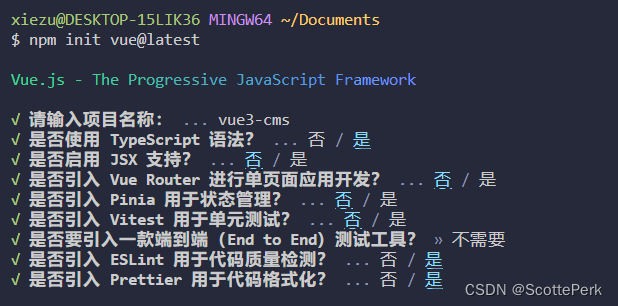
执行下面的命令开始安装:
  cd vue3-cms
  npm install
  npm run format
  npm run dev
安装完成后,vscode会自动提示我们安装下面的插件,如果你没有安装的话。
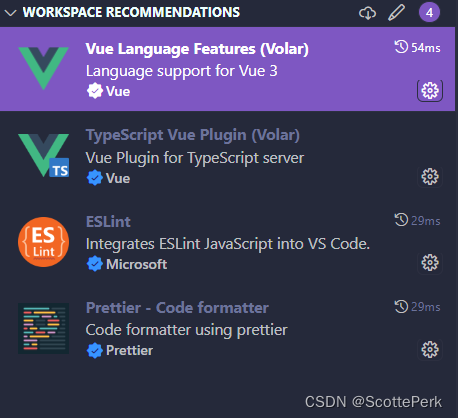
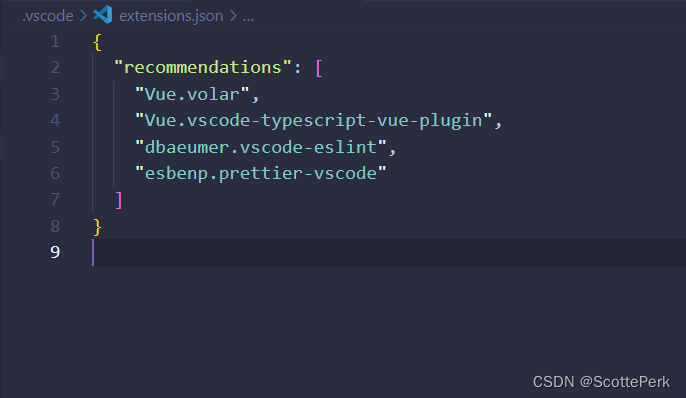
这些推荐来自这个文件,是vscode自动生成的。
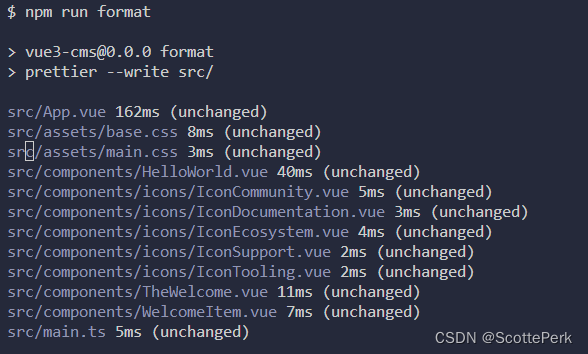
这里比以往多了一个npm run format命令。执行这个命令会运行Prettier来美化代码,和没执行是一样的,因为生成的代码非常完美,不需要美化。
运行一下项目,正式开始。
.vue文件类型的声明
ts只识别.ts文件。任何不认识的文件类型都会当做any类型。包括.jpg,.png这些文件。这是相对于import导入来说的,你项目中存在这些文件是没问题的,但是当你用import关键字导入的时候,就需要声明类型了。
import Home from "@/views/Home.vue";
在env.d.ts中添加下面这段代码。这样ts就能够识别.vue文件了。
declare module "*.vue" {


    import {

   DefineComponent} from "vue";
    const component:DefineComponent
    export default component
}
这里有个非常奇怪的问题:为什么我们要手动配置这段代码,难道vite就不能帮我们自动生成吗?问chat,chat的回答是并不是所有的vue3+ts都需要这段代码,还有vite是轻量级等等。我认为是在鬼扯。不过chat说的webpack是会帮我们生成这段代码倒是真的。下面的代码是使用vue cli的时候shims-vue.d.ts生成的代码。
不过,我相信,vite应该还是出于某种原因导致他不能自动帮我们配这段代码,不然要我们手动配实在是说不过去的。
declare module '*.vue' {


  import type {

    DefineComponent } from 'vue'
  const component: DefineComponent
  export default component
}
更新:
这段代码想要实现的目的是在鼠标悬停的时候,可以看到.vue的ts类型提示。但在新版本的volar或者vue-official里面已经没有作用了。以前配置这段代码是因为不配置会报错,vue默认只配置了html,css等这些类型。现在应该是不需要这段代码了,因为已经没有报错了,想看源码,能点击直接跳转。
再更新:
一般的代码是推荐这样写的,也就是有两个空对象,这两个空对象是DefineComponent定义的参数,分别对应props和data。默认传两个空对象。之所以,前面代码没这样写是因为ts会报错,解决办法就是关闭这个规则。
declare module '*.vue' {


  import {

    DefineComponent } from 'vue'
  const component: DefineComponent<{

   }, {

   }, any>
  export default component
}
把下面这个规则关闭就不会报错了。
'@typescript-eslint/no-empty-object-type': 'off',
你把这个属性设置为false能直接跳过这个检验,但是不推荐。因为这个属性建议设置为true。使用ts就是图类型检测,关闭了使用ts就大打折扣了。这个功能只在调试,或者迁移的时候关闭,正常情况下都是要打开的。
  "compilerOptions": {


    "noImplicitAny": false,
  }
.js文件的类型声明
我们看下面这个auth.js文件。本质上就是定义了一个defineStore然后导出。专门用于处理登录数据逻辑。这没什么特别的,但是这里涉及到ts的类型识别,这个例子非常的典型。
import {

    defineStore } from 'pinia'
import {

    ref, computed } from 'vue'

export const useAuthStore = defineStore('auth', () => {


  const user = ref(null)
  const isAuthenticated = ref(false)
  const rememberMe = ref(false)

  // 计算属性
  const userName = computed(() => user.value?.username || '')

  // 方法
  const login = async (userData) => {


    return new Promise((resolve, reject) => {


      setTimeout(() => {


        // ...
    })
  }

  const logout = () => {


    //...
  }

  const setRememberMe = (value) => {


    rememberMe.value = value
  }

  const checkSavedLogin = () => {


    // ...
  }

  return {


    user,
    isAuthenticated,
    rememberMe,
    userName,
    login,
    logout,
    setRememberMe,
    checkSavedLogin,
  }
})
当我们打算在Login.vue里面引入这个文件的时候,就会报错。
import {

    useAuthStore } from '@/stores/auth'
报错的意思是你的auth.js有隐式的any类型。说的这个隐式any指的就是你导出的export const useAuthStore = defineStore()没有定义类型,所以@/stores/auth的类型是any。这在ts里面是不允许的。

一种最简单的方法就是关闭这个隐式any检测。
这是不推荐的,因为使用ts就是图类型检测,关闭了使用ts就大打折扣了。这个功能只在调试,或者迁移的时候关闭,正常情况下都是要打开的。
  "compilerOptions": {


    "noImplicitAny": false,
  }
你导出的useAuthStore是一个方法,ts不知道这个方法是什么类型,你直接定义出这个方法返回的类型就行了。
//env.d.ts或者你自己新建一个auth.d.ts
declare module '@/stores/auth' {


  // 根据你的实际导出内容补充类型
  export function useAuthStore(): {


    setRememberMe: (remember: boolean) => void
    login: (form: {

    username: string; password: string }) => Promise<void>
    checkSavedLogin: () => {

    username: string; password: string } | null
    user: any
    //...
  }
}
这个和.vue的声明本质上是一样的,一个是*.vue任意文件为.vue的文件。而@/stores/auth是很具体的一个文件。
declare module '*.vue' {


  import type {

    DefineComponent } from 'vue'
  const component: DefineComponent
  export default component







 扫一扫
扫一扫


&spm=1001.2101.3001.5002&articleId=134791831&d=1&t=3&u=a436d799fcda454da2ceffe33d2db6e5)
 5887
5887

 被折叠的 条评论
为什么被折叠?
被折叠的 条评论
为什么被折叠?
 到【灌水乐园】发言





