Linux 中 g++: command not found 解决方法

开发者福利!热门AI工具限时免费用 购周边即赠Coding Plan Lite,Claude Code、Cursor等20+工具畅享,效率翻倍! 阅读详情

Linux 中 g++: command not found 解决方法

G++没有安装或者没有更新

解决方法如下:

  • centos:
    yum -y update gcc
    yum -y install gcc+ gcc-c++

  • ubuntu:
    apt-get update gcc
    apt-get install g++

解决方案示图:
1> 编译 C++ 文件时,出现提示:

在这里插入图片描述
2> 直接输入 yum -y update gcc 命令时,警告要切换到 root 身份,方可执行

在这里插入图片描述
3> 一定要先从用户身份切换到 root 身份,然后再输入 yum -y update gcc 命令
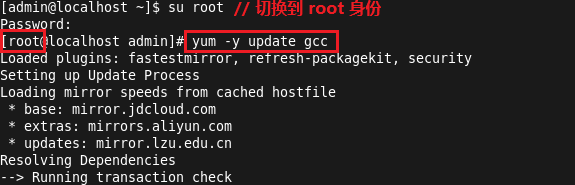
在这里插入图片描述

注意:一定要切换到 root 身份,方可执行

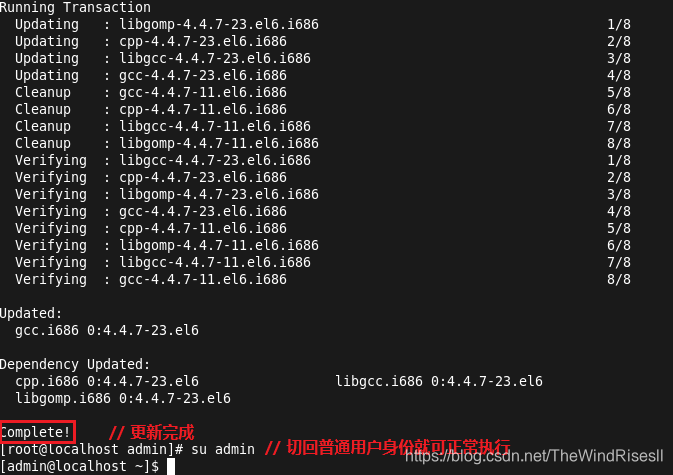
4> 然后就开始更新了,等待完成即可
在这里插入图片描述

解决centos "g++: Command not found"报错问题 在centos编译C++代码时,如果有如下提示: Invoking: GCC C++ Compiler g++ -std=c++1y -fpermissive -Iusr/local/include/zlib/include/ -O0 -g3 -Wall -c -fmessage-length=0 -MMD -MP -MF"Epoll.d" -MT"Epoll.o" -o "Epoll.o" ... 阅读详情

相关推荐

./build.sh:行1: g++: 未找到命令的错误问题在centos操作系统下面如何解决

centos操作系统,执行一个bash,bash命令很简单,就是用g++编译一个C++的程序。报告错误:./build.sh:行1: g++: 未找到命令。

1720

Centos上运行g++c++:command not found

 Centos上运行g++c++:command not found [root@localhost bin]# g++ -bash: g++: command not found [root@localhost bin]# whereis g++ g++: [root@localhost bin]# whereis c++ c++: [root@localhost bin]#

Jesse的黑洞 4847

基于51单片机的智能花盆灌溉系统设计与实现

本文详细介绍了基于51单片机的智能花盆灌溉系统设计与实现,通过DS18B20温度传感器、土壤湿度传感器和LCD1602显示屏等硬件模块,结合精确的算法控制,实现自动监测与灌溉。系统解决了传统灌溉依赖定时器、缺乏可视化界面的问题,适合上班族、园艺爱好者和植物园工作人员使用,有效提升植物养护效率。

honey的博客 990

g++: command not found解决

G++没有装或却没有更新   以下方法都可以试试: centos: yum -y update gcc yum -y install gcc+ gcc-c++   ubuntu: apt-get update gcc apt-get install g++

winter2summer的博客 1万+

linux解决make: g++: Command not found

在编译执行make命令的时候,提示make: g++: Command not found,原因是缺少组件导致的。 [smart@node-build cpp_jni]$ make g++ -c -pipe -g -std=gnu++0x -Wall -W -fPIC -I. -I/usr/java/jdk1.8.0_131/include -I/usr/java/jdk1.8.0_131/include/linux -I../../../../Qt5.6.1/5.6/gcc_64/mkspecs/lin

BUG_88的博客 1万+

unbuntu下编译出现:“make: arm-linux-g++: Command not found解决方法

在ubuntu下,如果在编译arm的qt时候,出现这个问题:arm-linux-g++; command not found,请你获得root权限后进入/root目录下,然后vi .bashrc文件: 进入编辑器后shift+G跳转到最后一行,单击“i”进入编辑模式,插入交叉编译路径: export PATH=$PATH:/usr/local/arm/4.4.1/bin 插入后,“E...

Faith_Leeo的博客 4124

Linux/Unix下报:make: g++: Command not found解决方法

在Ubuntu系统下安装软件时,通常会报“make: g++: Command not found”,是因为g++没有安装的缘故,我们可以在Terminal中通过输入以下命令并输入管理员密码来安装,重启终端就可以了: $ sudo apt-get install build-essential   ...

iteye_4009的博客 964

孙其功陪你学之--解决QT Creator交叉编译提示make:arm-linux-g++:Command not found 命令找不到

解决QT Creator交叉编译提示make:arm-linux-g++:Command not found 命令找不到 终端执行arm-linux-g++ -v可正常获得版本号终端执行which arm-linux-g++ 可正常显示路径QT Creator编译时候提示make:arm-linux-g++:Command not foundmake:leaving directory '/

启功社区 3773

Linux make: g++: Command not found

Linux使用make命令时遇到“make: g++: Command not found”,这个主要是没有安装gcc-c++.x86_64,如下所示 [root@localhost nethogs]# yum install "gcc-c++.x86_64" Loaded plugin...

weixin_34174132的博客 328

g++安装 yum -y install gcc+ gcc-c++ 报错Unable to find a match: gcc+

原因:G++没有安装或者没有更新。

craftsman2020的博客 3757

arm-linux-g++: command not found,解决Linuxg++: Command not found”报错问题 | 老左笔记

周末的时候看到网友们都在折腾ServerStatus服务器监控工具,老左也看到cp同学留言说可以让我也折腾折腾,于是今天正好没其他事情就准备在测试机上玩玩。但是在编译make的时候看到有 "g++: Command not found"报错提示,当然解决方法也很简单,缺少组件导致的。在这篇文章中就先记录如果有遇"g++: Command not found"报错问题的解决方法。第一、报错提示[[...

weixin_32842805的博客 3406

如何解决 pip install 编译报错 g++: command not found(缺少 C++ 编译器)问题

摘要 本文针对Python包安装时出现的“g++: command not found”错误,分析其核心原因是系统缺失C++编译器(g++),导致依赖C++扩展的Python包无法编译。文章指出该错误常见于Linux最小化安装、未配置Xcode的macOS及原生Windows环境,并提供针对不同操作系统的解决方案:Linux通过包管理器安装g++工具链,macOS安装Xcode Command Line Tools获取clang++,Windows建议使用预编译包或配置MinGW/WSL环境。

那些看似不起波澜的日复一日,会在某天让你看到坚持的意义 1156

g++: command not found问题解决

apt-get update gcc apt-get install g++ 然后可能会出现 apt-get中Unmet dependencies问题 反正就是一堆dependencies问题 sudo apt --fix-broken install sudo apt-get update sudo apt-get upgrade 如果还有dependencies问题 那就跟着depende...

RAVANLALA 1316

解决g++ command not found:跨平台C++编译环境配置终极指南

在C++开发中,编译器是将源代码转换为可执行文件的核心工具,其工作原理是通过词法分析、语法分析、优化和链接等步骤生成机器码。环境变量PATH是操作系统定位可执行程序的关键机制,它决定了系统在哪些目录中搜索命令。对于C++开发者而言,正确配置g++编译器不仅能确保代码的顺利编译,更是实现跨平台开发、自动化构建和持续集成的基础。无论是开发桌面应用、系统软件还是嵌入式项目,一个稳定可靠的编译环境都是工程实践的基石。本文针对常见的“g++: command not found”报错,深入解析其背后的环境变量配置、多

weixin_30660027的博客 394

编译linux 源码:make[2]: g++: Command not found

下面是错误代码 make[2]: g++: Command not found Makefile:50: recipe for target 'arg_parser.o' failed make[2]: *** [arg_parser.o] Error 127 make[2]: *** Waiting for unfinished jobs.... make[2]: g++: Command...

GUOmingbao博客 1988

编译QTmake:arm-linux-g++:Command not found

编译QT时按开发板的说明手册执行老是出现make:arm-linux-g++:Command not found,可是我明明是安了的单独执行tab 键arm-linux-g+会出现arm-linux-g++,到底是什么问题呢?可能是识别不了环境变量吧。于是编辑/usr/local/Trolltech/QtEmbedded-4.7.3-arm/mkspecs/qws/linux-arm-g++/qm

z1179675084的专栏 3686
上一篇: Linux : 虚拟机怎么用root身份登录
下一篇: Linux : CentOS 6.6 yum 源更新
TheWindRisesll
博客等级 码龄8年 35粉丝 52原创
评论 1
成就一亿技术人!
拼手气红包6.0元
还能输入1000个字符
 
 条评论被折叠 查看
添加红包

请填写红包祝福语或标题

红包个数最小为10个

红包金额最低5元

当前余额3.43前往充值 >
需支付:10.00
成就一亿技术人!
领取后你会自动成为博主和红包主的粉丝 规则
hope_wisdom
发出的红包
实付
使用余额支付
点击重新获取
扫码支付
钱包余额 0

抵扣说明:

1.余额是钱包充值的虚拟货币,按照1:1的比例进行支付金额的抵扣。
2.余额无法直接购买下载,可以购买VIP、付费专栏及课程。

余额充值