


MCP入门
前往个人网站获得更佳体验:https://www.wananhome.site/
什么是MCP?
MCP全称Model Context Protocol,译为模型上下文协议。
要理解MCP是什么,先要知道MCP可以做什么。我们知道,*LLM(大语言模型)*虽然具有很强的推理能力,但是局限于训练数据,如果训练数据只包含2024年之前的数据,那么LLM就无法分析2026年发生的事情,因为它缺少相应的数据。
对于数据时效性的问题,一般的解决方法是:提供一个包含最新数据的知识库,先在知识库中进行检索相关数据,然后将检索到的数据发送给LLM,这样,LLM就能知道最新的数据了。这个方法也就是所谓的RAG(检索增强生成)。
关键字:检索,谁来检索?如何检索?LLM的能力是推理,并没有检索的功能啊!
实际上,虽然我们一直在说某某模型(GPT、Qwen),但我们实际使用时并不是直接与LLM进行交互的。我们是直接与各种客户端交互(ChatGPT网页端、Codex、千问网页端),这些客户端先通过LLM分析用户的输入,LLM判断需要额外检索知识库,客户端再根据LLM的判断去检索知识库。客户端可以将检索到的数据直接返回给用户,也可以进一步调用LLM进行分析。
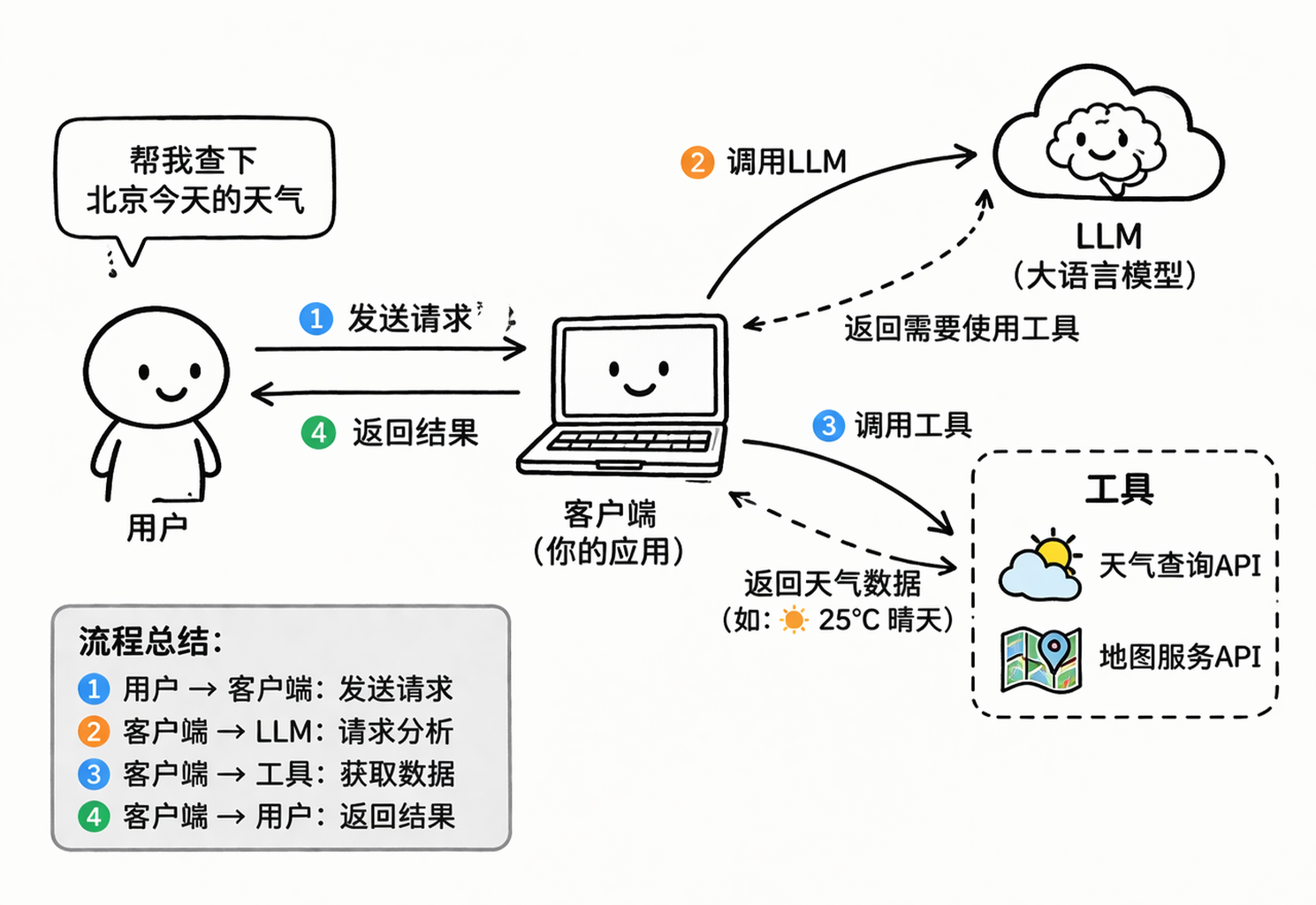
也就是说,RAG是让客户端来进行检索。实际上,也不是客户端进行检索,而是客户端调用工具进行检索。那么,既然客户端可以调用工具进行检索,自然也可以调用工具进行地图查询、天气查询、联网搜索,等等。
那么,问题来了,不同的工具需要不同的输入参数,返回不同的结果,例如:天气查询返回文本数据,地图服务返回二进制数据。难道要客户端对每个工具都进行适配吗?各种工具,如此繁杂,太不现实了。难道要每个工具都对客户端进行适配吗?先不说客户端开发商有没有那么大的号召力,就说客户端也不止一家啊,适配了这家客户端,那别家客户端怎么办,也不现实。
据说有一句名言,忘了是谁说的了,大概意思是:所有计算机问题,都可以通过加一层中间层来解决。
说了那么多,MCP就是这个中间层。
MCP是一个协议,实现了MCP协议的服务,承诺接收固定格式的参数,返回固定格式的结果。
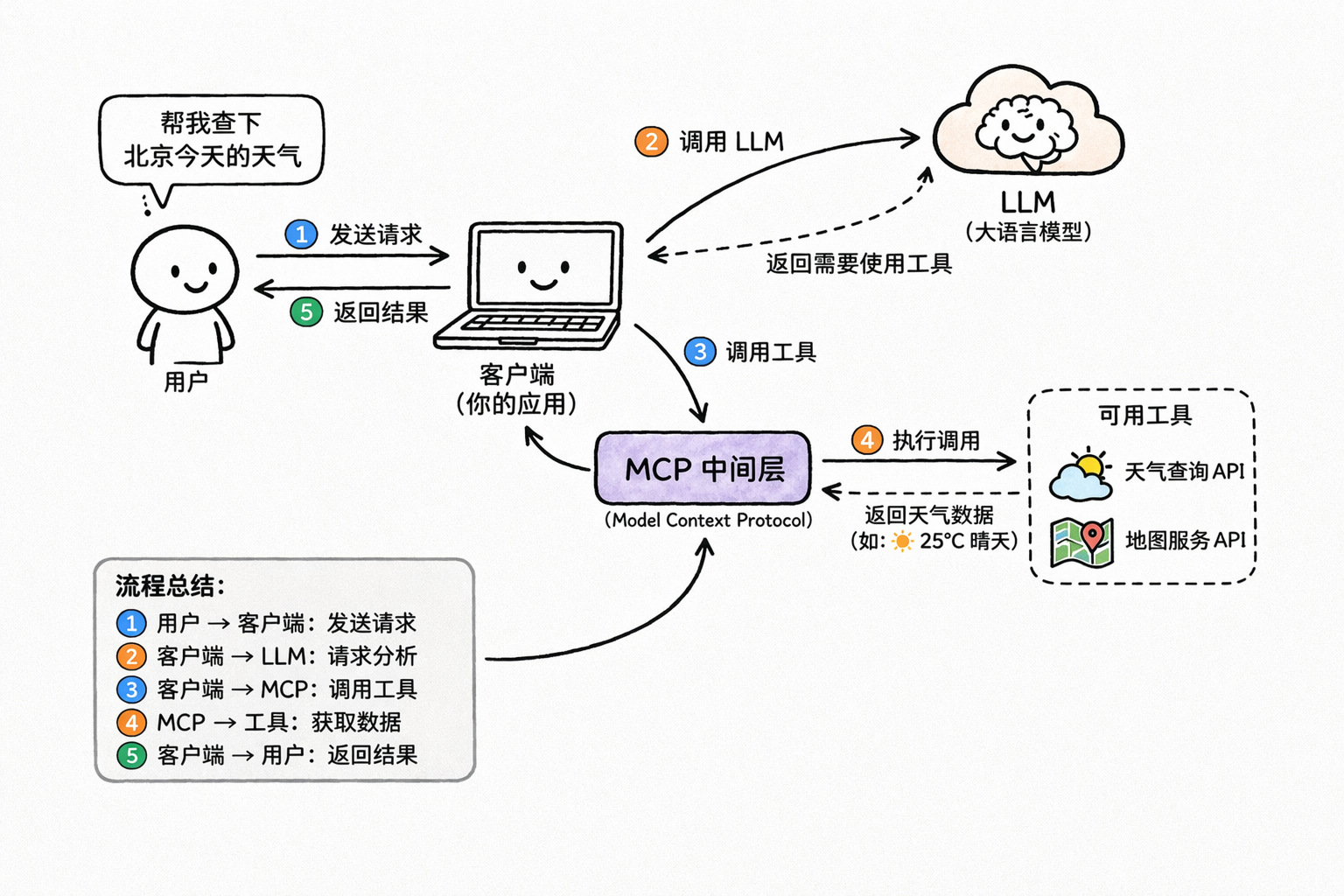
也就是说,现在客户端也不直接调用工具了,而是通过MCP服务来调用工具。
最后,贴一段MCP官方的定义:MCP (Model Context Protocol) is an open-source standard for connecting AI applications to external systems.(MCP(模型上下文协议)是一种用于将 AI 应用程序连接到外部系统的开源标准。)
接下来,我们边做边学,在实操中,我会解释涉及到的概念。
后续操作主要使用Codex Desktop,和Java。若是技术栈不符,只看其中的概念,也是通用的。
本地MCP服务
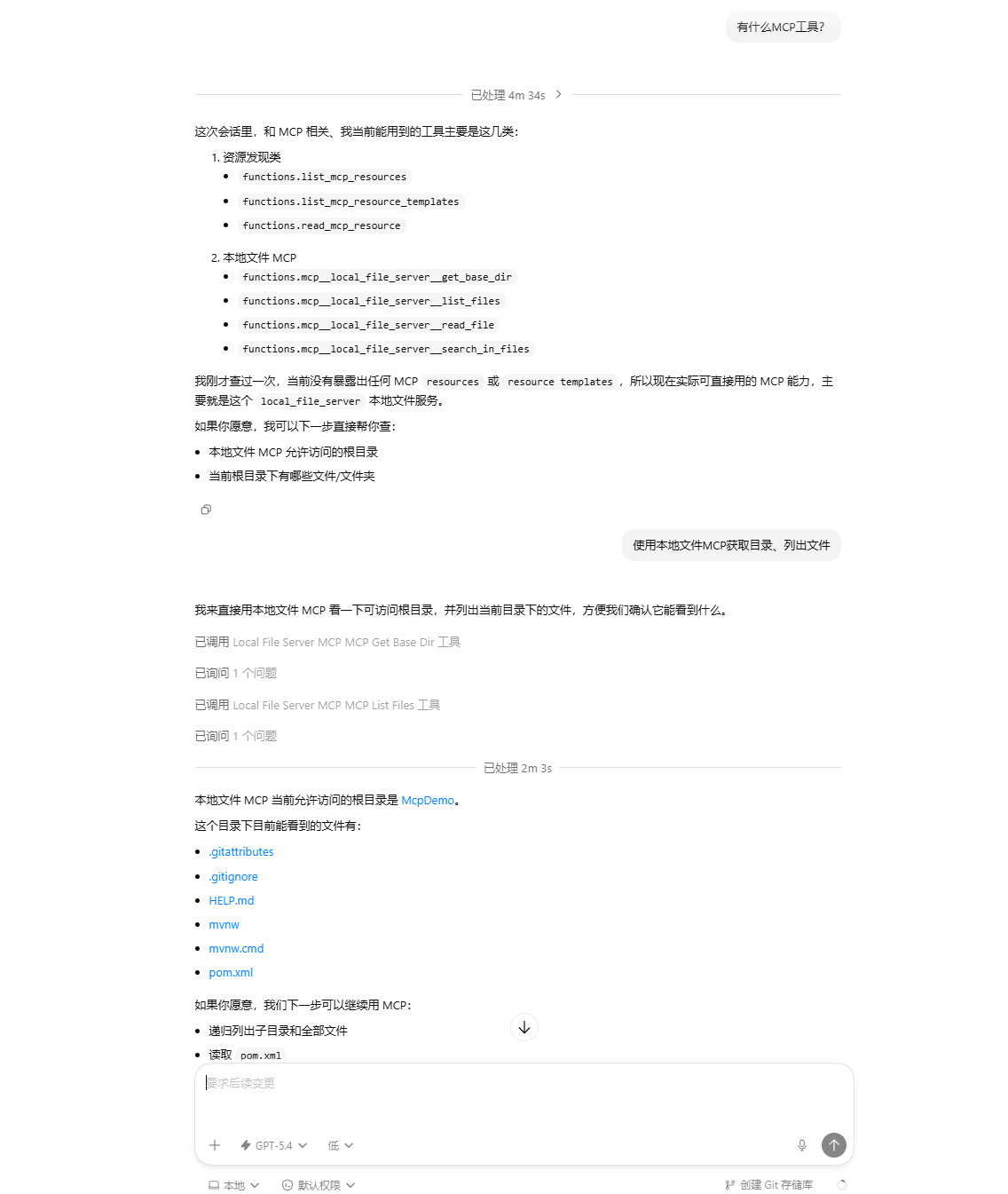
在这一部分,我们会在本地实现一个可供Codex使用的本地文件MCP服务。
-
安装Node.js
-
创建一个SpringBoot项目:McpDemo:
引入pom依赖:
<?xml version="1.0" encoding="UTF-8"?> <project xmlns="http://maven.apache.org/POM/4.0.0" xmlns:xsi="http://www.w3.org/2001/XMLSchema-instance" xsi:schemaLocation="http://maven.apache.org/POM/4.0.0 https://maven.apache.org/xsd/maven-4.0.0.xsd"> <modelVersion>4.0.0</modelVersion> <parent> <groupId>org.springframework.boot</groupId> <artifactId>spring-boot-starter-parent</artifactId> <version>4.0.4</version> <relativePath/> <!-- lookup parent from repository --> </parent> <groupId>com.example</groupId> <artifactId>McpDemo</artifactId> <version>0.0.1-SNAPSHOT</version> <name>McpDemo</name> <description>McpDemo</description> <url/> <licenses> <license/> </licenses> <developers> <developer/> </developers> <scm> <connection/> <developerConnection/> <tag/> <url/> </scm> <properties> <java.version>17</java.version> <spring-ai.version>2.0.0-M3</spring-ai.version> </properties> <dependencies> <dependency> <groupId>org.springframework.ai</groupId> <artifactId>spring-ai-starter-mcp-server</artifactId> </dependency> <dependency> <groupId>org.springframework.boot</groupId> <artifactId>spring-boot-starter-test</artifactId> <scope>test</scope> </dependency> </dependencies> <dependencyManagement> <dependencies> <dependency> <groupId>org.springframework.ai</groupId> <artifactId>spring-ai-bom</artifactId> <version>${spring-ai.version}</version> <type>pom</type> <scope>import</scope> </dependency> </dependencies> </dependencyManagement> <build> <plugins> <plugin> <groupId>org.springframework.boot</groupId> <artifactId>spring-boot-maven-plugin</artifactId> </plugin> </plugins> </build> </project> -
配置application.yaml依赖:
spring: application: name: McpDemo main: banner-mode: off # 关闭 Spring 启动时输出的 banner,避免破坏 STDIO MCP web-application-type: none # 不启用 Web容器 ai: mcp: server: name: local-file-server # MCP服务名称 version: 1.0.0 # 版本 stdio: true # 低于 STDIO 的 MCP服务 type: SYNC # 同步模式,客户端会阻塞等待服务器的返回 instructions: | # MCP 服务的描述 This server can list files, read text files, and search text in files under the configured base directory only. annotation-scanner: enabled: true # 启动时自动扫描项目中带 MCP 注解的 Bean 并注册为 MCP 工具,不需要手动注册每个工具 logging: pattern: console: # 不在控制台输出日志 file: name: ./log/application.log # 将日志输出到文件中,默认是 stdio,但stdio要被mcp占用,如果我们用了stdio就会让mcp异常MCP支持基于STDIO和Streamable HTTP的服务:
- STDIO:作为本地进程运行的服务器(由命令启动)
- Streamable HTTP:可以访问的远程服务
-
编写处理本地文件的代码:
package com.example; import org.springframework.ai.mcp.annotation.McpTool; import org.springframework.ai.mcp.annotation.McpToolParam; import org.springframework.stereotype.Component; import java.io.IOException; import java.nio.charset.MalformedInputException; import java.nio.charset.StandardCharsets; import java.nio.file.Files; import java.nio.file.Path; import java.nio.file.Paths; import java.util.*; import java.util.stream.Stream; @Component public class LocalFileTools { // 最大单文件读取大小:1MB private static final long MAX_FILE_SIZE = 1024 * 1024L; // 允许读取的文本文件类型 private static final Set<String> ALLOWED_EXTENSIONS = Set.of( ".txt", ".md", ".java", ".xml", ".yml", ".yaml", ".json", ".properties", ".js", ".ts", ".html", ".css", ".sql", ".sh", ".bat", ".ps1", ".log", ".csv" ); @McpTool(name = "get_base_dir", description = "返回当前 MCP 服务允许访问的根目录") public String getBaseDir() { return getBaseDirPath().toString(); } @McpTool(name = "list_files", description = "列出指定目录下的文件") public String listFiles( @McpToolParam(description = "相对根目录的子目录", required = false) String relativeDir, @McpToolParam(description = "是否递归列出", required = false) Boolean recursive, @McpToolParam(description = "最多返回多少条", required = false) Integer maxResults ) throws IOException { String dirArg = isBlank(relativeDir) ? "." : relativeDir; boolean recursiveFlag = recursive == null || recursive; int limit = maxResults == null ? 200 : Math.max(1, maxResults); Path dir = safeResolve(dirArg); if (!Files.exists(dir)) { return "目录不存在: " + dirArg; } if (!Files.isDirectory(dir)) { return "不是目录: " + dirArg; } List<String> files; try (Stream<Path> stream = recursiveFlag ? Files.walk(dir) : Files.list(dir)) { files = stream .filter(Files::isRegularFile) .map(this::toRelativePath) .sorted() .limit(limit) .toList(); } return files.isEmpty() ? "未找到文件" : String.join("\n", files); } @McpTool(name = "read_file", description = "读取单个文本文件的指定行范围") public String readFile( @McpToolParam(description = "相对根目录的文件路径") String relativePath, @McpToolParam(description = "起始行号,从1开始", required = false) Integer startLine, @McpToolParam(description = "结束行号", required = false) Integer endLine ) throws IOException { if (isBlank(relativePath)) { return "relativePath 不能为空"; } int start = startLine == null ? 1 : Math.max(1, startLine); int end = endLine == null ? 200 : Math.max(start, endLine); Path file = safeResolve(relativePath); if (!Files.exists(file)) { return "文件不存在: " + relativePath; } if (!Files.isRegularFile(file)) { return "不是文件: " + relativePath; } if (!isAllowedTextFile(file)) { return "不允许读取该类型文件: " + file.getFileName(); } if (Files.size(file) > MAX_FILE_SIZE) { return "文件过大,拒绝读取"; } List<String> lines; try { lines = Files.readAllLines(file, StandardCharsets.UTF_8); } catch (MalformedInputException e) { return "文件不是 UTF-8 文本,暂不支持读取"; } int actualEnd = Math.min(end, lines.size()); StringBuilder sb = new StringBuilder(); sb.append("# File: ").append(relativePath).append("\n"); sb.append("# Lines: ").append(start).append("-").append(actualEnd).append("\n\n"); for (int i = start; i <= actualEnd; i++) { sb.append(i).append(": ").append(lines.get(i - 1)).append("\n"); } return sb.toString(); } @McpTool(name = "search_in_files", description = "在目录内搜索关键词,返回 文件路径:行号:内容") public String searchInFiles( @McpToolParam(description = "要搜索的关键词") String keyword, @McpToolParam(description = "相对根目录的子目录", required = false) String relativeDir, @McpToolParam(description = "是否区分大小写", required = false) Boolean caseSensitive, @McpToolParam(description = "最多返回多少条命中", required = false) Integer maxHits ) throws IOException { if (isBlank(keyword)) { return "keyword 不能为空"; } String dirArg = isBlank(relativeDir) ? "." : relativeDir; boolean caseFlag = caseSensitive != null && caseSensitive; int limit = maxHits == null ? 100 : Math.max(1, maxHits); Path dir = safeResolve(dirArg); if (!Files.exists(dir) || !Files.isDirectory(dir)) { return "目录不存在或非法: " + dirArg; } String needle = caseFlag ? keyword : keyword.toLowerCase(Locale.ROOT); List<String> hits = new ArrayList<>(); try (Stream<Path> stream = Files.walk(dir)) { Iterator<Path> iterator = stream .filter(Files::isRegularFile) .filter(this::isAllowedTextFile) .iterator(); while (iterator.hasNext() && hits.size() < limit) { Path file = iterator.next(); if (Files.size(file) > MAX_FILE_SIZE) { continue; } List<String> lines; try { lines = Files.readAllLines(file, StandardCharsets.UTF_8); } catch (MalformedInputException e) { continue; } for (int i = 0; i < lines.size() && hits.size() < limit; i++) { String line = lines.get(i); String haystack = caseFlag ? line : line.toLowerCase(Locale.ROOT); if (haystack.contains(needle)) { hits.add(toRelativePath(file) + ":" + (i + 1) + ": " + line.trim()); } } } } return hits.isEmpty() ? "未找到匹配内容" : String.join("\n", hits); } private Path getBaseDirPath() { String baseDir = System.getenv("LOCAL_FILE_MCP_BASE_DIR"); if (isBlank(baseDir)) { baseDir = "."; } return Paths.get(baseDir).toAbsolutePath().normalize(); } private Path safeResolve(String userPath) { Path baseDir = getBaseDirPath(); Path resolved = baseDir.resolve(userPath).normalize().toAbsolutePath(); if (!resolved.startsWith(baseDir)) { throw new IllegalArgumentException("禁止访问根目录之外的路径: " + userPath); } return resolved; } private boolean isAllowedTextFile(Path path) { String fileName = path.getFileName().toString().toLowerCase(Locale.ROOT); return ALLOWED_EXTENSIONS.stream().anyMatch(fileName::endsWith); } private String toRelativePath(Path path) { return getBaseDirPath().relativize(path.toAbsolutePath().normalize()) .toString() .replace("\\", "/"); } private boolean isBlank(String s) { return s == null || s.isBlank(); } } -
编写一个客户端测试一下:
package com.example; import io.modelcontextprotocol.client.McpClient; import io.modelcontextprotocol.client.transport.ServerParameters; import io.modelcontextprotocol.client.transport.StdioClientTransport; import io.modelcontextprotocol.json.McpJsonDefaults; import io.modelcontextprotocol.spec.McpSchema.ListToolsResult; import org.slf4j.Logger; import org.slf4j.LoggerFactory; public class ClientStdio { private static final Logger log = LoggerFactory.getLogger(ClientStdio.class); public static void main(String[] args) { var stdioParams = ServerParameters.builder("java") .args("-jar", "D:\\IdeaProjects\\McpDemo\\target\\McpDemo-0.0.1-SNAPSHOT.jar") .build(); var transport = new StdioClientTransport(stdioParams, McpJsonDefaults.getMapper()); var client = McpClient.sync(transport).build(); client.initialize(); // List and demonstrate tools ListToolsResult toolsList = client.listTools(); log.info("Available Tools = " + toolsList); client.closeGracefully(); } } -
通过maven将项目进行package,获得文件McpDemo-0.0.1-SNAPSHOT.jar
-
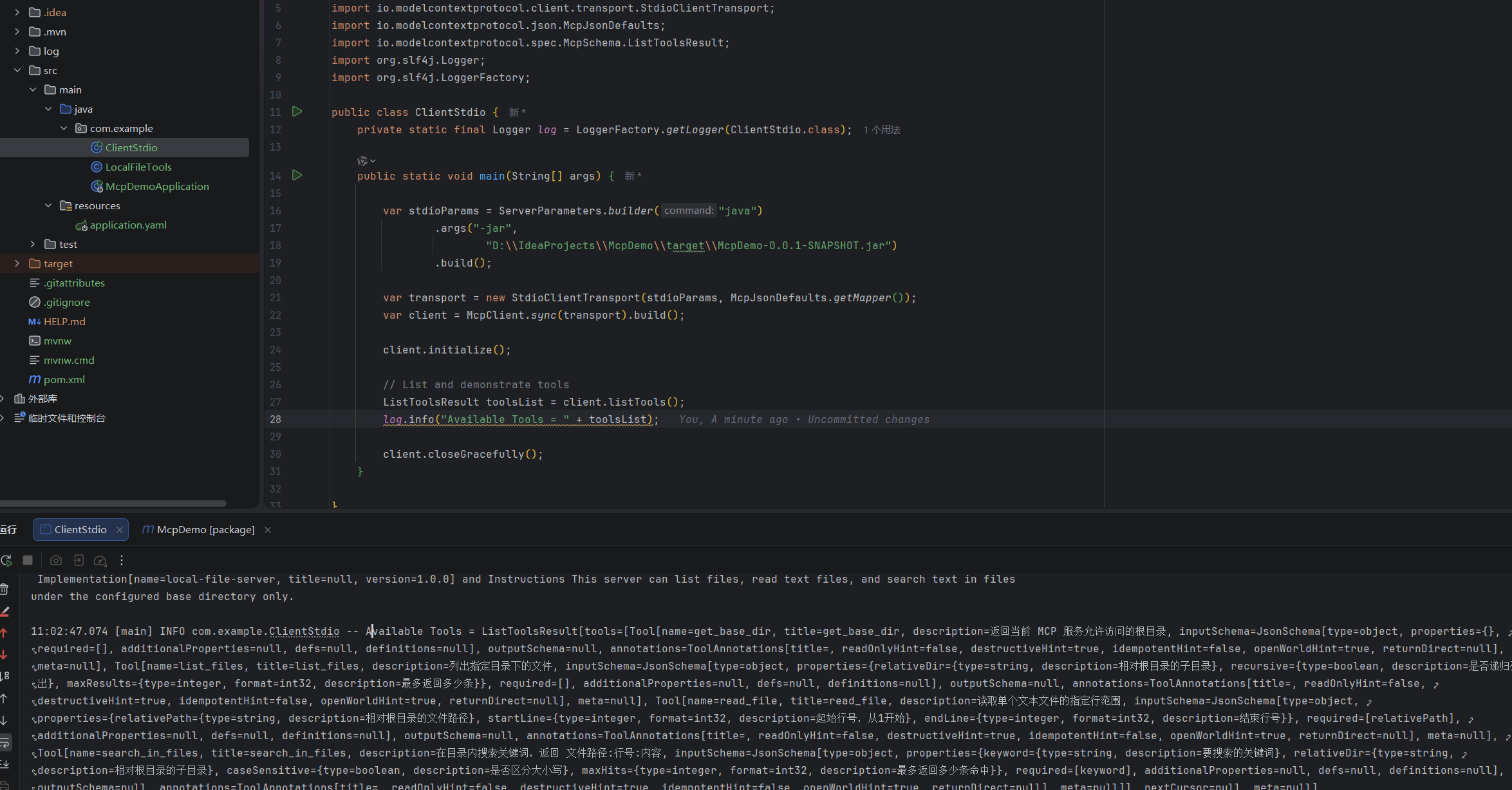
运行ClientStdio客户端,可以看到在控制台打印出了工具列表:
-
在Codex Desktop的 设置->MCP服务器 中添加服务器:
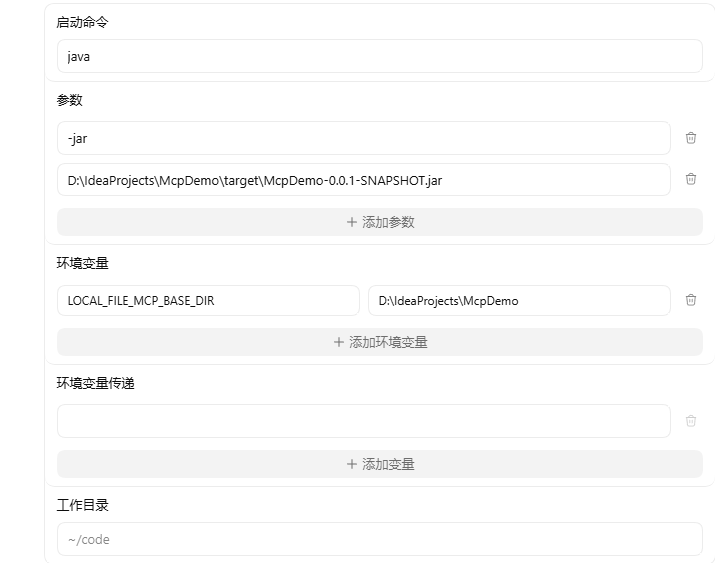
对于Codex基于STDIO的MCP,有以下几个主要参数可以配置:
- command:启动命令,必填,是启动MCP服务器的命令
- args:参数,可选,是启动命令的参数
- env:环境变灵,可选,用于配置MCP服务器需要的环境变量
- env_vars:环境变量传递,可选,将系统中的环境变量传递给MCP服务
- cwd:工作目录,可选,限制MCP服务在该目录下工作
-
在Codex中测试:
远程MCP服务
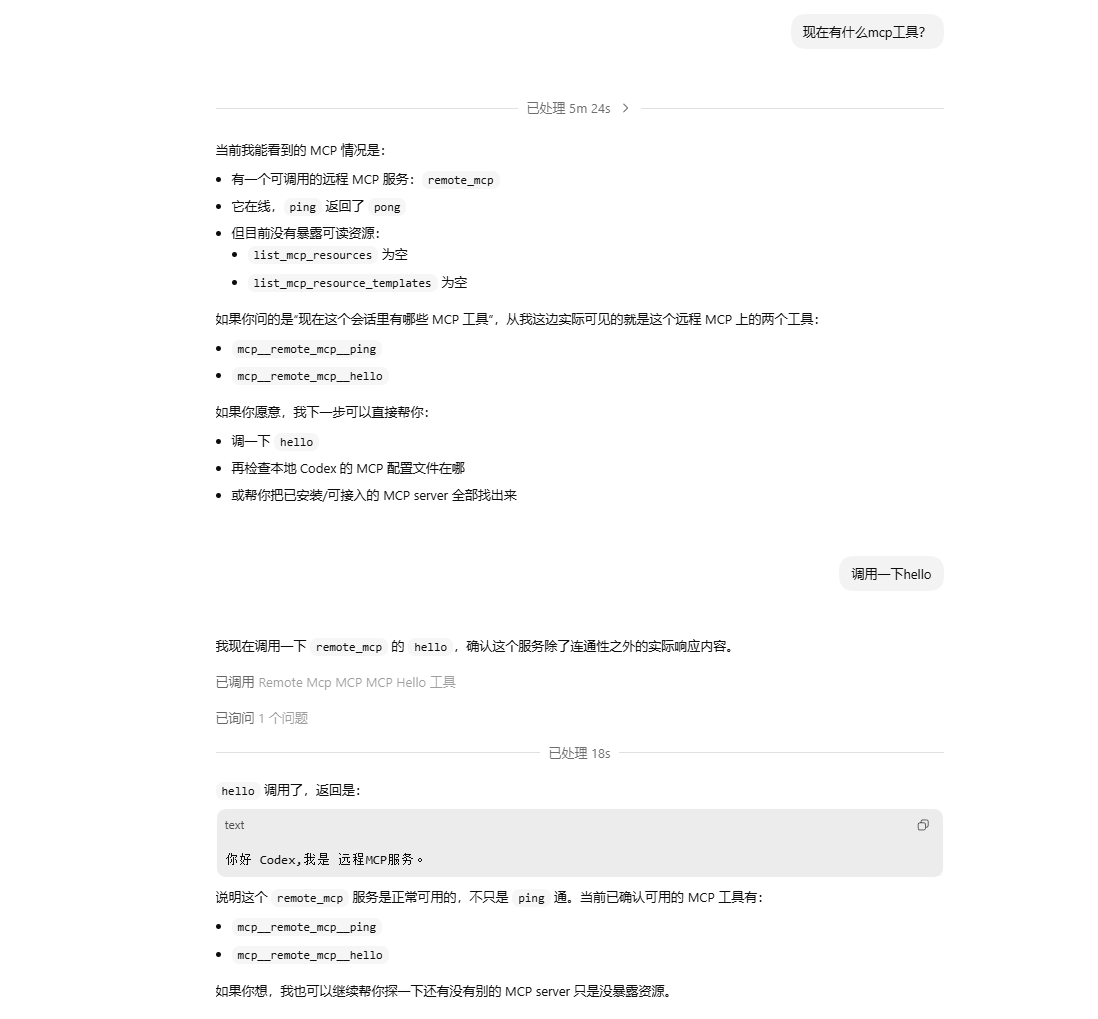
在这一部分,我们会实现一个可供Codex远程调用的MCP服务。
-
创建一个SpringBoot项目:McpDemo:
引入pom依赖:
<?xml version="1.0" encoding="UTF-8"?> <project xmlns="http://maven.apache.org/POM/4.0.0" xmlns:xsi="http://www.w3.org/2001/XMLSchema-instance" xsi:schemaLocation="http://maven.apache.org/POM/4.0.0 https://maven.apache.org/xsd/maven-4.0.0.xsd"> <modelVersion>4.0.0</modelVersion> <parent> <groupId>org.springframework.boot</groupId> <artifactId>spring-boot-starter-parent</artifactId> <version>4.0.4</version> <relativePath/> <!-- lookup parent from repository --> </parent> <groupId>com.example</groupId> <artifactId>McpDemo</artifactId> <version>0.0.1-SNAPSHOT</version> <name>McpDemo</name> <description>McpDemo</description> <url/> <licenses> <license/> </licenses> <developers> <developer/> </developers> <scm> <connection/> <developerConnection/> <tag/> <url/> </scm> <properties> <java.version>17</java.version> <spring-ai.version>2.0.0-M3</spring-ai.version> </properties> <dependencies> <dependency> <groupId>org.springframework.ai</groupId> <artifactId>spring-ai-starter-mcp-server-webmvc</artifactId> </dependency> <dependency> <groupId>org.springframework.boot</groupId> <artifactId>spring-boot-starter-test</artifactId> <scope>test</scope> </dependency> </dependencies> <dependencyManagement> <dependencies> <dependency> <groupId>org.springframework.ai</groupId> <artifactId>spring-ai-bom</artifactId> <version>${spring-ai.version}</version> <type>pom</type> <scope>import</scope> </dependency> </dependencies> </dependencyManagement> <build> <plugins> <plugin> <groupId>org.springframework.boot</groupId> <artifactId>spring-boot-maven-plugin</artifactId> </plugin> </plugins> </build> </project> -
编写application.yml配置文件:
server: port: 8080 spring: application: name: McpDemo ai: mcp: server: name: remote-mcp-server # MCP服务名称 version: 1.0.0 # 版本 type: SYNC # 同步模式,客户端会阻塞等待服务器的返回 instructions: 这是一个可以和你打招呼的远程MCP服务。 # MCP 服务的描述 annotation-scanner: enabled: true # 启动时自动扫描项目中带 MCP 注解的 Bean 并注册为 MCP 工具,不需要手动注册每个工具 protocol: streamable # 基于 Streamable 的 MCP服务 -
编写要提供的工具:
package com.example; import org.springframework.ai.mcp.annotation.McpTool; import org.springframework.ai.mcp.annotation.McpToolParam; import org.springframework.stereotype.Component; @Component public class McpTools { @McpTool(name = "ping", description = "检查远程 MCP 服务是否可用") public String ping() { return "pong"; } @McpTool(name = "hello", description = "打个招呼") public String hello( @McpToolParam(description = "你的名字") String name ) { return "你好 " + name + ",我是 远程MCP服务。"; } } -
启动这个项目
-
在Codex Desktop中配置MCP:
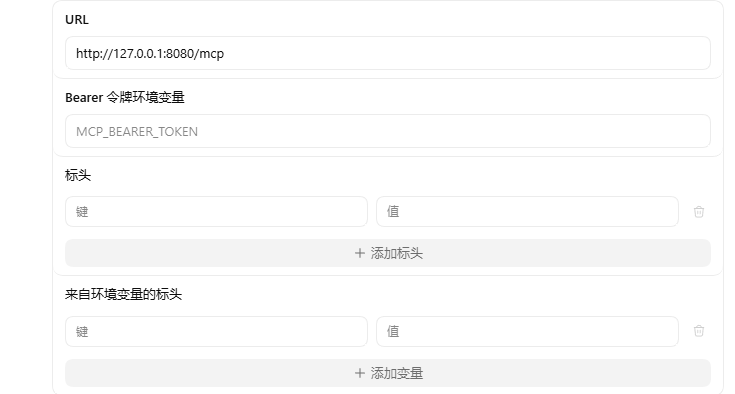
对于Codex基于Streamable HTTP的MCP,有以下几个主要参数可以配置:
- url:必填,MCP服务器的地址
- bearer_token_env_var:Bearer令牌环境变量,可选,用于MCP服务认证授权的Token
- http_headers:表头,可选,添加在http请求头里的键值对
- env_http_headers:来自环境变量的标头,可选,添加在http请求头里的环境变量键值对
-
在Codex中测试:





 扫一扫
扫一扫


 被折叠的 条评论
为什么被折叠?
被折叠的 条评论
为什么被折叠?
 到【灌水乐园】发言





