



 这篇博客介绍了在Unity中创建摇杆并控制物体移动的方法。通过设置UI布局,使用IPointerDownHandler、IDragHandler、IPointerUpHandler接口实现摇杆交互,根据摇杆拖动的偏移量确定物体的移动方向,从而达到遥感控制的效果。
实现功能:点击一定范围内的屏幕,以点击点为中心生成一个摇杆,移动摇杆可以控制物体的移动。
ui布局比较简单,
Limit-yaogan决定摇杆的活动范围
yaoganDI大圈
yaogan小圈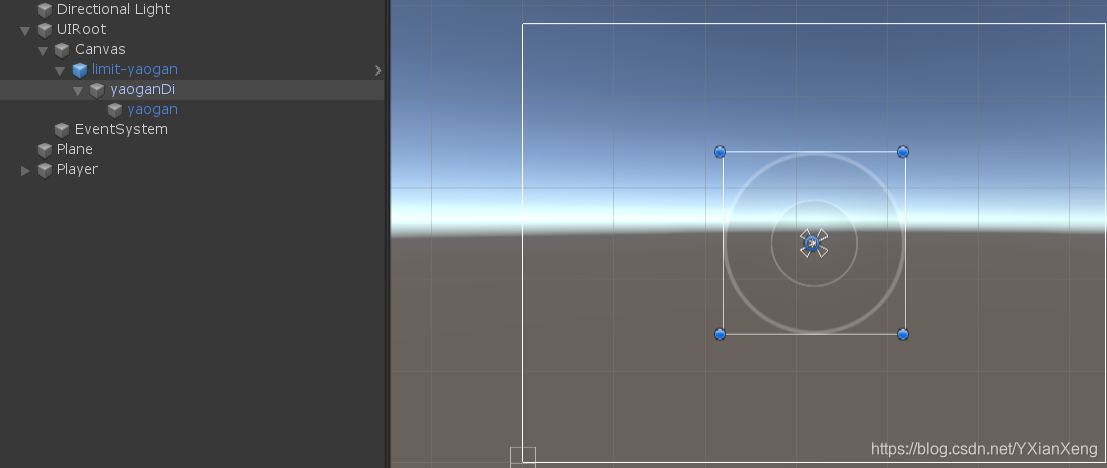
摇杆脚本部分的:需要引用三个拖拽的接口,用来达到摇杆的效果。IPointerDownHandler,IDragHandler,IPointerUpHandler
using System.Collections;
using System.Collections.Generic;
using UnityEngine;
using UnityEngine.EventSystems;

public class YaoganMager : MonoBehaviour,IPointerDownHandler,IDragHandler,IPointerUpHandler
{
    public float r;     //半径
    public Vector2 placeValue; //位置
    public float pull;//拉扯
    /// <summary>
    /// 点击过程中两种情况
    /// 1、推拽在大圈里,直接获取位置就可以了
    /// 2、拖拽小圈在大圈外,获取方向标准化*半径,再加上大圈的位置,就可以限定住小圈,最远也是只能超出半径
    /// </summary>
    /// <param name="eventData"></param>
    public void OnDrag(PointerEventData eventData)
    {
        if (Vector2.Distance(eventData.position,transform.GetChild(0).position)<=r)
        {
            transform.GetChild(0).GetChild(0).position = eventData.position;
        }
        else
        {
            transform.GetChild(0).GetChild(0).position =transform.GetChild(0).position + Vector3.Normalize((Vector3)eventData.position - transform.GetChild(0).position) * r;
            Debug.Log(Vector3.Normalize((Vector3)eventData.position - transform.GetChild(0).position));
        }
        placeValue.y = transform.GetChild(0).GetChild(0).position.y / r;
        placeValue.x = transform.GetChild(0).GetChild(0).position.x / r;
        pull = Vector2.Distance(transform.GetChild(0).GetChild(0).position, transform.GetChild(0).position) / r;
    }
    //点击遥感出现,设置位置
    public void OnPointerDown(PointerEventData eventData)
    {
        transform.GetChild(0).gameObject.SetActive(true);
        transform.GetChild(0).position = eventData.position;
    }
    //点击遥感消失,重置位置
    public void OnPointerUp(PointerEventData eventData)
    {
        transform.GetChild(0).gameObject.SetActive(false);
        transform.GetChild(0).GetChild(0).localPosition = Vector2.zero;
        placeValue = Vector2.zero;
        pull = 0;
    }
}
与物体关联:
我把原理说一下,比较简单。通过摇杆的拖拽,可以获得小圈相对于大圈的一个偏移量关于(x,y)的,,若你控制的是水平方向的你可以定义一个vector3来接收这个偏移量(x,0,y);把vector3当作物体的移动方向,就实现了遥感于物体之间的关联。





 扫一扫
扫一扫


 5214
5214

 被折叠的 条评论
为什么被折叠?
被折叠的 条评论
为什么被折叠?
 到【灌水乐园】发言





