


1. 静态分析生成 Java 代码方法完整调用链
1.1. 前言
在很多场景下,如果能够生成 Java 代码中方法之间的调用链,是很有帮助的,例如分析代码执行流程、确认被修改代码的影响范围、代码审计/漏洞分析等
IDEA 提供了显示调用指定 Java 方法向上的完整调用链的功能,可以通过“Navigate -> Call Hierarchy”菜单(快捷键:Ctrl+Alt+H) 使用;Eclipse 也提供了相同的功能。但以上都需要针对每个方法进行手工处理,不支持对方法进行过滤或者其他扩展功能
java-all-call-graph 项目能够通过静态分析的方式批量生成指定 Java 方法向下的完整调用链,对于关注的 Java 方法,能够生成其向下调用的方法信息,及被调用方法再向下调用的方法,直到最下层被调用的方法
java-all-call-graph 项目地址为 https://github.com/Adrninistrator/java-all-call-graph
也可以生成调用指定 Java 类方法向上的完整调用链,对于关注的 Java 类的方法,能够生成调用对应方法的方法信息,及调用上述方法的信息,直到最上层未被其他方法调用的方法(通常是对外提供的服务,或定时任务等)
当前项目生成的 Java 方法完整调用链中,支持显示相关的包名、类名、方法名、方法参数、调用者源代码行号、方法注解、循环调用,入口方法
当前项目提供了扩展功能,可用于为 Java 代码自动生成 UML 时序图,可参考 https://github.com/Adrninistrator/gen-java-code-uml-sequence-diagram,根据关键字查找关注的方法时,可使用自定义 Java 代码判断是否满足关键字,在该文档中会有说明
增加 java-all-call-graph Web 界面及 MCP 版,可参考 https://blog.csdn.net/a82514921/article/details/160089820
1.2. 适用场景
1.2.1. 分析代码执行流程
使用当前项目生成指定方法向下调用链的功能,可以将代码中复杂的方法调用转换为相对简单的方法完整调用链形式展示
人工查看生成的调用链时,能够通过类名及方法名识别出对应含义
支持将不关注的方法调用忽略,仅展示重要的方法调用
对于分析代码执行流程有一定帮助,适合梳理交易流程、首次接触代码时熟悉流程等场景
1.2.2. 确认被修改代码的影响范围
使用当前项目生成指定方法向上调用链的功能,可以生成调用指定类的所有方法的调用链
能识别入口方法,减少人工逐层确认入口方法的工作量
可用于快速确认被修改代码的影响范围
1.2.3. 应用功能拆分
在进行应用功能拆分时,需要准确定位指定功能涉及的数据库表,及使用了对应数据库表的相关入口方法
使用当前项目生成指定方法向下调用链的功能,生成指定入口方法向下的调用链,能够根据类的包名快速找到 Mapper 接口(使用 Mybatis 的场景),即可找到相关的数据库表
使用当前项目生成指定方法向上调用链的功能,生成调用指定 Mapper 接口向上的调用链,能够根据“!entry!”找到入口方法
重复执行以上过程,直到没有再找到新的 Mapper 接口(即数据库表)和入口方法,即可确认指定功能涉及的数据库表及相关入口方法
1.2.4. 代码审计/漏洞分析
在进行代码审计时,可使用当前项目梳理交易流程,生成指定方法向下的调用链,查找是否有调用敏感 API;或者生成指定方法向上的调用链,查找调用敏感 API 的场景
在进行漏洞分析时,结合当前项目生成的完整调用链辅助分析,也能提高效率
1.3. 生成的调用链文件示例
生成的调用链文件内容结构如下图所示:
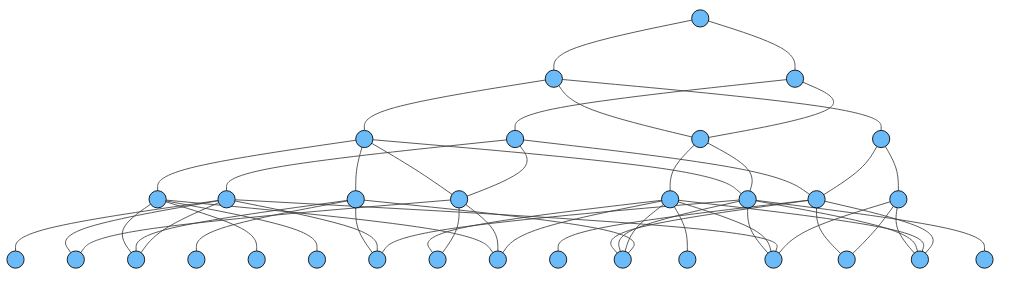
以下为生成的方法完整调用链文件内容示例,对于文件格式的说明可参考后续内容
1.3.1. 从指定方法开始向上的完整调用链文件示例
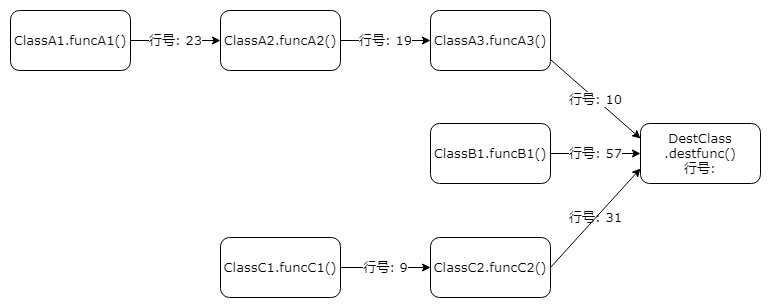
从指定方法开始向上生成的完整调用链文件内容如下所示:
[0]#DestClass:destfunc()
[1]#  ClassA3:funcA3()	(ClassA3:10)
[2]#    ClassA2:funcA2()	(ClassA2:19)
[3]#      ClassA1:funcA1()	(ClassA1:23)    !entry!
[1]#  ClassB1:funcB1()	(ClassB1:57)    !entry!
[1]#  ClassC2:funcC2()	(ClassC2:31)
[2]#    ClassC1:funcC1()	(ClassC1:9)    !entry!
以上对应的调用关系如下所示:
以下为使用当前项目生成的调用 Mybatis 的 MyBatisExceptionTranslator 类的部分方法向上完整调用链(方法参数太长,已省略):
org.mybatis.spring.MyBatisExceptionTranslator:initExceptionTranslator()
[0]#org.mybatis.spring.MyBatisExceptionTranslator:initExceptionTranslator
[1]#  org.mybatis.spring.MyBatisExceptionTranslator:translateExceptionIfPossible	(MyBatisExceptionTranslator:88)	!entry!
[1]#  org.mybatis.spring.MyBatisExceptionTranslator:<init>	(MyBatisExceptionTranslator:72)
[2]#    org.mybatis.spring.MyBatisExceptionTranslator:<init>	(MyBatisExceptionTranslator:55)
[3]#      org.mybatis.spring.SqlSessionTemplate:<init>	(SqlSessionTemplate:106)
[4]#        org.mybatis.spring.SqlSessionTemplate:<init>	(SqlSessionTemplate:92)
[5]#          org.mybatis.spring.support.SqlSessionDaoSupport:createSqlSessionTemplate	(SqlSessionDaoSupport:70)
[6]#            org.mybatis.spring.support.SqlSessionDaoSupport:setSqlSessionFactory	(SqlSessionDaoSupport:52)	!entry!
[4]#        org.mybatis.spring.batch.MyBatisPagingItemReader:doReadPage	(MyBatisPagingItemReader:99)	!entry!
[4]#        org.mybatis.spring.batch.MyBatisBatchItemWriter:setSqlSessionFactory	(MyBatisBatchItemWriter:85)
[5]#          org.mybatis.spring.batch.builder.MyBatisBatchItemWriterBuilder:build	(MyBatisBatchItemWriterBuilder:113)	!entry!
IDEA 使用技巧:在 IntelliJ IDEA 中,打开“Navigate Class...”窗口,即根据类名进入对应代码文件的窗口后,若输入 [类名]:[行号] 格式的内容并回车,可打开对应的代码文件并跳转到对应的行号
1.3.2. 从指定方法开始向下完整调用链文件示例
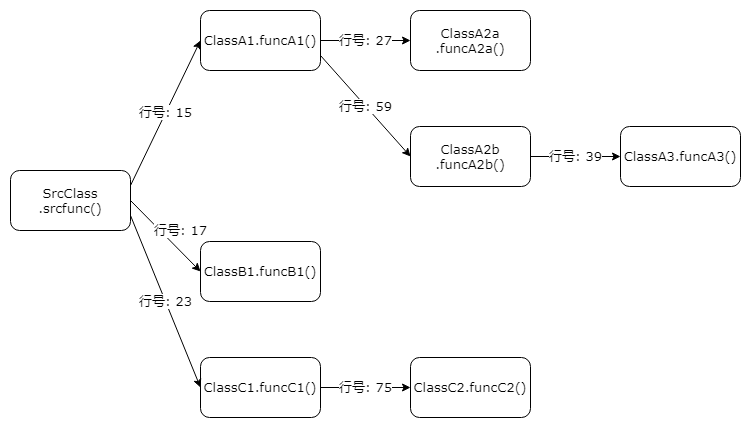
从指定方法开始向下生成的完整调用链文件内容如下所示:
[0]#SrcClass:srcfunc()
[1]#  [SrcClass:15]	ClassA1:funcA1()
[2]#    [ClassA1:27]	ClassA2a:funcA2a()
[2]#    [ClassA1:59]	ClassA2b:funcA2b()
[3]#      [ClassA2b:39]	ClassA3:funcA3()
[1]#  [SrcClass:17]	ClassB1:funcB1()
[1]#  [SrcClass:23]	ClassC1:funcC1()
[2]#    [ClassC1:75]	ClassC2:funcC2()
以上对应的调用关系如下所示:
以下为使用当前项目生成的 spring-webmvc 的 org.springframework.web.servlet.DispatcherServlet:doService() 方法向下的完整调用链如下,为了便于展示,只展示了部分行,省略了方法参数:
org.springframework.web.servlet.DispatcherServlet:doService
[0]#org.springframework.web.servlet.DispatcherServlet:doService
[1]#  [DispatcherServlet:927]	org.springframework.web.servlet.DispatcherServlet:logRequest	!no_callee!
[1]#  [DispatcherServlet:950]	org.springframework.web.servlet.FlashMapManager:retrieveAndUpdate@org.springframework.lang.Nullable	!no_callee!
[1]#  [DispatcherServlet:954]	org.springframework.web.servlet.FlashMap:<init>	!no_callee!
[1]#  [DispatcherServlet:965]	org.springframework.web.servlet.DispatcherServlet:doDispatch
[2]#    [DispatcherServlet:1044]	org.springframework.web.servlet.DispatcherServlet:checkMultipart
[3]#      [DispatcherServlet:1204]	org.springframework.web.servlet.DispatcherServlet:hasMultipartException	!no_callee!
[3]#      [DispatcherServlet:1210]	org.springframework.web.multipart.MultipartResolver:resolveMultipart	!no_callee!
[2]#    [DispatcherServlet:1050]	org.springframework.web.servlet.DispatcherServlet:noHandlerFound
[3]#      [DispatcherServlet:1287]	org.springframework.web.servlet.NoHandlerFoundException:<init>	!no_callee!
[2]#    [DispatcherServlet:1102]	org.springframework.web.servlet.HandlerExecutionChain:applyAfterConcurrentHandlingStarted
[3]#      [HandlerExecutionChain:195]	org.springframework.web.servlet.AsyncHandlerInterceptor:afterConcurrentHandlingStarted	!no_callee!
[2]#    [DispatcherServlet:1108]	org.springframework.web.servlet.DispatcherServlet:cleanupMultipart
[3]#      [DispatcherServlet:1251]	org.springframework.web.multipart.MultipartResolver:cleanupMultipart	!no_callee!
[2]#    [DispatcherServlet:1062]	org.springframework.web.context.request.ServletWebRequest:<init>	!no_callee!
[2]#    [DispatcherServlet:1062]	org.springframework.web.context.request.ServletWebRequest:checkNotModified
1.4. 公共的使用说明
参考 java-all-call-graph 使用说明,“使用说明”部分
1.5. 前置处理
在使用当前功能前,需要首先解析指定的 Java 代码,并将结果写入数据库,参考 对 Java 代码静态分析并支持 SQL 查询
1.6. 配置参数说明
1.6.1. 当前场景使用的配置参数
当前场景使用的配置参数使用说明,可参考
RunnerGenAllGraph4Callee - 生成指定方法向上的方法完整调用链
RunnerGenAllGraph4Caller - 生成指定方法向下的方法完整调用链
1.6.2. 重要配置参数-java-all-call-graph
1.6.2.1. _jacg_config/config_db.properties
指定需要使用的数据库信息
1.6.2.2. _jacg_gen_all_call_graph/method_class_4callee.properties
指定需要生成向上的方法完整调用链的类或方法
1.6.2.3. _jacg_gen_all_call_graph/method_class_4caller.properties
指定需要生成向下的方法完整调用链的类或方法
1.6.3. 配置参数示例
参考 配置参数示例
1.6.4. EL 表达式使用通用说明文档
1.6.5. EL 表达式字符串比较说明文档
1.7. 入口类
1.7.1. 生成向上的方法完整调用链
- 通过配置文件指定配置参数
当通过配置文件指定配置参数时,入口类为 test.jacg.TestRunnerGenAllGraph4Callee
该类会调用下面的类
- 通过代码指定配置参数
通过代码指定配置参数时,入口类为 com.adrninistrator.jacg.runner.RunnerGenAllGraph4Callee
1.7.2. 生成向下的方法完整调用链
- 通过配置文件指定配置参数
当通过配置文件指定配置参数时,入口类为 test.jacg.TestRunnerGenAllGraph4Caller
该类会调用下面的类
- 通过代码指定配置参数
通过代码指定配置参数时,入口类为 com.adrninistrator.jacg.runner.RunnerGenAllGraph4Caller
1.8. 示例代码
以下为通过代码指定配置参数执行时的示例代码
1.8.1. 生成向上的方法完整调用链
ConfigureWrapper configureWrapper = new ConfigureWrapper();
configureWrapper.setOtherConfigSet(OtherConfigFileUseSetEnum.OCFUSE_METHOD_CLASS_4CALLEE, System.class.getName());

Assert.assertTrue(new RunnerGenAllGraph4Callee(configureWrapper).run());
对应 test.runbycodemain.TestRBCRunnerGenAllGraph4Callee:testExampleWriteToFile 方法
1.8.2. 生成向下的方法完整调用链
ConfigureWrapper configureWrapper = new ConfigureWrapper();
configureWrapper.setOtherConfigSet(OtherConfigFileUseSetEnum.OCFUSE_METHOD_CLASS_4CALLER, TestMCCaller.class.getName());

Assert.assertTrue(new RunnerGenAllGraph4Caller(configureWrapper).run());
对应 test.runbycodemain.TestRBCRunnerGenAllGraph4Caller:testExampleWriteToFile 方法
1.9. 生成的调用链结果使用说明
1.9.1. 调用链文件生成位置
在生成方法完整调用链时,支持输出到文件
默认生成在当前目录的 _jacg_o_ee、_jacg_o_er 目录中,分别对应向上与向下的方法完整调用链
通过配置文件_jacg_config/config.properties 中的参数可以指定生成调用链文件生成位置,对应的参数名称如下:
output.root.path
output.dir.flag
output.dir.name
1.9.2. 调用链文件名格式
每个方法会生成一个对应的调用链文件
生成的调用链文件名格式为: {唯一类名}@{方法名}@{完整方法 HASH+长度}.txt
唯一类名可能使用简单类名或完整类名,若简单类名不存在重复则使用简单类名;若简单类名存在重复则使用完整类名
若指定的方法调用链文件内容为空,则生成的调用链文件名后面会包含标志“!empty”
若指定的方法未找到,则生成的调用链文件名后面会包含标志“!not_found”
调用链文件名示例如下:
System@currentTimeMillis@zR_y_EAKSEXglDqyvU4uqA==#029.txt
TestNoMethodClass1@(init)@9gaHMSoTHjmg9fsAp0cHCg==#035!empty.txt
TestMCCallee@1!not_found.txt
test.callgraph.future.CallableImpl@call@4Dz8NwViRLdIZ2hR9nw6Aw==#03a.txt
1.9.3. 在内存中返回方法完整调用链的格式
生成方法完整调用链也支持在内存中返回
生成向上的方法完整调用链时,获取内存中返回的调用链使用的方法,与调用链结构分别如下:
com.adrninistrator.jacg.runner.RunnerGenAllGraph4Callee:getAllMethodCallLineData4EeMap

Map<String, List<MethodCallLineData4Ee>>
生成向下的方法完整调用链时,获取内存中返回的调用链使用的方法,与调用链结构分别如下:
com.adrninistrator.jacg.runner.RunnerGenAllGraph4Caller:getAllMethodCallLineData4ErMap

Map<String, List<MethodCallLineData4Er>>
1.9.4. 向上的方法完整调用链文件格式
从指定方法开始向上的完整调用链输出结果格式类似一棵树,树的根节点为起始方法
以下为向上的方法完整调用链文件内容示例:
test.callgraph.annotation.MethodWithAnnotation:clone()
[0]#test.callgraph.annotation.MethodWithAnnotation:clone()@test.callgraph.annotation.TestAnnotationOuter
[1]#  test.callgraph.annotation.MethodWithAnnotation:test2()@test.callgraph.annotation.TestAnnotationOuter	(MethodWithAnnotation:48)
[2]#    test.callgraph.annotation.MethodWithAnnotation:test1()@test.callgraph.annotation.TestAnnotation	(MethodWithAnnotation:35)
[3]#      test.callgraph.annotation.MethodWithAnnotation:test2()@test.callgraph.annotation.TestAnnotationOuter	(MethodWithAnnotation:47)	!cycle[1]!
[3]#      test.callgraph.annotation.CallMethodWithAnnotation:test1()@test.callgraph.annotation.TestAnnotation	(CallMethodWithAnnotation:22)
[4]#        test.callgraph.annotation.CallMethodWithAnnotation:test2()	(CallMethodWithAnnotation:28)	!entry!
[3]#      test.callgraph.extendcomplex.TestExtendComplex:test1()	(TestExtendComplex:52)	!entry!
文件首行为起始方法
从文件第二行开始,代表调用链中不同层级的方法,分为多个不同的部分,每部分之间使用“\t”分隔,以下为每部分的说明
1.9.4.1. 层级序号与空格
固定存在,格式如下:
[层级序号]#空格
属于每行的第一部分,中括号内的数字为当前行对应方法在调用链中的层级序号,层级序号最小为 0
在井号后面会有空格,空格数量等于 2 * 层级序号
1.9.4.2. 起始方法/调用者方法
固定存在,格式如下:
class_name:method_name(method_arg_types)
class_name 为类名
method_name 为方法名
method_arg_types 为方法参数类型,若存在多个则中间使用半角逗号拼接
可通过配置参数指定详细程度
对于层级序号为 0 的行,代表起始方法
对于层级序号非 0 的行,代表调用者方法,层级序号【大】的方法【调用】层级序号【小】的方法(处在同一个方法调用堆栈中时)
1.9.4.3. 注解
非固定存在
直接拼接在调用者方法后面,两者之间没有其他分隔字符,格式为“@注解”
假如存在多个注解,则多个注解会拼接在一起,例如“@注解 1@注解 2…@注解 n”
注解显示方式可配置
1.9.4.4. 调用者简单类名与代码行号
对于层级序号为 0 的行,固定不存在
对于层级序号非 0 的行,固定存在,代表当前行的方法所在的简单类名,以及对应的代码行号
格式如下:
(caller_simple_class_name:caller_line_number)
caller_simple_class_name 代表调用者简单类名
caller_line_number 代表代码行号
1.9.4.5. 业务功能数据
非固定存在,格式如下:
!busi_data! 业务功能数据类型@业务功能数据值
关于业务功能数据的详细说明参考后续内容
1.9.4.6. 循环调用标志
非固定存在,格式如下:
!cycle[循环调用方法层级序号]!
假如出现当前标志,说明当前方法存在循环调用,中括号内的数字代表产生循环调用的方法层级序号
示例如下:
[7]#              [ServerRequest:71]	org.springframework.web.servlet.function.ServerRequest:methodName()
[8]#                [ServerRequest:0]	org.springframework.web.servlet.function.DefaultServerRequest:methodName()
[9]#                  [DefaultServerRequest:111]	org.springframework.web.servlet.function.DefaultServerRequest:servletRequest()
[10]#                    [DefaultServerRequest:149]	org.springframework.http.server.ServletServerHttpRequest:getServletRequest()	!no_callee!
[9]#                  [DefaultServerRequest:111]	javax.servlet.http.HttpServletRequest:getMethod()	!no_callee!
[8]#                [ServerRequest:0]	org.springframework.web.servlet.function.DefaultServerRequestBuilder$BuiltServerRequest:methodName()	!no_callee!
[8]#                [ServerRequest:0]	org.springframework.web.servlet.function.RequestPredicates$SubPathServerRequestWrapper:methodName()
[9]#                  [RequestPredicates$SubPathServerRequestWrapper:968]	org.springframework.web.servlet.function.ServerRequest:methodName()	!cycle[7]!
1.9.4.7. 入口方法标志
非固定存在,格式如下:
!entry!
假如出现当前标志,说明当前方法没有被其他方法调用,属于入口方法
1.9.4.8. 在其他线程中执行标志
非固定存在,格式如下:
!run_in_other_thread!
假如出现当前标志,说明当前方法在其他线程中执行
示例如下:
[1]#  test.callgraph.thread.thread.ThreadChild:run()	(ThreadChild:13)
[2]#    test.callgraph.thread.thread.ThreadChild:start()	(ThreadChild:0)	!run_in_other_thread!
1.9.4.9. 在 Spring 事务中执行标志
非固定存在,格式如下:
!run_in_spring_tx!
假如出现当前标志,说明当前方法在 Spring 事务中执行
示例如下:
[1]#  test.callgraph.spring.tx.TestSpringTx:test1()@org.springframework.transaction.annotation.Transactional	(TestSpringTx:15)	!run_in_spring_tx!
[2]#    test.callgraph.spring.tx.TestUseSpringTx:test()	(TestUseSpringTx:12)	!entry!
1.9.5. 向下的方法完整调用链文件格式
从指定方法开始向下的完整调用链输出结果格式类似一棵树,树的根节点为起始方法
以下为向下的方法完整调用链文件内容示例:
test.callgraph.annotation.CallMethodWithAnnotation:test1()
[0]#test.callgraph.annotation.CallMethodWithAnnotation:test1()@test.callgraph.annotation.TestAnnotation
[1]#  [CallMethodWithAnnotation:21]	test.callgraph.annotation.MethodWithAnnotation:<init>()
[2]#    [MethodWithAnnotation:23]	test.callgraph.annotation.TestParentClass1:<init>()
[3]#      [TestParentClass1:8]	java.lang.Object:<init>()	!no_callee!
[1]#  [CallMethodWithAnnotation:22]	test.callgraph.annotation.MethodWithAnnotation:test1()@test.callgraph.annotation.TestAnnotation
[2]#    [MethodWithAnnotation:33]	java.io.PrintStream:println(java.lang.String)	!no_callee!
[2]#    [MethodWithAnnotation:34]	test.callgraph.annotation.MethodWithAnnotation:clone()@test.callgraph.annotation.TestAnnotationOuter
[3]#      [MethodWithAnnotation:79]	test.callgraph.annotation.MethodWithAnnotation:<init>()
文件首行为起始方法
从文件第二行开始,代表调用链中不同层级的方法,分为多个不同的部分,每部分之间使用“\t”分隔,以下为每部分的说明
1.9.5.1. 层级序号与空格
与向上的方法完整调用链中的格式相同
1.9.5.2. 调用者简单类名与代码行号
对于层级序号为 0 的行,固定不存在
对于层级序号非 0 的行,固定存在,代表调用当前行的方法的上层方法所在的简单类名,以及对应的代码行号
格式如下:
[caller_simple_class_name:caller_line_number]
1.9.5.3. 起始方法/被调用者方法
固定存在,与向上的方法完整调用链中“起始方法/调用者方法”的格式相同
对于层级序号为 0 的行,代表起始方法
对于层级序号非 0 的行,代表被调用者方法,层级序号【小】的方法【调用】层级序号【大】的方法(处在同一个方法调用堆栈中时)
1.9.5.4. 注解
与向上的方法完整调用链中的格式相同
1.9.5.5. 业务功能数据
与向上的方法完整调用链中的格式相同
1.9.5.6. 循环调用标志
与向上的方法完整调用链中的格式相同
1.9.5.7. 在其他线程中执行标志
与向上的方法完整调用链中的格式相同
1.9.5.8. 在 Spring 事务中执行标志
与向上的方法完整调用链中的格式相同
1.9.5.9. 没有调用其他方法标志
非固定存在,格式如下:
!no_callee!
假如出现当前标志,说明当前方法没有调用其他方法
1.9.6. 对调用链文件进行解析
假如需要对生成的调用链文件进行解析,可参考 从方法调用堆栈文件提取关注的信息 相关内容
1.10. 支持的功能
1.10.1. 循环调用处理
在生成方法完整调用链时,如果遇到循环调用的方法,会显示对应的标志 cycle,不会循环生成,详情可参考示例
1.10.2. 方法完整调用链入口方法
在生成向上的方法完整调用链时,如果找到了没有被其他方法调用的方法,认为是方法完整调用链入口方法,会显示对应的标志!entry!,详情可参考示例
1.10.3. 方法完整调用链最底层方法
在生成向下的方法完整调用链时,如果找到了没有调用其他方法的方法,认为是方法完整调用链最底层方法,会显示对应的标志!no_callee!,详情可参考示例
1.10.4. Spring 事务中执行的方法
在生成向下的方法完整调用链时,如果找到了在 Spring 事务中执行的方法,会显示对应的标志“!run_in_spring_tx!”,详情可参考示例
1.10.5. 指定生成方法详细程度
支持指定四种详细程度:
0: 最详细 完整类名+方法名+方法参数+返回类型
1: 详细 完整类名+方法名+方法参数
2: 中等 完整类名+方法名
3: 最简单 简单类名(对于同名类展示完整类名)+方法名
1.10.6. 指定生成调用链深度与数量
支持指定生成调用链的深度与数量,当达到允许的最大深度或数量时,会停止生成调用链,默认无限制
1.10.7. 生成调用链时忽略部分方法调用
支持通过 EL 表达式配置生成调用链时忽略部分方法调用,使用方式可查看 EL 表达式使用通用说明文档
1.10.8. 生成调用链时处理多态-父类调用子类实现/重写的方法
对于涉及多态的父类调用子类实现/重写的方法的场景,会进行专门处理,以保证生成的调用链准确
需要处理的场景为:被调用的对象为子类,被调用方法在父类中实现,父类的方法调用了子类中重写的方法
例如以下代码中,父类 ChildOverrideSuper 中有 exec 方法,会调用抽象方法 custom,custom 方法需要在子类中实现
在子类 ChildOverrideChildA 中,重写了 custom 方法
在 TestUseChildOverride 类的 test1 方法中,调用了 ChildOverrideChildA 对象的 exec 方法,即父类 ChildOverrideSuper 的 exec 方法
public abstract class ChildOverrideSuper {
    public String exec() {
        custom();
        return "";
    }

    protected abstract void custom();
}

public class ChildOverrideChildA extends ChildOverrideSuper {
    @Override
    protected void custom() {
        printA();
    }

    private void printA() {
        System.out.println("a");
    }
}

public class TestUseChildOverride {
    public void test1() {
        ChildOverrideSuper childOverrideChildA = new ChildOverrideChildA();
        childOverrideChildA.exec();
    }
}
对于 TestUseChildOverride:test1 方法,生成的向下的方法完整调用链如下,可以看到能够找到调用子类重写的方法 ChildOverrideChildA:custom,与实际的方法调用情况一致:
test.callgraph.polymorphism.childoverride.TestUseChildOverride:test1()
[0]#test.callgraph.polymorphism.childoverride.TestUseChildOverride:test1()
[1]#  [TestUseChildOverride:13]	test.callgraph.polymorphism.childoverride.ChildOverrideChildA:<init>()
[2]#    [ChildOverrideChildA:8]	test.callgraph.polymorphism.childoverride.ChildOverrideSuper:<init>()
[3]#      [ChildOverrideSuper:8]	java.lang.Object:<init>()	!no_callee!
[1]#  [TestUseChildOverride:14]	test.callgraph.polymorphism.childoverride.ChildOverrideChildA:exec()
[2]#    [ChildOverrideChildA:0]	test.callgraph.polymorphism.childoverride.ChildOverrideSuper:exec()
[3]#      [ChildOverrideSuper:10]	test.callgraph.polymorphism.childoverride.ChildOverrideChildA:custom()
[4]#        [ChildOverrideChildA:12]	test.callgraph.polymorphism.childoverride.ChildOverrideChildA:printA()
[5]#          [ChildOverrideChildA:16]	java.io.PrintStream:println(java.lang.String)	!no_callee!
对应的示例代码参考 test.callgraph.polymorphism.childoverride.TestUseChildOverride 类
1.10.9. 生成调用链时处理多态-方法参数作为被调用对象
对于涉及多态的以方法参数作为被调用对象的场景,需要进行专门处理,才能保证生成的调用链准确
需要处理的场景为:在某个方法中,调用了方法参数对象的方法,该方法定义的方法参数为父类类型,外部其他方法调用该方法时,传入的实际参数为子类
1.10.9.1. 示例代码
示例代码如下
接口 CalleeArgTypePolymorphismInterface1 中有方法 cmd1、cmd2
公共方法 CalleeArgTypePolymorphismTool1:run0 方法的参数 2 类型为以上接口 CalleeArgTypePolymorphismInterface1,会调用参数 2 的 cmd1、cmd2 方法
CalleeArgTypePolymorphismChild1B 为 CalleeArgTypePolymorphismInterface1 接口的实现类
CalleeArgTypePolymorphismService1:testRun0Use1B 方法中调用了 CalleeArgTypePolymorphismTool1:run0 方法,使用的参数 2 类型为子类 CalleeArgTypePolymorphismChild1B
public interface CalleeArgTypePolymorphismInterface1 {
    void cmd1();
    void cmd2();
}

public class CalleeArgTypePolymorphismTool1 {
    public void run0(String str1, CalleeArgTypePolymorphismInterface1 arg1, String str2) {
        arg1.cmd1();
        arg1.cmd2();
    }
}

public class CalleeArgTypePolymorphismChild1B implements CalleeArgTypePolymorphismInterface1 {
    @Override
    public void cmd1() {
        System.getProperty("");
    }

    @Override
    public void cmd2() {
        System.setErr(null);
    }
}

public class CalleeArgTypePolymorphismService1 {
    public void testRun0Use1B() {
        CalleeArgTypePolymorphismTool1 calleeArgTypePolymorphismTool1 = new CalleeArgTypePolymorphismTool1();
        CalleeArgTypePolymorphismInterface1 calleeArgTypePolymorphismChild1B = new CalleeArgTypePolymorphismChild1B();
        calleeArgTypePolymorphismTool1.run0("a", calleeArgTypePolymorphismChild1B, "b");
    }
}
1.10.9.2. 生成的调用链示例
对于以上示例代码,生成的调用链示例如下
可以看到识别到 CalleeArgTypePolymorphismTool1:run0 方法调用了 CalleeArgTypePolymorphismChild1B:cmd1、cmd2 方法,与代码执行时实际会调用的方法一致
test.callgraph.polymorphism.calleeargtype.CalleeArgTypePolymorphismService1:testRun0Use1B()
[0]#test.callgraph.polymorphism.calleeargtype.CalleeArgTypePolymorphismService1:testRun0Use1B()
[1]#  [CalleeArgTypePolymorphismService1:29]	test.callgraph.polymorphism.calleeargtype.CalleeArgTypePolymorphismTool1:<init>()
[2]#    [CalleeArgTypePolymorphismTool1:14]	java.lang.Object:<init>()	!no_callee!
[1]#  [CalleeArgTypePolymorphismService1:30]	test.callgraph.polymorphism.calleeargtype.superchild.CalleeArgTypePolymorphismChild1B:<init>()
[2]#    [CalleeArgTypePolymorphismChild1B:8]	java.lang.Object:<init>()	!no_callee!
[1]#  [CalleeArgTypePolymorphismService1:31]	test.callgraph.polymorphism.calleeargtype.CalleeArgTypePolymorphismTool1:run0(java.lang.String,test.callgraph.polymorphism.calleeargtype.superchild.CalleeArgTypePolymorphismInterface1,java.lang.String)
[2]#    [CalleeArgTypePolymorphismTool1:19]	test.callgraph.polymorphism.calleeargtype.superchild.CalleeArgTypePolymorphismChild1B:cmd1()
[3]#      [CalleeArgTypePolymorphismChild1B:12]	java.lang.System:getProperty(java.lang.String)	!no_callee!
[2]#    [CalleeArgTypePolymorphismTool1:20]	test.callgraph.polymorphism.calleeargtype.superchild.CalleeArgTypePolymorphismChild1B:cmd2()
[3]#      [CalleeArgTypePolymorphismChild1B:17]	java.lang.System:setErr(java.io.PrintStream)	!no_callee!
1.10.9.3. 配置参数指定方式
对于涉及多态的以方法参数作为被调用对象的场景,需要在配置参数中进行配置
在配置文件 _jacg_gen_all_call_graph/caller_graph_callee_arg_type_polymorphism.properties 指定哪些方法参数作为被调用对象涉及多态时的类型替换,或在代码中进行配置,具体格式可参考 配置参数示例
可参考示例方法 test.runbycode.callgraph.calleeargtypepolymorphism.TestGenCallerGraphCalleeArgTypePolymorphism:testRun0Use1B,在代码中设置的参数如下
        configureWrapper.setOtherConfigSet(OtherConfigFileUseSetEnum.OCFUSE_CALLER_GRAPH_CALLEE_ARG_TYPE_POLYMORPHISM,
                "test.callgraph.polymorphism.calleeargtype.CalleeArgTypePolymorphismTool1:run0(java.lang.String,test.callgraph.polymorphism.calleeargtype.superchild.CalleeArgTypePolymorphismInterface1,java.lang.String)=2"
        );
1.10.10. 生成调用链时显示方法注解
在使用默认配置时,若某个方法上有指定注解,在生成的调用链中,对应的方法后面会显示对应的注解。若方法存在多个注解,则多个注解会拼接在一起,例如“@xxx@yyy”
1.10.10.1. 通过配置参数指定方法注解格式化方式
在配置文件_jacg_extensions/method_annotation_formatter.properties 中可以指定用于在调用链中显示方法注解的类名(也可以通过代码指定),这些类需要继承抽象父类 com.adrninistrator.jacg.annotation.formatter.AbstractAnnotationFormatter
当前项目实现了以下用于在调用链中显示方法注解的类,也可以自己实现
com.adrninistrator.jacg.annotation.formatter.SpringMvcRequestMappingFormatter
com.adrninistrator.jacg.annotation.formatter.SpringTransactionalFormatter
com.adrninistrator.jacg.annotation.formatter.DefaultAnnotationFormatter
在 com.adrninistrator.jacg.conf.ConfigureWrapper:addAllPreBuildExtensions 方法中为默认会添加的 AbstractAnnotationFormatter 子类类名:
        addOtherConfigList(OtherConfigFileUseListEnum.OCFULE_EXTENSIONS_METHOD_ANNOTATION_FORMATTER,
                SpringMvcRequestMappingFormatter.class.getName(),
                SpringTransactionalFormatter.class.getName(),
                DefaultAnnotationFormatter.class.getName()
        );
当需要指定多个 AbstractAnnotationFormatter 子类类名时,排在前面的类处理优先级更高
假如生成调用链时不需要显示方法上的注解信息,则需要将以上配置参数值置为空
1.10.10.2. 方法上的 Spring MVC RequestMapping 注解格式化类-SpringMvcRequestMappingFormatter
com.adrninistrator.jacg.annotation.formatter.SpringMvcRequestMappingFormatter 是方法上的 Spring MVC RequestMapping 注解格式化类,返回的注解内容为“@注解类名 ({uri})”
uri 中会包含当前类及当前方法的 RequestMapping 相关注解的 path
假如 uri 为空,则返回的注解内容为“@注解类名”
- 示例代码
@Controller
@RequestMapping({"test1", "/test1_alias"})
public class TestSpringController1 {

    @GetMapping("get1")
    @ResponseBody
    public String get1() {
- 生成的调用链示例
[0]#test.callgraph.spring.mvc.TestSpringController1:get1()@org.springframework.web.bind.annotation.GetMapping(/test1/get1)@org.springframework.web.bind.annotation.ResponseBody
1.10.10.3. 方法上的 spring-tx Transactional 注解格式化类-SpringTransactionalFormatter
com.adrninistrator.jacg.annotation.formatter.SpringTransactionalFormatter 是方法上的 spring-tx Transactional 注解格式化类,返回的注解内容为“@注解类名 (propagation={事务传播行为})”
假如 propagation 为空,则返回的注解内容为“@注解类名”
- 示例代码
public class TestSpringTx {

    @Transactional
    public void test1() {

    @Transactional(propagation = Propagation.REQUIRES_NEW)
    public void test2() {
- 生成的调用链示例
[1]#  [TestUseSpringTx:12]	test.callgraph.spring.tx.TestSpringTx:test1()@org.springframework.transaction.annotation.Transactional	!run_in_spring_tx!

[1]#  [TestUseSpringTx:13]	test.callgraph.spring.tx.TestSpringTx:test2()@org.springframework.transaction.annotation.Transactional(propagation=REQUIRES_NEW)	!run_in_spring_tx!
1.10.10.4. 默认的方法注解格式化类-DefaultAnnotationFormatter
com.adrninistrator.jacg.annotation.formatter.DefaultAnnotationFormatter 是默认的方法注解格式化类,需要指定在最后,对于每个注解都处理,返回的注解内容为“@注解类名”
- 示例代码
public class MethodWithAnnotation extends TestParentClass1 {

    @TestAnnotation(
            strValue = "bbb\r\n",
            intValue = 222,
            intArrayValue = {11, 12, 13, 14},
            clazz1 = DbOperWrapper.class,
            enum1 = ConfigKeyEnum.CKE_CALL_GRAPH_OUTPUT_DETAIL,
            annotation1 = @TestAnnotationInner(valueA = "va1", valueB = "vb1"))
    public void test1() {
- 生成的调用链示例
[0]#test.callgraph.annotation.MethodWithAnnotation:test1()@test.callgraph.annotation.TestAnnotation
1.10.11. 业务功能数据
1.10.11.1. 概念约定
在 Java 代码中,有一些数据能够反映业务功能,包括但不限于方法调用中使用的常量值、参数类型、方法的参数或返回值的泛型类型、方法使用 MyBatis 操作的数据库表名等,将这些数据统称为业务功能数据
1.10.11.2. 业务功能数据格式
1.10.12. 生成向上的调用链时显示默认支持的业务功能数据
1.10.12.1. 默认支持显示的业务功能数据
在生成向上的方法完整调用链时,默认支持显示的业务功能数据如下:
方法调用信息,包括被调用对象、参数的类型、值等,具体参考 JavaCG2MethodCallInfoTypeEnum 枚举
方法参数泛型类型
方法返回泛型类型
在对 Java 代码静态分析时会解析以上数据,会将结果写入数据库,保存在各自对应的数据库表中
1.10.12.2. 控制显示哪些默认支持的业务功能数据配置参数
在生成向上的方法完整调用链时,可以使用配置文件_jacg_business_data_type/business_data_type_show_4ee.properties,或通过代码,控制默认支持的业务功能数据需要显示哪些
假如需要在生成的调用链中显示特定的默认支持的业务功能数据,则需要在以上配置文件中指定 com.adrninistrator.jacg.common.enums.DefaultBusinessDataTypeEnum 枚举中的类型,假如没有指定则不会显示
1.10.12.3. 方法调用信息
- 配置参数(通过代码指定)
        configureWrapper.setOtherConfigSet(OtherConfigFileUseSetEnum.OCFULE_BUSINESS_DATA_TYPE_SHOW_4EE,
                DefaultBusinessDataTypeEnum.BDTE_METHOD_CALL_INFO.getType()
        );
- 示例代码与生成的调用链示例-1
ChildClassB1:runA 方法调用 PrintStream:println 方法,被调用对象使用了 System 类中名称为 out 的字段,参数 1 类型为 String,值为空字符串
public class ChildClassB1 extends AbstractSuperClassB {
    @Override
    protected void runA() {
        System.out.println("");

[4]#        [ChildClassB1:16]	java.io.PrintStream:println(java.lang.String)	!busi_data!method_call_info@{"obj":[{"sf":"java.lang.System:out"}],"args":{"1":[{"vt":"java.lang.String","v":""}]}}	!no_callee!
- 示例代码与生成的调用链示例-2
AbstractSuperClassA:entryB 方法调用 AbstractSuperClassB:runD 方法,被调用对象名称为 this
public abstract class AbstractSuperClassA {
    protected void entryB() {
        runD();

[7]#              [AbstractSuperClassA:17]	test.callgraph.extendcomplex.AbstractSuperClassB:runD()	!busi_data!method_call_info@{"obj":[{"nov":"this"}]}
- 示例代码与生成的调用链示例-3
CalleeArgTypePolymorphismTool1:run1 方法调用 CalleeArgTypePolymorphismInterface1:cmd1 方法,被调用对象的变量名称为 arg1,为当前方法的第 2 个参数
public class CalleeArgTypePolymorphismTool1 {
    public void run1(String str1, CalleeArgTypePolymorphismInterface1 arg1, String str2) {
        arg1.cmd1();

[3]#      test.callgraph.polymorphism.calleeargtype.CalleeArgTypePolymorphismTool1:run1(java.lang.String,test.callgraph.polymorphism.calleeargtype.superchild.CalleeArgTypePolymorphismInterface1,java.lang.String)	(CalleeArgTypePolymorphismTool1:26)	!busi_data!method_call_info@{"obj":[{"nov":"arg1","mas":2}]}
- 对应数据库表
method_call_info
1.10.12.4. 方法参数泛型类型
- 配置参数(通过代码指定)
        configureWrapper.setOtherConfigSet(OtherConfigFileUseSetEnum.OCFULE_BUSINESS_DATA_TYPE_SHOW_4EE,
                DefaultBusinessDataTypeEnum.BDTE_METHOD_ARG_GENERICS_TYPE.getType()
        );
- 示例代码
TestArgumentGenerics1:testAll 方法调用 TestArgumentGenerics1:test2 方法
public class TestArgumentGenerics1 {

    public static void testAll(int i, List<TestArgument1> list) {
        TestArgumentGenerics1 testArgumentGenerics1 = new TestArgumentGenerics1();s
        testArgumentGenerics1.test2(null);

    public void test2(List<String> list) {
        System.out.println("");
    }
- 生成的调用链示例
TestArgumentGenerics1:test2 方法的参数 1 的类型为 List,泛型中使用的类型为 String
[2]# [TestArgumentGenerics1:18] test.callgraph.methodargument.TestArgumentGenerics1:test2(java.util.List) !busi_data!method_arg_generics_type@{"0":{"t":"java.util.List","gt":["java.lang.String"]}} !busi_data!method_call_info@{"obj":[{"nov":"testArgumentGenerics1","mci":"2496"}]}
- 对应数据库表
method_arg_generics_type
1.10.12.5. 方法返回泛型类型
- 配置参数(通过代码指定)
        configureWrapper.setOtherConfigSet(OtherConfigFileUseSetEnum.OCFULE_BUSINESS_DATA_TYPE_SHOW_4EE,
                DefaultBusinessDataTypeEnum.BDTE_METHOD_RETURN_GENERICS_TYPE.getType()
        );
- 示例代码
MethodWithAnnotation:test3 方法调用 TestMethodReturnGenericsType1:test3 方法
public class MethodWithAnnotation extends TestParentClass1 {
    public void test3() {
        new TestMethodReturnGenericsType1().test3();

public class TestMethodReturnGenericsType1 {
    public Map<Integer, TestArgument1> test3() {
- 生成的调用链示例
TestMethodReturnGenericsType1:test3 方法的返回类型为 Map,泛型中使用的类型有 Integer、TestArgument1
[1]# [MethodWithAnnotation:73] test.callgraph.methodreturn.TestMethodReturnGenericsType1:test3() !busi_data!method_call_info@{"obj":[{"mci":"21"}]} !busi_data!method_return_generics_type@{"t":"java.util.Map","gt":["java.lang.Integer","test.callgraph.methodargument.TestArgument1"]}
- 对应数据库表
method_return_generics_type
1.10.13. 生成向下的调用链时显示默认支持的业务功能数据
1.10.13.1. 默认支持显示的业务功能数据
在生成向下的方法完整调用链时,默认支持显示的业务功能数据如下:
方法调用信息,包括被调用对象、参数的类型、值等,具体参考 JavaCG2MethodCallInfoTypeEnum 枚举
方法参数泛型类型
方法返回泛型类型
MyBatis Mapper 对应的 XML 文件中操作的数据库表名(支持 MySQL 数据库)
MyBatis Mapper 对应的 XML 文件中操作的写数据库表名(支持 MySQL 数据库)
与生成向上的方法完整调用链时相比,多支持了最后两项
1.10.13.2. 控制显示哪些默认支持的业务功能数据配置参数
在生成向下的方法完整调用链时,可以使用配置文件_jacg_business_data_type/business_data_type_show_4er.properties,或通过代码,控制默认支持的业务功能数据需要显示哪些
与生成向上的方法完整调用链时的配置方式相同
1.10.13.3. 方法调用信息
与生成向上的方法完整调用链时类似
1.10.13.4. 方法参数泛型类型
与生成向上的方法完整调用链时类似
1.10.13.5. 方法返回泛型类型
与生成向上的方法完整调用链时类似
1.10.13.6. MyBatis Mapper 对应的 XML 文件中操作的数据库表名(支持 MySQL 数据库)
- 配置参数(通过代码指定)
        configureWrapper.setOtherConfigSet(OtherConfigFileUseSetEnum.OCFULE_BUSINESS_DATA_TYPE_SHOW_4ER,
                DefaultBusinessDataTypeEnum.BDTE_MYBATIS_MYSQL_TABLE.getType()
        );
- 示例代码
Service1BImpl:test1 方法调用 TestTable2Mapper:selectByOtherTable 方法,TestTable2Mapper:selectByOtherTable 方法使用了对应 XML 文件中 ID 为 selectByOtherTable 的 SQL 语句
public class Service1BImpl extends AbstractService1 {
    private TestTable2Mapper testTable2Mapper;

    @Override
    public void test1() {
        testTable2Mapper.selectByOtherTable("test");

public interface TestTable2Mapper {
    TestTable2 selectByOtherTable(String id);
<mapper namespace="test.callgraph.mybatis.dao.TestTable2Mapper">
  <select id="selectByOtherTable" parameterType="java.lang.String" resultMap="BaseResultMap">
    select
    t1.id, t2.value, t2.create_time, t2.update_time
    from test_table as t1, test_table2 as t2
    where t1.id = #{id,jdbcType=VARCHAR} and t1.id = t2.id
  </select>
</mapper>
- 生成的调用链示例
识别到 TestTable2Mapper:selectByOtherTable 方法中通过 MyBatis 执行了 select 操作,对应的数据库表名为 test_table、test_table2
[1]# [Service1BImpl:21] test.callgraph.mybatis.dao.TestTable2Mapper:selectByOtherTable(java.lang.String) !busi_data!method_call_info@{"obj":[{"nsf":"this:testTable2Mapper"}],"args":{"1":[{"vt":"java.lang.String","v":"test"}]}} !busi_data!mybatis_mysql_table@{"select":["test_table","test_table2"]} !no_callee!
- 对应数据库表
mybatis_ms_table
1.10.13.7. MyBatis Mapper 对应的 XML 文件中操作的写数据库表名(支持 MySQL 数据库)
- 配置参数(通过代码指定)
        configureWrapper.setOtherConfigSet(OtherConfigFileUseSetEnum.OCFULE_BUSINESS_DATA_TYPE_SHOW_4ER,
                DefaultBusinessDataTypeEnum.BDTE_MYBATIS_MYSQL_WRITE_TABLE.getType()
        );
- 示例代码
ListenerService1Impl:test1 方法调用 TestTable2Mapper:updateByPrimaryKeySelective 方法,TestTable2Mapper:updateByPrimaryKeySelective 方法使用了对应 XML 文件中 ID 为 updateByPrimaryKeySelective 的 SQL 语句
public class ListenerService1Impl implements ListenerService1 {
    private TestTable2Mapper testTable2Mapper;

    @Override
    public void test1() {
        testTable2Mapper.updateByPrimaryKeySelective(null);
<mapper namespace="test.callgraph.mybatis.dao.TestTable2Mapper">
  <update id="updateByPrimaryKeySelective" parameterType="test.callgraph.mybatis.entity.TestTable2">
    update test_table2
    <set>
      <if test="value != null">
        value = #{value,jdbcType=VARCHAR},
      </if>
      <if test="create_time != null">
        create_time = #{create_time,jdbcType=TIMESTAMP},
      </if>
      <if test="update_time != null">
        update_time = #{update_time,jdbcType=TIMESTAMP},
      </if>
    </set>
    where id = #{id,jdbcType=VARCHAR}
  </update>
</mapper>
- 生成的调用链示例
识别到 TestTable2Mapper:updateByPrimaryKeySelective 方法中通过 MyBatis 执行了 update 写操作,对应的数据库表名为 test_table2
[1]# [ListenerService1Impl:33] test.callgraph.mybatis.dao.TestTable2Mapper:updateByPrimaryKeySelective(test.callgraph.mybatis.entity.TestTable2) !busi_data!method_call_info@{"obj":[{"nsf":"this:testTable2Mapper"}]} !busi_data!mybatis_mysql_table@{"update":["test_table2"]} !busi_data!mybatis_mysql_write_table@{"recordId":0,"sqlStatement":"update","tableName":"test_table2"} !no_callee!
- 对应数据库表
mybatis_ms_write_table
1.10.14. 生成调用链时显示自定义业务功能数据
除了当前项目默认支持获取及显示的业务功能数据外,在生成调用链时也支持显示自定义业务功能数据
1.10.14.1. 显示自定义业务功能数据的步骤
为了在生成调用链时也支持显示自定义业务功能数据,需要按照以下步骤处理:
解析代码并将结果写入数据库
获取自定义业务功能数据并写入数据库
生成方法完整调用链
1.10.14.2. 解析代码并将结果写入数据库
按照常规方式处理,不需要特别指定配置参数
可执行 test.runbycode.businessdata.TestWriteBusinessData2DbHandler:$test0WriteDb 方法用于验证
1.10.14.3. 获取自定义业务功能数据并写入数据库
用于获取自定义业务功能数据的类需要继承抽象父类 com.adrninistrator.jacg.handler.businessdata.AbstractWriteBusinessData2DbHandler,在该抽象父类中,会将获取到的自定义业务功能数据写入数据库表 business_data
用于获取自定义业务功能数据的类会间接实现 Closeable 接口,可使用 try-with-resources 方式释放资源,需要调用 handleMethodCallByCallee 方法,以获取自定义业务功能数据并写入数据库,示例代码如下:
public class WriteSystemSetProperty2DbHandler extends AbstractWriteBusinessData2DbHandler {

        try (WriteSystemSetProperty2DbHandler writeSystemSetProperty2DbHandler = new WriteSystemSetProperty2DbHandler(configureWrapper)) {
            Assert.assertTrue(writeSystemSetProperty2DbHandler.handleMethodCallByCallee());
        }
可执行 test.runbycode.businessdata.TestWriteBusinessData2DbHandler:testSystemSetProperty 方法用于验证
用于获取自定义业务功能数据的类需要实现抽象父类的以下方法
- 选择当前类需要处理的被调用方法信息
protected abstract String[] chooseCalleeMethodInfoArray();
返回当前类需要处理的被调用方法,格式为:{类名}:{方法名},不需要指定方法参数
- 选择当前类需要处理的业务功能数据类型
public abstract String chooseBusinessDataType();
选择当前类需要处理的业务功能数据类型,对应自定义业务功能数据写入数据库表 business_data 时 data_type 字段值
- 执行处理方法调用
protected abstract String handleMethodCall(int methodCallId,
                                               String calleeClassName,
                                               String calleeMethodName,
                                               ObjArgsInfoInMethodCall objArgsInfoInMethodCall,
                                               List<String> currentCalleeMethodArgTypeList);
根据被调用的方法参数等信息生成的业务功能数据,字符串类型,可为 JSON 等格式,若非 null 则会写入数据表 business_data
1.10.14.4. 生成方法完整调用链
按照常规方式处理,不需要特别指定配置参数,在生成方法完整调用链时,会读取数据库表 business_data 中的数据,并在调用链中展示
例如 TestArgument2:test5 方法有调用 System:setProperty 方法,使用的参数为"key"、“value”
public class TestArgument2 {
    public void test5() {
        System.setProperty("key", "value");
    }
test.runbycode.businessdata.handler.WriteSystemSetProperty2DbHandler 是用于获取自定义业务功能数据的类,该类会将 System:setProperty 方法中使用的参数拼接的 JSON 字符串作为自定义业务功能数据的值,自定义业务功能数据的类型为“System”
使用以上类获取自定义业务功能数据并写入数据库后,生成的调用链如下:
[0]#test.callgraph.methodargument.TestArgument2:test5()
[1]#  [TestArgument2:96]	java.lang.System:setProperty(java.lang.String,java.lang.String)	!busi_data!System@["key","value"]	!no_callee!
可执行 test.runbycodemain.TestRBCRunnerGenAllGraph4Callee:testWriteToFile、test.runbycodemain.TestRBCRunnerGenAllGraph4Caller:testWriteToFile 方法用于验证
1.11. 无法正确处理的方法调用关系
1.11.1. 误识别为入口方法
对于以下方法,找不到被其他方法调用的关系,可能会被误识别为入口方法:
- 不是直接通过 Java 方法进行调用的情况(例如在 XML 文件中配置代码执行流程、通过注解配置代码执行流程、使用 AOP 处理等)
- 未被调用的方法
1.12. 多余的调用关系处理
1.12.1. 问题
当代码中使用接口或抽象父类方法,且对应多个实现类或子类时,生成的方法完整调用链可能存在多余的调用关系
当一个接口对应多个实现类时,若在某个类中调用该接口的方法,生成的完整调用链中,可能将当前类未使用的其他实现类相关的调用关系也包含进来
当一个抽象父类对应多个非抽象子类时,若在某个类中调用抽象父类的方法,生成的完整调用链中,可能将当前类未使用的其他非抽象子类相关的调用关系也包含进来
当代码中使用工厂模式获取某个接口/抽象父类的实现类/非抽象子类时,也可能会出现类似的问题
1.12.2. 解决
当出现以上情况时,当前项目会在生成的调用链文件目录生成“_notice_multi_ITF.md”或“_notice_multi_SCC.md”文件,可按照文档中的提示,将前缀为“method_call_”的数据库表中不需要的方法调用设置为禁用,或者在生成调用链时通过 EL 表达式指定需要忽略哪些方法
当需要将禁用的方法调用恢复为启用时,可按照当前目录生成的“_notice_disabled_ITF.md”或“_notice_disabled_SCC.md”文件的说明进行操作





 扫一扫
扫一扫


 1357
1357

 被折叠的 条评论
为什么被折叠?
被折叠的 条评论
为什么被折叠?
 到【灌水乐园】发言





