


Android中有个我们熟悉又陌生的对象Context(上下文),当我们启动Activity的时候需要上下文,当我们使用dialog的时候我们需要上下文,但是上下文对象到底是个什么东西呢?
在Android api当中是这样描述context对象的。
"Interface to global information about an application environment. This is an abstract class whose implementation is provided by the Android system. It allows access to application-specific resources and classes, as well as up-calls for application-level operations such as launching activities, broadcasting and receiving intents, etc."
“是一个用于实现关于应用环境的整体信息的一个接口。这是一个由安卓系统提供的抽象类并且系统有对他进行实现。它允许访问到应用特殊的资源和类,同时它也可以实现到应用级别的操作,例如:Activity的启动,广播的实现和接受intent等。”
一、Context的主要实现和继续理解
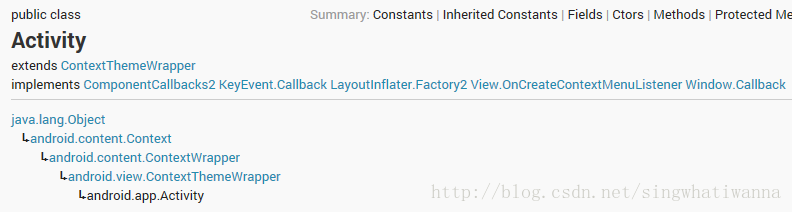
知道了context的大概描述,我们可以再继续理解Context这个神秘的对象了,首先,作为基类,肯定有其它类去实现它,主要实现了context类的类是Activity,Service,Application。他们三个类虽然都是Context的子类,但是具体的继承关系却有些不大一样:
Activity的继承关系:
Service和Application的继承关系:
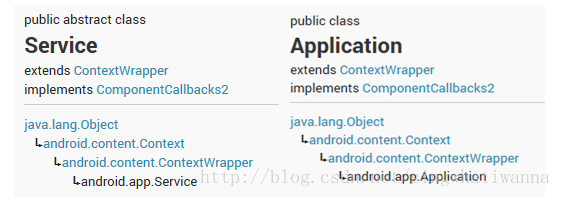
可以看出我们的Context其实就是我们熟知的Activity,Service,Application。
在这3个类中,Activity的context对象和Application的context对象最容易弄混淆。
二、Context中的主要方法
知道了Context的大概描述和他的一些继承关系,我们对Context这个类有了一个大致的了解。现在可以看看在context中的一些方法,来加深对context的一个理解,有很多我们使用过的方法其实都是从Context这个类中实现而来。
我们从Android api中查看Context类,这里出现了一个非常熟悉的方法:startActivity,可以看到其实Activity中的StartActivity方法是重写了Context中的方法。
| abstract void |
startActivity(
Intent intent)
Same as
startActivity(Intent, Bundle) with no options specified.
|
| abstract void |
startActivity(
Intent intent,
Bundle options)
Launch a new activity.
|
同时context还可以访问到资源文件,获得资源文件中的信息。
| abstract Resources |
getResources()
Return a Resources instance for your application's package.
|
| abstract SharedPreferences |
getSharedPreferences(
String name, int mode)
Retrieve and hold the contents of the preferences file 'name', returning a SharedPreferences through which you can retrieve and modify its values.
|
| final String |
getString(int resId)
Return a localized string from the application's package's default string table.
|
| final String |
getString(int resId,
Object... formatArgs)
Return a localized formatted string from the application's package's default string table, substituting the format arguments as defined in
Formatter and
format(String, Object...).
|
同时context不但可以开启一个activity,同时还可以开启或者关闭一个Service。
| abstract ComponentName |
startService(
Intent service)
Request that a given application service be started.
|
| abstract boolean |
stopService(
Intent service)
Request that a given application service be stopped.
|
访问Android Api 或者查看源码可以看到,Context中还有很多访问资源文件和程序之间互相通信的方法。
可以看出context其实就是一个应用之中的手脚,可以通过他来拿取资源文件中的资源,还可以通过他来处理Activity和Service中的一些操作,这个类就是整个程序的枢纽,负责管理整个程序的通畅运行。
我们可以通过分析一个Toast通知的源码去分析context的去向和使用,来了解context到底做了些神马操作:
    public static Toast makeText(Context context, CharSequence text, int duration) {
        Toast result = new Toast(context);

        LayoutInflater inflate = (LayoutInflater)
                context.getSystemService(Context.LAYOUT_INFLATER_SERVICE);
        View v = inflate.inflate(com.android.internal.R.layout.transient_notification, null);
        TextView tv = (TextView)v.findViewById(com.android.internal.R.id.message);
        tv.setText(text);

        result.mNextView = v;
        result.mDuration = duration;

        return result;
    }
可以看到makeText方法接受的context被用于
 context.getSystemService(Context.LAYOUT_INFLATER_SERVICE);


 View v = inflate.inflate(com.android.internal.R.layout.transient_notification, null);


 这是用于获取XML中定义的View的方法,可以看到通过外部传入的Context,在这里获得了一个View布局用于显示Toast。


      public Toast(Context context) {
        mContext = context;
        mTN = new TN();
        mTN.mY = context.getResources().getDimensionPixelSize(
                com.android.internal.R.dimen.toast_y_offset);
        mTN.mGravity = context.getResources().getInteger(
                com.android.internal.R.integer.config_toastDefaultGravity);
    }
这一行中可以看出在context又被用来获取资源文件,可以看出Toast的显示和布局都是通过context去调用系统写好的资源文件来进行实现的。
三、Activity context和Application context的区别
Activity的context和Application的context的区别在于生命周期的区别,Activity的context是依附在着Activity的生命周期的,而Application的Context的生命周期是依附在整个应用之上的。

 3066


 扫一扫


 被折叠的 条评论
为什么被折叠?
 到【灌水乐园】发言


