用Nutch2.3+MongoDB+Elasticsearch1.4开发垂直搜索引擎

lumongo:使用Lucene和MongoDB进行分布式实时搜索 鲁蒙戈 LuMongo不再被积极开发。 现在我们的工作集中在 使用Lucene进行分布式实时搜索 LuMongo是基于Lucene的实时分布式搜索和存储系统。 LuMongo从头开始设计,可以在服务器之间垂直和水平扩展。 LuMongo将Lucene索引直接存储到MongoDB中。 文档可以本地存储在MongoDB中。 当以本地方式存储文档时,可以从MongoDB中正常查询文档,并且可以使用和 。 LuMongo是: 即时的 分散式 纯Java 开源的 LuMongo支持: 排序 刻面 使用单个查询搜索多个索引 将相关文档与文档一起存储 要了解更多信息,请参见 : 立即下载

Nutch下载

上nutch官网下载页面下载最新的代码包
http://nutch.apache.org/downloads.html
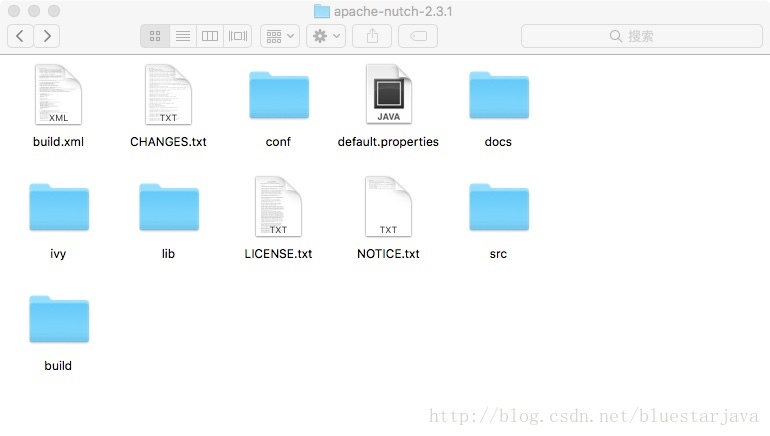
下载并解压后,得到如下文件夹
nutch解压后的结构

Elasticsearch1.4下载

最新的Elasticsearch是5.1版本,但由于Nutch2.3内置的是Elasticsearch1.4.1的连接客户端,所以还是需要安装Elasticsearch1.4
下载地址 https://download.elasticsearch.org/elasticsearch/elasticsearch/elasticsearch-1.4.1.tar.gz

修改ivy源

由于默认的ivy源速度比较慢,所以在这里换成国内的源
在ivy/ivysetting.xml文件中找到下面这段配置

<property name="repo.maven.org"  
      value="http://repo1.maven.org/maven2/"  
      override="false"/> 

把value替换成阿里云的地址:

http://maven.aliyun.com/nexus/content/groups/public/

创建eclipse项目

把nutch解压后的文件压移至eclipse工作空间中;
在eclipse中,在菜单中选择File->New->Project
然后选择工程类型”Java Project from Existing Ant Buildfile”,再选择nutch文件夹下的build.xml文件即可;

修改配置文件

  1. 修改conf/nutch-site.xml

    <!-- Put site-specific property overrides in this file. -->
    <configuration>
    
    <!--此参数主要用于在IDE环境开发模式运行,在构建输出的runtime部署运行请注释或删除此项参数-->
        <!-- Just for development, please remove this plugin.folders for production env -->
        <property>
            <name>plugin.folders</name>
            <value><value>/Users/luojian/Documents/javaworkspace/nutch/build/plugins</value></value>
        </property>
    
    <!--基于gora的爬虫数据底层存储机制,-->
        <!--官方文档及推荐为HBase,本项目默认配置为MongoDB。需要同步配置gora.properties文件中相关参数。-->
        <property>
                <name>storage.data.store.class</name>
                <value>org.apache.gora.mongodb.store.MongoStore</value>
                <description>Default class for storing data</description>
        </property>
    
        <property>
                <name>http.agent.name</name>
                <value>Your Nutch Spider</value>
        </property>
    </configuration>
  2. 修改ivy/ivy.xml

    <!-- 取消以下关于MongoDB的注释,使其生效-->
    <dependency org="org.apache.gora" name="gora-mongodb" rev="0.6.1" conf="*->default" />
    
  3. 修改conf/gora.properties

    #######################
    \# MongoDBStore properties #
    \#######################
    gora.datastore.default=org.apache.gora.mongodb.store.MongoStore
    gora.mongodb.override_hadoop_configuration=false
    gora.mongodb.mapping.file=/gora-mongodb-mapping.xml
    gora.mongodb.servers=localhost:27017
    gora.mongodb.db=nutchFocuse
    \#gora.mongodb.login=login
    \#gora.mongodb.secret=secret
  4. Ant 编译
    右键build.xml-> Ant build…
    在Targets标签页下,选中 eclipse
  5. 修改config build path 顺序,将conf置顶
    这里写图片描述

    这里写图片描述

添加爬取网址

在项目目录下新建 urls 文件夹,
并在此文件夹下新建seed.txt文件
seed.txt文件的内容如下:

#zhihu
https://www.zhihu.com/explore

启动爬虫

配置启动参数
这里写图片描述

这里写图片描述

点击Run运行
看到如下结果,则代表正常
这里写图片描述

增加操作java类

完成以上步骤,nutch已经能在eclipse中跑起来了
用nutch编译生成的 crawl脚本,在eclipse中会有比较多问题,比如找不到类,classpath不正确等
为了更方便操作,增加一个java类来代替crawl脚本

package org.apache.nutch.crawl;

import org.apache.nutch.fetcher.FetcherJob;
import org.apache.nutch.indexer.IndexingJob;
import org.apache.nutch.parse.ParserJob;

public class Crawler {
    /**
     * @param args
     */
    public static void main(String[] args) {
        GeneratorJob gen = new GeneratorJob();
        String a = null;
        try {
            String[] arg1 = { "/Users/luojian/Documents/javaworkspace/nutch/urls", "-crawlId", "test" };
            InjectorJob.inject(arg1);
            for (int count=0;count<2;count++){
            String[] arg2 = { "-crawlId", "test" };
            a = gen.gen(arg2);
            System.out.println("输出的是" + a);
            String[] arg3= {a,"-crawlId","test"};
            FetcherJob.fetch(arg3);
            ParserJob.parse(arg3);
            DbUpdaterJob.dbupdate(arg3);
            String[] arg4={"-all","-crawlId","test"};
            IndexingJob.index(arg4);
            }
        } catch (Exception e) {
            e.printStackTrace();
        }
    }
}

其中 gen.gen(arg2) FetcherJob.fetch(arg3) ParserJob.parse(arg3) DbUpdaterJob.dbupdate(arg3) IndexingJob.index(arg4) 都是在原有的main方法上修改的,复制main方法,并修改方法名称,把里面的System.exit(res)这一行代码注释掉,如IndexingJob类的代码修改如下

public static void main(String[] args) throws Exception {
    final int res = ToolRunner.run(NutchConfiguration.create(),
        new IndexingJob(), args);
    System.exit(res);
  }
  //复制main方法,然后注释掉System.exit
  public static void index(String[] args) throws Exception {
        final int res = ToolRunner.run(NutchConfiguration.create(),
            new IndexingJob(), args);
//      System.exit(res);
      }

参考链接:

wiki:RunNutchInEclipse
未完待续

lumongo-example-0.30.zip thucydides-jbehave.zip,Thucydides Jbehave集成 立即下载

相关推荐

安时积分法和开路电压法结合估算锂电池SOC

基于安时积分法和开路电压法结合的锂电池SOC估计Simulink仿真建模,利用安时积分法计算放电过程中的SOC,在搁置状态利用开路电压法进行SOC修正。

qq_39304296的博客 2566

【Apache Nutch系列】Nutch2.2+hadoop+hbase+zookeeper环境部署

1、下载数据包 wget http://archive.apache.org/dist/hbase/hbase-0.90.4/hbase-0.90.4.tar.gz wget http://archive.apache.org/dist/hadoop/common/hadoop-0.20.2/hadoop-0.20.2.tar.gz wget http://mirrors.ust

Jonathan.Wei的专栏 5444

一文讲透什么是ADC/DAC中的DDC、DUC、采样率以及数据率等概念

摘要:ADC/DAC中的采样率与数据率概念不同,采样率是转换器的时钟速率,而数据率是数字输出的实际速率。抽取通过滤波降低数据速率,提升信噪比但牺牲带宽;内插则通过插零和滤波提高采样率,将镜像信号移远但增加延迟和功耗。JESD204B标准的高速转换器需平衡通道数与串行速率,内插/抽取技术是关键。文章还解析了DDC、DUC的应用及优缺点,为高速数据转换设计提供参考。(150字)

weixin_49761275的博客 4297

用python写一个简单的中文搜索引擎

自己写代码实现一个简陋的中文的搜索引擎,作为一个小练习。 搜索范围限定在某个新闻网站内部,和百度site:(指定网址)的功能类似。把爬虫和解析的代码改改,也可以用于其他的搜索场合。 使用的编程语言为python。

山兔与孟婆 2万+

RK3568平台(网络篇)添加网络交换芯片RTL8306M

该交换芯片支持I2C、SPI、mdio通信,但是看ast1520的uboot代码采用的是mdio去通信phy芯片的,所以暂时也先采用mdio的方式,需要配置相应的引脚才可以配置成mdio通信模式,具体的配置硬件工程师解决。RTL8306M芯片上可能没有提供MDC/MDIO接口,可以通过GPIO(General Purpose Input/Output)来模拟,GPIO可实现串行输入输出,且一般CPU上会提供很多GPIO接口供用户自定义使用。

weixin_49303682的博客 3942

Fiori Elements 表格之 Tree Tables:从数据建模到交互行为的全链路剖析

SAP Fiori elements的Tree Table组件将分层数据以表格形式展示,支持展开/折叠操作,适用于组织结构、物料清单等多级数据场景。该组件在List Report和Object Page中均可使用,支持懒加载、多选、列冻结等标准表格功能,并与OData V4服务层级注解深度集成。后端需通过RAP或CAP建模提供层级数据,前端通过清单配置切换表类型。需注意在草稿模式下仅显示活动实体,且展开状态在编辑时不保留。性能方面建议采用懒加载策略,避免全量加载树节点。

2007 年 ~ 2025 年,深耕 SAP 技术 18 年 163

Nutch+MongoDB+ElasticSearch+Kibana 搭建搜索引擎

前言: 文章讲述如何通过Nutch、MongoDB、ElasticSearch、Kibana搭建网络爬虫,其中Nutch用于网页数据爬取,MongoDB用于存储爬虫而来的数据,ElasticSearch用来作Index索引,Kibana用来形象化查看索引结果。具体步骤如下: 配置环境:系统环境:Ubuntu 14.04JDK版本:jdk1.8.0_45 通过wget获取下载安装包:gannye

gannyee 7412

Spring AI 实战:如何使用 MCP Server 搭建 MCP 天气查询服务

MCP(Model Context Protocol)是 Anthropic 提出的一种开放协议,它定义了AI 模型与外部世界交互的标准方式。通俗地说:大模型本身只拥有训练数据中的知识,它不知道今天的天气、无法查询你的数据库、不能调用你的内部 API。MCP 就是解决这个问题的"桥梁"——它让模型能够发现并使用外部工具(Tools),就像人用手去操作工具一样。角色职责对应依赖MCP Server暴露工具(Tool),供模型调用MCP Client连接 Server,让模型发现和使用工具本文我们先聚焦。

SmartSi 770

基于Nutch+Hadoop+Hbase+ElasticSearch的网络爬虫及搜索引擎

2019独角兽企业重金招聘Python工程师标准>>> ...

weixin_33967071的博客 522

Open3D——RANSAC拟合球面【2026最新版】

RANSAC三维点云球面拟合,博客长期更新,本文最新更新时间为:2026年3月5日。

点云侠的博客 4088

学Simulink--基础微电网场景实例:基于Simulink的微电网黑启动过程建模与仿真

黑启动(Black Start)是指在全系统停电(无电压、无频率)状态下,微电网依靠内部电源自主恢复供电的能力。🌩️典型场景主网长时间故障自然灾害导致区域停电计划检修后重启❗挑战无参考电压/频率 → 逆变器无法锁相负荷逐级投入 → 需避免过流/过压多电源协调 → 防止环流或失步✅黑启动成功标准在30 秒内恢复关键负荷供电电压/频率稳定在范围内无设备损坏或保护跳闸🎯本文目标:手把手教你使用 Simulink + Simscape + Stateflow 搭建。

amy_mhd的博客 203

Hadoop生态组件介绍

Hadoop生态组件介绍

qq_37771475的博客 412

深度学习工具包 DeepLearningToolbox

深度学习工具包Deprecation notice.-----This toolbox is outdated and no longer maintained.There are much better tools available for deep learning than this toolbox, e.g. [Theano](http://deeplearning.net/software/theano/), [torch](http://torch.ch/) or [tensorflow](http://www.tensorflow.org/)I would suggest you use one of the tools mentioned above rather than use this toolbox.Best, Rasmus.DeepLearnToolbox================A Matlab toolbox for Deep Learning.Deep Learning is a new subfield of machine learning that focuses on learning deep hierarchical models of data.It is inspired by the human brain&#39;s apparent deep (layered, hierarchical) architecture.A good overview of the theory of Deep Learning theory is[Learning Deep Architectures for AI](http://www.iro.umontreal.ca/~bengioy/papers/ftml_book.pdf)For a more informal introduction, see the following videos by Geoffrey Hinton and Andrew Ng.* [The Next Generation of Neural Networks](http://www.youtube.com/watch?v=AyzOUbkUf3M) (Hinton, 2007)* [Recent Developments in Deep Learning](http://www.youtube.com/watch?v=VdIURAu1-aU) (Hinton, 2010)* [Unsupervised Feature Learning and Deep Learning](http://www.youtube.com/watch?v=ZmNOAtZIgIk) (Ng, 2011)If you use this toolbox in your research please cite [Prediction as a candidate for learning deep hierarchical models of data](http://www2.imm.dtu.dk/pubdb/views/publication_details.php?id=6284)```@MASTERSTHESIS\{IMM2012-06284, author = "R. B. Palm", title = "Prediction as a candidate for learning deep hierarchical models of data", year = "2012",}```Contact: rasmusbergpalm at gmail dot comDirectories included in the toolbox-----------------------------------`NN/` - A library for Feedforward Backpropagation Neural Networks`CNN/` - A library for Convolutional Neural Networks`DBN/` - A library for Deep Belief Networks`SAE/` - A library for Stacked Auto-Encoders`CAE/` - A library for Convolutional Auto-Encoders`util/` - Utility functions used by the libraries`data/` - Data used by the examples`tests/` - unit tests to verify toolbox is workingFor references on each library check REFS.mdSetup-----1. Download.2. addpath(genpath(&#39;DeepLearnToolbox&#39;));Example: Deep Belief Network---------------------```matlabfunction test_example_DBNload mnist_uint8;train_x = double(train_x) / 255;test_x = double(test_x) / 255;train_y = double(train_y);test_y = double(test_y);%% ex1 train a 100 hidden unit RBM and visualize its weightsrand(&#39;state&#39;,0)dbn.sizes = [100];opts.numepochs = 1;opts.batchsize = 100;opts.momentum = 0;opts.alpha = 1;dbn = dbnsetup(dbn, train_x, opts);dbn = dbntrain(dbn, train_x, opts);figure; visualize(dbn.rbm{1}.W&#39;); % Visualize the RBM weights%% ex2 train a 100-100 hidden unit DBN and use its weights to initialize a NNrand(&#39;state&#39;,0)%train dbndbn.sizes = [100 100];opts.numepochs = 1;opts.batchsize = 100;opts.momentum = 0;opts.alpha = 1;dbn = dbnsetup(dbn, train_x, opts);dbn = dbntrain(dbn, train_x, opts);%unfold dbn to nnnn = dbnunfoldtonn(dbn, 10);nn.activation_function = &#39;sigm&#39;;%train nnopts.numepochs = 1;opts.batchsize = 100;nn = nntrain(nn, train_x, train_y, opts);[er, bad] = nntest(nn, test_x, test_y);assert(er < 0.10, &#39;Too big error&#39;);```Example: Stacked Auto-Encoders---------------------```matlabfunction test_example_SAEload mnist_uint8;train_x = double(train_x)/255;test_x = double(test_x)/255;train_y = double(train_y);test_y = double(test_y);%% ex1 train a 100 hidden unit SDAE and use it to initialize a FFNN% Setup and train a stacked denoising autoencoder (SDAE)rand(&#39;state&#39;,0)sae = saesetup([784 100]);sae.ae{1}.activation_function = &#39;sigm&#39;;sae.ae{1}.learningRate = 1;sae.ae{1}.inputZeroMaskedFraction = 0.5;opts.numepochs = 1;opts.batchsize = 100;sae = saetrain(sae, train_x, opts);visualize(sae.ae{1}.W{1}(:,2:end)&#39;)% Use the SDAE to initialize a FFNNnn = nnsetup([784 100 10]);nn.activation_function = &#39;sigm&#39;;nn.learningRate = 1;nn.W{1} = sae.ae{1}.W{1};% Train the FFNNopts.numepochs = 1;opts.batchsize = 100;nn = nntrain(nn, train_x, train_y, opts);[er, bad] = nntest(nn, test_x, test_y);assert(er < 0.16, &#39;Too big error&#39;);```Example: Convolutional Neural Nets---------------------```matlabfunction test_example_CNNload mnist_uint8;train_x = double(reshape(train_x&#39;,28,28,60000))/255;test_x = double(reshape(test_x&#39;,28,28,10000))/255;train_y = double(train_y&#39;);test_y = double(test_y&#39;);%% ex1 Train a 6c-2s-12c-2s Convolutional neural network %will run 1 epoch in about 200 second and get around 11% error. %With 100 epochs you&#39;ll get around 1.2% errorrand(&#39;state&#39;,0)cnn.layers = { struct(&#39;type&#39;, &#39;i&#39;) %input layer struct(&#39;type&#39;, &#39;c&#39;, &#39;outputmaps&#39;, 6, &#39;kernelsize&#39;, 5) %convolution layer struct(&#39;type&#39;, &#39;s&#39;, &#39;scale&#39;, 2) %sub sampling layer struct(&#39;type&#39;, &#39;c&#39;, &#39;outputmaps&#39;, 12, &#39;kernelsize&#39;, 5) %convolution layer struct(&#39;type&#39;, &#39;s&#39;, &#39;scale&#39;, 2) %subsampling layer};cnn = cnnsetup(cnn, train_x, train_y);opts.alpha = 1;opts.batchsize = 50;opts.numepochs = 1;cnn = cnntrain(cnn, train_x, train_y, opts);[er, bad] = cnntest(cnn, test_x, test_y);%plot mean squared errorfigure; plot(cnn.rL);assert(er<0.12, &#39;Too big error&#39;);```Example: Neural Networks---------------------```matlabfunction test_example_NNload mnist_uint8;train_x = double(train_x) / 255;test_x = double(test_x) / 255;train_y = double(train_y);test_y = double(test_y);% normalize[train_x, mu, sigma] = zscore(train_x);test_x = normalize(test_x, mu, sigma);%% ex1 vanilla neural netrand(&#39;state&#39;,0)nn = nnsetup([784 100 10]);opts.numepochs = 1; % Number of full sweeps through dataopts.batchsize = 100; % Take a mean gradient step over this many samples[nn, L] = nntrain(nn, train_x, train_y, opts);[er, bad] = nntest(nn, test_x, test_y);assert(er < 0.08, &#39;Too big error&#39;);%% ex2 neural net with L2 weight decayrand(&#39;state&#39;,0)nn = nnsetup([784 100 10]);nn.weightPenaltyL2 = 1e-4; % L2 weight decayopts.numepochs = 1; % Number of full sweeps through dataopts.batchsize = 100; % Take a mean gradient step over this many samplesnn = nntrain(nn, train_x, train_y, opts);[er, bad] = nntest(nn, test_x, test_y);assert(er < 0.1, &#39;Too big error&#39;);%% ex3 neural net with dropoutrand(&#39;state&#39;,0)nn = nnsetup([784 100 10]);nn.dropoutFraction = 0.5; % Dropout fraction opts.numepochs = 1; % Number of full sweeps through dataopts.batchsize = 100; % Take a mean gradient step over this many samplesnn = nntrain(nn, train_x, train_y, opts);[er, bad] = nntest(nn, test_x, test_y);assert(er < 0.1, &#39;Too big error&#39;);%% ex4 neural net with sigmoid activation functionrand(&#39;state&#39;,0)nn = nnsetup([784 100 10]);nn.activation_function = &#39;sigm&#39;; % Sigmoid activation functionnn.learningRate = 1; % Sigm require a lower learning rateopts.numepochs = 1; % Number of full sweeps through dataopts.batchsize = 100; % Take a mean gradient step over this many samplesnn = nntrain(nn, train_x, train_y, opts);[er, bad] = nntest(nn, test_x, test_y);assert(er < 0.1, &#39;Too big error&#39;);%% ex5 plotting functionalityrand(&#39;state&#39;,0)nn = nnsetup([784 20 10]);opts.numepochs = 5; % Number of full sweeps through datann.output = &#39;softmax&#39;; % use softmax outputopts.batchsize = 1000; % Take a mean gradient step over this many samplesopts.plot = 1; % enable plottingnn = nntrain(nn, train_x, train_y, opts);[er, bad] = nntest(nn, test_x, test_y);assert(er < 0.1, &#39;Too big error&#39;);%% ex6 neural net with sigmoid activation and plotting of validation and training error% split training data into training and validation datavx = train_x(1:10000,:);tx = train_x(10001:end,:);vy = train_y(1:10000,:);ty = train_y(10001:end,:);rand(&#39;state&#39;,0)nn = nnsetup([784 20 10]); nn.output = &#39;softmax&#39;; % use softmax outputopts.numepochs = 5; % Number of full sweeps through dataopts.batchsize = 1000; % Take a mean gradient step over this many samplesopts.plot = 1; % enable plottingnn = nntrain(nn, tx, ty, opts, vx, vy); % nntrain takes validation set as last two arguments (optionally)[er, bad] = nntest(nn, test_x, test_y);assert(er < 0.1, &#39;Too big error&#39;);```[![Bitdeli Badge](https://d2weczhvl823v0.cloudfront.net/rasmusbergpalm/deeplearntoolbox/trend.png)](https://bitdeli.com/free "Bitdeli Badge")

nutch1.6与mongoDB的轻度结合

nutch采集后的数据,以hadoop数据结构的形式保存,不方便直观的调用,虽然有对应的读取接口,但是可读性依然较差。nutch2.0已经在整合mysql等方面有很多优异表现。不过应对大数据场景下,mysql性能实在不容乐观。最近做贝叶斯算法,数据大范围的迁移到mongoDB,于是针对nutch1.6做轻度的二次开发,将爬取下的数据另存一份到mongoDB.。当然这个是轻量级的,重量级的应该是nutch全过程的写入和存储都指向到mongoDB。

lies_joker的专栏 798

Statistics and Machine Learning Toolbox

Statistics and Machine Learning Toolbox(带书签),MATLAB统计学习工具

怀旧版电脑GBC模拟器

再现原版GBC掌机的界面,电脑运行连游戏界面都一样大小,很怀旧,很真实,(英文版)强烈推荐,很小的文件,很难才找到的。

hadoop2.7.1+nutch2.3+mongodb+solr5.2.1的单机配置

hadoop2.7.1+nutch2.3+mongodb+solr5.2.1的单机配置

feihuadao的专栏 3854

Nutch2.3.1源码开发环境搭建

源码下载 修改配置文件 编译项目 导入intellij idea 调整依赖顺序 运行测试 联系作者 源码下载 下载地址:http://nutch.apache.org/downloads.html 解压后得到目录apache-nutch-2.3.1,进入该目录。 修改配置文件 修改配置文件conf/nutch-...

weixin_33958585的博客 445

mongo-基本操作

NoSQL介绍 NoSQL(非关系型数据库):NotOnlySQL 关系型数据库:Oracle、Mysql 关系型数据库:dataBase-&gt;table-&gt;record-&gt;field 面向对象数据库:dataBase-&gt;collection-&gt;document-&gt;JSON 优势: 简单的扩展 快速的读写(是SQL的十倍) 低廉的成本(硬件要求...

kuyuyingzi的专栏 374

windows上Nutch2.3.1导入Eclipse详解

自己搞了大半天才配置好,所以记录一下。 正文: 环境配置:Eclipse:Mars(4.5.2)   JDK1.7    Ivy:2.4.0              http://download.csdn.net/detail/xiaoyaoxiaozi007/9921665   Ant::1.9.9  http://download.csdn.net/detail/xi

Fight攻城狮 1956

大数据——hadoop1.2.1+hbase0.94.11+nutch2.2.1+elasticsearch0.90.5安装配置攻略(中集)

hadoop1.2.1+hbase0.94.11+nutch2.2.1+elasticsearch0.90.5配置详见安装配置攻略(上集) 接下来具体实现单机伪分布式爬取! 一 首先启动hadoop(配置完成可在任意目录下。也可在hadoop目录下) $ start-all.sh $ jps 二 启动hbase(配置完成可在任意目录下。也可在hadoop目录下)开启hbase之前,

没有什么不可能 1427

Lucene+nutch构建垂直搜索引擎

      垂直搜索是针对某一个行业的专业搜索引擎,是搜索引擎的细分和延伸,是对网页库中的某类专门的信息进行一次整合,定向分字段抽取出需要的数据进行处理后再以某种形式返回给用户。垂直搜索引擎和普通的网页搜索引擎的最大区别是对网页信息进行了结构化信息抽取,也就是将网页的非结构化数据抽取成特定的结构化信息数据,好比网页搜索是以网页为最小单位,基于视觉的网页块分析是以网页块为最小单位,而垂直搜索是以结构

tiantian1980的专栏 3468

nutch从搜索引擎到网络爬虫

人物介绍 姓名:DougCutting 个人名望:开发出开源全文检索引擎工具包Lucene。 个人简介/主要荣誉:除了 Lucene,还开发了著名的网络爬虫工具 Nutch,分布式系统基础架构 Hadoop,这些大师级作品都是开源的。目前任职 Apache 软件基金会主席。 网络上对 Doug Cutting 的评价:“他开发出卓越超群的全文检索引擎工具包(Lucene/Solr

鲍礼彬的CSDN博客 ~_~ 4853

Nutch2.3.1+MongoDB+ElasticSearch1.4.4 环境配置

前言:本博客是nutch本地运行的一篇配置实践笔记,不包含分布式运行配置 1.环境准备 Ubuntu 16.04 jdk 1.8 Ant 1.9.13 2.Mongodb安装 1)mongodb数据库安装及基本概念学习 参考:http://www.runoob.com/mongodb/mongodb-linux-install.html 2)mongodb可视化工具:robomon...

伏念先生的博客 829

Python:Scrapy分布式爬虫打造搜索引擎集合篇 -(一)到(八)完整版

Python分布式爬虫打造搜索引擎 基于Scrapy、Redis、elasticsearch和django打造一个完整的搜索引擎网站 本教程一共八章:从零开始,直到搭建一个搜索引擎。 推荐前往我的个人博客进行阅读:http://blog.mtianyan.cn/ 目录分章效果更佳哦 分章查看目录: Scra...

weixin_34144848的博客 4960

关注云端搜索技术:elasticsearch,nutch,hadoop,nosql,mongodb,hbase,cassandra 及Hadoop优化...

http://www.searchtech.pro/ Hadoop添加或调整的参数: 一、hadoop-env.sh1、hadoop的heapsize的设置,默认1000 # The maximum amount of heap to use, in MB. Default is 1000.# export HADOOP_HEAPSIZE=2000 2、改变pid的路径...

weixin_33896069的博客 121

python实现搜索引擎——构建爬虫系统(二)

python实现搜索引擎——构建爬虫系统(二) 一、实验介绍 前面提到,我们的目标是构建一个基于技术博客的垂直搜索引擎,正所谓路要一步一步走,项目也要一节一节来,本节的目的很简单,就是带你构建搜索引擎的基石——可靠的爬虫系统。 爬虫是文档的重要来源,所以这一节也比较重要,我会从爬虫的基础讲起,爬虫的构成,如何编写爬虫等等,希望大家能跟着文档一步步动手做下去。 1.1 实验知识点 爬虫的基本概念 ...

Leee++的博客 2280
上一篇: React-Native 开发问题记录
下一篇: Elasticsearch安装步骤及问题记录
评论
成就一亿技术人!
拼手气红包6.0元
还能输入1000个字符
 
 条评论被折叠 查看
添加红包

请填写红包祝福语或标题

个

红包个数最小为10个

元

红包金额最低5元

当前余额3.43元 前往充值 >
需支付:10.00元
成就一亿技术人!
领取后你会自动成为博主和红包主的粉丝 规则
hope_wisdom
发出的红包
实付元
使用余额支付
点击重新获取
扫码支付
钱包余额 0

抵扣说明:

1.余额是钱包充值的虚拟货币,按照1:1的比例进行支付金额的抵扣。
2.余额无法直接购买下载,可以购买VIP、付费专栏及课程。

余额充值