


1. 将ROS2的Bag文件转换为CSV、JSON等
具体代码地址:https://github.com/fishros/ros2bag_convert
2.动手学Moveit2|使用配置助手创建自己机械臂的功能包
运行如下配置助手:
ros2 run moveit_setup_assistant moveit_setup_assistant如果运行报如下错误:
terminate called after throwing an instance of 'ament_index_cpp::PackageNotFoundError'
what(): package 'elite_description' not found, searching: [/home/zy0035/piper_ros/install/piper_with_gripper_moveit, /home/zy0035/piper_ros/install/piper_no_gripper_moveit, /home/zy0035/piper_ros/install/piper_mujoco, /home/zy0035/piper_ros/install/piper_msgs, /home/zy0035/piper_ros/install/piper_humble, /home/zy0035/piper_ros/install/piper_gazebo, /home/zy0035/piper_ros/install/piper_description, /home/zy0035/piper_ros/install/piper, /home/zy0035/ros2_ws/install/vision, /home/zy0035/ros2_ws/install/ur_bringup, /home/zy0035/ros2_ws/install/ur5e_octomap_moveit, /home/zy0035/ros2_ws/install/ur5e_gripper_control, /home/zy0035/ros2_ws/install/ur5e_gripper_moveit_config, /home/zy0035/ros2_ws/install/ur5e_gripper_description, /home/zy0035/ros2_ws/install/robotiq_moveit_config, /home/zy0035/ros2_ws/install/robotiq_description, /home/zy0035/ros2_ws/install/realsense2_description, /home/zy0035/ros2_ws/install/realsense2_camera_msgs, /home/zy0035/ros2_ws/install/octo_bringup, /home/zy0035/ros2_ws/install/gazebo_grasp_plugin_ros, /home/zy0035/ros2_ws/install/gazebo_version_helpers, /opt/ros/humble]
Stack trace (most recent call last):
#31 Object "/usr/lib/x86_64-linux-gnu/libQt5Widgets.so.5.15.3", at 0x70a086572e46, in QApplicationPrivate::sendMouseEvent(QWidget*, QMouseEvent*, QWidget*, QWidget*, QWidget**, QPointer<QWidget>&, bool, bool)
#30 Object "/usr/lib/x86_64-linux-gnu/libQt5Core.so.5.15.3", at 0x70a0858b9e39, in QCoreApplication::notifyInternal2(QObject*, QEvent*)
#29 Object "/usr/lib/x86_64-linux-gnu/libQt5Widgets.so.5.15.3", at 0x70a086574363, in QApplication::notify(QObject*, QEvent*)
#28 Object "/usr/lib/x86_64-linux-gnu/libQt5Widgets.so.5.15.3", at 0x70a08656c712, in QApplicationPrivate::notify_helper(QObject*, QEvent*)
#27 Object "/usr/lib/x86_64-linux-gnu/libQt5Widgets.so.5.15.3", at 0x70a0865af4ed, in QWidget::event(QEvent*)
#26 Object "/usr/lib/x86_64-linux-gnu/libQt5Widgets.so.5.15.3", at 0x70a0866641e6, in QAbstractButton::mouseReleaseEvent(QMouseEvent*)
#25 Object "/usr/lib/x86_64-linux-gnu/libQt5Widgets.so.5.15.3", at 0x70a086663fc3, in
#24 Object "/usr/lib/x86_64-linux-gnu/libQt5Widgets.so.5.15.3", at 0x70a08666239d, in
#23 Object "/usr/lib/x86_64-linux-gnu/libQt5Widgets.so.5.15.3", at 0x70a086662115, in QAbstractButton::clicked(bool)
#22 Object "/usr/lib/x86_64-linux-gnu/libQt5Core.so.5.15.3", at 0x70a0858f17c7, in
#21 Source "./src/helper_widgets.cpp", line 171, in btnFileDialog [0x70a086faf5ef]
#20 Object "/usr/lib/x86_64-linux-gnu/libQt5Widgets.so.5.15.3", at 0x70a0866c2a91, in QWidgetLineControl::internalSetText(QString const&, int, bool)
#19 Object "/usr/lib/x86_64-linux-gnu/libQt5Widgets.so.5.15.3", at 0x70a0866c27ce, in QWidgetLineControl::finishChange(int, bool, bool)
#18 Object "/usr/lib/x86_64-linux-gnu/libQt5Widgets.so.5.15.3", at 0x70a0866bf0f8, in QWidgetLineControl::textChanged(QString const&)
#17 Object "/usr/lib/x86_64-linux-gnu/libQt5Core.so.5.15.3", at 0x70a0858f17c7, in
#16 Object "/usr/lib/x86_64-linux-gnu/libQt5Widgets.so.5.15.3", at 0x70a0866b7845, in QLineEdit::textChanged(QString const&)
#15 Object "/usr/lib/x86_64-linux-gnu/libQt5Core.so.5.15.3", at 0x70a0858f17c7, in
#14 Source "./.obj-x86_64-linux-gnu/include/moveit_setup_framework/qt/moc_helper_widgets.cpp", line 222, in pathChanged [0x70a086fd86c5]
#13 Object "/usr/lib/x86_64-linux-gnu/libQt5Core.so.5.15.3", at 0x70a0858f17c7, in
#12 Source "./src/start_screen_widget.cpp", line 308, in onUrdfPathChanged [0x70a071141f19]
#11 Source "./src/start_screen.cpp", line 52, in loadURDFFile [0x70a0711400a0]
#10 Source "./src/urdf_config.cpp", line 80, in loadFromPath [0x70a086fba4f4]
#9 | Source "./src/urdf_config.cpp", line 104, in getSharePath
Source "./include/moveit_setup_framework/utilities.hpp", line 52, in setPackageName [0x70a086fba14f]
#8 Object "/opt/ros/humble/lib/libament_index_cpp.so", at 0x70a086bf0e42, in ament_index_cpp::get_package_share_directory(std::__cxx11::basic_string<char, std::char_traits<char>, std::allocator<char> > const&)
#7 Object "/opt/ros/humble/lib/libament_index_cpp.so", at 0x70a086beeb19, in
#6 Object "/usr/lib/x86_64-linux-gnu/libstdc++.so.6.0.30", at 0x70a0870ae4d7, in __cxa_throw
#5 Object "/usr/lib/x86_64-linux-gnu/libstdc++.so.6.0.30", at 0x70a0870ae276, in std::terminate()
#4 Object "/usr/lib/x86_64-linux-gnu/libstdc++.so.6.0.30", at 0x70a0870ae20b, in
#3 Object "/usr/lib/x86_64-linux-gnu/libstdc++.so.6.0.30", at 0x70a0870a2b9d, in
#2 Source "./stdlib/abort.c", line 79, in abort [0x70a0852287f2]
#1 Source "../sysdeps/posix/raise.c", line 26, in raise [0x70a085242475]
#0 | Source "./nptl/pthread_kill.c", line 89, in __pthread_kill_internal
| Source "./nptl/pthread_kill.c", line 78, in __pthread_kill_implementation
Source "./nptl/pthread_kill.c", line 44, in __pthread_kill [0x70a0852969fc]
Aborted (Signal sent by tkill() 2007497 1000)
[ros2run]: Aborted
解决方案:
有stl文件在urdf里边,或者你应该在你的含有urdf文件的功能包的src目录下打开moveit setup assistant,然后再去找你的urdf文件
Moveit2生成的参数有BUG修复
具体配置参考:https://zhuanlan.zhihu.com/p/567246503
这里,给出我使用松灵的piper臂生成的文件下载地址:
https://download.csdn.net/download/caokaifa/91669593
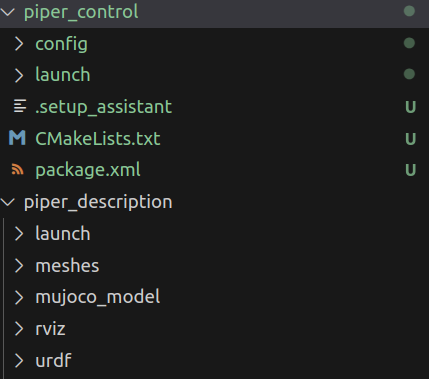
不知道为啥生成的joint_limits.yaml调用ros2 launch piper_control_arm demo.launch.py会报错,只要把文件中的5改为5.0就OK了,正确的如下图参数。
# joint_limits.yaml allows the dynamics properties specified in the URDF to be overwritten or augmented as needed

# For beginners, we downscale velocity and acceleration limits.
# You can always specify higher scaling factors (<= 1.0) in your motion requests.  # Increase the values below to 1.0 to always move at maximum speed.
default_velocity_scaling_factor: 0.1
default_acceleration_scaling_factor: 0.1

# Specific joint properties can be changed with the keys [max_position, min_position, max_velocity, max_acceleration]
# Joint limits can be turned off with [has_velocity_limits, has_acceleration_limits]
joint_limits:
  joint1:
    has_velocity_limits: true
    max_velocity: 5.0
    has_acceleration_limits: false
    max_acceleration: 0
  joint2:
    has_velocity_limits: true
    max_velocity: 5.0
    has_acceleration_limits: false
    max_acceleration: 0
  joint3:
    has_velocity_limits: true
    max_velocity: 5.0
    has_acceleration_limits: false
    max_acceleration: 0
  joint4:
    has_velocity_limits: true
    max_velocity: 5.0
    has_acceleration_limits: false
    max_acceleration: 0
  joint5:
    has_velocity_limits: true
    max_velocity: 5.0
    has_acceleration_limits: false
    max_acceleration: 0
  joint6:
    has_velocity_limits: true
    max_velocity: 5.0
    has_acceleration_limits: false
    max_acceleration: 0
生成的文件调用没有错误,但是控制不了臂,原谅是moveit_controllers.yaml中有问题:
把这个文件修改一下:原代码如下:
# MoveIt uses this configuration for controller management

moveit_controller_manager: moveit_simple_controller_manager/MoveItSimpleControllerManager

moveit_simple_controller_manager:
  controller_names:
    - piper_arm_controller

  piper_arm_controller:
    type: FollowJointTrajectory
    joints:
      - joint1
      - joint2
      - joint3
      - joint4
      - joint5
      - joint6
修改后如下:
# MoveIt uses this configuration for controller management

moveit_controller_manager: moveit_simple_controller_manager/MoveItSimpleControllerManager

moveit_simple_controller_manager:
  controller_names:
    - piper_arm_controller

  piper_arm_controller:
    type: FollowJointTrajectory
    action_ns: follow_joint_trajectory
    default: true
    joints:
      - joint1
      - joint2
      - joint3
      - joint4
      - joint5
      - joint6
这样就可以控制臂规划了!!!!
相关moveit应用例子代码参考:
https://github.com/LitchiCheng/ros2_package
Hybrid Planning — MoveIt Documentation: Rolling documentation
https://github.com/agilexrobotics/piper_ros/tree/humble
3.ROS2 查看话题是谁订阅以及发布指令
ros2 topic info /joint_states --verbose
就是通过info查看话题有几个发布,几个订阅,通过--verbose显示话题的详细信息
4.ROS2 查看msg类型
ros2 interface show sensor_msgs/msg/JointState
5.yolo的使用与数据模型
参考论文
yolo11超详细教程_ultralytics yolo11-CSDN博客
Ultralytics YOLO11 - Documentos Ultralytics YOLO
6.调用moveit2中的C++接口控制
piper_control.cpp内容如下:
#include <rclcpp/rclcpp.hpp>
#include <moveit/move_group_interface/move_group_interface.h>
#include <memory>

void move_robot(rclcpp::Node::SharedPtr node)
{
    //创建一个MoveGroupInterface对象,用于控制机械臂的运动
    auto arm_move_group = moveit::planning_interface::MoveGroupInterface(node, "arm");

    // 设置机械臂各个关节的角度
    std::vector<double> arm_joint_goal = {0.5, 0.5, 0, 0, 0, 0};
    bool arm_within_bounds = arm_move_group.setJointValueTarget(arm_joint_goal);

    if (!arm_within_bounds)
    {
        RCLCPP_WARN(rclcpp::get_logger("moveit_api_test"), "失败");
        return;
    }

    // 创建一个Plan对象,用于存储规划结果
    moveit::planning_interface::MoveGroupInterface::Plan arm_plan;

    // 调用plan()函数进行规划,返回规划是否成功
    bool arm_plan_success = (arm_move_group.plan(arm_plan) == moveit::core::MoveItErrorCode::SUCCESS);
    if (!arm_plan_success)
    {
        RCLCPP_WARN(rclcpp::get_logger("moveit_api_test"), "失败");
        return;
    }
    else
    {
        RCLCPP_INFO(rclcpp::get_logger("moveit_api_test"), "成功");
        arm_move_group.move();
    }
}

int main(int argc, char **argv)
{
    // 初始化ROS2通信上下文
    rclcpp::init(argc, argv);

    // 创建ROS2节点实例,节点名称为"simple_moveit_interface"
    rclcpp::Node::SharedPtr node = rclcpp::Node::make_shared("simple_moveit_interface");

    move_robot(node);


    // 进入事件循环,等待处理回调(此处尚未添加具体回调逻辑)
    rclcpp::spin(node);

    // 关闭ROS2通信上下文
    rclcpp::shutdown();

    return 0;  // 程序正常退出
}
CMakeLists.txt中
cmake_minimum_required(VERSION 3.8)
project(piper_control)

if(CMAKE_COMPILER_IS_GNUCXX OR CMAKE_CXX_COMPILER_ID MATCHES "Clang")
  add_compile_options(-Wall -Wextra -Wpedantic)
endif()

# find dependencies
find_package(ament_cmake REQUIRED)
# uncomment the following section in order to fill in
# further dependencies manually.
# find_package(<dependency> REQUIRED)
find_package(rclcpp REQUIRED)

find_package(moveit_core REQUIRED)

find_package(moveit_ros_planning_interface REQUIRED)

find_package(moveit_ros_planning REQUIRED)

add_executable(moveit_node src/piper_control.cpp)

ament_target_dependencies(moveit_node

        rclcpp

        moveit_core

        moveit_ros_planning_interface

        moveit_ros_planning

)
install(TARGETS

        moveit_node

        DESTINATION lib/${PROJECT_NAME}

)
if(BUILD_TESTING)
  find_package(ament_lint_auto REQUIRED)
  # the following line skips the linter which checks for copyrights
  # comment the line when a copyright and license is added to all source files
  set(ament_cmake_copyright_FOUND TRUE)
  # the following line skips cpplint (only works in a git repo)
  # comment the line when this package is in a git repo and when
  # a copyright and license is added to all source files
  set(ament_cmake_cpplint_FOUND TRUE)
  ament_lint_auto_find_test_dependencies()
endif()

ament_package()
package.xml中
<?xml version="1.0"?>
<?xml-model href="http://download.ros.org/schema/package_format3.xsd" schematypens="http://www.w3.org/2001/XMLSchema"?>
<package format="3">
  <name>piper_control</name>
  <version>0.0.0</version>
  <description>TODO: Package description</description>
  <maintainer email="caokaifa2015@sina.com">robert</maintainer>
  <license>TODO: License declaration</license>

  <buildtool_depend>ament_cmake</buildtool_depend>
  <depend>rclcpp</depend>
  <depend>moveit_core</depend>
  <depend>moveit_ros_move_group</depend>
  <depend>moveit_kinematics</depend>
  <depend>moveit_ros_planning_interface</depend>
  <depend>tf2_ros</depend>
  <depend>controller_manager</depend>
  <depend>moveit_ros_planning</depend>
  <depend>moveit_ros_occupancy_map_monitor</depend>
  <depend>pluginlib</depend>
  <depend>class_loader</depend>


  <depend>geometry_msgs</depend>
  <depend>moveit_visual_tools</depend>


  <test_depend>ament_lint_auto</test_depend>
  <test_depend>ament_lint_common</test_depend>

  <export>
    <build_type>ament_cmake</build_type>
  </export>
</package>
具体可以参考:ROS2调用Moveit2的C++接口-CSDN博客
roslaunch piper_with_gripper_moveit demo.launch use_rviz:=false7.获取手机陀螺仪数据进行滤波
import asyncio
import websockets
import socket
import json
import math
import time
import numpy as np
from piper_sdk import *


def get_ip():
    s = socket.socket(socket.AF_INET, socket.SOCK_DGRAM)
    try:
        s.connect(('10.255.255.255', 1))
        IP = s.getsockname()[0]
    except Exception:
        IP = '127.0.0.1'
    finally:
        s.close()
    return IP

def quat_from_euler(pitch, roll, yaw):
    cy = np.cos(yaw * 0.5)
    sy = np.sin(yaw * 0.5)
    cp = np.cos(pitch * 0.5)
    sp = np.sin(pitch * 0.5)
    cr = np.cos(roll * 0.5)
    sr = np.sin(roll * 0.5)
    q0 = cy * cp * cr + sy * sp * sr
    q1 = cy * sp * cr + sy * cp * sr
    q2 = sy * cp * cr - cy * sp * sr
    q3 = cy * cp * sr - sy * sp * cr
    return np.array([q0, q1, q2, q3])

def euler_from_quat(q):
    q0, q1, q2, q3 = q
    roll = np.arctan2(2*(q0*q1 + q2*q3), 1 - 2*(q1*q1 + q2*q2))
    pitch = np.arcsin(2*(q0*q2 - q3*q1))
    yaw = np.arctan2(2*(q0*q3 + q1*q2), 1 - 2*(q2*q2 + q3*q3))
    return pitch, roll, yaw

def normalize_quat(q):
    return q / np.linalg.norm(q)


class EKFAHRS:
    def __init__(self):
        # State vector: [q0, q1, q2, q3, bgx, bgy, bgz]
        self.x = np.zeros(7)
        self.x[0] = 1.0  # Initial quaternion
        self.P = np.eye(7)
        # Noise parameters
        self.Q = np.diag([1e-6]*4 + [1e-8]*3)
        self.R = np.diag([1e-1]*3)
        self.g = 9.81

    def set_init(self, acc, mag):
        # acc: 3, mag: 3, units g and μT
        acc = acc / np.linalg.norm(acc)
        pitch = np.arcsin(-acc[0])
        roll = np.arctan2(acc[1], acc[2])
        # Initialize yaw using magnetometer
        mx, my, mz = mag
        mag_x = mx * np.cos(pitch) + my * np.sin(roll) * np.sin(pitch) + mz * np.cos(roll) * np.sin(pitch)
        mag_y = my * np.cos(roll) - mz * np.sin(roll)
        yaw = np.arctan2(-mag_y, mag_x)
        q = quat_from_euler(pitch, roll, yaw)
        self.x[:4] = normalize_quat(q)

    def predict(self, gyro, dt):
        # gyro: rad/s, dt: s
        q = self.x[:4]
        bg = self.x[4:]
        omega = gyro - bg
        wx, wy, wz = omega
        Omega = np.array([
            [0, -wx, -wy, -wz],
            [wx, 0, wz, -wy],
            [wy, -wz, 0, wx],
            [wz, wy, -wx, 0]
        ])
        dq = 0.5 * Omega @ q
        q_new = q + dq * dt
        q_new = normalize_quat(q_new)
        self.x[:4] = q_new
        # Approximate state transition matrix
        F = np.eye(7)
        F[:4, :4] += 0.5 * Omega * dt
        self.P = F @ self.P @ F.T + self.Q

    def update(self, acc):
        # acc: 3, unit g
        q = self.x[:4]
        # Observation model: acc = R(q)^T * [0,0,1]
        hx = np.array([
            2*(q[1]*q[3] - q[0]*q[2]),
            2*(q[0]*q[1] + q[2]*q[3]),
            q[0]**2 + q[3]**2 - q[1]**2 - q[2]**2
        ])
        acc = acc / np.linalg.norm(acc)
        y = acc - hx
        # Jacobian matrix
        H = np.zeros((3,7))
        q0, q1, q2, q3 = q
        H[0,0] = -2*q2
        H[0,1] = 2*q3
        H[0,2] = -2*q0
        H[0,3] = 2*q1
        H[1,0] = 2*q1
        H[1,1] = 2*q0
        H[1,2] = 2*q3
        H[1,3] = 2*q2
        H[2,0] = 2*q0
        H[2,1] = -2*q1
        H[2,2] = -2*q2
        H[2,3] = 2*q3
        S = H @ self.P @ H.T + self.R
        K = self.P @ H.T @ np.linalg.inv(S)
        dx = K @ y
        self.x += dx
        self.x[:4] = normalize_quat(self.x[:4])
        self.P = (np.eye(7) - K @ H) @ self.P

    def get_euler(self):
        return euler_from_quat(self.x[:4])


async def echo(websocket, path):
    global last_time, ekf_initialized
    async for message in websocket:
        try:
            data = json.loads(message)
            sensor_name = data.get("SensorName", "").lower()
            timestamp = data.get("Timestamp", 0)

            if sensor_name in sensor_data:
                sensor_data[sensor_name]['x'] = float(data.get('x', 0))
                sensor_data[sensor_name]['y'] = float(data.get('y', 0))
                sensor_data[sensor_name]['z'] = float(data.get('z', 0))
                sensor_data[sensor_name]['timestamp'] = timestamp

                # Check if all three types of data are fresh
                accel_ts = sensor_data['accelerometer']['timestamp']
                gyro_ts = sensor_data['gyroscope']['timestamp']
                mag_ts = sensor_data['magnetometer']['timestamp']
                if abs(accel_ts - gyro_ts) < 100 and abs(accel_ts - mag_ts) < 100:
                    current_time = time.time()
                    dt = current_time - last_time
                    last_time = current_time

                    # Unit Explanation:
                    # Accelerometer ax, ay, az units are g (gravity)
                    # Gyroscope gx, gy, gz units are rad/s
                    # Magnetometer mx, my, mz units are μT
                    gx = sensor_data['gyroscope']['x']
                    gy = sensor_data['gyroscope']['y']
                    gz = sensor_data['gyroscope']['z']
                    ax = sensor_data['accelerometer']['x']
                    ay = sensor_data['accelerometer']['y']
                    az = sensor_data['accelerometer']['z']
                    mx = sensor_data['magnetometer']['x']
                    my = sensor_data['magnetometer']['y']
                    mz = sensor_data['magnetometer']['z']

                    # EKF Initialization
                    if not ekf_initialized:
                        ekf.set_init(np.array([ax, ay, az]), np.array([mx, my, mz]))
                        ekf_initialized = True

                    # EKF Calculation
                    ekf.predict(np.array([gx, gy, gz]), dt)
                    ekf.update(np.array([ax, ay, az]))
                    epitch, eroll, eyaw = ekf.get_euler()
                    print(f"EKF - Roll: {math.degrees(eroll):.2f}, Pitch: {math.degrees(epitch):.2f}, Yaw: {math.degrees(eyaw):.2f}")

                    # Send results to the robotic arm
                    ctl = [round(initial_position[0] * 1000),
                           round(initial_position[1] * 1000),
                           round(initial_position[2] * 1000),
                           round(math.degrees(eroll) * 1000),
                           round(math.degrees(epitch) * 1000),
                           round(math.degrees(eyaw) * 1000)]
                    robot.EndPoseCtrl(*ctl)

        except Exception as e:
            print(f"Error: {e}")

async def main():
    port = 5000
    async with websockets.serve(echo, '0.0.0.0', port, max_size=1_000_000_000):
        await asyncio.Future()


if __name__ == "__main__":
    robot = C_PiperInterface_V2()
    robot.ConnectPort()

    # Enable Piper
    while not robot.EnablePiper():
        time.sleep(0.01)

    # Set control mode
    mode = 0xAD
    spd = 100
    robot.MotionCtrl_2(0x01, 0x00, spd, mode)
    time.sleep(0.1)
    robot.MotionCtrl_2(0x01, 0x00, spd, mode)

    # Set initial position
    initial_position = [0, 0, 500]  # X, Y, Z (0.001mm)
    # Send initial position to the robotic arm
    robot.EndPoseCtrl(
                    initial_position[0] * 1000,     # X
                    initial_position[1] * 1000,     # Y
                    initial_position[2] * 1000,     # Z
                    0 * 1000,                       # RX
                    0 * 1000,                       # RY
                    0 * 1000                        # RZ
                )

    # Sensor data cache
    sensor_data = {
        'accelerometer': {'x': 0.0, 'y': 0.0, 'z': 0.0, 'timestamp': 0},
        'gyroscope': {'x': 0.0, 'y': 0.0, 'z': 0.0, 'timestamp': 0},
        'magnetometer': {'x': 0.0, 'y': 0.0, 'z': 0.0, 'timestamp': 0},
    }

    last_time = time.time()
    ekf = EKFAHRS()
    ekf_initialized = False

    hostname = socket.gethostname()
    IPAddr = get_ip()
    port = 5000
    print("Your Computer Name is: " + hostname)
    print("Your Computer IP Address is: " + IPAddr)
    print("* Enter {0}:{1} in the app.\n* Press the 'Set IP Address' button.\n* Select the sensors to stream.\n* Update the 'update interval' by entering a value in ms.".format(IPAddr, port))

    # Start WebSocket server
asyncio.run(main())参考:https://github.com/agilexrobotics/Agilex-College/blob/master/piper/mobilePhoneCtl/main.py
8.下载文件是否完整
使用如下语句检测:
sha256sum model.safetensors
9.使用nvtop查看GPU使用情况
sudo apt install nvtop
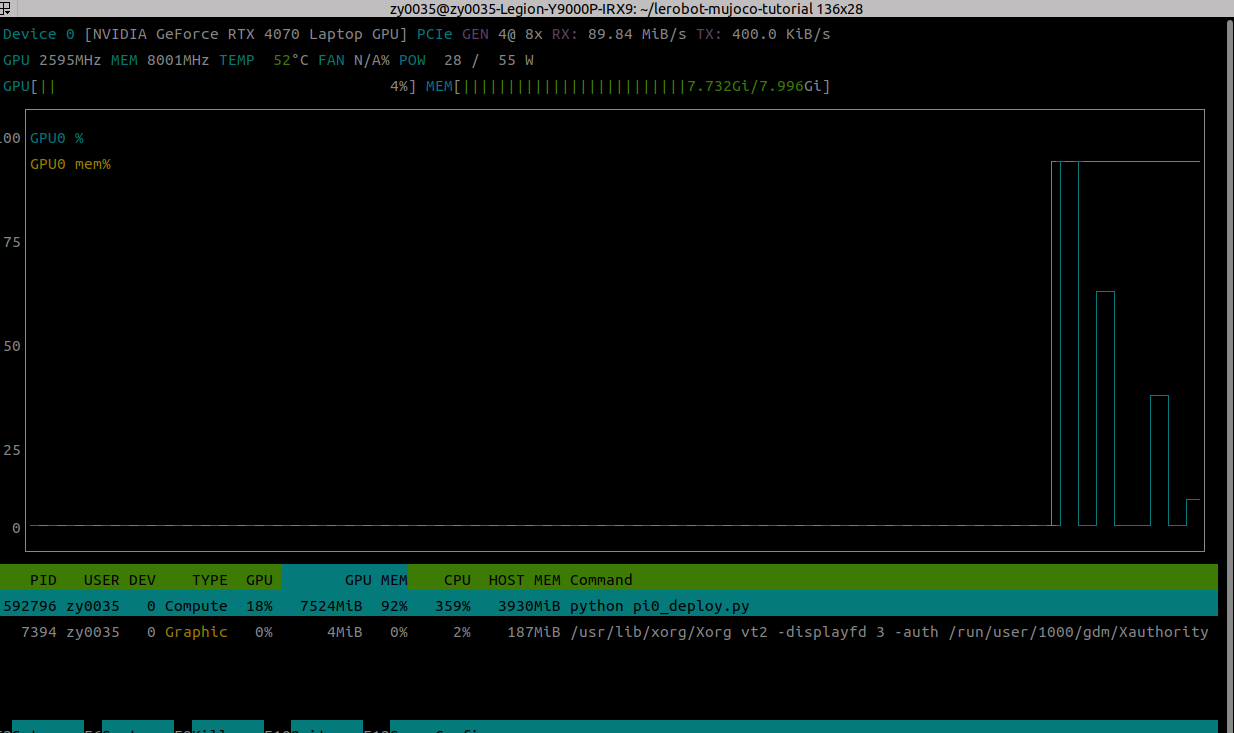
使用nvtop查看
10.docker常用指令
docker run创建容器
docker images 查看镜像
docker run -it --name pi0_train 899566afc09e /bin/bash 通过镜像建立容器
docker ps -a 查看容器ID号
docker start ID 启动建的容器
docker exec -it ID /bin/bash 交互启动
docker cp lerobot-mujoco-tutorial 32af88f50f8c:/workspace 复制
docker commit ba4c1bbcd75c pi0_test:v1 打包镜像
docker run -it --gpus all -v /data02:/data02 --shm-size=128g --name name pi0_test:v1 /bin/bash
docker安装参考文章地址:
https://blog.csdn.net/qq_33665793/article/details/150762218
- 安装所需的软件包,以支持通过 HTTPS 使用 Docker 仓库:
sudo apt install apt-transport-https ca-certificates curl software-properties-common- 添加 Docker 的官方 GPG 密钥:
curl -fsSL https://download.docker.com/linux/ubuntu/gpg | sudo apt-key add -- 添加 Docker 的 APT 仓库:
sudo add-apt-repository "deb [arch=amd64] https://download.docker.com/linux/ubuntu $(lsb_release -cs) stable"- 更新软件包索引:
sudo apt update- 安装 Docker:
sudo apt install docker-ce- 验证 Docker 是否安装成功:
sudo docker --version使用docker出现zy0035 is not in the sudoers file. This incident will be reported:
这里 -aG 选项表示将用户添加到指定的组中,并且如果该组不存在则创建它
sudo usermod -aG sudo zy0035
拉镜像:
国外nvidia:
https://hub.docker.com/r/nvidia/cuda/tags?name=12.4
国内的:
sudo docker pull nvcr.io/nvidia/cuda:12.4.1-cudnn-devel-ubuntu22.04
拉取之后使用run创建:
sudo docker run --gpus all -it --name pi0 nvcr.io/nvidia/cuda:12.4.1-cudnn-devel-ubuntu22.04
使用docker ps -a查看
挂载:
docker run -it --gpus all -p 30010:22 -v /data:/data -v /media:/media --shm-size=128g --name my_container ***** /bin/bash
打包容器:
docker commit fddcb1d2b419 nvcr.io/nvidia/cuda:12.4.1-cudnn-devel-ubuntu22.04-1113
could not select device driver "" with capabilities: [[gpu]]
1. 安装和确认 NVIDIA 驱动
确保你的宿主机安装了支持你的NVIDIA GPU的驱动。可以通过运行 nvidia-smi 来检查驱动是否已安装和GPU是否被识别。
2. 安装NVIDIA Container Toolkit
NVIDIA Container Toolkit(包括nvidia-docker)是必需的,以便Docker可以管理和使用GPU。可以按照NVIDIA官方文档的指示进行安装。(https://docs.nvidia.com/datacenter/cloud-native/container-toolkit/install-guide.html)
以下是一个基本的安装步骤概览(以Ubuntu为例):
# 设置稳定版仓库和GPG密钥
distribution=$(. /etc/os-release;echo $ID$VERSION_ID)
curl -s -L https://nvidia.github.io/nvidia-docker/gpgkey | sudo apt-key add -
curl -s -L https://nvidia.github.io/nvidia-docker/$distribution/nvidia-docker.list | sudo tee /etc/apt/sources.list.d/nvidia-docker.list
# 安装nvidia-docker2和重启Docker服务
sudo apt-get update
sudo apt-get install -y nvidia-docker2
sudo systemctl restart docker
具体可以参考:https://blog.csdn.net/weixin_44212848/article/details/137013980?spm=1001.2101.3001.6650.3&utm_medium=distribute.pc_relevant.none-task-blog-2%7Edefault%7EBlogCommendFromBaidu%7ECtr-3-137013980-blog-145335593.235%5Ev43%5Epc_blog_bottom_relevance_base1&depth_1-utm_source=distribute.pc_relevant.none-task-blog-2%7Edefault%7EBlogCommendFromBaidu%7ECtr-3-137013980-blog-145335593.235%5Ev43%5Epc_blog_bottom_relevance_base1
下载git 代码出现:
the authenticity of host 'github.com (20.205.243.166)' can't be established.
ED25519 key fingerprint is SHA256:+DiY3wvvV6TuJJhbpZisF/zLDA0zPMSvHdkr4UvCOqU.
This key is not known by any other names
Are you sure you want to continue connecting (yes/no/[fingerprint])? yes
Warning: Permanently added 'github.com' (ED25519) to the list of known hosts.
git@github.com: Permission denied (publickey).
fatal: Could not read from remote repository.
ssh-keygen -t ed25519 -C "***@qq.com"
然后进入cat /root/.ssh/id_ed25519.pub里面内容拷贝到github中
写一个脚本直接登入docker并切换文件夹:
docker exec -it fddcb1d2b419 /bin/bash -c "cd /root && exec bash"
11.解决运行smoVLA中huggingface下载不下的问题
Traceback (most recent call last): File "/home/zy0035/anaconda3/envs/lerobot_mujoco/lib/python3.10/site-packages/urllib3/connectionpool.py", line 464, in _make_request self._validate_conn(conn) File "/home/zy0035/anaconda3/envs/lerobot_mujoco/lib/python3.10/site-packages/urllib3/connectionpool.py", line 1093, in _validate_conn conn.connect() File "/home/zy0035/anaconda3/envs/lerobot_mujoco/lib/python3.10/site-packages/urllib3/connection.py", line 790, in connect sock_and_verified = _ssl_wrap_socket_and_match_hostname( File "/home/zy0035/anaconda3/envs/lerobot_mujoco/lib/python3.10/site-packages/urllib3/connection.py", line 969, in _ssl_wrap_socket_and_match_hostname ssl_sock = ssl_wrap_socket( File "/home/zy0035/anaconda3/envs/lerobot_mujoco/lib/python3.10/site-packages/urllib3/util/ssl_.py", line 480, in ssl_wrap_socket ssl_sock = _ssl_wrap_socket_impl(sock, context, tls_in_tls, server_hostname) File "/home/zy0035/anaconda3/envs/lerobot_mujoco/lib/python3.10/site-packages/urllib3/util/ssl_.py", line 524, in _ssl_wrap_socket_impl return ssl_context.wrap_socket(sock, server_hostname=server_hostname) File "/home/zy0035/anaconda3/envs/lerobot_mujoco/lib/python3.10/ssl.py", line 512, in wrap_socket return self.sslsocket_class._create( File "/home/zy0035/anaconda3/envs/lerobot_mujoco/lib/python3.10/ssl.py", line 1070, in _create self.do_handshake() File "/home/zy0035/anaconda3/envs/lerobot_mujoco/lib/python3.10/ssl.py", line 1341, in do_handshake self._sslobj.do_handshake() TimeoutError: _ssl.c:980: The handshake operation timed out The above exception was the direct cause of the following exception: Traceback (most recent call last): File "/home/zy0035/anaconda3/envs/lerobot_mujoco/lib/python3.10/site-packages/requests/adapters.py", line 644, in send resp = conn.urlopen( File "/home/zy0035/anaconda3/envs/lerobot_mujoco/lib/python3.10/site-packages/urllib3/connectionpool.py", line 841, in urlopen retries = retries.increment( File "/home/zy0035/anaconda3/envs/lerobot_mujoco/lib/python3.10/site-packages/urllib3/util/retry.py", line 474, in increment raise reraise(type(error), error, _stacktrace) File "/home/zy0035/anaconda3/envs/lerobot_mujoco/lib/python3.10/site-packages/urllib3/util/util.py", line 39, in reraise raise value File "/home/zy0035/anaconda3/envs/lerobot_mujoco/lib/python3.10/site-packages/urllib3/connectionpool.py", line 787, in urlopen response = self._make_request( File "/home/zy0035/anaconda3/envs/lerobot_mujoco/lib/python3.10/site-packages/urllib3/connectionpool.py", line 488, in _make_request raise new_e File "/home/zy0035/anaconda3/envs/lerobot_mujoco/lib/python3.10/site-packages/urllib3/connectionpool.py", line 466, in _make_request self._raise_timeout(err=e, url=url, timeout_value=conn.timeout) File "/home/zy0035/anaconda3/envs/lerobot_mujoco/lib/python3.10/site-packages/urllib3/connectionpool.py", line 367, in _raise_timeout raise ReadTimeoutError( urllib3.exceptions.ReadTimeoutError: HTTPSConnectionPool(host='huggingface.co', port=443): Read timed out. (read timeout=10) During handling of the above exception, another exception occurred: Traceback (most recent call last): File "/home/zy0035/anaconda3/envs/lerobot_mujoco/lib/python3.10/site-packages/huggingface_hub/file_download.py", line 1546, in _get_metadata_or_catch_error metadata = get_hf_file_metadata( File "/home/zy0035/anaconda3/envs/lerobot_mujoco/lib/python3.10/site-packages/huggingface_hub/utils/_validators.py", line 114, in _inner_fn return fn(*args, **kwargs) File "/home/zy0035/anaconda3/envs/lerobot_mujoco/lib/python3.10/site-packages/huggingface_hub/file_download.py", line 1463, in get_hf_file_metadata r = _request_wrapper( File "/home/zy0035/anaconda3/envs/lerobot_mujoco/lib/python3.10/site-packages/huggingface_hub/file_download.py", line 286, in _request_wrapper response = _request_wrapper( File "/home/zy0035/anaconda3/envs/lerobot_mujoco/lib/python3.10/site-packages/huggingface_hub/file_download.py", line 309, in _request_wrapper response = http_backoff(method=method, url=url, **params, retry_on_exceptions=(), retry_on_status_codes=(429,)) File "/home/zy0035/anaconda3/envs/lerobot_mujoco/lib/python3.10/site-packages/huggingface_hub/utils/_http.py", line 310, in http_backoff response = session.request(method=method, url=url, **kwargs) File "/home/zy0035/anaconda3/envs/lerobot_mujoco/lib/python3.10/site-packages/requests/sessions.py", line 589, in request resp = self.send(prep, **send_kwargs) File "/home/zy0035/anaconda3/envs/lerobot_mujoco/lib/python3.10/site-packages/requests/sessions.py", line 703, in send r = adapter.send(request, **kwargs) File "/home/zy0035/anaconda3/envs/lerobot_mujoco/lib/python3.10/site-packages/huggingface_hub/utils/_http.py", line 96, in send return super().send(request, *args, **kwargs) File "/home/zy0035/anaconda3/envs/lerobot_mujoco/lib/python3.10/site-packages/requests/adapters.py", line 690, in send raise ReadTimeout(e, request=request) requests.exceptions.ReadTimeout: (ReadTimeoutError("HTTPSConnectionPool(host='huggingface.co', port=443): Read timed out. (read timeout=10)"), '(Request ID: 6191a71e-1234-41c4-8c83-ca43043ac261)') The above exception was the direct cause of the following exception: Traceback (most recent call last): File "/home/zy0035/anaconda3/envs/lerobot_mujoco/lib/python3.10/site-packages/transformers/utils/hub.py", line 424, in cached_files hf_hub_download( File "/home/zy0035/anaconda3/envs/lerobot_mujoco/lib/python3.10/site-packages/huggingface_hub/utils/_validators.py", line 114, in _inner_fn return fn(*args, **kwargs) File "/home/zy0035/anaconda3/envs/lerobot_mujoco/lib/python3.10/site-packages/huggingface_hub/file_download.py", line 1010, in hf_hub_download return _hf_hub_download_to_cache_dir( File "/home/zy0035/anaconda3/envs/lerobot_mujoco/lib/python3.10/site-packages/huggingface_hub/file_download.py", line 1117, in _hf_hub_download_to_cache_dir _raise_on_head_call_error(head_call_error, force_download, local_files_only) File "/home/zy0035/anaconda3/envs/lerobot_mujoco/lib/python3.10/site-packages/huggingface_hub/file_download.py", line 1661, in _raise_on_head_call_error raise LocalEntryNotFoundError( huggingface_hub.errors.LocalEntryNotFoundError: An error happened while trying to locate the file on the Hub and we cannot find the requested files in the local cache. Please check your connection and try again or make sure your Internet connection is on. The above exception was the direct cause of the following exception: Traceback (most recent call last): File "/home/zy0035/lerobot-mujoco-tutorial/smolvla_deploy.py", line 32, in <module> policy = SmolVLAPolicy.from_pretrained('./omy_pnp_smolvla', config=cfg, dataset_stats=dataset_metadata.stats) File "/home/zy0035/lerobot-mujoco-tutorial/./lerobot/lerobot/common/policies/pretrained.py", line 109, in from_pretrained instance = cls(config, **kwargs) File "/home/zy0035/lerobot-mujoco-tutorial/./lerobot/lerobot/common/policies/smolvla/modeling_smolvla.py", line 257, in __init__ self.language_tokenizer = AutoProcessor.from_pretrained(self.config.vlm_model_name).tokenizer File "/home/zy0035/anaconda3/envs/lerobot_mujoco/lib/python3.10/site-packages/transformers/models/auto/processing_auto.py", line 316, in from_pretrained config = AutoConfig.from_pretrained( File "/home/zy0035/anaconda3/envs/lerobot_mujoco/lib/python3.10/site-packages/transformers/models/auto/configuration_auto.py", line 1096, in from_pretrained config_dict, unused_kwargs = PretrainedConfig.get_config_dict(pretrained_model_name_or_path, **kwargs) File "/home/zy0035/anaconda3/envs/lerobot_mujoco/lib/python3.10/site-packages/transformers/configuration_utils.py", line 594, in get_config_dict config_dict, kwargs = cls._get_config_dict(pretrained_model_name_or_path, **kwargs) File "/home/zy0035/anaconda3/envs/lerobot_mujoco/lib/python3.10/site-packages/transformers/configuration_utils.py", line 653, in _get_config_dict resolved_config_file = cached_file( File "/home/zy0035/anaconda3/envs/lerobot_mujoco/lib/python3.10/site-packages/transformers/utils/hub.py", line 266, in cached_file file = cached_files(path_or_repo_id=path_or_repo_id, filenames=[filename], **kwargs) File "/home/zy0035/anaconda3/envs/lerobot_mujoco/lib/python3.10/site-packages/transformers/utils/hub.py", line 491, in cached_files raise EnvironmentError( OSError: We couldn't connect to 'https://huggingface.co' to load the files, and couldn't find them in the cached files. Checkout your internet connection or see how to run the library in offline mode at 'https://huggingface.co/docs/transformers/installation#offline-mode' 怎么解决这个问题
修改conda环境路径下的constants.py,如我的:
/home/zy0035/anaconda3/envs/lerobot_mujoco/lib/python3.10/site-packages/huggingface_hub/constants.py
修改HUGGINGFACE_CO_URL_HOME和_HF_DEFAULT_ENDPOINT
将HUGGINGFACE_CO_URL_HOME修改为HUGGINGFACE_CO_URL_HOME = "https://hf-mirror.com/"
将_HF_DEFAULT_ENDPOINT修改为_HF_DEFAULT_ENDPOINT = "https://hf-mirror.com"
修改完运行即可
12. 建立conda环境如果没法建立,后面指定conda-forge
conda create --name pi0.5 python=3.11 -c conda-forge
13. ssh登入需要安装
sudo apt install openssh-server
14.python 库tyro处理复杂的配置结构,同时保持代码的简洁和类型安全
@dataclass
class Args:
    exp_name: str = os.path.basename(__file__)[: -len(".py")]
    """the name of this experiment"""
    seed: int = 1
    """seed of the experiment"""
    track: bool = False
    """if toggled, this experiment will be tracked with Weights and Biases"""
    wandb_project_name: str = "cleanRL"
    """the wandb's project name"""
    capture_video: bool = False
    """whether to capture videos of the agent performances (check out `videos` folder)"""
    env_id: str = 'dm_control/walker-run-v0'
    """the id of the environment"""
    action_repeat: int = 4
    """number of times the same action is repeated"""

    # Model learning
    total_timesteps: int = 1_000_000
    """total timesteps of the experiments"""
    learning_rate: float = 3e-4
    """the learning rate of the optimizer"""
    gamma: float = 0.95
    """the discount factor gamma"""
    tau: float = 0.01
    """target smoothing coefficient"""
    batch_size: int = 512
    """the batch size of sample from the reply memory"""
    exploration_noise: float = 0.05
    """the scale of exploration noise"""
    learning_starts: int = 25e3
    """timestep to start learning"""
    grad_clip_norm = 20.0
    """the norm for gradient clipping"""
    latent_dim: int = 512
    """coefficient of transition loss term"""
    consis_coef: float = 2.0
    """coefficient of transition loss term"""
    reward_coef: float = 0.5
    """coefficient of reward loss term"""
    value_coef: float = 0.1
    """coefficient of value loss term"""
    rho: float = 0.5
    """coefficient of loss decay over time"""
    target_network_frequency: int = 2
    "the frequency of updates for the target nerworks"

    # Planning (MPPI)
    horizon: int = 3
    """planning horizon length in time steps"""
    iterations: int = 6
    """number of updates during planning"""
    num_samples: int = 512
    """number of samples drawn from the distribution"""
    num_actor_traj: int = 16
    """number of trajectory samples generated by the actor"""
    num_elites: int = 64
    """number of elite samples for optimization"""
    temperature: float = 0.5
    """temperature parameter controlling the scale of updates"""
调用:
  args = tyro.cli(Args)
    run_name = f"{args.env_id}__{args.exp_name}__{args.seed}__{int(time.time())}"
    group_name = f"{args.env_id}__{args.exp_name}"
15.NVIDIA驱动失效简单解决方案:NVIDIA-SMI has failed because it couldn‘t communicate with the NVIDIA driver.
第一步,打开终端,输入:vidia-smi
NVIDIA-SMI has failed because it couldn't communicate with the NVIDIA driver.
Make sure that the latest NVIDIA driver is installed and running.
第二步,使用nvcc -V检查驱动和cuda。
nvcc: NVIDIA (R) Cuda compiler driver
Copyright (c) 2005-2018 NVIDIA Corporation
Built on Sat_Aug_25_21:08:01_CDT_2018
Cuda compilation tools, release 10.0, V10.0.130
发现驱动是存在的,于是进行下一步。
第三步,查看已安装驱动的版本信息
ls /usr/src | grep nvidia
比如我的驱动版本是:nvidia-535.161.08
第四步,依次输入以下命令
sudo apt-get install dkms
sudo dkms install -m nvidia -v 535.161.08
发现:
Error! Could not locate dkms.conf file.
File: /usr/src/nvidia-535.161.08/dkms.conf does not exist.
直接卸载:
sudo apt-get remove --purge '^nvidia-.*'
打开软件与更新,重新装对应驱动即可
https://www.cnblogs.com/nannandbk/p/18144618
设置使用几张GPU卡训练模型
import os
os.environ["CUDA_VISIBLE_DEVICES"] = "0,1,2,3"
这里设置使用0,1,2,3
刷新nvidia指令
watch -n 1 -c nvidia-smi
python代码可以使用pdb进行微调
import pdb; pdb.set_trace() # 程序会在这里暂停
例子:
def calculate_sum(a, b):
    import pdb; pdb.set_trace()  # 程序会在这里暂停
    result = a + b
    return result

x = 5
y = 3
print(calculate_sum(x, y))
基本导航
-
n(next) - 执行下一行 -
s(step) - 进入函数调用 -
c(continue) - 继续执行直到下一个断点 -
q(quit) - 退出调试器
huggingface 下载设置地址:
uv与python环境不同,可以设置把uv环境设置为python运行环境为:
uv venv --python $(conda activate pi0.5 && which python)
du查找哪个文件占用
sudo du -h --max-depth=1 /home | sort -hr | head -n 20
python配置参数hydra
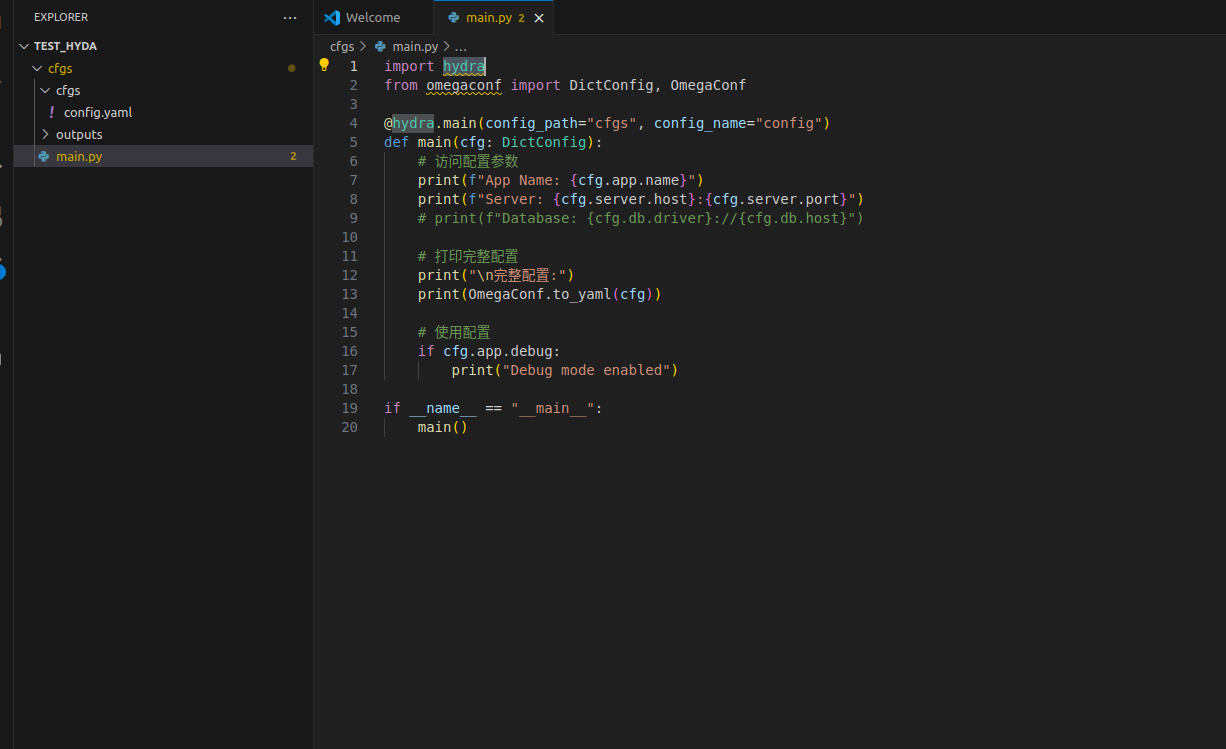
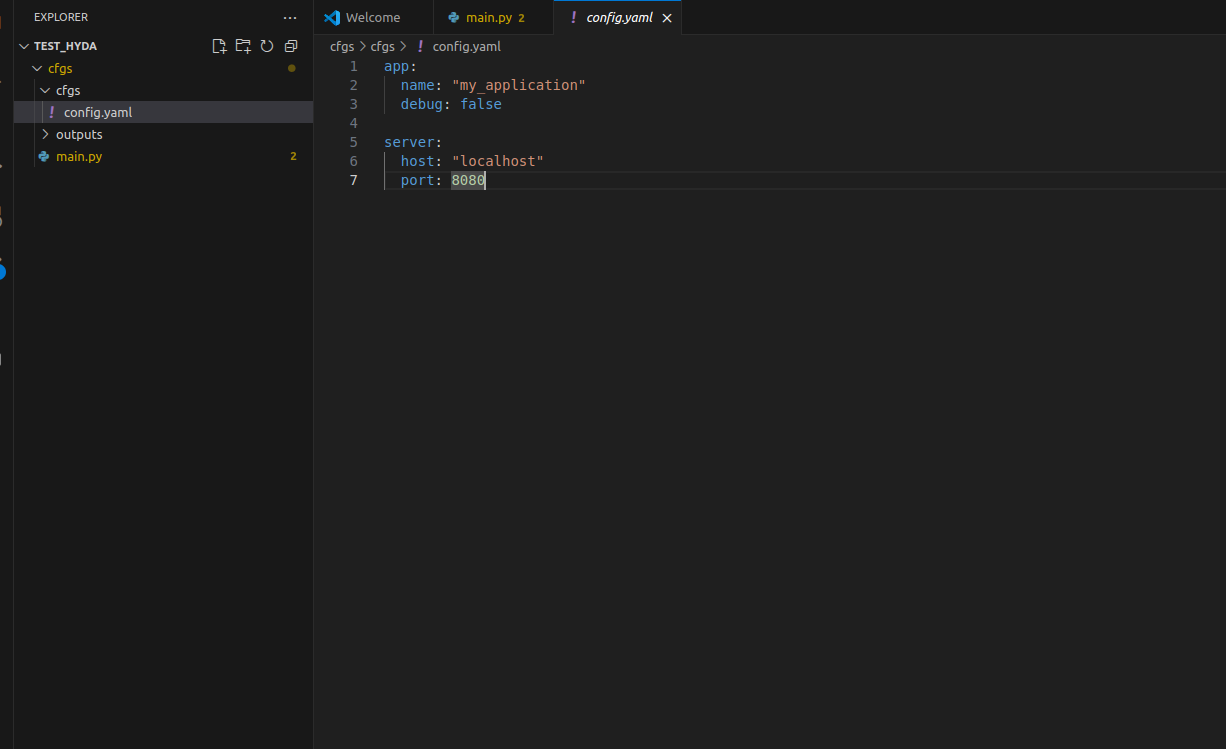
这个运行最后结果为python main.py:
App Name: my_application
Server: localhost:8080
完整配置:
app:
name: my_application
debug: false
server:
host: localhost
port: 8080
免费Google AI Studio平台使用地址:
https://aistudio.google.com/prompts/new_chat?model=gemini-3-pro-preview
使用sshpass登入,仿真终端掉落:
这两个参数组合起来构成了保活机制(Keep-Alive),主要用于防止因防火墙或路由器认为连接空闲而将其断开。
-
-o ServerAliveInterval=60:
-
含义:客户端每隔 60秒 向服务器发送一个空的“心跳包”(KeepAlive 数据包)。
-
作用:告诉服务器“我还在线,不要断开我”,同时也通过产生流量防止中间的防火墙或 NAT 设备因连接空闲超时而切断连接。
-
-
-o ServerAliveCountMax=3:
-
含义:设置允许发送心跳包但没有收到服务器响应的最大次数。
-
作用:判定掉线。如果客户端发送了心跳包,服务器没有回应,计数器加 1。当连续 3次(即 3 × 60秒 = 180秒)都没有收到回应时,客户端会判定连接已断开并自动终止 SSH 进程。
-
sshpass -p 密码 ssh -o ServerAliveInterval=60 -o ServerAliveCountMax=3 用户名@IP
查找那张nvidia卡被占用
详细的:sudo lsof /dev/nvidia5
nvtop
把程序挂起来:
XLA_PYTHON_CLIENT_MEM_FRACTION=0.9 nohup uv run scripts/train.py pi05_flatten_fold_awbc --exp_name=run1 --overwrite > train.log 2>&1 &命令原理解析:
-
nohup:告诉系统,即使你关闭了终端/断开了SSH,也不要杀掉这个程序。
-
> train.log:把程序原本打印在屏幕上的输出(如进度条、loss)保存到 train.log 文件中。
-
2>&1:把“错误信息”也一并合并保存到 train.log 里。
-
&:关键所在,让程序在后台运行,把控制台马上还给你
如何查看进度?
因为在后台运行,你看不到输出,可以使用这行命令实时查看日志:
code Bash
tail -f train.log补充:如何关掉后台的程序?
如果你想强行终止后台的训练进程:
-
如果是用 nohup 跑的,输入 ps -ef | grep scripts/train.py 找到进程号(PID),然后 kill -9 <PID>。
linux安装codex
curl -fsSL https://deb.nodesource.com/setup_22.x | sudo bash -
sudo apt-get install -y nodejs
node -v
npm -v
安装 Codex CLI
Bash
npm install -g @openai/codex
开发板自启动调用:
在目录下/etc/systemd/system建立一个文件
从容器配置可以看到:
主机系统启动 → /etc/systemd/system/chassis.service → /home/startup.sh → 启动Docker容器 nav2 → Docker Entrypoint执行/scripts/project_startup/startup.sh → 启动完整的ROS导航定位系统。
Config.Cmd: ["/bin/bash"]
Config.Entrypoint: ["/bin/bash", "/scripts/project_startup/startup.sh"]
1. 镜像中的Entrypoint: ["/bin/bash", "/scripts/project_startup/startup.sh"]
2. 创建容器时指定的Cmd: ["/bin/bash"]
查看创建容器的命令(来自/home/startup.sh):
docker run -it \
-e "ROS_DOMAIN_ID=69" \
-e "ROS_LOG_DIR=/root/.ros/log/" \
--privileged=true \
--shm-size 2147483648 \
--net host \
--volume /home/robot:/home/robot \
--volume /root/.ros/log:/root/.ros/log \
--name nav2 \
-d \
nav2/arm64:latest \
/bin/bash # <-- 这个就是Cmd参数
强制指定底层为 CycloneDDS 并绑定物理网卡:
(注意:请把下面这段命令里的 eth0 替换成你第一步查到的真实网卡名!双端都要替换为各自对应的网卡)
code Bash
export RMW_IMPLEMENTATION=rmw_cyclonedds_cpp
export CYCLONEDDS_URI='<CycloneDDS><Domain><General><NetworkInterfaceAddress>eth0</NetworkInterfaceAddress></General></Domain></CycloneDDS>'
export ROS_DOMAIN_ID=2 export ROS_DISCOVERY_SERVER="12.16.2.6:11811" export ROS_SUPER_CLIENT=TRUE # 关键:不加则 ros2 topic list 看不全





 扫一扫
扫一扫


 2万+
2万+

 被折叠的 条评论
为什么被折叠?
被折叠的 条评论
为什么被折叠?
 到【灌水乐园】发言





