mac:brew无法访问raw.githubusercontent.com解决方式

安装 brew 报错Failed to connect to raw.githubusercontent.com port 443: Connection refused mac安装brew Failed to connect to raw.githubusercontent.com port 443: Connection refused 阅读详情

在mac上用homebrew安装python3.6,结果报错如下:curl: (7) Failed to connect to raw.githubusercontent.com port 443: Connection refused


我试了下ping raw.githubusercontent.com,确实不通,在网上搜素访问方式,终于找到了一篇文章:https://www.cnblogs.com/sinferwu/p/12726833.html

参照解决方法如下:

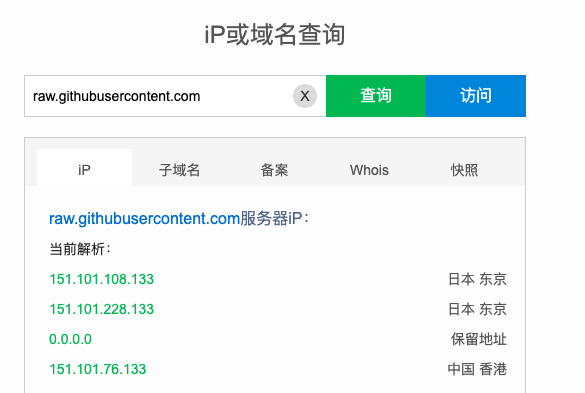
1. 查询raw.githubusercontent.com对应的dns

输入:https://site.ip138.com/raw.Githubusercontent.com/


2. 修改hosts

在mac的终端下执行:

sudo echo "151.101.76.133 raw.githubusercontent.com" >> /etc/hosts


3. 试试效果

传送门:2021最新测试资料与大厂招聘合集

博主:测试生财(一个不为996而996的测开码农)

座右铭:专注测试开发与自动化运维,努力读书思考写作,为内卷的人生奠定财务自由。

内容范畴:技术提升,职场杂谈,事业发展,阅读写作,投资理财,健康人生。

csdn:https://blog.csdn.net/ccgshigao

博客园:https://www.cnblogs.com/qa-freeroad/

51cto:https://blog.51cto.com/14900374

微信公众号:测试生财(定期分享独家内容和资源)


解决!MAC 安装homebrew出错:Failed to connect to raw.githubusercontent.com port 443问题) MAC安装brew通用办法(以前) /usr/bin/ruby -e “$(curl -fsSL https://raw.githubusercontent.com/Homebrew/install/master/install)” 结果执行报错 Failed to connect to raw.githubusercontent.com port 443: Connection refuse... 阅读详情

相关推荐

Mac curl: (7) Failed to connect to raw.githubusercontent.com port 443: Connection refused解决方案

问题描述 Mac安装HomeBrew时出错 curl: (7) Failed to connect to raw.githubusercontent.com port 443: Connection refused 解决方案: 执行命令vim brew_install.rb 将下面文本粘贴到上面的文件中 在brew_install.rb所在目录终端执行ruby brew_install.rb brew_install.rb内容如下: #!/usr/bin/ruby # This script inst

RuiDer的博客 1616

MacOS安装Homebrew——支持M1芯片

文章目录Homebrew的安装Homebrew的配置install.sh脚本 Homebrew的安装 使用官方脚本安装homebrew,或者可以先访问https://raw.githubusercontent.com/Homebrew/install/HEAD/install.sh将脚本复制到本地。 /bin/bash -c "$(curl -fsSL https://raw.githubusercontent.com/Homebrew/install/HEAD/install.sh)" 因为网络原因,可

leekari 6346

mac 安装brew报错 Failed to connect to raw.githubusercontent.com port 443: Connection refused解决办法

mac剑指丧心病狂,连最基本的telnet命令都没有,没办法,那我们就只能自己安装telnet命令了。 安装telnet前需要安装hongbrew,很简单,复制下面的命令到你的终端工具: /usr/bin/ruby -e "$(curl -fsSL https://raw.githubusercontent.com/Homebrew/install/master/install)" 此时,在我的电脑上报了一个错,居然拒绝连接。。 Failed to connect to raw.githubus

m0_37136046的博客 9793

Mac安装brew

1.在/etc/hosts设置下列github重定向 https://blog.csdn.net/laoxuan2011/article/details/106177126/ 2.执行命令安装brew /bin/bash -c “$(curl https://raw.githubusercontent.com/Homebrew/install/master/install.sh)”

jayronwang的博客 3486

Mac下安装brew遇到的问题以及解决方案Homebrew | curl: (7) Failed to connect to raw.githubusercontent.com port 443

前言 为了安装 Python3 我需要安装 Homebrew ,在安装 Homebrew 的时候遇到了一些阻力。 首先用官网的方式安装: /bin/bash -c "$(curl -fsSL https://raw.githubusercontent.com/Homebrew/install/master/install.sh)" 得到的是这样一串错误: curl: (7) Failed to connect to raw.githubusercontent.com port 443: Connectio

纵身一跃 1519

安装brew不成功,提示:curl: (7) Failed to connect to raw.githubusercontent.com port 443: Connection refused

@[toc](安装brew不成功,提示:curl: (7) Failed to connect to raw.githubusercontent.com port 443: Connection refused) 这次在mac系统上安装brew遇到问题。使用的是常规方法,终端输入: $ /usr/bin/ruby -e "$(curl -fsSL https://raw.githubusercontent.com/Homebrew/install/master/install)" 不成功,提示: curl

Athena_Tintin的博客 803

Mac安装brew,解决raw.githubusercontent.com无法访问的问题

Mac安装brew,解决raw.githubusercontent.com无法访问的问题 博客说明 文章所涉及的资料来自互联网整理和个人总结,意在于个人学习和经验汇总,如有什么地方侵权,请联系本人删除,谢谢! brew介绍 Homebrew是一款Mac OS平台下的软件包管理工具,拥有安装、卸载、更新、查看、搜索等很多实用的功能。简单的一条指令,就可以实现包管理,而不用你关心各种依赖和文件路径...

归子莫的博客 1万+

Homebrew 国内安装脚本

Homebrew 国内安装脚本

mac安装brew(亲测)

在网上搜了很多brew安装方式,包括使用官网的方式都安装报错 Failed to connect to raw.githubusercontent.com port 443: Connection refused 然后找了好久终于找到一个安装成功。 安装方式 /bin/zsh -c "$(curl -fsSL https://gitee.com/cunkai/HomebrewCN/raw/master/Homebrew.sh)" 原地址链接:链接 ...

猿上生活 16万+

全球最大光伏电池缺陷异常检测数据集PVELAD【发布】

下载地址 1:GitHub - binyisu/PVEL-AD 下载地址 2:http://aihebut.com/col.jsp?id=118 下载地址 3:NAVEDownload 竞赛测试系统:Photovoltaic cell anomaly detection | Kaggle 一、简介 PVEL-AD 数据集又叫做EL2021数据集是用于对光伏电池异常缺陷检测方法进行基准测试的数据集,重点是光伏电池工业检测。PVEL-AD包含 36,543 张具有各种内部缺陷和异构背...

苏打水的杯子的博客 2万+

处理图数据, 安装“Pytorch“ + 图神经网络开源框架“PyG “+ “ogb“使用

"OGB" OSError: [WinError 127] 找不到指定的程序。1.[遇到这类问题往往跟torch安装的工具包(如torch-sparse,torch-scatter,torch-cluster)版本没对应上有关](https://blog.csdn.net/weixin_42358688/article/details/117433691)2.[OGB使用环境安装与依赖](https://ogb.stanford.edu/docs/home/)Data Loaders3.[torch-geo

Fuguir™的博客 3706

解决无法连接raw.githubusercontent.com导致mac无法安装homebrew的解决办法

Failed to connect to raw.githubusercontent.com port 443: Connection refused 主要原因是:国内被墙的原因。 解决办法:复制下面的代码,保存为 install-brew.sh 后,chmod +x install-brew.sh 赋予执行权限。 然后执行 ./install-brew.sh 正常安装即可。 #!/bin/bash set -u # First check if the OS is Linux. if [.

liuze0109的博客 5412

转录组分析中的Fastp和FastQC:如何快速检测数据质量并优化流程

本文深入探讨了转录组分析中数据质量控制的核心流程,重点介绍了Fastp和FastQC两款工具的组合应用。FastQC负责对原始测序数据进行全面质量评估,生成可视化报告;Fastp则能一站式完成接头切除、低质量序列过滤、长度筛选等关键质控步骤。文章提供了详细的参数解读、实战脚本和自动化流程构建指南,帮助研究人员快速检测数据质量并优化预处理流程,为下游的差异表达等分析奠定可靠基础。

weixin_28452161的博客 195

Homebrew | curl: (7) Failed to connect to raw.githubusercontent.com port 443: Connection refused

某天想玩玩 Homebrew,突然提示如下: 依稀记得,我曾经玩过这个东西啊,啥情况? 果断官网准备安装下 Homebrew: 出师不利,自然的打开 Stack Overflow 查找解决之道: Homebrew installation on Mac OS X Failed to connect to raw.githubusercontent.com port 443 关键靠谱答案截图...

静心 Study 3万+

STM32F103跑LVGL,用DMA加速刷屏,800*480大屏也能丝滑

本文详细介绍了如何在STM32F103芯片上通过DMA加速和内存优化,实现800*480大屏的LVGL流畅运行。通过FSMC+DMA硬件架构优化、双缓冲机制和LVGL参数调优,显著提升了界面刷新率和响应速度,适用于嵌入式GUI开发中的高性能需求场景。

weixin_30357231的博客 381

C++笔试题整理

目录 1. 笔试题1 1.1 链表反转 1.2 String 2. 笔试题2 2.1 求下面函数的返回值(微软) 2.2 什么是“引用”?申明和使用“引用”要注意哪些问题? 2.3 将“引用”作为函数参数有哪些特点? 2.4 在什么时候需要使用“常引用”?  2.5 将“引用”作为函数返回值类型的格式、好处和需要遵守的规则? 2.6 “引用”与多态的关系? 2.7 “引用”与指针的区别是什么? 2.8 什么时候需要“引用”? 2.9 结构与联合有和区别? 2.10 下面关于.

星月相随的专栏 2490

Mac 安装brew时遇到curl: (7) Failed to connect to raw.githubusercontent.com port 443: Connection refused...

本人在安装brew时遇到一下问题: curl: (7) Failed to connect to raw.githubusercontent.com port 443: Connection refused 尝试各种方法,包括stackoverflow上的解决方案,终于经过了各种失败后,找到解决办法。 输入指令sudo gem install redis,再输入安装brew指令即可...

u010707262的博客 677

Cisco三层交换机的详细配置

** 本文适用于新手小白以及微微基础的同学来用于参考,实验是在Cisco Packet Tracer Student 进行,实验最终效果如图所示,所有命令配置与图中的一致。 使用到的机器型号为:五台电脑,一台服务器,三个普通交换机(2960型号),一个三层交换机(3560-24PS),两台普通服务器(2811) 文章目录一、什么是三层交换机二、配置交换机步骤1.配置二层交换机2.配置三层交换机3.配置两台路由器以及最后一台电脑 一、什么是三层交换机 1.三层交换机 = 三层路由+二层交换机 2.工作在

真正的大师,永远都怀着一颗学徒的心。 4万+

MAC 安装brew raw.githubusercontent.com port 443: Connection refused 本人亲自认证过,踩过多种方案,最终认证的解决方案

MAC 安装brew raw.githubusercontent.com port 443: Connection refused 本人亲自认证过,踩过多种方案,最终认证的解决方案 原因:由于某些你懂的因素,导致GitHub的raw.githubusercontent.com域名解析被污染了。 解决办法:通过修改hosts解决此问题。 查询真实IP 在https://www.ipaddress.com/ 查询raw.githubusercontent.com的真实IP。 修改hosts: sudo vi

jackl 9671

把慢点掰开看:在 SAP HANA 中启用 SQL 优化耗时跟踪 SqlOptTime 的实战指南

摘要:SAP HANA 性能排查中,常出现SQL查询时快时慢的现象,表面看似执行问题,实则是编译阶段耗时过长。通过SQL优化跟踪工具SqlOptStep和SqlOptTime,可精准区分编译与执行时间。SqlOptStep展示优化树变化过程,而SqlOptTime则记录各阶段耗时,帮助定位问题根源。启用SqlOptTime需配置traceprofile,建议限定特定用户以减少系统负载。实际案例显示,报表响应慢常由计算视图编译(CeQo)导致,而非执行阶段问题。解决方案包括调整计算视图展开方式或优化基础视图结

2007 年 ~ 2025 年,深耕 SAP 技术 18 年 1023

SPICE仿真软件:HSPICE_(22).HSPICE仿真案例分析

通过上述案例分析,我们可以看到HSPICE仿真软件在不同电路类型和仿真场景中的应用。无论是简单的直流分析、交流分析还是复杂的暂态分析,HSPICE都能提供详细的仿真结果,帮助我们更好地理解和优化电路设计。希望这些案例能够为读者提供实用的参考和指导,进一步提升使用HSPICE进行电路仿真的能力。输入文件的编写:确保输入文件格式正确,使用注释来解释每一部分的内容。分析类型的选择:根据电路的特点选择合适的分析类型,如.DC.AC和.TRAN。输出结果的设置:使用.print命令来指定需要输出的节点电压和支路电流。

kkchenjj的博客 1317

Mac安装brew手撸 curl:(7) Failed to connect to raw.githubusercontent.com port 443: Connection re fused

cd ~ mkdir homebrew cd homebrew touch install.sh open install.sh https://free-2019.oss-cn-beijing.aliyuncs.com/install.sh 此时会弹出一个文本框,然后接着访问地址复制到弹出的文本框里面去就行 再command + s 保存。 sh ~/homebrew/install.sh 就开始下载homebrew 然后一直等着进度条---~~~~~ 等完后又会继续下载 ..

404路西法的博客 1223

ET2012新版免狗免安装绿色软件

ET2012新版免狗免安祖昂绿色软件。,新界面,新视觉,

Failed to connect to raw.githubusercontent.com port 443

现象:brew 或者 wget 安装过程中报错Failed to connect to raw.githubusercontent.com port 443一、https://www.ipaddress.com/ 去查询 raw.githubusercontent.com 对应 ip拉到底部看到如图二、配置 host文件 三、运行之前命令 比如 成功.........

前端kk的博客 2134

SAP B1中文培訓教材_SDK

公司内部培训资料,对开发工具 ,DIAPI, UIAPI,Add-ON有详细解说

计算机控制技术及应用

《计算机控制技术及应用》通过总结作者的科研成果和吸收国内外的先进理论、方法和技术,以计算机控制系统的网络化、开放化、智能化和集成化发展趋势为主线索,主要介绍计算机控制系统的基本概念和计算机控制系统的典型形式,计算机控制系统的数学描述与基本分析方法,以及数字PID控制器、最少拍控制系统、达林算法、状态变量设计法等设计方法及其各种改进算法。重点突出计算机控制系统输入输出通道接口的设计方法和典型控制系统的设计案例与实现方法等。

Mac中安装brew遇到curl: (7) Failed to connect to raw.githubusercontent.com port 443: Connection refused

Mac中安装brew遇到curl: (7) Failed to connect to raw.githubusercontent.com port 443: Connection refused 我最近在装nginx的时候遇到了一个问题,就是在装brew的时候报错了,找了挺久的,就是执行指令 sudo gem install redis 然后再执行brew的安装命令即可 ...

就是不减肥 3388

深度学习工具包 DeepLearningToolbox

深度学习工具包Deprecation notice.-----This toolbox is outdated and no longer maintained.There are much better tools available for deep learning than this toolbox, e.g. [Theano](http://deeplearning.net/software/theano/), [torch](http://torch.ch/) or [tensorflow](http://www.tensorflow.org/)I would suggest you use one of the tools mentioned above rather than use this toolbox.Best, Rasmus.DeepLearnToolbox================A Matlab toolbox for Deep Learning.Deep Learning is a new subfield of machine learning that focuses on learning deep hierarchical models of data.It is inspired by the human brain's apparent deep (layered, hierarchical) architecture.A good overview of the theory of Deep Learning theory is[Learning Deep Architectures for AI](http://www.iro.umontreal.ca/~bengioy/papers/ftml_book.pdf)For a more informal introduction, see the following videos by Geoffrey Hinton and Andrew Ng.* [The Next Generation of Neural Networks](http://www.youtube.com/watch?v=AyzOUbkUf3M) (Hinton, 2007)* [Recent Developments in Deep Learning](http://www.youtube.com/watch?v=VdIURAu1-aU) (Hinton, 2010)* [Unsupervised Feature Learning and Deep Learning](http://www.youtube.com/watch?v=ZmNOAtZIgIk) (Ng, 2011)If you use this toolbox in your research please cite [Prediction as a candidate for learning deep hierarchical models of data](http://www2.imm.dtu.dk/pubdb/views/publication_details.php?id=6284)```@MASTERSTHESIS\{IMM2012-06284, author = "R. B. Palm", title = "Prediction as a candidate for learning deep hierarchical models of data", year = "2012",}```Contact: rasmusbergpalm at gmail dot comDirectories included in the toolbox-----------------------------------`NN/` - A library for Feedforward Backpropagation Neural Networks`CNN/` - A library for Convolutional Neural Networks`DBN/` - A library for Deep Belief Networks`SAE/` - A library for Stacked Auto-Encoders`CAE/` - A library for Convolutional Auto-Encoders`util/` - Utility functions used by the libraries`data/` - Data used by the examples`tests/` - unit tests to verify toolbox is workingFor references on each library check REFS.mdSetup-----1. Download.2. addpath(genpath('DeepLearnToolbox'));Example: Deep Belief Network---------------------```matlabfunction test_example_DBNload mnist_uint8;train_x = double(train_x) / 255;test_x = double(test_x) / 255;train_y = double(train_y);test_y = double(test_y);%% ex1 train a 100 hidden unit RBM and visualize its weightsrand('state',0)dbn.sizes = [100];opts.numepochs = 1;opts.batchsize = 100;opts.momentum = 0;opts.alpha = 1;dbn = dbnsetup(dbn, train_x, opts);dbn = dbntrain(dbn, train_x, opts);figure; visualize(dbn.rbm{1}.W'); % Visualize the RBM weights%% ex2 train a 100-100 hidden unit DBN and use its weights to initialize a NNrand('state',0)%train dbndbn.sizes = [100 100];opts.numepochs = 1;opts.batchsize = 100;opts.momentum = 0;opts.alpha = 1;dbn = dbnsetup(dbn, train_x, opts);dbn = dbntrain(dbn, train_x, opts);%unfold dbn to nnnn = dbnunfoldtonn(dbn, 10);nn.activation_function = 'sigm';%train nnopts.numepochs = 1;opts.batchsize = 100;nn = nntrain(nn, train_x, train_y, opts);[er, bad] = nntest(nn, test_x, test_y);assert(er < 0.10, 'Too big error');```Example: Stacked Auto-Encoders---------------------```matlabfunction test_example_SAEload mnist_uint8;train_x = double(train_x)/255;test_x = double(test_x)/255;train_y = double(train_y);test_y = double(test_y);%% ex1 train a 100 hidden unit SDAE and use it to initialize a FFNN% Setup and train a stacked denoising autoencoder (SDAE)rand('state',0)sae = saesetup([784 100]);sae.ae{1}.activation_function = 'sigm';sae.ae{1}.learningRate = 1;sae.ae{1}.inputZeroMaskedFraction = 0.5;opts.numepochs = 1;opts.batchsize = 100;sae = saetrain(sae, train_x, opts);visualize(sae.ae{1}.W{1}(:,2:end)')% Use the SDAE to initialize a FFNNnn = nnsetup([784 100 10]);nn.activation_function = 'sigm';nn.learningRate = 1;nn.W{1} = sae.ae{1}.W{1};% Train the FFNNopts.numepochs = 1;opts.batchsize = 100;nn = nntrain(nn, train_x, train_y, opts);[er, bad] = nntest(nn, test_x, test_y);assert(er < 0.16, 'Too big error');```Example: Convolutional Neural Nets---------------------```matlabfunction test_example_CNNload mnist_uint8;train_x = double(reshape(train_x',28,28,60000))/255;test_x = double(reshape(test_x',28,28,10000))/255;train_y = double(train_y');test_y = double(test_y');%% ex1 Train a 6c-2s-12c-2s Convolutional neural network %will run 1 epoch in about 200 second and get around 11% error. %With 100 epochs you'll get around 1.2% errorrand('state',0)cnn.layers = { struct('type', 'i') %input layer struct('type', 'c', 'outputmaps', 6, 'kernelsize', 5) %convolution layer struct('type', 's', 'scale', 2) %sub sampling layer struct('type', 'c', 'outputmaps', 12, 'kernelsize', 5) %convolution layer struct('type', 's', 'scale', 2) %subsampling layer};cnn = cnnsetup(cnn, train_x, train_y);opts.alpha = 1;opts.batchsize = 50;opts.numepochs = 1;cnn = cnntrain(cnn, train_x, train_y, opts);[er, bad] = cnntest(cnn, test_x, test_y);%plot mean squared errorfigure; plot(cnn.rL);assert(er<0.12, 'Too big error');```Example: Neural Networks---------------------```matlabfunction test_example_NNload mnist_uint8;train_x = double(train_x) / 255;test_x = double(test_x) / 255;train_y = double(train_y);test_y = double(test_y);% normalize[train_x, mu, sigma] = zscore(train_x);test_x = normalize(test_x, mu, sigma);%% ex1 vanilla neural netrand('state',0)nn = nnsetup([784 100 10]);opts.numepochs = 1; % Number of full sweeps through dataopts.batchsize = 100; % Take a mean gradient step over this many samples[nn, L] = nntrain(nn, train_x, train_y, opts);[er, bad] = nntest(nn, test_x, test_y);assert(er < 0.08, 'Too big error');%% ex2 neural net with L2 weight decayrand('state',0)nn = nnsetup([784 100 10]);nn.weightPenaltyL2 = 1e-4; % L2 weight decayopts.numepochs = 1; % Number of full sweeps through dataopts.batchsize = 100; % Take a mean gradient step over this many samplesnn = nntrain(nn, train_x, train_y, opts);[er, bad] = nntest(nn, test_x, test_y);assert(er < 0.1, 'Too big error');%% ex3 neural net with dropoutrand('state',0)nn = nnsetup([784 100 10]);nn.dropoutFraction = 0.5; % Dropout fraction opts.numepochs = 1; % Number of full sweeps through dataopts.batchsize = 100; % Take a mean gradient step over this many samplesnn = nntrain(nn, train_x, train_y, opts);[er, bad] = nntest(nn, test_x, test_y);assert(er < 0.1, 'Too big error');%% ex4 neural net with sigmoid activation functionrand('state',0)nn = nnsetup([784 100 10]);nn.activation_function = 'sigm'; % Sigmoid activation functionnn.learningRate = 1; % Sigm require a lower learning rateopts.numepochs = 1; % Number of full sweeps through dataopts.batchsize = 100; % Take a mean gradient step over this many samplesnn = nntrain(nn, train_x, train_y, opts);[er, bad] = nntest(nn, test_x, test_y);assert(er < 0.1, 'Too big error');%% ex5 plotting functionalityrand('state',0)nn = nnsetup([784 20 10]);opts.numepochs = 5; % Number of full sweeps through datann.output = 'softmax'; % use softmax outputopts.batchsize = 1000; % Take a mean gradient step over this many samplesopts.plot = 1; % enable plottingnn = nntrain(nn, train_x, train_y, opts);[er, bad] = nntest(nn, test_x, test_y);assert(er < 0.1, 'Too big error');%% ex6 neural net with sigmoid activation and plotting of validation and training error% split training data into training and validation datavx = train_x(1:10000,:);tx = train_x(10001:end,:);vy = train_y(1:10000,:);ty = train_y(10001:end,:);rand('state',0)nn = nnsetup([784 20 10]); nn.output = 'softmax'; % use softmax outputopts.numepochs = 5; % Number of full sweeps through dataopts.batchsize = 1000; % Take a mean gradient step over this many samplesopts.plot = 1; % enable plottingnn = nntrain(nn, tx, ty, opts, vx, vy); % nntrain takes validation set as last two arguments (optionally)[er, bad] = nntest(nn, test_x, test_y);assert(er < 0.1, 'Too big error');```[![Bitdeli Badge](https://d2weczhvl823v0.cloudfront.net/rasmusbergpalm/deeplearntoolbox/trend.png)](https://bitdeli.com/free "Bitdeli Badge")

mac 安装 docker报错 Failed to connect to raw.githubusercontent.com port 443: Connection refused

今天整理了一下家里的电脑的文件夹,想着学习一波,然后下载docker时候,给我直接报了这个错然后我就查资料,发现这个域名被废掉了,所以我们需要重新找到这个域名的IP地址,然后把它添加到hosts文件中就可以了。作者:靴唯白链接:https://www.jianshu.com/p/68c6a9ac67db来源:简书著作权归作者所有。商业转载请联系作者获得授权,非商业转载请注明出处。

whf1215847706的专栏 1085

安装HomeBrew 在 Mac OS 遇到curl: (35) LibreSSL SSL in connection to raw.githubusercontent.com:443错误的解决

1、先右键这个链接,保存链接文件 https://raw.githubusercontent.com/Homebrew/install/master/install 2、打开保存的地方 3、把名字更改为 4、打开terminal输入 ruby brew_install.rb 即可 如果在安装的过程中很慢,可以将文件中的brew源换成清华的源, 还有可能遇到 LibreSSL SSL_read:...

BLOG OF PETERMAOSX. 2万+
上一篇: telnet:no route to host
下一篇: 阅读后的变化
评论
成就一亿技术人!
拼手气红包6.0元
还能输入1000个字符
 
 条评论被折叠 查看
添加红包

请填写红包祝福语或标题

个

红包个数最小为10个

元

红包金额最低5元

当前余额3.43元 前往充值 >
需支付:10.00元
成就一亿技术人!
领取后你会自动成为博主和红包主的粉丝 规则
hope_wisdom
发出的红包

打赏作者

公众号-测试生财

点赞和关注比打赏更重要

¥1 ¥2 ¥4 ¥6 ¥10 ¥20
扫码支付:¥1
获取中
扫码支付

您的余额不足,请更换扫码支付或充值

打赏作者

实付元
使用余额支付
点击重新获取
扫码支付
钱包余额 0

抵扣说明:

1.余额是钱包充值的虚拟货币,按照1:1的比例进行支付金额的抵扣。
2.余额无法直接购买下载,可以购买VIP、付费专栏及课程。

余额充值