



 本文详细介绍了WPF中资源的三种使用方式:StaticResource、DynamicResource及资源字典中的静态资源,并展示了如何在实际项目中应用这些资源。
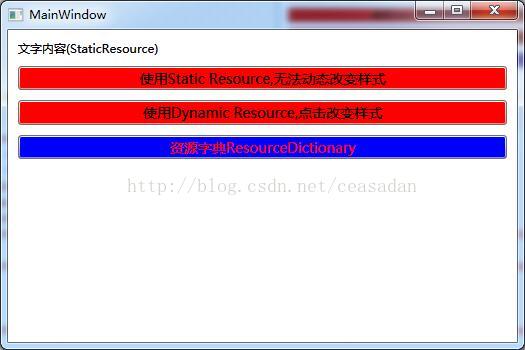
上面一个简单的DEMO示范了资源的三种不同用法:StaticResource静态资源,DynamicResource动态资源,资源字典中的静态资源。
1.StaticResource静态资源
  <Window.Resources>
            <SolidColorBrush x:Key="RedBrush" Color="Red"></SolidColorBrush>
            <sys:String x:Key="textContent">文字内容(StaticResource)</sys:String>
        </Window.Resources>
        <StackPanel Margin="5">
            <TextBlock Text="{StaticResource textContent}" Margin="5"></TextBlock>
            <Button Background="{StaticResource RedBrush}" Margin="5" FontSize="14" Content="使用Static Resource,无法动态改变样式"/>
        </StackPanel>
2.DynamicResource动态资源
        <Window.Resources>
            <SolidColorBrush x:Key="RedBrush" Color="Red"></SolidColorBrush>
            <sys:String x:Key="textContent">文字内容(StaticResource)</sys:String>
        </Window.Resources>
        <StackPanel Margin="5">
            <TextBlock Text="{StaticResource textContent}" Margin="5"></TextBlock>
            <Button Background="{StaticResource RedBrush}" Margin="5" FontSize="14" Content="使用Static Resource,无法动态改变样式"/>
            <Button Background="{DynamicResource RedBrush}" Margin="5" FontSize="14" Content="使用Dynamic Resource,点击改变样式" Click="On_Click"/>
 private void On_Click(object sender, RoutedEventArgs e)
        {
            this.Resources["RedBrush"] = new SolidColorBrush(Colors.Yellow);//改变动态资源:背景色变为黄色
        }
单击按钮,背景色从红色变成了黄色。
3.资源字典中的静态资源
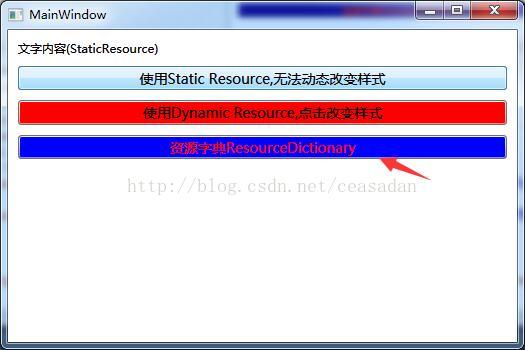
先新建一个资源字典:
<ResourceDictionary xmlns="http://schemas.microsoft.com/winfx/2006/xaml/presentation"
                    xmlns:x="http://schemas.microsoft.com/winfx/2006/xaml">
    <SolidColorBrush x:Key="blueBrush" Color="Blue" ></SolidColorBrush>
    <FontWeight x:Key="fontWeight" >Bold</FontWeight>

</ResourceDictionary>
将资源字典合并到应用程序的字典集合,以便应用程序的其他窗口使用,在App.xaml中添加:
<Application x:Class="WpfApplication1.App"
             xmlns="http://schemas.microsoft.com/winfx/2006/xaml/presentation"
             xmlns:x="http://schemas.microsoft.com/winfx/2006/xaml"
             StartupUri="MainWindow.xaml">
    <Application.Resources>
        <ResourceDictionary>
            <ResourceDictionary.MergedDictionaries>
                <ResourceDictionary Source="ResourceDic/TestResourceDic.xaml"></ResourceDictionary>
            </ResourceDictionary.MergedDictionaries>
        </ResourceDictionary>

    </Application.Resources>
</Application>
使用资源字典,使用了资源字典中的blueBrush:
<Window x:Class="WpfApplication1.MainWindow"
        xmlns="http://schemas.microsoft.com/winfx/2006/xaml/presentation"
        xmlns:x="http://schemas.microsoft.com/winfx/2006/xaml"
        xmlns:sys="clr-namespace:System;assembly=mscorlib"
        Title="MainWindow" Height="350" Width="525">

        <Window.Resources>
            <SolidColorBrush x:Key="RedBrush" Color="Red"></SolidColorBrush>
            <sys:String x:Key="textContent">文字内容(StaticResource)</sys:String>
        </Window.Resources>
        <StackPanel Margin="5">
            <TextBlock Text="{StaticResource textContent}" Margin="5"></TextBlock>
            <Button Background="{StaticResource RedBrush}" Margin="5" FontSize="14" Content="使用Static Resource,无法动态改变样式"/>
            <Button Background="{DynamicResource RedBrush}" Margin="5" FontSize="14" Content="使用Dynamic Resource,点击改变样式" Click="On_Click"/>
            <Button Margin="5" Content="资源字典ResourceDictionary" FontSize="14" Background="{StaticResource blueBrush}" Foreground="Red"></Button>

        </StackPanel>

</Window>
4.多个工程或应用程序之间共享资源
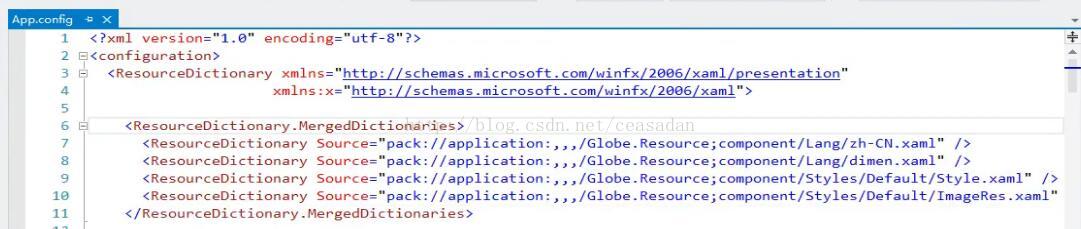
在需要应用资源字典的工程的App.xaml中,引入工程外的资源字典





 扫一扫
扫一扫


 3148
3148

 被折叠的 条评论
为什么被折叠?
被折叠的 条评论
为什么被折叠?
 到【灌水乐园】发言





