


执行Connect连接操作
public abstract boolean connect( SocketAddress remote)方法的作用是连接到远程通道的Socket。
-
如果此通道处于非阻塞模式,则此方法的调用将启动非阻塞连接操作。
-
如果通道呈阻塞模式,则立即发起连接;如果呈非阻塞模式,则不是立即发起连接,而是在随后的某个时间才发起连接。
-
如果连接是立即建立的,说明通道是阻塞模式,当连接成功时,则此方法返回true,连接失败出现异常。如果此通道处于阻塞模式,则此方法的调用将会阻塞,直到建立连接或发生I/O错误。
-
如果连接不是立即建立的,说明通道是非阻塞模式,则此方法返回 false,并且以后必须通过调用 finish Connecto方法来验证连接是否完成。
虽然可以随时调用此方法,但如果在调用此方法时调用此通道上的读或写操作,则该操作将首先阻止,直到此调用完成为止。如果已尝试连接但失败,即此方法的调用引发检查异常,则该通道将关闭。
返回值代表如果建立了连接,则为true。如果此通道处于非阻塞模式且连接操作正在进行中,则为 false
阻塞的客户端:
long beginTime = 0;
        long endTime = 0;
        boolean connectResult = false;

        try {
            //SocketChannel是阻塞模式
            //在发生错误或连接到目标之前,connect()方法一直是阻塞的
            SocketChannel socketChannel = SocketChannel.open();
            beginTime = System.currentTimeMillis();
            connectResult = socketChannel.connect(new InetSocketAddress("localhost", 8088));
            endTime = System.currentTimeMillis();
            System.out.println("正常连接耗时:" + (endTime - beginTime) + " connectResult:" + connectResult);
            socketChannel.close();
        } catch (IOException e) {
            e.printStackTrace();
            endTime = System.currentTimeMillis();
            System.out.println("异常连接耗时:" + (endTime - beginTime) + " connectResult:" + connectResult);
        }
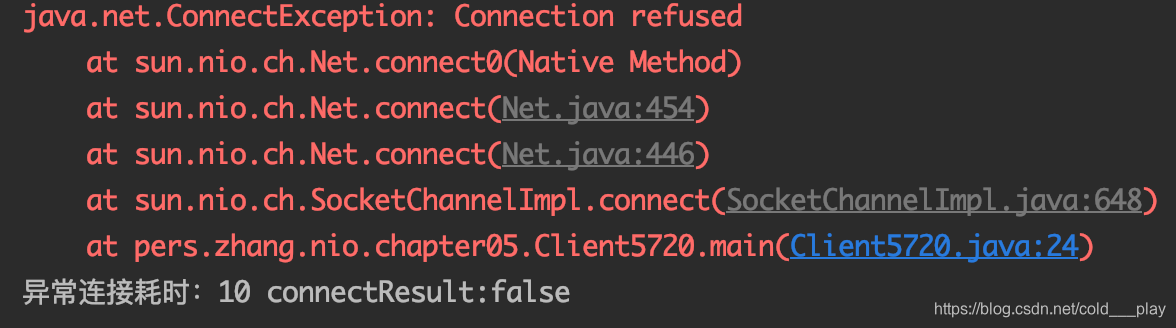
出现异常说明连接建立失败,输出 false的原因是因为变量 connectResult的初始值为false,在程序执行的过程中并未对这个变量再次进行赋值。
添加服务端:
try {
            ServerSocketChannel serverSocketChannel = ServerSocketChannel.open();
            serverSocketChannel.bind(new InetSocketAddress("localhost", 8088));
            SocketChannel socketChannel = serverSocketChannel.accept();
            socketChannel.close();
            serverSocketChannel.close();
            System.out.println("server end!");
        } catch (IOException e) {
            e.printStackTrace();
        }
先运行服务端,在运行客户端:

非阻塞的客户端:
long beginTime = 0;
        long endTime = 0;
        boolean connectResult = false;
        try {

            SocketChannel socketChannel = SocketChannel.open();
            //SocketChannel是非阻塞模式
            socketChannel.configureBlocking(false);
            beginTime = System.currentTimeMillis();
            connectResult = socketChannel.connect(new InetSocketAddress("localhost", 8088));
            endTime = System.currentTimeMillis();
            System.out.println("正常连接耗时:" + (endTime - beginTime) + " connectResult:" + connectResult);
            socketChannel.close();
        } catch (IOException e) {
            e.printStackTrace();
            endTime = System.currentTimeMillis();
            System.out.println("异常连接耗时:" + (endTime - beginTime) + " connectResult:" + connectResult);
        }

输岀 false说明此通道处于非阻塞模式且连接操作正在进行中,此时 connectO方法返回flse。
先运行服务度,再运行非阻塞的客户端:

从两者的输出时间来看,耗时的差距不大,但阻塞模式由于正确连接到服务器,因此返回值为true,而非阻塞模式由于正在连接服务器,因此返回 false。
判断此通道上是否正在进行连接操作
public abstract boolean is Connection Pending()方法的作用是判断此通道上是否正在进行连接操作。返回值是true代表当且仅当已在此通道上发起连接操作,但是尚未通过调用 finish Connect()方法完成连接。还可以是在通道 accepto之后通道 closed之前,is ConnectionPending()方法的返回值都是true。
服务端代码:
try {
            ServerSocketChannel serverSocketChannel = ServerSocketChannel.open();
            serverSocketChannel.bind(new InetSocketAddress("localhost", 8088));
            SocketChannel socketChannel = serverSocketChannel.accept();
            socketChannel.close();
            serverSocketChannel.close();
            System.out.println("server end!");
        } catch (IOException e) {
            e.printStackTrace();
        }
1. 阻塞通道,IP不存在:
//1. 阻塞通道,IP不存在
        SocketChannel socketChannel = null;

        try {
            socketChannel = SocketChannel.open();
            System.out.println(socketChannel.isConnectionPending());
            //192.168.0.123此IP不存在
            socketChannel.connect(new InetSocketAddress("192.168.0.123", 8088));
            socketChannel.close();
        } catch (IOException e) {
            e.printStackTrace();
            System.out.println("catch " + socketChannel.isConnectionPending());
            try {
                socketChannel.close();
            } catch (IOException ex) {
                ex.printStackTrace();
            }
        }
通道建立失败,catch中输出false,表示当前并没有进行连接。
2. 非阻塞通道,IP不存在:
//2. 非阻塞通道,IP不存在
        SocketChannel socketChannel = null;
        socketChannel = SocketChannel.open();
        //非阻塞
        socketChannel.configureBlocking(false);
        System.out.println(socketChannel.isConnectionPending());
        //192.168.0.123此IP不存在
        socketChannel.connect(new InetSocketAddress("192.168.0.123", 8088));
        System.out.println(socketChannel.isConnectionPending());
        socketChannel.close();

最后输出true,说明非阻塞通道正在建立连接。
3. 阻塞通道,IP存在:
SocketChannel socketChannel = null;

        try {
            socketChannel = SocketChannel.open();
            System.out.println(socketChannel.isConnectionPending());
            //192.168.0.123此IP不存在
            socketChannel.connect(new InetSocketAddress("localhost", 8088));
            System.out.println(socketChannel.isConnectionPending());
            socketChannel.close();
        } catch (IOException e) {
            e.printStackTrace();
            System.out.println("catch " + socketChannel.isConnectionPending());
            try {
                socketChannel.close();
            } catch (IOException ex) {
                ex.printStackTrace();
            }
        }
先运行服务端,在运行客户端:

上述程序运行结果并未出现异常,最后输出值为 false,说明阻塞通道并没有正在建立连接。
4. 非阻塞通道,IP存在:
SocketChannel socketChannel = null;
        socketChannel = SocketChannel.open();
        //非阻塞
        socketChannel.configureBlocking(false);
        System.out.println(socketChannel.isConnectionPending());
        //192.168.0.123此IP不存在
        socketChannel.connect(new InetSocketAddress("localhost", 8088));
        System.out.println(socketChannel.isConnectionPending());
        socketChannel.close();

最后输出true,说明非阻塞通道正在建立连接。
完成套接字通道的连接过程
public abstract boolean finish Connect()方法的作用是完成套接字通道的连接过程。通过将套接字通道置于非阻塞模式,然后调用其 connecto方法来发起非阻塞连接操作。
-
如果连接操作失败,则调用此方法将导致抛出 IOException
一旦建立了连接,或者尝试已失败,该套接字通道就变为可连接的,并且可调用此方法完成连接序列。 -
如果已连接了此通道,则不阻塞此方法并且立即返回true。
-
如果此通道处于非阻塞模式,那么当连接过程尚未完成时,此方法将返回 false;
-
如果此通道处于阻塞模式,当连接成功之后返回true,连接失败时抛出描述该失败的、经过检查的异常。在连接完成或失败之前都将阻塞此方法。
虽然可在任意时间调用此方法,但如果正在调用此方法时在此通道上调用读取或写入操作,则在此调用完成前将首先阻塞该操作。
如果试图发起连接但失败了,也就是说,调用此方法导致抛出经过检查的异常,则关闭此通道。返回值当且仅当已连接此通道的套接字时才返回true。
类FileChannel中的long transferTo(position, count, WritableByteChannel)方法的使用
方法transfer To()的作用是试图读取此通道文件中给定 position处开始的 count个字节,并将其写入目标通道中,但是此方法的调用不一定传输所有请求的字节,是否传输取决于通道的性质和状态。
服务端:
public static void main(String[] args) throws Exception{
        ServerSocketChannel serverSocketChannel = ServerSocketChannel.open();
        SocketChannel socketChannel = null;
        serverSocketChannel.configureBlocking(false);
        serverSocketChannel.bind(new InetSocketAddress("localhost", 8088));

        Selector selector = Selector.open();
        serverSocketChannel.register(selector, SelectionKey.OP_ACCEPT);
        boolean isRun = true;
        while (isRun == true) {
            selector.select();
            Set<SelectionKey> set = selector.selectedKeys();
            Iterator<SelectionKey> it = set.iterator();
            while (it.hasNext()) {
                SelectionKey key = it.next();
                it.remove();
                if (key.isAcceptable()) {
                    socketChannel = serverSocketChannel.accept();
                    socketChannel.configureBlocking(false);
                    socketChannel.register(selector, SelectionKey.OP_WRITE);
                }
                if (key.isWritable()) {
                    RandomAccessFile file = new RandomAccessFile("/Users/acton_zhang/software/elasticsearch-5.6.8.tar.gz", "rw");
                    System.out.println("file.length=" + file.length());
                    FileChannel fileChannel = file.getChannel();
                    fileChannel.transferTo(0, file.length(), socketChannel);
                    fileChannel.close();
                    file.close();
                    socketChannel.close();
                }
            }
        }
        serverSocketChannel.close();
    }
客户端:
public static void main(String[] args) throws IOException {
        SocketChannel socketChannel = SocketChannel.open();
        socketChannel.configureBlocking(false);
        socketChannel.connect(new InetSocketAddress("localhost", 8088));
        Selector selector = Selector.open();
        socketChannel.register(selector, SelectionKey.OP_CONNECT);
        boolean isRun = true;
        while (isRun == true) {
            System.out.println("begin selector");
            if (socketChannel.isOpen() == true) {
                selector.select();
                System.out.println("end selector");
                Set<SelectionKey> set = selector.selectedKeys();
                Iterator<SelectionKey> it = set.iterator();
                while (it.hasNext()) {
                    SelectionKey key = it.next();
                    it.remove();
                    if (key.isConnectable()) {
                        while (!socketChannel.finishConnect()){}
                        socketChannel.register(selector, SelectionKey.OP_READ);
                    }
                    if (key.isReadable()) {
                        ByteBuffer byteBuffer = ByteBuffer.allocate(50000);
                        int readLength = socketChannel.read(byteBuffer);
                        byteBuffer.flip();
                        long count = 0;
                        while (readLength != -1) {
                            count += readLength;
                            readLength = socketChannel.read(byteBuffer);
                            System.out.println("count=" + count + " readLength=" + readLength);
                            byteBuffer.clear();
                        }
                        System.out.println("读取结束");
                        socketChannel.close();
                    }
                }
            } else {
                break;
            }

        }
    }
服务端输出:
file.length=38041600
客户端输出:
begin selector
end selector
begin selector
end selector
count=50000 readLength=50000
count=100000 readLength=50000
count=150000 readLength=50000
count=200000 readLength=50000
count=250000 readLength=19868
count=269868 readLength=-1
读取结束
begin selector
open(SocketAddress remote)方法与SocketOption的执行顺序
如果先调用public static SocketChannel open(SocketAddress remote)方法,然后设置SocketPotion,则不会出现逾期的效果,因为在open()方法中已经自动执行了connect()方法。
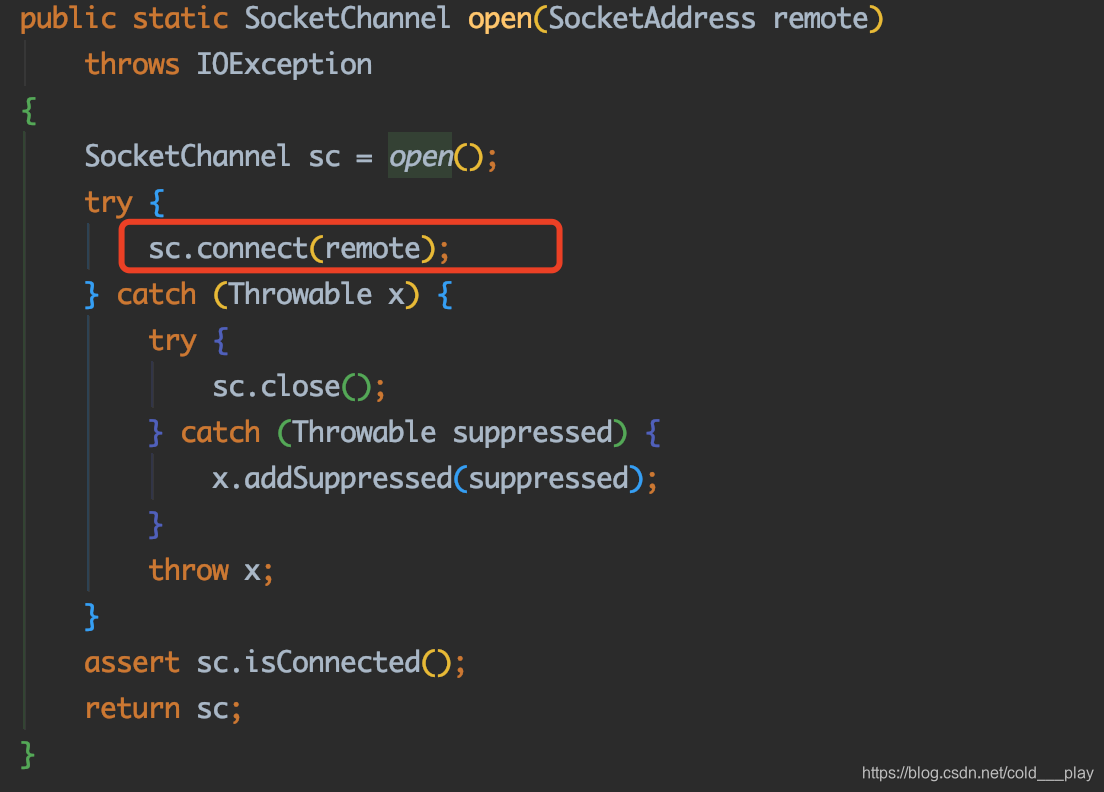
在设置某些SocketOption特性时,需要在connect()方法执行之前进行初始化:
SocketChannel socketChannel = SocketChannel.open()
socketChannel.setOption(StandardSocketOptions.SO_REVBUF, 1234);
socketChannel.connet(new InetSocketAddress("localhost", 8088));
验证read和write方法是非阻塞的
执行代码configureBlocking(false)代表当前的I/O为非阻塞的,NIO 就是同步非阻塞模型,所以read和write方法也呈现此特性,下面开始实验。
测试read为非阻塞特性:
public static void main(String[] args) {
        ServerSocketChannel serverSocketChannel = null;
        try {
            serverSocketChannel = ServerSocketChannel.open();
            serverSocketChannel.configureBlocking(false);
            serverSocketChannel.bind(new InetSocketAddress("localhost", 7077));

            Selector selector = Selector.open();
            serverSocketChannel.register(selector, SelectionKey.OP_ACCEPT);
            selector.select();
            Set<SelectionKey> set = selector.selectedKeys();
            Iterator<SelectionKey> iterator = set.iterator();
            while (iterator.hasNext()) {
                SelectionKey key = iterator.next();
                ServerSocketChannel channel = (ServerSocketChannel) key.channel();
                SocketChannel socketChannel = channel.accept();
                socketChannel.configureBlocking(false);
                ByteBuffer byteBuffer = ByteBuffer.allocate(100);
                System.out.println("begin " + System.currentTimeMillis());
                socketChannel.read(byteBuffer);
                System.out.println("end " + System.currentTimeMillis() + " byteBuffer.position()=" + byteBuffer.position());
            }
            serverSocketChannel.close();
        } catch (IOException e) {
            e.printStackTrace();
        }
    }


public static void main(String[] args) {
        try {
            SocketChannel socketChannel = SocketChannel.open();
            socketChannel.connect(new InetSocketAddress("localhost", 7077));
            socketChannel.close();
        } catch (IOException e) {
            e.printStackTrace();
        }
    }
服务端输出:
begin 1591706395799
end 1591706395801 byteBuffer.position()=0
//read并没有读取到数据就继续向下运行,说明read具有非阻塞特性
测试write为非阻塞特性:
public static void main(String[] args) {
        try {
            ServerSocketChannel serverSocketChannel = ServerSocketChannel.open();
            serverSocketChannel.configureBlocking(false);
            serverSocketChannel.bind(new InetSocketAddress("localhost", 7077));

            Selector selector = Selector.open();
            serverSocketChannel.register(selector, SelectionKey.OP_ACCEPT);
            selector.select();
            Set<SelectionKey> set = selector.selectedKeys();
            Iterator<SelectionKey> iterator = set.iterator();
            while (iterator.hasNext()) {
                SelectionKey key = iterator.next();
                ServerSocketChannel channel = (ServerSocketChannel) key.channel();
                SocketChannel socketChannel = channel.accept();
                channel.configureBlocking(false);
                ByteBuffer byteBuffer = ByteBuffer.allocate(Integer.MAX_VALUE / 10);
                System.out.println("byteBuffer.limit()=" + byteBuffer.limit());
                System.out.println("begin " + System.currentTimeMillis());
                socketChannel.write(byteBuffer);
                System.out.println("end " + System.currentTimeMillis() + " byteBuffer.position()=" + byteBuffer.position());
            }
            serverSocketChannel.close();
        } catch (IOException e) {
            e.printStackTrace();
        }
    }

public static void main(String[] args) {
        try {
            SocketChannel socketChannel = SocketChannel.open();
            socketChannel.configureBlocking(false);
            socketChannel.connect(new InetSocketAddress("localhost", 7077));
            socketChannel.close();
        } catch (IOException e) {
            e.printStackTrace();
        }
    }
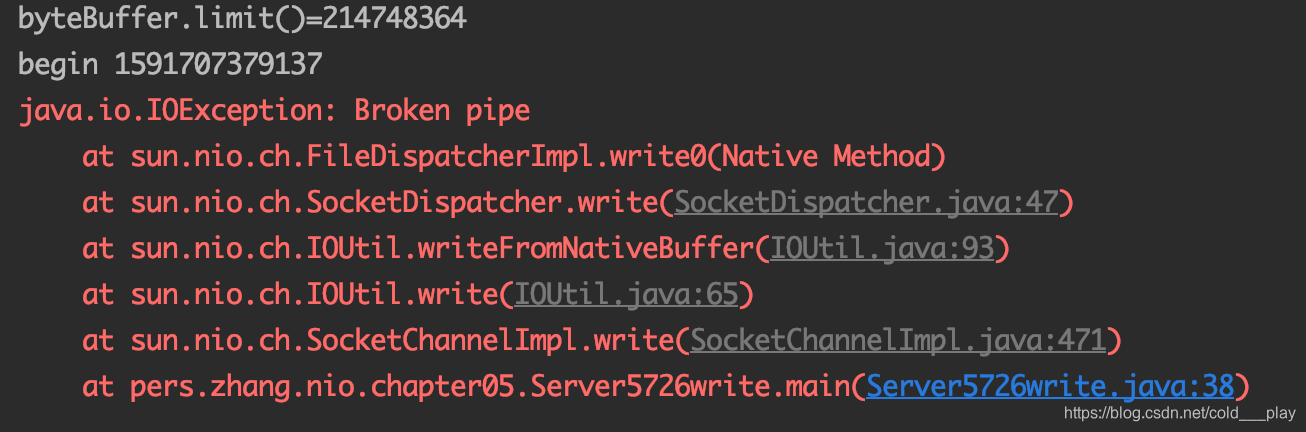
write方法并没有写到数据就继续向下运行。

 1035


 扫一扫


 被折叠的 条评论
为什么被折叠?
 到【灌水乐园】发言


