



 本文介绍MQTT协议的基本概念,以及如何使用Mosquitto Broker搭建MQTT服务器。通过C和C++示例代码,展示了如何实现MQTT客户端的发布与订阅功能。
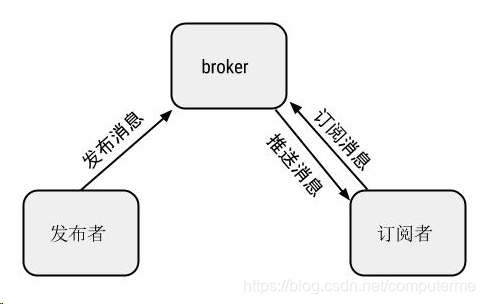
MQTT 是一个轻型协议,使用基于 TCP/IP 协议的发布/订阅消息转发模式,专门用于机器对机器 (M2M) 通信。 MQTT 协议的中心是 MQTT 服务器或代理 (broker) ,支持发布程序和订阅程序进行访问,如下图所示:
mosquitto 是一个开源的 MQTT broker 。
准备工作
sudo apt-get install mosquitto  #安装后才能运行MQTT broker
sudo apt-get install libmosquitto-dev  #安装开发包才能在程序中调用
sudo apt-get install libmosquittopp-dev #C++版封装的libmosquitto
运行Broker
mosquitto -v #使用默认参数开启MQTT broker
开个窗口订阅消息mosquitto_sub -t test -v
在代码中publish topic
有两种方式,一种可以调用libmosquitto来实现(C语言接口),另一种可以采用 libmosquittopp来实现(C++接口)。
c style
#include <stdio.h>
#include <stdlib.h>
#include <mosquitto.h>
#include <string.h>

#define HOST "localhost"
#define PORT  1883
#define KEEP_ALIVE 60
#define MSG_MAX_SIZE  512

bool session = true;

int main()
{
    char buff[MSG_MAX_SIZE];
    struct mosquitto *mosq = NULL;
    //libmosquitto 库初始化
    mosquitto_lib_init();
    //创建mosquitto客户端
    mosq = mosquitto_new(NULL,session,NULL);
    if(!mosq){
        printf("create client failed..\n");
        mosquitto_lib_cleanup();
        return 1;
    }
    //连接服务器
    if(mosquitto_connect(mosq, HOST, PORT, KEEP_ALIVE)){
        fprintf(stderr, "Unable to connect.\n");
        return 1;
    }
    //开启一个线程,在线程里不停的调用 mosquitto_loop() 来处理网络信息
    int loop = mosquitto_loop_start(mosq);
    if(loop != MOSQ_ERR_SUCCESS)
    {
        printf("mosquitto loop error\n");
        return 1;
    }
    while(fgets(buff, MSG_MAX_SIZE, stdin) != NULL)
    {
                /*发布消息*/
                mosquitto_publish(mosq,NULL,"test",strlen(buff)+1,buff,0,0);
                memset(buff,0,sizeof(buff));
    }
    mosquitto_destroy(mosq);
    mosquitto_lib_cleanup();
    return 0;
}
c++ style
#include <string>
#include <stdio.h>
#include <iostream>
#include <stdlib.h>
#include <cstring>
#include "mosquitto.h"
#include "mosquittopp.h"
#pragma comment(lib, "mosquittopp.lib")
class mqtt_test:public mosqpp::mosquittopp
{
public:
    mqtt_test(const char *id):mosquittopp(id){}
    void on_connect(int rc) {std::cout<<"on_connect"<<std::endl;}
    void on_disconnect() {std::cout<<"on_disconnect"<<std::endl;}
    void on_publish(int mid) {std::cout<<"on_publish"<<std::endl;}
    void on_subscribe(int mid, int qos_count, const int *granted_qos);//订阅回调函数
    void on_message(const struct mosquitto_message *message);//订阅主题接收到消息
};
std::string g_subTopic="subTopic";
void mqtt_test::on_subscribe(int mid, int qos_count, const int *granted_qos)
{
    std::cout<<"订阅 mid: %d "<<mid<<std::endl;
}
void mqtt_test::on_message(const struct mosquitto_message *message)
{
    bool res=false;
    mosqpp::topic_matches_sub(g_subTopic.c_str(),message->topic,&res);
    if(res)
    {
        std::string strRcv=(char *)message->payload;
        std::cout<<"来自<"<<message->topic<<">的消息:"<<strRcv<<std::endl;
    }
}
int main(int argc, char* argv[])
{
    mosqpp::lib_init();
    mqtt_test test("client6");

    int rc;
    char buf[1024] = "This is test";
    rc = test.connect("localhost",1883,600);//本地IP
    char err[1024];
    if(rc == MOSQ_ERR_ERRNO)
        std::cout<<"连接错误:"<< mosqpp::strerror(rc)<<std::endl;//连接出错
    else if (MOSQ_ERR_SUCCESS == rc)
    {
        //发布测试
        rc = test.loop_start();
       while(fgets(buf, 1024, stdin) != NULL)
       {
            std::string topic1="test";
            rc = test.publish(NULL, topic1.c_str(), strlen(buf), (const void *)buf);
       }
    }
    mosqpp::lib_cleanup();
    return 0;
}
编译运行以上代码在sub窗口中会看到发过了的消息,若想在代码中sub一个topic,方法类似,主要就是处理on_message和on_subscribe回调函数。
Reference:
http://www.cnblogs.com/lowdan/p/7792196.html
https://blog.csdn.net/baidu_24388023/article/details/81543396
http://shaocheng.li/post/blog/2015-08-11





 扫一扫
扫一扫


 1018
1018

 被折叠的 条评论
为什么被折叠?
被折叠的 条评论
为什么被折叠?
 到【灌水乐园】发言





