


A recovery model is a database configuration option that determines the type of backup that one could perform, and provides the ability to restore the data or recover it from a failure.
恢复模型是一种数据库配置选项,用于确定可以执行的备份类型,并提供恢复数据或从故障中恢复数据的功能。
The recovery model decides how the transaction log of a database should be maintained and protects the data changes in a specific sequence, which may later be used for a database restore operation.
恢复模型决定应如何维护数据库的事务日志,并按特定顺序保护数据更改,以后可以将其用于数据库还原操作。
恢复模型的类型 (Types of recovery models)
All SQL Server database backup, restore, and recovery operations are based on one of three available recovery models:
所有SQL Server数据库备份,还原和恢复操作均基于以下三种可用恢复模型之一:
- SIMPLE 简单
- FULL 充分
- BULK_Logged BULK_已记录
简单 (SIMPLE )
The SIMPLE recovery model is the simplest among the available models. It supports full, differential, and file level backups. Transaction log backups are not supported. The log space is reused whenever the SQL Server background process checkpoint operation occurs. The inactive portion of the log file is removed and is made available for reuse.
SIMPLE恢复模型是可用模型中最简单的模型。 它支持完整,差异和文件级备份。 不支持事务日志备份。 每当发生SQL Server后台进程检查点操作时,便会重用日志空间。 日志文件的非活动部分将被删除,并可供重用。
Point-in-time and page restore are not supported, only the restoration of the secondary read-only file is supported.
不支持时间点和页面还原,仅支持辅助只读文件的还原。
Reasons to choose the simple database recovery model
选择简单数据库恢复模型的原因
- Most suited for Development and Test databases 最适合开发和测试数据库
- Simple reporting or application database, where data loss is acceptable 简单的报告或应用程序数据库,可以接受数据丢失
- The point-of-failure recovery is exclusively for full and differential backups 故障点恢复专门用于完整备份和差异备份
- No administrative overhead 没有管理费用
It supports:
它支持:
- Full backup 完整备份
- Differential backup 差异备份
- Copy-Only backup 仅复制备份
- File backup 文件备份
- Partial backup 部分备份
充分 (FULL)
In this recovery model, all the transactions (DDL (Data Definition Language) + DML (Data Manipulation Language)) are fully recorded in the transaction log file. The log sequence is unbroken and is preserved for the databases restore operations. Unlike the Simple recovery model, the transaction log file is not auto-truncated during CHECKPOINT operations.
在此恢复模型中,所有事务(DDL(数据定义语言)+ DML(数据操作语言))都完全记录在事务日志文件中。 日志序列是不间断的,并保留用于数据库还原操作。 与简单恢复模型不同,在CHECKPOINT操作过程中不会自动截断事务日志文件。
All restore operations are supported, including point-in-time restore, page restore and file restore.
支持所有还原操作,包括时间点还原,页面还原和文件还原。
Reasons to choose the full database recovery model:
选择完整数据库恢复模型的原因:
- Supporting mission critical applications 支持关键任务应用
- Design High Availability solutions 设计高可用性解决方案
- To facilitate the recovery of all the data with zero or minimal data loss 促进零丢失或最小数据丢失的所有数据的恢复
- If the database designed to have multiple filegroups, and you want to perform a piecemeal restore of read/write secondary filegroups and, optionally, read-only filegroups. 如果数据库设计为具有多个文件组,并且您要对读/写辅助文件组以及(可选)只读文件组执行逐段还原。
- Allow arbitrary point-in-time restoration 允许任意时间点还原
- Restore individual pages 恢复单个页面
- Incur high administration overhead 产生高昂的管理费用
It supports all type of following backups
它支持所有类型的以下备份
- Full backup 完整备份
- Differential backup 差异备份
- Transaction log backup 交易日志备份
- Copy-Only backup 仅复制备份
- File and/or file-group backup 文件和/或文件组备份
- Partial backup 部分备份
BULK_LOGGED (BULK_LOGGED)
It’s a special purpose database configuration option and it works similar to FULL recovery model except that certain bulk operations can be minimally logged. The transaction log file uses a technique known as minimal logging for bulk operations. The catch is that it’s not possible to restore specific point-in-time data.
这是一个特殊用途的数据库配置选项,除了可以完全记录某些批量操作之外,它的工作方式与FULL恢复模型相似。 事务日志文件使用称为批量操作的最小日志记录的技术。 问题是不可能恢复特定的时间点数据。
Reasons to choose the bulk logged recovery model:
选择批量记录的恢复模式的原因:
- Use minimal logging technique to prevent log file growth 使用最少的日志记录技术来防止日志文件增长
- If the database is subjected to periodic bulk operations 如果数据库进行定期批量操作
It supports all types of backups:
它支持所有类型的备份:
- Full backup 完整备份
- Differential backup 差异备份
- Transaction log backup 交易日志备份
- Copy-Only backup 仅复制备份
- File and/or file-group backup 文件和/或文件组备份
- Partial backup 部分备份
事务日志内部 (Transaction log internals)
It’s worth taking the time to understand the internals of the SQL Server transaction log.
值得花时间来了解SQL Server事务日志的内部。
- Whenever there is a transaction (DDL and DML) the details of every operation is logged in the transaction log file 每当有事务(DDL和DML)时,每个操作的详细信息都会记录在事务日志文件中
- The transaction log backup ensures transactional durability and data consistency using a mechanism known as WAL (Write-Ahead-Logging). The transactions that occur on the database first get registered into the transaction log file and then the data is written to the disk. This facilitates the SQL Server to rollback or roll-forward every step of the recovery process 事务日志备份使用称为WAL(预写日志)的机制来确保事务持久性和数据一致性。 首先,将在数据库上发生的事务注册到事务日志文件中,然后将数据写入磁盘。 这有助于SQL Server回滚或前滚恢复过程的每个步骤
- Enables point-in-time restore of databases 启用数据库的时间点还原
- SQL Server always writes to the transaction log file sequentially. It’s cyclic in nature. The transaction log file is further divided into log blocks which are logically mapped using VLF’s (Virtual Log Files) SQL Server始终按顺序写入事务日志文件。 它本质上是循环的。 事务日志文件进一步分为多个日志块,这些日志块使用VLF(虚拟日志文件)进行逻辑映射
- The log records in the blocks that are no longer needed are deemed as “inactive,” and this portion of the log blocks can be truncated, i.e., the inactive segments of the log blocks are overwritten by new transactions. These segments or portion of the log file are known as virtual log files (VLFs) 不再需要的块中的日志记录被视为“非活动”,并且日志块的这一部分可以被截断,即,新事务将覆盖日志块的非活动段。 日志文件的这些段或部分称为虚拟日志文件(VLF)
- Any inactive VLF can be truncated, although the point at which this truncation can occur depends on the recovery model of the database 任何不活动的VLF都可以被截断,尽管发生这种截断的时间点取决于数据库的恢复模型
- In the SIMPLE recovery model, truncation can take place immediately upon the occurrence of a CHECKPOINT operation. Pages in the data cache are flushed to the disk, having first “hardened” the changes to the log file. The space in any VLFs that becomes inactive as a result, and is made available for reuse 在SIMPLE恢复模型中,在发生CHECKPOINT操作时可以立即进行截断。 数据高速缓存中的页面首先冲刷对日志文件的更改,然后刷新到磁盘。 结果,任何VLF中的空间将变为非活动状态,并且可供重新使用
- A database may have multiple log files but it’s mandatory to have at least one. It will only ever write to one log file at a time, and having more than one files will not boost write-throughput or speed. In fact, having more multiple files could result in performance degradation, if each file is not correctly sized or differs in size. Any mismatch leads to longer duration of recovery of the database 一个数据库可能有多个日志文件,但必须至少有一个。 它将一次只写入一个日志文件,并且拥有多个文件不会提高写入吞吐量或速度。 实际上,如果每个文件的大小或大小不正确,则拥有多个文件可能会导致性能下降。 任何不匹配都会导致数据库恢复时间更长
恢复模型概述 (Recovery Model Overview)
Simple
简单
- Description 描述
- No transaction log backups. 没有事务日志备份。
- In the Simple Recovery Model, the transaction log is automatically purged and the file size is kept intact. Because of this, you can’t make log backups in this case. 在简单恢复模型中,事务日志将自动清除,并且文件大小保持不变。 因此,在这种情况下,您无法进行日志备份。
- Supports only full and bulk_logged backup operations. 仅支持完整备份和bulk_logged备份操作。
- The unsupported features of in simple recovery model are: Log shipping, AlwaysOn or Mirroring and Point-in-time restore 简单恢复模型中不受支持的功能包括:日志传送,AlwaysOn或镜像和时间点还原
- Data loss 资料遗失
- Yes; we cannot restore the database to an arbitrary point in time. This means, in the event of a failure, it is only possible to restore database as current as the last full or differential backup, and data loss is a real possibility 是; 我们无法将数据库还原到任意时间点。 这意味着,如果发生故障,则只能将数据库还原为最新的完整备份或差异备份,并且确实有可能丢失数据
- Point-in-time restore 时间点还原
- No 没有
Full
充分
- Description 描述
- Supports transaction log backups. 支持事务日志备份。
- No work is lost due to a lost or damaged data file. The Full database recovery model completely records every transaction that occurs on the database. 丢失或损坏的数据文件不会丢失任何工作。 完全数据库恢复模型完全记录数据库上发生的每个事务。
- One could arbitrarily choose a point in time for database restore. 可以任意选择一个数据库还原的时间点。
- This is possible by first restoring a full backup, most recent differential then replaying the changes recorded in the transaction log. If a differential backup doesn’t exist, then the series of t-logs are applied. 这可以通过首先还原完整备份,最新差异然后重播事务日志中记录的更改来实现。 如果不存在差异备份,则将应用一系列t日志。
- Supports Point-in-time data recovery. 支持时间点数据恢复。
- If the database uses the full recovery model, the transaction log would grow infinitely, and that will be a problem. So, we need to make sure that we take transaction log backups on a regular basis. 如果数据库使用完整恢复模型,则事务日志将无限增长,这将是一个问题。 因此,我们需要确保定期进行事务日志备份。
- Data loss 资料遗失
- Minimal or zero data loss. 最小或零数据丢失。
- Point-in-time restore 时间点还原
- This setup enables more options. 此设置启用更多选项。
- Point-in-time recovery. 时间点恢复。
Bulk logged
批量记录
- Description 描述
- This model is similar to the Full Recovery Model, in that a transaction log is kept, but certain transactions such as bulk loading operations are minimally logged, although it logs other transaction. This makes the bulk data imports perform quicker and keeps the file size of the transaction log down, but does not support the point in time recovery of the data. 此模型与完全恢复模型相似,在该模型中,保留了事务日志,但是尽管记录了其他事务,但是某些事务(例如批量加载操作)的日志记录也很少。 这使批量数据导入执行得更快,并使事务日志的文件大小减小,但不支持数据的时间点恢复。
- This can help increase performance bulk load operations. 这可以帮助提高性能的大容量装载操作。
- Reduces log space usage by using minimal logging for most bulk operations. 通过对大多数批量操作使用最少的日志记录来减少日志空间的使用。
- Data loss 资料遗失
- If you run transactions under the bulk-logged recovery model that might require a transaction log restore, these transactions could be exposed to data loss. 如果您在可能需要还原事务日志的大容量日志恢复模型下运行事务,则这些事务可能会遭受数据丢失的困扰。
- Point-in-time restore 时间点还原
- Point-in-time recovery is not possible with bulk-logged model 使用批量记录的模型无法进行时间点恢复
Users are currently not allowed in the database.
当前不允许用户进入数据库。
If you’re able to re-running the bulk processes.
如果您能够重新运行批量处理。
切换恢复模式 (Switching recovery models)
Full and bulk-logged
完整日志和批量日志
- Initiate a log backup 启动日志备份
- Perform bulk operations, immediately switch back the database to full recovery model 执行批量操作,立即将数据库切换回完整恢复模型
- Initiate transaction log backup 启动事务日志备份
Simple to FULL or Differential
简单到完整或差分
- Initiate a full (or differential, if full is already available) database backup 启动完整(或差异备份,如果已经可用)数据库备份
- Schedule t-log backups 安排t-log备份
FULL or BULK_Logged to Simple
FULL或BULK_Logged到简单
- Disable the transaction log backup job 禁用事务日志备份作业
- Ensure that there is a job to take full backup 确保有一项作业可以进行完整备份
View or change the database recovery model using the following options:
使用以下选项查看或更改数据库恢复模型:
- Using SSMS 使用SSMS
- T-SQL T-SQL
- PowerShell 电源外壳
使用SSMS (Using SSMS)
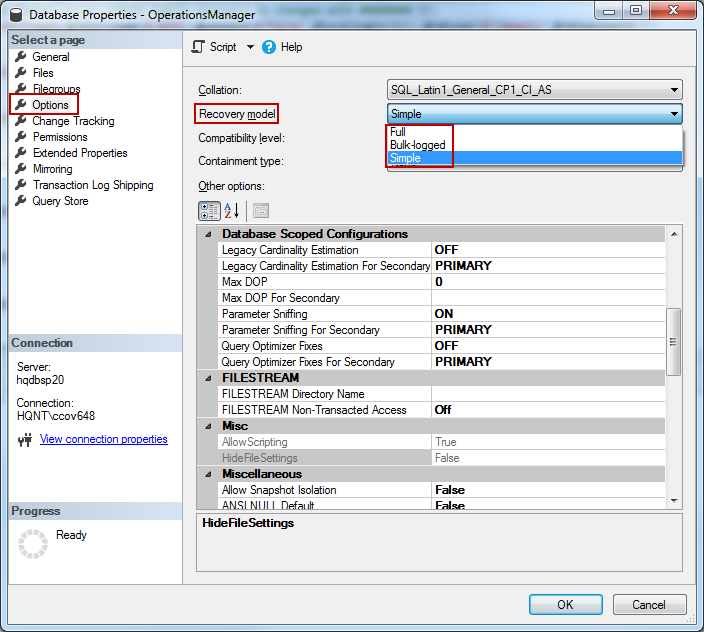
- Databases, select the desired database 数据库” ,选择所需的数据库
- Properties 属性”。
- Options 选项”。
- Recovery model list box highlights the current recovery model 恢复模型列表框突出显示当前的恢复模型
- Full, Full , Bulk-logged, or Bulk-logged或Simple from the drop-down list Simple
使用Transact-SQL (Using Transact-SQL)
- Connect to the Database Engine 连接到数据库引擎
- New Query window 新查询窗口
- sys.databases system catalog to view the recovery model of the databases sys.databases系统目录以查看数据库的恢复模型
SELECT name, recovery_model,recovery_model_desc FROM sys.databases
GO
To change the recovery model, execute the alter database statement with set recovery option. For example, the recovery model of the database is set to SIMPLE using.
要更改恢复模型,请执行带有set recovery选项的alter database语句。 例如,数据库的恢复模型设置为SIMPLE using。
USE master
GO
ALTER DATABASE MODEL SET RECOVERY SIMPLE ;
SELECT name, recovery_model,recovery_model_desc FROM sys.databases  where name='model'
如何更改SQL Server实例的整个数据库的恢复模型? (How to change the recovery model of entire databases of SQL Server instance?)
The undocumented stored procedure, sp sp_msforeachdb, is used to iterate through every database and execute the alter database command.
未记录的存储过程sp sp_msforeachdb用于遍历每个数据库并执行alter database命令。
EXEC sp_msforeachdb "
IF '?' not in ('tempdb')
begin
    exec ('ALTER DATABASE [?] SET RECOVERY FULL;')
    print '?'
end
"

SELECT name, recovery_model,recovery_model_desc FROM sys.databases
How to check the recovery model of entire databases in an SQL environment?
如何在SQL环境中检查整个数据库的恢复模型?
In most production servers, the database recovery model is set to FULL. There may be a chance, though, that the recovery model is switched for some reason. Let’s identify all the production databases where the recovery model is SIMPLE. In order to do that, dynamic T-SQL, sqlcmd and Windows scripting are used. The T-SQL query is run against all the servers using SQL Server agent scheduled job to get the desired output.
在大多数生产服务器中,数据库恢复模型设置为FULL。 但是,由于某种原因,恢复模型可能会被转换。 让我们确定恢复模型为SIMPLE的所有生产数据库。 为此,使用了动态T-SQL,sqlcmd和Windows脚本。 使用SQL Server代理计划作业对所有服务器运行T-SQL查询,以获取所需的输出。
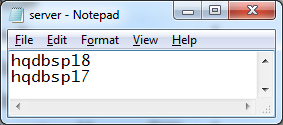
Input file – the list contains the names of the production server
输入文件–列表包含生产服务器的名称
USE MASTER
GO
SELECT name, recovery_model,recovery_model_desc FROM sys.databases where database_id>4 and recovery_model=3
MASTER..XP_CMDSHELL 'for /f %h in (\\share\hq\inputserver.txt) do sqlcmd -S %h -i \\Share\hq\SQLRecoveryModelCheck.sql -E'Validate the output
验证输出
Using PowerShell
使用PowerShell
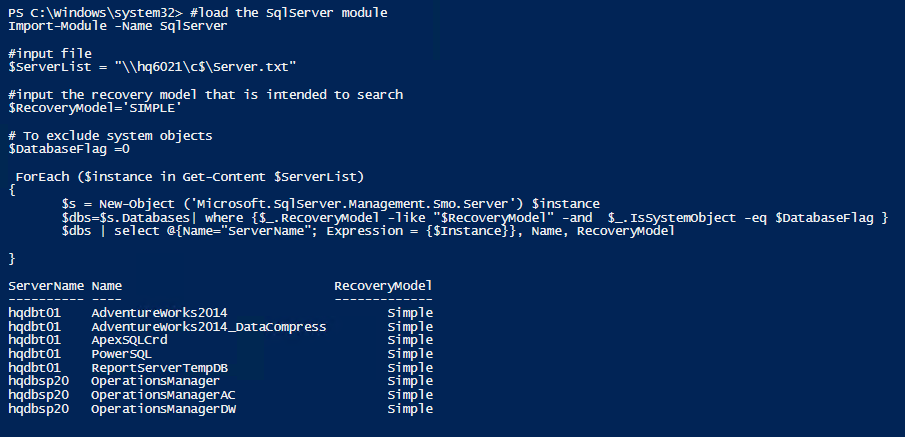
The function Get-RecoveryModel has three input parameters
函数Get-RecoveryModel具有三个输入参数
- Filename – the file contains a list of servers 文件名–该文件包含服务器列表
- Recovery_model_desc – this is a recovery model search pattern; for example, “simple”, “full”, “bulk_logged” Recovery_model_desc –这是一个恢复模型搜索模式; 例如“简单”,“完整”,“批量记录”
- Database_Flag – this flag excludes system databases Database_Flag –此标志排除系统数据库
#load the SqlServer module
Import-Module -Name SqlServer

#input file
$ServerList = "\\hq6021\c$\Server.txt"

#input the recovery model that is intended to search
$RecoveryModel='SIMPLE'

# To exclude system objects
$DatabaseFlag =0

 ForEach ($instance in Get-Content $ServerList)
{
       $s = New-Object ('Microsoft.SqlServer.Management.Smo.Server') $instance
       $dbs=$s.Databases| where {$_.RecoveryModel -like "$RecoveryModel" -and  $_.IsSystemObject -eq $DatabaseFlag }
       $dbs | select @{Name="ServerName"; Expression = {$Instance}}, Name, RecoveryModel

}
摘要 (Summary)
If the database is a development or a test server, the simple recovery model should mostly be sufficient. However, if a database is a production one, it is generally suggested to go with a full recovery model. The full recovery model can be supplemented by a bulk_logged recovery model. Of course, if your database is small, or is part of a data warehouse, or even if the database is read-only.
如果数据库是开发服务器或测试服务器,则简单的恢复模型应该就足够了。 但是,如果数据库是生产数据库,则通常建议使用完整恢复模型。 完整恢复模型可以用bulk_logged恢复模型进行补充。 当然,如果您的数据库很小,或者是数据仓库的一部分,或者即使数据库是只读的。
The choice of recovery model is mostly a business decision. The decision is based on what data the database holds, what amount of data loss is acceptable. For instance, if the business requires a full point-in-time recovery, the simple model may not be appropriate. At the same time, it is not viable to use the full recovery model for every case, for obvious reasons of cost and complexity.
恢复模型的选择主要是业务决策。 该决定基于数据库保存的数据量,可接受的数据丢失量。 例如,如果业务需要完整的时间点恢复,则简单模型可能不合适。 同时,出于成本和复杂性的明显原因,在每种情况下都不能使用完全恢复模型。
目录 (Table of contents)
An overview of the process of SQL Server backup-and-restore SQL Server备份和还原过程概述参考资料 (References)
- Recovery Models (SQL Server) 恢复模型(SQL Server)
- Recovery Model Overview 恢复模型概述
- View or Change the Recovery Model of a Database (SQL Server) 查看或更改数据库的恢复模型(SQL Server)
翻译自: https://www.sqlshack.com/understanding-database-recovery-models/
 1884


 扫一扫


 被折叠的 条评论
为什么被折叠?
 到【灌水乐园】发言


