


城市简码
Shortcodes are an easy way to add dynamic content into your WordPress posts, pages, and sidebars.
简码是将动态内容添加到WordPress帖子,页面和侧边栏中的简便方法。
Many WordPress plugins and themes use shortcodes to add specialized content like contact forms, image galleries, sliders, and more.
许多WordPress插件和主题使用短代码来添加特殊内容,例如联系表单,图像库,滑块等。
In this article, we will show you how to easily add a shortcode in WordPress. We will also show you how to create your own custom shortcodes in WordPress.
在本文中,我们将向您展示如何轻松地在WordPress中添加简码。 我们还将向您展示如何在WordPress中创建自己的自定义短代码。
什么是简码? (What are Shortcodes?)
Shortcodes in WordPress are code shortcuts that help you add dynamic content in WordPress posts, pages, and sidebar widgets. They are displayed inside square brackets like this:
WordPress中的短代码是代码快捷方式,可帮助您在WordPress帖子,页面和侧边栏小部件中添加动态内容。 它们显示在方括号内,如下所示:
[myshortcode]
[myshortcode]
To better understand shortcodes, lets take a look at the background of why they were added in the first place.
为了更好地理解短代码,让我们来看看为什么首先添加短代码的背景。
WordPress filters all content to make sure that no one uses posts and page content to insert malicious code in the database. This means that you can write basic HTML in your posts, but you cannot write PHP code.
WordPress过滤所有内容,以确保没有人使用帖子和页面内容在数据库中插入恶意代码。 这意味着您可以在帖子中编写基本HTML,但不能编写PHP代码。
But what if you wanted to run some custom code inside your posts to display related posts, banner ads, contact forms, galleries, etc?
但是,如果您想在帖子中运行一些自定义代码以显示相关的帖子,横幅广告,联系表,画廊等,该怎么办?
This is where Shortcode API comes in.
这就是Shortcode API的来源。
Basically, it allows developers to add their code inside a function and then register that function with WordPress as a shortcode, so users can easily use it without having any coding knowledge.
基本上,它使开发人员可以将他们的代码添加到一个函数中,然后将该函数作为简码注册到WordPress,因此用户可以轻松使用它而无需任何编码知识。
When WordPress finds the shortcode it will automatically run the code associated with it.
当WordPress找到简码时,它将自动运行与其关联的代码。
Let’s see how to easily add shortcodes in your WordPress posts and pages.
让我们看看如何在WordPress帖子和页面中轻松添加短代码。
在WordPress帖子和页面中添加简码 (Adding a Shortcode in WordPress Posts and Pages)
First, you need to edit the post and page where you want to add the shortcode. After that, you need to click on the add block button to insert a shortcode block.
首先,您需要编辑要在其中添加简码的帖子和页面。 之后,您需要单击添加块按钮以插入一个简码块。
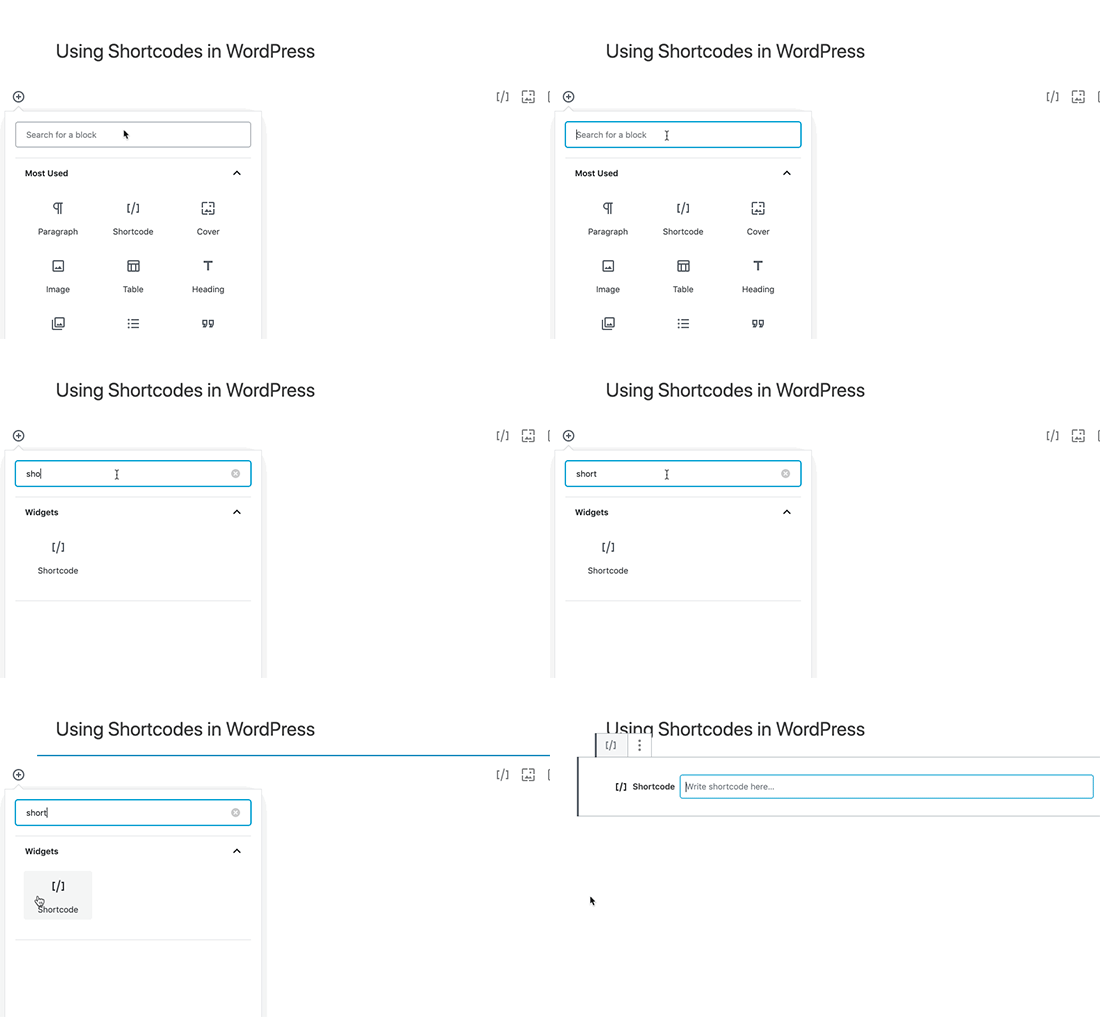
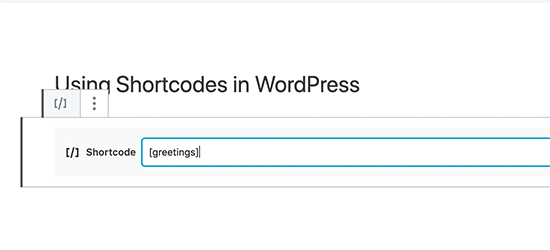
After adding the shortcode block, you can simply enter your shortcode in the block settings. The shortcode will be provided by various WordPress plugins that you might be using such as WPForms for contact forms, OptinMonster for email marketing forms, WP Call button for inserting a click to call button, etc.
添加简码块后,您只需在块设置中输入简码即可。 短码将通过各种WordPress插件来提供,你可能如使用是WPForms的接触形式 , OptinMonster对于电子邮件营销的形式, WP呼叫按钮插入一个点击通话按钮 ,等等。
To learn more about using blocks, see our Gutenberg tutorial for more details.
要了解有关使用块的更多信息,请参见我们的Gutenberg教程以获取更多详细信息。
You can now save your post or page and preview your changes to see the shortcode in action.
现在,您可以保存您的帖子或页面并预览更改,以查看正在使用的短代码。
在WordPress侧边栏小部件中添加简码 (Adding a Shortcode in WordPress Sidebar Widgets)
You can also use shortcodes in WordPress sidebar widgets. Simply visit the Appearance » Widgets page and add the ‘Text’ widget to a sidebar.
您还可以在WordPress侧边栏小部件中使用简码。 只需访问外观»小部件页面,然后将“文本”小部件添加到侧边栏中。
Now you can paste your shortcode inside the text area of the widget.
现在,您可以将您的简码粘贴到小部件的文本区域内。
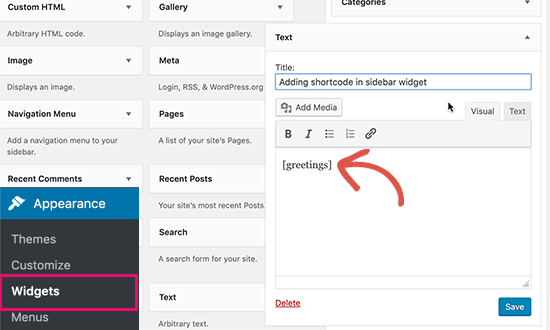
Don’t forget to click on the ‘Save’ button to store your widget settings.
不要忘记单击“保存”按钮来存储您的小部件设置。
After that, you can visit your WordPress website to see the live preview of the shortcode in the sidebar widget.
之后,您可以访问WordPress网站以在侧边栏小部件中查看短代码的实时预览。
在旧的WordPress经典编辑器中添加简码 (Adding a Shortcode in Old WordPress Classic Editor)
If you are still using the old classic editor in WordPress, then here is how you can add shortcodes to your WordPress posts and pages.
如果您仍在WordPress中使用旧的经典编辑器 ,则可以通过以下方法将短代码添加到WordPress帖子和页面中。
Simply edit the post and page where you want to add the shortcode. You can paste the shortcode anywhere inside the content editor where you want it to be displayed. Just make sure the shortcode is in its own line.
只需编辑您要在其中添加简码的帖子和页面。 您可以将短代码粘贴到内容编辑器中希望显示的任何位置。 只要确保简码在自己的行中即可。
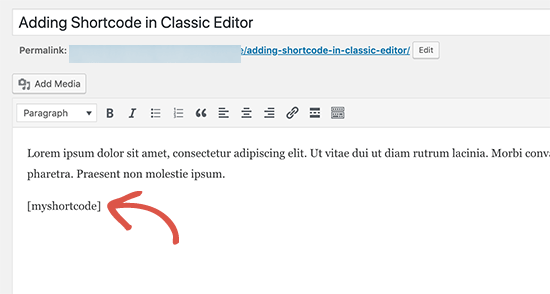
Don’t forget to save your changes. After that you can preview your post and page to see the shortcode in action.
不要忘记保存您的更改。 之后,您可以预览您的帖子和页面以查看正在使用的简码。
如何在WordPress主题文件中添加简码 (How to Add a Shortcode in WordPress Theme Files)
Shortcodes are meant to be used inside WordPress posts, pages, and widgets. However, sometimes you may want to use a shortcode inside a WordPress theme file.
简码旨在在WordPress帖子,页面和小部件内使用。 但是,有时您可能想在WordPress主题文件中使用简码。
WordPress makes it easy to do that, but you will need to edit your WordPress theme files. If you haven’t done this before, then see our guide on how to copy and paste code in WordPress.
WordPress可以轻松做到这一点,但是您将需要编辑WordPress主题文件。 如果您以前没有做过,请参阅有关如何在WordPress中复制和粘贴代码的指南。
Basically, you can add a shortcode to any WordPress theme template by simply adding the following code.
基本上,您只需添加以下代码即可向任何WordPress主题模板添加简码。
<?php echo do_shortcode("[your_shortcode]"); ?>
WordPress will now look for the shortcode and display its output in your theme template.
WordPress现在将寻找简码并在主题模板中显示其输出。
如何在WordPress中创建自己的自定义简码 (How to Create Your Own Custom Shortcode in WordPress)
Shortcodes can be really useful when you want to add dynamic content or custom code inside the WordPress post and pages. However, if you want to create a custom shortcode, then it requires some coding experience.
当您想在WordPress帖子和页面中添加动态内容或自定义代码时,简码会非常有用。 但是,如果要创建自定义的简码,则需要一定的编码经验。
If you are comfortable with writing PHP code, then here is a sample code that you can use as a template.
如果您愿意编写PHP代码,那么这里是示例代码,您可以将其用作模板。
// function that runs when shortcode is called
function wpb_demo_shortcode() {

// Things that you want to do.
$message = 'Hello world!';

// Output needs to be return
return $message;
}
// register shortcode
add_shortcode('greeting', 'wpb_demo_shortcode');
In this code, we first created a function that runs some code and returns the output. After that, we created a new shortcode called ‘greeting’ and told WordPress to run the function we created.
在此代码中,我们首先创建了一个运行一些代码并返回输出的函数。 之后,我们创建了一个名为“ greeting”的新短代码,并告诉WordPress运行我们创建的功能。
You can now use add this shortcode to your posts, pages, and widgets using the following code:
现在,您可以使用以下代码,将此简码添加到帖子,页面和小部件中:
[greeting]
[问候]
It will run the function you created and show the desired output.
它将运行您创建的函数并显示所需的输出。
Now let’s take a look at a more practical usage of a shortcode. In this example, we will display a Google AdSense banner inside a shortcode.
现在让我们看一下短代码的更实际用法。 在此示例中,我们将在简码内显示Google AdSense标语 。
// The shortcode function
function wpb_demo_shortcode_2() {

// Advertisement code pasted inside a variable
$string .= '<script async src="//pagead2.googlesyndication.com/pagead/js/adsbygoogle.js"></script>
<ins class="adsbygoogle"
     style="display:block; text-align:center;"
     data-ad-format="fluid"
     data-ad-layout="in-article"
     data-ad-client="ca-pub-0123456789101112"
     data-ad-slot="9876543210"></ins>
<script>
     (adsbygoogle = window.adsbygoogle || []).push({});
</script>';

// Ad code returned
return $string;

}
// Register shortcode
add_shortcode('my_ad_code', 'wpb_demo_shortcode_2');
Don’t forget to replace the ad code with your own advertisement code.
不要忘记用您自己的广告代码替换广告代码。
You can now use the [my_ad_code] shortcode inside your WordPress posts, pages, and sidebar widgets. WordPress will automatically run the function associated with the shortcode and display the advertisement code.
现在,您可以在WordPress帖子,页面和侧边栏小部件内使用[my_ad_code]简码。 WordPress将自动运行与短代码关联的功能并显示广告代码。
简码与古腾堡块 (Shortcodes vs Gutenberg Blocks)
We’re often asked by users about the differences between shortcode vs the new Gutenberg blocks.
用户经常向我们询问简码与新的Gutenberg块之间的区别。
Basically if you find shortcodes useful, then you’ll love WordPress editor blocks. Blocks allow you to do the same thing but in a more user-friendly way.
基本上,如果您发现短代码有用,那么您会喜欢WordPress编辑器块的。 块允许您以更用户友好的方式执行相同的操作。
Instead of requiring users to add a shortcode for displaying dynamic content, blocks allow users to add dynamic content inside posts / pages with a more intuitive user interface. A lot of popular WordPress plugins are switching to using Gutenberg blocks instead of shortcodes because they’re more beginner friendly.
块不要求用户添加用于显示动态内容的简码,而是允许用户使用更直观的用户界面在帖子/页面内添加动态内容。 许多流行的WordPress插件都开始使用古腾堡块而不是短代码,因为它们对初学者更加友好。
We have put together a list of the most useful Gutenberg block plugins for WordPress that you may want to try.
我们列出了您可能想尝试的最有用的WordPress古腾堡块插件列表。
If you want to create your own custom Gutenberg blocks, you can follow our step by step tutorial on how to create custom Gutenberg blocks in WordPress.
如果您想创建自己的自定义古腾堡块,可以按照我们的分步教程学习如何在WordPress中创建自定义古腾堡块 。
We hope this article helped you learn how to add a shortcode in WordPress. You may also want to see our guide on the best drag & drop WordPress page builder plugins, and how to create a custom WordPress theme without writing any code.
我们希望本文能帮助您学习如何在WordPress中添加简码。 您可能还想查看有关最佳拖放WordPress页面构建器插件的指南 ,以及如何在不编写任何代码的情况下创建自定义WordPress主题 。
If you liked this article, then please subscribe to our YouTube Channel for WordPress video tutorials. You can also find us on Twitter and Facebook.
如果您喜欢这篇文章,请订阅我们的YouTube频道 WordPress视频教程。 您也可以在Twitter和Facebook上找到我们。
翻译自: https://www.wpbeginner.com/wp-tutorials/how-to-add-a-shortcode-in-wordpress/
城市简码
 352


 扫一扫


&spm=1001.2101.3001.11974&articleId=108602743&d=1&t=3&u=c83aee07e28647f1bd91486ee488e1b1)

 被折叠的 条评论
为什么被折叠?
 到【灌水乐园】发言


