


一、坐标系
- WPF 的 3D 坐标系原点通常位于对象中心,X 轴向右,Y 轴向上,Z 轴朝向观察者(右手定则)。
正四面体旋转以原点为中心,绕X,Y,Z 轴自动旋转。
二、正十二面体的坐标
1. 正十二面体的几何特征
- 顶点数:20
- 面数:12,每个面都是正五边形
- 边数:30
- 对偶多面体:正二十面体(12个顶点 ↔ 12个面)
2. 顶点坐标的数学构造
- 一般的vertices 数组给出了全部 20 个顶点坐标,它们基于黄金比例 φ=(1+5)/2φ=(1+\sqrt{5})/2φ=(1+5)/2
(±1, ±1, ±1)(8个)
(0, ±1/φ, ±φ),(±1/φ, ±φ, 0),(±φ, 0, ±1/φ) (12个)
这些点均匀分布在以原点为中心的球面上,构成正十二面体的所有顶点。
三、本例程序中的坐标
- 这个程序是 Charles Petzold在2006年写的。在MeshGeometry3D 定义了一个正十二面体的三角网格模型,但为了渲染方便,它采用了每面独立顶点的方式,而不是共享顶点。
1. 顶点(Positions)
- Positions 字符串中一共包含 72 个顶点(每个顶点三个坐标值,共 72 组)。
这 72 个顶点被划分为 12 组,每组 6 个顶点,对应正十二面体的一个五边形面(每个面用一个中心点 + 五个外圈顶点表示)。 - 分组方式
按顺序每 6 个顶点为一组,共 12 组。例如:- 第 1 组(索引 0~5):
(-1.171, -0.724, 0),(-1, -1, 1),(-1.618, 0, 0.618),(-1.618, 0, -0.618),(-1, -1, -1),(-0.618, -1.618, 0) - 第 2 组(索引 6~11):
(1.171, -0.724, 0),(1, -1, -1),(1.618, 0, -0.618),(1.618, 0, 0.618),(1, -1, 1),(0.618, -1.618, 0) - 依此类推,直到第 12 组(索引 66~71)。
- 第 1 组(索引 0~5):
每组内部的第一个顶点是该五边形面的中心点(位于面内),其余 5 个顶点按顺序围成五边形。
注意: 这些坐标值并非标准的正十二面体顶点(如 (±1, ±1, ±1) 或黄金比例组合),而是经过缩放/旋转的近似值(例如 1.618 ≈ φ,0.618 ≈ 1/φ,0.724 等),整体模型仍然保留了正十二面体的对称性。
2. 三角形(TriangleIndices)
- TriangleIndices 定义了 60 个三角形(12 个面 × 每面 5 个三角形)。
索引顺序也按面分组,每组包含 5 个三角形,全部使用该面第一个顶点作为公共顶点:- 第 1 面(索引 0~5):
0 1 2,0 2 3,0 3 4,0 4 5,0 5 1
即中心点 0 与五边形的边 (1-2, 2-3, 3-4, 4-5, 5-1) 构成 5 个三角形,完整覆盖该五边形。 - 第 2 面(索引 6~11):
6 7 8,6 8 9,6 9 10,6 10 11,6 11 7
同样以顶点 6 为中心。 - 其他面依此类推,每组偏移为 6 个顶点和 5 个三角形。
- 第 1 面(索引 0~5):
3. 几何意义与验证
- 正十二面体:
原本有 12 个正五边形面、20 个顶点、30 条边。 - 三角化:
每个五边形被划分为 5 个三角形,因此总三角形数为 12 × 5 = 60。 - 顶点冗余:
因为每个面独立存储自己的 6 个顶点,相邻面之间的共享边和顶点被重复定义,所以总顶点数为 12 × 6 = 72,远多于理论上的 20 个。
这样做的好处是无需处理顶点共享逻辑,渲染简单;缺点是内存占用较大。 - 面是否平坦?
每组中的 6 个点(中心 + 5 外点)确实共面,这是正十二面体的性质。
可以检查任一组,比如第一组,计算中心到各外点的向量,它们都在同一平面内。
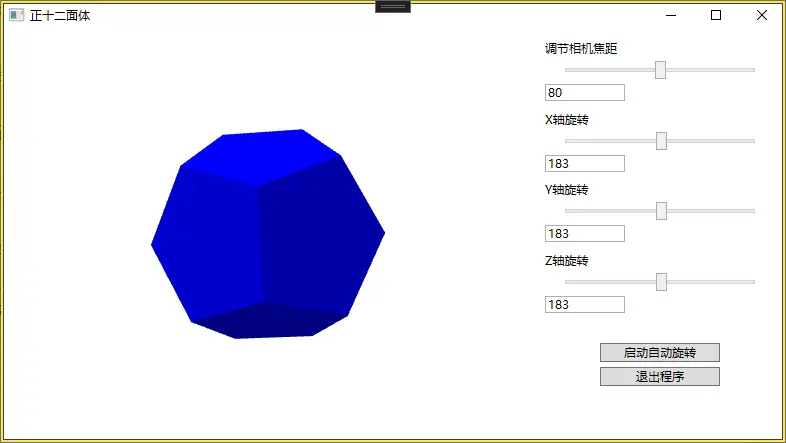
四、MainWindow.xaml
<Window x:Class="WpfA_Dodecahedron.MainWindow"
        xmlns="http://schemas.microsoft.com/winfx/2006/xaml/presentation"
        xmlns:x="http://schemas.microsoft.com/winfx/2006/xaml"
        xmlns:d="http://schemas.microsoft.com/expression/blend/2008"
        xmlns:mc="http://schemas.openxmlformats.org/markup-compatibility/2006"
        xmlns:local="clr-namespace:WpfA_Dodecahedron"
        mc:Ignorable="d"
         Title="正十二面体" Height="450" Width="800">

    <Grid>
        <Grid.ColumnDefinitions>
            <ColumnDefinition Width="*"/>
            <ColumnDefinition Width="250"/>
        </Grid.ColumnDefinitions>
        <!-- 右侧控制面板 -->
        <StackPanel Grid.Column="1" Margin="10">
            <!-- 焦距控制 -->
            <TextBlock Text="调节相机焦距" Margin="0,0,0,5"/>
            <Slider x:Name="viewAngle" Width="200" Value="60" Minimum="10" Maximum="150" />
            <TextBox Text="{Binding ElementName=viewAngle, Path=Value, UpdateSourceTrigger=PropertyChanged, Mode=TwoWay}"
                    Width="80" Margin="0,5,0,10" HorizontalAlignment="Left"/>

            <!-- X轴旋转 -->
            <TextBlock Text="X轴旋转" Margin="0,0,0,5"/>
            <Slider x:Name="rotateX" Width="200" Value="0" Minimum="0" Maximum="360" />
            <TextBox Text="{Binding ElementName=rotateX, Path=Value, UpdateSourceTrigger=PropertyChanged, Mode=TwoWay}"
                    Width="80" Margin="0,5,0,10" HorizontalAlignment="Left"/>

            <!-- Y轴旋转 -->
            <TextBlock Text="Y轴旋转" Margin="0,0,0,5"/>
            <Slider x:Name="rotateY" Width="200" Value="0" Minimum="0" Maximum="360" />
            <TextBox Text="{Binding ElementName=rotateY, Path=Value, UpdateSourceTrigger=PropertyChanged, Mode=TwoWay}"
                    Width="80" Margin="0,5,0,10" HorizontalAlignment="Left"/>

            <!-- Z轴旋转 -->
            <TextBlock Text="Z轴旋转" Margin="0,0,0,5"/>
            <Slider x:Name="rotateZ" Width="200" Value="0" Minimum="0" Maximum="360" />
            <TextBox Text="{Binding ElementName=rotateZ, Path=Value, UpdateSourceTrigger=PropertyChanged, Mode=TwoWay}"
                    Width="80" Margin="0,5,0,10" HorizontalAlignment="Left"/>

            <!-- 按钮 -->
            <Button x:Name="btnAutoRotate" Content="启动自动旋转" Width="120" Margin="0,20,0,5" Click="BtnAutoRotate_Click"/>
            <Button x:Name="btnExit" Content="退出程序" Width="120" Click="BtnExit_Click"/>
        </StackPanel>

        <DockPanel>


        <Viewport3D>
            <ModelVisual3D>
                <ModelVisual3D.Content>
                    <Model3DGroup>
                        <GeometryModel3D>
                            <GeometryModel3D.Geometry>
                                <MeshGeometry3D

    Positions="-1.171 -0.724 0, -1 -1  1, -1.618 0  0.618, -1.618 0 -0.618, -1 -1 -1, -0.618 -1.618 0,
                1.171 -0.724 0,  1 -1 -1,  1.618 0 -0.618,  1.618 0  0.618,  1 -1  1,  0.618 -1.618 0,
               -1.171  0.724 0, -1  1 -1, -1.618 0 -0.618, -1.618 0  0.618, -1  1  1, -0.618  1.618 0,
                1.171  0.724 0,  1  1  1,  1.618 0  0.618,  1.618 0 -0.618,  1  1 -1,  0.618  1.618 0,

               -0.724 0 -1.171, -1  1 -1, 0  0.618 -1.618, 0 -0.618 -1.618, -1 -1 -1, -1.618 0 -0.618,
               -0.724 0  1.171, -1 -1  1, 0 -0.618  1.618, 0  0.618  1.618, -1  1  1, -1.618 0  0.618,
                0.724 0 -1.171,  1 -1 -1, 0 -0.618 -1.618, 0  0.618 -1.618,  1  1 -1,  1.618 0 -0.618,
                0.724 0  1.171,  1  1  1, 0  0.618  1.618, 0 -0.618  1.618,  1 -1  1,  1.618 0  0.618,

               0 -1.171 -0.724,  1 -1 -1,  0.618 -1.618 0, -0.618 -1.618 0, -1 -1 -1, 0 -0.618 -1.618,
               0  1.171 -0.724, -1  1 -1, -0.618  1.618 0,  0.618  1.618 0,  1  1 -1, 0  0.618 -1.618,
               0 -1.171  0.724, -1 -1  1, -0.618 -1.618 0,  0.618 -1.618 0,  1 -1  1, 0 -0.618  1.618,
               0  1.171  0.724,  1  1  1,  0.618  1.618 0, -0.618  1.618 0, -1  1  1, 0  0.618  1.618"

    TriangleIndices=" 0  1  2,  0  2  3,  0  3  4,  0  4  5,  0  5  1,
                      6  7  8,  6  8  9,  6  9 10,  6 10 11,  6 11  7,
                     12 13 14, 12 14 15, 12 15 16, 12 16 17, 12 17 13,
                     18 19 20, 18 20 21, 18 21 22, 18 22 23, 18 23 19,

                     24 25 26, 24 26 27, 24 27 28, 24 28 29, 24 29 25,
                     30 31 32, 30 32 33, 30 33 34, 30 34 35, 30 35 31,
                     36 37 38, 36 38 39, 36 39 40, 36 40 41, 36 41 37,
                     42 43 44, 42 44 45, 42 45 46, 42 46 47, 42 47 43,

                     48 49 50, 48 50 51, 48 51 52, 48 52 53, 48 53 49,
                     54 55 56, 54 56 57, 54 57 58, 54 58 59, 54 59 55,
                     60 61 62, 60 62 63, 60 63 64, 60 64 65, 60 65 61,
                     66 67 68, 66 68 69, 66 69 70, 66 70 71, 66 71 67" />

                            </GeometryModel3D.Geometry>

                            <GeometryModel3D.Material>
                                <DiffuseMaterial Brush="Blue" />
                            </GeometryModel3D.Material>
                        </GeometryModel3D>

                        <!-- Light sources -->
                        <AmbientLight Color="Gray" />
                        <DirectionalLight Color="Gray" Direction="1, -3 -2" />

                    </Model3DGroup>
                </ModelVisual3D.Content>

                    <!-- 旋转变换保持不变,仍作用于整个模型 -->
                    <ModelVisual3D.Transform>
                        <Transform3DGroup>
                            <RotateTransform3D>
                                <RotateTransform3D.Rotation>
                                    <AxisAngleRotation3D Axis="1,0,0" Angle="{Binding Value, ElementName=rotateX}"/>
                                </RotateTransform3D.Rotation>
                            </RotateTransform3D>
                            <RotateTransform3D>
                                <RotateTransform3D.Rotation>
                                    <AxisAngleRotation3D Axis="0,1,0" Angle="{Binding Value, ElementName=rotateY}"/>
                                </RotateTransform3D.Rotation>
                            </RotateTransform3D>
                            <RotateTransform3D>
                                <RotateTransform3D.Rotation>
                                    <AxisAngleRotation3D Axis="0,0,1" Angle="{Binding Value, ElementName=rotateZ}"/>
                                </RotateTransform3D.Rotation>
                            </RotateTransform3D>
                        </Transform3DGroup>
                    </ModelVisual3D.Transform>


                </ModelVisual3D>

                <Viewport3D.Camera>
                    <PerspectiveCamera Position="0,0,5" LookDirection="0,0,-1"
                                 FieldOfView="{Binding Value, ElementName=viewAngle}"
                                 UpDirection="0,1,0"/>
                </Viewport3D.Camera>


        </Viewport3D>
    </DockPanel>
  </Grid>
</Window>
五、MainWindow.xaml.cs
同正八面体
六、源码下载
https://download.csdn.net/download/dalong10/93203385





 扫一扫
扫一扫


 6万+
6万+

 被折叠的 条评论
为什么被折叠?
被折叠的 条评论
为什么被折叠?
 到【灌水乐园】发言





