


http://www.blogjava.net/amigoxie/archive/2009/09/11/294717.html
1. SIPp概述
1.1 介绍
SIPp是一个测试SIP协议性能的工具软件。这是一个GPL的开放源码软件。
它包含了一些基本的SipStone用户代理工作流程(UAC和UAS),并可使用INVITE和B YE建立和释放多个呼叫。它也可以读XML的场景文件,即描述任何性能测试的配置文件。它能动态显示测试运行的统计数据(呼叫速率、信号来回的延迟,以及 消息统计)。周期性地把CSV统计数据转储,在多个套接字上的TCP和UDP,利用重新传输管理的多路复用。在场景定义文件中可以使用正规表达式,动态调 整呼叫速率。
SIPp可以用来测试许多真实的SIP设备,如SIP代理,B2BUAs,SIP媒体服务器,SIP/x网关,SIP PBX,等等,它也可以模仿上千个SIP代理呼叫你的SIP系统。
关于SIPp从google上搜索到很多,可是关于SIPp的中文说明资料较少,或者很多都是不齐全的安装使用说明。
SIPp的网址:http://sipp.sourceforge.net/
1.2 用途
SIPp一般来进行AS的压力测试,图示如下:
UAC(发起端,主叫)--------------------AS---------------------UAS(接收端,被叫)
其中UAC和UAS都有SIPp来担任。因此可以由它来控制每秒有多少个caps,也可由它来控制一个呼叫持续多长时间等。
2. 安装
2.1 Windows版安装
很简单,省略。
3. SIPp的使用
3.1 运行SIPp
选择“程序”->”Sipp_3.1”->“Start sipp”,运行界面如下所示:

在命令行运行:sipp,出现帮助信息,如下所示:
 the scenarios. First line of this file say whether the data is to be read in sequence (SEQUENTIAL), random (RANDOM), or user (USER) order. Each line corresponds to one call and has one or more ';' delimited data fields. Those fields can be referred as [field0], [field1],
  in the xml scenario file. Several CSV files can be used simultaneously (syntax: -inf f1.csv -inf f2.csv ) -infindex : file field Create an index of file using field. For example -inf users.csv -infindex users.csv 0 creates an index on the first key. -ip_field : Set which field from the injection file contains the IP address from which the client will send its messages. If this option is omitted and the '-t ui' option is present, then field 0 is assumed. Use this option together with '-t ui' -l : Set the maximum number of simultaneous calls. Once this limit is reached, traffic is decreased until the number of open calls goes down. Default: (3 * call_duration (s) * rate). -lost : Set the number of packets to lose by default (scenario specifications override this value). -m : Stop the test and exit when 'calls' calls are processed -mi : Set the local media IP address (default: local primary host IP address) -master : 3pcc extended mode: indicates the master number -max_recv_loops : Set the maximum number of messages received read per cycle. Increase this value for high traffic level. The default value is 1000. -max_sched_loops : Set the maximum number of calsl run per event loop. Increase this value for high traffic level. The default value is 1000. -max_reconnect : Set the the maximum number of reconnection. -max_retrans : Maximum number of UDP retransmissions before call ends on timeout. Default is 5 for INVITE transactions and 7 for others. -max_invite_retrans: Maximum number of UDP retransmissions for invite transactions before call ends on timeout. -max_non_invite_retrans: Maximum number of UDP retransmissions for non-invite transactions before call ends on timeout. -max_log_size : What is the limit for error and message log file sizes. -max_socket : Set the max number of sockets to open simultaneously. This option is significant if you use one socket per call. Once this limit is reached, traffic is distributed over the sockets already opened. Default value is 50000 -mb : Set the RTP echo buffer size (default: 2048). -mp : Set the local RTP echo port number. Default is 6000. -nd : No Default. Disable all default behavior of SIPp which are the following: - On UDP retransmission timeout, abort the call by sending a BYE or a CANCEL - On receive timeout with no ontimeout attribute, abort the call by sending a BYE or a CANCEL - On unexpected BYE send a 200 OK and close the call - On unexpected CANCEL send a 200 OK and close the call - On unexpected PING send a 200 OK and continue the call - On any other unexpected message, abort the call by sending a BYE or a CANCEL -nr : Disable retransmission in UDP mode. -nostdin : Disable stdin. -p : Set the local port number. Default is a random free port chosen by the system. -pause_msg_ign : Ignore the messages received during a pause defined in the scenario -periodic_rtd : Reset response time partition counters each logging interval. -r : Set the call rate (in calls per seconds). This value can bechanged during test by pressing '+','_','*' or '/'. Default is 10. pressing '+' key to increase call rate by 1 * rate_scale, pressing '-' key to decrease call rate by 1 * rate_scale, pressing '*' key to increase call rate by 10 * rate_scale, pressing '/' key to decrease call rate by 10 * rate_scale. If the -rp option is used, the call rate is calculated with the period in ms given by the user. -rp : Specify the rate period for the call rate. Default is 1 second and default unit is milliseconds. This allows you to have n calls every m milliseconds (by using -r n -rp m). Example: -r 7 -rp 2000 ==> 7 calls every 2 seconds. -r 10 -rp 5s => 10 calls every 5 seconds. -rate_scale : Control the units for the '+', '-', '*', and '/' keys. -rate_increase : Specify the rate increase every -fd units (default is seconds). This allows you to increase the load for each independent logging period. Example: -rate_increase 10 -fd 10s ==> increase calls by 10 every 10 seconds. -rate_max : If -rate_increase is set, then quit after the rate reaches this value. Example: -rate_increase 10 -rate_max 100 ==> increase calls by 10 until 100 cps is hit. -no_rate_quit : If -rate_increase is set, do not quit after the rate reaches -rate_max. -recv_timeout : Global receive timeout. Default unit is milliseconds. If the expected message is not received, the call times out and is aborted. -send_timeout : Global send timeout. Default unit is milliseconds. If a message is not sent (due to congestion), the call times out and is aborted. -reconnect_close : Should calls be closed on reconnect? -reconnect_sleep : How long (in milliseconds) to sleep between the close and reconnect? -ringbuffer_files: How many error/message files should be kept after rotation? -ringbuffer_size : How large should error/message files be before they get rotated? -rsa : Set the remote sending address to host:port for sending the messages. -rtp_echo : Enable RTP echo. RTP/UDP packets received on port defined by -mp are echoed to their sender. RTP/UDP packets coming on this port + 2 are also echoed to their sender (used for sound and video echo). -rtt_freq : freq is mandatory. Dump response times every freq calls in the log file defined by -trace_rtt. Default value is 200. -s : Set the username part of the resquest URI. Default is 'service'. -sd : Dumps a default scenario (embeded in the sipp executable) -sf : Loads an alternate xml scenario file. To learn more about XML scenario syntax, use the -sd option to dump embedded scenarios. They contain all the necessary help. -oocsf : Load out-of-call scenario. -oocsn : Load out-of-call scenario. -skip_rlimit : Do not perform rlimit tuning of file descriptor limits. Default: false. -slave : 3pcc extended mode: indicates the slave number -slave_cfg : 3pcc extended mode: indicates the file where the master and slave addresses are stored -sn : Use a default scenario (embedded in the sipp executable). If this option is omitted, the Standard SipStone UAC scenario is loaded. Available values in this version: - 'uac' : Standard SipStone UAC (default). - 'uas' : Simple UAS responder. - 'regexp' : Standard SipStone UAC - with regexp and variables. - 'branchc' : Branching and conditional branching in scenarios - client. - 'branchs' : Branching and conditional branching in scenarios - server. Default 3pcc scenarios (see -3pcc option): - '3pcc-C-A' : Controller A side (must be started after all other 3pcc scenarios) - '3pcc-C-B' : Controller B side. - '3pcc-A' : A side. - '3pcc-B' : B side. -stat_delimiter : Set the delimiter for the statistics file -stf : Set the file name to use to dump statistics -t : Set the transport mode: - u1: UDP with one socket (default), - un: UDP with one socket per call, - ui: UDP with one socket per IP address The IP addresses must be defined in the injection file. - t1: TCP with one socket, - tn: TCP with one socket per call, - l1: TLS with one socket, - ln: TLS with one socket per call, - c1: u1 + compression (only if compression plugin loaded), - cn: un + compression (only if compression plugin loaded). This plugin is not provided with sipp.
3.2 使用SIPp进行压力测试
3.2.1启动服务端
首先查知本机的IP,例如笔者本机的IP为192.168.2.45。在SIPp的运行窗口运行:
sipp -sn uas -i 192.168.2.45 -p 5060
出现的命令窗口的内容类似如下:

3.2.2启动和运行客户端
再开启一个SIPp界面。
启动客户端使用:sipp -sn uac….,使用如下:
sipp -sn uac -m 1 -i 192.168.2.45 -p 6060 -s 01012345678 192.168.2.154
启动后命令窗口如下所示:

其中:
-m:该参数表示每秒的caps数,若没写该参数,默认为每秒10个caps;
-i:这个用于指定本机的ip,若本机只有一个ip,可以不指定,若有多个IP,需要指定该参数;
-p:指定本机的端口,可以不指定;
-s:该参数用于指定要呼叫的电话号码;
192.168.1.154为AS的IP地址,没有指定端口时,默认指向的端口为5060。
注意:因为UAC和UAS都在笔者机器,IP为:192.168.2.45,因此AS端还需要对应配置,将落地等的IP地址等都指向该IP。对于我们的环境来说,需要配置SCF的config.as.ACD文件,修改成:

笔者修改了ss1的IP为:192.168.2.45.
在使用uac前,可使用SIP软终端来测试下是不是呼叫后落地是不是落在本机。
3.2.3查看运行结果
在运行:
sipp -sn uac -i 192.168.2.45 -p 6060 -s 01012345678 192.168.2.154
后(该句为10caps),可查看UAS和UAC的界面,服务端的界面类似如下所示:

UAC端的界面类似如下所示:

因为笔者的AS没有发183的流程,所以它的次数是为0的,后续章节还会说到如果不是SIPp的参考流程时该怎么做。
3.2.4查看AS所在的Linux机器的性能情况
1)inmon
公司的SCF提供inmon来查看自动机挂接等的情况,如下所示:

其中FSMS表示当前挂着的自动机数,是需要关注的项。
2)vmstat
vmstat 命令报告关于内核线程、虚拟内存、磁盘、陷阱和 CPU 活动的统计信息。由 vmstat 命令生成的报告可以用于平衡系统负载活动。系统范围内的这些统计信息(所有的处理器中)都计算出以百分比表示的平均值,或者计算其总和。
例如笔者使用:
vmstat 3
表示每隔3s显示内核线程、虚拟内存、磁盘、陷阱和 CPU 活动的统计信息。界面如下所示:

重点要关注的项是io和cpu等信息。
3)top
top命令提供了实时的对系统处理器的状态监视。它将显示系统中CPU最“敏感”的任务列表。
运行top命令后,AS所在Linux机器的显示效果如下:

因为应用主要为cc和mysql,所以要重点关注这两者是否稳定。
主要关注的项是VIRT和RES,如果这两者一直增加,那很可能程序或其它地方存在内存泄露。
3.2.5其它
在UAC端运行的过程中:
1) 按“+”键表示在当前caps的基础中加1;
2) 按“-”键表示在当前caps的基础中减1;
3) 按“*”键表示在当前caps的基础中+运行起点的caps,例如10caps,按“*”后,变成20,再按“*”变成30.
1. 使用场景
笔者最近需要对新做的一个SBC(Ssession Border Controller,会话边界控制器)进行大呼测试。所做的SBC包括两个模块:CN和VN,CN模块做信令转发,VN模块主要做媒体转发,SBC用于解决SIP和媒体流的NAT穿越问题。
SBC服务器为双网卡机器,IP地址为:192.168.2.47和125.39.155.110,UAS服务器的IP为192.168.2.66。UAC所在机器(笔者机器)的IP为125.39.155.107。
UAC往SBC服务器发INVITE消息,SBC接收到消息后,由CN模块将消息转发给UAS服务器,并转发UAS发过来的信息给UAC,呼叫建立后,UAS和UAC的媒体流的转发由SBC的VN模块来做。
UAC(125.39.155.107)< -------------------> SBC (192.168.2.47、125.39.155.110)<----------------->UAS(192.168.2.66)
在该大呼测试中,UAC由笔者机器的Sipp软件来做,UAS是另一台经过测试的稳定的服务器,它在收到SBC的INVITE消息后,发100、180、200,并放一段音。
2. uac.xml编辑
因为我们需要在媒体包、所带的音频Codec等、另外流程等上有一些不同,所以还需要准备自定义的uac.xml。在Sipp的安装目录(eg. C:"Program Files"Sipp_3.1)新建uac.xml文件,该文件内容编写如下:
<?xml version="1.0" encoding="ISO-8859-1" ?>
<!DOCTYPE scenario SYSTEM "sipp.dtd">
<!-- This program is free software; you can redistribute it and/or -->
<!-- modify it under the terms of the GNU General Public License as -->
<!-- published by the Free Software Foundation; either version 2 of the -->
<!-- License, or (at your option) any later version. -->
<!-- -->
<!-- This program is distributed in the hope that it will be useful, -->
<!-- but WITHOUT ANY WARRANTY; without even the implied warranty of -->
<!-- MERCHANTABILITY or FITNESS FOR A PARTICULAR PURPOSE. See the -->
<!-- GNU General Public License for more details. -->
<!-- -->
<!-- You should have received a copy of the GNU General Public License -->
<!-- along with this program; if not, write to the -->
<!-- Free Software Foundation, Inc., -->
<!-- 59 Temple Place, Suite 330, Boston, MA 02111-1307 USA -->
<!-- -->
<!-- Sipp default 'uac' scenario. -->
<!-- -->
<scenario name="Basic Sipstone UAC">
<send retrans="500">
<![CDATA[
INVITE sip:[service]@[remote_ip]:[remote_port] SIP/2.0
Via: SIP/2.0/[transport] [local_ip]:[local_port]
From: sipp <sip:sipp@[local_ip]:[local_port]>;tag=[call_number]
To: sut <sip:[service]@[remote_ip]:[remote_port]>
Call-ID: [call_id]
Cseq: 1 INVITE
Contact: sip:sipp@[local_ip]:[local_port]
Max-Forwards: 70
Subject: Performance Test
Content-Type: application/sdp
Content-Length: 136
v=0
o=user1 53655765 2353687637 IN IP4 127.0.0.1
s=-
t=0 0
m=audio [media_port] RTP/AVP 8
c=IN IP4 [media_ip]
a=rtpmap:8 PCMA/8000
]]>
</send>
<recv response="100"
optional="true">
</recv>
<recv response="180" optional="true">
</recv>
<recv response="200" rtd="true">
</recv>
<!-- Packet lost can be simulated in any send/recv message by -->
<!-- by adding the 'lost = "10"'. Value can be [1-100] percent. -->
<send>
<![CDATA[
ACK sip:[service]@[remote_ip]:[remote_port] SIP/2.0
Via: SIP/2.0/[transport] [local_ip]:[local_port]
From: sipp <sip:sipp@[local_ip]:[local_port]>;tag=[call_number]
To: sut <sip:[service]@[remote_ip]:[remote_port]>[peer_tag_param]
Call-ID: [call_id]
Cseq: 1 ACK
Contact: sip:sipp@[local_ip]:[local_port]
Max-Forwards: 70
Subject: Performance Test
Content-Length: 0
]]>
</send>
<nop>
<action>
<exec play_pcap_audio="pcap/g711a.pcap"/>
</action>
</nop>
<!-- This delay can be customized by the -d command-line option -->
<!-- or by adding a 'milliseconds = "value"' option here. -->
<pause/>
<!-- The 'crlf' option inserts a blank line in the statistics report. -->
<send retrans="500">
<![CDATA[
BYE sip:[service]@[remote_ip]:[remote_port] SIP/2.0
Via: SIP/2.0/[transport] [local_ip]:[local_port]
From: sipp <sip:sipp@[local_ip]:[local_port]>;tag=[call_number]
To: sut <sip:[service]@[remote_ip]:[remote_port]>[peer_tag_param]
Call-ID: [call_id]
Cseq: 2 BYE
Contact: sip:sipp@[local_ip]:[local_port]
Max-Forwards: 70
Subject: Performance Test
Content-Length: 0
]]>
</send>
<recv response="200" crlf="true">
</recv>
<!-- definition of the response time repartition table (unit is ms) -->
<ResponseTimeRepartition value="10, 20, 30, 40, 50, 100, 150, 200"/>
<!-- definition of the call length repartition table (unit is ms) -->
<CallLengthRepartition value="10, 50, 100, 500, 1000, 5000, 10000"/>
</scenario>
该流程表示的意思是首先由uac主动往外发INVITE,接着期望收到100、180、200信息,UAC收到SBC的200 OK信息后,往SBC发送ACK信息,接着往服务器发送pcap/g711a.pcap的RTP包信息。接着开始pause,pause的是时间是uac启动时所带的d参数(在后续章节带了该参数)。等待d(s)后,往服务器发BYE消息,并期待得到服务器的200 OK信息,流程结束。
上面脚本中的“[]”中都是用户带入的一些参数,若未指定,系统会自动指定。
1) remote_ip:服务器的IP,本实例中指定为125.39.155.100;
2) remote_port:服务器的端口,本实例中指定为5040;
3) local_ip:UAC的IP,未指定时,使用UAC所在主机的IP,本例中指定为192.168.4.20;
4) local_port:UAC的端口,本例中指定为6060;
5) call_number:主叫号码,本实例中通过-s参数指定为01077778888;
6) transport:未指定,默认为udp;
7) call_id:Call-ID,由系统生成,未指定。
……
注意如下这段脚本:
<nop>
<action>
<exec play_pcap_audio="pcap/g711a.pcap"/>
</action>
</nop>
这段表示接通后UAC向服务器发送的RTP包,笔者使用的是Sipp安装目录pcap下的g711.pcap包,也可以自己录制。
3. 媒体包准备
在测试过程中常常需要携带RTP流,此时需要有对应的RTP流文件,Sipp安装目录pcap下有一些默认的RTP流文件,若不满足条件,也可以自行录制,录制好后,可在wireshark中过滤好需要的包后,点击“Save As”另存到Sipp安装目录/pcap目录。
4. 测试结果分析
选择“开始”->“程序”->“Sipp_3.1”->“start sipp”,在弹出的窗口中可以先运行如下语句先试呼叫一个:
sipp -sf uac.xml -m 1 -i 192.168.4.20 -d 5000 -p 6060 -s 01077778888 -rtp_echo 125.39.155.110:5040
其中:
1)-sf后跟的是自定义的uac的脚本文件;
2)-m后跟的是呼叫次数;
3)-i后跟的是本机IP(该参数可以不加,默认使用本机IP);
4)-p后跟的是本地的端口;
5)-d后跟的是暂停的秒数,可“2. uac.xml”
6)-s后跟的是助教号码;
7)rtp_echo表示需要对方发送RTP;
8)125.39.155.110:5040表示的服务器的IP和端口。
一个试呼成功后,可以开始进行大呼,此时可以去掉-m参数。命令如下:
sipp -sf uac.xml -i 192.168.4.20 -d 5000 -p 6060 -s 01077778888 -rtp_echo 125.39.155.110:5040
另外在SBC服务器开三个窗口观察当前的运行情况,分别使用如下命令:
1)inmon: 观察SCF的load值等情况(我们公司平台的一个命令);
2)vmstat 3:主要观察id列等,一般要稳定在idle 70%以上;
3)top: 实时查看当前cpu的占用排位情况。
将caps值加到25,运行一段时间后,笔者观察到top、vmstat 3的情况比较稳定,测试基本情况如下:
1)sipp uac窗口:
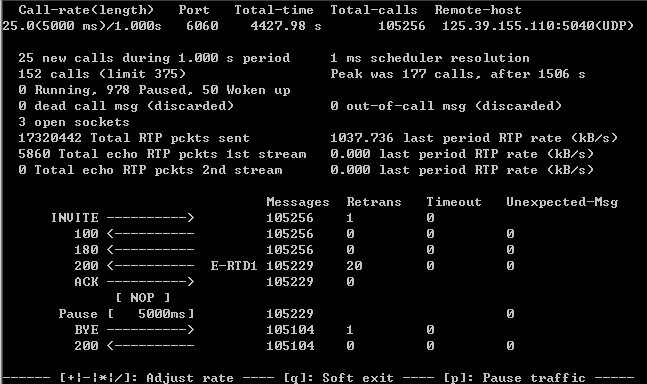
从该结果中可看出,虽然有重复现象,但是重发布多,而且没有“Timout”和“Unexpected Msg”,总体算正常。
2)vmstat 3运行基本情况:
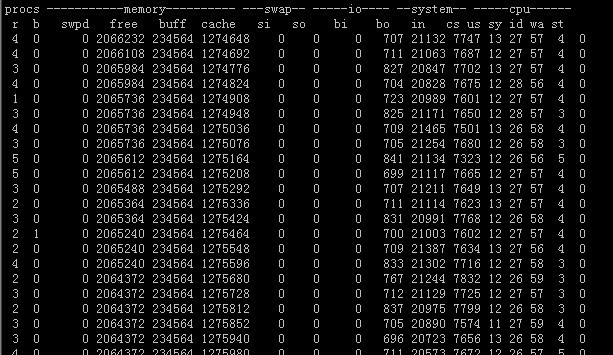
从上图可以看出,idle值太低,基本在57%,离70%还有距离;
3)top运行基本情况:
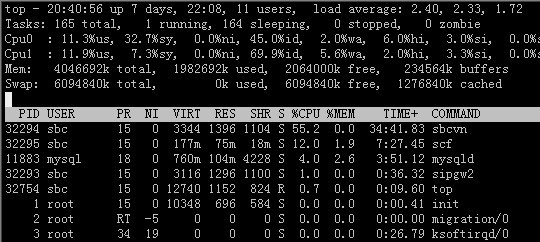
从上图中可以看出,sbcvn模块所占CPU比较高,需要重点优化效率,sbc的VN模块基本在12%,只是负责信令转发,所以瓶颈在 VN模块。
4)inmon运行基本情况:
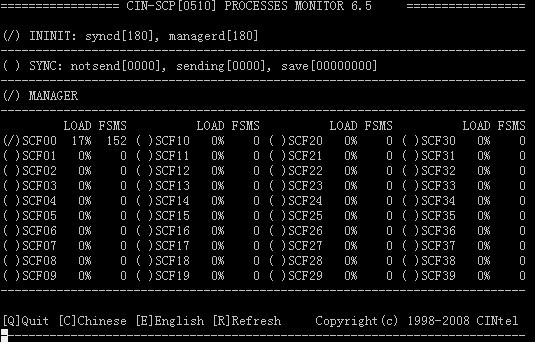
inmon的load值一般在17%,而且比较稳定,没有突然居高位,并持续居高位的情况,CN模块比较稳定。
5. 参考文献
《sip使用秘籍-v1.2》阮班勇:
http://wenku.baidu.com/view/632ac7c758f5f61fb73666c5.html

 1万+
1万+


 扫一扫
扫一扫


 被折叠的 条评论
为什么被折叠?
被折叠的 条评论
为什么被折叠?
 到【灌水乐园】发言


