


文章目录
AS
- 属于同一个组织管理下的网络集合称为自制系统
- 一个自制系统往往具有相同的路由管理规范和策略
- AS通过不同的AS号进行区分,AS号范围原本范围是0-65535,后来进行扩展0-232
- 中国电信163 AS号:4134
- 中国电信CN2 AS号:4809
- 中国网通AS 号:9929
IGP
- 内部网关协议
- 执行拓扑发现
- 当网络发生变化的时候,可以快速的更新路由
- 尽力完成快速收敛
- 网络发生变化,到全部设备的路由表都稳定的时间,称为收敛时间
- IGP协议的收敛速度是路由协议优化的一个衡量标准
- 需要周期性的更新来确保路由选择信息的精确性
- 受同一个管理机构的控制
- 采取了共同的路由选择策略
- 提供了优先的策略控制能力
- 控制路由的唯一手段就是度量值
EGP
- 外部网关协议 主要是为了在AS之间传递路由
- 早期的时候有协议就叫EGP,后来被淘汰,被BGP替代
- EGP的路由设备可能各自属于不同的自制系统
一、BGP
-
Border Gateway Protocol 边界网关路由协议(距离矢量)
-
主要作用是在AS之间传递路由信息
-
目前BGP有4个版本:V1、V2、V4、V4+(即MBGP)
-
为什么使用BGP
- 大量路由需要承载,IGP只能容纳千条,而BGP可以容纳上万
- 支撑MPLS/VPN的应用,传递客户VPN路由。
- 策略能力强,可以很好的实现路由决策与数据控制。
-
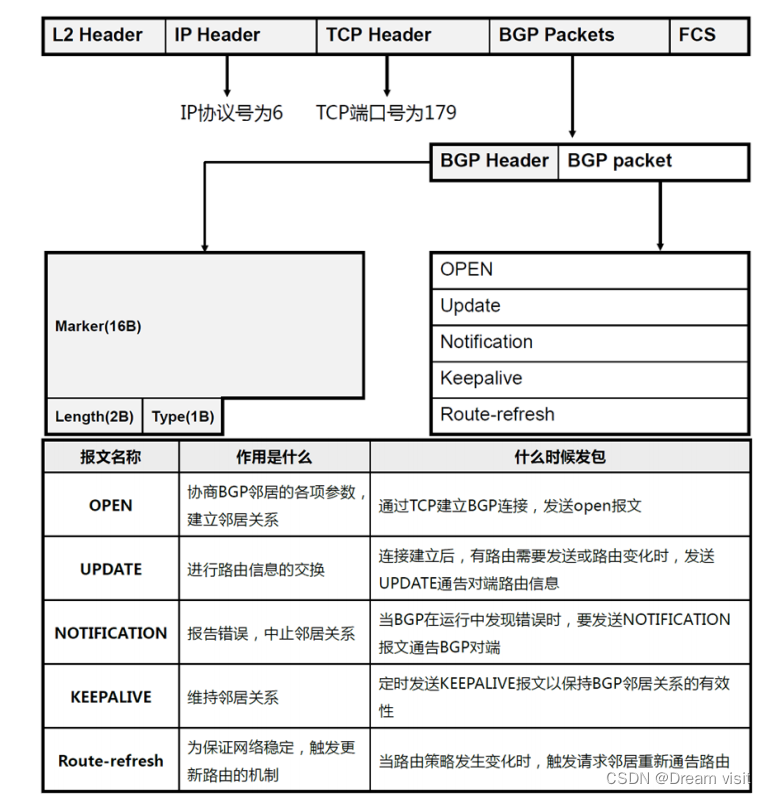
BGP使用TCP为传输层协议,TCP端口号为179
-
BGP路由器之间建立TCP连接,这些路由器称为BGP对等体,也叫BGP邻居:EBGP,IBGP
-
对等体之间交换整个BGP路由表
-
BGP路由器只发送增量更新或者触发更新(不会周期更新)
-
具有丰富的路径属性
-
BGP通告成千上万的路由,可采用TCP滑动窗口的机制,停止并等待确认前,可以发送65576个字节
-
比如各个运营商将自己内部的服务地址通过BGP传递到全球,这样不同的运营商都可以访问。
-
一般来说各个AS不会将所有的地址都上报给BGP

拓扑

IP地址配置
R1(config)#int lo0
R1(config-if)#ip add 1.1.1.1 255.255.255.0
R1(config-if)#int e0/0
R1(config-if)#ip add 192.168.12.1 255.255.255.0
R1(config-if)#no sh
==============================
R2(config)#int lo0
R2(config-if)#ip add 2.2.2.2 255.255.255.0
R2(config-if)#int e0/0
R2(config-if)#ip add 192.168.12.2 255.255.255.0
R2(config-if)#no sh
R2(config-if)#int e0/1
R2(config-if)#ip add 192.168.23.2 255.255.255.0
R2(config-if)#no sh
R2(config-if)#int e0/2
R2(config-if)#ip add 192.168.24.2 255.255.255.0
R2(config-if)#no sh
==========================
R3(config)#int lo0
R3(config-if)#ip add 3.3.3.3 255.255.255.0
R3(config-if)#int e0/0
R3(config-if)#ip add 192.168.23.3 255.255.255.0
R3(config-if)#no sh
R3(config-if)#int e0/1
R3(config-if)#ip add 192.168.35.3 255.255.255.0
R3(config-if)#no sh
==============================
R4(config)#int lo0
R4(config-if)#ip add 4.4.4.4 255.255.255.0
R4(config-if)#int e0/0
R4(config-if)#ip add 192.168.24.4 255.255.255.0
R4(config-if)#no sh
R4(config-if)#int e0/1
R4(config-if)#ip add 192.168.45.4 255.255.255.0
R4(config-if)#no sh
=============================
R5(config)#int lo0
R5(config-if)#ip add 5.5.5.5 255.255.255.0
R5(config-if)#int e0/0
R5(config-if)#ip add 192.168.35.5 255.255.255.0
R5(config-if)#no sh
R5(config-if)#int e0/1
R5(config-if)#ip add 192.168.45.5 255.255.255.0
R5(config-if)#no sh
R5(config-if)#int e0/2
R5(config-if)#ip add 192.168.56.5 255.255.255.0
R5(config-if)#no sh
===========================
R6(config)#int lo0
R6(config-if)#ip add 6.6.6.6 255.255.255.0
R6(config-if)#int e0/0
R6(config-if)#ip add 192.168.56.6 255.255.255.0
R6(config-if)#no sh
AS200中的IGP(OSPF)
这边要注意,在R2和R5的对其他AS的接口,不应启用路由协议,不然就会导致泄漏路由。
R2(config)#int range e0/1-2,lo0
R2(config-if-range)#ip ospf 1 area 0
===============================
R3(config-if)#int range e0/0-1,lo0
R3(config-if-range)#ip ospf 1 area 0
================================
R4(config-if)#int range e0/0-1,lo0
R4(config-if-range)#ip ospf 1 area 0
==================================
R5(config)#int range e0/0-1,lo0
R5(config-if-range)#ip ospf 1 area 0
配置AS之间的BGP协议
首先建立R1和R2的BGP邻居
R1(config)#router bgp 100
R1(config-router)#neighbor 192.168.12.2 remote-as 200
# BGP无法自己发现邻居,要自己去指定邻居关系,因为BGP就不是拿来做拓扑发现作用的,是用来传递现有的路由
================================
R2(config)#router bgp 200
R2(config-router)#neighbor 192.168.12.1 remote-as 100
查看邻居关系
R1#sh ip bgp summary
BGP router identifier 1.1.1.1, local AS number 100
BGP table version is 1, main routing table version 1

Neighbor 	V 	AS MsgRcvd MsgSent TblVer InQ OutQ Up/Down State/PfxRcd
192.168.12.2 4 200 	4 		4 		1 		0 	0 	00:00:09 0
# 一定要确认Up/Down下面有时间,因为BGP summary中会显示所有被指定的邻居,即使从来没建立过
# 所以邻居条目即使有,后面写的never也是无效
建立R5和R6的邻居
R5(config)#router bgp 200
R5(config-router)#neighbor 192.168.56.6 remote 300
=======================
R6(config)#router bgp 300
R6(config-router)#neighbor 192.168.56.5 remote 300
# 这边如果AS号写错了,比如我写成了300
*Apr 5 02:32:30.617: %BGP-3-NOTIFICATION: sent to neighbor 192.168.56.5 passive 2/2 (peer in wrong AS) 2 bytes 00C8
# 如果出现了peer in wrong AS,就说明你配置错误的AS号
查看邻居关系
R6#show ip bgp summary
BGP router identifier 6.6.6.6, local AS number 300
BGP table version is 1, main routing table version 1

Neighbor 	V  AS  MsgRcvd MsgSent TblVer InQ OutQ Up/Down State/PfxRcd
192.168.56.5 4 200  5 		5 		1 		0  0   00:01:28 0
然而在AS之间建立连接,肯定是需要链路的冗余,所以直接指定对方的物理接口地址作为邻居也是不稳定的。
建议BGP所有的邻居关系都最好使用环回接口
AS之间不能启动IGP协议,但是可以配置静态路由,可以使用静态路由保障双方环回接口可达性。
R1(config)#ip route 2.2.2.0 255.255.255.0 192.168.12.2
=======================
R2(config)#ip route 1.1.1.0 255.255.255.0 192.168.12.1
检查连通性
R1#ping 2.2.2.2 so 1.1.1.1
Type escape sequence to abort.
Sending 5, 100-byte ICMP Echos to 2.2.2.2, timeout is 2 seconds:
Packet sent with a source address of 1.1.1.1
!!!!!
Success rate is 100 percent (5/5), round-trip min/avg/max = 1/1/1 ms
两边都设置邻居,并且设置更新源
R1(config)#router bgp 100
R1(config-router)#nei 2.2.2.2 remote 200
R1(config-router)#neighbor 2.2.2.2 update-source Loopback0
=====================
R2(config)#router bgp 200
R2(config-router)#nei 1.1.1.1 remote 100
R2(config-router)#neighbor 1.1.1.1 update-source Loopback0
发现无法建立邻居
R1#sh ip bgp sum
Neighbor V AS MsgRcvd MsgSent TblVer InQ OutQ Up/Down State/PfxRcd
2.2.2.2 4 200 0 0 1 0 0 never Idle
我们尝试抓取EBGP邻居之间数据包

我们发现EBGP邻居默认发出的数据包TTL是1,也就是如果R1发送EBGP邻居消息给R2,根本无法被R2的lo0收到。
如果是EBGP邻居使用环回接口,或者跨网段建立邻居关系,需要设置EBGP多跳。
R1(config)#router bgp 100
R1(config-router)#nei 2.2.2.2 ebgp-multihop
=====================
R2(config)#router bgp 200
R2(config-router)#neighbor 1.1.1.1 ebgp-multihop
配置AS200内部的BGP协议
BGP使用端口号179/tcp来发送各种信息,消息基于4层传递,可以穿越广播域(之前的广播,组播都是不可以的),所以BGP可以跨设备建立邻居关系,在现实中也是这样,BGP设备在地理上可能处于不同的地方,但是可以互相建立邻居,最终组成覆盖全球大网。
R2和R5建立邻居就可以了,但是R5有两个接口都可以到达R2,那R2在指定邻居时候,选择R5的接口就比较重要。
由于物理接口的稳定性不如环回接口。所以我们一般使用环回接口作为BGP邻居地址。
比如R5的e0/0,e0/1任何一个接口失效了,R2依旧可以访问R5的环回接口。
R2(config)#router bgp 200
R2(config-router)#neighbor 5.5.5.5 remote 200
=======================
R5(config)#router bgp 200
R5(config-router)#neighbor 2.2.2.2 remote 200
等待一段时间之后,发现R2和R5无法建立邻居,通过 debug bgp all ,发现R5是通过 192.168.45.5尝试与对方建立邻居的,但是R2只认5.5.5.5作为源地址。
*Apr 5 02:42:13.641: BGP: 2.2.2.2 open active, local address 192.168.45.5
所以需要指定建立邻居的时候路由更新的源接口
R2(config)#router bgp 200
R2(config-router)#neighbor 5.5.5.5 update-source lo0
===================
R5(config)#router bgp 200
R5(config-router)#nei 2.2.2.2 up lo0
检查邻居关系
R5#sh ip bgp summary
BGP router identifier 5.5.5.5, local AS number 200
BGP table version is 1, main routing table version 1

Neighbor V AS MsgRcvd MsgSent TblVer InQ OutQ Up/Down State/PfxRcd
2.2.2.2 4 200 4 4 1 0 0 00:00:58 0
192.168.56.6 4 300 18 18 1 0 0 00:13:06 0
BGP路由的传递
由于BGP并不是用来发现拓扑的,所以BGP在建立邻居的时候不会传递任何条目。
我们需要手动的将需要传递的路由加入BGP表,才可以被传递
我们将R1的lo0和R6的lo0作为通信的双方,将路由加入BGP表
R1(config)#router bgp 100
R1(config-router)#network 1.1.1.0 mask 255.255.255.0
===============================================
R6(config)#router bgp 300
R6(config-router)#netw 6.6.6.0 mask 255.255.255.0
在R2上检查路由
R2#show ip route bgp
	1.0.0.0/24 is subnetted, 1 subnets
B 1.1.1.0 [20/0] via 192.168.12.1, 00:01:18
在R5上检查路由
R5#show ip route bgp
	6.0.0.0/24 is subnetted, 1 subnets
B 6.6.6.0 [20/0] via 192.168.56.6, 00:01:07
发现R2和R5都各自学到了不同的路由,但是没有互相交换条目,检查R5的bgp表。
bgp表里面存放了BGP收到的所有条目,以及条目的属性,即使是无效的条目都会存在。
R5#show ip bgp
	Network Next Hop Metric LocPrf Weight Path
* i 1.1.1.0/24 192.168.12.1 0 100 0 100 i
*> 6.6.6.0/24 192.168.56.6 0 0 300 i
R5虽然收到了 1.1.1.0/24 条目,但是 Next Hop 无效。因为R5并不知道AS100中地址。
IGP是Router—-Router的协议,所以在一个条目传递到下一台路由器的时候,下一跳会被改成之前路由器的地址。
BGP是AS—-AS的协议,所以在一个条目传递到下一个AS的时候,下一跳会被改成之前AS的出去地址,BGP条目在AS内部传递的时候默认下一跳不变。
所以在AS边缘的路由器需要将条目的下一跳改为自己
R2(config)#router bgp 200
R2(config-router)#nei 5.5.5.5 next-hop-self
==================
R5(config)#router bgp 200
R5(config-router)#nei 2.2.2.2 next-hop-self
查看R5的BGP表,发现下一跳已经被改变
R5#sh ip bgp
	Network Next Hop Metric LocPrf Weight Path
*>i 1.1.1.0/24 2.2.2.2 0 100 0 100 i
*> 6.6.6.0/24 192.168.56.6 0 0 300 i
查看R5的路由表
R5#sh ip route bgp
	1.0.0.0/24 is subnetted, 1 subnets
B 1.1.1.0 [200/0] via 2.2.2.2, 00:00:34
	6.0.0.0/24 is subnetted, 1 subnets
B 6.6.6.0 [20/0] via 192.168.56.6, 00:06:44
查看R1和R6的路由表
R1#show ip route bgp
	6.0.0.0/24 is subnetted, 1 subnets
B 6.6.6.0 [20/0] via 192.168.12.2, 00:00:40
=========================
R6#sh ip route bgp
	1.0.0.0/24 is subnetted, 1 subnets
B 1.1.1.0 [20/0] via 192.168.56.5, 00:01:16
尝试在R6上 ping 1.1.1.1 source 6.6.6.6
结果并不通,逐条分析流量的源目的IP地址发现了原因。
当R1和R6互相通信的时候,R3和R4没有参与BGP,所以学不到BGP路由条目,当流量经过R3和R4的时候,就会被丢弃。
这个情况在BGP中很常见,我们称为路由黑洞,解决的方法有很多,看具体的情况。
二、BGP邻居
R5#show ip bgp summary
Neighbor V AS  MsgRcvd MsgSent TblVer InQ OutQ 	Up/Down  State/PfxRcd
2.2.2.2  4 200  29 		30 		11 		0 	0 	00:21:23 	1
6.6.6.6  4 300  7 		8 		11 		0 	0 	00:02:47 	1
- Neighbor
- 建立邻居的设备Router-ID
- V
- 版本,默认是v4
- AS
- 邻居所属的AS号
- MsgRcvd MsgSent
- 收到和发送的消息计数
- TblVer
- 最后一次邻居表版本号
- InQ OutQ
- 进站和出站队列,正常情况下是0,表示等待被处理的数据
- 如果非0,表示网络发生拥塞
- Up/Down
- 邻居建立的时间
- 没有建立过的邻居会写never
- State/PfxRcd
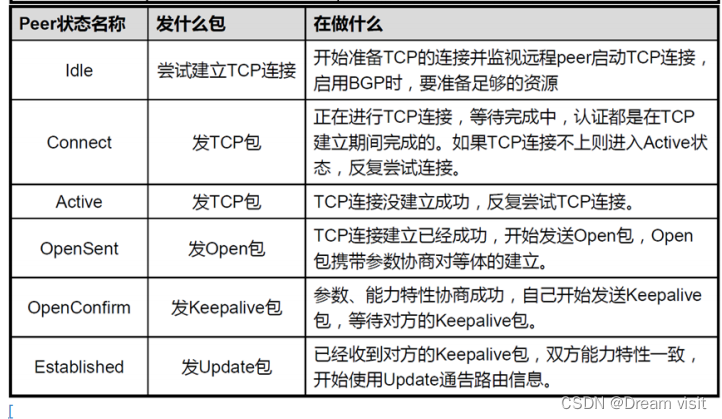
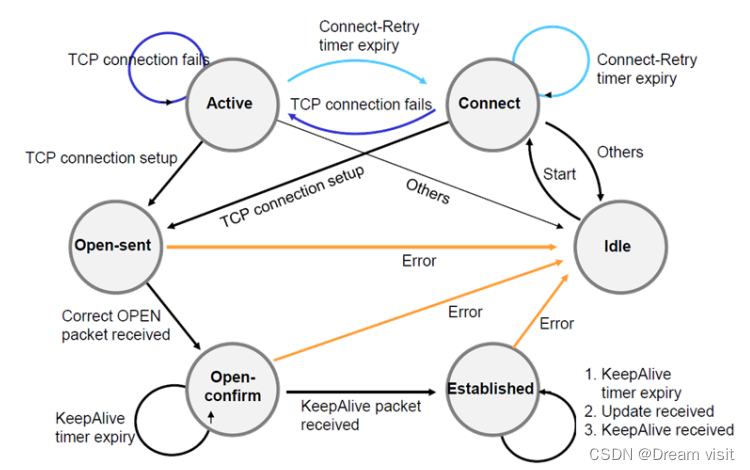
- 状态请参见下面的邻居状态表
- 前缀是表示从这个邻居学到的路由数量
- BGP显式的配置每个邻居,邻居之间建立TCP关系,默认每隔60S发送一次BGP/TCP存活消息,保持时间为180S
- BGP触发更新,增量更新
分类
BGP对等体(peer)也叫BGP邻居,建立基于TCP
- IBGP邻居关系
- 位于同一个自治系统(AS)的路由器之间的BGP邻接关系
- 通过IBGP学到的路由管理距离为200
- 从IBGP学到的路由不会传递给其他的IBGP的邻居
- 如果开启了BGP同步,那么没有在IGP学习到的路由,BGP也不会用
- IBGP邻居传递路由默认不会修改下一条地址为发出的那台路由器
- 建立IBGP邻接关系,满足的条件
- 自治系统号相同
- 定义邻居建立TCP会话
- IBGP邻居可达
- 这边测试可达性的时候,必须在ping后面加上source,因为BGP邻居看重源地址。
- EBGP邻居关系
- BGP位于不同自治系统(AS)的路由器之间的BGP邻接关系
- 通过EBGP学习到的路由管理距离为20
- EBGP邻居为了安全考虑,传递的数据包中的TTL值默认为1
- EBGP邻居传递路由默认会修改下一条地址为发出的那台路由器
- 建立EBGP邻接关系,必须满足三个条件
- EBGP之间自治系统号不同
- 定义邻居建立TCP会话
- neighbor中指定的IP地址要可达
三、BGP消息类型
四、BGP同步
-
BGP路由器不应使用通过IBGP获悉的路由或将其通告给外部邻居,除非该路由是本地的或通过IGP获悉的。
-
正常情况下,如果通过IGP学到了路由条目,就没必要用BGP了,所以BGP默认是关闭的,也不去打开
R2(config)#router bgp 200
R2(config-router)#synchronization
五、BGP表
R5#show ip bgp
BGP table version is 11, local router ID is 5.5.5.5
Status codes: s suppressed, d damped, h history, * valid, > best, i - internal,
		r RIB-failure, S Stale, m multipath, b backup-path, f RT-Filter,
		x best-external, a additional-path, c RIB-compressed,
		t secondary path,
Origin codes: i - IGP, e - EGP, ? - incomplete
RPKI validation codes: V valid, I invalid, N Not found

Network 		Next Hop 	Metric LocPrf 	Weight Path
*>i 1.1.1.0/24 	2.2.2.2 	0 		100 		0  100 i
*> 6.6.6.0/24 	6.6.6.6 	0 					0  300 i
BGP表中会保存着路由器通过BGP学习到所有路由条目和自己产生的BGP条目
- *
- 表示有效的
- >
- 最佳的,有了>才可以进入路由表
- i
- 表示是ibgp邻居发过来的
- Network
- 网段和前缀长度
- Next Hop
- 下一跳信息
- Metric
- 度量值
- 默认情况下本地产生的路由条目是0
- EBGP邻居传递过来的条目是空
- LocPrf
- 本地优先级
- 用于告知内部路由器如何优选离开本AS
- Weight
- 用于告诉自己如何选择最优路由
- 自己产生的条目权重为32768
- 学来的条目权重为0
- Path
- 里面记录了路由条目经历过的所有AS号
- 用来防止路由条目被自己重复学习了
- 最后的一个字母,表示了这条路由出身
- i
- 起源于IGP
- 是被管理员手动放进来的
- e
- 起源于egp协议(然而这个协议已经消失)
- ?
- 未知来源
- 比如重发布会丢失起源信息
- i
六、BGP维护
硬重置(很不推荐)
clear ip bgp *
因为会删除所有BGP邻居,然后重新建立,由于BGP条目非常的多,这么做可能导致断网,或者导致邻居无法再次建立。
软重置(推荐)
R5#clear ip bgp * soft in/out
软重置分为两种:
- in
- 发送route-refresh消息给邻居,然后邻居发送最新的路由条目,来刷新自己的路由表
- 这个过程中,在更新之前不会删除路由表条目
- out
- 发送route-refresh给邻居,告诉邻居我们要给你发送新的路由条目
- 邻居收到了之后可能会处理
七、BGP路由黑洞解决
路由黑洞在上面已经产生,解决方案多样
全互联
将R2-R3-R4-R5之间的直连线路都建立邻居关系
先删除R2-R5的邻居关系
R2(config)#router bgp 200
R2(config-router)#no nei 5.5.5.5
=============
R5(config)#router bgp 200
R5(config-router)#no nei 2.2.2.2
建立邻居关系
R2(config)#router bgp 200
R2(config-router)#nei 3.3.3.3 remote 200
R2(config-router)#nei 3.3.3.3 up lo0
R2(config-router)#nei 3.3.3.3 next-hop-self
R2(config-router)#nei 4.4.4.4 remote 200
R2(config-router)#nei 4.4.4.4 up lo0
R2(config-router)#nei 4.4.4.4 next-hop-s
===================
R3(config)#router bgp 200
R3(config-router)#nei 2.2.2.2 remote 200
R3(config-router)#nei 2.2.2.2 up lo0
R3(config-router)#nei 5.5.5.5 remote 200
R3(config-router)#nei 5.5.5.5 up lo0
================
R4(config)#router bgp 200
R4(config-router)#nei 2.2.2.2 remote 200
R4(config-router)#nei 2.2.2.2 up lo0
R4(config-router)#nei 5.5.5.5 remote 200
R4(config-router)#nei 5.5.5.5 up lo0
===================
R5(config)#router bgp 200
R5(config-router)#nei ibgp peer-group
R5(config-router)#nei ibgp remote 200
R5(config-router)#nei ibgp next-hop-s
R5(config-router)#nei ibgp up lo0
R5(config-router)#nei 3.3.3.3 peer ibgp
R5(config-router)#nei 4.4.4.4 peer ibgp
使用对等体组,将需要相同配置的邻居加入,可以简便配置。
下面我们检查R3和R4的路由表,发现可以学习到1.1.1.0/24和6.6.6.0/24
R3#sh ip route bgp
	1.0.0.0/24 is subnetted, 1 subnets
B 1.1.1.0 [200/0] via 2.2.2.2, 00:03:29
	6.0.0.0/24 is subnetted, 1 subnets
B 6.6.6.0 [200/0] via 5.5.5.5, 00:01:30
=============================
R4#sh ip route bgp
	1.0.0.0/24 is subnetted, 1 subnets
B 1.1.1.0 [200/0] via 2.2.2.2, 00:02:00
	6.0.0.0/24 is subnetted, 1 subnets
B 6.6.6.0 [200/0] via 5.5.5.5, 00:01:50
下面检查R1–R6连通性
R1#ping 6.6.6.6 so 1.1.1.1
Type escape sequence to abort.
Sending 5, 100-byte ICMP Echos to 6.6.6.6, timeout is 2 seconds:
Packet sent with a source address of 1.1.1.1
.....
Success rate is 0 percent (0/5)
通过BGP表中的Path属性可以让路由条目在AS之间防环。但是在AS中,这个Path是不变的。所以BGP有ibgp水平分割(从任何IBGP邻居学来的路由信息都不再向任何IBGP路由器转发)的机制,来防止路由条目在AS内环路。
- 收到一个路由条目
- 如果是ebgp邻居给我的,那么将发送给所有的BGP邻居
- 如果是ibgp邻居给我的,那么将不会发送给任何一个ibgp邻居,只给ebgp邻居
可以在R2—R5之间建立邻居关系,这样就可以学到路由条目了
R2(config)#router bgp 200
R2(config-router)#nei 5.5.5.5 remote 200
R2(config-router)#nei 5.5.5.5 up lo0
R2(config-router)#nei 5.5.5.5 next-hop-s
=====================
R5(config)#router bgp 200
R5(config-router)#nei 2.2.2.2 peer ibgp
检查连通性
R1#ping 6.6.6.6 so 1.1.1.1
Type escape sequence to abort.
Sending 5, 100-byte ICMP Echos to 6.6.6.6, timeout is 2 seconds:
Packet sent with a source address of 1.1.1.1
!!!!!
Success rate is 100 percent (5/5), round-trip min/avg/max = 1/1/1 ms
但是全互联在实际应用中几乎无法实现,因为不是所有的设备都支持BGP的,即使支持BGP,性能也不够处理千万级别的条目。
而且全互联配置和维护极其麻烦,如果你有100台路由器,想全互联,那么需要建立9900个邻居关系,并且更新将会是一场网络风暴。
BGP路由重发步仅IGP
删除AS200中的BGP
no router bgp 200
然后R2和R5建立邻居关系
R2(config)#router bgp 200
R2(config-router)#nei 5.5.5.5 remote 200
R2(config-router)#nei 5.5.5.5 up lo0
R2(config-router)#nei 5.5.5.5 next-hop-s
R2(config-router)#nei 1.1.1.1 remote 100
R2(config-router)#nei 1.1.1.1 up lo0
R2(config-router)#nei 1.1.1.1 eb
===================
R5(config)#router bgp 200
R5(config-router)#nei 2.2.2.2 remote 200
R5(config-router)#nei 2.2.2.2 up lo0
R5(config-router)#nei 2.2.2.2 next-hop-s
R5(config-router)#nei 6.6.6.6 remote 300
R5(config-router)#nei 6.6.6.6 up lo0
R5(config-router)#nei 6.6.6.6 eb
在R2和R5上重发布BGP条目到IGP中,让IGP学习到,来消除路由黑洞
R2(config)#router ospf 1
R2(config-router)#redistribute bgp 200 subnets
============
R5(config)#router ospf 1
R5(config-router)#redistribute bgp 200 subnets
检查R3R4的路由表
R3#sh ip route ospf
	1.0.0.0/24 is subnetted, 1 subnets
O E2 1.1.1.0 [110/1] via 192.168.23.2, 00:01:01, Ethernet0/0
	2.0.0.0/32 is subnetted, 1 subnets
O 2.2.2.2 [110/11] via 192.168.23.2, 00:05:10, Ethernet0/0
	4.0.0.0/32 is subnetted, 1 subnets
O 4.4.4.4 [110/21] via 192.168.35.5, 00:05:10, Ethernet0/1
		[110/21] via 192.168.23.2, 00:05:10, Ethernet0/0
	5.0.0.0/32 is subnetted, 1 subnets
O 5.5.5.5 [110/11] via 192.168.35.5, 00:05:10, Ethernet0/1
	6.0.0.0/24 is subnetted, 1 subnets
O E2 6.6.6.0 [110/1] via 192.168.35.5, 00:00:40, Ethernet0/1
O 192.168.24.0/24 [110/20] via 192.168.23.2, 00:05:10, Ethernet0/0
O 192.168.45.0/24 [110/20] via 192.168.35.5, 00:05:10, Ethernet0/1
====================
R4#sh ip route ospf
	1.0.0.0/24 is subnetted, 1 subnets
O E2 1.1.1.0 [110/1] via 192.168.24.2, 00:01:18, Ethernet0/0
	2.0.0.0/32 is subnetted, 1 subnets
O 2.2.2.2 [110/11] via 192.168.24.2, 00:05:24, Ethernet0/0
	3.0.0.0/32 is subnetted, 1 subnets
O 3.3.3.3 [110/21] via 192.168.45.5, 00:05:24, Ethernet0/1
		[110/21] via 192.168.24.2, 00:05:24, Ethernet0/0
	5.0.0.0/32 is subnetted, 1 subnets
O 5.5.5.5 [110/11] via 192.168.45.5, 00:05:24, Ethernet0/1
	6.0.0.0/24 is subnetted, 1 subnets
O E2 6.6.6.0 [110/1] via 192.168.45.5, 00:00:57, Ethernet0/1
O 192.168.23.0/24 [110/20] via 192.168.24.2, 00:05:24, Ethernet0/0
O 192.168.35.0/24 [110/20] via 192.168.45.5, 00:05:24, Ethernet0/1
检查连通性
R1#ping 6.6.6.6 so 1.1.1.1
Type escape sequence to abort.
Sending 5, 100-byte ICMP Echos to 6.6.6.6, timeout is 2 seconds:
Packet sent with a source address of 1.1.1.1
!!!!!
Success rate is 100 percent (5/5), round-trip min/avg/max = 1/1/1 ms
但是IGP在真实场景中,可能处理不了BGP庞大的路由条目,导致本职工作受到影响。
这样做了之后,也将外部的条目引入了内部路由协议,可能导致一系列问题。
路由反射器
删除R2R5的BGP邻居,并且删除重发布操作
R2(config)#router ospf 1
R2(config-router)#no redistribute bgp 200 subnets
R2(config-router)#router bgp 200
R2(config-router)#no nei 5.5.5.5
============
R5(config)#router ospf 1
R5(config-router)#no redistribute bgp 200 subnets
R5(config-router)#router bgp 200
R5(config-router)#no nei 2.2.2.2
在发生ibgp水平分割无法将条目再次发送给ibgp邻居的时候,可以将对方设置为路由反射器客户端,这样就可以打破一次水平分割机制。
在实际应用中,我们在一个AS中,选择一个路由器作为反射器,然后其他的BGP路由全部都和这个反射器做邻居,有任何路由更新,都只发给反射器,再由反射器发送给所有的ibgp邻居。
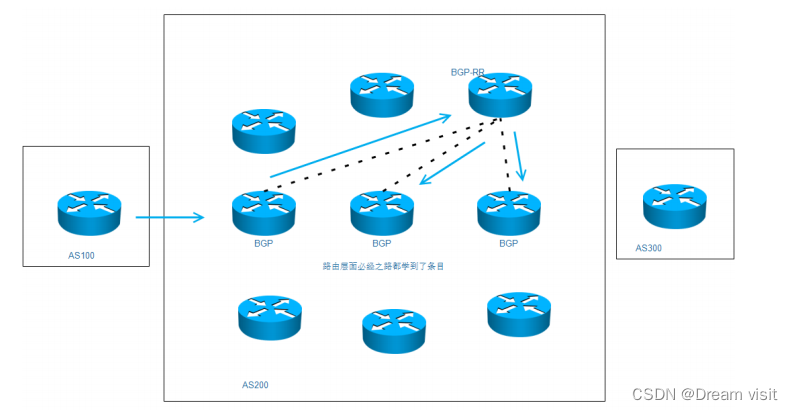
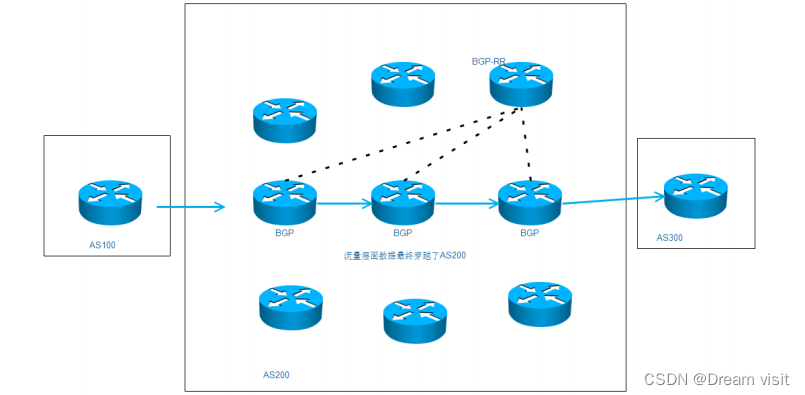
如果再由100台路由器,那么只需要挑选节点,和路由反射器建立邻居即可,即使都需要加入BGP,那也不过99个邻居关系。
下图是规则的补充
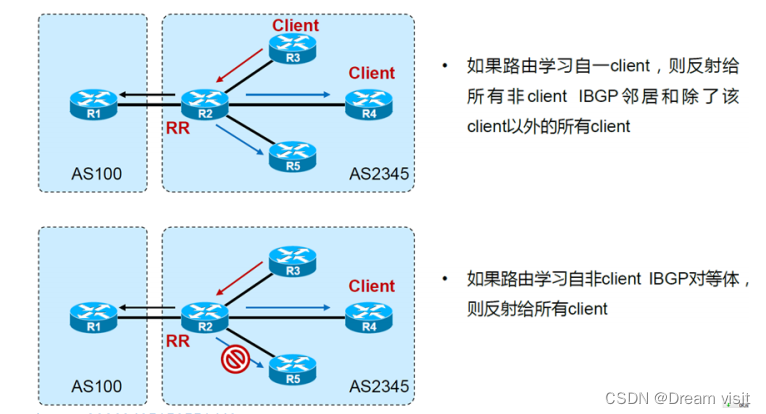
之前的路由黑洞实验,我们选择R3作为路由反射器,其他路由器都和R3建立邻居。
R2&R4&R5
router bgp 200
nei 3.3.3.3 remote 200
nei 3.3.3.3 up lo0
nei 3.3.3.3 next-hop-s # R4不需要这条
===============
R3
R3(config)#router bgp 200
R3(config-router)#nei as200 peer
R3(config-router)#nei as200 remote 200
R3(config-router)#nei as200 up lo0
R3(config-router)#nei as200 route-reflector-client
R3(config-router)#nei 2.2.2.2 peer as200
R3(config-router)#nei 4.4.4.4 peer as200
R3(config-router)#nei 5.5.5.5 peer as200
检查连通性
R1#ping 6.6.6.6 so 1.1.1.1
Type escape sequence to abort.
Sending 5, 100-byte ICMP Echos to 6.6.6.6, timeout is 2 seconds:
Packet sent with a source address of 1.1.1.1
!!!!!
Success rate is 100 percent (5/5), round-trip min/avg/max = 1/1/1 ms
八、BGP常见属性
BGP属性分类
- 公认属性 Well-Known(所有路由器都必须认识)
- 公认强制属性Well-known mandatory(所有路由在更新的时候,都必须携带,如果不携带,直接报错)
- 公认自由决定属性Well-known discretionary(可以更新的时候不携带)
- 可选属性 Optional(路由器可以不识别)
- 可选传递的Optional transitive(建议将这个属性传递下去)
- 可选非传递的Optional non-transitive(建议这个属性不传递)
拓扑
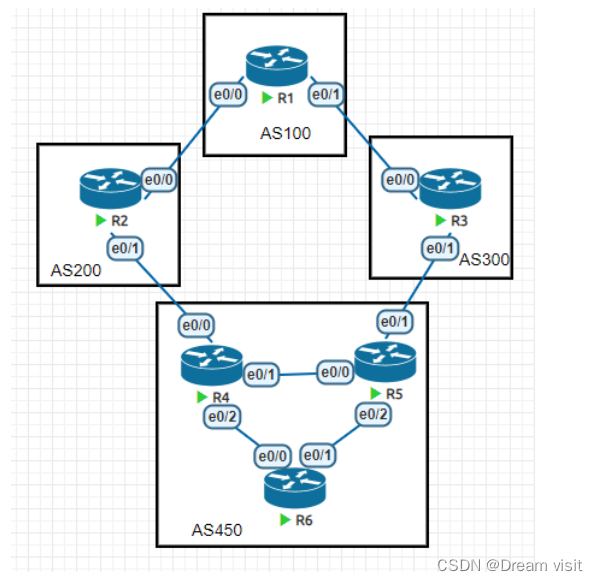
初始配置
===============R1===============
interface Loopback0
  no shutdown
  ip address 1.1.1.1 255.255.255.0
!
interface Ethernet0/0
  no shutdown
  ip address 192.168.12.1 255.255.255.0
!
interface Ethernet0/1
  no shutdown
  ip address 192.168.13.1 255.255.255.0

router bgp 100
  bgp log-neighbor-changes
  network 1.1.1.0 mask 255.255.255.0
  neighbor 2.2.2.2 remote-as 200
  neighbor 2.2.2.2 ebgp-multihop 255
  neighbor 2.2.2.2 update-source Loopback0
  neighbor 3.3.3.3 remote-as 300
  neighbor 3.3.3.3 ebgp-multihop 255
  neighbor 3.3.3.3 update-source Loopback0

ip route 2.2.2.2 255.255.255.255 192.168.12.2
ip route 3.3.3.3 255.255.255.255 192.168.13.3
===============R2===============
interface Loopback0
  no shutdown
  ip address 2.2.2.2 255.255.255.0
!
interface Ethernet0/0
  no shutdown
  ip address 192.168.12.2 255.255.255.0
!
interface Ethernet0/1
  no shutdown
  ip address 192.168.24.2 255.255.255.0

router bgp 200
  bgp log-neighbor-changes
  network 2.2.2.0 mask 255.255.255.0
  neighbor 1.1.1.1 remote-as 100
  neighbor 1.1.1.1 ebgp-multihop 255
  neighbor 1.1.1.1 update-source Loopback0
  neighbor 4.4.4.4 remote-as 450
  neighbor 4.4.4.4 ebgp-multihop 255
  neighbor 4.4.4.4 update-source Loopback0

ip route 1.1.1.1 255.255.255.255 192.168.12.1
ip route 4.4.4.4 255.255.255.255 192.168.24.4
===============R3===============
interface Loopback0
  no shutdown
  ip address 3.3.3.3 255.255.255.0
!
interface Ethernet0/0
  no shutdown
  ip address 192.168.13.3 255.255.255.0
!
interface Ethernet0/1
  no shutdown
  ip address 192.168.35.3 255.255.255.0

router bgp 300
  bgp log-neighbor-changes
  network 3.3.3.0 mask 255.255.255.0
  neighbor 1.1.1.1 remote-as 100
  neighbor 1.1.1.1 ebgp-multihop 255
  neighbor 1.1.1.1 update-source Loopback0
  neighbor 5.5.5.5 remote-as 450
  neighbor 5.5.5.5 ebgp-multihop 255
  neighbor 5.5.5.5 update-source

ip route 1.1.1.1 255.255.255.255 192.168.13.1
ip route 5.5.5.5 255.255.255.255 192.168.35.5
===============R4===============
interface Loopback0
  no shutdown
  ip address 4.4.4.4 255.255.255.0
  ip ospf 1 area 0
!
interface Ethernet0/0
  no shutdown
  ip address 192.168.24.4 255.255.255.0
!
interface Ethernet0/1
  no shutdown
  ip address 192.168.45.4 255.255.255.0
  ip ospf 1 area 0
!
interface Ethernet0/2
  no shutdown
  ip address 192.168.46.4 255.255.255.0
  ip ospf 1 area 0

router bgp 450
  bgp log-neighbor-changes
  network 4.4.4.0 mask 255.255.255.0
  neighbor 2.2.2.2 remote-as 200
  neighbor 2.2.2.2 ebgp-multihop 255
  neighbor 2.2.2.2 update-source Loopback0
  neighbor 6.6.6.6 remote-as 450
  neighbor 6.6.6.6 update-source Loopback0
  neighbor 6.6.6.6 next-hop-self

ip route 2.2.2.2 255.255.255.255 192.168.24.2
===============R5===============
interface Loopback0
  no shutdown
  ip address 5.5.5.5 255.255.255.0
  ip ospf 1 area 0
!
interface Ethernet0/0
  no shutdown
  ip address 192.168.45.5 255.255.255.0
  ip ospf 1 area 0
!
interface Ethernet0/1
  no shutdown
  ip address 192.168.35.5 255.255.255.0
!
interface Ethernet0/2
  no shutdown
  ip address 192.168.56.5 255.255.255.0
  ip ospf 1 area 0

router bgp 450
  bgp log-neighbor-changes
  network 5.5.5.0 mask 255.255.255.0
  neighbor 3.3.3.3 remote-as 300
  neighbor 3.3.3.3 ebgp-multihop 255
  neighbor 3.3.3.3 update-source Loopback0
  neighbor 6.6.6.6 remote-as 450
  neighbor 6.6.6.6 update-source Loopback0
  neighbor 6.6.6.6 next-hop-self

ip route 3.3.3.3 255.255.255.255 192.168.35.3
===============R6===============
interface Loopback0
  no shutdown
  ip address 6.6.6.6 255.255.255.0
  ip ospf 1 area 0
!
interface Ethernet0/0
  no shutdown
  ip address 192.168.46.6 255.255.255.0
  ip ospf 1 area 0
!
interface Ethernet0/1
  no shutdown
  ip address 192.168.56.6 255.255.255.0
  ip ospf 1 area 0

router bgp 450
  bgp log-neighbor-changes
  network 6.6.6.0 mask 255.255.255.0
  neighbor 4.4.4.4 remote-as 450
  neighbor 4.4.4.4 update-source Loopback0
  neighbor 4.4.4.4 route-reflector-client
  neighbor 5.5.5.5 remote-as 450
  neighbor 5.5.5.5 update-source Loopback0
  neighbor 5.5.5.5 route-reflector-client
权重(weight)
- 思科私有的,不过其他厂商也有,只是名字不一样
- 在路由器本地配置,只提供本地路由策略,不会传播给任何BGP邻居
- 范围:0~65535;越大越优先
- 路由器本地始发的路径默认权重为32768,从其他BGP邻居学习到的为0
查看R4关于1.1.1.1的bgp表,发现其实可以有两条路线去往,R4优选从2.2.2.2走。
R4#sh ip bgp
	Network Next Hop Metric LocPrf Weight Path
* i 1.1.1.0/24 5.5.5.5 0 100 0 300 100 i
*> 2.2.2.2 0 200 100 i
*> 2.2.2.0/24 2.2.2.2 0 0 200 i
*>i 3.3.3.0/24 5.5.5.5 0 100 0 300 i
*> 4.4.4.0/24 0.0.0.0 0 32768 i
*>i 5.5.5.0/24 5.5.5.5 0 100 0 i
我们修改5.5.5.5这条路线的权重,可以影响R4的选路
R4(config)#router bgp 450
R4(config-router)#nei 5.5.5.5 weight 10
R4#clear ip bgp * so in
R4#show ip bgp
	Network Next Hop Metric LocPrf Weight Path
*>i 1.1.1.0/24 5.5.5.5 0 100 10 300 100 i
* 2.2.2.2 0 200 100 i
*> 2.2.2.0/24 2.2.2.2 0 0 200 i
*>i 3.3.3.0/24 5.5.5.5 0 100 10 300 i
*> 4.4.4.0/24 0.0.0.0 0 32768 i
*>i 5.5.5.0/24 5.5.5.5 0 100 10 i
可以看到凡是5.5.5.5学习的条目权重都被修改了,影响整个邻居,正常情况下不推荐使用。
R4(config)#router bgp 450
R4(config-router)#no nei 5.5.5.5 weight 10
可以使用route-map对特定路由的权重进行修改
R4(config)#access-list 1 permit 1.1.1.0

R4(config)#route-map R5 per
R4(config-route-map)#mat ip ad 1
R4(config-route-map)#set weight 10
R4(config)#route-map R5 per 20

R4(config)#router bgp 450
R4(config-router)#nei 5.5.5.5 route-map R5 in
R4(config-router)#do clea ip bgp * so in
R4(config-router)#do sh ip bgp
	Network Next Hop Metric LocPrf Weight Path
*>i 1.1.1.0/24 5.5.5.5 0 100 10 300 100 i
* 2.2.2.2 0 200 100 i
*> 2.2.2.0/24 2.2.2.2 0 0 200 i
*>i 3.3.3.0/24 5.5.5.5 0 100 0 300 i
*> 4.4.4.0/24 0.0.0.0 0 32768 i
*>i 5.5.5.0/24 5.5.5.5 0 100 0 i
本地优先级(local preference)
- 公认自由决定属性
- 告诉AS中的路由器,哪条路径是离开AS的首选路径
- LP越高路径越优
- 只发送给IBGP邻居,而不能传递给EBGP邻居
- 默认本地优先级为100
将上面的实验环境还原
R6#sh ip bgp
	Network Next Hop Metric LocPrf Weight Path
* i 1.1.1.0/24 5.5.5.5 0 100 0 300 100 i
*>i 4.4.4.4 0 100 0 200 100 i
*>i 2.2.2.0/24 4.4.4.4 0 100 0 200 i
*>i 3.3.3.0/24 5.5.5.5 0 100 0 300 i
*>i 4.4.4.0/24 4.4.4.4 0 100 0 i
*>i 5.5.5.0/24 5.5.5.5 0 100 0 i
*> 6.6.6.0/24 0.0.0.0 0 32768 i
可以看到R6去往 1.1.1.0/24 可以有两个路线,现在选择的是 4.4.4.4 。我们可以在R5上略施手段让R6选择从R5走,在R5上修改更新给R6路由的本地优先级。
R5(config)#router bgp 450
R5(config-router)#bgp default local-preference 500
R5(config-router)#do clea ip bgp * so out
查看R6的BGP表
R6#sh ip bgp
	Network Next Hop Metric LocPrf Weight Path
*>i 1.1.1.0/24 5.5.5.5 0 500 0 300 100 i
*>i 2.2.2.0/24 4.4.4.4 0 100 0 200 i
*>i 3.3.3.0/24 5.5.5.5 0 500 0 300 i
*>i 4.4.4.0/24 4.4.4.4 0 100 0 i
*>i 5.5.5.0/24 5.5.5.5 0 500 0 i
*> 6.6.6.0/24 0.0.0.0 0 32768 i
如果想设置某台路由器作为整个AS的优选出口,可以修改默认的本地优先级
如果只是想改某一条路由的路径,建议用route-map
R5(config)#access-list 1 permit 1.1.1.0
R5(config)#route-map R6 per
R5(config-route-map)#mat ip add 1
R5(config-route-map)#set local-preference 110
R5(config-route-map)#exit
R5(config)#route-map R6 per 20
R5(config-route-map)#router bgp 450
R5(config-router)#nei 6.6.6.6 route-map R6 out
R5(config-router)#do clea ip bgp * so out
查看R6的BGP表
R6#sh ip bgp
	Network Next Hop Metric LocPrf Weight Path
*>i 1.1.1.0/24 5.5.5.5 0 110 0 300 100 i
*>i 2.2.2.0/24 4.4.4.4 0 100 0 200 i
*>i 3.3.3.0/24 5.5.5.5 0 100 0 300 i
*>i 4.4.4.0/24 4.4.4.4 0 100 0 i
*>i 5.5.5.0/24 5.5.5.5 0 100 0 i
*> 6.6.6.0/24 0.0.0.0 0 32768 i
AS_PATH
-
公认强制属性
-
是前往目标网络的路由经过的自制系统号列表,通告该路由的自治系统号位于列表末尾
-
作用:确保无环,通告给EBGP时会加上自己的AS号;通告给IBGP时不修改AS-path
-
只有在AS之间传递的时候才会发生变化,如果AS_PATH中有自己的AS号,那么就不学习不传递
如果R1不想让AS450学习到 1.1.1.0 这个条目,我们可以在AS_PATH中手动加上AS450
首先在R2上查看一下 1.1.1.0 的AS_PATH,只有AS100
R2#sh ip bgp
	Network Next Hop Metric LocPrf Weight Path
*> 1.1.1.0/24 1.1.1.1 0 0 100 i
在R1上配置 1.1.1.0 离开AS100的 route-map 追加AS450
R1(config)#access-list 1 permit 1.1.1.0
R1(config)#route-map AS100out per
R1(config-route-map)#ma ip add 1
R1(config-route-map)#set as-path prepend 450
R1(config-route-map)#exit
R1(config)#route-map AS100out per 20
R1(config-route-map)#router bgp 100
R1(config-router)#nei 2.2.2.2 route-map AS100out out
R1(config-router)#nei 3.3.3.3 route-map AS100out out
R1(config-router)#do clea ip bgp * so out
在R2上再次查看 1.1.1.0 的AS_PATH
R2#sh ip bgp
	Network Next Hop Metric LocPrf Weight Path
*> 1.1.1.0/24 1.1.1.1 0 0 100 450 i
我们发现AS450中就学习不到这个条目了
R6#show ip bgp
	Network Next Hop Metric LocPrf Weight Path
*>i 2.2.2.0/24 4.4.4.4 0 100 0 200 i
*>i 3.3.3.0/24 5.5.5.5 0 100 0 300 i
*>i 4.4.4.0/24 4.4.4.4 0 100 0 i
*>i 5.5.5.0/24 5.5.5.5 0 100 0 i
*> 6.6.6.0/24 0.0.0.0 0 32768 i
AS_PATH也可以用于路径好坏的判断,如果去往同一个目的地,权重和本地优先级都一样,那么可能会根据AS_PATH长度来判断哪条路径最佳。AS_PATH越短表示离目的地越近,路线越优。
还原实验环境,查看R6的bgp表,我们通过修改AS_PATH长度来影响路线选择
R6#sh ip bgp
	Network Next Hop Metric LocPrf Weight Path
*>i 1.1.1.0/24 4.4.4.4 0 100 0 200 100 i
* i 5.5.5.5 0 100 0 300 100 i
在R2上修改交给R4的 1.1.1.0 路由,增加AS_PATH长度,为了防止对其他的AS造成影响,所以推荐追加的AS号为自己的AS号,比如R2就追加200
R2(config)#access-list 1 permit 1.1.1.0
R2(config)#route-map R4out per
R2(config-route-map)#ma ip add 1
R2(config-route-map)#set as pre 200 200 200
R2(config-route-map)#route-map R4out per 20
R2(config-route-map)#router bgp 200
R2(config-router)#nei 4.4.4.4 route-map R4out out
R2(config-router)#do clea ip bgp * so out
查看R4的BGP表
R4#show ip bgp
	Network Next Hop Metric LocPrf Weight Path
*>i 1.1.1.0/24 5.5.5.5 0 100 0 300 100 i
* 2.2.2.2 0 200 200 200
200 100 i
AS_PATH有4种
- 有序AS_PATH
- 正常的AS_PATH都是会按照顺序进行排列,称为有序
- 450 300 100 i
- 无序AS_PATH
- 如果将多个AS的多条路由条目进行汇总,这个汇总的路由携带的AS_PATH就可能是无序的
- 汇总路由的明细来自于AS300和AS100,不分先后,所以无序
- 450 {300 100} i
- 联邦内有序AS_PATH
- 联邦内无序AS_PATH
ORIGIN
- 公认强制属性
- 标识路由的起源,有下列3种可能:
- i 通过BGP network,也就是起源于IGP,因为BGP network必须保证该网络在路由表中
- e 是由 EGP 这种早期的协议重发布而来
- ? Incomplete,从其他渠道学习到的,路由来源不完全(确认该路由来源的信息不完全)。(重发布的路由)
- 路由优选顺序: lowest origin code (IGP > EGP > Incomplete)
还原实验环境
R2(config)#access-list 1 per 1.1.1.0
R2(config)#route-map R4out per
R2(config-route-map)#mat ip ad 1
R2(config-route-map)#set origin incomplete
R2(config-route-map)#route-map R4out per 20
R2(config-route-map)#router bgp 200
R2(config-router)#nei 4.4.4.4 route-map R4out out
R2(config-router)#do clea ip bgp * so out
查看R4上路径的选择
R4#sh ip bgp
Network Next Hop Metric LocPrf Weight Path
*>i 1.1.1.0/24 5.5.5.5 0 100 0 300 100 i
* 2.2.2.2 0 200 100 ?
MED
- 可选非传递属性
- 是一种度量值,用于向外部邻居指出进入AS的首选路径,即当入口有多个时,自治系统可以使用MED动态的影响其他AS如何选择进入路径
- 度量值越小路径越优
- MED是在AS之间交换,MED发送给EBGP对等体,这些路由器在AS内传播MED,不传递给下一个AS
R1(config)#access-list 1 permit 1.1.1.0
R1(config)#route-map R2out per
R1(config-route-map)#ma ip add 1
R1(config-route-map)#set met
R1(config-route-map)#set metric 100
R1(config-route-map)#route-map R2oute per 20
R1(config-route-map)#router bgp 100
R1(config-router)#nei 2.2.2.2 route-map R2out out
R1(config-router)#do clea ip bgp * so
查看修改的效果
R2#sh ip bgp
	Network Next Hop Metric LocPrf Weight Path
*> 1.1.1.0/24 1.1.1.1 100 0 100 i
BGP在重发布IGP条目的时候,会将IGP条目的度量值用作MED
R4(config)#access-list 1 permit 192.168.56.0
R4(config)#route-map o-b per
R4(config-route-map)#ma ip ad 1
R4(config-route-map)#router bgp 450
R4(config-router)#redistribute ospf 1 route-map o-b
在R2上查看度量值,发现将OSPF的开销作为MED属性
R2#sh ip bgp
	Network Next Hop Metric LocPrf Weight Path
*> 192.168.56.0 4.4.4.4 20 0 450 ?
Next_Hop
- 公认必遵属性
- EBGP邻居之间传递的时候默认会修改下一跳为通告方
- IBGP邻居之间传递的时候,默认下一跳属性不会发生变化
- 建议在收到EBGP邻居更新条目转发给IBGP邻居的时候,加上Next-hop-self
- 不同的AS之间是用多路访问网络(MA)相连情况下,可以使用next-hop-unchange做到类似重定向的功能
Community(团体属性/社区属性)
- 可选传递属性
- 一种标记,用于简化路由策略的执行
- 可以将某些路由分配一个特定的COMMUNITY属性,之后就可以基于COMMUNITY值而不是每条路由进行BGP属性的设置了
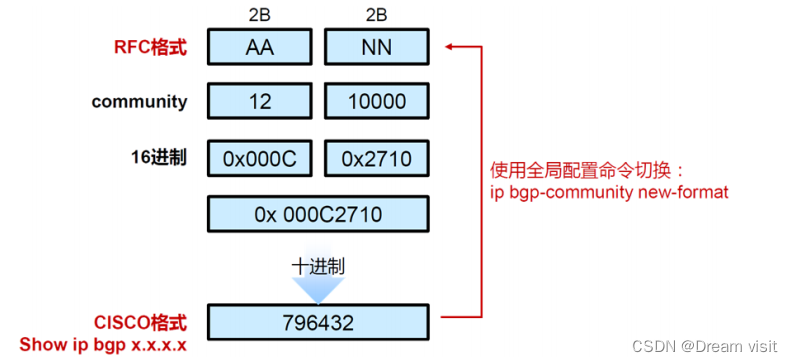
还原实验环境
假设 1.1.1.0/24、10.10.10.0/24 是属于某公司的AB两个个部门。AS300需要对B部门的条目修改,不让AS450收到。做到让AS450优选从AS200去往这个部门。
A:标签100:1
B:标签100:2
一个条目可以携带多个标签,来标识不同的团体,可以是下面这样包含关系标签,可以指定不同的范围
银河系——太阳系——地球——亚洲——中国——江苏——镇江
R1(config)#access-list 1 per 1.1.1.0
R1(config)#access-list 2 per 10.10.10.0
R1(config)#route-map R2R3out per
R1(config-route-map)#ma ip ad 1
R1(config-route-map)#set community 100:1
R1(config-route-map)#route-map R2R3out per 20
R1(config-route-map)#ma ip ad 2
R1(config-route-map)#set community 100:2
R1(config-route-map)#route-map R2R3oute per 30
R1(config-route-map)#router bgp 100
R1(config-router)#nei 2.2.2.2 route-map R2R3out out
R1(config-router)#nei 3.3.3.3 route-map R2R3out out
R1(config-router)#nei 2.2.2.2 send-community
R1(config-router)#nei 3.3.3.3 send-community
# 别忘了开启团体属性的发送
查看团体属性
R3(config)#ip bgp-community new-format
R3(config)#do sh ip bgp 10.10.10.0
BGP routing table entry for 10.10.10.0/24, version 11
Paths: (1 available, best #1, table default)
  Advertised to update-groups:
	1
  Refresh Epoch 1
  100
	1.1.1.1 from 1.1.1.1 (1.1.1.1)
	  Origin IGP, metric 0, localpref 100, valid, external, best
	  Community: 100:2
	  rx pathid: 0, tx pathid: 0x0
后面可以根据不同的community属性加上策略
R3(config)#ip community-list 1 permit 100:1
R3(config)#route-map R5out deny
R3(config-route-map)#match community 1
R3(config-route-map)#route-map R5out per 20
R3(config-route-map)#router bgp 300
R3(config-router)#nei 5.5.5.5 route-map R5out out
R3(config-router)#do clea ip bgp * so
查看R5的bgp表,发现现在已经无法从R3学习到有100:1标签的路由了
R5#sh ip bgp 1.1.1.0
BGP routing table entry for 1.1.1.0/24, version 14
Paths: (1 available, best #1, table default)
  Advertised to update-groups:
	1
  Refresh Epoch 1
  200 100
	4.4.4.4 (metric 11) from 6.6.6.6 (6.6.6.6)
  		Origin IGP, metric 0, localpref 100, valid, internal, best
	  Originator: 4.4.4.4, Cluster list: 6.6.6.6
	  rx pathid: 0, tx pathid: 0x0
有默认操作的团体属性
以下的属性是有默认功能的,不需要手动加上策略,携带了这个团体属性的条目默认就回执行对应的动作
<1-4294967295> community number
# 正常的团体属性
aa:nn community number in aa:nn format
# 正常的团体属性
internet Internet (well-known community)
# 表示所有的条目,如果想匹配any,可以用这个
local-AS Do not send outside local AS (well-known community)
# 不要让这个条目离开自己这个AS,也就是不会对EBGP邻居更新这个条目
no-advertise Do not advertise to any peer (well-known community)
# 告知下一个AS,不要让这个条目给第三个路由器知道
no-export Do not export to next AS (well-known community)
# 告知下一个AS,不要让这个条目给第三个AS知道
none No community attribute
# 去除所有community标签
还原实验环境
让R6的6.6.6.0带上 local-AS 属性
R6(config)#access-list 1 permit 6.6.6.0
R6(config)#route-map R4R5out per
R6(config-route-map)#ma ip ad 1
R6(config-route-map)#set commu local-AS
R6(config-route-map)#route-map R4R5out per 20
R6(config-route-map)#router bgp 450
R6(config-router)#nei 4.4.4.4 route-map R4R5out out
R6(config-router)#nei 5.5.5.5 route-map R4R5out out
R6(config-router)#nei 4.4.4.4 send-comm
R6(config-router)#nei 5.5.5.5 send-comm
R6(config-router)#do clea ip bgp * so
查看R4上的条目是否有这个属性
R4#sh ip bgp 6.6.6.0
BGP routing table entry for 6.6.6.0/24, version 12
Paths: (1 available, best #1, table default, not advertised outside localAS)
  Not advertised to any peer
  Refresh Epoch 2
  Local
	6.6.6.6 (metric 11) from 6.6.6.6 (6.6.6.6)
	  Origin IGP, metric 0, localpref 100, valid, internal, best
	  Community: local-AS
	  rx pathid: 0, tx pathid: 0x0
查看其他AS是否能学习到 6.6.6.0
R2#sh ip bgp
	Network Next Hop Metric LocPrf Weight Path
*> 1.1.1.0/24 1.1.1.1 0 0 100 i
*> 2.2.2.0/24 0.0.0.0 0 32768 i
* 3.3.3.0/24 4.4.4.4 0 450 300 i
*> 1.1.1.1 0 100 300 i
*> 4.4.4.0/24 4.4.4.4 0 0 450 i
*> 5.5.5.0/24 4.4.4.4 0 450 i
* 1.1.1.1 0 100 300 450 i
让 6.6.6.0 携带上 no-advertise
R6(config)#route-map R4R5out per 10
R6(config-route-map)#no set commu local-AS
R6(config-route-map)#set commu no-adv
查看R4是否有这个属性
R4#sh ip bgp 6.6.6.0
BGP routing table entry for 6.6.6.0/24, version 13
Paths: (1 available, best #1, table default, not advertised to any peer)
  Not advertised to any peer
  Refresh Epoch 4
  Local
	6.6.6.6 (metric 11) from 6.6.6.6 (6.6.6.6)
	  Origin IGP, metric 0, localpref 100, valid, internal, best
	  Community: no-advertise
	  rx pathid: 0, tx pathid: 0x0
然后查看R2是否学习到
R2#sh ip bgp
	Network Next Hop Metric LocPrf Weight Path
*> 1.1.1.0/24 1.1.1.1 0 0 100 i
*> 2.2.2.0/24 0.0.0.0 0 32768 i
* 3.3.3.0/24 4.4.4.4 0 450 300 i
*> 1.1.1.1 0 100 300 i
*> 4.4.4.0/24 4.4.4.4 0 0 450 i
*> 5.5.5.0/24 4.4.4.4 0 450 i
* 1.1.1.1 0 100 300 450 i
还原实验环境,在R4通告R2的时候让6.6.6.0携带上 no-advertise
R4(config)#access-list 1 per 6.6.6.0
R4(config)#route-map R2 per
R4(config-route-map)#ma ip ad 1
R4(config-route-map)#set commu no-ex
R4(config-route-map)#route-map R2 per 20
R4(config-route-map)#router bgp 450
R4(config-router)#nei 2.2.2.2 route-map R2 out
R4(config-router)#nei 2.2.2.2 send-comm
R4(config-router)#do clea ip bgp * so
查看R2是否有这个属性
R2#sh ip bgp 6.6.6.0
BGP routing table entry for 6.6.6.0/24, version 8
Paths: (2 available, best #2, table default, not advertised to EBGP peer)
  Not advertised to any peer
  Refresh Epoch 1
  100 300 450
	1.1.1.1 from 1.1.1.1 (1.1.1.1)
	  Origin IGP, localpref 100, valid, external
	  rx pathid: 0, tx pathid: 0
  Refresh Epoch 1
  450
	4.4.4.4 from 4.4.4.4 (4.4.4.4)
	  Origin IGP, localpref 100, valid, external, best
	  Community: no-export
	  rx pathid: 0, tx pathid: 0x0
到R1上查看路由条目,发现已经不能从R2学到这个条目了
R1#sh ip bgp
	Network Next Hop Metric LocPrf Weight Path
*> 1.1.1.0/24 0.0.0.0 0 32768 i
*> 2.2.2.0/24 2.2.2.2 0 0 200 i
*> 3.3.3.0/24 3.3.3.3 0 0 300 i
* 4.4.4.0/24 3.3.3.3 0 300 450 i
*> 2.2.2.2 0 200 450 i
* 5.5.5.0/24 2.2.2.2 0 200 450 i
*> 3.3.3.3 0 300 450 i
*> 6.6.6.0/24 3.3.3.3 0 300 450 i
如果AS200想让AS100继续可以学习到这个条目,也就是让 no-export 属性失效,可以进行如下操作
R2(config)#ip community-list 1 per no-export
R2(config)#access-list 1 per 6.6.6.0
R2(config)#route-map R4 per
R2(config-route-map)#ma ip add 1
R2(config-route-map)#set comm-list 1 delete
R2(config-route-map)#route-map R4 per 20
R2(config-route-map)#router bgp 200
R2(config-router)#nei 4.4.4.4 route-map R4 in
R2(config-router)#do clea ip bgp * so in
查看R2上 6.6.6.0 的属性
R2#sh ip bgp 6.6.6.0
BGP routing table entry for 6.6.6.0/24, version 9
Paths: (2 available, best #2, table default)
  Advertised to update-groups:
	1
  Refresh Epoch 3
  100 300 450
	1.1.1.1 from 1.1.1.1 (1.1.1.1)
	  Origin IGP, localpref 100, valid, external
	  rx pathid: 0, tx pathid: 0
  Refresh Epoch 3
  50
	4.4.4.4 from 4.4.4.4 (4.4.4.4)
	  Origin IGP, localpref 100, valid, external, best
	  rx pathid: 0, tx pathid: 0x0
查看R1是否可以学习到这个条目
R1#sh ip bgp
BGP table version is 8, local router ID is 1.1.1.1
Status codes: s suppressed, d damped, h history, * valid, > best, i - internal,
		r RIB-failure, S Stale, m multipath, b backup-path, f RT-Filter,
		x best-external, a additional-path, c RIB-compressed,
		t secondary path,
Origin codes: i - IGP, e - EGP, ? - incomplete
RPKI validation codes: V valid, I invalid, N Not found

	Network Next Hop Metric LocPrf Weight Path
*> 1.1.1.0/24 0.0.0.0 0 32768 i
*> 2.2.2.0/24 2.2.2.2 0 0 200 i
*> 3.3.3.0/24 3.3.3.3 0 0 300 i
* 4.4.4.0/24 3.3.3.3 0 300 450 i
*> 2.2.2.2 0 200 450 i
* 5.5.5.0/24 2.2.2.2 0 200 450 i
*> 3.3.3.3 0 300 450 i
* 6.6.6.0/24 2.2.2.2 0 200 450 i
*> 3.3.3.3 0 300 450 i

 7342
7342


 扫一扫
扫一扫


&spm=1001.2101.3001.11974&articleId=135658966&d=1&t=3&u=5c39adb9d0384e4d8ff266e082ac93d0)


 被折叠的 条评论
为什么被折叠?
被折叠的 条评论
为什么被折叠?
 到【灌水乐园】发言


