


实验目的
熟悉常用的 HDFS 操作
实验环境
- Vmware Pro 16
- Windows 10
- Ubuntu 14
实验原理
- 计算机组成原理
- 计算机网络
- 操作系统
实验步骤与实验结果
4.1 Java 编程实现以及 Shell 命令实现功能
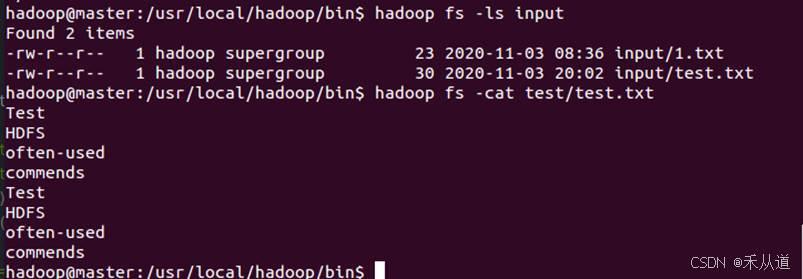
向HDFS中上传任意文本文件,如果指定的文件在 HDFS 中已经存在,由用户指定是追加到原有文件末尾还是覆盖原有的文件。
Shell:
| hadoop fs -put ~/test.txt /test/test.txt hadoop fs -appendToFile ~/test.txt /test/test.txt hadoop fs -copyFromLocal -f ~/test.txt / input/test.txt |
Java:
public static void main(String[] args) {

        // TODO Auto-generated method stub

        try{

            Configuration conf = new Configuration();

            conf.set("fs.defaultFS", "hdfs://master:9000");

            conf.set("fs.hdfs.impl",

                    "org.apache.hadoop.hdfs.DistributedFileSystem");

            FileSystem fs = FileSystem.get(conf);

            Path srcPath = new Path("/home/hadoop/test.txt");

            Path desPath = new Path("test/test.txt");

            test1(fs,srcPath,desPath);

            fs.close(); // 关闭hdfs

        }catch (Exception e) {

            e.printStackTrace();

        }

    }


    private static void test1(FileSystem fileSystem,Path srcPath, Path desPath){

        try {

            if (fileSystem.exists(new Path("test/test.txt"))){

                System.out.println("Do you want to overwrite the existed file? ( y / n )");

                if (new Scanner(System.in).next().equals("y")){

                    fileSystem.copyFromLocalFile(false,true,srcPath,desPath);

                }else {

                    FileInputStream inputStream = new FileInputStream(srcPath.toString());

                    FSDataOutputStream outputStream  = fileSystem.append(new Path("/test/test.txt"));

                    byte[] bytes = new byte[1024];

                    int read = -1;

                    while ((read = inputStream.read(bytes)) > 0){

                        outputStream.write(bytes,0,read);

                    }

                    inputStream.close();

                    outputStream.close();

                }

            }else {

                fileSystem.copyFromLocalFile(srcPath,desPath);

            }

        } catch (IOException e) {

            e.printStackTrace();

        }

    }
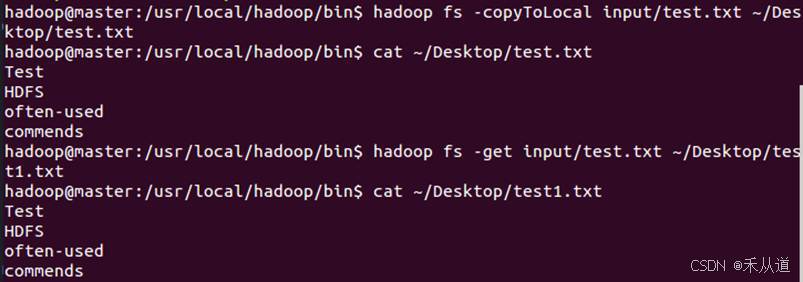
4.2 从HDFS中下载指定文件,如果本地文件与要下载的文件名称相同,则自动对下载的文件重命名。
Shell:
| hadoop fs -copyToLocal input/test.txt ~/Desktop/test.txt hadoop fs -get input/test.txt ~/Desktop/test1.txt |
Java
public static void main(String[] args) {

        // TODO Auto-generated method stub

        try{

            Configuration conf = new Configuration();

            conf.set("fs.defaultFS", "hdfs://master:9000");

            conf.set("fs.hdfs.impl",

                    "org.apache.hadoop.hdfs.DistributedFileSystem");

            FileSystem fs = FileSystem.get(conf);

            Path srcPath = new Path("/home/hadoop/test2.txt");

            Path desPath = new Path("test/test.txt");

//            test1(fs,srcPath,desPath);

            test2(fs,desPath,srcPath);

            fs.close(); // 关闭hdfs

        }catch (Exception e) {

            e.printStackTrace();

        }

    }

 private static void test2(FileSystem fileSystem,Path remotePath, Path localPath){

        try {

            if (fileSystem.exists(remotePath)){

                System.out.println("remotePath.getName() = " + remotePath.getName());

                System.out.println("localPath.getName() = " + localPath.getName());

                if (remotePath.getName().equals(localPath.getName())){

                    fileSystem.copyToLocalFile(remotePath,new Path("/home/hadoop/Desktop/"+ new Random().nextInt() +".txt"));

                }else {

                    fileSystem.copyToLocalFile(remotePath,localPath);

                }

            }else {

                System.out.println("Can't find this file in HDFS!");

            }


 &n






 扫一扫
扫一扫


 633
633

 被折叠的 条评论
为什么被折叠?
被折叠的 条评论
为什么被折叠?
 到【灌水乐园】发言





