



 本文介绍如何通过GDB进行程序调试,包括设置Core文件名以包含更多元信息,如PID、时间戳等,以及如何调整终端配置以启用Core dump。此外,还提供了创建测试demo和使用GDB读取Core文件进行调试的步骤。
0.关于core文件的设置
两种方式设置core文件名,默认系统是生成名为core的文件,但是当我们为了方便调试,需要生成带pid,time等信息的core文件时候,就需要自己设置一下了。以下命令一般都要root权限。
echo "1" > /proc/sys/kernel/core_uses_pid如果以上命令执行无权限,可以使用下列命令
sysctl -w kernel.core_uses_pid=1都是一个意思,设置core文件名带进程id。另外我们也可以修改core文件统一生成到一个自定义默认路径,比如:“/corefile”更详细可以参考下面说明:
#执行如下命令的一条即可
1. echo "/corefile/core-%e-%p-%t" > /proc/sys/kernel/core_pattern
#标识生成的core文件格式是 core-%e-%p-%t,保存路径为/corefile
2. sysctl -w kernel.core_pattern=/corefile/core-%e-%p-%t
%p - insert pid into filename 添加pid(进程id)
%u - insert current uid into filename 添加当前uid(用户id)
%g - insert current gid into filename 添加当前gid(用户组id)
%s - insert signal that caused the coredump into the filename 添加导致产生core的信号
%t - insert UNIX time that the coredump occurred into filename 添加core文件生成时的unix时间
%h - insert hostname where the coredump happened into filename 添加主机名
%e - insert coredumping executable name into filename 添加导致产生core的命令名
1.在终端使用命令
ulimit -c查看你当前终端是否打开了core dump。系统一半默认输出0,此时我们需要设置一下
ulimit -c unlimited将终端设置成无限dump文件大小。也可以设置成一个值比如1000,dump文件超过1000字节就不会继续生成。所以通常使用无限制大小。
2.编写测试demo,text.cpp文件
#include <iostream>
using namespace std;
int main()
{
	int *p = NULL;
	*p = 5;
	cout<<*p<<endl;
	return 0;
}
g++ -o text text.cpp,生成text可执行文件,然后运行,就会得到core.*文件了。
3.gdb调试
当我们发布程序后,拿到core文件了,怎么调试?答案就是gdb。
使用源代码,如果是用makefile的话也一样,编译的时候加 -g 参数
#编译
g++ -g -o textd text.cpp
#调试
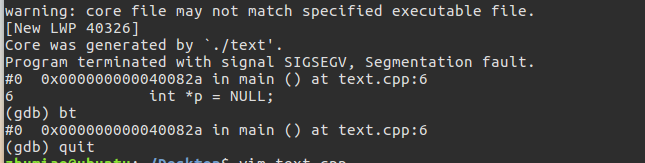
gdb textd core.*
此时我们就会发现输出信息很直观了,如下图,本文完。






 扫一扫
扫一扫


 2078
2078

 被折叠的 条评论
为什么被折叠?
被折叠的 条评论
为什么被折叠?
 到【灌水乐园】发言





