


 本文档详细介绍了在CentOS7上安装Elasticsearch7.14.0时遇到的四个主要问题及其解决方法:1)无法远程访问,需要修改`elasticsearch.yml`配置文件并检查防火墙设置;2)系统虚拟内存限制过低,需调整`vm.max_map_count`参数;3)最大文件描述符数量不足,需要在`limits.conf`中设置软硬限制;4)启动时bootstrap checks失败,需配置`discovery.seed_hosts`等参数。通过这些步骤,可以成功解决安装和运行Elasticsearch时的常见问题。
Centos7安装elasticsearch7.14.0遇到问题(无法远程访问;内存小;bootstrap checks failed)
问题1:无法远程访问
es解决方法
vim elasticsearch.yml 将原来network修改为以下配置:
network.host: 0.0.0.0
原因2:防火墙原因
解决方法:停止防火墙 或开放5601端口
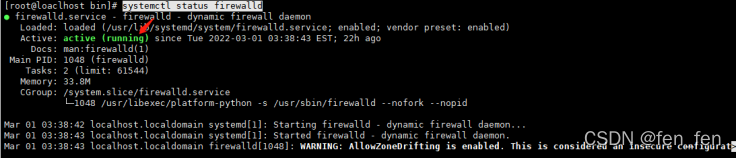
#查询防火墙状态,是否开启着
systemctl status firewalld
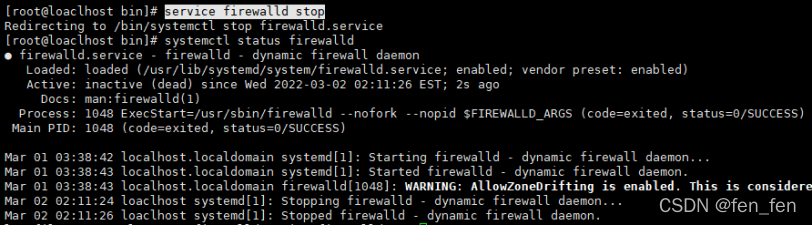
#停止防火墙
$service firewalld stop
其他防火墙命令:
1、查看firewall服务状态
systemctl status firewalld
出现Active: active (running)切高亮显示则表示是启动状态。
出现 Active: inactive (dead)灰色表示停止。
2、查看firewall的状态
firewall-cmd --state
3、开启、重启、关闭、firewalld.service服务
# 开启
service firewalld start
# 重启
service firewalld restart
# 关闭
service firewalld stop
4、查看防火墙规则
firewall-cmd --list-all
5、查询、开放、关闭端口
# 查询端口是否开放
firewall-cmd --query-port=8080/tcp
# 开放80端口
firewall-cmd --permanent --add-port=80/tcp
# 移除端口
firewall-cmd --permanent --remove-port=8080/tcp
#重启防火墙(修改配置后要重启防火墙)
firewall-cmd --reload# 参数解释
1、firwall-cmd:是Linux提供的操作firewall的一个工具;
2、--permanent:表示设置为持久;
3、--add-port:标识添加的端口;
问题2:ES启动时出现异常,报错:max virtual memory areas vm.max_map_count [65530] is too low, increase to at least [262144]
原因:系统虚拟内存默认最大映射数为65530,无法满足ES系统要求,需要调整为262144以上。
解决方法:root用户设置vm.max_map_count参数
#修改文件
vim /etc/sysctl.conf
#添加参数
...
vm.max_map_count = 262144
#重新加载/etc/sysctl.conf配置
sysctl -p 立即生效
或/sbin/sysctl -p
问题3:max file descriptors [4096] for elasticsearch process is too low, increase to at least [65535]
ERROR: [1] bootstrap checks failed. You must address the points described in the following [1] lines before starting Elasticsearch.
bootstrap check failure [1] of [1]: max file descriptors [4096] for elasticsearch process is too low, increase to at least [65535]

解决办法:
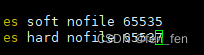
1、将当前用户的软硬限制调大。找到文件 /etc/security/limits.conf,编辑,在文件的最后追加如下配置:
2、来回切换用户,root修改后切换到es,使之生效
说明: soft nofile表示软限制,hard nofile表示硬限制。两行语句表示,es用户的软限制为65535,硬限制为65537,即表示es用户能打开的最大文件数量为65537,不管它开启多少个shell。
问题4:ES启动时出现异常,报错bootstrap checks failed
[1] bootstrap checks failed. You must address the points described in the following [1] lines before starting Elasticsearch.
bootstrap check failure [1] of [1]: the default discovery settings are unsuitable for production use; at least one of [discovery.seed_hosts, discovery.seed_providers, cluster.initial_master_nodes] must be configured

翻译:在discovery.seed_hosts,discovery.seed_providers, cluster.initial_master_nodes中至少设置一项。
解决方法:修改elasticsearch.yml配置文件,并重启es
vim elasticsearch.yml
network.host: 0.0.0.0
node.name: node-1
cluster.initial_master_nodes: ["node-1"]






 扫一扫
扫一扫


 1484
1484

 被折叠的 条评论
为什么被折叠?
被折叠的 条评论
为什么被折叠?
 到【灌水乐园】发言





