



作者:付文龙(红目香薰)
仓库地址:https://gitcode.com/feng8403000/FlutterfromBeginnertoAdvancedForHarmonyOS.git
联系邮箱:372699828@qq.com
一、引言
在Flutter应用开发中,状态管理的一个关键决策是确定状态的作用范围。状态可以分为局部状态和全局状态,选择合适的状态范围直接影响应用的可维护性、可测试性和性能。本章我们将深入探讨局部状态与全局状态的概念、特点和适用场景,并学习如何合理划分状态范围。
1.1 为什么状态范围很重要
状态范围的选择直接影响:
- 代码可维护性:状态越集中,越容易理解和修改
- 代码可测试性:状态越局部,越容易单独测试
- 应用性能:状态更新范围越小,重建的组件越少
- 团队协作:清晰的状态划分便于多人协作开发
1.2 本章内容概述
本章将详细探讨以下内容:
- 局部状态的概念和特点
- 全局状态的概念和特点
- 状态范围决策指南
- 状态分层架构设计
- 状态范围选择原则
二、局部状态
2.1 什么是局部状态
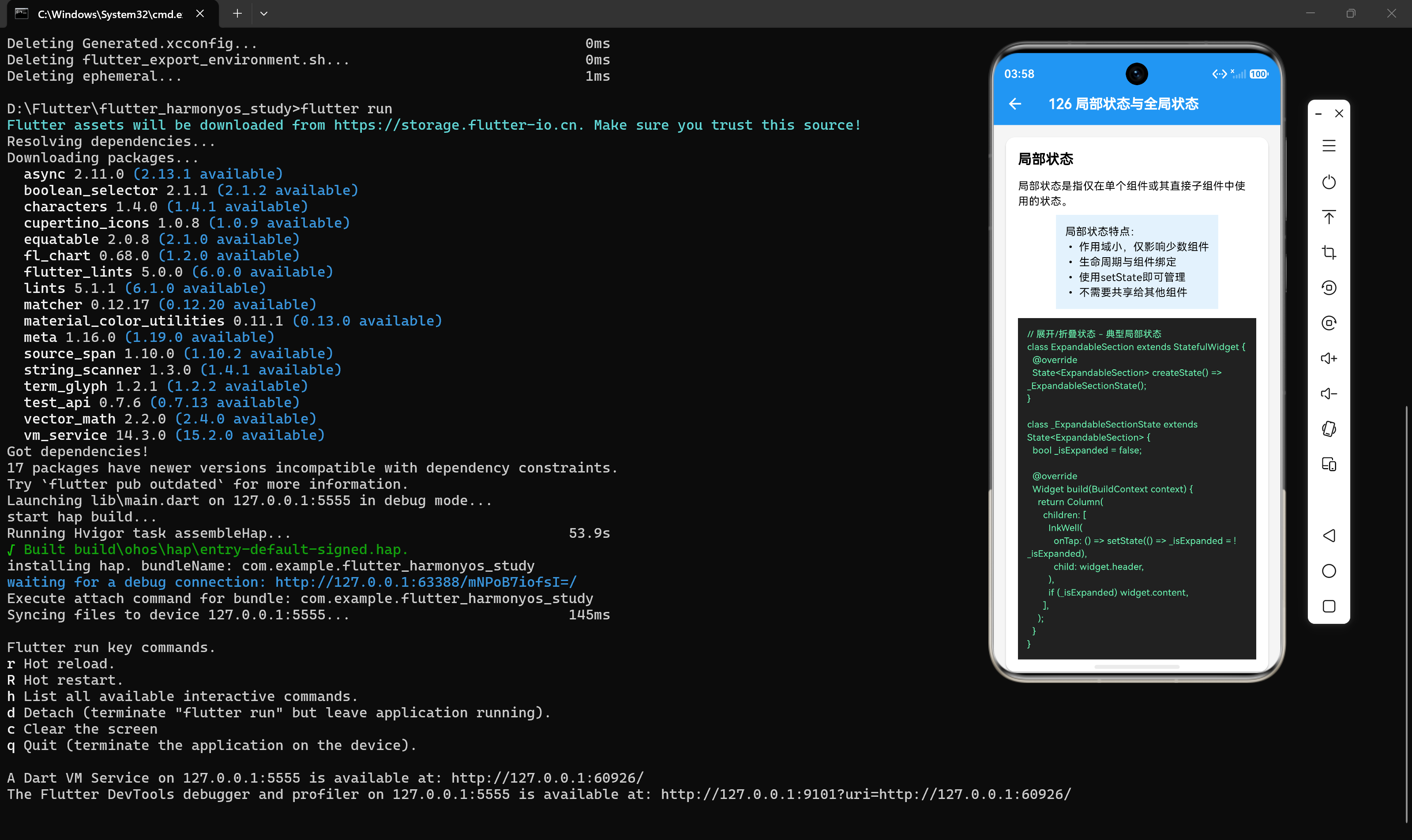
局部状态是指仅在单个组件或其直接子组件中使用和管理的状态。这种状态通常具有以下特点:
- 作用域小:状态只影响当前组件及其直接子组件
- 生命周期与组件绑定:组件创建时状态初始化,组件销毁时状态消失
- 不需要共享:状态不需要传递给其他不相关的组件
- 使用简单:使用
setState即可管理
2.2 局部状态示例
示例一:展开/折叠状态
class ExpandableSection extends StatefulWidget {
final Widget header;
final Widget content;
const ExpandableSection({
super.key,
required this.header,
required this.content,
});
State<ExpandableSection> createState() => _ExpandableSectionState();
}
class _ExpandableSectionState extends State<ExpandableSection> {
bool _isExpanded = false;
Widget build(BuildContext context) {
return Column(
children: [
InkWell(
onTap: () => setState(() => _isExpanded = !_isExpanded),
child: widget.header,
),
if (_isExpanded) widget.content,
],
);
}
}
代码解析:
_isExpanded是局部状态,只在ExpandableSection组件内部使用- 状态变化通过
setState触发,影响组件自身及其子组件 - 状态生命周期与组件绑定,组件销毁时状态消失
示例二:输入框焦点状态
class SearchInput extends StatefulWidget {
const SearchInput({super.key});
State<SearchInput> createState() => _SearchInputState();
}
class _SearchInputState extends State<SearchInput> {
final FocusNode _focusNode = FocusNode();
bool _hasFocus = false;
void initState() {
super.initState();
_focusNode.addListener(() {
setState(() => _hasFocus = _focusNode.hasFocus);
});
}
void dispose() {
_focusNode.dispose();
super.dispose();
}
Widget build(BuildContext context) {
return Container(
decoration: BoxDecoration(
border: Border.all(
color: _hasFocus ? Colors.blue : Colors.grey,
width: _hasFocus ? 2 : 1,
),
borderRadius: BorderRadius.circular(8),
),
child: TextField(
focusNode: _focusNode,
decoration: const InputDecoration(
hintText: '搜索...',
border: InputBorder.none,
padding: EdgeInsets.all(12),
),
),
);
}
}
代码解析:
_hasFocus是局部状态,用于控制输入框的边框样式_focusNode是局部资源,需要在dispose中释放- 状态变化通过焦点监听器触发
示例三:计数器状态
class CounterWidget extends StatefulWidget {
const CounterWidget({super.key});
State<CounterWidget> createState() => _CounterWidgetState();
}
class _CounterWidgetState extends State<CounterWidget> {
int _count = 0;
void _increment() {
setState(() => _count++);
}
void _decrement() {
setState(() => _count--);
}
Widget build(BuildContext context) {
return Row(
mainAxisAlignment: MainAxisAlignment.center,
children: [
IconButton(
icon: const Icon(Icons.remove),
onPressed: _decrement,
),
const SizedBox(width: 16),
Text(
'$_count',
style: const TextStyle(fontSize: 24, fontWeight: FontWeight.bold),
),
const SizedBox(width: 16),
IconButton(
icon: const Icon(Icons.add),
onPressed: _increment,
),
],
);
}
}
三、全局状态
3.1 什么是全局状态
全局状态是指需要在应用的多个页面或组件之间共享的状态。这种状态通常具有以下特点:
- 作用域大:状态影响多个页面或组件
- 生命周期与应用绑定:状态在应用启动时初始化,应用退出时销毁
- 需要共享:状态需要在多个组件间同步
- 需要状态管理库:通常需要使用Provider、Riverpod等状态管理库
3.2 全局状态示例
示例一:用户登录状态
class UserState {
  final String? userId;
  final String? username;
  final bool isLoggedIn;

  const UserState({
    this.userId,
    this.username,
    this.isLoggedIn = false,
  });
}

// 使用Riverpod管理全局用户状态
final userProvider = StateNotifierProvider<UserNotifier, UserState>((ref) {
  return UserNotifier();
});

class UserNotifier extends StateNotifier<UserState> {
  UserNotifier() : super(const UserState());

  void login(String userId, String username) {
    state = UserState(
      userId: userId,
      username: username,
      isLoggedIn: true,
    );
  }

  void logout() {
    state = const UserState();
  }
}
代码解析:
UserState是全局状态,需要在多个页面共享- 使用
StateNotifierProvider管理全局状态 - 状态变化通过
login和logout方法触发
示例二:购物车状态
class CartItem {
  final String id;
  final String name;
  final double price;
  final int quantity;

  const CartItem({
    required this.id,
    required this.name,
    required this.price,
    this.quantity = 1,
  });
}

class CartState {
  final List<CartItem> items;
  final double totalPrice;

  const CartState({
    required this.items,
    required this.totalPrice,
  });
}

// 使用ChangeNotifier管理购物车状态
class CartModel extends ChangeNotifier {
  final List<CartItem> _items = [];

  List<CartItem> get items => _items;

  double get totalPrice => _items.fold(0, (sum, item) => sum + item.price * item.quantity);

  void addItem(CartItem item) {
    _items.add(item);
    notifyListeners();
  }

  void removeItem(String id) {
    _items.removeWhere((item) => item.id == id);
    notifyListeners();
  }
}
四、状态范围决策指南
4.1 决策矩阵
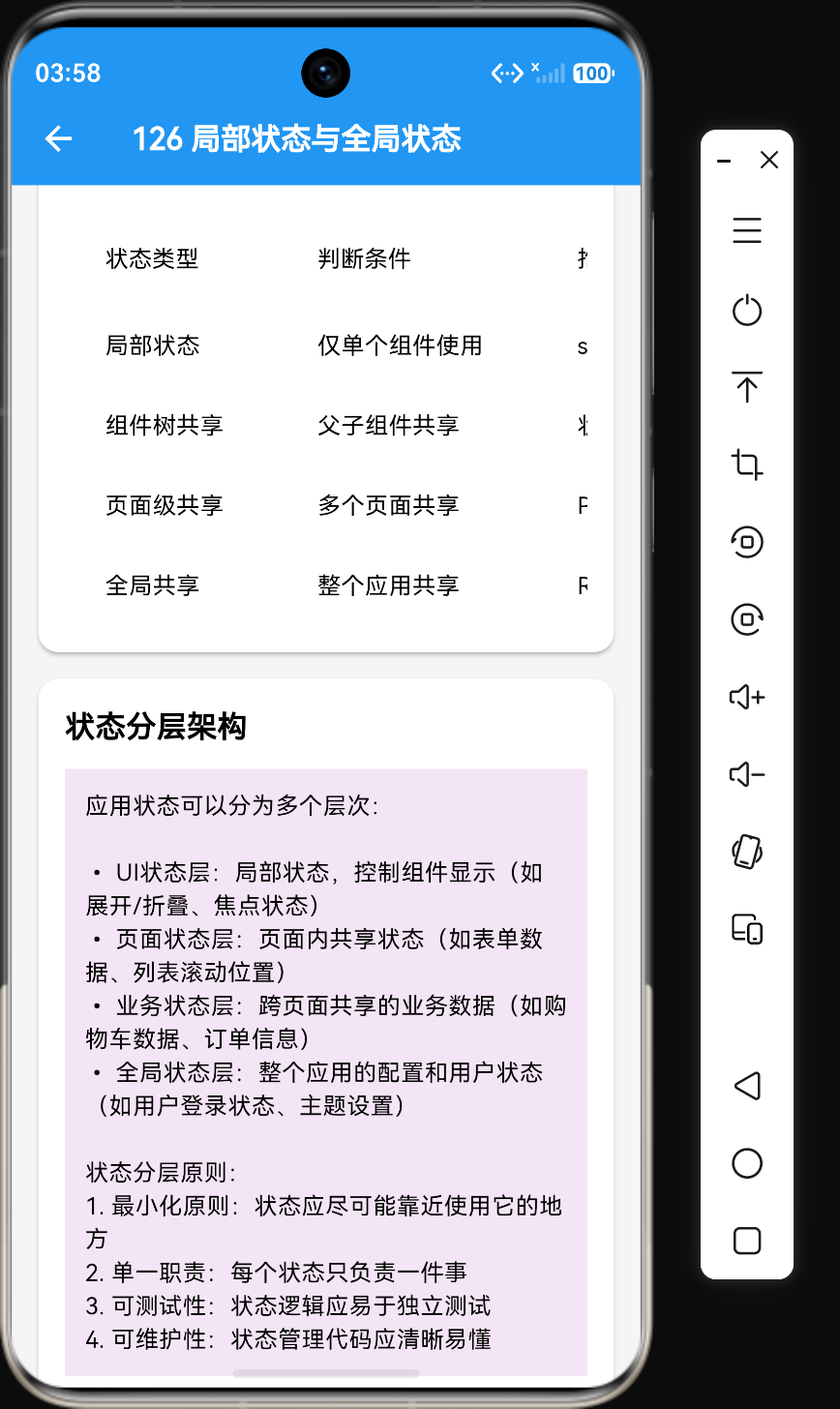
| 状态类型 | 判断条件 | 推荐方案 | 典型场景 |
|---|---|---|---|
| 局部状态 | 仅单个组件使用 | setState | 展开/折叠、输入框焦点、按钮状态 |
| 组件树共享 | 父子组件共享 | 状态提升 | 表单状态、列表选中状态 |
| 页面级共享 | 多个页面共享 | Provider | 购物车数据、用户信息 |
| 全局共享 | 整个应用共享 | Riverpod/Bloc | 登录状态、主题设置、语言设置 |
4.2 判断流程
状态需要在多个组件间共享吗?
├── 否 → 使用setState管理局部状态
└── 是 → 需要在多少组件间共享?
    ├── 2-3层父子组件 → 使用状态提升
    ├── 多个页面 → 使用Provider
    └── 整个应用 → 使用Riverpod/Bloc
4.3 实际案例分析
案例一:表单状态
// 场景:用户填写登录表单
// 状态:用户名、密码、记住我
// 共享范围:表单页面内的多个输入组件
class LoginPage extends StatefulWidget {
const LoginPage({super.key});
State<LoginPage> createState() => _LoginPageState();
}
class _LoginPageState extends State<LoginPage> {
final TextEditingController _usernameController = TextEditingController();
final TextEditingController _passwordController = TextEditingController();
bool _rememberMe = false;
void _toggleRememberMe() {
setState(() => _rememberMe = !_rememberMe);
}
void _submit() {
// 提交表单
}
Widget build(BuildContext context) {
return Column(
children: [
TextField(
controller: _usernameController,
decoration: const InputDecoration(labelText: '用户名'),
),
TextField(
controller: _passwordController,
decoration: const InputDecoration(labelText: '密码'),
obscureText: true,
),
Row(
children: [
Checkbox(
value: _rememberMe,
onChanged: (_) => _toggleRememberMe(),
),
const Text('记住我'),
],
),
ElevatedButton(onPressed: _submit, child: const Text('登录')),
],
);
}
}
分析:表单状态仅在登录页面内使用,属于局部状态,使用setState管理即可。
案例二:购物车状态
// 场景:用户在商品详情页添加商品,在购物车页面查看
// 状态:购物车商品列表
// 共享范围:多个页面

// 使用Provider管理购物车状态
ChangeNotifierProvider(
  create: (context) => CartModel(),
  child: MaterialApp(
    routes: {
      '/product': (context) => const ProductDetailPage(),
      '/cart': (context) => const CartPage(),
    },
  ),
)
分析:购物车状态需要在多个页面共享,属于全局状态,使用Provider管理。
五、状态分层架构
5.1 状态分层设计
应用状态可以分为多个层次,从局部到全局:
┌─────────────────────────────────────────────────────────┐
│                   全局状态层                             │
│  • 用户登录状态 • 应用主题 • 语言设置 • 全局配置         │
│  • 使用:Riverpod/Bloc                                  │
├─────────────────────────────────────────────────────────┤
│                   业务状态层                             │
│  • 购物车数据 • 订单数据 • 用户信息 • 商品数据           │
│  • 使用:Provider/Riverpod                              │
├─────────────────────────────────────────────────────────┤
│                   页面状态层                             │
│  • 页面级共享状态 • 表单状态 • 列表状态                 │
│  • 使用:状态提升/Provider                              │
├─────────────────────────────────────────────────────────┤
│                   UI状态层                               │
│  • 局部状态 • 控件状态 • 动画状态                       │
│  • 使用:setState/ValueNotifier                         │
└─────────────────────────────────────────────────────────┘
5.2 分层原则
- 最小化原则:状态应尽可能靠近使用它的地方
- 单一职责:每个状态只负责一件事
- 可测试性:状态逻辑应易于独立测试
- 可维护性:状态管理代码应清晰易懂
- 解耦原则:不同层次的状态应相互解耦
六、状态范围选择原则
6.1 最小化原则
状态应尽可能靠近使用它的地方,避免不必要的状态提升或全局化:
// 推荐:状态在需要的地方定义
class ItemWidget extends StatefulWidget {
const ItemWidget({super.key});
State<ItemWidget> createState() => _ItemWidgetState();
}
class _ItemWidgetState extends State<ItemWidget> {
bool _isSelected = false;
Widget build(BuildContext context) {
return ListTile(
selected: _isSelected,
onTap: () => setState(() => _isSelected = !_isSelected),
);
}
}
6.2 单一职责原则
每个状态只负责一件事,避免一个状态管理多个不相关的数据:
// 推荐:拆分状态
final themeProvider = StateProvider<ThemeMode>((ref) => ThemeMode.light);
final languageProvider = StateProvider<String>((ref) => 'zh');
final userProvider = StateNotifierProvider<UserNotifier, UserState>((ref) => UserNotifier());

// 不推荐:一个状态管理多个数据
final appStateProvider = StateProvider<AppState>((ref) => AppState());

class AppState {
  ThemeMode theme;
  String language;
  UserState user;
}
6.3 可测试性原则
状态逻辑应易于独立测试,避免与UI组件紧密耦合:
// 推荐:状态逻辑独立于UI
class CartNotifier extends StateNotifier<List<CartItem>> {
  CartNotifier() : super([]);

  void addItem(CartItem item) {
    state = [...state, item];
  }
}

// 测试:无需Widget树
void main() {
  test('add item', () {
    final notifier = CartNotifier();
    notifier.addItem(CartItem(id: '1', name: 'Test', price: 10.0));
    expect(notifier.state.length, 1);
  });
}
6.4 可维护性原则
状态管理代码应清晰易懂,便于团队成员理解和维护:
// 推荐:使用清晰的命名和结构
final cartProvider = StateNotifierProvider<CartNotifier, List<CartItem>>((ref) {
  return CartNotifier();
});

class CartNotifier extends StateNotifier<List<CartItem>> {
  CartNotifier() : super([]);

  void addItem(CartItem item) { ... }
  void removeItem(String id) { ... }
  void updateQuantity(String id, int quantity) { ... }
}
七、常见错误与最佳实践
7.1 常见错误
错误一:过度使用全局状态
// 错误:将局部状态提升为全局状态
final expandProvider = StateProvider<bool>((ref) => false);
后果:增加了不必要的复杂度,降低了代码的可维护性。
正确做法:使用setState管理局部状态。
错误二:状态传递层层嵌套
// 错误:通过参数传递状态
HomePage(cartItems, onAddToCart)
  ProductList(cartItems, onAddToCart)
    ProductCard(cartItems, onAddToCart)
      AddToCartButton(onAddToCart)
后果:中间组件被不使用的参数污染,代码难以维护。
正确做法:使用InheritedWidget或状态管理库。
错误三:状态逻辑与UI耦合
// 错误:状态逻辑分散在State类中
class _CartPageState extends State<CartPage> {
  List<CartItem> _items = [];

  void _addToCart(CartItem item) {
    setState(() { _items.add(item); });
  }
}
后果:状态逻辑难以复用和测试。
正确做法:将状态逻辑抽取到独立的类中。
7.2 最佳实践
实践一:优先使用局部状态
对于简单的UI交互状态,优先使用setState管理,避免引入不必要的依赖。
实践二:合理使用状态提升
对于父子组件共享的状态,使用状态提升模式,将状态移到共同的父组件中。
实践三:使用状态管理库处理复杂状态
对于需要跨页面共享的状态,使用Provider、Riverpod等状态管理库。
实践四:保持状态不可变
状态对象应设计为不可变的,状态变化通过创建新对象来实现。
实践五:状态分层管理
根据状态的作用范围,将状态分为不同层次,使用不同的管理方式。
八、完整代码示例
以下是一个完整的状态分层管理示例:
import 'package:flutter/material.dart';
import 'package:flutter_riverpod/flutter_riverpod.dart';
// 全局状态:用户登录状态
class UserState {
final String? userId;
final String? username;
final bool isLoggedIn;
const UserState({
this.userId,
this.username,
this.isLoggedIn = false,
});
}
final userProvider = StateNotifierProvider<UserNotifier, UserState>((ref) {
return UserNotifier();
});
class UserNotifier extends StateNotifier<UserState> {
UserNotifier() : super(const UserState());
void login(String userId, String username) {
state = UserState(
userId: userId,
username: username,
isLoggedIn: true,
);
}
void logout() {
state = const UserState();
}
}
// 全局状态:购物车状态
class CartItem {
final String id;
final String name;
final double price;
final int quantity;
const CartItem({
required this.id,
required this.name,
required this.price,
this.quantity = 1,
});
CartItem copyWith({int? quantity}) {
return CartItem(
id: id,
name: name,
price: price,
quantity: quantity ?? this.quantity,
);
}
}
final cartProvider = StateNotifierProvider<CartNotifier, List<CartItem>>((ref) {
return CartNotifier();
});
class CartNotifier extends StateNotifier<List<CartItem>> {
CartNotifier() : super([]);
void addItem(CartItem item) {
final existingIndex = state.indexWhere((i) => i.id == item.id);
if (existingIndex != -1) {
state = state.map((i) {
if (i.id == item.id) {
return i.copyWith(quantity: i.quantity + 1);
}
return i;
}).toList();
} else {
state = [...state, item];
}
}
void removeItem(String id) {
state = state.where((item) => item.id != id).toList();
}
}
// 页面状态:搜索页面状态
class SearchPage extends StatefulWidget {
const SearchPage({super.key});
State<SearchPage> createState() => _SearchPageState();
}
class _SearchPageState extends State<SearchPage> {
final TextEditingController _controller = TextEditingController();
String _query = '';
void _onSearch(String query) {
setState(() => _query = query);
}
Widget build(BuildContext context) {
return Column(
children: [
TextField(
controller: _controller,
onChanged: _onSearch,
decoration: const InputDecoration(labelText: '搜索'),
),
Text('搜索关键词: $_query'),
],
);
}
}
// UI状态:展开/折叠组件
class ExpandableSection extends StatefulWidget {
final Widget header;
final Widget content;
const ExpandableSection({
super.key,
required this.header,
required this.content,
});
State<ExpandableSection> createState() => _ExpandableSectionState();
}
class _ExpandableSectionState extends State<ExpandableSection> {
bool _isExpanded = false;
Widget build(BuildContext context) {
return Column(
children: [
InkWell(
onTap: () => setState(() => _isExpanded = !_isExpanded),
child: widget.header,
),
if (_isExpanded) widget.content,
],
);
}
}
九、总结与展望
9.1 本章回顾
在本章中,我们学习了以下内容:
- 局部状态的概念和特点:理解了什么是局部状态及其适用场景
- 全局状态的概念和特点:理解了什么是全局状态及其适用场景
- 状态范围决策指南:掌握了如何根据状态的使用范围选择合适的管理方案
- 状态分层架构设计:了解了如何将状态分为不同层次进行管理
- 状态范围选择原则:掌握了状态范围选择的五大原则
9.2 核心代码总结
本章的核心代码位于:
- 示例代码:[126_local_vs_global_state.dart](file:///d:/Flutter/flutter_harmonyos_study/lib/examples/chapter_04/section_4_1/126_local_vs_global_state.dart)
- UI页面:[126_local_vs_global_state_page.dart](file:///d:/Flutter/flutter_harmonyos_study/lib/pages/chapter_04/section_4_1/126_local_vs_global_state_page.dart)
9.3 下一章预告
在下一章中,我们将探讨状态管理模式的选择,包括:
- setState模式的适用场景
- 状态提升模式的适用场景
- Provider模式的适用场景
- Riverpod模式的适用场景
- Bloc模式的适用场景
- 决策矩阵和实际项目建议
文档版本:v1.0
创建日期:2026年7月20日





 扫一扫
扫一扫


 1310
1310

 被折叠的 条评论
为什么被折叠?
被折叠的 条评论
为什么被折叠?
 到【灌水乐园】发言





