


1、协程 (Coroutines)
消息 模型
在 windows 桌面应用程序中,一个 GUI 程序的主线程负责不停的读取消息并处理消息,所有的键盘、鼠标等消息都被发送到GUI程序的消息队列中,然后由GUI程序的主线程处理。由于GUI 线程处理键盘、鼠标等消息的速度非常快,所以用户感觉不到延迟。某些时候,GUI线程在一个消息处理的过程中遇到问题导致一次消息处理时间过长,此时,用户会感觉到整个GUI程序停止响应了,敲键盘、点鼠标都没有反应。这种情况说明在消息模型中,处理一个消息必须非常迅速,否则,主线程将无法及时处理消息队列中的其他消息,导致程序看上去停止响应。总结:Windows GUI 主线程消息循环是典型单线程协作式消息模型,没有抢占;事件串行执行;耗时操作会阻塞消息循环导致卡死,直观表现就是程序假死。
windows 桌面应用程序的 消息模型(消息循环)
- Windows GUI 基于消息驱动模型。操作系统捕获鼠标、键盘、窗口重绘等行为,封装成消息,放入 对应窗口 的消息队列。
- GUI 程序主线程运行消息循环:不断从消息队列取出消息,分发到窗口过程函数进行处理。
- 同一时刻主线程只能处理一条消息;单条消息处理必须快速完成。
- 若消息处理内部执行耗时同步 IO / 长时间运算,主线程被阻塞,无法持续消费消息,消息堆积 → 窗口卡死、界面无响应。
- 异步优化思路:遇到 IO 时不阻塞主线程,发起请求后立刻结束本次消息处理;IO 完成后由系统投递一条 “IO 完成消息” 到队列,主线程收到消息再处理结果。
极简伪代码
while(true){
    阻塞等待鼠标/键盘消息
    拿到消息 → 执行窗口处理函数(必须一口气跑完)
}
进程、线程、协程
- 进程(Process) 操作系统资源分配的最小单位;拥有独立虚拟地址空间、文件描述符、内存等资源。 一个进程内至少包含一条线程。
- 线程(Thread) 操作系统 CPU 调度的最小单位;共享所属进程的内存、文件资源;拥有独立内核栈、寄存器上下文。 线程由 OS 内核调度,切换会触发内核态开销。
- 协程(Coroutine) 又叫 微线程,是运行在线程内部的轻量级执行单元(协程运行在线程上),不属于操作系统调度对象,由用户空间代码(调度器 / 事件循环)管理。 操作系统完全感知不到协程的存在。协程依附在线程内部运行。一组协程通常运行在同一个线程中。一个进程内可以启动多条线程,每条线程各自运行独立的协程调度器。
- 总结:OS 只调度进程、线程;协程由应用层调度,内核无感。同一时刻,一个线程内只能运行一个协程。协程之间是协作式切换,不会被操作系统抢占。多进程开销最大;多线程中等(内核切换);协程切换开销最低(用户态)。
层级关系:进程 > 线程 > 协程
- 进程 包含 若干线程;
- 线程 包含 若干协程
关于 Python 的协程
- asyncio 协程 /greenlet 协程,全部寄生在线程中 单个线程可以同时承载成千上万个协程。
- GIL 限制:同一时刻一个 Python 线程只有一个字节码执行; 所以单线程下再多协程,也无法实现多核并行。想要利用多核,必须启动多进程。
函数调用、协程 核心区别
- 普通函数调用:函数在所有语言中都是层级调用,必须一次性完整跑完才会返回,中途无法暂停。比如: A 调用 B,B 在执行过程中又调用了 C,C 执行完毕返回,B 执行完毕返回,最后是 A 执行完毕。所以 函数的调用是通过栈实现的,函数调用总是一个入口,一次返回,调用顺序是明确的。普通函数是同步连续执行模型。流程如下:
1. 调用 func → 创建栈帧;
2. 从头到尾顺序执行;
3. 不能中途停下来交出控制权;
4. 函数执行完毕,栈帧销毁,返回调用方;
5. 再次调用:从头重新执行,不保留上次运行状态。
通俗场景举例:你去烧水,必须等水烧开,站在原地一动不动,啥也干不了。 - 协程的调用 (以 asyncio 无栈协程举例):协程是一类特殊函数,能够在指定位置主动挂起执行,保存运行上下文;等待条件就绪后,从暂停处恢复继续执行。协程具备暂停 + 恢复 + 保留中间状态能力,普通函数没有。但协程不是脱离函数的东西,协程本质是特殊函数,区别不在于 "是不是函数,在于「能否中途暂停恢复」"。协程依托调度器,实现单线程内任务交替并发,非常适合 IO 等待场景。流程:
1. 启动协程,执行到 await;
2. 协程让出 CPU 执行权 (让出线程的执行使用权)主动挂起,解释器保存协程执行位置、局部变量等状态到堆上的协程对象;
3. 线程回到事件循环,调度器挑选其他就绪任务运行;
4. IO 就绪后协程变为就绪状态并再次获得线程执行权,从 await 下一行恢复执行,不是从头再来;
5. 全部逻辑执行完毕,协程终止。
通俗场景举例:你启动烧水(发起 IO),不等烧开,先去扫地;水开通知你之后,回到烧水流程继续后续操作。
协程的调用总结:执行到 await 时,协程主动放弃线程的执行使用权并挂起,运行状态保存至协程对象;线程返还事件循环,调度器调度其他就绪任务执行。待 IO 就绪,协程重新获得执行权,从 await 下一行恢复运行。
| 对比维度 | 普通函数调用 | 协程(有栈 / 无栈) |
|---|---|---|
| 执行模式 | 调用后连续执行,一气呵成 | 可中途主动暂停,后续断点恢复执行 |
| 状态保存 | 执行结束栈销毁,不保留运行现场 | 挂起时保存运行状态,恢复继续运行 |
| 控制权交还时机 | 只能函数执行完毕后返回 | 运行中途(await/yield/switch)即可让出 CPU |
| 调度者 | 同步调用,调用方等待函数返回 | 由事件循环 / 协程调度器管理调度 |
| 嵌套关系 | A 调用 B,A 阻塞等待 B 执行完成 | A 内 await B 时,A 挂起;调度器可执行其他协程 |
| 重复执行 | 再次调用从头运行 | 可以恢复上次暂停的上下文继续跑 |
协程对比多线程优势
- 前提:讨论场景 IO 密集型任务(爬虫、网络服务);CPU 密集场景协程没有优势。 Python 中多线程受 GIL 限制,线程无法并行计算 CPU 任务,放大了协程优势。
- 切换开销极低。操作系统线程:切换属于内核态切换。 需要保存 / 恢复 TCB、寄存器、刷新缓存、页表,开销大,微秒级别;频繁大量切换会造成「线程颠簸」。协程:切换在用户态完成,不陷入操作系统内核。 有栈协程只切换栈与寄存器;无栈协程仅切换状态机信息,切换开销远小于线程。重点:线程切换由 OS 抢占调度;协程是协作式主动让出,没有强制上下文切换。
- 内存占用更小,可以支持极高并发数量。每个 OS 线程默认分配独立内核栈(Windows 通常 1MB,Linux 8MB 左右);上万线程内存占用巨大,容易到达系统线程上限。协程占用极小: asyncio 无栈协程仅保存少量状态;goroutine 初始栈 2KB;greenlet 栈也远小于系统线程。 单线程内轻松创建几十万协程,同等硬件下支持更多并发连接(爬虫、WebSocket 网关优势明显)。
- 减少锁竞争,简化并发编程。同一线程内运行的多个协程:协作式调度,不会被抢占。 只要代码中没有
await,一段代码执行过程不会被打断。 访问共享变量在很多场景不需要互斥锁,规避死锁、竞态条件等多线程经典难题。
如果跨多条线程,线程内各自跑协程,依然存在竞争,依旧需要锁;
同一线程的协程之间,如果读写共享变量中间存在await,依然会产生数据竞争,协程≠天然不需要锁:跨线程、await 分割共享变量依然存在竞争,不能去掉锁。 - 调度可控,没有抢占带来的不确定性。OS 线程是抢占式调度:操作系统随时可以中断线程,不知道代码在哪一行被切走,bug 难以复现。 协程只有在主动执行
await/switch时才会让出执行权;暂停点明确,程序执行流程更容易预测,调试难度更低。 - 在 Python 环境规避 GIL 带来的额外损耗。Python 线程执行时,线程切换伴随 GIL 的争抢、释放;大量线程频繁切换会产生 GIL 颠簸,损耗性能。 协程在单线程内部调度,全程持续持有 GIL,不存在频繁抢夺 GIL 的问题。
- 只能 IO 密集场景受益;纯 CPU 密集任务无法利用多核 单线程协程无法并行计算,长时间 CPU 运算会阻塞整个事件循环。想要多核必须配合多进程。
- 协作式调度,一旦出现阻塞同步调用,整个线程卡死 多线程下一个线程阻塞不影响其他线程;协程遇到同步阻塞 IO 会卡住全部任务。
- Python asyncio 无栈协程存在代码侵入性 整套调用链路需要全部使用异步写法,同步库无法直接使用;而多线程可以直接包装同步函数。
| 对比维度 | 操作系统 多线程 | 协程(有栈 / 无栈) |
|---|---|---|
| 调度主体 | 操作系统内核抢占式调度 | 应用层调度器(事件循环),协作式调度,内核完全无感 |
| 上下文切换位置 | 内核态切换,触发系统调用 | 纯用户态切换,不进入内核 |
| 切换开销 | 高(保存 TCB、寄存器、刷新缓存),微秒级 | 极低;无栈协程<有栈协程,纳秒级 |
| 内存占用 | 每个线程拥有独立内核栈(通常 1MB~8MB),上限较低 | 占用极小;单线程可轻松创建数万~数十万协程,并发上限高 |
| 抢占特性 | 抢占式;OS 可在任意代码行中断线程 | 非抢占,只有主动 await/switch 才让出执行权 |
| 共享资源竞争 | 随时可能被打断,共享变量访问必须加锁,易死锁、竞态条件 | 同线程内协程:无 await 的代码段不会被打断,很多场景无需锁;⚠️跨线程协程依然需要锁;await 前后共享变量依旧存在竞争 |
| GIL (Python 特有) | 多线程频繁争夺 GIL,大量线程切换产生性能损耗 | 单线程内所有协程共享一个 GIL,不存在频繁争抢 GIL 问题 |
| 阻塞影响 | 一个线程阻塞,不影响其他线程 | 同步阻塞代码会卡住整个线程内所有协程 |
| 多核利用 | 原生支持多核并行(CPU 密集适用) | 单线程协程无法利用多核;想要多核必须搭配多进程 |
| 代码侵入性 | 低,同步函数可直接丢入线程运行 | asyncio 无栈协程侵入性高,整条调用链路需要异步改造;greenlet 有栈协程侵入较低,可配合 monkey patch 兼容同步代码 |
| 典型适用场景 | CPU 密集运算;存在大量无异步版本的阻塞同步库;需要隔离阻塞任务 | IO 密集:爬虫、Web 服务、大量长连接、消息推送 |
| 异常调试 | 执行时机不可预测,bug 难以复现 | 暂停点明确,执行流程更可控,更容易定位问题 |
因为协程是一个线程执行,那怎么利用多核CPU呢?
最简单的方法是 多进程 + 协程,既充分利用多核,又充分发挥协程的高效率。
有栈协程、无栈协程
有栈协程 (greenlet/gevent、Goroutine、libco):每个协程拥有独立调用栈,在线程内拥有独立私有栈,用户态切换寄存器与栈;可以在任意函数调用深处切换;无栈协程(Stackless Coroutine)特点:
- 每个协程分配一块独立内存作为私有调用栈
- 切换时保存:CPU 寄存器 + 完整调用栈
- 可以在调用链任意深度切换,不限制必须在特定关键字位置
无栈协程 (asyncio):Python async def、JS async/await、C++20 协程、Kotlin 协程;无栈协程在线程内共享线程系统栈,依靠状态机实现暂停恢复; 只能在 await 标记点让出CPU执行权,普通子函数内部无法挂起; 两类协程都遵守:线程承载协程这个层级关系,以及可暂停、可恢复。这是和普通函数最大区别。有栈协程(Stackful Coroutine)特点:
- 没有独立栈,多个协程共享线程同一个系统栈
- 协程暂停时,完整调用栈被销毁;只把「当前执行位置、局部变量」保存到堆上的对象
- 只能在预先标记点挂起(
yield/await)
有栈协程 优缺点
- 可以在调用链任意深度挂起 / 切换 不需要在固定语法点让出执行权,普通函数内部阻塞时也能触发切换。
- 业务代码侵入性极低 配合 IO 劫持(monkey patch),传统同步代码几乎不用修改就能实现并发,存量项目改造友好。
- 调用栈完整保留 暂停时整条调用上下文保存,异常堆栈、调试信息更加完整友好。
- 上层感知透明 不用到处写
await,原有同步编程思维可以沿用。 - 内存开销更大 每个协程预先分配独立栈(即使支持动态伸缩,依然有基础内存成本),需要百万级别海量协程时内存资源紧张;
- 实现依赖底层能力 大多依靠 C 扩展 / 语言运行时底层操作寄存器、栈;Python 的 greenlet 属于第三方扩展,打包、跨平台兼容性差。
- 存在栈溢出风险 私有栈容量有限,递归层级过深容易栈溢出;栈大小调大又会进一步增加内存占用。
- 难以做编译器优化 运行时完整保存栈,编译器无法提前拆解、优化局部状态。
- Python 生态限制 gevent/greenlet 无法和标准 asyncio 互通,新异步生态(aiohttp、异步 redis)无法复用。
无栈协程 优缺点
- 极度轻量化,内存开销小 没有独立栈,仅在堆上保存少量状态(程序计数器、局部变量),支持创建几十万、上百万协程。
- 语言层面原生支持居多 Python asyncio、JS、C++20 均为语言标准,不依赖第三方 C 扩展,兼容性、可移植性强。
- 编译器可深度优化 协程被编译为状态机,暂停点明确,解释器 / 编译器可以做内存复用、逃逸分析等优化。
- 标准化生态完善 asyncio 拥有完整异步组件生态,长期官方维护,新项目首选。
- 只能在预先标记点(await/yield)挂起 普通同步函数深处无法让出;一旦调用阻塞同步 IO,直接卡死整个事件循环。
- 代码侵入性极强 整套链路都要改成异步写法,函数需要逐层传递
await,存量同步项目改造成本巨大。 - 编程模式变化大 需要区分同步 / 异步库,不能混用,开发人员需要适应异步思维。
- 暂停时调用栈被销毁 部分场景下堆栈追踪相对麻烦(现代运行时已经持续改善,但天生不如有栈天然完整)。
| 维度 | 有栈协程 | 无栈协程 |
|---|---|---|
| 切换位置 | 任意函数深度 | 仅 await/yield 显式点位 |
| 内存占用 | 较高(独立栈) | 极低(状态机,共享线程栈) |
| 代码改造 | 低,可兼容同步代码 | 高,全链路异步化 |
| 兼容性 (Python) | 依赖 greenlet C 扩展 | 标准库原生支持 |
| 调试堆栈 | 完整调用栈 | 栈被拆解,调试相对麻烦 |
| 海量协程场景 | 压力较大 | 非常适合 |
| 典型代表 | gevent、Goroutine | asyncio、JS async |
为什么 Go 语言 goroutine(有栈)可以支撑百万协程?
- goroutine 虽然是有栈协程,但栈支持动态扩容 / 缩容,初始栈极小(2KB),平衡了有栈协程内存开销问题; 而 Python greenlet 栈大小固定,没有动态伸缩能力,所以很难支撑百万协程,这是 Python gevent 和 Goroutine 巨大区别。
选型快速参考
- 老项目,大量同步 IO 代码,不想大规模重构 → 有栈协程(gevent)
- 全新项目、高并发 IO 服务、大量协程、追求标准生态 → 无栈协程(asyncio)
- 注意:Python 环境不要混合两类协程调度,无法互通。
有栈协程和无栈协程 能不能混合开发?
原生情况下不能直接互相 await /switch 调用,无法混合调度;强行混用会出现各种诡异阻塞、调度失效,不推荐生产环境混合开发。根本冲突在哪里?
两套完全独立的调度器
- asyncio:事件循环 + IO 多路复用,调度
Task/协程对象;挂起点只能是await;无栈、状态机模型。- gevent(greenlet):libev 调度器 +
switch()切换;有栈、独立私有栈。两套调度器互相不知道对方存在:
- asyncio 事件循环感知不到 greenlet 的切换;
- greenlet 也无法唤醒 asyncio 的协程; 两者拥有独立的 IO 监听、独立的任务队列。
暂停 / 让出机制互不兼容
- asyncio 协程让出:必须
await,控制权交还事件循环;- greenlet 让出:调用
.switch(); 一方让出,另一方无法接管执行流。IO 监听相互隔离
- asyncio 使用 selector (epoll)
- gevent 使用 libev 两套独立 fd 监听,无法共享 IO 事件。 同一个 socket 不能同时交给两套系统管理。
能不能间接 “共存”?
可以隔离运行:不同线程分开跑 方案:
- 线程 A:运行 asyncio 事件循环(无栈协程)
- 线程 B:运行 gevent 调度循环(有栈 greenlet)
- 要点:两者物理隔离,不跨调度器互相调用,可以通过队列(thread-safe Queue)做进程 / 线程间消息通信。 这叫并存,不叫混合调度。同一线程内不能混合调度 同一个线程里,你同一时间只能跑其中一套调度器: 要么持续运行 asyncio.run (),要么持续运行 gevent 主循环; 一个线程无法同时驱动两套调度器轮转。
总结:
- 有栈协程 (greenlet/gevent) 与无栈协程 (asyncio)无法在同一个线程内混合调度。 二者拥有独立调度器、独立 IO 事件管理、上下文切换机制互不兼容,不能直接互相唤醒、调用。 语法层面
await与switch()不能互通。 - 二者仅能做到多线程隔离并存:不同线程分别运行两套协程框架,借助线程安全队列通信,不能在单线程下互相调度。 虽然存在第三方桥接方案,但性能差、排障复杂,生产环境不推荐。项目开发应当统一选用一种协程模型。
python 协程
- 生成器协程:
yield(Python2 ~ 3.4)无栈。生成器 yield 和普通函数区别:生成器可以实现 " 暂停函数、保存局部状态,后续恢复执行 ",于是被用来实现早期无栈协程,这也是为什么 Python 用生成器演化出协程。
def coro():
print("start")
x = yield 1
print("recv", x)
yield 2
执行逻辑:
c = coro() 创建生成器对象,函数不会立刻执行;
next(c):运行到 yield 1,暂停;保存局部变量、代码位置;返回 1;
c.send(100):恢复运行,把 100 赋值给 x,执行到下一个 yield 再次暂停。
本质:解释器把函数状态保存到生成器对象(堆上);暂停时调用栈全部释放,共享线程系统栈 → 无栈协程典型特征。
缺陷:语法混乱,区分不开 “生成器” 和 “协程”;无法使用 return 返回结果(Python3.3 后支持,但取值麻烦);不能使用 yield 嵌套调用另外一个协程,需要 yield from 补救;没有标准化异步调度框架。所以 Python3.5 推出全新语法 async def 正式区分协程。 - 原生异步协程:
async def / await(Python3.5+ asyncio)无栈协程。核心定义:async def 定义的函数,调用后得到协程对象(coroutine),函数不会立即执行。
async def func():
pass
c = func() # 仅仅创建对象,不运行!
底层原理:状态机。CPython 编译器会把 async def 函数编译成一台状态机。每一处 await 就是状态分割点:
协程对象内部保存:
当前执行状态编号
所有局部变量、闭包变量
异常信息
运行流程:
事件循环驱动协程执行;
执行到 await xxx:
当前协程主动让出 CPU
当前线程调用栈全部销毁
协程状态保存到堆上协程对象
事件循环去调度其他就绪协程
当 await 对应的 IO 就绪后,事件循环重新唤醒协程,根据状态编号,从断点继续运行。
await 的硬性限制(无栈协程标志性特点)
只能在 async 函数内部使用 await
只能在 await 位置暂停、让出执行权!
如果协程内部调用一个普通同步阻塞函数(time.sleep()、同步 requests):
无法触发暂停,整个事件循环被卡住。
根源:普通同步函数内部没有状态分割点,无法切走。 - greenlet/gevent:第三方 C 扩展 有栈协程
Python 对 协程 的支持 是通过 generator (生成器)实现的
- 在 generator 中,不但可以通过 for 循环来迭代,还可以不断调用 next() 函数获取由 yield 语句返回的下一个值。但是 Python 的 yield 不但可以返回一个值,它还可以接收调用者发出的参数。
示例:传统的 生产者-消费者 模型是一个线程写消息,一个线程取消息,通过锁机制控制队列和等待,但一不小心就可能死锁。如果改用协程,生产者生产消息后,直接通过 yield 跳转到消费者开始执行,待消费者执行完毕后,切换回生产者继续生产,效率极高:
def func_consumer():
    ret = ''
    while True:
        n = yield ret
        if not n:
            return
        print('[CONSUMER] Consuming %s...' % n)
        ret = '200 OK'


def func_produce(c):
    c.send(None)
    n = 0
    while n < 5:
        n = n + 1
        print('[PRODUCER] Producing %s...' % n)
        r = c.send(n)
        print('[PRODUCER] Consumer return: %s' % r)
    c.close()


c = func_consumer()
func_produce(c)
打上断点然后单步调试:可以看到 func_consumer 函数是一个 generator,把一个 consumer 传入 func_produce 后:
- 首先调用 c.send(None) 启动生成器;
- 然后,一旦生产了东西,通过 c.send(n) 切换到 consumer 执行;
- consumer 通过 yield拿到消息,处理,又通过yield把结果传回;
- produce 拿到 consumer 处理的结果,继续生产下一条消息;
- produce 决定不生产了,通过 c.close() 关闭 consumer,整个过程结束。
整个流程无锁,由一个线程执行,produce和consumer协作完成任务,所以称为 "协程",而非线程的抢占式多任务。最后套用 Donald Knuth 的一句话总结协程的特点:子程序就是协程的一种特例。源码:https://github.com/michaelliao/learn-python3/blob/master/samples/async/coroutine.py
示例:验证 "协程是在一个线程中执行"。通过打印当前线程,可以看到两个 coroutine 是由同一个线程 并发 执行的。
import threading
import asyncio


async def hello():
    print(f'hello_1 ---> {threading.current_thread()}')
    await asyncio.sleep(5)
    print(f'hello_2 ---> {threading.current_thread()}')


loop = asyncio.get_event_loop()
task_list = [asyncio.ensure_future(hello()), asyncio.ensure_future(hello())]
# task_list = [asyncio.create_task(hello()), asyncio.create_task(hello())]
loop.run_until_complete(asyncio.wait(task_list))
loop.close()

"""
hello_1 ---> <_MainThread(MainThread, started 2332)>
hello_1 ---> <_MainThread(MainThread, started 2332)>
hello_2 ---> <_MainThread(MainThread, started 2332)>
hello_2 ---> <_MainThread(MainThread, started 2332)>
"""
Python 无栈协程
- 无栈协程(Stackless):
async def / asyncio / yield 生成器协程(官方原生)。协程没有独立栈,共用宿主线程的系统栈;挂起只能在显式标记点(await /yield);协程暂停时运行状态(局部变量、程序计数器、闭包等,不是完整栈)保存在堆上的 协程对象(协程帧)。关键限制:只能在语法显式暂停点交出控制权(await/yield),普通函数深处不能随意挂起。 - 有栈协程(Stackful):第三方 greenlet /gevent 。每个协程拥有独立操作系统栈;切换时保存 / 恢复 CPU 寄存器 + 私有栈;可以在任意函数的任意位置让出、切换,不必在顶层函数标记位置。
语法特征
- 无栈:强制语法标记点才能暂停(
await、yield),侵入式改造代码;只能在固定关键字位置暂停、子函数不能随意让出 = 无栈。 - 有栈:理论上不需要新增语法,可以做到对上层业务透明切换(gevent monkey patch)。能在任意深度函数内自由切换 = 有栈;
python 原生内置,包含两代实现:
- 生成器协程:
yield/yield from(Python2~3.6) - 现代协程:
async def+await(Python3.5+ asyncio) - 底层原理:状态机。Python 解释器在编译阶段,会把
async def函数编译成状态机。 每一处await就是状态分割点。 - 底层原理:编译器把协程翻译成状态机,每一处 await 对应一个状态节点。
- 关键限制(无栈标志性特征):只能在 await /yield 处挂起 如果阻塞发生在普通同步子函数深处,无法切换协程。
- 执行模型
单线程内:事件循环依次驱动各个协程。
协程 A → await 让出 → 执行协程 B → await 让出……
属于协作式调度,一旦某个协程执行耗时同步代码,卡死整个循环。
async def demo():
    print(1)
    await io_op()   # 状态点A
    print(2)
    await io_op()   # 状态点B
    print(3)
内部逻辑:
- 创建协程对象(堆上),保存状态编号、局部变量
- 运行到
await:暂停,交出控制权,当前 C 调用栈全部释放 - 下次恢复:根据状态编号,从对应位置继续向下执行
Python 有栈协程
代表性的包:greenlet /gevent
- 底层原理(C 扩展实现)。
greenlet是 C 写的扩展,绕过 Python 虚拟机上层机制,直接操作操作系统栈与 CPU 寄存器。
流程:创建 greenlet 对象时,在堆上分配一块独立内存,作为私有栈。调用 switch() 切换时:将当前 CPU 寄存器、整个调用栈内容保存到当前 greenlet。加载目标 greenlet 保存的寄存器与私有栈,直接跳转到上次暂停位置继续运行。
核心:切换发生在用户态,不触发操作系统线程调度。 - 关键特点:可以在调用链任意深度让出、切换,不必在顶层函数标记位置。
- 优点:任意调用深度切换。兼容传统同步代码,改造成本低,支持任意层级切换,语法无侵入
- 缺点:依赖 C 扩展;部分平台 / 打包环境容易出兼容问题,greenlet 栈大小有上限,递归太深容易栈溢出,无法和 asyncio 原生协程互通,GIL 依然存在,依然无法利用多核 CPU
gevent 工作方式。gevent = greenlet + 封装的 IO 轮询(libev)+ monkey patch
- monkey patch 替换标准库阻塞 IO(socket、time.sleep)。
monkey.patch_all()会偷换标准库阻塞 IO 方法(socket、sleep 等),当发生阻塞 IO 时,底层自动执行switch()让出当前 greenlet; IO 就绪后切回来。 - 当执行阻塞 IO 时,底层自动调用
switch()让出 greenlet 。业务代码不用改写成 async/await,同步写法自动并发,即 业务代码仍然是同步写法,不需要写 await,存量项目改造非常方便。# gevent环境下 from gevent import monkey; monkey.patch_all() import time def task(): time.sleep(1) # 同步sleep,但会自动切换greenlet
gevent 底层基于 C 实现的 greenlet:
- 每个 greenlet 分配独立栈;
- 可以在调用链任意深度执行 switch () 切换,不需要在固定关键字位置让出;
- 不用到处写 await;配合 monkey patch 能让普通同步 IO 自动触发协程切换; 缺点:C 扩展、兼容性差、不支持 asyncio 生态。
协程 相关 概念 (重要)
- 协程函数:
async def fn(): ... - 协程对象(coroutine):调用
fn()返回的实例。调用async def函数不会执行函数体,仅仅创建协程对象!协程对象需要注册到事件循环中,由事件循环驱动执行。 - awaitable 对象:可以放在
await后面:coroutine 协程对象、Task(包装协程,交给循环调度)、Future(底层异步结果占位符) - 关键字 await x:只能在
async def函数内部使用。作用: 暂停当前协程,交出执行权;等待 x 完成;完成后恢复协程继续执行。 - Future / Task:asyncio 的调度载体。
Future是底层原语:代表一个尚未完成的异步操作结果占位符。它和 task 上没有本质的区别。核心字段:_result:结果(未完成为 None); _exception:异常; _callbacks:完成后需要执行的回调列表
流程:
等待 IO 的操作创建 Future;
协程 await 这个 Future,协程被暂停;
IO 就绪 → 给 Future 设置 result;
Future 遍历回调,唤醒等待它的协程。
几乎不要手动创建 Future,日常开发使用上层 Task。 Task = 协程对象 + Future 的封装。作用:把协程注册进事件循环,使其能够并发调度。如果不封装 Task:单纯await coro是串行调用; 只有创建 Task,协程才会作为独立任务被事件循环调度,实现并发。任务是对协程进一步封装,其中包含任务的各种状态。任务是高级的协程对象,任务可以绑定回调函数(回调函数是绑定在任务对象)。表示任务执行结束后,开始执行回调函数。回调函数只可以有一个参数,该参数表示的是就是当前的任务对象。"任务对象.result()" 返回的就是特殊函数内部的返回值。在爬虫中,一般情况下,任务对象的回调函数被用来进行数据解析或者持久化存储。Task 的逻辑:Task 内部包裹一个 Future,协程执行完毕后,将返回值放入 Future,触发回调唤醒等待者。Task、await 串行与并发区别:
# 串行:依次执行
await coro1()
await coro2()
# 并发:两个协程同时交由循环调度
t1 = asyncio.create_task(coro1())
t2 = asyncio.create_task(coro2())
await t1
await t2
原理:create_task 立刻把协程包装成 Task 放入就绪队列,循环可以交替调度两个协程。单纯 await coro() 只是调用,不会提前调度,属于串行。- 事件循环 EventLoop(整个 asyncio 的调度中枢)本质是一个不停运转的
while循环。所有的async def协程都无法自己运行,必须由事件循环驱动。Task 可以把协程注册进事件循环中。事件循环两大职责:
1. 管理就绪任务队列,执行可运行的 协程 / 回调;
2. 封装操作系统 IO 多路复用(select /poll/epoll /kqueue),监听 socket IO 就绪事件。
简化版事件循环伪代码
def run_forever():
while not self._stop_flag:
# 阶段1:执行所有就绪队列中的任务,直到队列为空
self._run_ready_callbacks()
# 阶段2:计算下一个最早的定时任务超时时间,作为selector阻塞时长
timeout = self._get_min_timer_timeout()
# 阶段3:调用IO多路复用阻塞等待IO事件(最多等待timeout时长)
io_events = self._selector.select(timeout)
# 阶段4:处理所有就绪IO事件,触发对应的回调
for event in io_events:
callback = event.data
self._enqueue_ready(callback)
# 阶段5:处理已经超时的定时任务,放入就绪队列
self._process_timer_handles()
关键运行模式
当协程执行到 await 网络IO:
协程暂停;注册 socket 到 selector;事件循环继续处理其他就绪任务。
socket 收到数据,操作系统通知 selector;
selector 返回就绪事件,触发回调,标记对应的 Future 为完成;
Future 执行回调,将被挂起的协程放入就绪队列;
下一轮循环迭代时,继续执行该协程。Python3.5~3.6 老式写法
loop = asyncio.get_event_loop()
loop.run_until_complete(main())
loop.close()
特点:主线程默认创建全局循环。Python3.7+ 推荐高层 API(封装了循环创建、关闭)
asyncio.run(main()),其内部逻辑如下:
创建全新事件循环;
运行协程;
执行完毕,关闭循环,清理任务、selector 资源。
重要:asyncio.run() 不复用旧循环,每次新建。
事件循环核心组成要素
- 就绪队列(Ready Queue) 存放已经可以立刻执行的任务、回调函数(Task、普通 callbacks)。 循环每一轮优先消费就绪队列。
- IO 多路复用选择器 Selector 封装系统调用:Linux
epoll/ macOSkqueue/ WindowsIOCP/select。 作用:监听 socket、管道等文件描述符,阻塞等待 IO 事件到来。 当协程await网络 IO 时,协程暂停,socket 注册到 selector。 - Future / Task
Future:异步结果占位符,保存结果 / 异常,绑定回调;IO 就绪后标记 Future 完成,回调把协程放回就绪队列。
Task:Future 的子类,包装协程对象,将协程注册到循环进行并发调度。 - 延迟任务队列(Timer Handles)
asyncio.sleep()、定时任务,按触发时间排序;每一轮循环先检查是否有超时任务。
协作式调度重要特点
- asyncio 协程是协作式调度,没有抢占。协程只有遇到
await才会主动让出线程;如果某段协程执行同步耗时操作(time.sleep、同步数据库、复杂 CPU 计算),不会主动放弃执行权,整个事件循环被阻塞!因为没有 await 断点,解释器没有机会切走协程。解决方案:使用异步库(aiohttp、aiomysql);CPU 密集任务丢到线程池 loop.run_in_executor。
几个容易混淆的方法
get_event_loop():获取当前线程绑定的循环(3.10 后部分场景已不推荐)set_event_loop():给线程绑定循环run_in_executor(线程池, func)把同步阻塞函数丢到独立线程池执行,包装成 Future,交给事件循环监听;用来规避同步代码阻塞循环。- call_soon 和 call_later 的区别? call_soon:立刻放入就绪队列,本轮尽量执行;call_later:延迟指定时间执行。
调度顺序规则
- 就绪队列优先级高于 IO 事件和定时任务 每一轮循环先把就绪队列全部消费完,才去阻塞等待 IO; 如果就绪队列持续不断涌入任务,selector 可能长时间得不到执行,网络 IO 产生延迟。
- 定时任务:按照触发时间排序,只有到达时间点才会加入就绪队列。
- 回调执行顺序:先进先出 FIFO。
事件循环的局限
-
线程亲和性 事件循环不能跨线程调用!所有操作 loop.call_soon、await 必须在创建循环的线程内执行。 跨线程操作循环需要使用
loop.call_soon_threadsafe()。 -
原生不支持多核 单个事件循环绑定单线程,受 GIL 限制,无法利用多核 CPU。 想要多核:启动多个进程,每个进程内独立运行一个事件循环。
-
协作式无抢占 没有操作系统级抢占调度;长耗时同步代码直接冻结循环。
async def 如何被解释器处理(状态机)
- 普通函数执行逻辑:调用 → 创建栈帧 → 执行完毕销毁栈帧。
async def在编译阶段就被特殊处理: CPython 编译器识别async def,把函数编译成一台生成器风格的状态机字节码。
协程对象内部会保存这些信息(全部存堆上,不占用永久栈):
- 当前运行状态编号(执行到哪一段代码)
- 所有局部变量、闭包变量
- 异常堆栈信息
- 无栈协程最关键特征:协程暂停时没有保留完整调用栈,共享线程唯一系统栈。
执行过程:
- 事件循环第一次启动协程,从上一次保存的状态位置开始执行;
- 代码运行至
await xxx:- 当前线程调用栈全部展开、销毁
- 保存协程当前状态到协程对象
- 协程主动挂起,让出线程控制权
- 当 await 的目标就绪(IO 完成 / 其他任务结束),事件循环重新唤醒协程;
- 根据保存的状态编号,从 await 的下一行继续执行。
await 详解
看下 Python 中常见的几种函数形式,通过类型判断可以验证函数的类型
import types


# 1. 普通函数
def func():
    return 1


# 2. "生成器" 函数
def generator():
    yield 1


# 3. 异步函数 (协程)。在 Python 3.5+ 使用async修饰
async def async_function():
    return 1


# 4. 异步生成器
async def async_generator():
    yield 1


# print(isinstance(type(func), types.FunctionType))
# print(isinstance(type(generator()), types.GeneratorType))
# print(isinstance(type(async_function()), types.CoroutineType))
# print(isinstance(type(async_generator()), types.AsyncGeneratorType))
print(type(func))
print(type(generator()))
print(type(async_function()))
print(type(async_generator()))
直接调用 异步函数 async_function() 不会返回结果,而是返回一个coroutine对象,所以协程需要通过其他方式来驱动。可以使用这个协程对象的 send 方法给协程发送一个值:print(async_function().send(None)) ,不幸的是,如果通过上面的调用会抛出一个异常:StopIteration: 1,因为 生成器 / 协程 在正常返回退出时会抛出一个 StopIteration 异常,而原来的返回值会存放在 StopIteration 对象的 value 属性中,通过以下捕获可以获取协程真正的返回值:
try:
async_function().send(None)
except StopIteration as e:
print(e.value)
# 1
通过上面的方式来新建一个 run 函数来驱动协程函数,在协程函数中,可以通过 await 语法来挂起自身的协程,并等待另一个 协程 完成直到返回结果:
def run(coroutine):
try:
coroutine.send(None)
except StopIteration as e:
return 'run() : return {0}'.format(e.value)
async def async_function():
return 1
async def await_coroutine():
result = await async_function()
print('await_coroutine() : print {0} '.format(result))
ret_val = run(await_coroutine())
print(ret_val)
要注意的是,await 语法只能出现在通过 async 修饰的函数中,否则会报 SyntaxError 错误。而且 await 后面的对象需要是一个 Awaitable,或者实现了相关的协议。查看 Awaitable 抽象类的代码,表明了只要一个类实现了__await__方法,那么通过它构造出来的实例就是一个 Awaitable:
class Awaitable(metaclass=ABCMeta):
__slots__ = ()@abstractmethod
def __await__(self):
yield@classmethod
def __subclasshook__(cls, C):
if cls is Awaitable:
return _check_methods(C, "__await__")
return NotImplemented
而且可以看到 Coroutine类 也继承了 Awaitable,而且实现了 send,throw 和 close 方法。所以 await 一个调用异步函数返回的协程对象是合法的。
class Coroutine(Awaitable):
__slots__ = ()@abstractmethod
def send(self, value):
...@abstractmethod
def throw(self, typ, val=None, tb=None):
...def close(self):
...
@classmethod
def __subclasshook__(cls, C):
if cls is Coroutine:
return _check_methods(C, '__await__', 'send', 'throw', 'close')
return NotImplemented
接下来是异步生成器,来看一个例子:假如要到一家超市去购买土豆,而超市货架上的土豆数量是有限的,现在我想要买50个土豆,每次从货架上拿走一个土豆放到篮子:对应到代码中,就是迭代一个生成器的模型,显然,当货架上的土豆不够的时候,这时只能够死等,而且在上面例子中等多长时间都不会有结果(因为一切都是同步的),也许可以用多进程和多线程解决,而在现实生活中,更应该像是这样的:
import asyncio
import random


class Potato:
    @classmethod
    def make(cls, num, *args, **kws):
        potatoes = []
        for i in range(num):
            potatoes.append(cls.__new__(cls, *args, **kws))
        return potatoes


all_potatoes = Potato.make(5)


async def take_potatoes(num):
    count = 0
    while True:
        if len(all_potatoes) == 0:
            await ask_for_potato()
        potato = all_potatoes.pop()
        yield potato
        await asyncio.sleep(1)
        count += 1
        if count == num:
            break


async def ask_for_potato():
    await asyncio.sleep(random.random())
    all_potatoes.extend(Potato.make(random.randint(1, 10)))


async def buy_potatoes():
    bucket = []
    async for p in take_potatoes(50):
        bucket.append(p)
        print(f'Got potato {id(p)}...')


def main():
    asyncio.run(buy_potatoes())


if __name__ == '__main__':
    main()
当货架上的土豆没有了之后,可以询问超市请求需要更多的土豆,这时候需要等待一段时间直到生产者完成生产的过程。
当生产者完成和返回之后,这是便能从 await 挂起的地方继续往下跑,完成消费的过程。而这整一个过程,就是一个异步生成器迭代的流程。
用 asyncio 运行这段代码,结果是这样的:
Got potato 4338641384...
Got potato 4338641160...
Got potato 4338614736...
Got potato 4338614680...
Got potato 4338614568...
Got potato 4344861864...
Got potato 4344843456...
Got potato 4344843400...
Got potato 4338641384...
Got potato 4338641160...
...
看下 AsyncGenerator 的定义,它需要实现 __aiter__ 和 __anext__ 两个核心方法,以及 asend,athrow,aclose 方法。
class AsyncGenerator(AsyncIterator):
    __slots__ = ()

    async def __anext__(self):
        ...

    @abstractmethod
    async def asend(self, value):
        ...

    @abstractmethod
    async def athrow(self, typ, val=None, tb=None):
        ...

    async def aclose(self):
        ...

    @classmethod
    def __subclasshook__(cls, C):
        if cls is AsyncGenerator:
            return _check_methods(C, '__aiter__', '__anext__',
                                  'asend', 'athrow', 'aclose')
        return NotImplemented
异步生成器是在 3.6 之后才有的特性,同样的还有异步推导表达式,因此在上面的例子中,也可以写成这样:
bucket = [p async for p in take_potatos(50)]类似的,还有 await 表达式:
result = [await fun() for fun in funcs if await condition()]除了函数之外,类实例的普通方法也能用 async 语法修饰:
class ThreeTwoOne:
    async def begin(self):
        print(3)
        await asyncio.sleep(1)
        print(2)
        await asyncio.sleep(1)
        print(1)
        await asyncio.sleep(1)
        return

async def game():
    t = ThreeTwoOne()
    await t.begin()
    print('start')
实例方法的调用同样是返回一个 coroutine:
function = ThreeTwoOne.begin
method = function.__get__(ThreeTwoOne, ThreeTwoOne())
import inspect
assert inspect.isfunction(function)
assert inspect.ismethod(method)
assert inspect.iscoroutine(method())
同理 还有类方法:
class ThreeTwoOne:
    @classmethod
    async def begin(cls):
        print(3)
        await asyncio.sleep(1)
        print(2)
        await asyncio.sleep(1)
        print(1)
        await asyncio.sleep(1)
        return

async def game():
    await ThreeTwoOne.begin()
    print('start')
根据PEP 492中,async 也可以应用到 上下文管理器中,__aenter__ 和 __aexit__ 需要返回一个 Awaitable:
class GameContext:
    async def __aenter__(self):
        print('game loading...')
        await asyncio.sleep(1)

    async def __aexit__(self, exc_type, exc, tb):
        print('game exit...')
        await asyncio.sleep(1)

async def game():
    async with GameContext():
        print('game start...')
        await asyncio.sleep(2)
在3.7版本,contextlib 中会新增一个 asynccontextmanager 装饰器来包装一个实现异步协议的上下文管理器:
from contextlib import asynccontextmanager

@asynccontextmanager
async def get_connection():
    conn = await acquire_db_connection()
    try:
        yield
    finally:
        await release_db_connection(conn)
async 修饰符也能用在 __call__ 方法上:
class GameContext:
    async def __aenter__(self):
        self._started = time()
        print('game loading...')
        await asyncio.sleep(1)
        return self

    async def __aexit__(self, exc_type, exc, tb):
        print('game exit...')
        await asyncio.sleep(1)

    async def __call__(self, *args, **kws):
        if args[0] == 'time':
            return time() - self._started

async def game():
    async with GameContext() as ctx:
        print('game start...')
        await asyncio.sleep(2)
        print('game time: ', await ctx('time'))
await 和 yield from
Python3.3的yield from语法可以把生成器的操作委托给另一个生成器,生成器的调用方可以直接与子生成器进行通信:
def sub_gen():
yield 1
yield 2
yield 3def gen():
return (yield from sub_gen())def main():
for val in gen():
print(val)
# 1
# 2
# 3
利用这一特性,使用yield from能够编写出类似协程效果的函数调用,在3.5之前,asyncio正是使用@asyncio.coroutine和yield from语法来创建协程:
import asyncio
import types
@types.coroutine
def compute(x, y):
print("Compute %s + %s ..." % (x, y))
yield from asyncio.sleep(1.0)
return x + y
async def print_sum(x, y):
result = await compute(x, y)
print("%s + %s = %s" % (x, y, result))
loop = asyncio.get_event_loop()
loop.run_until_complete(print_sum(1, 2))
loop.close()
尽管两个函数分别使用了新旧语法,但他们都是协程对象,也分别称作 native coroutine 以及generator-based coroutine,因此不用担心语法问题。
一个asyncio中Future的例子:
import asyncio
future = asyncio.Future()
async def coro1():
await asyncio.sleep(1)
future.set_result('data')
async def coro2():
print(await future)
loop = asyncio.get_event_loop()
loop.run_until_complete(asyncio.wait([
coro1(),
coro2()
]))
loop.close()
两个协程在在事件循环中,协程coro1在执行第一句后挂起自身切到asyncio.sleep,而协程coro2一直等待future的结果,让出事件循环,计时器结束后coro1执行了第二句设置了future的值,被挂起的coro2恢复执行,打印出future的结果'data'。
future可以被await证明了future对象是一个Awaitable,进入Future类的源码可以看到有一段代码显示了future实现了__await__协议:
class Future:
...
def __iter__(self):
if not self.done():
self._asyncio_future_blocking = True
yield self # This tells Task to wait for completion.
assert self.done(), "yield from wasn't used with future"
return self.result() # May raise too.if compat.PY35:
__await__ = __iter__ # make compatible with 'await' expression
当执行 await future 这行代码时,future 中的这段代码就会被执行,首先 future 检查它自身是否已经完成,如果没有完成,挂起自身,告知当前的Task(任务)等待 future 完成。
当 future 执行 set_result 方法时,会触发以下的代码,设置结果,标记 future 已经完成:
def set_result(self, result):
...
if self._state != _PENDING:
raise InvalidStateError('{}: {!r}'.format(self._state, self))
self._result = result
self._state = _FINISHED
self._schedule_callbacks()
最后 future 会调度自身的回调函数,触发Task._step()告知Task驱动future从之前挂起的点恢复执行,不难看出,future会执行下面的代码:
class Future:
...
def __iter__(self):
...
assert self.done(), "yield from wasn't used with future"
return self.result() # May raise too.
使用 协程 ( 异步函数 )
创建一个协程只需使用 async / await 关键字,或者使用 @asyncio.coroutine 装饰器。但是@asyncio.coroutine 和 yield from 方式已经被弃用并移除。
对比 JavaScript 中 Promise ,可以把 协程对象 当作 Promise 。调用协程时实际上并未立即运行,而是返回一个协程对象,然后将其传递到 Eventloop 中,之后再执行。
- 如何判断一个 函数是不是协程 ? asyncio 提供了 asyncio.iscoroutinefunction(func) 方法。
- 如何判断一个 函数返回的是不是协程对象 ? 可以使用 asyncio.iscoroutine(obj) 。
Python 3.5 以前
import asyncio


@asyncio.coroutine
def hello():
    print("Hello world!")
    r = yield from asyncio.sleep(1)
    print("Hello again!")
Python 3.5 以后
从 Python 3.5 开始引入了新的语法 async 和 await,可以让 coroutine 的代码更简洁易读。
import asyncio


async def hello():
    print("Hello world!")
    r = await asyncio.sleep(1)
    print("Hello again!")
2、python 协程库
asyncio 是python的标准协程库,可以用这个库来编写异步代码。还有其他协程库,至于协程库之间是否兼容,需要看相对应的文档。
- asyncio,是 python 官方的标准协程库。
- AnyIO ,运行在Trio或asyncio之上的高级异步并发和网络框架。基于 AnyIO API 编写的应用程序和库可以在 asyncio 或 Trio 上不需要修改就可以直接运行。兼容 asyncio 库。
asyncio 是 Python 3.4+ 引入的标准库,直接内置了对 异步 IO 的支持。asyncio 官方只实现了比较底层的协议,比如TCP,UDP。所以 HTTP 协议需要借助第三方库,比如 aiohttp 。
asyncio 的编程模型就是一个 消息循环。从 asyncio 模块中直接获取一个 EventLoop 的引用,然后把需要执行的协程扔到 EventLoop 中执行,就实现了异步IO。
uvloop
内嵌于 asyncio 事件循环的库,使用 cython 基于 libuv 实现的快速异步库。
github地址: https://github.com/MagicStack/uvloop
AnyIO
AnyIO = Any I/O,跨后端统一异步标准库,MIT 开源,FastAPI/Starlette/HTTPX 底层依赖核心库。
- 底层兼容两大异步后端:asyncio(Python 标准)、Trio;一套代码无需修改即可在两者运行
- 把 Trio 成熟的结构化并发(Structured Concurrency) 移植到 asyncio,修复原生 asyncio 任务管理、取消、异常缺陷
- 提供统一高层异步 API:网络、文件、流、子进程、线程同步原语、信号处理
- 底层依赖
sniffio自动检测当前运行的异步后端,透明分发逻辑
安装
pip install anyio
pip install trio # 如需Trio后端额外安装
对比原生 asyncio
- 结构化并发,杜绝游离任务泄漏 asyncio
create_task()是发射后不管,任务脱离作用域仍后台运行,报错丢失、资源泄漏; AnyIOTaskGroup强制所有子任务在作用域内,退出前等待全部完成,任一任务异常自动取消所有子任务。 - 可预测的分级取消(CancelScope) asyncio 是边缘取消,任务可捕获并忽略取消;AnyIO 作用域级永久取消,只要在取消区间,每次 await 都会抛出取消异常,逻辑可控。
- 极简高层网络 API asyncio UDP 需要手写 Protocol 回调;AnyIO TCP/UDP/Unix Socket 全 async/await 同步写法,支持 TLS。
- 内置异步文件系统 asyncio 无官方异步文件;AnyIO
anyio.Path完全异步 pathlib 替代品,读写、目录遍历、临时文件全异步。 - 统一流抽象 内存流、TCP 字节流、对象通道、文本流统一接口,进程内 / 网络通信无缝切换。
- 完善异常聚合(ExceptionGroup) 多个任务同时报错会聚合抛出,不会丢失任意异常信息。
AnyIO 特点:
- 自动捕获 SIGINT/SIGTERM,安全取消所有任务
- 自动关闭流、文件、套接字
- 支持传参:
anyio.run(main, arg1, arg2)
AnyIO 编写 规则
- 所有并发任务必须在
async with create_task_group()块内启动,不允许游离任务 - 上下文退出前,会无条件等待所有子任务执行完毕
- 任意子任务抛出异常 → 自动取消所有其他子任务,聚合所有异常抛出
- 内置
cancel_scope,一键批量取消全部子任务
AnyIO 的两个启动方法
tg.start_soon(coro, *args):立即后台启动任务(最常用,等价 asyncio.create_task)tg.start(coro, *args):阻塞等待任务执行到第一个 await 才返回(等待任务就绪场景)
示例
from anyio import create_task_group, run, sleep

async def worker(name: str, delay: float):
    print(f"任务 {name} 启动")
    await sleep(delay)
    print(f"任务 {name} 完成")

async def main():
    async with create_task_group() as tg:
        tg.start_soon(worker, "A", 1)
        tg.start_soon(worker, "B", 2)
        tg.start_soon(worker, "C", 0.5)
    # 代码走到这里,所有worker一定全部执行完成
    print("所有任务执行完毕")

run(main)
批量取消所有任务
async def main():
    async with create_task_group() as tg:
        tg.start_soon(worker, "A", 10)
        tg.start_soon(worker, "B", 10)
        await sleep(0.5)
        # 一键取消组内全部任务
        tg.cancel_scope.cancel()
    print("全部任务已取消")
任务就绪等待(start)。适用于服务初始化场景,等待监听端口就绪再继续:
async def server():
    await sleep(0.5)
    print("服务监听就绪")

async def main():
    async with create_task_group() as tg:
        # 阻塞直到server执行到第一个await
        await tg.start(server)
        print("检测到服务就绪,继续执行其他逻辑")
异常聚合。多个任务同时报错,所有异常打包抛出,不会丢失:
async def fail_task():
    await sleep(0.2)
    raise ValueError("任务执行失败")

async def main():
    async with create_task_group() as tg:
        tg.start_soon(fail_task)
        tg.start_soon(fail_task)
AnyIO 独立取消作用域,可嵌套,分三种创建方式:
1. move_on_after (seconds):超时自动跳过。超过时间自动取消域内代码,但不抛出异常,直接退出上下文
async def main():
    # 最多等待0.5秒,超时直接跳过
    async with anyio.move_on_after(0.5):
        await sleep(1)
        print("不会执行")
    print("超时退出")
2. fail_after (seconds):超时抛 TimeoutError。超时直接抛出异常中断逻辑
async def main():
    try:
        async with anyio.fail_after(0.5):
            await sleep(1)
    except TimeoutError:
        print("操作超时")
3. open_cancel_scope ():手动控制取消。手动调用 cancel(),可判断是否触发取消
async def main():
    async with anyio.open_cancel_scope() as scope:
        await sleep(0.3)
        scope.cancel()
        print(scope.cancel_called)  # True
        await sleep(1)  # 立即抛出取消异常
嵌套取消规则。内层取消只影响自身;外层取消会连锁取消所有内层 scope。
Stream 流抽象(AnyIO IO 核心)
统一跨场景数据传输接口,分为两大类:
- ByteStream(字节流)
- ObjectStream(对象通道)
ByteStream 字节流
TCP/Unix 套接字、文件底层,仅传输二进制,无消息边界(和原生 socket 一致) 方法:send(bytes) / receive(n=None) / aclose()
TCP 客户端示例:
from anyio import connect_tcp, run

async def tcp_client():
    async with await connect_tcp("httpbin.org", 80) as stream:
        await stream.send(b"GET / HTTP/1.1\r\nHost: httpbin.org\r\n\r\n")
        data = await stream.receive(1024)
        print(data.decode())

run(tcp_client)
TCP 服务端:
from anyio import create_tcp_listener, run

async def handle_conn(stream):
    async with stream:
        data = await stream.receive()
        await stream.send(b"echo:" + data)

async def server():
    listener = await create_tcp_listener(port=9000)
    await listener.serve(handle_conn)

run(server)
ObjectStream 对象内存通道(进程内协程通信)。支持直接传输任意 Python 对象,自带消息边界,协程间安全通信,类似队列
from anyio import create_memory_object_stream, run

async def producer(send_stream):
    for i in range(3):
        await send_stream.send(f"消息{i}")
        await anyio.sleep(0.2)
    await send_stream.aclose()

async def consumer(recv_stream):
    async for msg in recv_stream:
        print("收到", msg)

async def main():
    send, recv = create_memory_object_stream(max_buffer_size=5)
    async with create_task_group() as tg:
        tg.start_soon(producer, send)
        tg.start_soon(consumer, recv)

run(main)
文本包装流 TextStream。字节流自动编解码字符串,无需手动 encode/decode
from anyio import connect_tcp, TextSendStream, run
async def main():
    stream = await connect_tcp("127.0.0.1", 9000)
    text_stream = TextSendStream(stream)
    await text_stream.send("中文测试")
异步文件系统 anyio.Path。替代阻塞的 pathlib,所有 IO 操作全部 async,底层通过线程池实现非阻塞循环占用。基础读写
from anyio import Path, run

async def file_demo():
    path = Path("test.txt")
    # 写入文本
    async with await path.open("w", encoding="utf-8") as f:
        await f.write("AnyIO异步文件")
    # 读取
    if await path.exists():
        text = await path.read_text(encoding="utf-8")
        print(text)
    # 异步遍历目录
    async for file in Path(".").iterdir():
        print(file)

run(file_demo)支持:mkdir / unlink / rename / stat / read_bytes / write_bytes 等全部 pathlib API。
同步原语(协程锁 / 信号量 / 事件)
API 和 asyncio 高度一致,但跨后端兼容,结构化取消友好
anyio.Lock互斥锁anyio.Semaphore(n)并发控制anyio.Event协程信号通知anyio.Condition条件变量
示例:并发限制信号量
from anyio import create_task_group, Semaphore, run

sem = Semaphore(2)  # 最多2个并发

async def limited_task(num):
    async with sem:
        print(f"执行任务{num}")
        await anyio.sleep(1)

async def main():
    async with create_task_group() as tg:
        for i in range(5):
            tg.start_soon(limited_task, i)

run(main)
线程 / 子进程工具
1. 同步阻塞函数放入异步线程执行(避免阻塞事件循环)
import time
from anyio import to_thread, run

# 阻塞同步函数
def sync_block():
    time.sleep(1)
    return "同步计算完成"

async def main():
    # 在后台线程运行,不阻塞loop
    res = await to_thread.run_sync(sync_block)
    print(res)

run(main)
2. 异步子进程
from anyio import run_process, run

async def proc():
    result = await run_process(["echo", "hello anyio"])
    print(result.stdout.decode())

run(proc)
信号处理、临时文件、测试工具
- 信号监听:
anyio.signal_event()异步捕获 Ctrl+C、SIGTERM - 异步临时文件:
anyio.NamedTemporaryFile、TemporaryDirectory,自动清理 - 测试插件 pytest-anyio:一条用例同时跑 asyncio/trio 双后端
适用场景
- Web 框架开发:FastAPI/Starlette 底层标准,异步路由、后台任务
- 异步库开发:需要同时兼容 asyncio、Trio(HTTPX、异步 Redis/MQ 客户端)
- 高并发爬虫 / IO 密集服务:结构化并发避免内存泄漏,简化任务管理
- 跨后端测试:一套测试代码跑两套异步运行时
- 复杂网络服务:TCP/UDP/TLS 服务端客户端快速开发
- 需要异步文件、进程、线程混合调度的项目
常见避坑
- 不要混用 asyncio 原生
create_task()和 AnyIO TaskGroup,会破坏结构化并发 to_thread.run_sync仅用于 IO 阻塞同步函数,CPU 密集计算建议多进程- CancelScope 取消后,域内所有 await 都会持续抛取消异常,如需忽略需捕获
get_cancelled_exc_class() - ObjectStream 传输对象需可序列化,复杂自定义对象注意深浅拷贝
- 不要在 TaskGroup 外部创建长期后台任务,会造成任务泄漏
- 切换后端(trio/asyncio)时,仅使用 AnyIO 标准 API,禁止直接调用 asyncio/trio 独有接口
Trio
Trio 是现代化结构化异步 I/O 框架,对标 Python 标准库 asyncio,由 Nathaniel J. Smith 开发,核心设计解决 asyncio 原生的缺陷(任务泄漏、不可控取消、异常丢失、复杂回调)。 定位:
- 结构化并发(Structured Concurrency)首创者,AnyIO 的两大底层后端之一;
- 一套简洁、可预测、安全的异步 API,专门解决 IO 密集场景;
- 内置完善的取消机制、异常聚合、线程桥接、TCP/UDP/ 文件流;
- 很多现代异步库(HTTPX、AnyIO)同时支持
asyncio+trio双后端。
Trio 核心设计理念(和 asyncio 最大区别)
- 1. 结构化并发(Nursery 托儿所).asyncio:
asyncio.create_task()发射即不管,任务脱离父作用域后台运行,容易泄漏、异常丢失。 Trio:所有异步任务必须交给 Nursery 管理,离开async with nursery代码块时,会自动等待所有子任务完成;任意子任务报错,自动取消全部任务并聚合异常。 Nursery = AnyIO 的TaskGroup原型,AnyIO 就是把这套设计移植给 asyncio。 - 2. 分级可预测取消(CancelScope)。Trio 独创
CancelScope取消域,可嵌套,三种模式:超时自动取消、手动取消;域内任意await点都会抛出取消异常,无法忽略;内层取消不影响外层,外层取消连锁所有内层,逻辑可控。 - 3. 异常自动聚合
ExceptionGroup。多个任务同时报错,所有异常打包抛出,不会像 asyncio 一样丢失部分报错。 - 4. 无全局事件循环。asyncio 依赖全局 loop,多线程极易混乱;Trio 的事件循环绑定在
trio.run()局部,每个run独立循环,天然支持多线程异步。
示例:使用 Trio + httpx 的现代化生产级爬虫
httpx 原生支持 Trio 后端,会自动检测当前运行的异步环境并切换底层实现。
"""
Trio + httpx 生产级异步爬虫(优化版)

核心特性:
- 异常隔离:单个任务失败不影响其他任务执行
- 优雅关闭:信号处理 + Trio 结构化并发确保资源正确释放
- 智能重试:指数退避 + 全抖动(full jitter)防止惊群效应
- 可观测性:结构化日志 + 实时统计指标

技术栈:
- Trio: 结构化并发框架,提供安全的异步编程模型
- httpx: 下一代 HTTP 客户端,原生支持 HTTP/2 和异步
- loguru: 现代化日志库,开箱即用

设计模式:
- 生产者-消费者模式:通过 MemoryChannel 解耦爬取和结果处理
- 策略模式:可配置的重试决策和退避策略
- 观察者模式:通过 on_item 回调实现结果监听
"""
# from __future__ import annotations

import random
import signal
import trio
import httpx
from loguru import logger
from dataclasses import dataclass
from typing import TypeVar, Callable, Awaitable, Any
from types import TracebackType
from collections.abc import Sequence
from enum import Enum, auto

# 泛型类型变量,用于类型注解
T = TypeVar("T")


class RetryDecision(Enum):
    """重试决策枚举

    RETRY: 继续重试
    FAIL: 放弃重试,返回失败结果
    """
    RETRY = auto()
    FAIL = auto()


@dataclass(frozen=True, slots=True)
class FetchResult:
    """单个 URL 抓取结果的数据结构

    Attributes:
        url: 抓取的完整 URL
        success: 是否成功
        status: HTTP 状态码(成功时)
        response_length: 响应内容长度(字节)
        error: 错误信息(失败时)
        elapsed_ms: 请求耗时(毫秒)
        attempts: 实际尝试次数
    """
    url: str
    success: bool = False
    status: int | None = None
    response_length: int = 0
    error: str | None = None
    elapsed_ms: float = 0.0
    attempts: int = 0


@dataclass(slots=True)
class CrawlerStats:
    """爬取统计数据

    Attributes:
        total: 总请求数
        success: 成功请求数
        failed: 失败请求数
        retries: 重试次数
        total_bytes: 总下载字节数
        total_elapsed_ms: 总耗时(毫秒)
    """
    total: int = 0
    success: int = 0
    failed: int = 0
    retries: int = 0
    total_bytes: int = 0
    total_elapsed_ms: float = 0.0

    @property
    def success_rate(self) -> float:
        """计算成功率

        Returns:
            成功率(0.0 ~ 1.0),无请求时返回 0.0
        """
        return self.success / self.total if self.total > 0 else 0.0

    @property
    def avg_response_time_ms(self) -> float:
        """计算平均响应时间

        Returns:
            平均响应时间(毫秒),无成功请求时返回 0.0
        """
        return self.total_elapsed_ms / self.success if self.success > 0 else 0.0


class TrioCrawler:
    """基于 Trio + httpx 的健壮并发爬虫类

    核心能力:
    1. 连接池管理:复用 TCP 连接,减少握手开销
    2. 并发限流:通过 CapacityLimiter 控制并发数
    3. 智能重试:根据错误类型决定是否重试
    4. 优雅关闭:支持信号中断和任务清理

    使用示例:
        async with TrioCrawler(max_concurrent=5) as crawler:
            result = await crawler.fetch("/api/data")
    """

    def __init__(
        self,
        base_url: str = "https://httpbin.org",
        max_concurrent: int = 5,
        timeout: float = 10.0,
        max_retries: int = 2,
        base_delay: float = 0.5,
        max_delay: float = 30.0,
        headers: dict[str, str] | None = None,
        http2: bool = True,
        verify_ssl: bool = True,
        proxy: str | None = None,
    ):
        """初始化爬虫

        Args:
            base_url: 基础 URL,所有请求路径将拼接在此 URL 后
            max_concurrent: 最大并发数
            timeout: 请求超时时间(秒)
            max_retries: 最大重试次数
            base_delay: 基础重试延迟(秒)
            max_delay: 最大重试延迟(秒),防止无限增长
            headers: 自定义请求头
            http2: 是否启用 HTTP/2 协议
            verify_ssl: 是否验证 SSL 证书
            proxy: 代理服务器地址(如 "http://proxy:8080")
        """
        self.base_url = base_url.rstrip("/")
        self.limiter = trio.CapacityLimiter(max_concurrent)
        self.timeout = httpx.Timeout(timeout, connect=5.0, pool=5.0)
        self.max_retries = max_retries
        self.base_delay = base_delay
        self.max_delay = max_delay
        self.stats = CrawlerStats()
        self._shutdown = trio.Event()  # 优雅关闭信号

        # 配置连接池:最大连接数 = 并发数 * 3,预留一定缓冲
        limits = httpx.Limits(
            max_connections=max_concurrent * 3,
            max_keepalive_connections=max_concurrent,
            keepalive_expiry=30.0,  # 连接保持时间
        )

        # 组装客户端配置选项
        client_options: dict[str, Any] = {
            "timeout": self.timeout,
            "limits": limits,
            "http2": http2,
            "follow_redirects": True,
            "verify": verify_ssl,
            "headers": headers or {
                "User-Agent": "TrioCrawler/2.0 (Production)",
                "Accept": "*/*",
                "Accept-Encoding": "gzip, deflate, br",
            },
        }

        # 添加代理配置(如果提供)
        if proxy:
            client_options["proxies"] = {"all://": proxy}

        self.client = httpx.AsyncClient(**client_options)

    async def __aenter__(self) -> "TrioCrawler":
        """异步上下文管理器进入方法"""
        return self

    async def __aexit__(
        self,
        exc_type: type[BaseException] | None,
        exc_val: BaseException | None,
        exc_tb: TracebackType | None,
    ) -> None:
        """异步上下文管理器退出方法,确保客户端正确关闭"""
        await self.client.aclose()

    def _should_retry(self, exc: Exception, attempt: int) -> RetryDecision:
        """智能重试决策函数

        根据异常类型和当前尝试次数决定是否重试。
        遵循以下策略:
        - 重试次数耗尽 → 放弃
        - 4xx 客户端错误(除 429)→ 放弃(请求本身有问题)
        - 429 Too Many Requests → 重试(限流可恢复)
        - 5xx 服务端错误 → 重试(服务可能临时故障)
        - 网络层错误(超时、连接失败等)→ 重试(网络问题可恢复)

        Args:
            exc: 捕获到的异常
            attempt: 当前尝试次数(从 1 开始)

        Returns:
            RetryDecision.RETRY 或 RetryDecision.FAIL
        """
        if attempt >= self.max_retries:
            return RetryDecision.FAIL

        # HTTP 状态码错误处理
        if isinstance(exc, httpx.HTTPStatusError):
            code = exc.response.status_code
            # 4xx 客户端错误(除了 429)不重试
            if 400 <= code < 500 and code != 429:
                return RetryDecision.FAIL
            # 429/5xx 重试
            return RetryDecision.RETRY

        # 网络层错误通常可重试
        if isinstance(exc, (httpx.TimeoutException, httpx.NetworkError, httpx.ConnectError)):
            return RetryDecision.RETRY

        # 传输错误也可重试
        if isinstance(exc, httpx.TransportError):
            return RetryDecision.RETRY

        # 默认不重试
        return RetryDecision.FAIL

    def _backoff(self, attempt: int) -> float:
        """全抖动指数退避算法

        公式:delay = random(0, base_delay * 2^(attempt-1))
        使用全抖动而非固定延迟可以防止多个请求同时重试导致的惊群效应。

        Args:
            attempt: 当前尝试次数(从 1 开始)

        Returns:
            计算后的延迟时间(秒),不超过 max_delay
        """
        # 指数封顶:最多 2^6 = 64 倍基础延迟
        exp = min(attempt - 1, 6)
        base = self.base_delay * (2 ** exp)
        # 全抖动:在 [0, base] 范围内随机选择
        jittered = random.uniform(0, base)
        # 不超过最大延迟
        return min(jittered, self.max_delay)

    async def fetch(
        self,
        path: str,
        method: str = "GET",
        **kwargs: Any,
    ) -> FetchResult:
        """获取单个 URL,带隔离的异常处理和智能重试

        核心流程:
        1. 检查关闭信号
        2. 执行 HTTP 请求
        3. 根据响应/异常决定重试或返回结果
        4. 重试前应用指数退避延迟

        Args:
            path: 请求路径(将与 base_url 拼接)
            method: HTTP 方法(GET/POST/PUT 等)
            **kwargs: 传递给 httpx.Client.request 的额外参数

        Returns:
            FetchResult 对象,包含请求结果
        """
        url = f"{self.base_url}{path}"
        error: str = "未知错误"  # 兜底错误信息
        attempts = 0

        async with self.limiter:  # 并发限流
            for attempt in range(1, self.max_retries + 1):
                # 检查优雅关闭信号:如果已收到关闭请求,立即返回
                if self._shutdown.is_set():
                    return FetchResult(
                        url=url, error="爬虫正在关闭", attempts=attempts
                    )

                attempts = attempt
                try:
                    # 执行 HTTP 请求
                    response = await self.client.request(
                        method=method, url=url, **kwargs
                    )
                    response.raise_for_status()  # 触发 HTTP 状态码异常

                    # 计算耗时
                    elapsed = response.elapsed.total_seconds() * 1000

                    # 更新成功统计
                    self.stats.success += 1
                    self.stats.total_bytes += len(response.content)
                    self.stats.total_elapsed_ms += elapsed

                    # 返回成功结果
                    return FetchResult(
                        url=url,
                        success=True,
                        status=response.status_code,
                        response_length=len(response.content),
                        elapsed_ms=elapsed,
                        attempts=attempts,
                    )

                except httpx.HTTPStatusError as e:
                    status = e.response.status_code
                    decision = self._should_retry(e, attempt)
                    if decision == RetryDecision.FAIL:
                        self.stats.failed += 1
                        return FetchResult(
                            url=url,
                            status=status,
                            error=f"HTTP {status}",
                            attempts=attempts,
                        )
                    error = f"HTTP {status} (attempt {attempt})"

                except httpx.TimeoutException as e:
                    decision = self._should_retry(e, attempt)
                    if decision == RetryDecision.FAIL:
                        self.stats.failed += 1
                        return FetchResult(
                            url=url, error=f"超时 (已重试{self.max_retries}次)", attempts=attempts
                        )
                    error = f"超时 (attempt {attempt})"

                except httpx.TransportError as e:
                    decision = self._should_retry(e, attempt)
                    if decision == RetryDecision.FAIL:
                        self.stats.failed += 1
                        return FetchResult(
                            url=url,
                            error=f"传输错误 {type(e).__name__}: {e}",
                            attempts=attempts,
                        )
                    error = f"传输错误 {type(e).__name__}: {e}"

                except Exception as e:
                    # 未知异常不重试,直接记录失败
                    self.stats.failed += 1
                    return FetchResult(
                        url=url,
                        error=f"未预期错误 {type(e).__name__}: {e}",
                        attempts=attempts,
                    )

                # 重试前等待(如果还有重试机会)
                if attempt < self.max_retries:
                    delay = self._backoff(attempt)
                    logger.debug(f"⏳ 等待 {delay:.2f}s 后重试: {url}")
                    # 使用 move_on_after 防止 sleep 被信号打断后无限等待
                    with trio.move_on_after(delay + 1):
                        await trio.sleep(delay)
                    self.stats.retries += 1

        # 所有重试耗尽,返回失败结果
        self.stats.failed += 1
        return FetchResult(url=url, error=error, attempts=attempts)

    async def fetch_many(
        self,
        paths: Sequence[str],
        result_sender: trio.MemorySendChannel[FetchResult],
        on_item: Callable[[FetchResult], Awaitable[None]] | None = None,
    ) -> None:
        """并发抓取多个 URL,异常隔离版

        每个 URL 的抓取任务相互隔离,单个任务失败不会影响其他任务。

        Args:
            paths: URL 路径列表
            result_sender: 结果发送通道
            on_item: 可选回调函数,每个结果产生时调用
        """
        async with trio.open_nursery() as nursery:
            for path in paths:
                nursery.start_soon(
                    self._fetch_with_isolation, path, result_sender, on_item
                )

    async def _fetch_with_isolation(
        self,
        path: str,
        sender: trio.MemorySendChannel[FetchResult],
        on_item: Callable[[FetchResult], Awaitable[None]] | None = None,
    ) -> None:
        """带异常隔离的单个抓取

        确保任何未捕获的异常不会传播到 nursery,避免影响其他任务。

        Args:
            path: 请求路径
            sender: 结果发送通道
            on_item: 可选回调函数
        """
        try:
            result = await self.fetch(path)
        except Exception as e:
            # 捕获所有异常,隔离失败任务
            result = FetchResult(
                url=f"{self.base_url}{path}",
                error=f"隔离捕获: {type(e).__name__}: {e}",
            )
            logger.exception(f"🚨 未捕获异常: {path}")

        # 发送结果(带超时保护)
        try:
            # 5 秒超时,防止消费者挂起导致生产者无限阻塞
            with trio.move_on_after(5.0):
                await sender.send(result)
            # 执行回调(如果提供)
            if on_item:
                await on_item(result)
        except trio.BrokenResourceError:
            logger.warning(f"⚠️ 通道已关闭,无法发送结果: {path}")
        except Exception as e:
            logger.error(f"❌ 发送结果失败: {path} - {e}")

    def request_shutdown(self) -> None:
        """请求优雅关闭

        设置关闭信号,使正在执行的任务有机会完成当前请求。
        """
        logger.info("🛑 收到关闭信号,正在优雅停止...")
        self._shutdown.set()

    @property
    def is_shutting_down(self) -> bool:
        """检查是否正在关闭"""
        return self._shutdown.is_set()


async def result_consumer(
    receiver: trio.MemoryReceiveChannel[FetchResult],
    total: int,
    stats: CrawlerStats,
) -> None:
    """结果消费者:实时展示进度与统计

    从通道接收结果,输出日志并更新统计。

    Args:
        receiver: 结果接收通道
        total: 总请求数(用于进度显示)
        stats: 统计对象
    """
    completed = 0
    async with receiver:  # 自动关闭接收端
        async for result in receiver:
            completed += 1
            stats.total += 1

            if result.success:
                logger.info(
                    f"[{completed:>3}/{total:>3}] ✅ {result.url:50} "
                    f"状态:{result.status:>3} "
                    f"耗时:{result.elapsed_ms:>7.1f}ms "
                    f"大小:{result.response_length:>7,}B "
                    f"尝试:{result.attempts}"
                )
            else:
                logger.warning(
                    f"[{completed:>3}/{total:>3}] ❌ {result.url:50} "
                    f"错误:{result.error:<35} "
                    f"尝试:{result.attempts}"
                )

    # 输出最终统计
    _print_final_stats(stats, total)


def _print_final_stats(stats: CrawlerStats, total: int) -> None:
    """打印最终统计信息

    Args:
        stats: 统计对象
        total: 总请求数
    """
    logger.info("=" * 70)
    logger.info(f"📊 爬取完成: 成功 {stats.success}/{total}, 失败 {stats.failed}, 总重试 {stats.retries}")
    logger.info(f"📈 成功率: {stats.success_rate:.1%}, 平均响应时间: {stats.avg_response_time_ms:.1f}ms")
    logger.info(f"📦 总下载: {stats.total_bytes:,}B, 总耗时: {stats.total_elapsed_ms:,.0f}ms")
    logger.info("=" * 70)


async def _produce_and_close(
    crawler: TrioCrawler,
    paths: Sequence[str],
    sender: trio.MemorySendChannel[FetchResult],
) -> None:
    """执行生产任务,确保无论成功或异常都关闭发送端

    关键:使用 try-finally 确保 sender 始终被关闭,否则消费者会永久挂起。

    Args:
        crawler: 爬虫实例
        paths: URL 路径列表
        sender: 结果发送通道
    """
    try:
        await crawler.fetch_many(paths, sender)
    except Exception as e:
        logger.exception(f"🚨 生产端异常: {e}")
    finally:
        await sender.aclose()
        logger.debug("🔒 发送端已关闭")


async def _signal_handler(
    crawler: TrioCrawler,
    cancel_scope: trio.CancelScope,
    grace_period: float = 5.0,
) -> None:
    """信号处理器

    监听 SIGINT(Ctrl+C)和 SIGTERM 信号,触发优雅关闭流程。

    Args:
        crawler: 爬虫实例
        cancel_scope: 取消作用域,用于强制取消所有任务
        grace_period: 优雅关闭等待时间(秒)
    """
    with trio.open_signal_receiver(signal.SIGINT, signal.SIGTERM) as sigset:
        async for signum in sigset:
            signame = signal.Signals(signum).name
            logger.info(f"📡 捕获信号: {signame}")
            # 请求爬虫优雅关闭
            crawler.request_shutdown()
            # 等待一段时间让正在进行的请求完成
            await trio.sleep(grace_period)
            # 强制取消所有任务
            cancel_scope.cancel()
            break


async def main() -> None:
    """主函数:演示爬虫的完整使用流程"""
    # 待爬取的路径列表
    paths = [
        "/status/200",       # 正常成功
        "/delay/1",          # 延迟 1 秒
        "/delay/3",          # 延迟 3 秒
        "/headers",          # 返回请求头
        "/get",              # 返回 GET 参数
        "/status/404",       # 404 错误(不重试)
        "/delay/10",         # 超时(重试后失败)
        "/bytes/1024",       # 返回 1024 字节
        "/status/500",       # 500 错误(应重试)
        "/status/429",       # 限流(应重试)
    ]

    # 创建内存通道:缓冲区大小 16,防止生产者过快导致内存增长
    send_ch, recv_ch = trio.open_memory_channel[FetchResult](max_buffer_size=16)
    stats = CrawlerStats()

    logger.info("=" * 70 + " 开始爬取 " + "=" * 70)

    # 使用 CancelScope 实现优雅关闭
    with trio.CancelScope() as main_scope:
        async with TrioCrawler(
            max_concurrent=3,    # 限制并发数为 3
            timeout=5.0,         # 超时时间 5 秒
            max_retries=3,       # 最多重试 3 次
            base_delay=0.5,      # 基础延迟 0.5 秒
        ) as crawler:
            async with trio.open_nursery() as nursery:
                # 启动信号处理器
                nursery.start_soon(_signal_handler, crawler, main_scope)
                # 启动结果消费者
                nursery.start_soon(result_consumer, recv_ch, len(paths), stats)
                # 启动生产任务(爬取)
                nursery.start_soon(_produce_and_close, crawler, paths, send_ch)


if __name__ == "__main__":
    """程序入口:运行主函数"""
    trio.run(main)
CapacityLimiter 对比 连接池
-
CapacityLimiter(3):控制并发任务数(业务层限流) -
httpx.Limits(...):控制物理连接数(传输层资源) 两者配合可防止文件描述符耗尽。
asyncio
事件循环
asyncio 模块在单线程上启动一个事件循环(event loop),时刻监听新进入循环的事件,加以处理,并不断重复这个过程,直到异步任务结束。

什么是事件循环?
单线程就意味着所有的任务需要在单线程上排队执行,也就是前一个任务没有执行完成,后一个任务就没有办法执行。在CPU密集型的任务之中,这样其实还行,但是如果我们的任务都是IO密集型的呢?也就是我们大部分的任务都是在等待网络的数据返回,等待磁盘文件的数据,这就会造成CPU一直在等待这些任务的完成再去执行下一个任务。
有没有什么办法能够让单线程的任务执行不这么笨呢?其实我们可以将这些需要等待IO设备的任务挂在一边嘛!这时候,如果我们的任务都是需要等待的任务,那么单线程在执行时遇到一个就把它挂起来,这里可以通过一个数据结构(例如队列)将这些处于执行等待状态的任务放进去,为什么是执行等待状态呢?因为它们正在执行但是又不得不等待例如网络数据的返回等等。直到将所有的任务都放进去之后,单线程就可以开始它的接连不断的表演了:有没有任务完成的小伙伴呀!快来我这里执行!
此时如果有某个任务完成了,它会得到结果,于是发出一个信号:我完成了。那边还在循环追问的单线程终于得到了答复,就会去看看这个任务有没有绑定什么回调函数呀?如果绑定了回调函数就进去把回调函数给执行了,如果没有,就将它所在的任务恢复执行,并将结果返回。
asyncio API
Python 的异步IO:API。官方文档:https://docs.python.org/zh-cn/3/library/asyncio.html
高级 API,编写普通异步IO的应用程序,只需熟悉 高级 API。
低层级 API,编写异步IO的库和框架时,才需要理解 低级API。
Introspection APIs
指南与教程
协程与任务
(1)协程、任务
- 使用 async/await 语法来声明 "协程函数",然后通过 asyncio.run(coro, *, debug=False) 函数来运行 "协程对象",asyncio.run 函数负责管理事件循环并完结异步生成器,被用作 asyncio 程序的主入口点,相当于main 函数,应该只被调用一次。
Task作用:把协程提交给事件循环然后并发调度,后续使用await task等待完成。重要区别:直接await coro是串行;先创建 Task 再 await,才能并发。
协程中创建 task 的几种方式
3.7+ 推荐:asyncio.create_task()(首选)
3.6 及更早:loop.create_task()
还有低阶 asyncio.ensure_future()(尽量少用)- "协程对象,任务、Future" 都是可等待对象。其中 Future 是低层级的可等待对象,表示一个异步操作的最终结果。
示例:使用 asyncio.create_task ()
import asyncio
import httpx
import datetime

pool_size_limit = httpx.Limits(max_keepalive_connections=300, max_connections=500)


async def fetch(url=None, index=None):
    async with httpx.AsyncClient(limits=pool_size_limit) as client:
        resp = await client.get('https://www.example.com/')
        print(f'{index} ---> {resp.status_code}')


async def use_asyncio_create_task():
    url = 'https://www.httpbin.org/delay/5'
    task_list = []
    for index in range(10):
        task_list.append(asyncio.create_task(fetch(url, index)))
    await asyncio.wait(task_list)


async def use_loop_create_task():
    url = 'https://www.httpbin.org/delay/5'
    loop = asyncio.get_running_loop()
    task_list = []
    for index in range(10):
        task_list.append(loop.create_task(fetch(url, index)))
    await asyncio.wait(task_list)


async def use_asyncio_future_task():
    url = 'https://www.httpbin.org/delay/5'
    task_list = []
    for index in range(10):
        task_list.append(asyncio.ensure_future(fetch(url, index)))
    await asyncio.wait(task_list)


if __name__ == '__main__':
    time_1 = datetime.datetime.now()
    asyncio.run(use_asyncio_create_task())
    time_2 = datetime.datetime.now()
    print((time_2 - time_1).seconds)
    print('*' * 100)
    asyncio.run(use_loop_create_task())
    time_3 = datetime.datetime.now()
    print((time_3 - time_2).seconds)
    print('*' * 100)
    asyncio.run(use_asyncio_future_task())
asyncio.gather 的基础定义:await asyncio.gather(*aws, return_exceptions=False)
- 作用:并发运行多个可等待对象(协程 / Task/Future),收集所有结果,返回结果列表。
gather接收协程对象 / Task,内部会自动创建 Task 调度;
return_exceptions=False【默认】:任意一个协程抛出异常 → gather 立刻抛出异常,其余任务继续后台运行(不会自动取消)。import asyncio async def foo(n): await asyncio.sleep(n) return f"res{n}" async def main(): # 传入多个协程 result_1 = await asyncio.gather( foo(1), foo(2) ) print(result_1) result_2 = await asyncio.gather( asyncio.create_task(foo(1)), asyncio.create_task(foo(2)) ) print(result_2) asyncio.run(main())
return_exceptions=True:异常不会向外抛出;异常对象会当作结果放入返回列表,你自己遍历判断成功 / 失败。- 返回列表顺序和传入顺序严格一致。不管任务谁先完成,
results[0]永远对应第一个传入的可等待对象。 - gather 返回的是一个 Future 对象,所以可以使用 await ,也可以外部取消:
async def main():
fut = asyncio.gather(foo(1), foo(2))
# ...中间做别的逻辑
res = await fut # 等待所有完成
# 调用 fut.cancel() 会取消所有内部正在运行的任务。
gather 对比 create_task
- 方式 1:gather(简洁,拿不到独立 Task):results = await asyncio.gather(foo(1), foo(2))
- 方式 2:手动创建 Task(可单独控制取消、查询状态)
t1 = asyncio.create_task(foo(1))
t2 = asyncio.create_task(foo(2))
results = await asyncio.gather(t1, t2)
适用场景:需要 t1.cancel()、t1.done()、单独获取任务状态时。
上面代码,异常出现时批量取消所有任务import asyncio async def work(t): await asyncio.sleep(t) if t == 2: raise Exception("出错") return t async def main(): tasks = [ asyncio.create_task(work(1)), asyncio.create_task(work(2)), asyncio.create_task(work(3)) ] try: await asyncio.gather(*tasks) except Exception: print("检测到异常,取消所有任务") for t in tasks: t.cancel() # 等待取消完成,处理 CancelledError await asyncio.gather(*tasks, return_exceptions=True) asyncio.run(main())
批量动态任务(循环常用写法)
async def main():
    coros = [foo(i) for i in range(5)]
    results = await asyncio.gather(*coros)
print(results)| API | 返回值 | 执行特点 | 典型场景 |
|---|---|---|---|
asyncio.gather() | 结果列表,顺序固定 | 等待全部完成;一次性收集结果 | 已知所有任务,需要全部返回结果 |
asyncio.wait() | (完成集合,未完成集合) | 支持 FIRST_COMPLETED / FIRST_EXCEPTION / ALL_COMPLETED | 需要自定义等待策略 |
asyncio.as_completed() | 迭代器 | 谁先完成先产出谁,顺序乱序 | 边完成边处理结果,不用等全部结束 |
常见坑总结
- 不要在 gather 里面放阻塞同步函数(
time.sleep),阻塞整个事件循环; return_exceptions=True只是吞异常,不会自动重试;- gather 某个任务异常,其他任务继续执行,不会自动取消;
- 需要失败即全部终止:手动管理 Task 列表,捕获异常后遍历 cancel;
- 如果需要限制并发数量:gather 本身不限流,外层搭配
asyncio.Semaphore。
asyncio 动态 添加任务
import asyncio


async def task1(tmp=None):
    print(f"{tmp} ---> Task 1 started")
    await asyncio.sleep(2)
    print(f"{tmp} ---> Task 1 finished")


async def task2(tmp=None):
    print(f"{tmp} ---> Task 2 started")
    await asyncio.sleep(1)
    print(f"{tmp} ---> Task 2 finished")


async def dynamic():
    for i in range(3):
        new_task = asyncio.create_task(task1("dynamic"))  # 创建任务task1并添加到事件循环
        await asyncio.sleep(1)


async def main_1():
    # 问题:协程没有执行完,主线程先退出
    await dynamic()


async def main_2():
    task = asyncio.create_task(task2("main"))  # 创建任务task2并添加到事件循环
    await task  # 等待任务完成


async def main_3():
    t1 = asyncio.create_task(task1('main_3'))
    t2 = asyncio.create_task(task2('main_3'))
    task_list = [t1, t2]
    await asyncio.wait(task_list)


if __name__ == "__main__":
    # asyncio.run(main_1())
    # asyncio.run(main_2())
    asyncio.run(main_3())
3、Python 异步 IO 编程 步骤
下面是一些比较成熟的异步库
- aiohttp:异步 http client/server框架。github地址: https://github.com/aio-libs/aiohttp
- sanic:速度更快的类 flask web 框架。github地址:https://github.com/channelcat/sanic
uvloop是 Pythonasyncio的高性能事件循环替换实现,基于 C 库libuv(Node.js 底层事件驱动库)重写,纯 C 实现,速度远超 Python 原生默认的。github地址: https://github.com/MagicStack/uvloop
创建 协程
首先创建一个协程函数:打印一行 "你好",等待1秒钟后再打印 "大家同好"。
import asyncio

async def main():
    print('hello')
    await asyncio.sleep(1)
    print('world')

asyncio.run(main())
注意:简单地调用一个协程函数,例如上面的 main() 并不会使其被调度执行
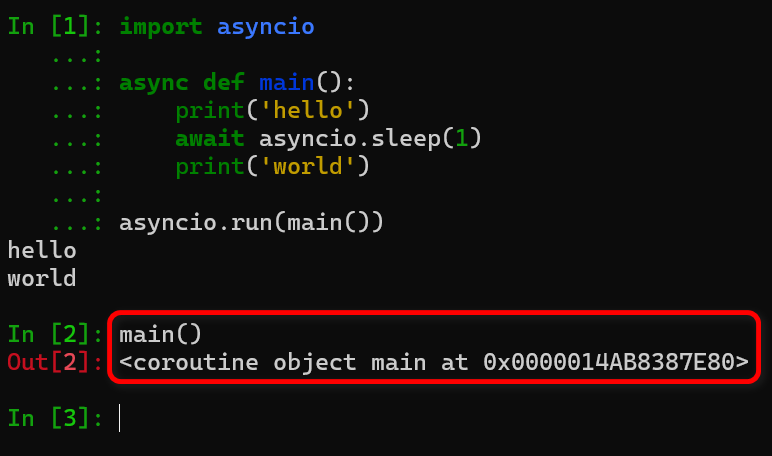
要实际运行一个协程,asyncio 提供了以下几种机制:
- (1)asyncio.run() 函数。这是异步程序的主入口,相当于C语言中的 main 函数。
- (2)对协程执行 await。示例:在等待 1 秒后打印 "hello",然后再等待 2 秒后打印 "world":
import asyncio import time async def say_after(delay, what): await asyncio.sleep(delay) print(what) async def main(): print(f"started at {time.strftime('%X')}") await say_after(1, 'hello') await say_after(2, 'world') print(f"finished at {time.strftime('%X')}") asyncio.run(main()) - ( 3 ) 使用 asyncio.create_task() 函数用来并发运行作为 asyncio 任务 的多个协程。asyncio.create_task() 是一个很有用的函数,在爬虫中可以实现大量并发去下载网页。示例:并发 运行两个
say_after协程。async def main(): task1 = asyncio.create_task( say_after(1, 'hello')) task2 = asyncio.create_task( say_after(2, 'world')) print(f"started at {time.strftime('%X')}") # 等待直到两个任务都完成 # (会花费约 2 秒钟。) await task1 await task2 print(f"finished at {time.strftime('%X')}") - ( 4 ) 使用 asyncio.TaskGroup 类提供的 create_task() ,这种方式更加的现代化。
async def main():
    async with asyncio.TaskGroup() as tg:
        task1 = tg.create_task(
            say_after(1, 'hello'))

        task2 = tg.create_task(
            say_after(2, 'world'))

        print(f"started at {time.strftime('%X')}")

    # 当上下文管理器退出时 await 是隐式执行的。

    print(f"finished at {time.strftime('%X')}")
等待 协程 完成
asyncio 等待所有协程全部完成的 5 种完整方案详解
需求:启动一批协程 / Task,阻塞直到全部执行完毕
统一测试代码
import asyncio

async def work(name, t):
    await asyncio.sleep(t)
    print(f"{name} 完成")
    return f"{name}_res"
1. asyncio.gather () 【最常用,首选】
语法:results = await asyncio.gather(*coro_or_task_list, return_exceptions=False)
- 接收多个可等待对象(协程 / Task/Future),内部自动创建 Task 并发执行;
- 阻塞等待全部任务结束,返回有序结果列表,顺序与入参严格对应;
- 参数
return_exceptions控制异常行为:- False (默认):任意任务抛异常,gather 立即向上抛出异常,剩余任务继续后台运行不会取消;
- True:异常不会抛出,异常对象直接放入结果列表统一返回。
- gather 本身返回一个 Future 对象,可提前保存、外部 cancel ()(取消所有内部任务)。
async def main():
    # 传入原生协程
    res = await asyncio.gather(work("A",1), work("B",2), work("C",1.5))
    print(res)

asyncio.run(main())- 优点:代码极简、自动收集有序结果、一行搞定批量并发
- 缺点:无法中途单独控制某个任务(cancel / 查询状态),只能整体操作;
某任务异常不会自动取消其他任务,资源可能泄漏;
无法自定义等待策略,只能强制等全部完成。 - 适用场景:简单批量并发、需要完整有序结果,爬虫、批量请求首选。
2. asyncio.wait () + ALL_COMPLETED 【灵活可控】
语法:done, pending = await asyncio.wait(task_list, return_when=asyncio.ALL_COMPLETED)
- 入参建议提前手动
create_task生成 Task 列表;传入裸协程会自动封装 Task; - 固定策略
ALL_COMPLETED= 等待所有任务结束; - 返回两个集合:
done(已完成任务集合)、pending(空集合,全部完成); - wait 不会主动抛出异常,异常存储在 Task 内部,调用
task.result()才会抛出; - 支持全局超时
timeout=,超时会直接返回未完成任务,不会自动取消。
async def main():
    tasks = [
        asyncio.create_task(work("A",1)),
        asyncio.create_task(work("B",2)),
        asyncio.create_task(work("C",1.5))
    ]
    done, pending = await asyncio.wait(tasks, return_when=asyncio.ALL_COMPLETED)
    # 手动遍历获取结果
    results = [t.result() for t in done]
    print(results)

asyncio.run(main())

# # 事件循环
# ioloop = asyncio.get_event_loop()
#
# # tasks中也可以使用 asyncio.ensure_future(gr1())..
# tasks = [
#     ioloop.create_task(gr1()),
#     ioloop.create_task(gr2()),
#     ioloop.create_task(gr3())
# ]
# ioloop.run_until_complete(asyncio.wait(tasks))
# ioloop.close()- 优点:持有独立 Task 对象,可随时单独 cancel、查询 done()、获取异常;
支持超时参数,精细化控制;
可切换 FIRST_COMPLETED/FIRST_EXCEPTION 策略,复用同一套代码。 - 缺点:需要手动遍历集合拿结果,代码比 gather 啰嗦;
返回结果无序,需要自行映射关联原始任务;
异常需要手动捕获处理。 - 适用场景:需要精细管理任务生命周期(主动取消、单独捕获异常、设置全局超时)。
3. 循环逐个 await Task (串行,特殊场景使用)
- 原理:先批量创建所有 Task(后台并发启动),再循环挨个 await 等待全部结束。
- 关键点:先全部 create_task,再 await,才是并发;如果边创建边 await 则串行。
async def main():
    tasks = []
    # 第一步:全部创建Task,后台同时运行
    for i in range(3):
        t = asyncio.create_task(work(f"task{i}", i+1))
        tasks.append(t)
    # 第二步:循环等待所有任务完成
    results = []
    for t in tasks:
        results.append(await t)
    print(results)

asyncio.run(main())- 优点:极致灵活,每一个任务单独捕获异常、单独处理返回值;
- 缺点:样板代码多,没有内置批量结果收集逻辑;
- 适用场景:每个任务完成后需要单独自定义处理逻辑、分步日志、单任务异常单独容错。
4. asyncio.as_completed () 循环遍历等待全部完成(流式处理)
- 原理:
as_completed返回异步迭代器,谁先完成先产出谁,循环迭代直到所有任务遍历完毕,间接实现等待全部完成。
async def main():
    tasks = [
        asyncio.create_task(work("A",1)),
        asyncio.create_task(work("B",2)),
        asyncio.create_task(work("C",1.5))
    ]
    results = []
    # 迭代所有完成的任务,全部遍历即代表所有协程完成
    for coro in asyncio.as_completed(tasks):
        res = await coro
        results.append(res)
    print("所有任务完成,无序结果:", results)

asyncio.run(main())- 优点:任务完成一个处理一个,无需等待全部结束才能执行业务逻辑,内存友好;
- 缺点:结果乱序;无法区分已完成 / 未完成集合,不方便批量取消剩余任务;
- 适用场景:流式爬虫、实时解析响应,边下载边入库,不需要保存完整有序结果。
5. 低阶 API:loop.run_until_complete (gather /task)(老式写法)
- 原理:手动获取事件循环,使用 loop 底层接口阻塞等待任务集合全部完成,Python3.7 前无
asyncio.run()时使用,现代代码不推荐。
async def main():
    await asyncio.gather(work("A",1), work("B",2))

# 老式手动loop管理
loop = asyncio.get_event_loop()
try:
    loop.run_until_complete(main())
finally:
loop.close()- 缺点:代码冗余、容易出现循环不匹配问题,现在统一用
asyncio.run()封装; 仅兼容老旧项目,新项目最好禁用。
| 方式 | 是否自动收集结果 | 结果顺序 | 可单独控制 Task | 支持超时 | 推荐度 |
|---|---|---|---|---|---|
| gather | 自动返回列表 | 和入参一致 | 不支持单个控制 | 无内置超时,外层套 wait_for | ⭐⭐⭐⭐⭐ 日常首选 |
| wait(ALL_COMPLETED) | 需手动遍历 | 无序集合 | 完全可控,可 cancel | 内置 timeout 参数 | ⭐⭐⭐⭐ 精细控制场景 |
| 循环 await Task | 手动收集 | 创建顺序 | 完全可控 | 单任务可套 wait_for | ⭐⭐⭐ 单任务独立处理 |
| as_completed 遍历 | 手动收集 | 乱序 | 无法批量区分 pending | 全局 timeout | ⭐⭐⭐ 流式实时处理 |
| loop.run_until_complete | 依赖内部 | 取决于内部 | 底层 loop 操作 | 无 | ⭐ 老旧项目兼容 |
常见踩坑
- 只有先 create_task 再等待,才是并发 错误串行写法:
# 串行,总耗时1+2=3s
await work("A",1)
await work("B",2) - gather 异常不会终止其他任务,如需失败即全部取消,必须手动管理 Task 列表;
- 所有等待原语都不会自动取消超时 / 异常后仍在运行的任务,长期服务需手动 cancel 防止连接泄漏;
- 若需要并发限流,以上任意方案搭配
asyncio.Semaphore使用。
选择推荐
- 简单批量并发、要有序结果 → gather
- 需要取消任务、捕获单个任务异常、设置全局超时 → wait + ALL_COMPLETED
- 任务完成立刻处理,不用等全部结束 → as_completed
- 每个任务需要独立单独异常重试、分步逻辑 → 循环 await Task
- Python3.6 及更早兼容代码 → loop.run_until_complete
生产者、消费者
示例 1:
import asyncio


async def consumer(n, q):
    print(f'消费者 {n}: 开始')
    while True:
        print(f'消费者 {n}: 等待任务')
        item = await q.get()
        print(f'消费者 {n}: 获取任务 ---> {item}')
        if item is None:
            # None is the signal to stop.
            q.task_done()
            break
        else:
            await asyncio.sleep(0.01 * item)
            q.task_done()
    print(f'消费者 {n}: 结束')


async def producer(q, num_workers):
    print('生产者: 开始')
    # Add some numbers to the queue to simulate jobs
    for i in range(num_workers * 3):
        await q.put(i)
        print(f'生产者: 添加任务 ---> {i}')
    # Add None entries in the queue
    # to signal the consumers to exit
    print('生产者: 添加 None 到队列, 相当于一个停止信号')
    for i in range(num_workers):
        await q.put(None)
    print('生产者: 等待队列为空')
    await q.join()
    print('生产者: 结束')


async def main(num_consumers=1):
    q = asyncio.Queue(maxsize=num_consumers)
    consumer_list = [
        asyncio.create_task(consumer(i, q)) for i in range(num_consumers)
    ]
    produce_list = [asyncio.create_task(producer(q, num_consumers))]
    task_list = consumer_list + produce_list
    await asyncio.wait(task_list)


if __name__ == '__main__':
    asyncio.run(main(num_consumers=3))
    pass
示例 2:
import asyncio


async def print_hello():
    while True:
        print("hello")
        await asyncio.sleep(1)  # 协程暂停1秒


async def print_goodbye():
    while True:
        print("bye bye")
        await asyncio.sleep(2)  # 协程暂停2秒


# 创建协程对象
co1 = print_hello()
co2 = print_goodbye()
task_list = [co1, co2]
# 获取事件循环
loop = asyncio.get_event_loop()  # epoll
loop.run_until_complete(asyncio.gather(co1, co2))  # 监听事件循环
# loop.run_until_complete(asyncio.gather(*task_list))  # 监听事件循环
示例 3:
import time
import asyncio


async def producer(event):
    n = 0
    while True:
        print("Running producer...")
        await asyncio.sleep(0.5)
        n += 1
        if n == 2:
            event.set()
            break


async def consumer(event):
    await event.wait()
    print("Running consumer...")
    await asyncio.sleep(0.5)


async def main():
    event = asyncio.Event()
    tasks = [asyncio.create_task(producer(event))] + [
        asyncio.create_task(consumer(event)) for _ in range(3)
    ]

    await asyncio.gather(*tasks)


while True:
    asyncio.run(main())
    print("\nSleeping for 1 sec...\n")
    time.sleep(1)
示例 4:
import asyncio
import random


async def cro_scheduler():
    page = 1
    while True:
        url = f'https://www.xxx.com/{page}'
        asyncio.create_task(cron_job(url))  # 创建新任务并注册到事件循环,和当前协程并发
        await asyncio.sleep(0)  # 这里不是阻塞,而是主动让度线程,可以让job打印日志
        page += 1


async def cron_job(url):
    tick = random.randint(1, 3)  # 模拟下载延迟
    await asyncio.sleep(tick)  # 阻塞协程,模拟下载
    print("下载结束:", url)


if __name__ == '__main__':
    asyncio.run(cro_scheduler())
示例 5:
import asyncio
import random
# import uvloop  # makes asyncio 2-4 times faster
# asyncio.set_event_loop_policy(uvloop.EventLoopPolicy())


# Async
async def produce(queue, n):
    for x in range(1, n + 1):
        # produce an item
        print('producing {}/{}'.format(x, n))
        # simulate i/o operation using sleep
        await asyncio.sleep(random.random())
        item = str(x)
        # put the item in the queue
        await queue.put(item)

    # indicate the producer is done
    await queue.put(None)


async def consume(queue):
    while True:
        # wait for an item from the producer
        item = await queue.get()
        if item is None:
            # the producer emits None to indicate that it is done
            break

        # process the item
        print('consuming item {}...'.format(item))
        # simulate i/o operation using sleep
        await asyncio.sleep(random.random())


def main_1():
    loop = asyncio.get_event_loop()
    queue = asyncio.Queue()
    producer_coro = produce(queue, 10)
    consumer_coro = consume(queue)
    loop.run_until_complete(asyncio.gather(producer_coro, consumer_coro))
    loop.close()


async def temp():
    queue = asyncio.Queue()
    producer_coro = produce(queue, 10)
    consumer_coro = consume(queue)
    await asyncio.gather(*(producer_coro, consumer_coro))


def main_2():
    asyncio.run(temp())


if __name__ == '__main__':
    main_1()
    print("*" * 100)
    main_2()
示例:
import time
import random
import asyncio
import math

"""
判断一个数是否为素数
"""


def is_prime(num: int):
    if num == 2 or num == 3:
        return True
    if num % 6 != 1 and num % 6 != 5:
        return False
    for i in range(5, int(math.sqrt(num)) + 1, 6):
        if num % i == 0 or num % (i + 2) == 0:
            return False
    return True


def big_number():
    # 生成大于20亿的随机数,上限自定义
    return random.randint(2 * 10 ** 10, 2 * 10 ** 15)


class ProducerConsumerModel(object):
    def __init__(self, c_num=1, p_num=1, size=1000000, is_print=False):
        """
        生产者消费者模型
        :param c_num: 消费者个数
        :param p_num: 生产者个数
        :param size: 需要处理的数据大小
        :param is_print: 是否打印日志
        """
        self.consumer_num = c_num
        self.producer_num = p_num
        self.size = size
        self.print_log = is_print

    async def consumer(self, buffer, name):
        for _ in iter(int, 1):  # 死循环,秀一波python黑魔法
            try:
                # 从缓冲区取数,如果超过设定时间取不到数则证明协程任务结束
                value = await asyncio.wait_for(buffer.get(), timeout=0.5)
                if is_prime(value):
                    if self.print_log:
                        print('[{}]{} is Prime'.format(name, value))
                else:
                    if self.print_log:
                        print('[{}]{} is not Prime'.format(name, value))
            except asyncio.TimeoutError:
                break
            await asyncio.sleep(0)

    async def producer(self, buffer, name):
        for i in range(self.size // self.producer_num):  # 将处理数据总数按生产者个数进行切分
            big_num = big_number()  # 生成大随机数
            await buffer.put(big_num)  # 放入缓冲区
            if self.print_log:
                print('[{}] {} is Produced'.format(name, big_num))
            await asyncio.sleep(0)

    async def main(self):
        buffer = asyncio.Queue()  # 定义缓冲区
        worker_list = []  # 工作列表
        # 将生成者和消费者都加入工作列表
        for i in range(self.consumer_num):
            # 给消费者传入公共缓冲区和该消费者名字
            worker_list.append(asyncio.create_task(self.consumer(buffer, 'Consumer' + str(i + 1))))
        for i in range(self.producer_num):
            # 给消费者传入公共缓冲区和该消费者名字
            worker_list.append(asyncio.create_task(self.producer(buffer, 'Producer' + str(i + 1))))

        # 打工人开始上班了
        await asyncio.gather(*worker_list)
        # await asyncio.wait(worker_list)


if __name__ == '__main__':
    start_time = time.perf_counter()  # 时间计数
    pc_model = ProducerConsumerModel(c_num=2, p_num=2, size=100, is_print=True)
    asyncio.run(pc_model.main())  # 开启协程服务
    end_time = time.perf_counter()
    print("此次程序耗时:【{:.3f}】秒 ".format(end_time - start_time))
可等待对象:协程、Task、Future
可等待对象,就是可以在 await 表达式中使用的对象,前面已经接触了两种可等待对象的类型:协程 和 任务,还有一个是低层级的 Future。
asyncio 模块的许多 API 都需要传入可等待对象,比如 run(), create_task() 等等。
- (1)协程:协程是可等待对象,可以在其它协程中被等待。
- (2)任务:当一个协程通过
asyncio.create_task()被打包为一个 任务,该协程将自动加入调度队列中,但是还未执行。
create_task() 的基本使用前面例子已经讲过。它返回的 task 通过 await 来等待其运行完。如果,我们不等待,会发生什么?“准备立即运行”又该如何理解呢?先看看下面这个例子:

运行这段代码的情况是这样的:首先,1秒钟后打印一行,这是第13,14行代码运行的结果:
calling:0, now is 09:15:15
接着,停顿1秒后,连续打印4行:
calling:1, now is 09:15:16
calling:2, now is 09:15:16
calling:3, now is 09:15:16
calling:4, now is 09:15:16
从这个结果看,asyncio.create_task()产生的4个任务,我们并没有 await,它们也执行了。关键在于第18行的 await,如果把这一行去掉或是 sleep 的时间小于1秒(比whattime()里面的sleep时间少即可),就会只看到第一行的输出结果而看不到后面四行的输出。这是因为,main() 不 sleep 或 sleep 少于1秒钟,main() 就在 whattime() 还未来得及打印结果(因为,它要sleep 1秒)就退出了,从而整个程序也退出了,就没有 whattime() 的输出结果。
再来理解一下 "准备立即执行" 这个说法。它的意思就是,create_task() 只是打包了协程并加入调度队列还未执行,并准备立即执行,什么时候执行呢?在 "主协程" 挂起的时候,这里的“挂起”有两个方式:
- 一是,通过 await task 来执行这个任务;
- 另一个是,主协程通过 await sleep 挂起,事件循环就去执行task了。
我们知道,asyncio 是通过事件循环实现异步的。在主协程 main()里面,没有遇到 await 时,事件就是执行 main() 函数,遇到 await 时,事件循环就去执行别的协程,即 create_task() 生成的 whattime() 的4个任务,这些任务一开始就是 await sleep 1秒。这时候,主协程和4个任务协程都挂起了,CPU空闲,事件循环等待协程的消息。
如果 main() 协程只 sleep了 0.1秒,它就先醒了,给事件循环发消息,事件循环就来继续执行 main() 协程,而 main() 后面已经没有代码,就退出该协程,退出它也就意味着整个程序退出,4个任务就没机会打印结果;
如果 main()协程sleep时间多余1秒,那么4个任务先唤醒,就会得到全部的打印结果;
如果main()的18行sleep等于1秒时,和4个任务的sleep时间相同,也会得到全部打印结果。这是为什么呢?
我猜想是这样的:4个任务生成在前,第18行的sleep在后,事件循环的消息响应可能有个先进先出的顺序。后面深入asyncio的代码专门研究一下这个猜想正确与否。
示例:
# -*- coding: utf-8 -*-

"""
@File    : aio_test.py
@Author  : XXX
@Time    : 2020/12/25 23:54
"""

import asyncio
import datetime


async def hi(msg=None, sec=None):
    print(f'enter hi(), {msg} @{datetime.datetime.now().replace(microsecond=0)}')
    await asyncio.sleep(sec)
    print(f'leave hi(), {msg} @{datetime.datetime.now().replace(microsecond=0)}')
    return sec


async def main_1():
    print(f'main() begin at {datetime.datetime.now().replace(microsecond=0)}')
    task_list = [asyncio.create_task(hi(i, i)) for i in range(5, -1, -1)]
    for task in task_list:
        ret_val = await task
        print(f'ret_val:{ret_val}')
    print(f'main() end at {datetime.datetime.now().replace(microsecond=0)}')


async def main_2():
    # *****  注意:main_2 中睡眠了2秒,导致睡眠时间大于2秒的协程没有执行完成 *****
    print(f'main() begin at {datetime.datetime.now().replace(microsecond=0)}')
    task_list = [asyncio.create_task(hi(i, i)) for i in range(5, -1, -1)]
    await asyncio.sleep(2)
    print(f'main() end at {datetime.datetime.now().replace(microsecond=0)}')


async def main_2_1():
    # 改进。防止因主线程执行完毕,从而导致协程没有执行而直接推出
    print(f'main() begin at {datetime.datetime.now().replace(microsecond=0)}')
    task_list = [asyncio.create_task(hi(i, i)) for i in range(5, -1, -1)]
    await asyncio.wait(task_list)
    print(f'main() end at {datetime.datetime.now().replace(microsecond=0)}')


async def main_3():
    # *****  注意:main_3方法并没有实现并发执行,只是顺序执行 *****
    print(f'main() begin at {datetime.datetime.now().replace(microsecond=0)}')
    tasks = []
    for i in range(1, 5):
        tsk = asyncio.create_task(hi(i, i))
        await tsk
    print(f'main() end at {datetime.datetime.now().replace(microsecond=0)}')


print('*' * 50)
asyncio.run(main_1())
print('*' * 50)
asyncio.run(main_2())
asyncio.run(main_2_1())
print('*' * 50)
asyncio.run(main_3())
print('*' * 50)
不 使用 asyncio 的 消息循环 让协程运行
先看下 不使用 asyncio 的消息循环 怎么 调用 协程,让协程 运行:
async def func_1():
    print("func_1 start")
    print("func_1 end")


async def func_2():
    print("func_2 start")
    print("func_2 a")
    print("func_2 b")
    print("func_2 c")
    print("func_2 end")


f_1 = func_1()
print(f_1)

f_2 = func_2()
print(f_2)


try:
    print('f_1.send')
    f_1.send(None)
except StopIteration as e:
    # 这里也是需要去捕获StopIteration方法
    pass

try:
    print('f_2.send')
    f_2.send(None)
except StopIteration as e:
    pass
运行结果:
<coroutine object func_1 at 0x0000020121A07C40>
<coroutine object func_2 at 0x0000020121B703C0>
f_1.send
func_1 start
func_1 end
f_2.send
func_2 start
func_2 a
func_2 b
func_2 c
func_2 end
示例代码2:
async def test(x):
    return x * 2

print(test(100))

try:
    # 既然是协程,我们像之前yield协程那样
    test(100).send(None)
except BaseException as e:
    print(type(e))
    ret_val = e.value
    print(ret_val)
示例代码3:
def simple_coroutine():
    print('-> start')
    x = yield
    print('-> recived', x)


sc = simple_coroutine()

next(sc)

try:
    sc.send('zhexiao')
except BaseException as e:
print(e)对上述例子的分析:yield 的右边没有表达式,所以这里默认产出的值是None。刚开始先调用了next(...)是因为这个时候生成器还没有启动,没有停在yield那里,这个时候也是无法通过send发送数据。所以当我们通过 next(...)激活协程后 ,程序就会运行到x = yield,这里有个问题我们需要注意, x = yield这个表达式的计算过程是先计算等号右边的内容,然后在进行赋值,所以当激活生成器后,程序会停在yield这里,但并没有给x赋值。当我们调用 send 方法后 yield 会收到这个值并赋值给 x,而当程序运行到协程定义体的末尾时和用生成器的时候一样会抛出StopIteration异常
如果协程没有通过 next(...) 激活(同样我们可以通过send(None)的方式激活),但是我们直接send,会提示如下错误:

最先调用 next(sc) 函数这一步通常称为“预激”(prime)协程 (即,让协程执行到第一个 yield 表达式,准备好作为活跃的协程使用)。
协程在运行过程中有四个状态:
-
GEN_CREATE: 等待开始执行
-
GEN_RUNNING: 解释器正在执行,这个状态一般看不到
-
GEN_SUSPENDED: 在yield表达式处暂停
-
GEN_CLOSED: 执行结束
通过下面例子来查看协程的状态:

示例代码4:(使用协程计算移动平均值)
def averager():
    total = 0.0
    count = 0
    avg = None

    while True:
        num = yield avg
        total += num
        count += 1
        avg = total / count


# run
ag = averager()
# 预激协程
print(next(ag))  # None

print(ag.send(10))  # 10
print(ag.send(20))  # 15
这里是一个死循环,只要不停 send 值 给 协程,可以一直计算下去。
解释:
- 1. 调用 next(ag) 函数后,协程会向前执行到 yield 表达式,产出 average 变量的初始值 None。
- 2. 此时,协程在 yield 表达式处暂停。
- 3. 使用 send() 激活协程,把发送的值赋给 num,并计算出 avg 的值。
- 4. 使用 print 打印出 yield 返回的数据。
单步 调试 上面程序。
示例代码
import asyncio
import aiohttp
from scrapy.http import TextResponse
from scrapy.linkextractors import LinkExtractor


async def get_a_href(kw: str, session: aiohttp.ClientSession, proxy: str = None) -> None:
    url = f'https://haowallpaper.com/homeView?lbName={kw}'
    # 在请求中添加 proxy 参数
    async with session.get(url, proxy=proxy) as response:
        response.raise_for_status()
        resp_text = await response.text()

    if not resp_text:
        return

    link_extractor = LinkExtractor(
        allow=(),
        deny=(),
        tags=('a',),
        attrs=('href',),
        restrict_xpaths=(),
        restrict_css=(),
        canonicalize=True
    )
    text_response = TextResponse(url, body=resp_text, encoding='utf-8')
    a_href = link_extractor.extract_links(text_response)
    for item in a_href:
        print(item.url)


async def main() -> None:
    # 代理配置
    proxy = 'http://127.0.0.1:7897'  # 替换为你的代理地址

    async with aiohttp.ClientSession() as session:
        tasks = [
            get_a_href('美女', session, proxy),
            get_a_href('黑丝', session, proxy),
            get_a_href('性感', session, proxy),
        ]
        await asyncio.gather(*tasks)

"""
tasks 中每个协程get_a_href都传递了 session,又在 get_a_href 函数中使用 with 管理上下文
但是 async with session.get(url) 管理的是 response 对象 的生命周期,不是 session。
session 的生命周期是在 main() 函数中由 async with aiohttp.ClientSession() as session 管理的
多个协程共享同一个 session,各自独立管理自己的 response 对象
当所有协程完成后,main() 退出 with 块时,session 才会被关闭一次
这三个任务虽然共享同一个 session 和 proxy,但它们是并发执行的独立协程,各自有自己的执行上下文。
每个协程在执行时,会根据自己的参数和上下文,独立地发送请求和处理响应。
aiohttp.ClientSession 内部使用连接池管理连接,但每个请求都是独立的:
每个请求会创建独立的 TCP 连接
代理配置在请求级别生效
多个请求可以同时使用同一个代理,也可以使用不同代理
"""


if __name__ == '__main__':
    asyncio.run(main())
目标, 明朝那些事儿 http://www.mingchaonaxieshier.com/
import asyncio
import aiohttp
import aiofiles
from lxml import etree
import os
import re
from typing import List, Dict, Any


def sanitize_filename(filename: str) -> str:
    invalid_chars = r'[\\/:*?"<>|]'
    return re.sub(invalid_chars, '_', filename)


async def get_chapter_info(session: aiohttp.ClientSession, url: str) -> List[Dict[str, Any]]:
    async with session.get(url) as resp:
        resp.raise_for_status()
        page_source = await resp.text(encoding='utf-8')

    result = []
    tree = etree.HTML(page_source)
    mulus = tree.xpath("//div[@class='main']/div[@class='bg']/div[@class='mulu']")

    for mulu in mulus:
        trs = mulu.xpath("./center/table/tr")
        if not trs:
            continue

        title = trs[0].xpath(".//text()")
        chapter_name = sanitize_filename("".join(title).strip())

        chapter_hrefs = []
        for tr in trs[1:]:
            hrefs = tr.xpath("./td/a/@href")
            chapter_hrefs.extend(hrefs)

        if chapter_hrefs:
            result.append({
                "chapter_name": chapter_name,
                "chapter_hrefs": chapter_hrefs
            })

    return result


async def download_one(
    session: aiohttp.ClientSession,
    semaphore: asyncio.Semaphore,
    chapter_name: str,
    href: str
) -> None:
    async with semaphore:
        try:
            async with session.get(href) as resp:
                resp.raise_for_status()
                hm = await resp.text(encoding="utf-8", errors="ignore")

            tree = etree.HTML(hm)
            title_elements = tree.xpath("//div[@class='main']/h1/text()")
            if not title_elements:
                print(f"警告: 无法获取标题,跳过 {href}")
                return

            title = sanitize_filename(title_elements[0].strip())
            content_list = tree.xpath("//div[@class='main']/div[@class='content']/p/text()")
            content = "\n".join(content_list).strip()

            os.makedirs(chapter_name, exist_ok=True)
            async with aiofiles.open(f"{chapter_name}/{title}.txt", mode="w", encoding="utf-8") as f:
                await f.write(content)

            print(f"已下载: {title}")

        except aiohttp.ClientError as e:
            print(f"网络错误 {href}: {str(e)}")
        except IOError as e:
            print(f"文件写入失败 {chapter_name}/{title}.txt: {str(e)}")
        except Exception as e:
            print(f"未知错误 {href}: {str(e)}")


async def download_all(base_url: str, max_concurrent: int = 10) -> None:
    async with aiohttp.ClientSession() as session:
        chapter_info = await get_chapter_info(session, base_url)
        print(f"共发现 {len(chapter_info)} 个章节")

        semaphore = asyncio.Semaphore(max_concurrent)
        tasks = []

        for chapter in chapter_info:
            chapter_name = chapter['chapter_name']
            print(f"开始下载章节: {chapter_name} ({len(chapter['chapter_hrefs'])} 篇)")

            for href in chapter['chapter_hrefs']:
                full_href = href if href.startswith('http') else base_url + href
                task = asyncio.create_task(download_one(session, semaphore, chapter_name, full_href))
                tasks.append(task)

        await asyncio.gather(*tasks)
        print("\n所有下载任务完成")


def main():
    url = "http://www.mingchaonaxieshier.com/"
    asyncio.run(download_all(url))


if __name__ == '__main__':
    main()
示例:
import asyncio
import os
from urllib.parse import urlparse
import aiohttp  # pip install aiohttp
import aiofiles  # pip install aiofiles

"""
共享 ClientSession - 不要每次下载都创建新 session,现在所有任务共享一个 session,复用连接池,提升性能
并发控制 - 添加 asyncio.Semaphore 限制最大并发数(默认3),避免请求过多被封
流式下载 - 使用 resp.content.iter_chunked() 分块读取,支持大文件下载,避免内存溢出
下载进度显示 - 实时显示下载百分比,提升用户体验
"""


async def download(url: str,session: aiohttp.ClientSession,semaphore: asyncio.Semaphore,save_dir: str = "downloads") -> None:
    os.makedirs(save_dir, exist_ok=True)
    filename = os.path.basename(urlparse(url).path)
    if not filename:
        filename = f"download_{hash(url)}.bin"
    file_path = os.path.join(save_dir, filename)
    async with semaphore:
        print(f"开始下载: {url}")
        try:
            async with session.get(url) as resp:
                resp.raise_for_status()
                content_length = int(resp.headers.get("Content-Length", 0))
                downloaded = 0
                async with aiofiles.open(file_path, mode="wb") as f:
                    async for chunk in resp.content.iter_chunked(1024 * 1024):
                        await f.write(chunk)
                        downloaded += len(chunk)
                        if content_length:
                            progress = (downloaded / content_length) * 100
                            print(f"\r下载中: {filename} [{progress:.1f}%]", end="")

            print(f"\n下载完成: {filename}")

        except aiohttp.ClientError as e:
            print(f"\n下载失败 {url}: {str(e)}")
        except IOError as e:
            print(f"\n文件写入失败 {file_path}: {str(e)}")


async def main() -> None:
    urls = [
        "https://haowallpaper.com/link/common/file/previewFileImg/15730961105981760",
        "https://haowallpaper.com/link/common/file/previewFileImg/19195142717723520"
    ]

    max_concurrent = 3
    semaphore = asyncio.Semaphore(max_concurrent)

    async with aiohttp.ClientSession() as session:
        tasks = [download(url, session, semaphore) for url in urls]
        await asyncio.gather(*tasks)

    print("\n所有任务完成")


if __name__ == '__main__':
    asyncio.run(main())
4、aiohttp 使用 示例
asyncio 实现了TCP、UDP、SSL等协议,aiohtt p则是基于 asyncio 实现的 HTTP 框架。
github 地址:https://github.com/aio-libs/aiohttp
官网文档:https://docs.aiohttp.org/en/stable/安装 aiohttp:pip install aiohttp
client
为什么要使用 client ?
- 如果使用顶级 API 发出请求时,会为每个请求建立新连接(不会重复使用连接)。随着对主机的请求数量的增加,这很快就会变得低效。最好的用法:每个应用程序都需要一个会话来一起执行所有请求。更复杂的情况可能需要每个站点一个会话,例如一个用于Github,另一个用于Facebook api。无论如何,为每个请求创建一个会话是一个非常糟糕的主意。
- "Client实例" 使用 HTTP 连接池。这意味着,当您向同一主机发出多个请求时,将重用基础 TCP 连接,而不是为每个请求重新创建一个。
与使用顶级 API 相比,这可以带来显著的性能改进,包括:
- 减少了跨请求的延迟(无握手)。
- 减少了 CPU 使用率和往返。
- 减少网络拥塞。
官网示例:client 示例
import aiohttp
import asyncio


async def main():
    async with aiohttp.ClientSession() as session:
        async with session.get('http://python.org') as response:
            print("Status:", response.status)
            print("Content-type:", response.headers['content-type'])

            html = await response.text()
            print("Body:", html[:15], "...")


asyncio.run(main())
一般情况下只需要创建一个 session,然后使用这个 session 执行所有的请求。
import asyncio
import aiohttp


async def download(cs=None, url=None, name=None):
    async with cs.get(url) as resp:
        with open(name, mode='w', encoding='utf-8') as f:
            f.write(await resp.text())


async def main_1():
    url_map = {
        'baidu': "https://www.baidu.com",
        'bilibili': "https://www.bilibili.com",
        '163': "https://www.163.com"
    }
    async with aiohttp.ClientSession() as cs:
        tasks = [asyncio.create_task(download(cs, v, k)) for k, v in url_map.items()]
        await asyncio.wait(tasks)


async def main_2():
    url_map = {
        'baidu': "https://www.baidu.com",
        'bilibili': "https://www.bilibili.com",
        '163': "https://www.163.com"
    }
    cs = aiohttp.ClientSession()
    tasks = [asyncio.create_task(download(cs, v, k)) for k, v in url_map.items()]
    await asyncio.wait(tasks)
    await cs.close()


if __name__ == "__main__":
    asyncio.run(main_1())
# asyncio.run(main_2())- 自定义 cookies 应该放在 ClientSession中,而不是 session.get() 中
- 自定义的 headers 跟正常的 requests 一样放在 session.get() 中
- 默认响应时间为5分钟,通过 timeout 可以重新设定,其放在session.get()中
- 代理也是在 session.get() 中配置
- 禁用 SSL 验证
async with aiohttp.ClientSession(connector=aiohttp.TCPConnector(verify_ssl=False)) as session:
每个请求创建一个 aiohttp.ClientSession(),随着对主机的请求数量的增加,这很快就会变得低效
import asyncio
import aiohttp


async def download(url, name):
    async with aiohttp.ClientSession() as session:
        async with session.get(url) as resp:
            with open(name, mode='w', encoding='utf-8') as f:
                f.write(await resp.text())


async def main():
    url_map = {
        'baidu': "https://www.baidu.com",
        'bilibili': "https://www.bilibili.com",
        '163': "https://www.163.com"
    }
    tasks = [asyncio.create_task(download(v, k)) for k, v in url_map.items()]
    await asyncio.wait(tasks)


if __name__ == "__main__":
    asyncio.run(main())
顶级 API 示例 ( 不推荐 ):aiohttp.request。随着对主机的请求数量的增加,这很快就会变得低效
import asyncio
import aiohttp


async def aiohttp_requests(url):  # aiohttp的requests函数
    async with aiohttp.request("GET", url=url) as response:
        return await response.text(encoding='UTF-8')


async def main():  # 主函数用于异步函数的启动
    url = 'https://www.baidu.com'
    html = await aiohttp_requests(url)  # await修饰异步函数
    print(html)


if __name__ == '__main__':
    asyncio.run(main())
server
官网示例:server 示例
from aiohttp import web


async def handle(request):
    name = request.match_info.get('name', "Anonymous")
    text = "Hello, " + name
    return web.Response(text=text)


app = web.Application()
app.add_routes([web.get('/', handle),
                web.get('/{name}', handle)])

if __name__ == '__main__':
    web.run_app(app)
示例:编写一个HTTP服务器,分别处理 对应URL:
import asyncio

from aiohttp import web


async def index(request):
    await asyncio.sleep(0.5)
    return web.Response(body=b'<h1>Index</h1>')


async def hello(request):
    await asyncio.sleep(0.5)
    text = '<h1>hello, %s!</h1>' % request.match_info['name']
    return web.Response(body=text.encode('utf-8'))


async def init(loop):
    app = web.Application(loop=loop)
    app.router.add_route('GET', '/', index)
    app.router.add_route('GET', '/hello/{name}', hello)
    srv = await loop.create_server(app.make_handler(), '127.0.0.1', 8000)
    print('Server started at http://127.0.0.1:8000...')
    return srv


loop = asyncio.get_event_loop()
loop.run_until_complete(init(loop))
loop.run_forever()
Utilities
FAQ
- FAQ
- Are there plans for an @app.route decorator like in Flask?
- Does aiohttp have a concept like Flask’s “blueprint” or Django’s “app”?
- How do I create a route that matches urls with a given prefix?
- Where do I put my database connection so handlers can access it?
- How can middleware store data for web handlers to use?
- Can a handler receive incoming events from different sources in parallel?
- How do I programmatically close a WebSocket server-side?
- How do I make a request from a specific IP address?
- What is the API stability and deprecation policy?
- How do I enable gzip compression globally for my entire application?
- How do I manage a ClientSession within a web server?
- How do I access database connections from a subapplication?
- How do I perform operations in a request handler after sending the response?
- How do I make sure my custom middleware response will behave correctly?
- Why is creating a ClientSession outside of an event loop dangerous?
Miscellaneous
requests + ThreadPoolExecutor、aiohttp 对比
import requests
import timeit
import asyncio
from typing import List
from concurrent.futures import ThreadPoolExecutor, as_completed
import aiohttp


# 配置常量
URL = "https://www.baidu.com"
REQUEST_COUNT = 50
MAX_WORKERS = 20
TIMEOUT = 10  # 请求超时时间(秒)

# 复用的 requests session
requests_session = requests.Session()
requests_session.headers.update({
    'User-Agent': 'Mozilla/5.0 (Windows NT 10.0; Win64; x64) AppleWebKit/537.36 '
                  '(KHTML, like Gecko) Chrome/120.0.0.0 Safari/537.36'
})


def req_with_session(url: str) -> bool:
    """使用复用的 session 发送请求"""
    try:
        resp = requests_session.get(url, timeout=TIMEOUT)
        if resp.status_code != 200:
            print(f'status_code: {resp.status_code} - {url}')
            return False
        return True
    except requests.exceptions.RequestException as e:
        print(f'Request failed {url}: {str(e)}')
        return False


def requests_test() -> None:
    """同步循环方式"""
    for _ in range(REQUEST_COUNT):
        req_with_session(URL)


def pool_requests_test() -> None:
    """线程池方式"""
    url_list = [URL] * REQUEST_COUNT
    with ThreadPoolExecutor(max_workers=MAX_WORKERS) as pool:
        # 使用 as_completed 可以获取结果(虽然这里不需要结果)
        futures = [pool.submit(req_with_session, url) for url in url_list]
        for future in as_completed(futures):
            try:
                future.result()
            except Exception as e:
                print(f'Thread pool error: {str(e)}')


async def fetch_with_session(session: aiohttp.ClientSession, url: str) -> bool:
    """使用复用的 session 发送异步请求"""
    try:
        async with session.get(url, timeout=aiohttp.ClientTimeout(total=TIMEOUT)) as resp:
            if resp.status != 200:
                print(f'status_code: {resp.status} - {url}')
                return False
            return True
    except asyncio.TimeoutError:
        print(f'Request timeout - {url}')
        return False
    except aiohttp.ClientError as e:
        print(f'Client error {url}: {str(e)}')
        return False
    except Exception as e:
        print(f'Unexpected error {url}: {str(e)}')
        return False


async def aiohttp_concurrent(url: str, count: int) -> None:
    """并发执行多个异步请求"""
    # 创建一次 connector 和 session,所有请求复用
    connector = aiohttp.TCPConnector(limit=MAX_WORKERS)
    async with aiohttp.ClientSession(connector=connector) as session:
        tasks = [fetch_with_session(session, url) for _ in range(count)]
        await asyncio.gather(*tasks)


def aiohttp_test() -> None:
    """aiohttp 异步方式"""
    asyncio.run(aiohttp_concurrent(URL, REQUEST_COUNT))


def benchmark() -> None:
    """性能测试主函数"""
    print("=" * 60)
    print(f"测试配置: 请求数={REQUEST_COUNT}, 线程数/并发数={MAX_WORKERS}, 超时={TIMEOUT}s")
    print("=" * 60)

    # 同步循环方式
    sync_time = timeit.timeit(stmt=requests_test, number=1)
    print(f"\n1. 同步循环方式: {sync_time:.2f}s")

    # 线程池方式
    pool_time = timeit.timeit(stmt=pool_requests_test, number=1)
    print(f"2. 线程池方式: {pool_time:.2f}s")

    # aiohttp 异步方式
    async_time = timeit.timeit(stmt=aiohttp_test, number=1)
    print(f"3. aiohttp 异步方式: {async_time:.2f}s")

    print("\n" + "=" * 60)
    print("性能对比:")
    print(f"  线程池比同步快: {(sync_time - pool_time) / sync_time * 100:.1f}%")
    print(f"  aiohttp比同步快: {(sync_time - async_time) / sync_time * 100:.1f}%")
    print("=" * 60)


if __name__ == '__main__':
    benchmark()
asyncio.queue 的使用
import asyncio
import aiohttp
from typing import Optional


# 配置常量
TEMPLATE = 'http://exercise.kingname.info/exercise_middleware_ip/{page}'
TOTAL_PAGES = 1000
CONCURRENT_WORKERS = 100
MAX_CONCURRENT_REQUESTS = 20  # 并发请求限制
REQUEST_TIMEOUT = 30  # 请求超时时间(秒)

# 请求头
HEADERS = {
    'User-Agent': 'Mozilla/5.0 (Windows NT 10.0; Win64; x64) AppleWebKit/537.36 '
                  '(KHTML, like Gecko) Chrome/120.0.0.0 Safari/537.36',
    'Accept': 'text/html,application/xhtml+xml,application/xml;q=0.9,*/*;q=0.8',
    'Accept-Language': 'zh-CN,zh;q=0.9,en;q=0.8'
}


async def fetch(session: aiohttp.ClientSession, url: str, semaphore: asyncio.Semaphore) -> Optional[str]:
    """
    异步获取网页内容

    Args:
        session: aiohttp会话对象
        url: 要获取的URL
        semaphore: 并发控制信号量

    Returns:
        网页内容,如果失败返回 None
    """
    async with semaphore:
        try:
            async with session.get(
                url,
                headers=HEADERS,
                timeout=aiohttp.ClientTimeout(total=REQUEST_TIMEOUT)
            ) as resp:
                if resp.status == 200:
                    return await resp.text(encoding='utf-8')
                else:
                    print(f"HTTP error {resp.status} - {url}")
        except asyncio.TimeoutError:
            print(f"请求超时 - {url}")
        except aiohttp.ClientError as e:
            print(f"请求失败 {url}: {str(e)}")
        except Exception as e:
            print(f"未知错误 {url}: {str(e)}")
    return None


async def worker(session: aiohttp.ClientSession, queue: asyncio.Queue, semaphore: asyncio.Semaphore):
    """
    工作协程:从队列获取任务并处理

    Args:
        session: aiohttp会话对象
        queue: 任务队列
        semaphore: 并发控制信号量
    """
    while not queue.empty():
        try:
            page = queue.get_nowait()
            url = TEMPLATE.format(page=page)
            content = await fetch(session, url, semaphore)
            if content:
                print(f"Page {page}: {content.strip()[:50]}...")  # 只打印前50个字符
            queue.task_done()
        except asyncio.QueueEmpty:
            break
        except Exception as e:
            print(f"Worker error: {str(e)}")
            queue.task_done()


async def main():
    """主协程:初始化资源并启动爬取"""
    print(f"开始爬取,共 {TOTAL_PAGES} 页,并发数 {CONCURRENT_WORKERS}")

    # 创建并发控制信号量
    semaphore = asyncio.Semaphore(MAX_CONCURRENT_REQUESTS)

    # 创建任务队列
    queue = asyncio.Queue()
    for page in range(TOTAL_PAGES):
        queue.put_nowait(page)

    # 创建 aiohttp 会话
    async with aiohttp.ClientSession() as session:
        # 创建工作协程任务
        tasks = [worker(session, queue, semaphore) for _ in range(CONCURRENT_WORKERS)]

        # 等待所有任务完成
        await asyncio.gather(*tasks)

        # 等待队列中所有任务标记完成
        await queue.join()

    print("爬取完成")


if __name__ == '__main__':
    asyncio.run(main())
aiohttp 与 aiomultiprocess (异步多线程)
import asyncio
import time
from typing import List, Optional

import aiohttp
from aiomultiprocess import Pool


# 配置常量
BASE_URL = 'http://127.0.0.1:5000'
REQUEST_COUNT = 100
REQUEST_TIMEOUT = 30

# 请求头
HEADERS = {
    'User-Agent': 'Mozilla/5.0 (Windows NT 10.0; Win64; x64) AppleWebKit/537.36 '
                  '(KHTML, like Gecko) Chrome/120.0.0.0 Safari/537.36',
    'Accept': 'text/html,application/xhtml+xml,application/xml;q=0.9,*/*;q=0.8'
}


async def fetch_with_session(session: aiohttp.ClientSession, url: str) -> Optional[str]:
    """
    使用复用的 session 发送请求

    Args:
        session: aiohttp会话对象
        url: 要获取的URL

    Returns:
        响应文本,如果失败返回 None
    """
    try:
        async with session.get(
            url,
            headers=HEADERS,
            timeout=aiohttp.ClientTimeout(total=REQUEST_TIMEOUT)
        ) as response:
            if response.status == 200:
                return await response.text(encoding='utf-8', errors='ignore')
            else:
                print(f"HTTP error {response.status} - {url}")
                return None
    except asyncio.TimeoutError:
        print(f"请求超时 - {url}")
        return None
    except aiohttp.ClientError as e:
        print(f"请求失败 {url}: {str(e)}")
        return None
    except Exception as e:
        print(f"未知错误 {url}: {str(e)}")
        return None


async def process_urls(urls: List[str]) -> List[Optional[str]]:
    """
    处理一组URL请求(单个进程内的异步处理)

    Args:
        urls: URL列表

    Returns:
        响应结果列表
    """
    async with aiohttp.ClientSession() as session:
        tasks = [fetch_with_session(session, url) for url in urls]
        results = await asyncio.gather(*tasks)
        return results


async def main() -> List[Optional[str]]:
    """主协程:使用多进程+异步并发请求"""
    urls = [BASE_URL for _ in range(REQUEST_COUNT)]

    # 按进程数分割URL列表
    # aiomultiprocess 会自动分配工作负载
    async with Pool() as pool:
        results = await pool.map(process_urls, [urls])
        # pool.map 返回的是每个进程的结果列表,需要展平
        return [item for sublist in results for item in sublist]


def benchmark() -> None:
    """性能测试函数"""
    start_time = time.time()

    # 使用现代 asyncio API
    results = asyncio.run(main())

    end_time = time.time()
    elapsed = end_time - start_time

    # 统计成功和失败的请求数
    success_count = sum(1 for r in results if r is not None)
    fail_count = REQUEST_COUNT - success_count

    print("=" * 60)
    print(f"请求总数: {REQUEST_COUNT}")
    print(f"成功: {success_count}, 失败: {fail_count}")
    print(f"总耗时: {elapsed:.2f}秒")
    print(f"平均耗时: {elapsed / REQUEST_COUNT * 1000:.2f}毫秒/请求")
    print("=" * 60)


if __name__ == '__main__':
    benchmark()
在子进程中执行协程
import asyncio
from typing import Dict, Any, Optional

from aiohttp import ClientSession, ClientTimeout
from aiomultiprocess import Process


# 配置常量
REQUEST_TIMEOUT = 30

# 请求头
HEADERS = {
    'User-Agent': 'Mozilla/5.0 (Windows NT 10.0; Win64; x64) AppleWebKit/537.36 '
                  '(KHTML, like Gecko) Chrome/120.0.0.0 Safari/537.36',
    'Accept': 'application/json, text/plain, */*',
    'Content-Type': 'application/json'
}


async def make_put_request(url: str, data: Dict[str, Any]) -> Optional[int]:
    """
    发送 PUT 请求

    Args:
        url: 请求URL
        data: 请求数据(会被序列化为JSON)

    Returns:
        HTTP 状态码,如果失败返回 None
    """
    async with ClientSession(timeout=ClientTimeout(total=REQUEST_TIMEOUT)) as session:
        try:
            async with session.put(
                url,
                json=data,
                headers=HEADERS
            ) as response:
                print(f"PUT请求完成 - URL: {url}, 状态码: {response.status}")
                return response.status
        except asyncio.TimeoutError:
            print(f"PUT请求超时 - URL: {url}")
            return None
        except Exception as e:
            print(f"PUT请求失败 {url}: {str(e)}")
            return None


async def main():
    """主协程"""
    url = "https://jreese.sh"
    payload = {"key": "value"}

    # 创建并启动子进程
    process = Process(target=make_put_request, args=(url, payload))

    try:
        await process
        print("子进程执行完成")
    except Exception as e:
        print(f"子进程执行异常: {str(e)}")
    finally:
        # 确保进程资源被正确清理
        process.close()


if __name__ == "__main__":
asyncio.run(main())如果您想从协程中获取结果Worker,请使用以下方法:
import asyncio
from aiohttp import request
from aiomultiprocess import Worker


async def get(url):
    async with request("GET", url) as response:
        return await response.text("utf-8")


async def main():
    p = Worker(target=get, args=("https://jreese.sh",))
    response = await p


if __name__ == "__main__":
    asyncio.run(main())
如果您需要一个托管的工作进程池,请使用Pool:
import asyncio
from aiohttp import request
from aiomultiprocess import Pool


async def get(url):
    async with request("GET", url) as response:
        return await response.text("utf-8")


async def main():
    urls = ["https://jreese.sh", "https://www.baidu.com"]
    async with Pool() as pool:
        result = await pool.map(get, urls)
        print(result)


if __name__ == "__main__":
    asyncio.run(main())
控制 并发量、异步写 Mongodb
import asyncio
import json
from typing import List, Dict, Any, Optional

import aiohttp
import logging
from motor.motor_asyncio import AsyncIOMotorClient


# 配置日志
logging.basicConfig(
    level=logging.INFO,
    format='%(asctime)s - %(levelname)s: %(message)s'
)
logger = logging.getLogger(__name__)


class Config:
    """爬虫配置类"""
    # API 配置
    INDEX_URL = 'https://spa5.scrape.center/api/book/?limit=18&offset={offset}'
    DETAIL_URL = 'https://spa5.scrape.center/api/book/{id}'
    PAGE_SIZE = 18
    PAGE_NUMBER = 3

    # 并发配置
    CONCURRENCY = 5
    REQUEST_TIMEOUT = 30

    # 请求头
    HEADERS = {
        'User-Agent': 'Mozilla/5.0 (Windows NT 10.0; Win64; x64) AppleWebKit/537.36 '
                      '(KHTML, like Gecko) Chrome/120.0.0.0 Safari/537.36',
        'Accept': 'application/json, text/plain, */*',
        'Accept-Language': 'zh-CN,zh;q=0.9,en;q=0.8'
    }

    # MongoDB 配置
    MONGO_CONNECTION_STRING = 'mongodb://localhost:27017'
    MONGO_DB_NAME = 'books'
    MONGO_COLLECTION_NAME = 'books'


class BookSpider:
    """书籍数据爬虫类"""

    def __init__(self, config: Optional[Config] = None):
        self.config = config or Config()
        self.semaphore = asyncio.Semaphore(self.config.CONCURRENCY)
        self.session: Optional[aiohttp.ClientSession] = None
        self.client: Optional[AsyncIOMotorClient] = None
        self.collection = None
        self.total_saved = 0

    async def _scrape_api(self, url: str) -> Optional[Dict[str, Any]]:
        """内部方法:发送 API 请求"""
        async with self.semaphore:
            try:
                logger.info('Scraping %s', url)
                async with self.session.get(
                    url,
                    headers=self.config.HEADERS,
                    timeout=aiohttp.ClientTimeout(total=self.config.REQUEST_TIMEOUT)
                ) as response:
                    if response.status == 200:
                        return await response.json()
                    else:
                        logger.warning('HTTP error %d - %s', response.status, url)
                        return None
            except asyncio.TimeoutError:
                logger.error('Request timeout - %s', url)
                return None
            except aiohttp.ClientError as e:
                logger.error('Client error scraping %s: %s', url, str(e))
                return None
            except Exception as e:
                logger.error('Unexpected error scraping %s: %s', url, str(e))
                return None

    async def scrape_index(self, page: int) -> Optional[Dict[str, Any]]:
        """爬取列表页"""
        offset = self.config.PAGE_SIZE * (page - 1)
        url = self.config.INDEX_URL.format(offset=offset)
        return await self._scrape_api(url)

    async def scrape_detail(self, book_id: int) -> None:
        """爬取详情页并保存数据"""
        url = self.config.DETAIL_URL.format(id=book_id)
        data = await self._scrape_api(url)
        if data:
            await self._save_data(data)

    async def _save_data(self, data: Dict[str, Any]) -> None:
        """保存数据到 MongoDB"""
        try:
            if not self.collection:
                logger.error('MongoDB collection not initialized')
                return

            result = await self.collection.update_one(
                {'id': data.get('id')},
                {'$set': data},
                upsert=True
            )
            self.total_saved += 1
            logger.info('Saved data (id: %s, upserted: %s)', data.get('id'), result.upserted_id)
        except Exception as e:
            logger.error('Failed to save data: %s', str(e))

    async def _init_mongo(self) -> None:
        """初始化 MongoDB 连接"""
        try:
            self.client = AsyncIOMotorClient(self.config.MONGO_CONNECTION_STRING)
            db = self.client[self.config.MONGO_DB_NAME]
            self.collection = db[self.config.MONGO_COLLECTION_NAME]
            logger.info('MongoDB connection established')
        except Exception as e:
            logger.error('Failed to connect to MongoDB: %s', str(e))
            raise

    async def _close_resources(self) -> None:
        """关闭资源"""
        if self.session:
            await self.session.close()
            logger.info('HTTP session closed')
        if self.client:
            self.client.close()
            logger.info('MongoDB client closed')

    async def run(self) -> None:
        """爬虫主入口"""
        logger.info('Starting spider...')

        try:
            # 初始化资源
            await self._init_mongo()
            self.session = aiohttp.ClientSession()

            # 爬取列表页获取所有书籍ID
            index_tasks = [self.scrape_index(page) for page in range(1, self.config.PAGE_NUMBER + 1)]
            index_results = await asyncio.gather(*index_tasks)

            # 提取书籍ID
            book_ids: List[int] = []
            for index_data in index_results:
                if index_data and 'results' in index_data:
                    for item in index_data['results']:
                        book_id = item.get('id')
                        if book_id:
                            book_ids.append(book_id)

            logger.info('Found %d books', len(book_ids))

            # 爬取详情页
            detail_tasks = [self.scrape_detail(book_id) for book_id in book_ids]
            await asyncio.gather(*detail_tasks)

            logger.info('Spider finished. Total saved: %d', self.total_saved)

        except Exception as e:
            logger.error('Spider failed: %s', str(e), exc_info=True)
        finally:
            await self._close_resources()


async def main():
    """程序主入口"""
    spider = BookSpider()
    await spider.run()


if __name__ == '__main__':
    asyncio.run(main())
linux 打开文件的最大数默认是1024,windows默认是509,如果异步操作文件的数量超过最大值会引起报错ValueError: too many file descriptors in select(),可以用 asyncio.Semaphore(100) 限制并发数量。有了信号量的控制之后,同时运行的 task 数量就会被控制,这样就能给 aiohttp 限制速度了
使用 uvloop 加速
uvloop基于libuv,libuv是一个使用C语言实现的高性能异步I/O库,uvloop用来代替asyncio默认事件循环,可以进一步加快异步I/O操作的速度。
uvloop 的使用非常简单,只要在获取事件循环前,调用如下方法,将 asyncio 的事件循环策略设置为 uvloop 的事件循环策略。
asyncio.set_event_loop_policy(uvloop.EventLoopPolicy())
Aiohttp 与 Scrapy 绕过 JA3 指纹反爬机制
aiohttp、aiomysql
"""
使用 aiohttp 的 client 端实现异步爬虫
爬取目标:www.jobbole.com
爬取策略:获取页面中的所有URL,判断是否为文章详情页
"""
import asyncio
import aiohttp
import re
from typing import Set, List, Optional, Dict, Any
from pyquery import PyQuery
import aiomysql
from loguru import logger


class Config:
    """爬虫配置类"""
    # 数据库配置
    DB_CONFIG: Dict[str, Any] = {
        'host': '127.0.0.1',
        'port': 3306,
        'user': 'root',
        'password': '',
        'db': 'aiomysql_test',
        'charset': 'utf8',
        'autocommit': True,
        'minsize': 1,
        'maxsize': 5
    }

    # 爬虫配置
    MAX_CONCURRENT: int = 3
    REQUEST_DELAY: float = 1.0
    REQUEST_TIMEOUT: int = 30
    QUEUE_TIMEOUT: float = 5.0

    # 请求头
    HEADERS: Dict[str, str] = {
        'User-Agent': 'Mozilla/5.0 (Windows NT 10.0; Win64; x64) AppleWebKit/537.36 '
                      '(KHTML, like Gecko) Chrome/120.0.0.0 Safari/537.36',
        'Accept': 'text/html,application/xhtml+xml,application/xml;q=0.9,*/*;q=0.8',
        'Accept-Language': 'zh-CN,zh;q=0.9,en;q=0.8',
        'Connection': 'keep-alive'
    }


class JobboleSpider:
    """
    异步爬虫类,用于爬取 jobbole.com 网站

    Attributes:
        start_url: 起始爬取URL
        seen_urls: 已爬取的URL集合,用于去重
        waiting_urls: 待爬取的URL队列
        semaphore: 并发控制信号量
        stopping: 爬虫停止标志
        config: 配置对象
    """

    # 文章详情页URL模式:匹配数字ID结尾的URL
    ARTICLE_PATTERN = re.compile(r'https?://.*?jobbole\.com/\d+/')

    def __init__(self, start_url: str, config: Optional[Config] = None):
        """
        初始化爬虫

        Args:
            start_url: 起始爬取URL
            config: 配置对象,默认为 Config 类的默认配置
        """
        self.start_url = start_url.rstrip('/')
        self.config = config or Config()
        self.seen_urls: Set[str] = set()
        self.waiting_urls: asyncio.Queue = asyncio.Queue()
        self.semaphore = asyncio.Semaphore(self.config.MAX_CONCURRENT)
        self.stopping = False
        self.total_articles = 0
        self.total_pages = 0

    async def fetch(self, session: aiohttp.ClientSession, url: str) -> str:
        """
        异步获取网页内容

        Args:
            session: aiohttp会话对象
            url: 要获取的URL

        Returns:
            网页HTML文本,如果失败返回空字符串
        """
        async with self.semaphore:
            await asyncio.sleep(self.config.REQUEST_DELAY)
            try:
                async with session.get(
                    url,
                    headers=self.config.HEADERS,
                    timeout=aiohttp.ClientTimeout(total=self.config.REQUEST_TIMEOUT)
                ) as resp:
                    logger.debug(f"URL status: {resp.status} - {url}")
                    if resp.status in (200, 201):
                        return await resp.text(encoding='utf-8', errors='ignore')
                    else:
                        logger.warning(f"HTTP error {resp.status} - {url}")
            except asyncio.TimeoutError:
                logger.error(f"请求超时 - {url}")
            except aiohttp.ClientError as e:
                logger.error(f"请求失败 {url}: {str(e)}")
            except Exception as e:
                logger.error(f"未知错误 {url}: {str(e)}")
        return ""

    def extract_urls(self, html: str) -> List[str]:
        """
        从HTML中提取所有符合条件的URL

        Args:
            html: 网页HTML文本

        Returns:
            提取到的URL列表(同时会添加到 waiting_urls 队列)
        """
        urls = []
        if not html:
            return urls

        try:
            pq = PyQuery(html)
            for link in pq.items("a"):
                url = link.attr("href")
                if not url:
                    continue

                # 处理相对URL
                if url.startswith("/"):
                    url = f"{self.start_url}{url}"
                elif not url.startswith(('http://', 'https://')):
                    url = f"{self.start_url}/{url}"

                # 规范化URL,去除末尾斜杠
                url = url.rstrip('/')

                # 过滤:只保留本站URL且未爬取过的
                if url.startswith(self.start_url) and url not in self.seen_urls:
                    urls.append(url)
                    self.seen_urls.add(url)
                    self.waiting_urls.put_nowait(url)
        except Exception as e:
            logger.error(f"解析URL失败: {str(e)}")

        return urls

    async def save_article(self, pool: aiomysql.Pool, title: str, url: str) -> None:
        """
        保存文章到数据库

        Args:
            pool: MySQL连接池
            title: 文章标题
            url: 文章URL
        """
        if not title:
            return

        try:
            async with pool.acquire() as conn:
                async with conn.cursor() as cur:
                    insert_sql = "INSERT INTO article_test(title, url) VALUES (%s, %s)"
                    await cur.execute(insert_sql, (title, url))
                    self.total_articles += 1
                    logger.info(f"已入库 [{self.total_articles}]: {title}")
        except aiomysql.Error as e:
            logger.error(f"数据库插入失败 {url}: {str(e)}")
        except Exception as e:
            logger.error(f"保存文章失败 {url}: {str(e)}")

    async def process_article(self, session: aiohttp.ClientSession, pool: aiomysql.Pool, url: str):
        """
        处理文章详情页:解析内容并入库

        Args:
            session: aiohttp会话对象
            pool: MySQL连接池
            url: 文章详情页URL
        """
        html = await self.fetch(session, url)
        self.extract_urls(html)

        if not html:
            return

        try:
            pq = PyQuery(html)
            title = pq("title").text().strip()
            await self.save_article(pool, title, url)
        except Exception as e:
            logger.error(f"解析文章失败 {url}: {str(e)}")

    async def process_page(self, session: aiohttp.ClientSession, url: str):
        """
        处理普通页面:仅提取URL,不入库

        Args:
            session: aiohttp会话对象
            url: 普通页面URL
        """
        html = await self.fetch(session, url)
        self.extract_urls(html)
        self.total_pages += 1

    async def consumer(self, session: aiohttp.ClientSession, pool: aiomysql.Pool):
        """
        消费者协程:从队列中获取URL并处理

        Args:
            session: aiohttp会话对象
            pool: MySQL连接池
        """
        while not self.stopping:
            try:
                url = await asyncio.wait_for(
                    self.waiting_urls.get(),
                    timeout=self.config.QUEUE_TIMEOUT
                )
            except asyncio.TimeoutError:
                if self.waiting_urls.empty():
                    logger.info("队列为空,准备停止爬虫")
                    self.stopping = True
                continue

            logger.info(f"开始处理: {url}")

            try:
                if self.ARTICLE_PATTERN.match(url):
                    await self.process_article(session, pool, url)
                else:
                    await self.process_page(session, url)
            finally:
                self.waiting_urls.task_done()

    async def run(self):
        """
        爬虫主入口:初始化资源并启动爬取流程
        """
        logger.info(f"爬虫启动,起始URL: {self.start_url}")
        logger.info(f"最大并发数: {self.config.MAX_CONCURRENT}")

        pool = None
        try:
            pool = await aiomysql.create_pool(**self.config.DB_CONFIG)
            logger.info("数据库连接池创建成功")

            async with aiohttp.ClientSession() as session:
                self.seen_urls.add(self.start_url)
                self.waiting_urls.put_nowait(self.start_url)

                consumer_task = asyncio.create_task(self.consumer(session, pool))
                await self.waiting_urls.join()

                self.stopping = True
                await consumer_task

        except aiomysql.Error as e:
            logger.error(f"数据库连接失败: {str(e)}")
        except Exception as e:
            logger.error(f"爬虫运行异常: {str(e)}")
        finally:
            if pool:
                pool.close()
                await pool.wait_closed()
                logger.info("数据库连接池已关闭")

            logger.info(f"爬虫结束 - 爬取页面数: {self.total_pages}, 入库文章数: {self.total_articles}")


async def main():
    """程序主入口"""
    spider = JobboleSpider("http://www.jobbole.com")
    await spider.run()


if __name__ == "__main__":
    asyncio.run(main())
Scrapy 使用 aiohttp
要在Scrapy里面启用asyncio,需要额外在settings.py文件中,添加一行配置:
TWISTED_REACTOR = 'twisted.internet.asyncioreactor.AsyncioSelectorReactor'
"""
Scrapy + aiohttp 集成示例

展示如何在 Scrapy 中使用 aiohttp 执行异步操作:
1. 在 Spider 中使用 aiohttp 发送额外请求
2. 异步数据处理
"""
import asyncio
import json
from typing import Optional

import scrapy
import aiohttp
from scrapy import Request
from scrapy.http import Response


class AiohttpSpider(scrapy.Spider):
    """
    演示 Scrapy 与 aiohttp 集成的爬虫

    注意:Scrapy 默认使用 Twisted 作为异步引擎,但我们可以通过
    asyncio.ensure_future 或在回调中使用 aiohttp 来执行异步操作。
    """

    name = 'aiohttp_demo'
    allowed_domains = ['example.com']
    start_urls = ['http://example.com']

    # aiohttp session(在爬虫启动时创建)
    _session: Optional[aiohttp.ClientSession] = None

    @property
    def session(self) -> aiohttp.ClientSession:
        """获取或创建 aiohttp session"""
        if self._session is None:
            self._session = aiohttp.ClientSession(
                headers={
                    'User-Agent': 'Mozilla/5.0 (Windows NT 10.0; Win64; x64) '
                                  'AppleWebKit/537.36 (KHTML, like Gecko) '
                                  'Chrome/120.0.0.0 Safari/537.36'
                },
                timeout=aiohttp.ClientTimeout(total=30)
            )
        return self._session

    async def close(self, reason):
        """爬虫关闭时清理资源"""
        await super().close(reason)
        if self._session:
            await self._session.close()
            self.logger.info("aiohttp session closed")

    def start_requests(self):
        """生成起始请求"""
        for url in self.start_urls:
            yield Request(url, callback=self.parse)

    async def parse(self, response: Response):
        """主解析函数"""
        self.logger.info(f"Scraped: {response.url}")

        # 示例1: 使用 aiohttp 发送异步请求
        extra_data = await self.fetch_extra_data()
        if extra_data:
            self.logger.info(f"Extra data received: {json.dumps(extra_data, indent=2)}")

        # 示例2: 并发执行多个 aiohttp 请求
        results = await self.fetch_multiple_urls([
            'https://httpbin.org/get?param=1',
            'https://httpbin.org/get?param=2',
            'https://httpbin.org/get?param=3'
        ])
        for i, result in enumerate(results):
            self.logger.info(f"Request {i+1} result: {result}")

        # 继续正常的 Scrapy 请求流程
        items = self.extract_items(response)
        for item in items:
            yield item

    async def fetch_extra_data(self) -> Optional[dict]:
        """使用 aiohttp 异步获取额外数据"""
        url = 'https://httpbin.org/json'
        try:
            async with self.session.get(url) as resp:
                if resp.status == 200:
                    return await resp.json()
                else:
                    self.logger.warning(f"HTTP error {resp.status} - {url}")
                    return None
        except asyncio.TimeoutError:
            self.logger.error(f"Request timeout - {url}")
            return None
        except aiohttp.ClientError as e:
            self.logger.error(f"Client error: {e}")
            return None

    async def fetch_multiple_urls(self, urls: list) -> list:
        """并发获取多个 URL"""
        tasks = [self._fetch_single_url(url) for url in urls]
        results = await asyncio.gather(*tasks)
        return results

    async def _fetch_single_url(self, url: str) -> Optional[dict]:
        """获取单个 URL"""
        try:
            async with self.session.get(url) as resp:
                if resp.status == 200:
                    return await resp.json()
                return None
        except Exception as e:
            self.logger.error(f"Failed to fetch {url}: {e}")
            return None

    def extract_items(self, response: Response) -> list:
        """从响应中提取数据项"""
        items = []
        title = response.xpath('//title/text()').get()
        if title:
            items.append({
                'title': title,
                'url': response.url,
                'source': 'scrapy'
            })
        return items


class AsyncPipelineExample:
    """
    在 Pipeline 中使用 aiohttp 的示例

    需要在 settings.py 中配置:
    ITEM_PIPELINES = {
        'apodex_scrapy_crawler.pipelines.AsyncPipelineExample': 300,
    }
    """

    def __init__(self):
        self.session = None

    async def open_spider(self, spider):
        """Spider 开启时初始化"""
        self.session = aiohttp.ClientSession(
            timeout=aiohttp.ClientTimeout(total=30)
        )
        spider.logger.info("AsyncPipelineExample initialized")

    async def process_item(self, item, spider):
        """异步处理 item"""
        # 示例:异步保存到外部 API
        await self.save_to_api(item, spider)
        return item

    async def save_to_api(self, item, spider):
        """使用 aiohttp 异步保存到外部 API"""
        api_url = 'https://httpbin.org/post'
        try:
            async with self.session.post(
                api_url,
                json=dict(item),
                headers={'Content-Type': 'application/json'}
            ) as resp:
                if resp.status == 200:
                    result = await resp.json()
                    spider.logger.info(f"Item saved successfully: {result.get('url')}")
                else:
                    spider.logger.warning(f"Failed to save item: HTTP {resp.status}")
        except Exception as e:
            spider.logger.error(f"Error saving item: {e}")

    async def close_spider(self, spider):
        """Spider 关闭时清理"""
        if self.session:
            await self.session.close()
            spider.logger.info("AsyncPipelineExample session closed")
多进程 + 协程
# -*- coding: utf-8 -*-
"""
优化后的多进程 + 协程爬虫示例
"""
import time
import asyncio
from typing import List, Optional

from aiohttp import ClientSession, ClientTimeout
from multiprocessing import Process, cpu_count
from loguru import logger


# 配置常量
URLS = ["https://www.baidu.com/", "https://www.so.com"] * 4
CONCURRENT_REQUESTS = 5  # 并发请求限制
REQUEST_TIMEOUT = 10


async def fetch(session: ClientSession, url: str, semaphore: asyncio.Semaphore) -> Optional[bytes]:
    """
    使用复用的 session 发送请求

    Args:
        session: aiohttp会话对象
        url: 请求URL
        semaphore: 并发控制信号量

    Returns:
        响应内容,如果失败返回 None
    """
    async with semaphore:
        start_time = time.time()
        logger.info(f"开始请求: {url}")
        try:
            async with session.get(
                url,
                timeout=ClientTimeout(total=REQUEST_TIMEOUT)
            ) as response:
                content = await response.read()
                elapsed = (time.time() - start_time) * 1000
                logger.info(f"请求完成: {url} | 耗时: {elapsed:.2f}ms | 状态: {response.status}")
                return content
        except asyncio.TimeoutError:
            logger.error(f"请求超时: {url}")
            return None
        except Exception as e:
            logger.error(f"请求失败 {url}: {str(e)}")
            return None


async def fetch_all(urls: List[str]) -> List[Optional[bytes]]:
    """
    并发获取所有 URL

    Args:
        urls: URL列表

    Returns:
        响应结果列表
    """
    semaphore = asyncio.Semaphore(CONCURRENT_REQUESTS)

    async with ClientSession() as session:
        tasks = [fetch(session, url, semaphore) for url in urls]
        results = await asyncio.gather(*tasks)
        return results


def worker_process(urls: List[str], process_id: int) -> None:
    """
    工作进程:执行异步请求

    Args:
        urls: 要处理的URL列表
        process_id: 进程ID
    """
    logger.info(f"进程 {process_id} 启动,处理 {len(urls)} 个URL")

    try:
        results = asyncio.run(fetch_all(urls))
        success_count = sum(1 for r in results if r is not None)
        logger.info(f"进程 {process_id} 完成,成功 {success_count}/{len(results)}")
    except Exception as e:
        logger.error(f"进程 {process_id} 异常: {str(e)}")


def split_urls(urls: List[str], num_processes: int) -> List[List[str]]:
    """
    将URL列表均匀分配到多个进程

    Args:
        urls: URL列表
        num_processes: 进程数

    Returns:
        每个进程分配到的URL列表
    """
    avg = len(urls) // num_processes
    remainder = len(urls) % num_processes

    batches = []
    start = 0
    for i in range(num_processes):
        end = start + avg + (1 if i < remainder else 0)
        batches.append(urls[start:end])
        start = end

    return batches


if __name__ == '__main__':
    start_time = time.time()
    num_processes = min(cpu_count(), len(URLS))  # 进程数不超过URL数量

    logger.info(f"=== 开始爬取 ===")
    logger.info(f"总URL数: {len(URLS)}")
    logger.info(f"进程数: {num_processes}")
    logger.info(f"每进程并发数: {CONCURRENT_REQUESTS}")

    # 分配URL到各个进程
    url_batches = split_urls(URLS, num_processes)

    # 创建并启动进程
    processes = []
    for i, batch in enumerate(url_batches):
        p = Process(target=worker_process, args=(batch, i + 1))
        processes.append(p)
        p.start()

    # 等待所有进程完成
    for p in processes:
        p.join()

    elapsed = time.time() - start_time
    logger.info(f"=== 爬取完成 ===")
    logger.info(f"总耗时: {elapsed:.2f}秒")
"""
多进程 + 协程 高性能爬虫示例
使用 aiomultiprocess 实现多进程,每个进程内使用 asyncio + aiohttp 实现协程并发。
这种架构结合了多进程(利用多核CPU)和协程(单进程高并发)的优势。
架构说明:
┌─────────────────────────────────────────────────────────────────┐
│ 主进程 (Main Process) │
├─────────────────────────────────────────────────────────────────┤
│ ┌──────────┐ ┌──────────┐ ┌──────────┐ ┌──────────┐ │
│ │ 进程 1 │ │ 进程 2 │ │ 进程 3 │ │ 进程 N │ │
│ │(Worker) │ │(Worker) │ │(Worker) │ │(Worker) │ │
│ ├──────────┤ ├──────────┤ ├──────────┤ ├──────────┤ │
│ │ 协程池 │ │ 协程池 │ │ 协程池 │ │ 协程池 │ │
│ │┌─────┐ │ │┌─────┐ │ │┌─────┐ │ │┌─────┐ │ │
│ ││任务1 │ │ ││任务1 │ │ ││任务1 │ │ ││任务1 │ │ │
│ ││任务2 │ │ ││任务2 │ │ ││任务2 │ │ ││任务2 │ │ │
│ ││任务3 │ │ ││任务3 │ │ ││任务3 │ │ ││任务3 │ │ │
│ │└─────┘ │ │└─────┘ │ │└─────┘ │ │└─────┘ │ │
│ └──────────┘ └──────────┘ └──────────┘ └──────────┘ │
└─────────────────────────────────────────────────────────────────┘
"""
import asyncio
import time
from typing import List, Dict, Any, Optional
from multiprocessing import cpu_count
import aiohttp
from aiomultiprocess import Pool, Process
class Config:
"""爬虫配置类"""
# 目标配置
BASE_URL = 'https://httpbin.org/get?page={page}'
TOTAL_PAGES = 100 # 总请求数
# 并发配置
MAX_PROCESSES = cpu_count() # 进程数,默认使用全部CPU核心
MAX_CONCURRENT_PER_PROCESS = 10 # 每个进程的协程并发数
# 请求配置
REQUEST_TIMEOUT = 30
REQUEST_DELAY = 0.1 # 每个请求间隔(秒)
# 请求头
HEADERS = {
'User-Agent': 'Mozilla/5.0 (Windows NT 10.0; Win64; x64) '
'AppleWebKit/537.36 (KHTML, like Gecko) '
'Chrome/120.0.0.0 Safari/537.36',
'Accept': 'application/json, text/plain, */*',
'Accept-Language': 'zh-CN,zh;q=0.9,en;q=0.8'
}
async def fetch(session: aiohttp.ClientSession, url: str, semaphore: asyncio.Semaphore) -> Optional[Dict[str, Any]]:
"""
单个请求的异步函数
Args:
session: aiohttp会话对象
url: 请求URL
semaphore: 并发控制信号量
Returns:
响应数据,如果失败返回 None
"""
async with semaphore:
await asyncio.sleep(Config.REQUEST_DELAY) # 请求间隔
try:
async with session.get(
url,
headers=Config.HEADERS,
timeout=aiohttp.ClientTimeout(total=Config.REQUEST_TIMEOUT)
) as resp:
if resp.status == 200:
return await resp.json()
else:
print(f"HTTP error {resp.status} - {url}")
return None
except asyncio.TimeoutError:
print(f"请求超时 - {url}")
return None
except aiohttp.ClientError as e:
print(f"请求失败 {url}: {str(e)}")
return None
except Exception as e:
print(f"未知错误 {url}: {str(e)}")
return None
async def process_batch(page_numbers: List[int]) -> List[Optional[Dict[str, Any]]]:
"""
单个进程处理一批页面(协程并发)
Args:
page_numbers: 要处理的页面编号列表
Returns:
响应结果列表
"""
semaphore = asyncio.Semaphore(Config.MAX_CONCURRENT_PER_PROCESS)
async with aiohttp.ClientSession() as session:
tasks = []
for page in page_numbers:
url = Config.BASE_URL.format(page=page)
task = fetch(session, url, semaphore)
tasks.append(task)
results = await asyncio.gather(*tasks)
return results
def split_tasks(total_tasks: int, num_processes: int) -> List[List[int]]:
"""
将任务均匀分配到多个进程
Args:
total_tasks: 总任务数
num_processes: 进程数
Returns:
每个进程分配到的任务列表
"""
tasks_per_process = total_tasks // num_processes
remainder = total_tasks % num_processes
batches = []
start = 0
for i in range(num_processes):
end = start + tasks_per_process + (1 if i < remainder else 0)
batches.append(list(range(start, end)))
start = end
return batches
async def main():
"""主协程:协调多进程+协程爬取"""
start_time = time.time()
print(f"=== 开始爬取 ===")
print(f"总请求数: {Config.TOTAL_PAGES}")
print(f"进程数: {Config.MAX_PROCESSES}")
print(f"每进程并发数: {Config.MAX_CONCURRENT_PER_PROCESS}")
print(f"总并发数: {Config.MAX_PROCESSES * Config.MAX_CONCURRENT_PER_PROCESS}")
# 分配任务到各个进程
task_batches = split_tasks(Config.TOTAL_PAGES, Config.MAX_PROCESSES)
# 使用多进程池执行
async with Pool(processes=Config.MAX_PROCESSES) as pool:
# 每个进程处理一批任务
results = await pool.map(process_batch, task_batches)
# 展平结果
all_results = [item for sublist in results for item in sublist]
# 统计结果
success_count = sum(1 for r in all_results if r is not None)
fail_count = Config.TOTAL_PAGES - success_count
end_time = time.time()
elapsed = end_time - start_time
print(f"\n=== 爬取完成 ===")
print(f"成功: {success_count}, 失败: {fail_count}")
print(f"总耗时: {elapsed:.2f}秒")
print(f"平均耗时: {elapsed / Config.TOTAL_PAGES * 1000:.2f}毫秒/请求")
print(f"吞吐量: {Config.TOTAL_PAGES / elapsed:.2f}请求/秒")
return all_results
def run_crawler():
"""启动爬虫"""
try:
asyncio.run(main())
except KeyboardInterrupt:
print("\n爬虫被用户中断")
except Exception as e:
print(f"爬虫异常: {str(e)}")
if __name__ == '__main__':
run_crawler()





 扫一扫
扫一扫


 1662
1662

 被折叠的 条评论
为什么被折叠?
被折叠的 条评论
为什么被折叠?
 到【灌水乐园】发言





