C#实现简单网页

C#学习之web网站制作入门篇(ASP.NET) 之前熟悉C#与.net, 以为.net就是C#,现在知道了.NET是C#的开发平台,C#即可用来开发客户端(WindowsFrom),也可以用来开发网站即ASP.NET; 阅读详情

⑴ 创建ASP.NET网站

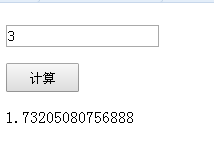
新建MyWebSite网站,添加一个WebForm1网页,其中包含一个文本框TextBox1一个按钮Button1(计算)和一个标签Label1("")。在文本框中输入一个数,当点击“计算”按钮时,在标签中显示此数的平方根。

WebForm1.aspx文件内容如下:


<%@ Page Language="C#" AutoEventWireup="true" CodeBehind="WebForm1.aspx.cs" Inherits="shiyan1.WebForm1" %>
<!DOCTYPE html PUBLIC "-//W3C//DTD XHTML 1.0 Transitional//EN" "http://www.w3.org/TR/xhtml1/DTD/xhtml1-transitional.dtd">
<html xmlns="http://www.w3.org/1999/xhtml">
<head runat="server">
    <title></title>
    <style type="text/css">
        .TextBox1 {
            width: 20px;
            height: 5px;
            right: 50%;
            left: 50%;
            margin-top: 20px;
            margin-right: 400px;
        }
        .Button1
        {
            width: 10px;
            height: 4px;
            right: 500px;
            left: 500px;
        }
    </style>
</head>
<body class="TextBox1">
    <form id="form1" runat="server">
    <div>
        <asp:TextBox ID="TextBox1" runat="server" ontextchanged="TextBox1_TextChanged"></asp:TextBox>
    </div>
    <p>
        <asp:Button ID="Button1" runat="server" onclick="Button1_Click" Text="计算" 
            Width="73px" Height="29px" />
    </p>
    </form>
</body>
</html>

WebForm1.aspx.cs文件如下:


using System;
using System.Collections.Generic;
using System.Linq;
using System.Web;
using System.Web.UI;
using System.Web.UI.WebControls;
namespace shiyan1
{
    public partial class WebForm1 : System.Web.UI.Page
    {
        protected void Button1_Click(object sender, EventArgs e)
        {
            double num = Convert.ToDouble(TextBox1.Text);
            Label1.Text = Math.Sqrt(num).ToString();
        } 
    }
}

实现数据的前后台调用

实现样式如下:
 

⑵ DIV/CSS布局

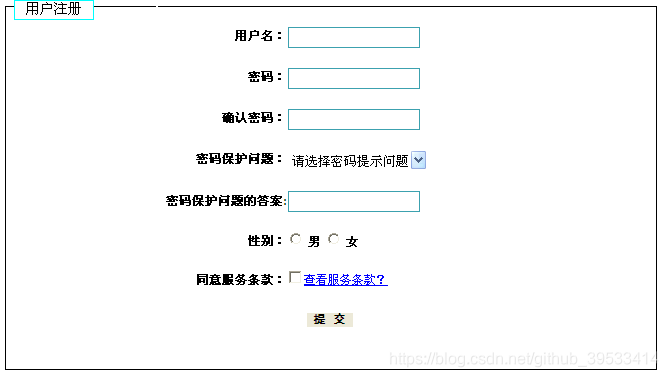
使用HTML标签设计如下所示表单
 

Webform1.aspx文件:

<%@ Page Language="C#" AutoEventWireup="true" CodeBehind="WebForm1.aspx.cs" Inherits="shiyan112.WebForm1" %>
<!DOCTYPE html>
<html xmlns="http://www.w3.org/1999/xhtml">
<head runat="server">
<meta http-equiv="Content-Type" content="text/html; charset=utf-8"/>
    <title>实验1</title>
      <style type="text/css">
        *{
            left: 50px;
            padding: 0px;
            margin: 0px;
            border: 1px solid #FFFFFF;
        }
        #div0
        {
            left: 50px;
            width: 600px;
            margin: auto;
            border-style: solid;
            border-width: 1px;
        }
        fieldset
        {
            border: 1px solid #000000;
            margin: -15px 0px 0px 0px;
            width: 500px;
            height: 362px;
            padding-left: 150px;
        }
        label
        {
            font-weight: bold;
            font-size: 12px;
            height: 19px;
            float: none;
            margin-left: 0px;
            text-align: right;
        }
        #name01, #pass01, #pass02, #zjhm, #dh
        {
            border: 1px solid #3ca1af;
            height: 19px;
            width: 130px;
        }
        .juli
        {
            line-height: 21px;
            width: 130px;
            float: left;
            display: block;
            padding-right: 0px;
            height: 19px;
            clip: rect(auto, auto, auto, 0px);
        }
        #button
        {
            margin: 0px 0px 0px 150px;
            font-size: 12px;
            font-family: 黑体;
            font-weight: bold;
            padding: 0px;
            height: 16px;
            width: 48px;
            float: none;
        }
        #zjzl
        {
            width: 140px;
            height: 22px;
        }
        a
        {
            font-size: 12px;
        }
        .c1
        {
            border: 1px solid #00FFFF;
            padding: 0px;
            width: 80px;
            height: 20px;
            margin-left: 424px;
            margin-top: 50px;
            font-size: 14px;
            background-color: #FFFFFF;
        }
    </style>
</head>
<body>
  <form id="form1" runat="server">
    &nbsp;<input  type="button" class="c1" value="用户注册" onclick="return button_onclick()" />
    <div id="div0">
        <fieldset >           
            <br />
            <label for="name01" class="juli">用户名:</label>
            <input type="text" id="name01" />
            <br />
            <br />
            <label for="pass01" class="juli">密码:</label>
            <input type="password" id="pass01" />
            <br />
            <br />
            <label for="pass02" class="juli"> 确认密码:</label>
            <input type="password" id="pass02" />
            <br />
            <br />
            <label for="zjzl" class="juli">密码保护问题:</label>
                 <select id="zjzl" onclick="return zjzl_onclick()">
                    <option id="zjzl1">请选择密码提示问题</option>
                    <option id="zjzl2">问题一</option>
                 </select>
            <br />
            <br />
            <label for="zjhm" class="juli">密码保护问题的答案:</label>
            <input type="text" id="zjhm" />
            <br />
            <br />
            <label class="juli">性别:</label>
            <input type="radio" name="dx" value="单选" id="dx_0" />
            <label for="dx_0">男</label>
            <input type="radio" name="dx" value="单选" id="dx_1" />       
            <label for="dx_1">女</label>
            <br />
            <br />
            <label class="juli"> 同意服务条款:</label>
            <input type="checkbox" name="vehicle" value="Bike" /><a href="#">查看服务条款?</a>
            <br />
            <br />
            <input type="button" id="button" value="提 交"  /></fieldset>    
    </div>
    </form>
</body>
</html>

小Tips:

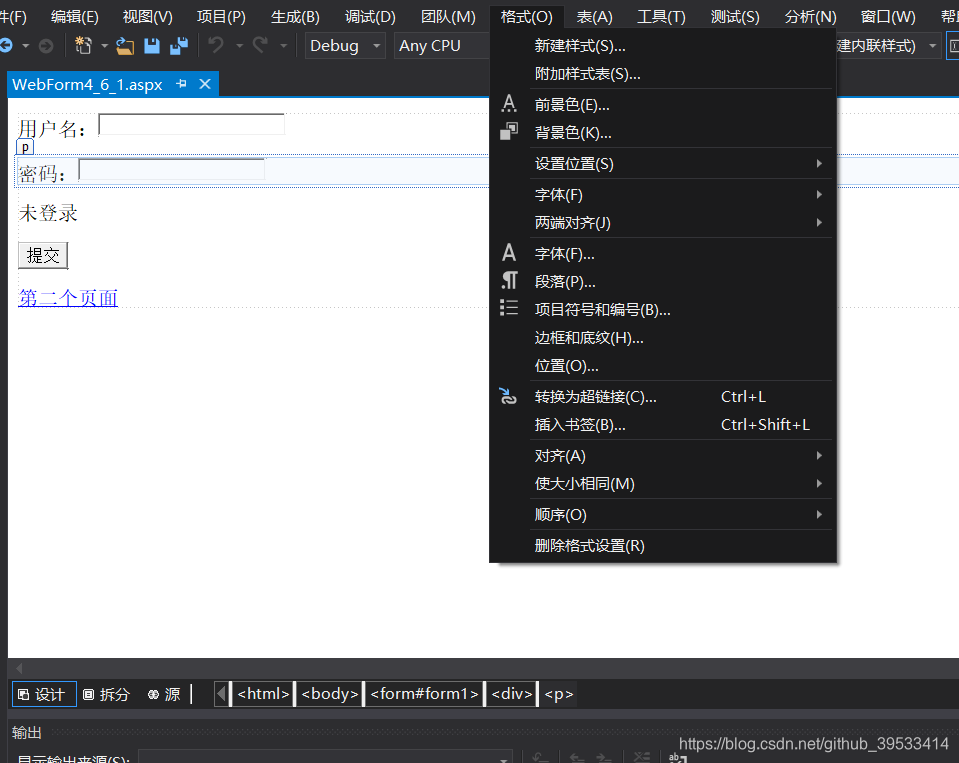
如何给前端页面添加样式:

点击设计 -- > 选择格式  --- 》新建样式
(3)简单表单设计

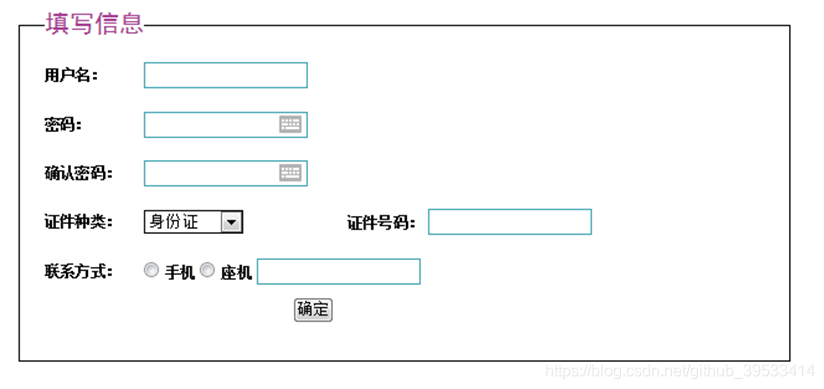
实现如下界面;
 

ThisPage.aspx:

<%@ Page Language="C#" AutoEventWireup="true" CodeFile="Default2.aspx.cs" Inherits="Default2" %>

<!DOCTYPE html PUBLIC "-//W3C//DTD XHTML 1.0 Transitional//EN" "http://www.w3.org/TR/xhtml1/DTD/xhtml1-transitional.dtd">

<html xmlns="http://www.w3.org/1999/xhtml">
<head runat="server">
    <title></title>
</head>
<body>
    <form id="form1" runat="server">
    <div id="div0">
       <fieldset>
           <legend>填写信息</legend>
           <br />
           <label for="name01">用户名:</label>
           <input type="text" id="name01" />
           <br /><br />
           <label for="pass01">密码:</label>
           <input type="password" id="pass01" />
           <br /><br />
           <label for="pass02">确认密码:</label>
           <input type="password" id="pass02" />
           <br /><br />
           <label for="sfz">证件种类:</label>
           <select id="sfz">
              <option id="sfz1">身份证</option>
              <option id="sfz2">学生证</option>
           </select>
           <label for="number">证件号码:</label>
           <input type="text" id="number" />
           <br /><br />
           <label for="tel">联系方式:</label>
           <input type="radio" name="dx" value="单选" id="dx_0" />
           <label for="dx_0">手机</label>
           <input type="radio" name="dx" value="单选" id="dx_1" />
           <label for="dx_1">座机</label>
           <input type="text" id="tel" />
           <br /><br />
           <input type="button" id="button" value="确定" />
       </fieldset>

    </div>
    </form>
</body>
</html>


 

C#实现简单的网页爬虫 using System; using System.Collections.Generic; using System.IO; using System.Linq; using System.Net; using System.Text; using System.Text.RegularExpressions; using System.Threading.Tasks; namespace 阅读详情

相关推荐

C# 制作网页

使用C#进行的网页开发实现局域网连接,通常是实现工厂的局域网软件登陆控制等功能

c#从入门到建设网站详解教程

本课程主要实现了,运用c#建设网站的一个过程,该网站实现的功能前台展示和后台数据维护是分离的。主要用到的技术有前端技术html,css,js, jquery,以及layui框架。后台技术c#开发语言,数据库是sqlserver。学习完后,可以轻松运用所学知识建设网站。

使用C#制作网页

在vs2008中使用C#制作网页的例子,参考一下还是不错的!

C#之网页开发基础

1.注册模块using System; using System.Collections.Generic; using System.Data; using System.Linq; using System.Web; using System.Web.UI; using System.Web.UI.WebControls; using WebService;namespace webTest {

shaguabufadai的博客 1万+

手把手教你用Ubuntu Base 20.04打造轻量级ARM开发板根文件系统(附常见问题解决)

本文详细介绍了如何基于Ubuntu Base 20.04 LTS构建轻量级ARM开发板根文件系统,涵盖环境准备、镜像制作、跨架构配置、软件包定制及常见问题解决。通过实战指南,开发者可快速掌握ARM架构下的根文件系统构建技巧,优化系统性能并解决部署中的典型问题。

gin88的博客 206

高通camx ThreadManager

m_pCore->AcceptNewJob是将一个Job或者任务插入一个Queue,有一个工作线程循环从Queue中取Job任务执行,执行任务就是回调任务中的callback函数,AcceptNewJob实现。调用AddToPriorityQueue将任务添加到queue任务队列,那么什么时候从这个queue中取任务执行呢?有个线程循环执行DoWork,最终调用checkAndDequeue取任务执行。

GetnextWindow的专栏 430

C# 网络编程之网页简单下载实现

这是根据《C#网络编程实例教程》中学到的知识实现的一个C#网页简单下载器,其中涉及到的知识主要是HTTP协议编程中相关类:HttpWebRequest类、HttpWebResponse类、WebRequest类、WebResponse类、Uri类、WebClient类。通过它们相应的方法实现,这里涉及到了4个新接触的知识点我想重点讲述: (1).ComboBox控件:这是一个下拉列表的可编辑的文...

weixin_34159110的博客 95

【Windows】 解决联想为主的所有自带摄像头(integrate camera)打不开的毛病(特别点名小新、thinkbook、thinkpad、y7000...)

解决联想系列电脑打不开自带摄像头的问题

Iamruzi的csdn博客 3万+

c#简单实现提取网页内容

下面的代码是从一个网络爬虫程序中提取出来的,觉得有用,记录下来。 代码 usingSystem;usingSystem.Collections;usingSystem.Collections.Generic;usingSystem.Reflection;usingSystem.IO;usingSystem.Net;usingSystem.Text;namespaceMyC...

weixin_30263073的博客 109

4G+GNSS定位模块DX-CT511N-B:AT指令实战与多协议通信指南

本文详细介绍了4G+GNSS定位模块DX-CT511N-B的AT指令实战应用与多协议通信配置。内容涵盖TCP/UDP通信、MQTT协议集成、HTTP服务交互以及GNSS定位功能的深度解析,为开发者提供从基础指令到高级调试的完整指南,助力物联网设备开发。

hope8的博客 284

Camera HAL Camx — DRQ总结

Camera HAL — DRQ(延迟请求队列)总结 DRQ是CAMX核心层的依赖驱动延迟执行调度器,解决Node处理请求时依赖未就绪的问题。其主要特点包括: 核心功能:当Node处理请求时缺少必要输入(property/metadata/fence),DRQ将其挂起并在依赖满足后重新调度,避免阻塞流水线或丢帧。 系统架构:Session持有主DRQ实例,管理该Session下所有Pipeline Node的依赖;CHI context另有独立DRQ实例专门处理Chi fence同步。 关键数据结构: De

DU_YULIN的博客 67

C#——signalr实现简单的网页实时聊天

1.新建asp.net web应用程序,然后在vs的NuGet包中下载安装Microsoft.AspNet.SignalR 2.右键项目-》新建项,选择signalr集线器类,并写入代码,namespace与类名记得改成实际类名 using System; using System.Collections.Generic; using System.Linq; using System.We...

知北行的博客 3297

医疗AI多智能体资源调度:用Python构建高性能MCU资源池

本文介绍了医疗AI服务平台中多智能体资源争用问题的解决方案。作者设计了一个基于MCU(多点控制单元)理念的中央资源调度器,通过三层架构(资源抽象层、调度策略层、执行控制层)实现对GPU、API、数据库等医疗资源的统一管理。系统采用增强版信号量机制处理可计数并发资源,优化令牌桶算法管理速率资源,并支持急诊优先、配额限制、审计合规等医疗场景特殊需求。核心代码提供了带优先级抢占的并发控制和医疗专用令牌桶实现,可有效解决多智能体资源争用导致的优先级混乱、资源利用不均等问题。

AllenLV的博客 3183

基于C#简单实现的微信网页版接口

​​一、想法来源 ​ 作为程序员,对自己工具不满,就要去改造,对于微信已经厌恶极久了。总有人不合时宜的发语音,总有老板无时无刻的艾特,总有微商群发各种消息。重点是不能忍受语音。​当现有客户端不能满足要求,心中无限郁闷,想着做一个客户端,去回怼那些发语音的人。 二、初期准备​ 最开始想从手机微信客户端动手​,奈何抓包看的我头疼,...

weixin_33721344的博客 3109

AUTOSAR从入门到精通-汽车电子电气架构(EEA)

EEA(Electrical/Electronic Architecture),电子电气架构,是首先由德尔福公司提出的,集合汽车的电子电气系统原理设计、中央电器盒的设计、连接器的设计、电子电气分配系统等设计为一体的整车电子电气解决方案的概念。通过EEA的设计,可将动力总成、驱动信息、娱乐信息等车身信息转化为实际的电源分配的物理布局、信号网络、数据网络、诊断、容错、能量管理等的电子电气解决方案。

getusushu的博客 847

visio安装包

Microsoft Office Visio 是一款专业的制图软件。利用经过更新的形状、协作工具和数据链接图表,创建专业级图表以简化复杂的信息。

linux 提取网页内容,c#简单实现提取网页内容

下面的代码是从一个网络爬虫程序中提取出来的,觉得有用,记录下来。代码using System;using System.Collections;using System.Collections.Generic;using System.Reflection;using System.IO;using System.Net;using System.Text;namespace MyCsStudy{...

weixin_42135462的博客 270

jre9下载 jdk9

(Java SE Runtime Environment 9.0) 9.0u175 官方最新版 【x86|x64】

c#关于网页内容抓取,简单爬虫的实现。(包括动态,静态的)

整理一下最近做的几个项目。总结几个用到的知识点和关键部分代码,以供大家学习交流。 1、爬虫抓取网页内容信息。可以用System.Net.WebRequest、webclient等类来处理。 2、对于某些动态网页,生成页面信心由javascript动态生成链接信息的。也可以进行分析传值的方式,在post的时候将参数带进去(大多数网站的参数是有规则的)。实在不行也可以使用webbrowser控件,

falcon_fei的博客 2万+

ssm框架搭建

这个是一个在idea上成功跑起来的ssm框架项目,保存在这里方便以后使用直接下载

数学建模模型总结

这是本人在两年内准备参加数学建模竞赛搜集到的模型资料,已经经过了本人的筛选和整理,希望能够对准备参加数学建模竞赛的学弟学妹们提供一些帮助!

ASP.Net、C#实现网页小偷程序

ASP.Net、C#实现网页小偷程序      在ASP中实现小偷是使用XMLHTTP对象,最近在学习.net时看到了WebClient类,于是将过去用来做小偷的程序改了一下,使用ASP.Net、C#来实现,程序写的比较简单,目的是为了起到抛砖引玉的作者,希望能与各位一起探讨,使之更加完善,下一步我将使之实现根据设置可以获取网页中指定的内容。以下是程序部分,包括在WEB页中的ASP.NET的源

kgdlin的专栏 1778
上一篇: Ubuntu18.04搭建kafka集群(入门指南)
下一篇: 初始C#的基本语法(一)
git1314
博客等级 码龄9年 282粉丝 114原创
评论 1
成就一亿技术人!
拼手气红包6.0元
还能输入1000个字符
 
 条评论被折叠 查看
添加红包

请填写红包祝福语或标题

个

红包个数最小为10个

元

红包金额最低5元

当前余额3.43元 前往充值 >
需支付:10.00元
成就一亿技术人!
领取后你会自动成为博主和红包主的粉丝 规则
hope_wisdom
发出的红包
实付元
使用余额支付
点击重新获取
扫码支付
钱包余额 0

抵扣说明:

1.余额是钱包充值的虚拟货币,按照1:1的比例进行支付金额的抵扣。
2.余额无法直接购买下载,可以购买VIP、付费专栏及课程。

余额充值