
JAVA基础 - 使用CommandLine解析命令行参数

解决Java项目运行时错误:“Command line is too long” 阅读详情
AI摘要

文章介绍了ApacheCommonsCLI库,它是一个用于处理命令行参数的开源工具。通过定义选项、解析参数和获取参数值,开发者可以方便地在Java程序中处理各种风格的命令行参数,包括POSIX、GNU和Java风格。文章提供了详细的编码步骤、参数风格说明以及示例代码,帮助读者理解和应用这个库。

它是什么

commons-cli 是一个强大而的开源的命令行参数传递与解析的解决方案,用于接收MAIN方法的args参数。可以通过设置短选项(即选项名简写)、长选项(即全写)、设置是否需要携带选项参数(指定为 false 时,表示此选项不带参数,即为布尔选项)和描述信息来定义参数选项。
官网:https://commons.apache.org/proper/commons-cli/index.html

请先阅读该博文:
CENTOS下的命令行参数:https://blog.csdn.net/goodjava2007/article/details/131083116

编码步骤

(1)定义参数

Options options = new Options();

(2)解析参数

CommandLine cmd = new BasicParser().parse(options, args);
// 或者
CommandLine cmd = new DefaultParser().parse(options, args);
// 或者
CommandLine cmd = new PosixParser().parse(options, args);
// 或者
CommandLine cmd = new GnuParser().parse(options, args);

(3)获取参数

String db = cmd.getOptionValue("d")

参数风格

序号风格类型参数描述解析器
1POSIX风格参数以“-”开头的单个字符的POSIX风格的参数,如:tar -zxvf foo.tar.gzPosixParser
2GNU风格参数以“- -”后接选项关键字的GNU风格的参数,GNU风格兼容POSIX风格,如:du - -human-readable - -max-depth=1GnuParser
3JAVA风格参数以“-D”开头的参数,如:java -Datlas.log.file=import-hive.log -Dlog4j.configuration=atlas-hive-import-log4j.xmlDefaultParser
4短选项参数以“-”开头的单个字符参数,即:横杠+参数名+空格+参数值(空格也可以不带),如:import-hive.sh -dmallx -tmallx_order 或者 import-hive.sh -d mallx -t mallx_order 都可以DefaultParser / BasicParser
5长选项参数以“-”开头的多个字符参数,如:ant -projecthelpDefaultParser / BasicParser

注:以上表格说明的是参数风格,至于某个参数后面是否带参数对应的值,需要在选项的代码中进行设置。

如何使用

① 依赖引入
<dependency>
  <groupId>commons-cli</groupId>
  <artifactId>commons-cli</artifactId>
  <version>1.4</version>
</dependency>
② 示例代码
public class MyCommandLine {

    public static void main(String[] args) {
        MyCommandLine mcl = new MyCommandLine();
        mcl.defaultParser(args);
    }


    private void defaultParser(String[] args) {
        Options options = new Options();
        try {

            // 1.1 构造参数
            options.addOption("help", "如何使用mcl指令");
            options.addOption("d", "database", true, "指定数据库名");
            options.addOption("t", "table", true, "指定表名");
            options.addOption("s", "size", true, "指定文件的大小");
            options.addOption("f", "filename", true, "指定文件的全路径名");
            options.addOption("failOnError", false, "指定出现错误是是否停止");

            Option property = Option.builder("D")
                    .argName("property=value")
                    .hasArgs()
                    .valueSeparator('=')
                    .desc("指定KEY=VALUE形式的参数")
                    .build();

            options.addOption(property);


            // 1.2 解析
            CommandLine cmd = new DefaultParser().parse(options, args);

            // 1.3 取值
            boolean failOnError = cmd.hasOption("failOnError");
            String db = cmd.getOptionValue("d");       // 数据库
            String table = cmd.getOptionValue("t");    // 表
            String size = cmd.getOptionValue("s");     // 表大小
            String file = cmd.getOptionValue("f");     // 文件
            String log = cmd.getOptionProperties("D").getProperty("atlas.log");
            // 以下仅仅用于测试
            // 输出USAGE
            System.out.println(getHelp(options));
            // 输出参数
            System.out.println(String.format("The db is: %s, table is: %s, size is : %s, file is: %s, log is %s", db, table, size, file, log));
        } catch (Exception e) {

        } finally {

        }
    }

    private String getHelp(Options options) {
        HelpFormatter helper = new HelpFormatter();

        ByteArrayOutputStream byteArrayOutputStream = new ByteArrayOutputStream();
        PrintWriter printWriter = new PrintWriter(byteArrayOutputStream);
        helper.printHelp(printWriter, HelpFormatter.DEFAULT_WIDTH, "mcl -help", null,
                options, HelpFormatter.DEFAULT_LEFT_PAD, HelpFormatter.DEFAULT_DESC_PAD, null);
        printWriter.flush();
        String help = new String(byteArrayOutputStream.toByteArray());
        printWriter.close();
        return help;
    }
}
③ 示例测试

在IDEA中进行参数设置,如下:

在 "Program arguments" 输入框中如下设置:
-d mallx -tmallx_order -s1000 -Datlas.log=import-hive.log -f D:\02-工作空间\06-代码空间\04-gitee\rills-atlas-2.1.0-rc3\README.txt
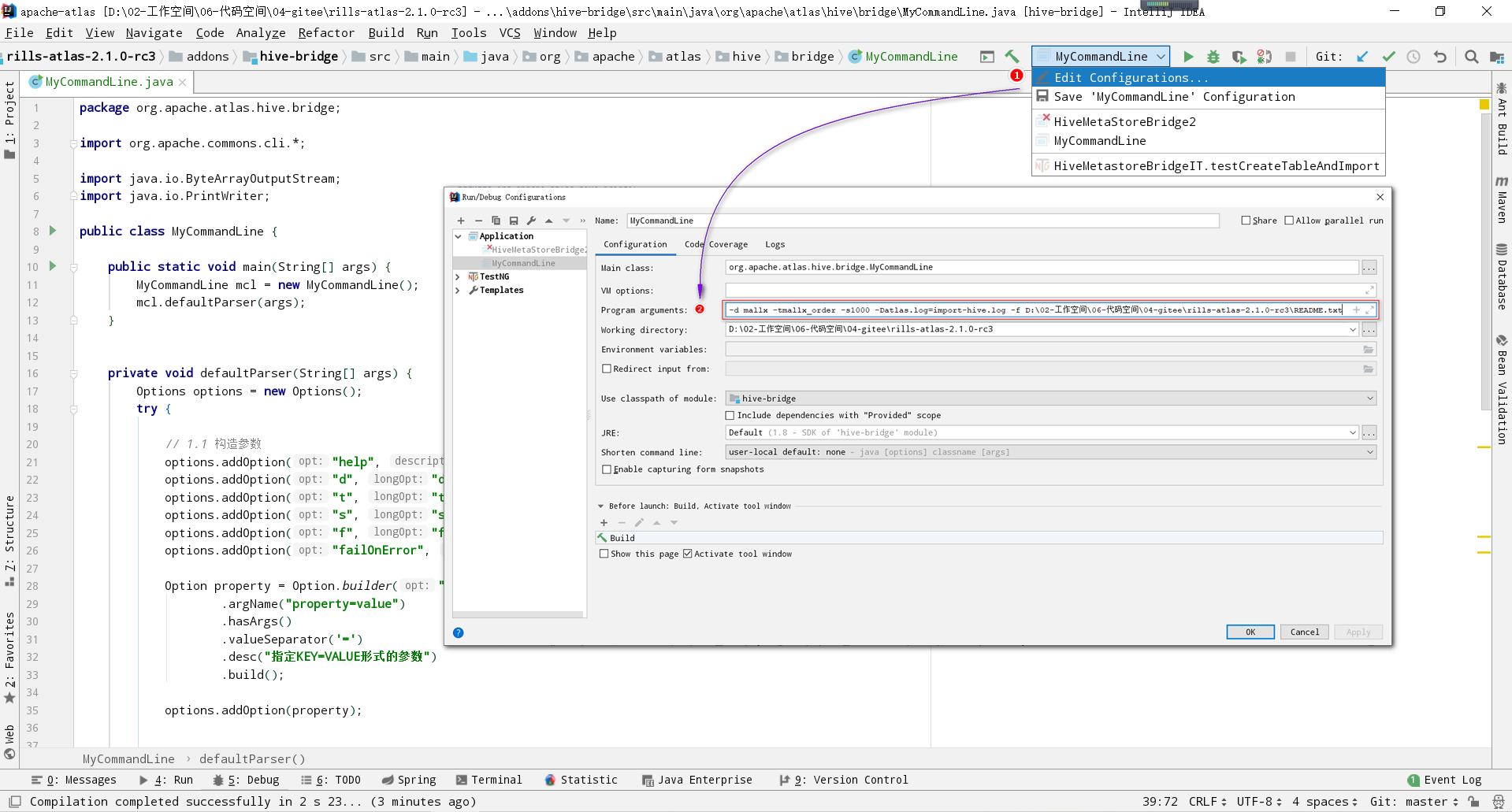
在这里插入图片描述

④ 执行结果
usage: mcl -help
 -d,--database <arg>   指定数据库名
 -D <property=value>   指定KEY=VALUE形式的参数
 -f,--filename <arg>   指定文件的全路径名
 -failOnError          指定出现错误是是否停止
 -help                 如何使用mcl指令
 -s,--size <arg>       指定文件的大小
 -t,--table <arg>      指定表名

The db is: mallx, table is: mallx_order, size is : 1000, file is: D:\02-工作空间\06-代码空间\04-gitee\rills-atlas-2.1.0-rc3\README.txt, log is import-hive.log
⑤ 官方示例

COMMONS CLI 官方示例:https://commons.apache.org/proper/commons-cli/usage.html

JVM源码剖析之Java命令行参数全解 最近,有一位网友询问关于Java命令行参数方面的问题,因为在Java中参数有很多种,有不少的读者一直没弄明白,所以特意写下此篇文章。此篇文章分2大块,第一块是不同参数的解释,第2块就是JVM源码论证~图1-1给出了运行Java代码的命令行,其中包括了启动命令和不同种类的参数,分别用红、黄、黑、绿、蓝、粉 6种颜色代表。 阅读详情

相关推荐

Command line超长。缩短Java项目的命令行

当我们在命令行中执行一个较长的Java命令时,例如编译一个包含大量源代码文件的项目,命令行的长度可能会超过操作系统所允许的限制。在上面的示例中,我们将项目的源代码文件(位于src目录下)和依赖库(位于lib目录下)分别放在命令行的不同位置。通过将项目的依赖库放在类路径中,我们可以减少命令行中需要包含的参数数量,从而缩短命令行的长度。在pom.xml文件中,我们可以指定项目的groupId、artifactId和version,并配置编译插件的版本和Java版本。命令,我们可以运行程序。

CyberLancer的博客 2932

【Java】apache CommandLine 使用

首先说一下CommandLine的设计理念。 我们知道,java程序的启动入口是main方法,我们其实已经可以通过main中的args参数来实现将外界变量传入main方法内部了,那为什么还需要CommandLine? 因为args参数使用不够方便,主要是因为其实现是一个数组,整个传递过程需要依赖顺序。编程者和程序调用需要记忆参数的顺序,才能正确传递参数。这个设计其实是不太好的。 更好的做法是...

u010900754的专栏 7042

【智能体评测】BrowserUse:一款超越 Anthropic Computer Use 的开源智能体

本文将全面介绍 BrowserUse 的核心功能、配置与使用方法,以及通过多场景测试评估其性能。

surfirst的博客 4104

java 方法_Java 方法 | 菜鸟教程

Java 方法在前面几个章节中我们经常使用到 System.out.println(),那么它是什么呢?println() 是一个方法。System 是系统类。out 是标准输出对象。这句话的用法是调用系统类 System 中的标准输出对象 out 中的方法 println()。那么什么是方法呢?Java方法是语句的集合,它们在一起执行一个功能。方法是解决一类问题的步骤的有序组合方法包含于类或对象...

weixin_39519741的博客 250

【GAMES201学习笔记】物质点法入门

《GAMES201》 学习笔记

捕鱼维的个人小站 9205

Windows下Codex配置备份与恢复:手动脚本与CC Switch实战

在AI编程工具日益普及的今天,配置文件管理成为开发者高频需求。Codex作为OpenAI推出的命令行编程助手,其配置存储在用户目录下的.codex文件夹中,包含config.toml核心参数与auth.json身份凭证。理解配置目录结构是备份恢复的基础。手动方式通过xcopy或PowerShell命令实现完整迁移,但隐藏文件、进程占用等问题常导致备份失效。图形化工具CC Switch(俗称小怪工具)将配置打包为可切换快照,支持一键导出导入、多套配置管理,显著提升效率。本文从配置原理出发,结合Windows环

weixin_33859135的博客 134

RocketMQ源码详解系列2 《cli CommandLine命令行参数解析》

1.我们分析rocketmq源码时,会遇到命令rocketmq启动时,会有设置命令行参数,如-c 配置文件地址 -h打印帮助等待参数,今天我们就来讲下怎么实现的。 看下图 上面代码片段是namesrv的源码,就是这个apache的cli CommandLine类 完成了命令行参数解析。 这里我拿namesrv的源码所有命令行来作了一个测试类 public class MyTest { publ...

吉他程序员的博客 655

app逆向分析案例-95分

先把justtrusmeplus打开设置好95分,开始抓包,得到结果为: https://www.95fenapp.com/api_goods/list/v3.0?is_all=1&keywords=%E7%A7%91%E6%AF%94& page=1&page_size=20 &publish_timestamp=0 &scene=2&scene_type=95fen_android_search_personal&sn=SearchList

weixin_41763171的博客 2753

java解析命令行参数

java应用中,经常需要向main方法传递参数(String[] args),比如: java -jar test.jar arg1 arg2 arg3 # 其中test.jar是jar包名,arg1、arg2、arg3是要传递的参数 但是有时候需要向main方法传递命令行参数(比如不同命令行参数实现不同的处理逻辑),比如: java -jar test.jar -a 6 -s 6 -...

Paste_Expert的博客 6202

基于51单片机的通讯聊天系统

通过编写51单片机通讯聊天程序,掌握51单片机的各个模块的知识点和运用C语言编写51单片机的能力。用51单片机与口袋开发板设计实现一个单片机与电脑串口助手实现通讯功能的程序。程序的主要功能如下: 1 OLED初始化显示Welcome to Bluetooth communication! 字符串。 2 程序开始时处于接收信息模式, 电脑串口助手发送信息时,将从初始化字符第一个开始显示,电脑串口助手发送信息后,蜂鸣器响铃2秒左右。 3 每次同时按下左右键时,可以轮流切换接收/发送信息模式 4 在发送信息模式时

m0_47419053的博客 3643

《UE4游戏开发》之 《查cook资源失败,问题记录》

当项目打包时,cook出错,但是从原始引擎提供的信息中,没有提示具体的那个资源出错,要查到出错资源,还是非常麻烦。 下面就材质cook出错,增加一些日志,方便查找问题做简单记录 材质cook的一个阶段,是收集MaterialShaderMap,如果在这个阶段收集的信息出错,将会在FShaderMapContent::GetOutdatedTypes函数中,因为Shaders指针指向的内存有问题而出错,通过断点发现,FShaderMapContent这个类对象指针为null,而这个类对象的来源于AllMat.

qq_21919621的博客 2582

使用Picocli解析命令行参数的Java示例

使用Picocli解析命令行参数的Java示例

Leon_Jinhai_Sun的博客 554

【WRF安装】WRF编译错误:problems building executables look for error in the build log

WRF编译错误:problems building executables look for error in the build log

WW、forever的博客 757

Java中的命令行参数是如何传递的?

在Java中,命令行参数是通过main方法的参数传递的。具体来说,main方法的签名是,其中args是一个String类型的数组,用于存储从命令行传递给程序的所有参数。当用户在命令行中执行Java程序时,可以在类名后面添加参数,这些参数会被JVM(Java虚拟机)解析并存储在args数组中。例如,如果用户在命令行中输入,那么argsargs[0]为"arg1"args[1]为"arg2"args[2]为"arg3"。需要注意的是,命令行参数始终以字符串的形式传递,即使参数看起来像数字。

破损的天堂鸟博客 1248

目标检测YOLO实战应用案例100讲-基于YOLOv7的番茄采摘机械手场景感知及试验(下)

根据软件系统的设计需求,制定系统的可行性方案分析,编写系统的相关程序和 调试运行环境,对系统进行测试,以实现对番茄数据的采集及监测。登陆界面登陆后,进入选择界面,菜单包括了对番茄种植棚室的固定相机数据的监测、 对番茄采摘机械手的双目相机采集的番茄的静态、动态数据的获取、对番茄静态、动态数 据处理的功能菜单等选项。与利用人工去进行对于番茄果实的识别和数目的统计相比,番茄视觉系统自动记录番 茄数量以及红色已经成熟的番茄、青色未成熟番茄的数量,减轻人工记录的工作量,减少 人工记录的误差,从经济方面是可行的。

qq_36130719的博客 818

RU DOS版、EFI版32bit/64bit BIOS常用工具

DOS版、EFI版的RU工具,可用来查看IO、MEM、PCI、SMBIOS等资源。亲测在EFI SHELL下可用。

如何在Java中解析命令行参数?

在Java中解析命令行参数的好方法是什么?

asdfgh0077的博客 1912

深度学习工具包 DeepLearningToolbox

深度学习工具包Deprecation notice.-----This toolbox is outdated and no longer maintained.There are much better tools available for deep learning than this toolbox, e.g. [Theano](http://deeplearning.net/software/theano/), [torch](http://torch.ch/) or [tensorflow](http://www.tensorflow.org/)I would suggest you use one of the tools mentioned above rather than use this toolbox.Best, Rasmus.DeepLearnToolbox================A Matlab toolbox for Deep Learning.Deep Learning is a new subfield of machine learning that focuses on learning deep hierarchical models of data.It is inspired by the human brain's apparent deep (layered, hierarchical) architecture.A good overview of the theory of Deep Learning theory is[Learning Deep Architectures for AI](http://www.iro.umontreal.ca/~bengioy/papers/ftml_book.pdf)For a more informal introduction, see the following videos by Geoffrey Hinton and Andrew Ng.* [The Next Generation of Neural Networks](http://www.youtube.com/watch?v=AyzOUbkUf3M) (Hinton, 2007)* [Recent Developments in Deep Learning](http://www.youtube.com/watch?v=VdIURAu1-aU) (Hinton, 2010)* [Unsupervised Feature Learning and Deep Learning](http://www.youtube.com/watch?v=ZmNOAtZIgIk) (Ng, 2011)If you use this toolbox in your research please cite [Prediction as a candidate for learning deep hierarchical models of data](http://www2.imm.dtu.dk/pubdb/views/publication_details.php?id=6284)```@MASTERSTHESIS\{IMM2012-06284, author = "R. B. Palm", title = "Prediction as a candidate for learning deep hierarchical models of data", year = "2012",}```Contact: rasmusbergpalm at gmail dot comDirectories included in the toolbox-----------------------------------`NN/` - A library for Feedforward Backpropagation Neural Networks`CNN/` - A library for Convolutional Neural Networks`DBN/` - A library for Deep Belief Networks`SAE/` - A library for Stacked Auto-Encoders`CAE/` - A library for Convolutional Auto-Encoders`util/` - Utility functions used by the libraries`data/` - Data used by the examples`tests/` - unit tests to verify toolbox is workingFor references on each library check REFS.mdSetup-----1. Download.2. addpath(genpath('DeepLearnToolbox'));Example: Deep Belief Network---------------------```matlabfunction test_example_DBNload mnist_uint8;train_x = double(train_x) / 255;test_x = double(test_x) / 255;train_y = double(train_y);test_y = double(test_y);%% ex1 train a 100 hidden unit RBM and visualize its weightsrand('state',0)dbn.sizes = [100];opts.numepochs = 1;opts.batchsize = 100;opts.momentum = 0;opts.alpha = 1;dbn = dbnsetup(dbn, train_x, opts);dbn = dbntrain(dbn, train_x, opts);figure; visualize(dbn.rbm{1}.W'); % Visualize the RBM weights%% ex2 train a 100-100 hidden unit DBN and use its weights to initialize a NNrand('state',0)%train dbndbn.sizes = [100 100];opts.numepochs = 1;opts.batchsize = 100;opts.momentum = 0;opts.alpha = 1;dbn = dbnsetup(dbn, train_x, opts);dbn = dbntrain(dbn, train_x, opts);%unfold dbn to nnnn = dbnunfoldtonn(dbn, 10);nn.activation_function = 'sigm';%train nnopts.numepochs = 1;opts.batchsize = 100;nn = nntrain(nn, train_x, train_y, opts);[er, bad] = nntest(nn, test_x, test_y);assert(er < 0.10, 'Too big error');```Example: Stacked Auto-Encoders---------------------```matlabfunction test_example_SAEload mnist_uint8;train_x = double(train_x)/255;test_x = double(test_x)/255;train_y = double(train_y);test_y = double(test_y);%% ex1 train a 100 hidden unit SDAE and use it to initialize a FFNN% Setup and train a stacked denoising autoencoder (SDAE)rand('state',0)sae = saesetup([784 100]);sae.ae{1}.activation_function = 'sigm';sae.ae{1}.learningRate = 1;sae.ae{1}.inputZeroMaskedFraction = 0.5;opts.numepochs = 1;opts.batchsize = 100;sae = saetrain(sae, train_x, opts);visualize(sae.ae{1}.W{1}(:,2:end)')% Use the SDAE to initialize a FFNNnn = nnsetup([784 100 10]);nn.activation_function = 'sigm';nn.learningRate = 1;nn.W{1} = sae.ae{1}.W{1};% Train the FFNNopts.numepochs = 1;opts.batchsize = 100;nn = nntrain(nn, train_x, train_y, opts);[er, bad] = nntest(nn, test_x, test_y);assert(er < 0.16, 'Too big error');```Example: Convolutional Neural Nets---------------------```matlabfunction test_example_CNNload mnist_uint8;train_x = double(reshape(train_x',28,28,60000))/255;test_x = double(reshape(test_x',28,28,10000))/255;train_y = double(train_y');test_y = double(test_y');%% ex1 Train a 6c-2s-12c-2s Convolutional neural network %will run 1 epoch in about 200 second and get around 11% error. %With 100 epochs you'll get around 1.2% errorrand('state',0)cnn.layers = { struct('type', 'i') %input layer struct('type', 'c', 'outputmaps', 6, 'kernelsize', 5) %convolution layer struct('type', 's', 'scale', 2) %sub sampling layer struct('type', 'c', 'outputmaps', 12, 'kernelsize', 5) %convolution layer struct('type', 's', 'scale', 2) %subsampling layer};cnn = cnnsetup(cnn, train_x, train_y);opts.alpha = 1;opts.batchsize = 50;opts.numepochs = 1;cnn = cnntrain(cnn, train_x, train_y, opts);[er, bad] = cnntest(cnn, test_x, test_y);%plot mean squared errorfigure; plot(cnn.rL);assert(er<0.12, 'Too big error');```Example: Neural Networks---------------------```matlabfunction test_example_NNload mnist_uint8;train_x = double(train_x) / 255;test_x = double(test_x) / 255;train_y = double(train_y);test_y = double(test_y);% normalize[train_x, mu, sigma] = zscore(train_x);test_x = normalize(test_x, mu, sigma);%% ex1 vanilla neural netrand('state',0)nn = nnsetup([784 100 10]);opts.numepochs = 1; % Number of full sweeps through dataopts.batchsize = 100; % Take a mean gradient step over this many samples[nn, L] = nntrain(nn, train_x, train_y, opts);[er, bad] = nntest(nn, test_x, test_y);assert(er < 0.08, 'Too big error');%% ex2 neural net with L2 weight decayrand('state',0)nn = nnsetup([784 100 10]);nn.weightPenaltyL2 = 1e-4; % L2 weight decayopts.numepochs = 1; % Number of full sweeps through dataopts.batchsize = 100; % Take a mean gradient step over this many samplesnn = nntrain(nn, train_x, train_y, opts);[er, bad] = nntest(nn, test_x, test_y);assert(er < 0.1, 'Too big error');%% ex3 neural net with dropoutrand('state',0)nn = nnsetup([784 100 10]);nn.dropoutFraction = 0.5; % Dropout fraction opts.numepochs = 1; % Number of full sweeps through dataopts.batchsize = 100; % Take a mean gradient step over this many samplesnn = nntrain(nn, train_x, train_y, opts);[er, bad] = nntest(nn, test_x, test_y);assert(er < 0.1, 'Too big error');%% ex4 neural net with sigmoid activation functionrand('state',0)nn = nnsetup([784 100 10]);nn.activation_function = 'sigm'; % Sigmoid activation functionnn.learningRate = 1; % Sigm require a lower learning rateopts.numepochs = 1; % Number of full sweeps through dataopts.batchsize = 100; % Take a mean gradient step over this many samplesnn = nntrain(nn, train_x, train_y, opts);[er, bad] = nntest(nn, test_x, test_y);assert(er < 0.1, 'Too big error');%% ex5 plotting functionalityrand('state',0)nn = nnsetup([784 20 10]);opts.numepochs = 5; % Number of full sweeps through datann.output = 'softmax'; % use softmax outputopts.batchsize = 1000; % Take a mean gradient step over this many samplesopts.plot = 1; % enable plottingnn = nntrain(nn, train_x, train_y, opts);[er, bad] = nntest(nn, test_x, test_y);assert(er < 0.1, 'Too big error');%% ex6 neural net with sigmoid activation and plotting of validation and training error% split training data into training and validation datavx = train_x(1:10000,:);tx = train_x(10001:end,:);vy = train_y(1:10000,:);ty = train_y(10001:end,:);rand('state',0)nn = nnsetup([784 20 10]); nn.output = 'softmax'; % use softmax outputopts.numepochs = 5; % Number of full sweeps through dataopts.batchsize = 1000; % Take a mean gradient step over this many samplesopts.plot = 1; % enable plottingnn = nntrain(nn, tx, ty, opts, vx, vy); % nntrain takes validation set as last two arguments (optionally)[er, bad] = nntest(nn, test_x, test_y);assert(er < 0.1, 'Too big error');```[![Bitdeli Badge](https://d2weczhvl823v0.cloudfront.net/rasmusbergpalm/deeplearntoolbox/trend.png)](https://bitdeli.com/free "Bitdeli Badge")

.NET环境中的命令行解析类库CommandLine

最近有个程序想用C#取出命令行中的参数,记得以前用C语言编程的时候有个GetOpts挺好用的,首先从网上搜GetOpts的.NET类库,找了半天,发现都很古老了,而且没有这个类库的使用说明。 后来又找到一个CommandLineArgumentParser类库,http://commandlinearguments.codeplex.com/,但文档不多。 后来又发现 The Apache Co...

申龙斌的程序人生 448

vb 6.0并口开发操作实例

vb6并口开发,简体中文,试例内有inpout32.dll动态链接库

TMS_WebGMaps_1.9.8.0_Full_Source

TMS_WebGMaps_1.9.8.0_Full_Source 全源码 delphi cbuilder

Java 命令行参数解析类库

命令行参数解析类库1 命令行参数解析类库2 命令行参数解析类库3 JArgs Jakarta Commons CLI TE-Code(it has a command line parsing library.) argparser Java port of GNU getopt Args...

chunchengzha9234的博客 1154

java命令行参数解析_Java中命令行参数解析

Apache.Commons.CLIThe Apache Commons CLI library provides an API for parsing command line options passed to programs. It's also able to print help messages detailing the options available for a comman...

weixin_36355328的博客 1605

通过System.CommandLine快速生成支持命令行的应用

一直以来,当我们想让我们的控制台程序支持命令行启动时,往往需要编写大量代码来实现这一看起来很简单的功能。虽然有一些库可以简化一些操作,但整个过程仍然是一个相当枯燥而乏味的过程。我之前也写过一些文章简单的介绍过它们: 微软官方的.net命令行参数库 让.Net程序支持命令行启动 今天,我这里要介绍一个新的命令行库:System.CommandLine,通过他我...

weixin_30451709的博客 147

使用Picocli创建命令行参数解析示例

使用Picocli创建命令行参数解析示例

Leon_Jinhai_Sun的博客 521

java commons cli_使用Apache commons-cli包进行命令行参数解析的示例代码

Apache的commons-cli包是专门用于解析命令行参数格式的包。依赖:commons-clicommons-cli1.3.1使用此包需要:1.先定义有哪些参数需要解析、哪些参数有额外的选项、每个参数的描述等等,对应Options类比如说一个命令行参数是 -hfbv,我们定义的Options的目的是,说明哪些参数是真正需要解析的参数:如我们定义了Option:h、f、b,那么在解析的时候解析...

weixin_33768246的博客 806

java调用命令行命令_Java命令行界面(第4部分):命令行

java调用命令行命令 我的Java命令行解析系列的第四部分介绍了Commandline ,它被描述为 “用于解析命令行参数的Java库”,它“基于使用注释从命令行参数到对象的映射”。 像以前介绍的args4j和jbock一样, Commandline使用注释来提供潜在命令行选项的“定义”。 然而,虽然args4j通过注释做到这一点的类字段和jbock通过在构造函数及其参数注解做到这一点,...

最佳 Java 编程 664

使用CLI解析Java命令行参数

最近准备用Java写一个数据抽取的小玩样,不过距离我上一次用Java写程序已经过去了N(N>4)年了;没有读过<Java编程思想>,深深地觉得现在写出来的代码很不Java风格..... 因为需要在命令行中用到比较复杂的参数(argument),所以想到利用CLI库来解决这一块。 CLI库的Jar文件可以从Apache Commons下...

weixin_34378045的博客 311

java commandline 使用_CommandLine Java Calculator

I've just learned java but from my old experience coming from C++ i tought that i can write a commandline calculator wich supports all 4 basic operators with just one line. But i am having a bit of pr...

weixin_34081203的博客 282

Java命令行参数解析示例

Java命令行参数解析示例

Leon_Jinhai_Sun的博客 422
上一篇: CENTOS下的命令行参数
下一篇: JAVA基础 - java -cp 如何使用?
cloneme01
博客等级 码龄20年 2万+粉丝 248原创
评论
成就一亿技术人!
拼手气红包6.0元
还能输入1000个字符
 
 条评论被折叠 查看
添加红包

请填写红包祝福语或标题

个

红包个数最小为10个

元

红包金额最低5元

当前余额3.43元 前往充值 >
需支付:10.00元
成就一亿技术人!
领取后你会自动成为博主和红包主的粉丝 规则
hope_wisdom
发出的红包

打赏作者

cloneme01

谢谢您的支持与鼓励!

¥1 ¥2 ¥4 ¥6 ¥10 ¥20
扫码支付:¥1
获取中
扫码支付

您的余额不足,请更换扫码支付或充值

打赏作者

实付元
使用余额支付
点击重新获取
扫码支付
钱包余额 0

抵扣说明:

1.余额是钱包充值的虚拟货币,按照1:1的比例进行支付金额的抵扣。
2.余额无法直接购买下载,可以购买VIP、付费专栏及课程。

余额充值