




引入pom文件
		<!-- 数据库加密 -->
		<dependency>
			<groupId>com.github.ulisesbocchio</groupId>
			<artifactId>jasypt-spring-boot-starter</artifactId>
			<version>2.1.0</version>
		</dependency>
配置加密key
jasypt:
   encryptor:
      password: mykey
生成密码
import org.jasypt.encryption.StringEncryptor;
import org.junit.Test;
import org.junit.runner.RunWith;
import org.springframework.beans.factory.annotation.Autowired;
import org.springframework.boot.test.context.SpringBootTest;
import org.springframework.test.context.junit4.SpringRunner;

@RunWith(SpringRunner.class)
@SpringBootTest
public class JasyptiTtest {

    @Autowired
    StringEncryptor stringEncryptor;

    @Test
    public void encryptPwd() {
        String result = stringEncryptor.encrypt("root");
        System.out.println("-----------"+result);

        String result2 = stringEncryptor.encrypt("123456");
        System.out.println("-----------"+result2);
    }

}
application.yml 配置数据库密码, ENC() 包裹
spring:
   datasource:
      driver-class-name: oracle.jdbc.driver.OracleDriver
      url: jdbc:oracle:thin:@192.168.3.152:49161:XE
      username: YUE8
      password: ENC(n/bLWmXm8qVj24yP8QmJMA==)
命令行加密
拷贝jasypt-1.9.2.jar到目录下
在此目录下执行命令
java -cp jasypt-1.9.2.jar org.jasypt.intf.cli.JasyptPBEStringEncryptionCLI input="root" password=mykey algorithm=PBEWithMD5AndDES得到密码:
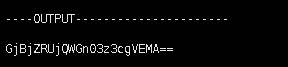
其中:
input:是数据库的明文密码
password:是机密的盐
algorithm:是加密的方式(默认)
https://www.cnblogs.com/zhangjianbing/p/9184083.html





 扫一扫
扫一扫


 1419
1419

 被折叠的 条评论
为什么被折叠?
被折叠的 条评论
为什么被折叠?
 到【灌水乐园】发言





