


1 消息
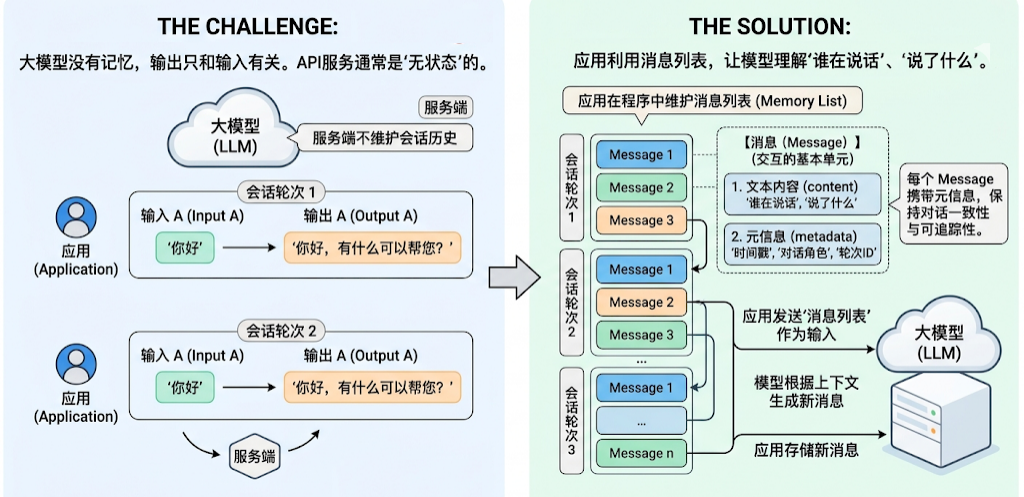
- 大模型没有记忆,它的输出只和输入模型的内容有关(上下文)。很多大模型API服务也没有在服务端维护会话历史,是“ 无状态”的。因此,如果应用需要“记住”对话历史,需要在程序中维护消息列表。
- 在LangChain 中,Message(消息)是模型交互的最基本单元。它既代表模型接收到的输入(Input),也代表模型生成的输出(Output)。
- 每一轮与大模型的对话,都由一条或多条Message 构成。每个Message 不仅包含,还携带描述上下文状态的元信息(metadata),用于保持对话的一致性和可追踪性。比如,模型文字内容在多轮交互中理解“谁在说话”、“说了什么”、“这条信息属于哪一轮对话”。
- LangChain 在1.0 中提供了跨模型统一的Message 标准。无论你使用的是OpenAI、Anthropic、Gemini 还是本地模型,这一标准都能保持一致的行为。好处:
- 兼容性强:不同模型的消息格式自动对齐。
- 可扩展性高:方便添加多模态内容或自定义字段。
- 可追踪性好:为LangSmith 等调试工具提供一致的上下文数据结构。
1.1 消息的内部结构
- LangChain的消息(Message)对象包含三种字段
- Role:消息所属的角色或类型,如system、user、assistant。
- Content:消息内容
- Metadata:(可选)元数据,存储额外信息。如:消息ID、响应时间、token消耗量、消息标签等。
1.2 消息的类型
- LangChain定义了很多消息类型,通过role 区分。常用的有四种。
- 系统消息
- 也称为系统提示词,用于在对话开始时为模型设定角色、行为准则和上下文背景。它像是给AI助手的一份工作说明书,决定了其回答问题的风格、领域和专业范围。
-
{"role": "system", "content": "你是个精通编程的软件架构师"}
- 用户消息
- 也称为用户提示词,在多轮对话中,它表示用户的一次输入。可以包含简单的文本问题,也可以是复杂的多模态内容(如图片、音频、文档等)。
-
{"role": "user", "content": "你好啊~"}
- 助手(AI)消息
- 代表模型的回复,包括生成的文本、工具调用、元数据等。
-
  {"role": "assistant", "content": "我也很高兴认识你"}

  {
  	"role ": "assistant ",
  	"content ": "",
  	"tool_calls ": [{
  		"name ": "get_weather ",
  		"args ": {"location ": "北京"},
  		"id ": "call_00_nUD2NC9QRN5Cg1GaoIkBJQ4s "
  		}]
  	}
- 工具调用消息
- 工具调用结果匹配的消息类型。将此消息返回给模型,让模型基于这个结果继续生成回复。
-
{"role ": "tool ", "content ": "今天天气很好", "tool_call_id ":"call_00_nUD2NC9QRN5Cg1GaoIkBJQ4s "}
- 使用不同消息的作用
- 明确角色:清晰区分系统提示、用户输入和AI 回复
- 控制行为 :通过SystemMessage 精确控制AI 的行为
- 对话历史 :构建完整的多轮对话上下文
- 调试友好:更容易追踪和调试对话流程
1.3 消息格式
- LangChain支持两种消息格式。
- 格式1:JSON格式
-
  # 系统消息
  {"role": "system", "content": "你是个善解人意的助手"}

  # 用户消息
  {"role ": "user ", "content ": "你好啊~"}

  # 助手消息
  {"role": "assistant", "content": "我也很高兴认识你"}

  # 工具调用消息
  {"role": "tool", "content": "<工具输出>", "tool_call_id":"call_00_nUD2NC9QRN5Cg1GaoIkBJQ4s"}
-
- 格式2:对象格式
-
  # 系统消息
  SystemMessage(content="你是个善解人意的助手")

  # 用户消息
  HumanMessage(content="你好啊~")

  # 助手消息
  AIMessage("我也很高兴认识你")

  # 工具调用消息
  ToolMessage(
  	content="<工具输出>",
  	tool_call_id="call_00_nUD2NC9QRN5Cg1GaoIkBJQ4s "  # 一定要和AI消息中的调用ID匹配
  )
-
- 总结
-
角色 字典格式 对象格式 用途 示例 System {"role": "system", ...}SystemMessage(...)设定 AI 的行为、角色、规则 “你是一个专业的数学老师” User {"role": "user", ...}HumanMessage(...)用户输入 “什么是微积分?” Assistant {"role": "assistant", ...}AIMessage(...)AI 的回复 “微积分是研究变化率的数学分支…” Tool {"role": "tool", ...}ToolMessage(...)工具执行的结果 “今天北京天气晴朗,万里无云”
-
- 示例1:json格式消息
-
  import os

  from dotenv import load_dotenv
  from langchain_classic.chains.question_answering.map_reduce_prompt import messages
  from langchain_deepseek import ChatDeepSeek

  # 读取.env配置
  load_dotenv(override=True)

  DEEPSEEK_API_KEY = os.getenv('DEEPSEEK_API_KEY')
  DEEPSEEK_BASE_URL = os.getenv('DEEPSEEK_BASE_URL')

  # 模型初始化
  llm_deepseek = ChatDeepSeek(
      api_key=DEEPSEEK_API_KEY,
      api_base=DEEPSEEK_BASE_URL,
      model="deepseek-v4-flash",
  )

  # 模型调用

  # json格式消息
  messages = [
      {"role":"system", "content":"你是一个科学家"},
      {"role":"user", "content":"世界上有永动机吗"},
      {"role":"assistant", "content":"没有"},
      {"role":"user", "content":"我刚才问了什么问题"},
  ]

  response = llm_deepseek.invoke(messages)
  print(response)
-
- 示例2:消息对象列表
-
  import os

  from dotenv import load_dotenv
  from langchain_core.messages import HumanMessage, AIMessage, SystemMessage
  from langchain_deepseek import ChatDeepSeek

  # 读取.env配置
  load_dotenv(override=True)

  DEEPSEEK_API_KEY = os.getenv('DEEPSEEK_API_KEY')
  DEEPSEEK_BASE_URL = os.getenv('DEEPSEEK_BASE_URL')

  # 模型初始化
  llm_deepseek = ChatDeepSeek(
      api_key=DEEPSEEK_API_KEY,
      api_base=DEEPSEEK_BASE_URL,
      model="deepseek-v4-flash",
  )

  # 模型调用

  # json格式消息
  messages = [
      SystemMessage(content="你是一个科学家"),
      HumanMessage("世界上有永动机吗"),
      AIMessage("没有"),
      HumanMessage("我刚才问了什么问题"),
  ]

  response = llm_deepseek.invoke(messages)
  print(response)
-
1.4 消息对象字段说明
1.4.1 SystemMessage参数列表
content:消息内容,字段名可以省略SystemMessage("你是个善解人意的助手")
- 相当于
SystemMessage(content = "你是个善解人意的助手")
1.4.2 HumanMessage参数列表
content:消息内容,字段名可以省略HumanMessage("你好啊~")
- 相当于
HumanMessage(content = "你好啊~")
- 还可以添加
metadata,即元数据字段,比如-
  HumanMessage(
  	content="Hello !",
  	name="alice ",  # 可选,用户名
  	id="msg_123 ",  # 可选,message的ID
  )
-
name和id都属于元数据字段,当消息类型相同,对消息进行区分。- 但不是所有模型都支持这一功能,是否支持取决于模型供应商,需要查看官方手册。
- 举例
-
  from langchain_core.messages import SystemMessage, HumanMessage
  from langchain.chat_models import init_chat_model
  from dotenv import load_dotenv
  import os

  # 从.env文件中加载环境变量
  load_dotenv(override=True)

  DEEPSEEK_API_KEY = os.getenv("DEEPSEEK_API_KEY")
  DEEPSEEK_BASE_URL = os.getenv("DEEPSEEK_BASE_URL")

  model = init_chat_model(
      model="deepseek-v4-flash",
      model_provider="openai",
      api_key=DEEPSEEK_API_KEY,
      base_url=DEEPSEEK_BASE_URL
  )

  messages = [
      SystemMessage("你是一个信息抽取器。你会收到多条来自不同发言者的 user 消息。每条消息可能带有 name 字段。你的任务是:严格根据每条消息的 name 提取发言者及其观点,并输出 JSON。禁止使用“第一个人/第二个人”这种相对对称。若某条消息没有 name,则输出 unknown。输出格式:{\"speakers\":[{\"name\":\"...\",\"claim\":\"...\"}]}"),
      HumanMessage(
          content="我认为 1+1=2",
          name="Bob"
      ),
      HumanMessage(
          content="我认为 1+1>2",
          name="Tom"
      ),
      HumanMessage(
          content="请列出谁说了什么,不要判断对错。",
          name="audience"
      )
  ]

  response = model.invoke(messages)
  print(response.content)
-
1.4.3 AIMessage参数列表
content:模型输出的原始内容,字段名可以省略AIMessage("你好~")
- 相当于
AIMessage(content="你好~")
response_metadata:AIMessage特有属性,LLM的响应中附加元数据,根据不同模型会有不同,如可能会包含本次token使用量等信息。tool_calls:AIMessage特有属性,表示工具调用信息。当LLM决定调用工具时,在AIMessage 中就会包含这个属性,没有工具调用则为空。-
  AIMessage(
  	content="",
  	tool_calls=[{
  		'name ': 'get_weather ',
  		'args ': {'city ': '北京'},
  		'id ': 'call_xxx '
  	}]
  )
-
usage_metadata:用量信息。
1.4.4 ToolMessage参数列表
content:文件内容name:工具名称tool_call_id:工具调用唯一ID,ToolMessage必须紧邻匹配的AIMessage,和前者tool_calls中的id一致。-
  ToolMessage(
  	content="<工具输出>",
  	name="get_weather "
  	tool_call_id="call_00_nUD2NC9QRN5Cg1GaoIkBJQ4s "  # 一定要和AI消息中的调用ID匹配
  )
-
- 举例1:json格式
-
  from langchain.chat_models import init_chat_model
  from dotenv import load_dotenv
  import os

  # 从.env文件中加载环境变量
  load_dotenv(override=True)

  DEEPSEEK_API_KEY = os.getenv("DEEPSEEK_API_KEY")
  DEEPSEEK_BASE_URL = os.getenv("DEEPSEEK_BASE_URL")

  model = init_chat_model(
      model="deepseek-v4-flash",
      model_provider="openai",
      api_key=DEEPSEEK_API_KEY,
      base_url=DEEPSEEK_BASE_URL,
      # v4-flash默认开启思考模式,要求带tool_calls的assistant消息必须回传reasoning_content,
      # 而langchain_openai序列化时不支持该字段,这里直接关闭思考模式
      extra_body={"thinking": {"type": "disabled"}},
  )

  def get_weather(city: str) -> str:
      return "不晴哦~"

  # 根据模型绑定工具
  model_with_tools = model.bind_tools([get_weather])

  ai_message = {
      "role": "assistant",
      "content": "",
      "tool_calls": [{
          "name": "get_weather",
          "args": {"location": "北京"},
          "id": "call_00_nU02nC9QRN5G9IGao1kBJQ4s"
      }]
  }

  tool_message = {
      "role": "tool",
      "content": "今天北京天气晴朗,万里无云~",
      "tool_call_id": "call_00_nU02nC9QRN5G9IGao1kBJQ4s"
  }

  messages = [
      {"role": "user", "content": "北京天气如何"},
      ai_message,
      tool_message
  ]

  response = model.invoke(messages)
  print(response)
-
- 示例2:对象格式
-
  from langchain_core.messages import AIMessage, ToolMessage, HumanMessage
  from langchain.chat_models import init_chat_model
  from dotenv import load_dotenv
  import os

  # 从.env文件中加载环境变量
  load_dotenv(override=True)

  DEEPSEEK_API_KEY = os.getenv("DEEPSEEK_API_KEY")
  DEEPSEEK_BASE_URL = os.getenv("DEEPSEEK_BASE_URL")

  model = init_chat_model(
      model="deepseek-v4-flash",
      model_provider="openai",
      api_key=DEEPSEEK_API_KEY,
      base_url=DEEPSEEK_BASE_URL,
      # v4-flash默认开启思考模式,要求带tool_calls的assistant消息必须回传reasoning_content,
      # 而langchain_openai序列化时不支持该字段,这里直接关闭思考模式
      extra_body={"thinking": {"type": "disabled"}},
  )

  def get_weather(city: str) -> str:
      return "不晴哦~"

  # 根据模型绑定工具
  model_with_tools = model.bind_tools([get_weather])

  ai_message = AIMessage(
      content=[],
      tool_calls=[{
          "name": "get_weather",
          "args": {"location": "北京"},
          "id": "call_00_nU02nC9QRN5G9IGao1kBJQ4s"
      }]
  )


  tool_message = ToolMessage(
      content="今天北京天气晴朗,万里无云~",
      tool_call_id="call_00_nU02nC9QRN5G9IGao1kBJQ4s"
  )

  messages = [
      {"role": "user", "content": "北京天气如何"},
      HumanMessage(content="北京天气如何"),
      ai_message,
      tool_message
  ]

  response = model.invoke(messages)
  print(response)
-
1.5 实战
1.5.1 对话历史管理
- 关键规则:每次调用必须传递完整的对话历史!
-
第 1 轮: [system, user] → AI回复 → 保存回复 第 2 轮: [system, user, assistant, user] → AI回复 → 保存回复 第 3 轮: [system, user, assistant, user, assistant, user] → AI回复 - 每次对话都要在原有的消息列表中添加新消息,不可重新创建新的列表。
- 错误示例1
-
  # 第一次
  response1 = model .invoke("我叫张三")
  # 第二次(没传历史)
  response2 = model .invoke("我叫什么?")  # AI 不记得!
-
- 错误示例2
-
  conversation = [{"role ": "user ", "content ": "问题1 "}]
  response1 = model .invoke(conversation)
  conversation = [{"role ": "user ", "content ": "问题2 "}]  # 重新创建!
  response2 = model .invoke(conversation)  # 丢失了历史
-
- 错误示例3
-
  conversation = []
  conversation.append({"role": "user", "content": "问题1"})
  response1 = model.invoke(conversation)
  # 忘记保存 response1.content!
  conversation.append({"role": "user", "content": "问题2"})
  response2 = model.invoke(conversation) # AI 不知道之前的回答
-
- 正确做法
-
  conversation = []
  # 第一次
  conversation .append({"role ": "user ", "content ": "我叫张三"})
  response1 = model .invoke(conversation)
  # 关键:保存AI 回复
  conversation .append({"role ": "assistant ", "content ": response1 .content})
  # 第二次(传递完整历史)
  conversation .append({"role ": "user ", "content ": "我叫什么?"})
  response2 = model .invoke(conversation)  # AI 记得!
-
1.5.2 对话历史优化
- 问题:对话历史会越来越长,消耗大量tokens 和成本。
- 解决方案:只保留最近N 轮对话。具体的:
- 总是保留system 消息(定义角色)
- 只保留最近N 轮对话,丢弃更早的历史
- 示例
-
from langchain.chat_models import init_chat_model from dotenv import load_dotenv import os def keep_recent_messages(messages , max_pairs=3): """ 保留最近的N 轮对话 max_pairs: 保留的对话轮数(每轮= user + assistant) """ # 分离system 和对话 system_msgs = [m for m in messages if m.get("role") == "system"] conversation_msgs = [m for m in messages if m.get("role") != "system"] # 只保留最近的 recent_msgs = conversation_msgs [-(max_pairs * 2):] # 返回:system + 最近对话 return system_msgs + recent_msgs # 从.env文件中加载环境变量 load_dotenv(override=True) DEEPSEEK_API_KEY = os.getenv("DEEPSEEK_API_KEY") DEEPSEEK_BASE_URL = os.getenv("DEEPSEEK_BASE_URL") model = init_chat_model( model="deepseek-v4-flash", model_provider="openai", api_key=DEEPSEEK_API_KEY, base_url=DEEPSEEK_BASE_URL, ) # 初始化 long_conversation = [ {"role": "system", "content": "你是 Python 导师"} ] # 第 1 轮 long_conversation.append({"role": "user", "content": "什么是列表?用一句解释"}) r1 = model.invoke(long_conversation) long_conversation.append({"role": "assistant", "content": r1.content}) # 第 2 轮 long_conversation.append({"role": "user", "content": "列表和元组有什么区别?用一句解释"}) r2 = model.invoke(long_conversation) long_conversation.append({"role": "assistant", "content": r2.content}) # 第 3 轮 long_conversation.append({"role": "user", "content": "什么是字典呢?用一句解释"}) r3 = model.invoke(long_conversation) long_conversation.append({"role": "assistant", "content": r3.content}) print(f"原始消息数:{len(long_conversation)}") # 优化:只保留最近 2 轮 optimized = keep_recent_messages(long_conversation, max_pairs=2) print(f"优化后消息数:{len(optimized)}") print(f"保留的内容:system + 最近2轮对话") # 添加新的用户问题 optimized.append({"role": "user", "content": "我第一个问题问的是什么?"}) # 使用优化后的历史 response = model.invoke(optimized) print(f"\nAI 回复:{response.content}") 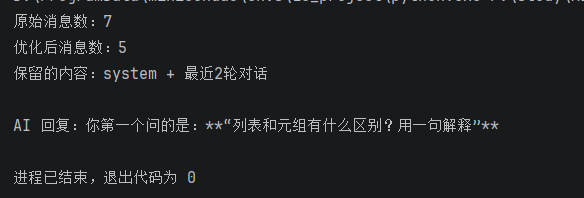
-
1.5.3 多轮对话聊天机器人
- 基于模型初始化、流式响应以及消息列表的拼接来创建多轮聊天机器人。
- 示例
-
from langchain.chat_models import init_chat_model import os from dotenv import load_dotenv def keep_recent_messages(messages , max_pairs=3): """ 保留最近的N 轮对话 max_pairs: 保留的对话轮数(每轮= user + assistant) """ # 分离system 和对话 system_msgs = [m for m in messages if m.get("role") == "system"] conversation_msgs = [m for m in messages if m.get("role") != "system"] # 只保留最近的 recent_msgs = conversation_msgs [-(max_pairs * 2):] # 返回:system + 最近对话 return system_msgs + recent_msgs load_dotenv(override=True) # 1. 基础配置 MAX_PAIRS_HISTORY = 10 EXIT_WORD = "quit" # 2. 初始化模型 DEEPSEEK_API_KEY = os.getenv("DEEPSEEK_API_KEY") DEEPSEEK_BASE_URL = os.getenv("DEEPSEEK_BASE_URL") model = init_chat_model( model="deepseek-v4-flash", model_provider="openai", api_key=DEEPSEEK_API_KEY, base_url=DEEPSEEK_BASE_URL, # v4-flash默认开启思考模式,多轮对话时要求回传reasoning_content, # 关闭思考模式以避免该协议约束,同时响应更快 extra_body={"thinking": {"type": "disabled"}}, ) # 3. 初始化消息列表 messages = [ { "role": "system", "content": "你是小灰灰, 是一个人工智能助手" } ] # 4. 启动提示 print(f"请输入问题,输入 {EXIT_WORD} 结束对话") # 5. 多轮对话主循环 i = 1 while True: print(f"\n", "=" * 6, f"-> 第 {i} 轮对话开始 <-", "=" * 10, "\n") user_input = input("你: ").strip() # 退出判断 if user_input.lower() == EXIT_WORD: print("对话已结束,欢迎下次再来!") break # 添加用户消息 messages.append({"role": "user", "content": user_input}) # 流式输出模型回复 print("小灰灰: ", end="", flush=True) reply_content = "" # 优化历史记忆 memory_messages = keep_recent_messages(messages, max_pairs=MAX_PAIRS_HISTORY) # 控制流输出模型的历史长度 for chunk in model.stream(memory_messages): if chunk.content: print(chunk.content, end="", flush=True) reply_content += chunk.content print(f"\n", "=" * 10, f"-> 第 {i} 轮对话结束 <-", "=" * 10, "\n") i += 1 # 添加 AI 回复 messages.append({"role": "assistant", "content": reply_content}) 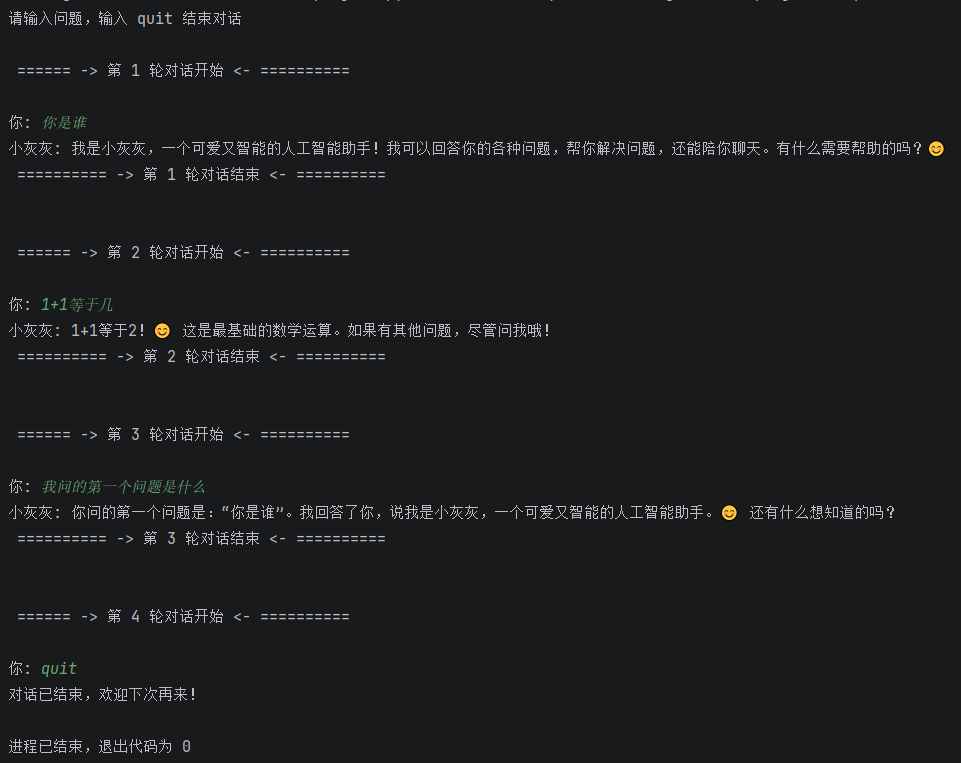
-
1.5.4 消息属性
1.5.4.1 content
- 消息的content 可以理解为数据内容,它是弱类型的,支持字符串和列表(列表元素通常为字典)。
- 举例1:存储字符串
- 如果只是纯文本内容,直接传递字符串即可。
-
  from LangChain.messages import HumanMessage

  msg1 = HumanMessage(content = "你好啊")

  # 当content内容只有字符串时,可以省略参数名称。
  msg2 = HumanMessage("你好啊")
-
- 如果只是纯文本内容,直接传递字符串即可。
- 举例2:存储字典列表
- 如果需要发送的不只是文本,如多模态内容,则需要content的字典列表形式。
- 字典内容遵循模型供应商的API规范。
-
  import base64
  from langchain.chat_models import init_chat_model
  from langchain.messages import HumanMessage
  from dotenv import load_dotenv
  import os

  load_dotenv(override=True)

  DEEPSEEK_API_KEY = os.getenv("DEEPSEEK_API_KEY")
  DEEPSEEK_BASE_URL = os.getenv("DEEPSEEK_BASE_URL")

  model = init_chat_model(
      model="deepseek-v4-flash",
      model_provider="openai",
      api_key=DEEPSEEK_API_KEY,
      base_url=DEEPSEEK_BASE_URL,
  )


  def encode_image(img_path, img_type='jpeg'):
      """将一张本地图片转换成 Base64 编码的 Data URI 字符串,方便在文本中嵌入图片数据"""
      with open(img_path, "rb") as img_file:
          return f"data:image/{img_type};base64,{base64.b64encode(img_file.read()).decode('utf-8')}"

  # 图像路径
  img_path = "image1.jpg"

  # 获取图像base64编码字符串
  base64_image = encode_image(img_path)

  response = model.invoke(
      [
          HumanMessage(
              content=[
                  {'type': 'text', 'text': '这张图里有什么?'},
                  {
                      'type': 'image_url',
                      "image_url": {"url": base64_image},
                  }
              ]
          )
      ]
  )

  print(response.content)
-
1.5.4.2 content_blocks
- 在LangChain 1.x 中,content_blocks 是消息对象(BaseMessage)的一项重大升级。它的核心目标是提供一种跨模型供应商、标准化的多模态数据结构。
- 过去,处理图片、音频、甚至是模型生成的“思维链(Reasoning)”内容时,不同供应商(OpenAI, Anthropic, Google 等)的API 格式各异,导致开发者需要写大量的适配代码。content_blocks 的出现终结了这种混乱。
- 在LangChain 1.2 版本中,消息对象的 content 属性依然存在(为了向前兼容),但新增了content_blocks属性,可以将content 解析为标准、类型安全的表示。
- 数据结构:它是一个
- 统一格式:每个block 都有一个type 字段,用于区分内容类型。
- 支持类型:包括text(文本)、 image(图片)、 audio(音频)、video(视频)、tool_call(工具调用)以及 reasoning(推理/思维链)。
- 支持的字段类型详见
https://docs.langchain.com/oss/python/langchain/messages#openai - 输入格式化
- 对于复杂的对话(带图片或工具结果),建议使用content_blocks列表形式构建HumanMessage或AIMessage。
- 借助content_blocks,我们可以用一套标准代码,无缝地在不同厂商的模型之间切换。
-
  import base64
  from langchain.chat_models import init_chat_model
  from langchain.messages import HumanMessage
  from dotenv import load_dotenv
  import os

  load_dotenv(override=True)

  DASHSCOPE_API_KEY = os.getenv("DASHSCOPE_API_KEY")
  DASHSCOPE_BASE_URL = os.getenv("DASHSCOPE_BASE_URL")

  model = init_chat_model(
      #model="deepseek-v4-flash",
      model="qwen3.7-plus",
      model_provider="openai",
      api_key=DASHSCOPE_API_KEY,
      base_url=DASHSCOPE_BASE_URL,
  )


  def encode_image(img_path):
      """将本地图片读取为纯base64编码字符串(不带data URI前缀)

      注意:标准content block {'type':'image','base64':...} 中的base64
      要的是纯编码,LangChain会自动拼接 data:{mime_type};base64, 前缀
      """
      with open(img_path, "rb") as img_file:
          return base64.b64encode(img_file.read()).decode('utf-8')

  # 图像路径
  img_path = "test01.png"

  # 获取图像纯base64编码
  base64_image = encode_image(img_path)

  response = model.invoke(
      [
          HumanMessage(
                content_blocks=[
                      {'type': 'text', 'text': '这张图里有什么'},
                      {
                          "type": "image",
                          "base64": base64_image,
                          "mime_type": "image/png",
                      },
                ]
          )
      ]
  )

  print(response.content)
- 输出格式化
- 不同的模型其输出格式可能不同,仅为提取思考内容,切换模型都可能需要更改代码,非常不方便。
- content_blocks提供了统一的输出格式,可以将不同格式的响应统一为标准格式。
-
from langchain.chat_models import init_chat_model from dotenv import load_dotenv import os # 从.env文件中加载环境变量 load_dotenv(override=True) DEEPSEEK_API_KEY = os.getenv("DEEPSEEK_API_KEY") DEEPSEEK_BASE_URL = os.getenv("DEEPSEEK_BASE_URL") model = init_chat_model( model="deepseek-v4-flash", model_provider="deepseek", api_key=DEEPSEEK_API_KEY, base_url=DEEPSEEK_BASE_URL ) response = model.invoke("1+1等于几") print("response.content: ", response.content) print("response.content_blocks: ", response.content_blocks) 
2 提示词模板
2.1 为什么推荐提示词模板
- 在LangChain 开发中,构造提示词既可以直接使用Python 字符串拼接(如f-string、format() 或+),也可以使用LangChain 提供的
PromptTemplate或ChatPromptTemplate。 - 举例1:字符串拼接方式
-
# 字符串拼接 topic = "Python " difficulty = "初学者" # 难以维护,容易出错 prompt_str = f "你是一个{difficulty}级别的编程导师。请用简单易懂的语言解释{topic}。" response = model .invoke(prompt_str) print(f "AI 回复:{response .content} \n") - 优点✅:
- 简单直接,上手快
- 适合临时demo
- 无额外学习成本
- 缺点❌:
- 可读性差(变量多时混乱)
- 不易维护(修改容易出错)
- 无变量校验(容易漏/拼错)
- 难以支持复杂场景(多轮对话/ RAG / Few-shot)
-
- 举例2:提示词模板
-
from langchain.chat_models import init_chat_model from dotenv import load_dotenv from langchain_core.prompts import ChatPromptTemplate import os load_dotenv(override=True) DEEPSEEK_API_KEY = os.getenv('DEEPSEEK_API_KEY') DEEPSEEK_BASE_URL = os.getenv('DEEPSEEK_BASE_URL') model = init_chat_model( model="deepseek-v4-flash", model_provider="openai", api_key=DEEPSEEK_API_KEY, base_url=DEEPSEEK_BASE_URL, ) prompt_template = ChatPromptTemplate([ ("system", "你是一个AI开发工程师. 你的名字是{name}."), ("human", "{user_input}") ]) # 调用format()方法,返回字符串 prompt = prompt_template.invoke({"name": "小谷AI", "user_input": "你能帮我做什么?"}) print(prompt) - 优点✅:
- 结构清晰(变量占位)
- 易维护、可复用
- 自动变量校验(更安全)
- 支持复杂场景(对话/ RAG /Agent)
- 可与LangChain 生态无缝集成
- 便于调试与日志追踪
- 缺点❌:
- 有一定学习成本
- 初期写法略复杂
- 对极简单场景略“重”
- 开发建议:
- 小项目/ 临时用→ 字符串拼接
- 正式开发/ AI应用→ 提示词模板(必选)
-
2.2 提示词机制演进
- LangChain 1.0的架构变革中,核心的演进之一体现在Prompt 机制上:一个结构化的、富含元数据的消息列表已经取代单一字符串,成为与模型交互的标准数据格式。
2.2.1 旧时代
- LLM + PromptTemplate(输入与输出均为字符串)
- 模型接口:对应于LangChain 中的LLM类,主要面向早期的文本补全模型。
- 工作方式:模型接受一个单一的字符串作为输人,基于此预测并生成后续的文本内容(文本补全)。
- Prompt 工具:核心工具是 PromptTemplate。它的职责是接收一组变量,并通过模板渲染,最终输出一个完整的字符串。
- 局限性:当我们需要用这种方式模拟多轮聊天时,开发者必须在字符串中手动拼接和伪造对话角色
- 这种方式不仅导致Prompt 的结构混乱、难以维护,也极易让模型混淆对话的边界与上下文,影响生成质量。
2.2.2 新时代
- ChatModel+ChatPromptTemplate(输入与输出均为消息列表)
- 模型接口:对应LangChain 1.0 的主流接口ChatModel。
- 工作方式:现代聊天模型API 已原生支持角色概念。它们不再接受单一字符串,而是要求输入一个结构化的消息列表。为构建复杂、可靠的多轮对话智能体系统奠定了坚实的基础。
- Prompt 工具:ChatPromptTemplate 因此成为LangChain 1.0 中最核心的Prompt工具。它的职责是接收变量,并输出一个List「BaseMessage](消息列表),该列表可直接传递给聊天模型。
- 对比
-
特性 PromptTemplate ChatPromptTemplate 输出格式 纯文本字符串 消息列表 角色支持 ❌ 无 ☑️ system/user/assistant 对话历史 ❌ 不支持 ☑️ 支持 适用场景 简单提示 聊天、对话、多轮交互
-
- 因此,用于生成消息列表的ChatPromptTemplate,也自然取代了生成字符串的PromptTemplate,成为构建现代LangChain 应用的首选工具。
- 示例
-
  from langchain.chat_models import init_chat_model
  from dotenv import load_dotenv

  from langchain_core.prompts import ChatPromptTemplate, PromptTemplate

  import os

  load_dotenv(override=True)

  DEEPSEEK_API_KEY = os.getenv('DEEPSEEK_API_KEY')
  DEEPSEEK_BASE_URL = os.getenv('DEEPSEEK_BASE_URL')

  model = init_chat_model(
      model="deepseek-v4-flash",
      model_provider="openai",
      api_key=DEEPSEEK_API_KEY,
      base_url=DEEPSEEK_BASE_URL,
  )

  # 方式一
  prompt_template1 = PromptTemplate.from_template("请给我一个关于{topic}的{type}解释。")
  prompt1 = prompt_template1.format(type="简单", topic="人工智能")
  response1 = model.invoke(prompt1)
  print(response1.content)

  # 方式二
  prompt_template2 = ChatPromptTemplate([
      ("system", "你是一个AI开发工程师. 你的名字是{name}."),
      ("human", "{user_input}")
  ])
  prompt2 = prompt_template2.invoke({"name": "小谷AI", "user_input": "你能帮我做什么?"})
  print(prompt2)
-
2.3 ChatPromptTemplate的使用
- 在LangChain 1.0中,
ChatPromptTemplate是用于生成消息列表的核心组件。 - ChatPromptTemplate是创建聊天消息列表的提示模板。它比普通PromptTemplate 更适合处理多角色、多轮次的对话场景。支持System/Human/AI 等不同角色的消息模板。
- 消息类型
-
角色字符串 含义 用途 "system"系统消息 设定 AI 的行为、角色、规则 "user"/"human"用户消息 用户的输入/问题 "assistant"/"ai"AI 消息 AI 的回复(用于对话历史)
-
2.3.1 两种实例化方式
-
ChatPromptTemplate 可以通过初始化方法或from_messages 方法来实例化提示词模板。实例化时需要传入 messages参数。
-
方式1(推荐):调用from_messages()
- 该方法允许传入一个由元组(Tuple)构成的列表,列表中的每一个元组都代表一条具有特定角色的消息。
-
from langchain_core.prompts import ChatPromptTemplate chat_template = ChatPromptTemplate.from_messages( [ ("system", "你是一个AI机器人,你的名字是{name}。"), ("human", "你好,最近怎么样?"), ("ai", "我很好,谢谢!"), ("human", "{user_input}"), ] ) # 格式化聊天提示词模版中的变量 prompt = chat_template.invoke({"name": "小明", "user_input": "你叫什么名字?"}) # 打印格式化后的聊天提示词模版内容 print(prompt) 
-
方式2:使用实例初始化方法
-
from langchain_core.prompts import ChatPromptTemplate chat_template = ChatPromptTemplate( [ ("system", "你是一个AI机器人,你的名字是{name}。"), ("human", "你好,最近怎么样?"), ("ai", "我很好,谢谢!"), ("human", "{user_input}"), ] ) # 格式化聊天提示词模版中的变量 prompt = chat_template.invoke({"name": "小明", "user_input": "你叫什么名字?"}) # 打印格式化后的聊天提示词模版内容 print(prompt) 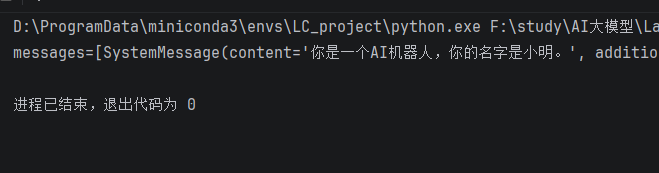
-
2.3.2 模板调用的3种方式
- 方式1:使用invoke()
-
from langchain_core.prompts import ChatPromptTemplate chat_template = ChatPromptTemplate.from_messages( [ ("system", "你是一个AI机器人,你的名字是{name}。"), ("human", "你好,最近怎么样?"), ("ai", "我很好,谢谢!"), ("human", "{user_input}"), ] ) # 传入参数:字典列表。返回参数:ChatPromptValue prompt = chat_template.invoke({"name": "小明", "user_input": "你叫什么名字?"}) # 打印格式化后的聊天提示词模版内容 print(prompt) print(type(prompt)) 
-
- 方式2:使用format()
-
from langchain_core.prompts import ChatPromptTemplate chat_template = ChatPromptTemplate.from_messages( [ ("system", "你是一个AI机器人,你的名字是{name}。"), ("human", "你好,最近怎么样?"), ("ai", "我很好,谢谢!"), ("human", "{user_input}"), ] ) # 传入参数:字典列表。返回参数:ChatPromptValue prompt = chat_template.format(name="小明", user_input="你叫什么名字?") # 打印格式化后的聊天提示词模版内容 print(prompt) print(type(prompt)) 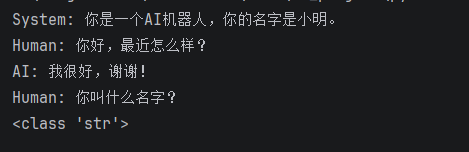
-
- 方式3:使用format_messages()
-
from langchain_core.prompts import ChatPromptTemplate chat_template = ChatPromptTemplate.from_messages( [ ("system", "你是一个AI机器人,你的名字是{name}。"), ("human", "你好,最近怎么样?"), ("ai", "我很好,谢谢!"), ("human", "{user_input}"), ] ) # 传入参数:字典列表。返回参数:ChatPromptValue prompt = chat_template.format_messages(name="小明", user_input="你叫什么名字?") # 打印格式化后的聊天提示词模版内容 print(prompt) print(type(prompt)) 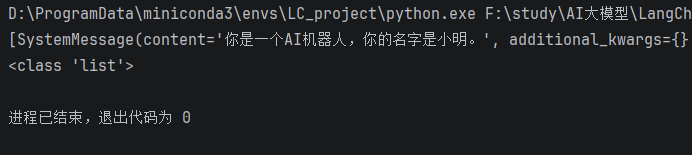
-
2.3.3 结合大模型调用
-
  from langchain.chat_models import init_chat_model
  from dotenv import load_dotenv
  from langchain_core.prompts import ChatPromptTemplate
  import os

  load_dotenv(override=True)

  DEEPSEEK_API_KEY = os.getenv('DEEPSEEK_API_KEY')
  DEEPSEEK_BASE_URL = os.getenv('DEEPSEEK_BASE_URL')

  model = init_chat_model(
      model="deepseek-v4-flash",
      model_provider="openai",
      api_key=DEEPSEEK_API_KEY,
      base_url=DEEPSEEK_BASE_URL,
  )

  # 提供提示词模板
  chat_template = ChatPromptTemplate.from_messages(
      [
          ("system", "你是一个AI机器人,你的名字是{name}。"),
          ("human", "你好,最近怎么样?"),
          ("ai", "我很好,谢谢!"),
          ("human", "{user_input}"),
      ]
  )

  # 格式化聊天提示词模版中的变量
  prompt_value = chat_template.invoke({"name": "小明", "user_input": "你叫什么名字?"})

  # 模型调用
  response = model.invoke(prompt_value)
  print(response.content)
2.3.4 更丰富的初始化参数类型
-
前面讲了ChatPromptTemplate的两种创建方式。我们看到不管使用实例初始化方法,还是使用from_messages(),参数类型都是列表类型。列表中的元素可以是多种类型,前面我们主要测试了元组类型。
-
参数是列表类型,列表的元素可以是字符串、字典、字符串构成的元组、消息类型、提示词模板类型、消息提示词模板类型等
-
类型1:str列表类型
- 列表参数格式是str类型(不推荐),因为默认角色都是human
-
from langchain_core.prompts import ChatPromptTemplate chat_template = ChatPromptTemplate.from_messages( [ # 会理解为是一个用户消息 "你好,我是{name}" ] ) prompt = chat_template.invoke({"name": "小明"}) print(prompt) print(type(prompt)) 
-
类型2:元组类型
- 列表参数格式是元组类型。
-
from langchain_core.prompts import ChatPromptTemplate chat_template = ChatPromptTemplate.from_messages( [ ("system", "你是一个AI助手"), ("human", "你好,我是{name}") ] ) prompt = chat_template.invoke({"name": "小明"}) print(prompt) print(type(prompt)) 
-
类型3:dict列表类型
-
  from langchain_core.prompts import ChatPromptTemplate

  chat_template = ChatPromptTemplate.from_messages(
      [
          {"role": "system", "content": "你是一个AI助手"},
          {"role": "human", "content":"你好,我是{name}"}
      ]
  )

  prompt = chat_template.invoke({"name": "小明"})

  print(prompt)
  print(type(prompt))
-
-
类型4:Message列表类型
-
  from langchain_core.prompts import ChatPromptTemplate
  from langchain_core.messages import SystemMessage,HumanMessage

  chat_template = ChatPromptTemplate.from_messages(
      [
          SystemMessage(content="你是一个AI助手"),
          HumanMessage(content="你好,我是小明")
      ]
  )

  prompt = chat_template.invoke({})

  print(prompt)
  print(type(prompt))
-
-
类型5:MessagePromptTemplate列表类型
- LangChain提供不同类型的MessagePromptTemplate。最常用的是SystemMessagePromptTemplate、HumanMessagePromptTemplate 和AIMessagePromptTemplate,分别创建系统消息、人工消息和AI消息。
-
  # 导入聊天消息类模板
  from langchain_core.prompts import ChatPromptTemplate, HumanMessagePromptTemplate, SystemMessagePromptTemplate

  # 创建消息模板
  system_message_prompt = SystemMessagePromptTemplate.from_template("你是一个{role}")
  human_message_prompt = HumanMessagePromptTemplate.from_template("你好,我是{name}")

  # 组合成聊天提示模板
  chat_prompt = ChatPromptTemplate.from_messages([
      system_message_prompt,
      human_message_prompt
  ])

  # 格式化提示
  formatted_messages = chat_prompt.invoke({"role": "AI助手", "name": "小明"})
  print(formatted_messages)
-
类型6:BaseChatPromptTemplate列表类型
- 使用BaseChatPromptTemplate,可以理解为ChatPromptTemplate里嵌套了ChatPromptTemplate。
- 举例1:带参数
-
  from langchain_core.prompts import ChatPromptTemplate

  # 使用BaseChatPromptTemplate(嵌套的ChatPromptTemplate)
  nested_prompt_template1 = ChatPromptTemplate.from_messages([
      ("system", "你是一个{role}")
  ])
  nested_prompt_template2 = ChatPromptTemplate.from_messages([
      ("human", "你好,我是{name}")
  ])

  prompt_template = ChatPromptTemplate.from_messages([
      nested_prompt_template1, nested_prompt_template2
  ])

  result = prompt_template.invoke({"role": "AI助手", "name": "小明"})
  print(result)
-
- 举例2:不带参数
-
  from langchain_core.prompts import ChatPromptTemplate

  # 使用BaseChatPromptTemplate(嵌套的ChatPromptTemplate)
  nested_prompt_template1 = ChatPromptTemplate.from_messages([("system", "你是一个AI助手")])
  nested_prompt_template2 = ChatPromptTemplate.from_messages([("human", "我是小明")])
  prompt_template = ChatPromptTemplate.from_messages([
      nested_prompt_template1, nested_prompt_template2
  ])

  result = prompt_template.invoke({})
  print(result)
-
2.4 高级特性
2.4.1 部分变量预填充:partial
- 预填充某些固定不变的变量,创建模板的变体。
- 使用场景
- 某些变量在所有调用中都相同
- 需要为不同用户/场景创建定制模板
- 举例1
-
  from langchain_core.prompts import ChatPromptTemplate

  # 原始模板
  template = ChatPromptTemplate.from_messages([
      ("system", "你是{role},目标用户是{audience}"),
      ("user", "{task}")
  ])

  # 部分填充
  customer_support_template = template.partial(
      role="客服专员",
      audience="普通用户"
  )
  # 现在只需要提供task
  messages = customer_support_template.invoke({"task": "解释退款政策"})
  print(messages)
-
- 举例2
-
  from langchain_core.prompts import ChatPromptTemplate

  # 场景:为不同部门创建专用模板
  base_template = ChatPromptTemplate.from_messages([
      ("system", "你是{department}的{role}"),
      ("user", "{task}")
  ])
  # IT 部门
  it_template = base_template.partial(
      department="IT 部门",
      role="技术支持"
  )

  # 销售部门
  sales_template = base_template.partial(
      department="销售部门",
      role="销售顾问"
  )

  message = sales_template.invoke({"task": "为什么每年年底汽车会促销"})
  print(message)
-
2.4.2 消息占位符
- 当你不确定消息提示模板使用什么角色,或者希望在格式化过程中插入消息列表时,该怎么办?这就需要使用消息占位符,负责在特定位置添加消息列表。
- 使用场景:多轮对话系统存储历史消息以及Agent的中间步骤处理此功能非常有用。
- 方式1:JSON形式
-
  from langchain_core.prompts import ChatPromptTemplate

  template = ChatPromptTemplate.from_messages(
      [
          ("system", "你是一个有用的AI助手"),
          ("placeholder", "{conversation}"),
      ]
  )
  prompt_value = template.invoke(
      {
          "conversation": [
              ("human", "你好!"),
              ("ai", "今天我能帮你做什么?"),
              ("human", "你能给我做一个冰激凌吗?"),
              ("ai", "抱歉,我没有这样的能力"),
          ]
      })

  print(prompt_value)
-
- 方式2:MessagesPlaceholder实例
- 举例1
-
  from langchain_core.prompts import ChatPromptTemplate, MessagesPlaceholder
  from langchain_core.messages import HumanMessage

  prompt_template = ChatPromptTemplate.from_messages([
      ("system", "You are a helpful assistant"),
      MessagesPlaceholder("msgs")
  ])

  result = prompt_template.invoke({"msgs": [HumanMessage(content="hi !")]})
  print(result)
-
- 举例2:存储历史对话
-
  from langchain_core.prompts import ChatPromptTemplate, MessagesPlaceholder

  prompt_template = ChatPromptTemplate.from_messages(
      [
          ("system", "你是一个非常友好的AI助手"),
          MessagesPlaceholder(variable_name="history"),
          ("human", "{question}")
      ]
  )
  prompt_template.invoke(
      {
          "history": [
              ("human", "5 + 2 = ?"),
              ("ai", "5 + 2 = 7 ")
          ],
          "question": "结果再乘以4呢?"
      }
  )
-
- 举例1


 扫一扫
扫一扫


- 消息与提示词模板&spm=1001.2101.3001.5002&articleId=165094291&d=1&t=3&u=7c7ef8aafb10457d80de56c03802c6c7)
 1033
1033

 被折叠的 条评论
为什么被折叠?
被折叠的 条评论
为什么被折叠?
 到【灌水乐园】发言


