



 本文介绍了如何使用Ansible进行Linux服务器的自动化运维,包括安装、设置主机清单、使用模块进行部署和配置,以及剧本编写。Ansible通过SSH协议进行远程管理,简化运维工作,提高效率并减少错误。
linux自动化运维ansible
一、概述
使用ansible可以自动部署应用程序、对服务器进行初始化配置、安全基线配置、以及进行更新和打补丁操作。
ansible目前是运维自动化工具中最简单、容易上手的一款优秀软件。
ansible服务本身并没有批量部署的功能,具有批量部署能力的是其运行的模块。
基于SSH远程会话协议,不需要客户端;
可以调高工作效率、减少人为失误、降低用工成本。

二、安装
安装环境为:rhel8,该系统镜像默认不带有ansilble服务程序,需要从EPEL扩展软件包获取。
1、配置安装源
在原有软件仓库配置下方,添加EPEL扩展软件包安装源信息
[root@192 /]# vim /etc/yum.repos.d/rhel.repo
[BaseOS]
name=BaseOS
baseurl=file:///media/cdrom/BaseOS
enabled=1
gpgcheck=0

[AppStream]
name=AppStream
baseurl=file:///media/cdrom/AppStream
enabled=1
gpgcheck=0

#添加EPEL扩展软件包安装源信息
[EPEL]
name=EPEL
baseurl=https://dl.fedoraproject.org/pub/epel/8/Everything/x86_64/
enabled=1
gpgcheck=0
2、安装
[root@192 /]# dnf install -y ansible
3、查询版本信息
安装完毕后,Ansible服务便默认已经启动。使用–version参数可以看到Ansible服务的版本及配置信息。
[root@192 /]# ansible --version
ansible 2.9.27
  config file = /etc/ansible/ansible.cfg
  configured module search path = ['/root/.ansible/plugins/modules', '/usr/share/ansible/plugins/modules']
  ansible python module location = /usr/lib/python3.6/site-packages/ansible
  executable location = /usr/bin/ansible
  python version = 3.6.8 (default, Jan 11 2019, 02:17:16) [GCC 8.2.1 20180905 (Red Hat 8.2.1-3)]
三、设置主机清单
ansible服务的主配置文件存在优先级的顺序关系,默认存放在/etc/ansible目录中的主配置文件优先级最低。同时存在多个ansible服务主配置文件时,优先级顺序如下图
| 优先级 | 文件位置 |
|---|---|
| 高 | ./ansible.cfg |
| 中 | ~/.ansible.cfg |
| 低 | /etc/ansible/ansible.cfg |
1、添加ip及账号信息
管理的主机ip及账号信息预先写入/etc/ansible/hosts文件中。
[root@192 /]# vim etc/ansible/hosts
[webserver]
192.168.199.129 ansible_ssh_user='root' ansible_ssh_pass='123456a?' ansible_ssh_port='22'
2、修改主配置文件
将主配置文件中的第71行设置成默认不需要SSH协议的指纹验证,以及将第107行设置成默认执行剧本时所使用的管理员名称为root
[root@192 /]# vim /etc/ansible/ansible.cfg
 70 # uncomment this to disable SSH key host checking
 71 host_key_checking = False
                          .....
 106 # (/usr/bin/ansible will use current user as default)
 107 remote_user = root
3、测试是否成功
如出现SUCCESS字样,则表示成功:
[root@192 /]# ansible all -m ping
192.168.199.129 | SUCCESS => {
    "ansible_facts": {
        "discovered_interpreter_python": "/usr/libexec/platform-python"
    },
    "changed": false,
    "ping": "pong"
}
四、模块应用
1、模块
ansible内置上千个模块
#列出所有模块信息
ansible-doc -l
#查询某一模块
ansible-doc 模块名称
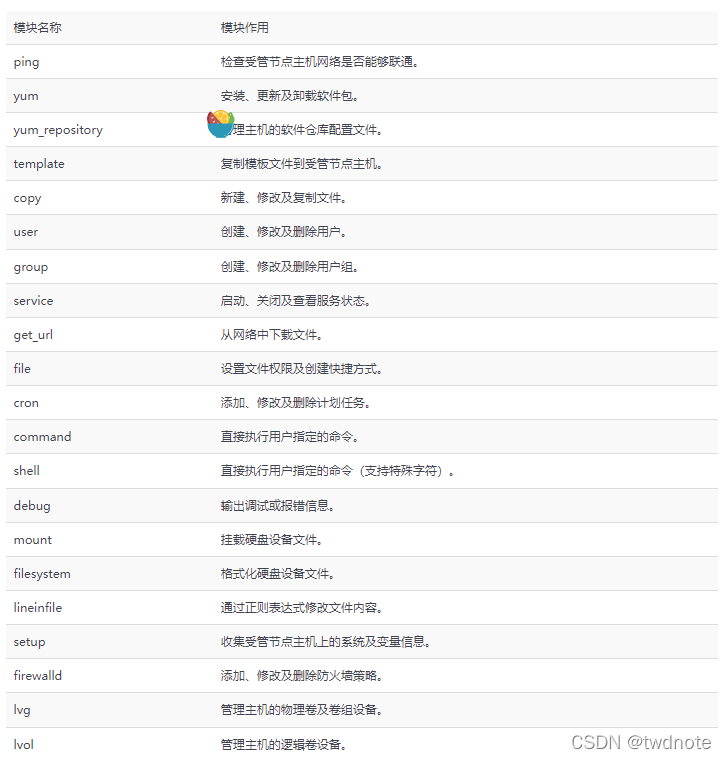
常用模块如下图
2、运行临时命令
在ansible服务中,ansible是用于执行临时任务的命令,在执行后即结束。
#ansible语法格式
ansible 受管主机节点 -m 模块名称[-a 模块参数]
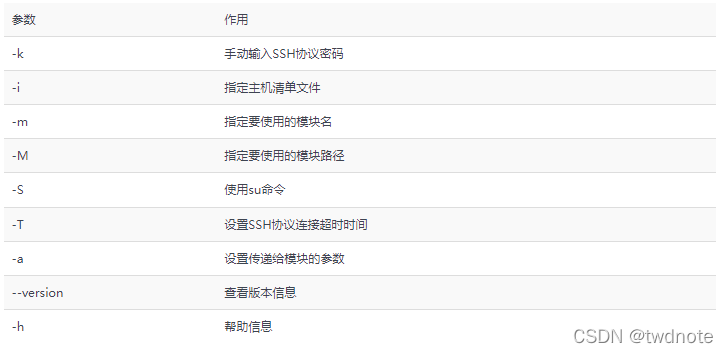
ansible常用参数
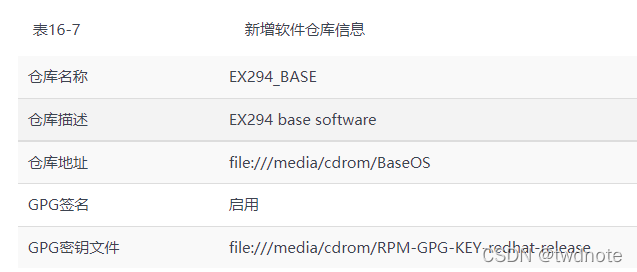
现在,想为主机清单中的所有服务器新增一个如表16-7所示的软件仓库,该怎么操作呢?
[root@192 ~]# ansible-doc yum_repository

EXAMPLES:

- name: Add repository
  yum_repository:
    name: epel
    description: EPEL YUM repo
    baseurl: https://download.fedoraproject.org/pub/epel/$releasever/$basearch/

- name: Add multiple repositories into the same file (1/2)
  yum_repository:
    name: epel
    description: EPEL YUM repo
    file: external_repos
    baseurl: https://download.fedoraproject.org/pub/epel/$releasever/$basearch/
    gpgcheck: no

- name: Add multiple repositories into the same file (2/2)
  yum_repository:
    name: rpmforge
    description: RPMforge YUM repo
    file: external_repos
    baseurl: http://apt.sw.be/redhat/el7/en/$basearch/rpmforge
    mirrorlist: http://mirrorlist.repoforge.org/el7/mirrors-rpmforge
    enabled: no
参照EXAMPLE实例段,逐一对应填写需求值和参数。如果出现CHANGED字样,则表示修改已经成功:
[root@192 ~]#  ansible all -m yum_repository -a 'name="EX294_BASE" description="EX294 base software" baseurl="file:///media/cdrom/BaseOS" gpgcheck=yes enabled=1 gpgkey="file:///media/cdrom/RPM-GPG-KEY-redhat-release"'
192.168.199.129 | CHANGED => {
    "ansible_facts": {
        "discovered_interpreter_python": "/usr/libexec/platform-python"
    },
    "changed": true,
    "repo": "EX294_BASE",
    "state": "present"
}


 扫一扫
扫一扫


 被折叠的 条评论
为什么被折叠?
被折叠的 条评论
为什么被折叠?
 到【灌水乐园】发言


