使用Hugging Face构建大型语言模型应用

huggingface的generate推理源码解读 大语言模型基本使用huggingface的generate方法进行推理。而我最近也在使用llama3代码,于是我写下一份huggingface的generate方法,帮助读者了解huggingface如何对大语言模型进行推理。同样,我和其它博客不太一样,我是按照源码来解读huggingface的generate方法。 阅读详情

在本文中,我们将介绍如何使用Hugging Face的大型语言模型(LLM)构建一些常见的应用,包括摘要(Summarization)、情感分析(Sentiment analysis)、翻译(Translation)、零样本分类(Zero-shot classification)和少样本学习(Few-shot learning)。我们将探索现有的开源和专有模型,展示如何直接应用于各种应用场景。同时,我们还将介绍简单的提示工程(prompt engineering),以及如何使用Hugging Face的API配置LLM管道。

学习目标:

  • 使用各种现有模型构建常见应用。

  • 理解基本的提示工程。

  • 了解LLM推理中的搜索和采样方法。

  • 熟悉Hugging Face的主要抽象概念:数据集、管道、分词器和模型。

环境安装

在这里插入图片描述

常见的大预言模型应用

本节旨在让您对几种常见的LLM应用有所了解,并展示使用LLM的入门方法的简易性。

在浏览示例时,请注意所使用的数据集、模型、API和选项。这些简单的示例可作为构建自己应用程序的起点。

在这里插入图片描述

摘要(Summarization)

摘要可以分为两种形式:

  1. 抽取式摘要(extractive):从文本中选择代表性的摘录作为摘要。

  2. 生成式摘要(abstractive):通过生成新的文本来形成摘要。

在本文中,我们将使用生成式摘要模型。

背景阅读:Hugging Face的摘要任务页面列出了支持摘要的模型架构。摘要章节提供了详细的操作指南。

在本节中,我们将使用以下内容:

  • 数据集:xsum数据集,该数据集提供了一系列BBC新闻文章和相应的摘要。

  • 模型:t5-small模型,该模型具有6000万个参数(对于PyTorch而言是242MB)。T5是由Google创建的编码器-解码器模型,支持多个任务,包括摘要、翻译、问答和文本分类。有关更多详细信息,请参阅Google的博客文章、GitHub上的代码或研究论文。

数据集加载

`xsum_dataset = load_dataset(
       "xsum", version="1.2.0", cache_dir="/root/home/LLMs/week1"   
)  # Note: We specify cache_dir to use predownloaded data.   
xsum_dataset  # The printed representation of this object shows the `num_rows` of each dataset split.      

# 输出   
DatasetDict({    
    train: Dataset({           
        features: ['document', 'summary', 'id'],           
        num_rows: 204045       
    })       
    validation: Dataset({      
        features: ['document', 'summary', 'id'],           
        num_rows: 11332       
    })       
    test: Dataset({      
        features: ['document', 'summary', 'id'],           
        num_rows: 11334       
    })   
})   `

该数据集提供了三列:

  • document:包含BBC文章的文本内容。

  • summary:一个“ground-truth”摘要。请注意,“ground-truth”摘要是主观的,可能与您所写的摘要不同。这是一个很好的例子,说明许多LLM应用程序没有明显的“正确”答案。

  • id:文章的唯一标识符。

xsum_sample = xsum_dataset["train"].select(range(10))   
display(xsum_sample.to_pandas())   
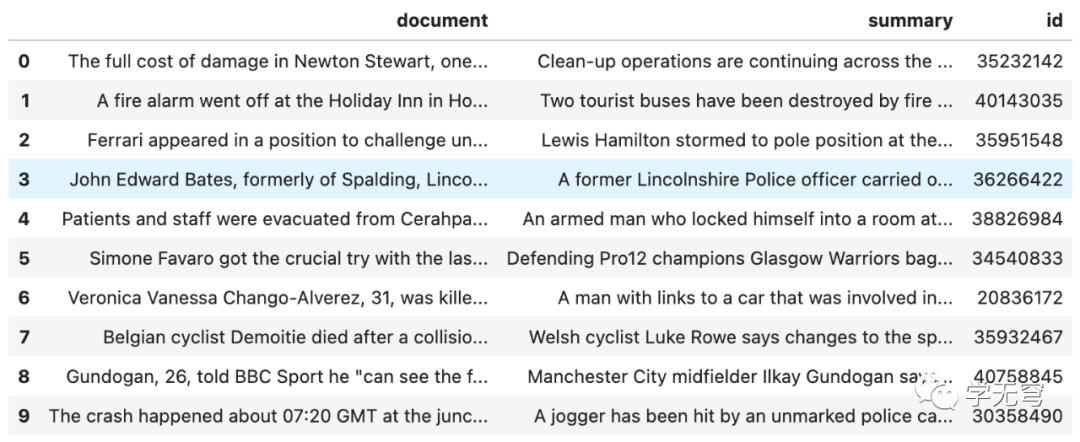
接下来,我们将使用Hugging Face的pipeline工具加载一个预训练模型。在LLM(Language Model)pipeline的构造函数中,我们需要指定以下参数:

  • task:第一个参数用于指定主要任务。您可以参考Hugging Face的task文档获取更多信息。

  • model:这是从Hugging Face Hub加载的预训练模型的名称。

  • min_length、max_length:我们可以设置生成的摘要的最小和最大标记长度范围。

  • truncation:一些输入文章可能过长,超出了LLM处理的限制。大多数LLM模型对输入序列的长度有固定的限制。通过设置此选项,我们可以告诉pipeline在需要时对输入进行截断。

在这里插入图片描述

# Apply to 1 article   
summarizer(xsum_sample["document"][0])      

# Apply to a batch of articles   
results = summarizer(xsum_sample["document"])      

# Display the generated summary side-by-side with the reference summary and original document.   
# We use Pandas to join the inputs and outputs together in a nice format.   
import pandas as pd       

display(    
    pd.DataFrame.from_dict(results)       
    .rename({"summary_text": "generated_summary"}, axis=1)       
    .join(pd.DataFrame.from_dict(xsum_sample))[       
        ["generated_summary", "summary", "document"]       
    ]   
)      

# 输出   
results   
[{'summary_text': 'the full cost of damage in Newton Stewart is still being assessed . many roads in peeblesshire remain badly affected by standing water . a flood alert remains in place across the'},  
 {'summary_text': 'a fire alarm went off at the Holiday Inn in Hope Street on Saturday . guests were asked to leave the hotel . the two buses were parked side-by-side in'},    
 {'summary_text': 'Sebastian Vettel will start third ahead of team-mate Kimi Raikkonen . stewards only handed Hamilton a reprimand after governing body said "n'},    
 {'summary_text': 'the 67-year-old is accused of committing the offences between March 1972 and October 1989 . he denies all the charges, including two counts of indecency'},    
 {'summary_text': 'a man receiving psychiatric treatment at the clinic threatened to shoot himself and others . the incident comes amid tension in Istanbul following several attacks on the reina nightclub .'},    
 {'summary_text': 'Gregor Townsend gave a debut to powerhouse wing Taqele Naiyaravoro . the dragons gave first starts of the season to wing a'},    
 {'summary_text': 'Veronica Vanessa Chango-Alverez, 31, was killed and another man injured in the crash . police want to trace Nathan Davis, 27, who has links to the Audi .'},    
 {'summary_text': 'the 25-year-old was hit by a motorbike during the Gent-Wevelgem race . he was riding for the Wanty-Gobert team and was taken'},    
 {'summary_text': 'gundogan will not be fit for the start of the premier league season at Brighton on 12 august . the 26-year-old says his recovery time is now being measured in "week'},    
 {'summary_text': 'the crash happened about 07:20 GMT at the junction of the A127 and Progress Road in leigh-on-Sea, Essex . the man, aged in his 20s'}]      

情感分析(Sentiment analysis)

情感分析是一种文本分类任务,旨在对一段文本进行评估,判断其是积极的、消极的还是其他类型的情感。具体的情感标签可以根据不同的应用而有所不同。

背景阅读:可以参考Hugging Face的文本分类任务页面或维基百科上的情感分析页面,以了解更多相关信息。

在本节中,我们将使用以下

人工智能 | Hugging Face 的应用 Hugging-Face 大语言模型 LLM 管理Transformers 机器学习框架文本生成推理 (TGI) 阅读详情

相关推荐

【AI】在本地 Docker 环境中搭建使用 Hugging Face 托管的 Llama 模型

在本地使用Docker部署LLM GGML模型是一种方便有效的使用自然语言处理的方式。将模型docker化使其易于在不同环境之间移动,并确保其能够一致运行。在浏览器中测试模型提供了用户友好的界面,让您可以快速评估其性能。 这样的设置使您对基础架构和数据有更多控制,并更容易部署先进的语言模型,适用于各种应用。这是在部署大型语言模型方面迈出的一大步。

欧阳天涵的专栏 4141

如何使用Hugging Face微调大语言模型(LLMs)

微调LLM时,了解你的使用场景和要解决的问题至关重要。这将帮助你选择合适的模型,或者帮助你创建一个数据集来微调你的模型。如果你还没有定义你的使用场景,你可能需要重新思考。并非所有的使用场景都需要微调,建议在微调你自己的模型之前,先评估和尝试已经微调过的模型或基于API的模型。例如,我们将使用以下使用场景:我们想要微调一个模型,它可以基于自然语言指令生成SQL查询,然后可以集成到我们的BI工具中。目标是减少创建SQL查询所需的时间,并使非技术用户更容易创建SQL查询。

FrenzyTechAI的博客 7607

模型警告:未设填充标记?自动用结束符有风险!Setting `pad_token_id` to `eos_token_id`:128001 for open-end generation.

摘要: 当模型检测到未设置pad_token_id时,会自动将其设为eos_token_id(如128001),但这可能导致语义冲突(如误将填充符视为结束符)。解决方案需根据模型类型调整: 支持填充标记的模型(如BERT):需显式设置pad_token,并生成attention_mask; 依赖掩码的模型(如Llama):无需pad_token_id,但必须提供attention_mask; 自定义填充标记:可手动添加[PAD]并扩展词表。 关键点:优先查阅模型文档,确保pad_token与eos_toke

ZhangJiqun&191cm&85kg 1007

大语言模型LLM算法框架演进:基于Hugging Face Transformers构建LLM应用(LLM系列19)

Hugging Face Transformers是一个开源Python库,它为开发者提供了易用且高效的接口来访问和使用多种预训练LLMs。模型多样性:涵盖了众多知名LLMs,如BERT、GPT-3、T5、GPT-NeoX等,满足不同NLP任务的需求。简单易用:提供统一的API接口,简化模型加载、预测和微调过程,使得即使是初学者也能快速上手。持续更新:不断整合最新研究进展,保持与学术界和工业界的紧密联系,确保开发者可以获取并应用最先进的模型。重要大型语言模型概览。

North_D的博客 1268

大象机器人myAGV移动机器人+mechArm六轴机械臂,开源复合机器人开发与实践!

我们这章节的内容是将协作性机械臂打破距离上的限制,跟移动机器人(myAGV)相连接,实现一个案例。

m0_71627844的博客 1492

记录一次小项目中的重放攻击与解决方案

文章目录1、重放攻击简介2、重放攻击演示3、解决方案4、重放攻击验证 欢迎各位 前(提)来(出)讨(意)论(见)。 1、重放攻击简介 重放攻击(Replay Attacks)又称重播攻击、回放攻击,是指攻击者发送一个目的主机已接收过的包,来达到欺骗系统的目的,主要用于身份认证过程,破坏认证的正确性。 举个简单的小例子。 我们往系统里面插入一条数据,如果此次操作的数据包被攻击者获取,又恰巧后台没有对重复内容进行验证,那么攻击者就可以利用该数据包重复的发起请求,无限制的往数据库插入数据,即使请求包是加密的也

fiveSix 8731

智能车竞赛卡丁快跑组:自动驾驶与人车交互技术实战解析

本文深入解析了智能车竞赛卡丁快跑组的技术核心,重点探讨了自动驾驶与人车交互两大模块的实战方案。文章详细拆解了从环境感知、路径规划到语音识别、命令执行的完整流程,并分享了基于单片机平台的调试心法与赛场经验,为参赛者提供了一套从零开始、分步攻坚的系统性备赛指南。

f0g1h2的博客 1182

初学树莓派——(九)DHT11数据传入ONENET

目录 前言 DHT11实现本地温湿度监测 DHT11.py 接线图 效果图 温湿度数据上传至ONENET 新建产品 新建设备 ONENET.py 测试 Shell脚本配置 效果图 前言 本文分部分实现温湿度上传至OneNet云平台,本地数据监测,数据上传 新建一个文件夹,文件夹内包含DHT11.py、ONENET.py、tmp_data.txt、hum_data.txt DHT11实现本地温湿度监测 DHT11.py import RPi.GPIO as GPIO

会点灯的大力水手的博客 2614

CLCD土地覆盖数据在ArcGIS中的实战应用:从导入到空间分析的完整指南

本文详细介绍了CLCD土地覆盖数据在ArcGIS中的实战应用,从数据导入到空间分析的完整流程。涵盖坐标系转换、数据质量检查、土地利用变化检测等核心技术,并分享城市扩张模拟和跨数据集融合等高级应用技巧,帮助研究者高效利用这一权威数据集进行环境监测和城市规划。

weixin_29292535的博客 610

聚类模型-层次聚类

聚类模型 1、层次聚类 2、原型聚类-K-means 3、模型聚类-GMM 4、EM算法-LDA主题模型 5、密度聚类-DBSCAN 6、图聚类-谱聚类 一、层次聚类 一、聚类理论 ​ 一般来说,聚类是在训练样本的标签信息不知的情况下,学习样本内在的性质和规律,将有限的集合划分成ccc类。根据“方以类聚,物以群分”的思想,类内对象尽可能的相似,...

myazi 6507

3、硬件工程师笔试面试学习汇总——器件篇目录(2025版本)

硬件工程师笔试面试学习

XU157303764的博客 7636

【A_Star三维路径规划】基于matlab A_Star算法结合B样条平滑三维地形路径规划(含雷达威胁)【含Matlab源码 3527期】

A_Star算法结合B样条平滑三维地形路径规划(含雷达威胁) 完整代码,包运行;可提供运行操作视频!适合小白!

订阅付费专栏Matlab(奶茶价版),可赠送奶茶价版付费专栏指定代码1份; 744

WINCC7.3破解文件

WINCC7.3硬件够破解文件,有需要的下载!WINCC7.3硬件够破解文件,有需要的下载!

深度学习工具包 DeepLearningToolbox

深度学习工具包Deprecation notice.-----This toolbox is outdated and no longer maintained.There are much better tools available for deep learning than this toolbox, e.g. [Theano](http://deeplearning.net/software/theano/), [torch](http://torch.ch/) or [tensorflow](http://www.tensorflow.org/)I would suggest you use one of the tools mentioned above rather than use this toolbox.Best, Rasmus.DeepLearnToolbox================A Matlab toolbox for Deep Learning.Deep Learning is a new subfield of machine learning that focuses on learning deep hierarchical models of data.It is inspired by the human brain's apparent deep (layered, hierarchical) architecture.A good overview of the theory of Deep Learning theory is[Learning Deep Architectures for AI](http://www.iro.umontreal.ca/~bengioy/papers/ftml_book.pdf)For a more informal introduction, see the following videos by Geoffrey Hinton and Andrew Ng.* [The Next Generation of Neural Networks](http://www.youtube.com/watch?v=AyzOUbkUf3M) (Hinton, 2007)* [Recent Developments in Deep Learning](http://www.youtube.com/watch?v=VdIURAu1-aU) (Hinton, 2010)* [Unsupervised Feature Learning and Deep Learning](http://www.youtube.com/watch?v=ZmNOAtZIgIk) (Ng, 2011)If you use this toolbox in your research please cite [Prediction as a candidate for learning deep hierarchical models of data](http://www2.imm.dtu.dk/pubdb/views/publication_details.php?id=6284)```@MASTERSTHESIS\{IMM2012-06284, author = "R. B. Palm", title = "Prediction as a candidate for learning deep hierarchical models of data", year = "2012",}```Contact: rasmusbergpalm at gmail dot comDirectories included in the toolbox-----------------------------------`NN/` - A library for Feedforward Backpropagation Neural Networks`CNN/` - A library for Convolutional Neural Networks`DBN/` - A library for Deep Belief Networks`SAE/` - A library for Stacked Auto-Encoders`CAE/` - A library for Convolutional Auto-Encoders`util/` - Utility functions used by the libraries`data/` - Data used by the examples`tests/` - unit tests to verify toolbox is workingFor references on each library check REFS.mdSetup-----1. Download.2. addpath(genpath('DeepLearnToolbox'));Example: Deep Belief Network---------------------```matlabfunction test_example_DBNload mnist_uint8;train_x = double(train_x) / 255;test_x = double(test_x) / 255;train_y = double(train_y);test_y = double(test_y);%% ex1 train a 100 hidden unit RBM and visualize its weightsrand('state',0)dbn.sizes = [100];opts.numepochs = 1;opts.batchsize = 100;opts.momentum = 0;opts.alpha = 1;dbn = dbnsetup(dbn, train_x, opts);dbn = dbntrain(dbn, train_x, opts);figure; visualize(dbn.rbm{1}.W'); % Visualize the RBM weights%% ex2 train a 100-100 hidden unit DBN and use its weights to initialize a NNrand('state',0)%train dbndbn.sizes = [100 100];opts.numepochs = 1;opts.batchsize = 100;opts.momentum = 0;opts.alpha = 1;dbn = dbnsetup(dbn, train_x, opts);dbn = dbntrain(dbn, train_x, opts);%unfold dbn to nnnn = dbnunfoldtonn(dbn, 10);nn.activation_function = 'sigm';%train nnopts.numepochs = 1;opts.batchsize = 100;nn = nntrain(nn, train_x, train_y, opts);[er, bad] = nntest(nn, test_x, test_y);assert(er < 0.10, 'Too big error');```Example: Stacked Auto-Encoders---------------------```matlabfunction test_example_SAEload mnist_uint8;train_x = double(train_x)/255;test_x = double(test_x)/255;train_y = double(train_y);test_y = double(test_y);%% ex1 train a 100 hidden unit SDAE and use it to initialize a FFNN% Setup and train a stacked denoising autoencoder (SDAE)rand('state',0)sae = saesetup([784 100]);sae.ae{1}.activation_function = 'sigm';sae.ae{1}.learningRate = 1;sae.ae{1}.inputZeroMaskedFraction = 0.5;opts.numepochs = 1;opts.batchsize = 100;sae = saetrain(sae, train_x, opts);visualize(sae.ae{1}.W{1}(:,2:end)')% Use the SDAE to initialize a FFNNnn = nnsetup([784 100 10]);nn.activation_function = 'sigm';nn.learningRate = 1;nn.W{1} = sae.ae{1}.W{1};% Train the FFNNopts.numepochs = 1;opts.batchsize = 100;nn = nntrain(nn, train_x, train_y, opts);[er, bad] = nntest(nn, test_x, test_y);assert(er < 0.16, 'Too big error');```Example: Convolutional Neural Nets---------------------```matlabfunction test_example_CNNload mnist_uint8;train_x = double(reshape(train_x',28,28,60000))/255;test_x = double(reshape(test_x',28,28,10000))/255;train_y = double(train_y');test_y = double(test_y');%% ex1 Train a 6c-2s-12c-2s Convolutional neural network %will run 1 epoch in about 200 second and get around 11% error. %With 100 epochs you'll get around 1.2% errorrand('state',0)cnn.layers = { struct('type', 'i') %input layer struct('type', 'c', 'outputmaps', 6, 'kernelsize', 5) %convolution layer struct('type', 's', 'scale', 2) %sub sampling layer struct('type', 'c', 'outputmaps', 12, 'kernelsize', 5) %convolution layer struct('type', 's', 'scale', 2) %subsampling layer};cnn = cnnsetup(cnn, train_x, train_y);opts.alpha = 1;opts.batchsize = 50;opts.numepochs = 1;cnn = cnntrain(cnn, train_x, train_y, opts);[er, bad] = cnntest(cnn, test_x, test_y);%plot mean squared errorfigure; plot(cnn.rL);assert(er<0.12, 'Too big error');```Example: Neural Networks---------------------```matlabfunction test_example_NNload mnist_uint8;train_x = double(train_x) / 255;test_x = double(test_x) / 255;train_y = double(train_y);test_y = double(test_y);% normalize[train_x, mu, sigma] = zscore(train_x);test_x = normalize(test_x, mu, sigma);%% ex1 vanilla neural netrand('state',0)nn = nnsetup([784 100 10]);opts.numepochs = 1; % Number of full sweeps through dataopts.batchsize = 100; % Take a mean gradient step over this many samples[nn, L] = nntrain(nn, train_x, train_y, opts);[er, bad] = nntest(nn, test_x, test_y);assert(er < 0.08, 'Too big error');%% ex2 neural net with L2 weight decayrand('state',0)nn = nnsetup([784 100 10]);nn.weightPenaltyL2 = 1e-4; % L2 weight decayopts.numepochs = 1; % Number of full sweeps through dataopts.batchsize = 100; % Take a mean gradient step over this many samplesnn = nntrain(nn, train_x, train_y, opts);[er, bad] = nntest(nn, test_x, test_y);assert(er < 0.1, 'Too big error');%% ex3 neural net with dropoutrand('state',0)nn = nnsetup([784 100 10]);nn.dropoutFraction = 0.5; % Dropout fraction opts.numepochs = 1; % Number of full sweeps through dataopts.batchsize = 100; % Take a mean gradient step over this many samplesnn = nntrain(nn, train_x, train_y, opts);[er, bad] = nntest(nn, test_x, test_y);assert(er < 0.1, 'Too big error');%% ex4 neural net with sigmoid activation functionrand('state',0)nn = nnsetup([784 100 10]);nn.activation_function = 'sigm'; % Sigmoid activation functionnn.learningRate = 1; % Sigm require a lower learning rateopts.numepochs = 1; % Number of full sweeps through dataopts.batchsize = 100; % Take a mean gradient step over this many samplesnn = nntrain(nn, train_x, train_y, opts);[er, bad] = nntest(nn, test_x, test_y);assert(er < 0.1, 'Too big error');%% ex5 plotting functionalityrand('state',0)nn = nnsetup([784 20 10]);opts.numepochs = 5; % Number of full sweeps through datann.output = 'softmax'; % use softmax outputopts.batchsize = 1000; % Take a mean gradient step over this many samplesopts.plot = 1; % enable plottingnn = nntrain(nn, train_x, train_y, opts);[er, bad] = nntest(nn, test_x, test_y);assert(er < 0.1, 'Too big error');%% ex6 neural net with sigmoid activation and plotting of validation and training error% split training data into training and validation datavx = train_x(1:10000,:);tx = train_x(10001:end,:);vy = train_y(1:10000,:);ty = train_y(10001:end,:);rand('state',0)nn = nnsetup([784 20 10]); nn.output = 'softmax'; % use softmax outputopts.numepochs = 5; % Number of full sweeps through dataopts.batchsize = 1000; % Take a mean gradient step over this many samplesopts.plot = 1; % enable plottingnn = nntrain(nn, tx, ty, opts, vx, vy); % nntrain takes validation set as last two arguments (optionally)[er, bad] = nntest(nn, test_x, test_y);assert(er < 0.1, 'Too big error');```[![Bitdeli Badge](https://d2weczhvl823v0.cloudfront.net/rasmusbergpalm/deeplearntoolbox/trend.png)](https://bitdeli.com/free "Bitdeli Badge")

全球国家地区城市数据

MySQL全球国家地区城市数据报。。。。。。。。。。。。

vb 6.0并口开发操作实例

vb6并口开发,简体中文,试例内有inpout32.dll动态链接库

上一篇: 掌握 RAG:使用 Langchain 和 Ollama 创建本地智能应用程序
下一篇: 多模态大模型主流架构模式的演化历程
普通网友
博客等级 码龄3年 4501粉丝 309原创
评论
成就一亿技术人!
拼手气红包6.0元
还能输入1000个字符
 
 条评论被折叠 查看
添加红包

请填写红包祝福语或标题

个

红包个数最小为10个

元

红包金额最低5元

当前余额3.43元 前往充值 >
需支付:10.00元
成就一亿技术人!
领取后你会自动成为博主和红包主的粉丝 规则
hope_wisdom
发出的红包
实付元
使用余额支付
点击重新获取
扫码支付
钱包余额 0

抵扣说明:

1.余额是钱包充值的虚拟货币,按照1:1的比例进行支付金额的抵扣。
2.余额无法直接购买下载,可以购买VIP、付费专栏及课程。

余额充值
