





 这篇博客探讨了处理使用woff字体进行反爬的策略。网站的API需要先请求生成woff文件,通过下载并分析多个woff文件,发现字体命名和像素坐标存在变化。解决方案包括将字体转化为图片进行OCR识别,以及通过比较像素点位置来确定相同字体。文章提供了Python实现的代码示例。
本篇博文的主题就是处理字体反爬,其实这种网上已经很多了,只是这次有点不一样,处理方式变化了点,记录一下。
以python3.7为基础
直接干货:
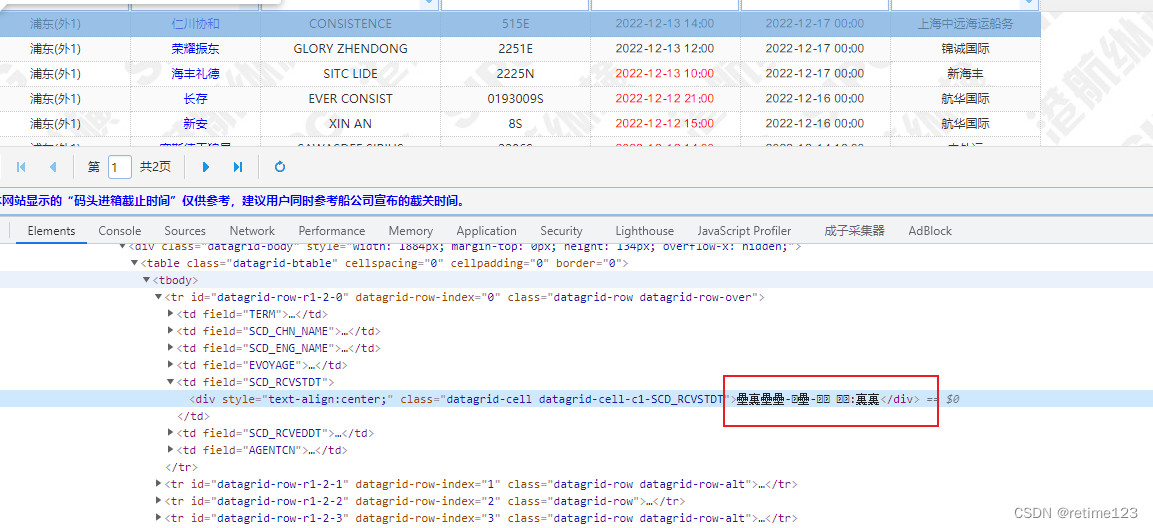
网站是json数据返回的:

这个网站有个好玩的地方,直接请求目标api,是不给数据的,要先请求生成woff名的api,才能请求目标数据,通过woff名,我们把woff文件下载下来分析,为了保证分析的准确性,我们要多下载几个woff文件,然后我们用 fontcreator 打开看下:
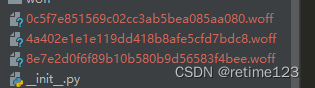
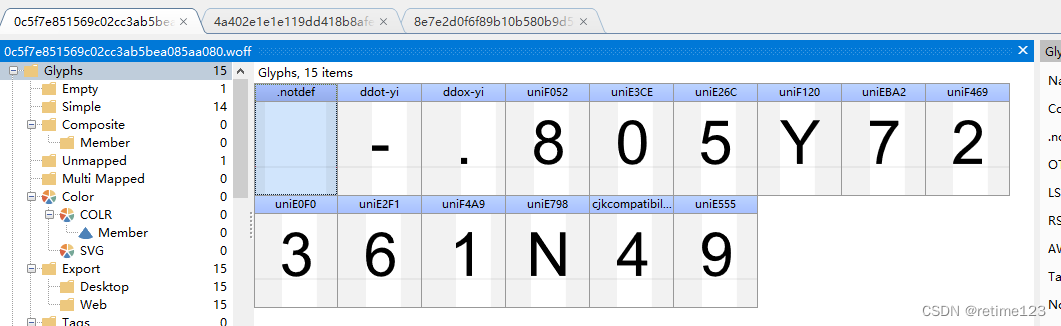
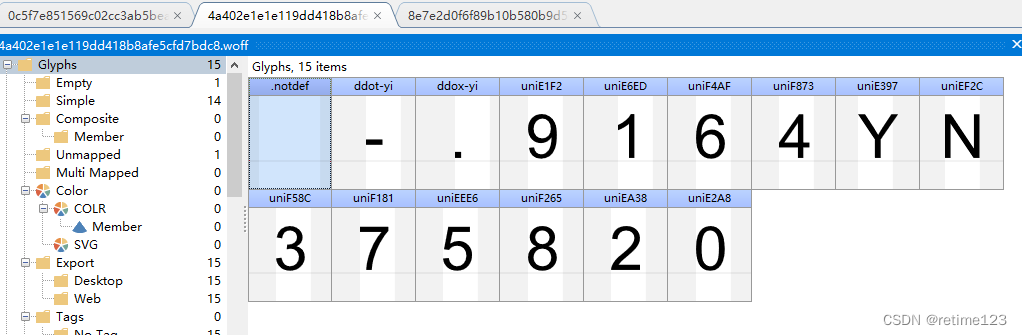
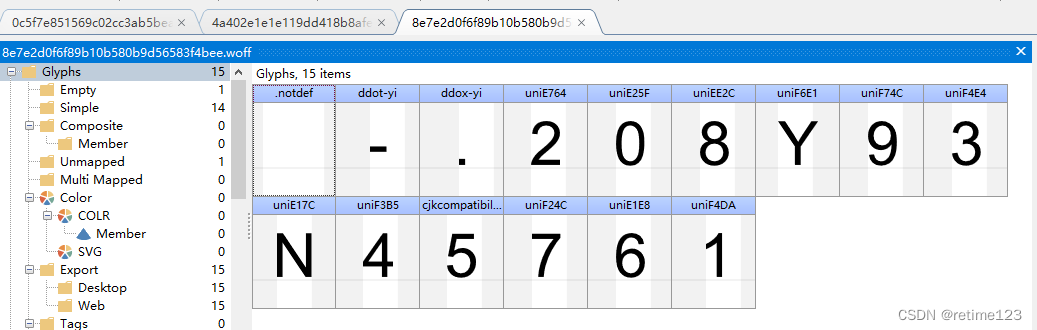
可看出3个文件,前面3个是固定的,后面是不固定的,这个就需要重点分析了!
结论:
- 每次页面加载的字体文件都不是同一个
- 某一个字体对象的命名方式不一样
- 同一个字体对应的像素坐标会有微妙的变化(观察了多个样本,每个字体像素点xy坐标的差距都不大于55)
- 同一个字体的像素点个数是一样的
下面是我的处理方法:
一、转化成图片,然后识别:
from fontTools.ttLib import TTFont
import pygame
import os,io
import ddddocr


# rFontPath = r'4a402e1e1e119dd418b8afe5cfd7bdc8.woff'
# rFontPath = '8e7e2d0f6f89b10b580b9d56583f4bee.woff'
rFontPath = '0c5f7e851569c02cc3ab5bea085aa080.woff'

font0 = TTFont(rFontPath)
font_names = font0.getGlyphNames()[3:]
pygame.init()
font = pygame.font.Font(rFontPath, 30)
font_ocr = ddddocr.DdddOcr(show_ad=False)
for i in font_names:
    a = i.replace('uni', '0x')
    word = chr(eval(a))
    rtext = font.render(word, True, (0, 0, 0), (255, 255, 255))
    byteIO = io.BytesIO()
    pygame.image.save(rtext, byteIO)
    byteArr = byteIO.getvalue()
    result = font_ocr.classification(byteArr)
    print(result)
用到python的包fontTools、pygame(这个要初始化,别忘记了),用到大佬做的ocr识别包 ddddocr 有兴趣的小伙伴可以去git上看看。
我们在实际应用中是二进制流的形式,下面是二进制流处理方式:
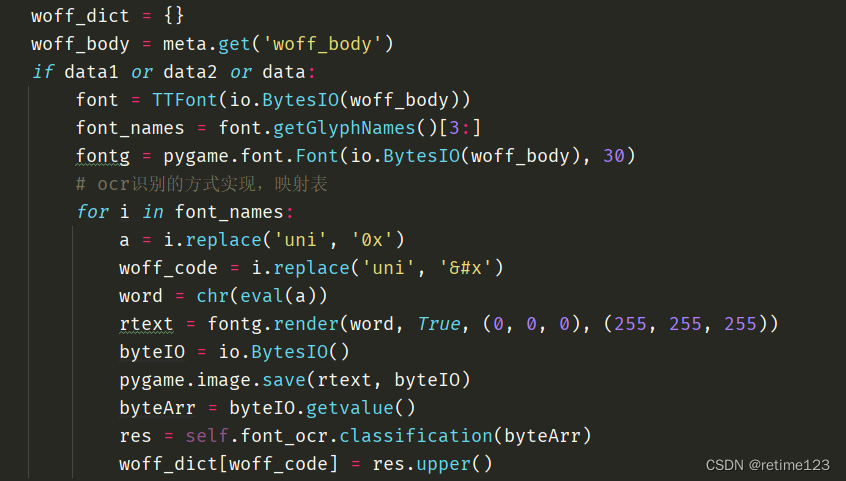
好了,最终我们得到对应的映射表。然后数据就可以结构化了!
二、字体的像素点相同,像素点相同且xy像素相差均小于55,则判定为同一个字体
直接上代码
# 比较两个图像的像素点  x、y坐标的差值
def compare_ptsxy(ptsxy_A, ptsxy_B):
    if len(ptsxy_A) != len(ptsxy_B):
        return False
    for i in range(0, len(ptsxy_A)):
        x_comp = abs(int(ptsxy_A[i][0]) - int(ptsxy_B[i][0]))
        y_comp = abs(int(ptsxy_A[i][1]) - int(ptsxy_B[i][1]))
        if x_comp > 55 | y_comp > 55:
            return False
    return True

# 作为一个 标准
rel = {
    'N': [(76, 50), (76, 766), (173, 766), (549, 204), (549, 766), (640, 766), (640, 50), (543, 50), (167, 613),
          (167, 50)],
    '6': [(498, 591), (410, 584), (398, 636), (377, 659), (341, 697), (289, 697), (247, 697), (215, 673), (174, 643),
          (126, 527), (125, 419), (157, 468), (249, 514), (299, 515), (387, 515), (511, 385), (510, 283), (510, 215),
          (452, 99), (350, 39), (286, 38), (176, 38), (38, 200), (38, 385), (38, 593), (114, 687), (181, 769),
          (294, 769), (379, 769), (487, 675), (139, 282), (139, 237), (177, 153), (247, 111), (285, 110), (340, 110),
          (423, 200), (423, 352), (342, 436), (281, 437), (222, 437), (138, 351)],
    '0': [(41, 403), (41, 530), (94, 686), (196, 768), (275, 769), (333, 769), (419, 723), (477, 635), (507, 509),
          (504, 403), (504, 277), (456, 123), (354, 37), (275, 38), (171, 38), (112, 112), (41, 202), (132, 403),
          (132, 227), (214, 111), (336, 109), (421, 229), (421, 403), (421, 580), (336, 696), (213, 696), (177, 645),
          (132, 580)],
    '2': [(503, 135), (503, 50), (30, 50), (29, 82), (41, 111), (59, 160), (132, 252), (213, 315), (330, 411),
          (412, 523), (412, 572), (412, 624), (338, 696), (214, 696), (138, 620), (132, 553), (47, 562), (56, 663),
          (178, 769), (382, 769), (502, 655), (502, 570), (502, 527), (468, 445), (386, 351), (291, 272), (212, 206),
          (168, 158), (152, 135)],
    '8': [(177, 438), (122, 458), (70, 534), (69, 584), (69, 663), (183, 769), (369, 769), (483, 661), (483, 582),
          (483, 532), (431, 458), (377, 438), (443, 417), (513, 321), (512, 255), (512, 163), (382, 39), (170, 37),
          (41, 165), (41, 257), (41, 327), (111, 421), (159, 587), (159, 537), (225, 471), (328, 472), (392, 536),
          (393, 582), (393, 631), (325, 697), (226, 697), (158, 633), (131, 257), (131, 219), (167, 149), (237, 111),
          (277, 110), (340, 110), (422, 192), (422, 317), (338, 401), (274, 400), (212, 400), (132, 318)],
    '7': [(47, 672), (47, 757), (511, 757), (511, 688), (442, 616), (308, 374), (272, 247), (245, 157), (238, 50),
          (148, 50), (149, 135), (213, 373), (331, 597), (398, 672)],
    '4': [(323, 50), (323, 222), (13, 222), (13, 302), (339, 766), (411, 766), (411, 302), (504, 302), (504, 222),
          (411, 222), (411, 50), (323, 302), (323, 625), (99, 302)],
    '1': [(373, 50), (285, 50), (285, 610), (253, 580), (149, 520), (110, 504), (110, 589), (183, 624), (293, 722),
          (316, 769), (373, 769)],
    '3': [(41, 239), (130, 251), (145, 176), (217, 110), (270, 110), (332, 110), (421, 196), (421, 260), (421, 320),
          (338, 400), (277, 399), (252, 399), (215, 389), (225, 466), (234, 465), (239, 465), (295, 465), (385, 525),
          (385, 585), (385, 633), (321, 697), (217, 697), (149, 633), (139, 568), (51, 583), (67, 672), (181, 768),
          (266, 769), (325, 769), (423, 719), (477, 631), (476, 583), (476, 537), (426, 459), (377, 438), (440, 423),
          (512, 331), (511, 262), (511, 168), (373, 38), (270, 38), (175, 38), (51, 150)],
    'Y': [(279, 50), (279, 353), (3, 766), (118, 766), (259, 550), (298, 490), (332, 429), (364, 485), (410, 556),
          (549, 766), (659, 766), (374, 353), (374, 50)],
    '9': [(55, 216), (139, 224), (150, 164), (210, 110), (258, 110), (298, 110), (360, 148), (398, 208), (426, 316),
          (425, 370), (424, 387), (398, 345), (306, 293), (253, 293), (165, 293), (41, 421), (41, 527), (41, 636),
          (170, 770), (267, 769), (336, 769), (452, 693), (512, 555), (512, 423), (512, 286), (452, 122), (336, 40),
          (256, 38), (172, 38), (66, 132), (415, 532), (415, 607), (333, 697), (277, 696), (219, 696), (131, 600),
          (132, 524), (132, 456), (214, 370), (336, 371), (414, 455)],
    '5': [(41, 238), (134, 246), (144, 178), (214, 110), (272, 110), (335, 110), (423, 206), (423, 285), (423, 360),
          (339, 448), (270, 447), (228, 447), (158, 409), (140, 378), (57, 389), (127, 756), (482, 756), (482, 672),
          (197, 672), (158, 480), (223, 525), (294, 525), (387, 525), (517, 395), (516, 293), (516, 196), (460, 125),
          (391, 38), (272, 38), (174, 38), (50, 148)]
}

font0 = TTFont('0c5f7e851569c02cc3ab5bea085aa080.woff')
print(font0.getGlyphNames())
woff_map_dict = {}
dict_data = {}
for k in font0.getGlyphNames()[3:]:
    val = []
    for _data in font0['glyf'][k].coordinates:
        _x = _data[0]
        _y = _data[1]
        _val = (_x, _y)
        val.append(_val)
    dict_data[k] = val
    for i in rel.keys():
        if compare_ptsxy(val, rel.get(i)):
            # print(k, i)
            woff_map_dict[k] = i
print(woff_map_dict)
结果:



 扫一扫
扫一扫


 2198
2198

 被折叠的 条评论
为什么被折叠?
被折叠的 条评论
为什么被折叠?
 到【灌水乐园】发言


