


前言
在 SpringBoot 多模块项目日常开发中,经常遇到几个典型问题:
1. Maven3.8+ 默认拦截内网 HTTP 私服,依赖拉取失败
2. Smart-Doc 插件每次构建全量扫描所有 Controller,编译耗时久
3. 全模块启用 QueryDSL,注解处理缓慢,Q类经常代码提示爆红
4. IDE 默认参数不合理,多模块编译资源不足、频繁GC
5. 项目中文乱码(控制台、配置文件、编译日志)
6. QueryDSL 版本分散定义,极易出现版本不一致冲突
本文提供一套开箱即用、规范严谨的标准化方案,包含 Maven settings、IDEA 全套配置、父Pom规范。
优化效果:完整编译从 5分钟 稳定降至 90秒。
环境清单
- Maven 3.9.x
- IDEA 2025
- SpringBoot 多模块工程
- 内网 Nexus HTTP 私服
- QueryDSL JPA
- Smart-Doc API文档生成
一、Maven settings.xml 通用配置
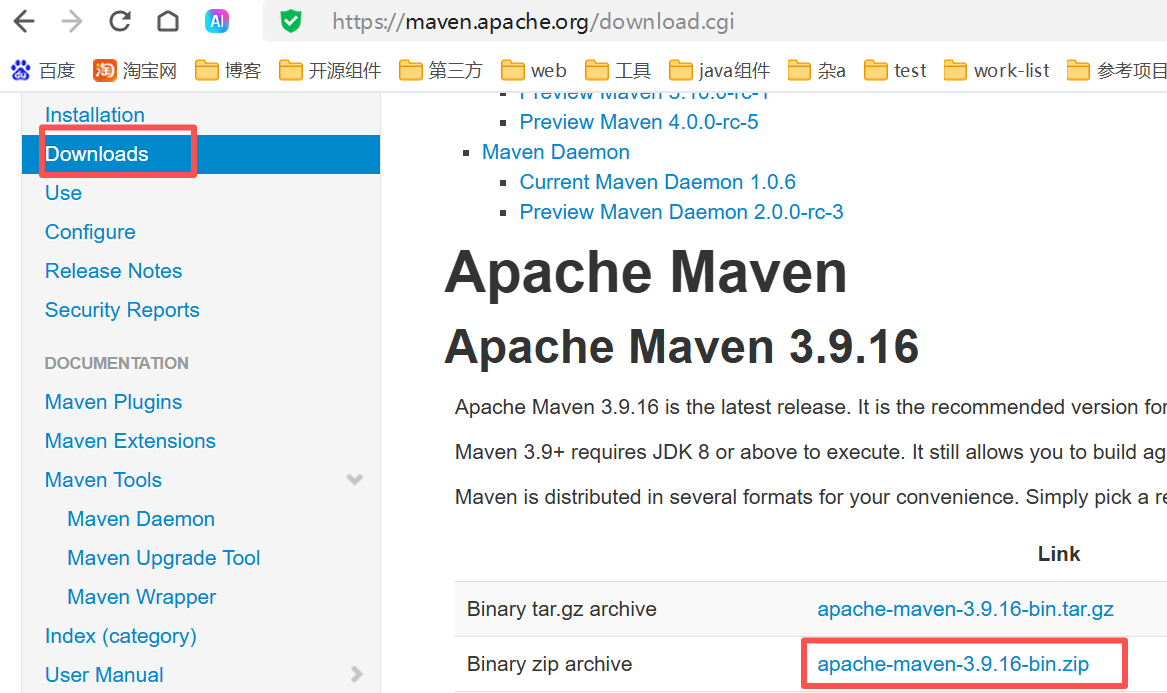
maven 下载地址 https://maven.apache.org/
重要规范:不要修改Maven安装目录自带settings,单独创建用户自定义配置文件。
解决核心问题:Maven3.8+ 强制阻断HTTP私服。
<?xml version="1.0" encoding="UTF-8"?>
<settings xmlns="http://maven.apache.org/SETTINGS/1.2.0"
          xmlns:xsi="http://www.w3.org/2001/XMLSchema-instance"
          xsi:schemaLocation="http://maven.apache.org/SETTINGS/1.2.0 http://maven.apache.org/xsd/settings-1.2.0.xsd">

    <localRepository>C:\java\maven\repository</localRepository>

    <servers>
        <!-- 私服账号密码按需配置 -->
    </servers>

    <mirrors>
        <!-- 解除Maven3.8+ HTTP强制拦截规则
        核心说明:mirrorOf="dummy" 匹配不到任何仓库,该镜像完全不参与依赖下载
        url仅为必填占位符,unused-empty-host.local 不会发起任何网络请求、无实际作用
        唯一功能:覆盖Maven内置http拦截规则,放行内网HTTP私服 -->
        <mirror>
            <id>maven-default-http-blocker</id>
            <mirrorOf>dummy</mirrorOf>
            <url>http://unused-empty-host.local</url>
            <blocked>false</blocked>
        </mirror>

        <!-- 统一内网私服,所有外部依赖转发到私服,请自行替换地址 -->
        <mirror>
            <id>private-all-mirror</id>
            <mirrorOf>external:*</mirrorOf>
            <url>http://你的内网私服地址/repository/maven-public/</url>
        </mirror>
    </mirrors>

    <profiles>
        <profile>
            <id>PrivateNexus</id>
            <repositories>
                <repository>
                    <id>PrivateNexus</id>
                    <url>http://你的内网私服地址/repository/maven-public/</url>
                    <httpConfiguration>
                        <allowInsecure>true</allowInsecure>
                    </httpConfiguration>
                    <releases>
                        <enabled>true</enabled>
                        <updatePolicy>never</updatePolicy>
                        <checksumPolicy>warn</checksumPolicy>
                    </releases>
                    <snapshots>
                        <enabled>true</enabled>
                        <checksumPolicy>fail</checksumPolicy>
                    </snapshots>
                </repository>
            </repositories>
            <pluginRepositories>
                <pluginRepository>
                    <id>private-nexus</id>
                    <name>private nexus</name>
                    <url>http://你的内网私服地址/repository/maven-public/</url>
                    <httpConfiguration>
                        <allowInsecure>true</allowInsecure>
                    </httpConfiguration>
                    <releases>
                        <enabled>true</enabled>
                        <checksumPolicy>warn</checksumPolicy>
                    </releases>
                    <snapshots>
                        <enabled>true</enabled>
                        <checksumPolicy>fail</checksumPolicy>
                    </snapshots>
                </pluginRepository>
            </pluginRepositories>
        </profile>
    </profiles>

    <activeProfiles>
        <activeProfile>PrivateNexus</activeProfile>
    </activeProfiles>
</settings>
二、IDEA2025 全套配置
打开路径:File -> Settings
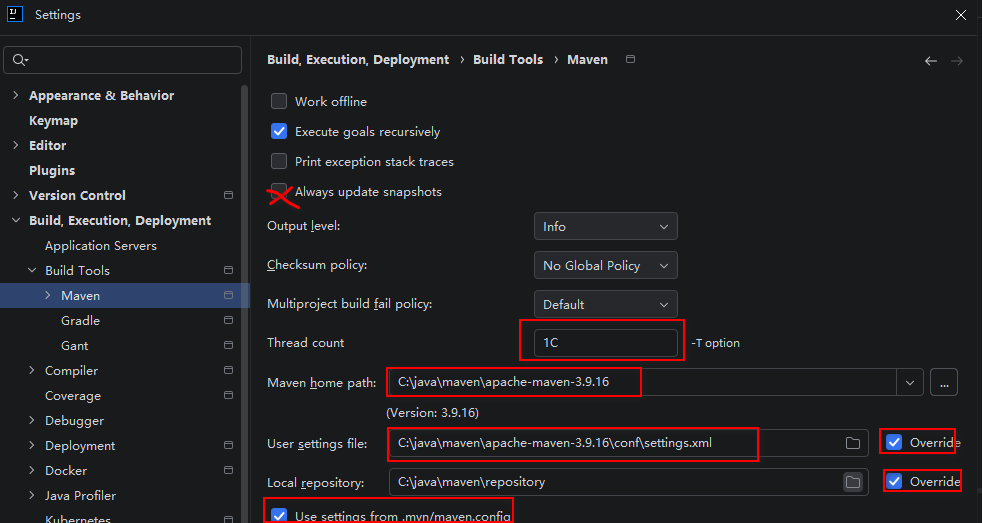
2.1 Maven 基础配置
路径:Build, Execution, Deployment → Maven
- Maven home path:选择本地 apache-maven-3.9.x
- User settings file:选中上面自定义 settings.xml
- Threads(-T option):1C
多模块并行编译,1C代表自动使用CPU核心数;部分项目存在模块依赖冲突可改为 0.8C
2.2 Maven Runner 配置
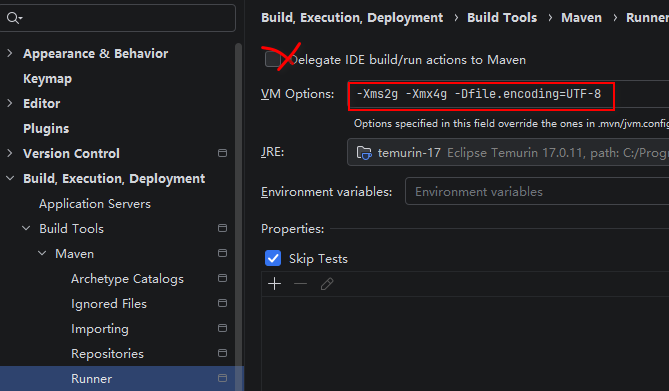
路径:Build, Execution, Deployment → Maven → Runner
- Delegate IDE build/run actions to Maven:不勾选【日常开发推荐】
不勾选:使用IDEA原生JPS增量编译器,编译速度更快,热重载体验更好;
勾选:构建、启动全部交由Maven执行,与CI行为一致,仅排查构建差异时临时启用。
- VM Options
-Xms2g -Xmx4g -Dfile.encoding=UTF-8
2.3 全局UTF-8编码(解决各类中文乱码)
路径:Editor → File Encodings
- Global Encoding:UTF-8
- Project Encoding:UTF-8
- Default encoding for properties files:UTF-8
- ✅ Transparent native-to-ascii conversion
开启后properties文件中文自动转义,避免配置读取乱码。
2.4 编译内存与注解处理器(QueryDSL必备)
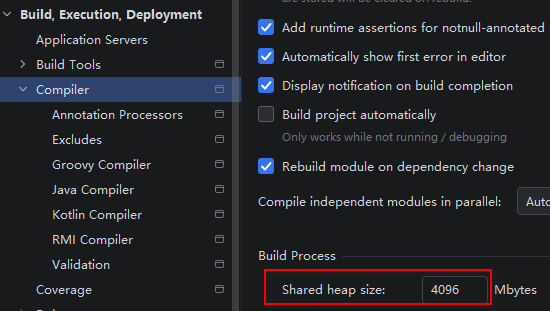
1)编译共享堆内存
路径:Build, Execution, Deployment → Compiler
- Build process Shared heap size(Mbytes):2048
提升多模块APT注解编译内存,减少GC停顿、防止内存溢出。
2)注解处理器(略)
我这边是默认开启
路径:Build, Execution, Deployment → Compiler → Annotation Processors
- ✅ Enable annotation processing
不开启此项,QueryDSL无法自动生成Q类,代码提示持续爆红。
三、父Pom关键配置
规范原则:在父工程
dependencyManagement统一锁定 QueryDSL 版本,一处管控全局,禁止分散定义版本。
<dependencyManagement>
    <dependencies>
        <dependency>
            <groupId>com.querydsl</groupId>
            <artifactId>querydsl-jpa</artifactId>
            <classifier>jpa</classifier>
            <version>5.0.0</version>
        </dependency>
        <dependency>
            <groupId>com.querydsl</groupId>
            <artifactId>querydsl-apt</artifactId>
            <version>5.0.0</version>
        </dependency>
    </dependencies>
</dependencyManagement>
3.1 Smart-Doc 使用Profile隔离(核心优化)
禁止直接绑定默认compile生命周期!
一旦全局启用,每次完整编译都会扫描全部Controller接口,极大拖慢构建速度。仅在需要导出API文档时手动激活。
放到父pom <profiles> 节点:
<project>
.....
<build>
<plugins>
<!-- 子模块识别parent的占位符 -->
<plugin>
<groupId>org.codehaus.mojo</groupId>
<artifactId>flatten-maven-plugin</artifactId>
</plugin>
<plugin>
<groupId>com.ly.smart-doc</groupId>
<artifactId>smart-doc-maven-plugin</artifactId>
<version>3.0.4</version>
<configuration>
<!--指定生成文档的使用的配置文件,配置文件放在自己的项目中-->
<configFile>./src/main/resources/smart-doc.json</configFile>
<!--指定项目名称-->
<projectName>OA</projectName>
<excludes>
<exclude>
org.springframework.boot:spring-boot-starter-tomcat
</exclude>
<exclude>
org.springframework.boot:spring-boot-starter-jdbc
</exclude>
</excludes>
</configuration>
<!--<executions>
<execution>
<!–不要添加内容:执行编译时启动smart-doc–>
<phase>compile</phase>
<goals>
<goal>markdown</goal>
</goals>
</execution>
</executions>-->
</plugin>
</plugins>
</build>
<!-- 通过maven环境变量,来控制文档是否生成 -->
<profiles>
<profile>
<id>doc</id>
<build>
<plugins>
<plugin>
<groupId>com.ly.smart-doc</groupId>
<artifactId>smart-doc-maven-plugin</artifactId>
<executions>
<execution>
<phase>compile</phase>
<goals>
<goal>markdown</goal>
</goals>
</execution>
</executions>
</plugin>
</plugins>
</build>
</profile>
</profiles>
</project>
3.2 QueryDSL APT插件(pluginManagement统一管理)
重点规范:移除插件内部dependencies版本声明,防止插件依赖与业务依赖版本不一致引发诡异编译问题
<plugin>
    <groupId>com.mysema.maven</groupId>
    <artifactId>apt-maven-plugin</artifactId>
    <version>1.1.3</version>
    <executions>
        <execution>
            <goals>
                <goal>process</goal>
            </goals>
            <configuration>
                <outputDirectory>target/generated-sources/java</outputDirectory>
                <processor>com.querydsl.apt.jpa.JPAAnnotationProcessor</processor>
                <options>
                    <option>querydsl.skipGeneratedCodeValidation=true</option>
                </options>
            </configuration>
        </execution>
    </executions>
</plugin>
3.3 子模块依赖引入
子模块无需填写version,自动继承父工程统一版本;
有实体、需要生成Q类的模块,两个依赖都引入。
<!-- QueryDSL 运行核心依赖 -->
<dependency>
    <groupId>com.querydsl</groupId>
    <artifactId>querydsl-jpa</artifactId>
    <classifier>jpa</classifier>
</dependency>

<!-- APT注解处理器,仅编译期生效 -->
<dependency>
    <groupId>com.querydsl</groupId>
    <artifactId>querydsl-apt</artifactId>
    <scope>provided</scope>
</dependency>
3.4 QueryDSL基础配置类
统一注入JPAQueryFactory,全局使用动态查询:
import jakarta.persistence.EntityManager;
import com.querydsl.jpa.impl.JPAQueryFactory;
import org.springframework.context.annotation.Bean;
import org.springframework.context.annotation.Configuration;

@Configuration
public class QueryDslConfig {

    @Bean
    public JPAQueryFactory jpaQueryFactory(EntityManager entityManager){
        return new JPAQueryFactory(entityManager);
    }
}
3.5 QueryDSL简单使用示例
实体编译后自动生成Q+实体名类,类型安全、动态拼接条件:
import com.querydsl.core.types.dsl.BooleanExpression;
import com.querydsl.jpa.impl.JPAQueryFactory;
import org.springframework.stereotype.Service;
import jakarta.annotation.Resource;
import java.util.List;

@Service
public class UserService {

    @Resource
    private JPAQueryFactory queryFactory;

    public List<User> listUser(String name){
        QUser user = QUser.user;
        BooleanExpression condition = null;
        if(name != null && !name.isEmpty()){
            condition = user.name.like("%"+name+"%");
        }
        return queryFactory.selectFrom(user)
                .where(condition)
                .orderBy(user.createTime.desc())
                .fetch();
    }
}
四、日常开发规范
本文适配 IDEA 可视化开发模式,优先使用IDE内置功能,不依赖命令行。
- 常规开发:直接使用IDEA增量编译、热更新,尽量少执行clean,充分利用增量编译提速;
- 全量编译/依赖异常排查:在Maven侧边栏手动执行clean、compile;
- 生成API文档:接口大规模变更后,临时激活smartdoc profile执行;
- 依赖版本更新:关闭离线模式拉取私服最新包,同步完成后可再次开启离线模式。
五、高频踩坑总结
- 不要直接修改Maven安装目录自带settings,使用独立用户配置;
- SmartDoc务必放到Profile,默认关闭,是编译提速最关键的优化点;
- 日常开发关闭Delegate委托Maven构建,优先IDEA原生编译器;
- QueryDSL必须开启注解处理器,否则Q类持续爆红;
- dummy占位镜像仅关闭Maven内置HTTP拦截,不会发起任何网络请求,无副作用;
- 本地仓库存在依赖缓存时,不会访问远程私服属于正常现象,可刷新Maven依赖强制拉取;
- ❗禁止在apt-maven-plugin内部定义QueryDSL版本,统一放在父工程dependencyManagement,避免版本冲突。
六、最终效果
✅ 解决Maven3.9 HTTP内网私服拦截报错
✅ SmartDoc按需启用,不再拖累日常编译
✅ QueryDSL全模块正常生成查询Q类
✅ 统一UTF-8编码,杜绝中文乱码
✅ 多模块编译耗时显著下降
✅ IDE增量编译、热重载开发体验最优
✅ QueryDSL版本统一管控,规避版本不一致导致的编译异常





 扫一扫
扫一扫


 被折叠的 条评论
为什么被折叠?
被折叠的 条评论
为什么被折叠?
 到【灌水乐园】发言





