Android控件之AlertDialog-单选、多选信息列表弹出框

AndroidAlertDialog(对话框)详解 本节继续给大家带来是显示提示信息的第三个控件AlertDialog(对话框),同时它也是其他 Dialog的的父类!比如ProgressDialog,TimePickerDialog等,而AlertDialog的父类是:Dialog! 另外,不像前面学习的Toast和Notification,AlertDialog并不能直接new出来,如果你打开 AlertDialog的源码,会发现构造方法是protected的,如果我们要创建AlertDialog的话,我们 需要使用到该类中的一个静态内部类:public 阅读详情

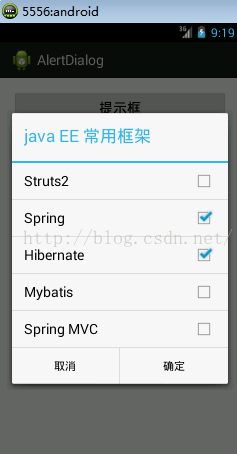
1、AlertDialog的信息列表、单选、多选对话框简介

上一遍简单介绍了一个信息提示框,下面一次介绍信息列表对话框、单选对话框、多选对话框,具体效果如下
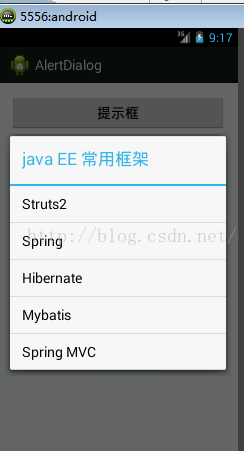

2、xml布局文件

布局文件只是几个按钮,并且为其绑定了点击事件,点击按钮后弹出对话框

[html]  view plain  copy
  1. <RelativeLayout xmlns:android="http://schemas.android.com/apk/res/android"  
  2.     xmlns:tools="http://schemas.android.com/tools"  
  3.     android:layout_width="match_parent"  
  4.     android:layout_height="match_parent"  
  5.     android:paddingBottom="@dimen/activity_vertical_margin"  
  6.     android:paddingLeft="@dimen/activity_horizontal_margin"  
  7.     android:paddingRight="@dimen/activity_horizontal_margin"  
  8.     android:paddingTop="@dimen/activity_vertical_margin"  
  9.     tools:context=".MainActivity" >  
  10.     <Button  
  11.         android:id="@+id/button2"  
  12.         android:layout_width="wrap_content"  
  13.         android:layout_height="wrap_content"  
  14.         android:layout_alignParentLeft="true"  
  15.         android:layout_alignRight="@+id/button1"  
  16.         android:layout_below="@+id/button1"  
  17.         android:onClick="showListAlertDialog"  
  18.         android:text="信息列表框" />  
  19.     <Button  
  20.         android:id="@+id/button3"  
  21.         android:layout_width="wrap_content"  
  22.         android:layout_height="wrap_content"  
  23.         android:layout_alignLeft="@+id/button2"  
  24.         android:layout_alignParentRight="true"  
  25.         android:layout_below="@+id/button2"  
  26.         android:onClick="showSingleAlertDialog"  
  27.         android:text="单选列表" />  
  28.     <Button  
  29.         android:id="@+id/button4"  
  30.         android:layout_width="wrap_content"  
  31.         android:layout_height="wrap_content"  
  32.         android:layout_alignLeft="@+id/button3"  
  33.         android:layout_alignParentRight="true"  
  34.         android:layout_below="@+id/button3"  
  35.         android:onClick="showMutilAler<span style="font-family: Arial, Helvetica, sans-serif;">tDialog"</span>  
  36.         android:text="多选按钮" />  
  37.   
  38. </RelativeLayout>  

3、java代码

[java]  view plain  copy
  1. package com.example.alertdialog;  
  2.   
  3. import android.app.Activity;  
  4. import android.app.AlertDialog;  
  5. import android.content.DialogInterface;  
  6. import android.os.Bundle;  
  7. import android.view.Menu;  
  8. import android.view.View;  
  9. import android.widget.EditText;  
  10. import android.widget.Toast;  
  11.   
  12. public class MainActivity extends Activity {  
  13.   
  14.     @Override  
  15.     protected void onCreate(Bundle savedInstanceState) {  
  16.         super.onCreate(savedInstanceState);  
  17.         setContentView(R.layout.activity_main);  
  18.     }  
  19.   
  20.     @Override  
  21.     public boolean onCreateOptionsMenu(Menu menu) {  
  22.         // Inflate the menu; this adds items to the action bar if it is present.  
  23.         getMenuInflater().inflate(R.menu.main, menu);  
  24.         return true;  
  25.     }  
  26.   
  27.     // 信息列表提示框  
  28.     private AlertDialog alertDialog1;  
  29.     public void showListAlertDialog(View view){  
  30.         final String[] items = {"Struts2","Spring","Hibernate","Mybatis","Spring MVC"};  
  31.         AlertDialog.Builder alertBuilder = new AlertDialog.Builder(this);  
  32.         alertBuilder.setTitle("java EE 常用框架");  
  33.         alertBuilder.setItems(items, new DialogInterface.OnClickListener() {  
  34.             @Override  
  35.             public void onClick(DialogInterface arg0, int index) {  
  36.                 Toast.makeText(MainActivity.this, items[index], Toast.LENGTH_SHORT).show();  
  37.                 alertDialog1.dismiss();  
  38.             }  
  39.         });  
  40.         alertDialog1 = alertBuilder.create();  
  41.         alertDialog1.show();  
  42.     }  
  43.       
  44.     // 单选提示框  
  45.     private AlertDialog alertDialog2;  
  46.     public void showSingleAlertDialog(View view){  
  47.         final String[] items = {"Struts2","Spring","Hibernate","Mybatis","Spring MVC"};  
  48.         AlertDialog.Builder alertBuilder = new AlertDialog.Builder(this);  
  49.         alertBuilder.setTitle("java EE 常用框架");  
  50.         alertBuilder.setSingleChoiceItems(items, 0new DialogInterface.OnClickListener() {  
  51.               
  52.             @Override  
  53.             public void onClick(DialogInterface arg0, int index) {  
  54.                 Toast.makeText(MainActivity.this, items[index], Toast.LENGTH_SHORT).show();  
  55.             }  
  56.         });  
  57.         alertBuilder.setPositiveButton("确定"new DialogInterface.OnClickListener() {  
  58.               
  59.             @Override  
  60.             public void onClick(DialogInterface arg0, int arg1) {  
  61.                 //TODO 业务逻辑代码  
  62.                   
  63.                 // 关闭提示框  
  64.                 alertDialog2.dismiss();  
  65.             }  
  66.         });  
  67.         alertBuilder.setNegativeButton("取消"new DialogInterface.OnClickListener() {  
  68.               
  69.             @Override  
  70.             public void onClick(DialogInterface arg0, int arg1) {  
  71.                 // TODO 业务逻辑代码  
  72.                   
  73.                 // 关闭提示框  
  74.                 alertDialog2.dismiss();  
  75.             }  
  76.         });  
  77.         alertDialog2 = alertBuilder.create();  
  78.         alertDialog2.show();  
  79.     }  
  80.       
  81.     // 多选提示框  
  82.     private AlertDialog alertDialog3;  
  83.     public void showMutilAlertDialog(View view){  
  84.         final String[] items = {"Struts2","Spring","Hibernate","Mybatis","Spring MVC"};  
  85.           
  86.         // 创建一个AlertDialog建造者  
  87.         AlertDialog.Builder alertDialogBuilder= new AlertDialog.Builder(this);  
  88.         // 设置标题  
  89.         alertDialogBuilder.setTitle("java EE 常用框架");  
  90.         // 参数介绍  
  91.         // 第一个参数:弹出框的信息集合,一般为字符串集合  
  92.         // 第二个参数:被默认选中的,一个布尔类型的数组  
  93.         // 第三个参数:勾选事件监听  
  94.         alertDialogBuilder.setMultiChoiceItems(items, nullnew DialogInterface.OnMultiChoiceClickListener() {  
  95.             @Override  
  96.             public void onClick(DialogInterface dialog, int which, boolean isChecked) {  
  97.                 // dialog:不常使用,弹出框接口  
  98.                 // which:勾选或取消的是第几个  
  99.                 // isChecked:是否勾选  
  100.                 if (isChecked) {  
  101.                     // 选中  
  102.                     Toast.makeText(MainActivity.this"选中"+items[which], Toast.LENGTH_SHORT).show();  
  103.                 }else {  
  104.                     // 取消选中  
  105.                     Toast.makeText(MainActivity.this"取消选中"+items[which], Toast.LENGTH_SHORT).show();  
  106.                 }  
  107.                   
  108.             }  
  109.         });  
  110.         alertDialogBuilder.setPositiveButton("确定"new DialogInterface.OnClickListener() {  
  111.               
  112.             @Override  
  113.             public void onClick(DialogInterface arg0, int arg1) {  
  114.                 //TODO 业务逻辑代码  
  115.                   
  116.                 // 关闭提示框  
  117.                 alertDialog3.dismiss();  
  118.             }  
  119.         });  
  120.         alertDialogBuilder.setNegativeButton("取消"new DialogInterface.OnClickListener() {  
  121.               
  122.             @Override  
  123.             public void onClick(DialogInterface arg0, int arg1) {  
  124.                 // TODO 业务逻辑代码  
  125.                   
  126.                 // 关闭提示框  
  127.                 alertDialog3.dismiss();  
  128.             }  
  129.         });  
  130.         alertDialog3 = alertDialogBuilder.create();  
  131.         alertDialog3.show();  
  132.     }  
  133.       
  134. }  
Android App开发超实用实例 | AlertDialog对话框 介绍AlertDialog对话框从简到繁的种设计方案,从新角度理解UI交互设计。 AlertDialog对话框允许自定义弹出对话框的内容,实现比之前讲解的几种对话框更丰富的功能。 阅读详情

相关推荐

Android列表项、单选对话框实践指南

本文还有配套的精品资源,点击获取 简介:在Android开发中,对话框是用于展示信息和收集用户输入的关键UI元素。本文详细介绍了如何使用Dialog、ListView以及适配器来实现列表项、单选对话框。从创建AlertDialog到自定义ListView项的样式和行为,再到处理中状态和用户交互,本文通过实例代码和解释,指导开发者构建用户友好的交互式界面。 ...

weixin_36427956的博客 1593

Android实现弹出列表单选

主要为大家详细介绍了Android实现弹出列表单选框,具有一定的参考价值,感兴趣的小伙伴们可以参考一下

AlertDialog对话框

AlertDialog是一个常用的组件,用于展示一个漂浮在当前界面之上的对话框,常用来显示警告、确认信息或简单的用户输入。通常,我们不是直接实例化AlertDialog对象,而是通过其内部类AlertDialog.Builder来构建。AlertDialog不同于前面已经学习过的 UI 控件,它不能用new方法创造出来,也不能用 XML 创建,只能通过AlertDialob的内部类Builder来创建。

全栈 1932

Android中AlertDilog显示简单和复杂列表的方法

本文实例讲述了AndroidAlertDialog显示简单和复杂列表的方法。分享给大家供大家参考,具体如下: AlertDialog 显示简单列表 setItems import Android.app.Activity; import android.app.AlertDialog; import android.content.DialogInterface; import android.os.Bundle; import android.os.Handler; import android.view.View; import android.view.View.OnClickLis

Android弹出择对话框,Android:具有择的警报对话框

您的OnMultiChoiceClickListener就在附近.它只有两个问题:首先,您的for循环不会遍历除单击的孩子以外的所有孩子.// A loop to disable all items other than clicked onefor (int position = alertDialogList.getCheckedItemPosition(); position<aler...

weixin_39610956的博客 232

Android 对话框(Dialog)大全 建立你自己的对话框

  Activities提供了一种方便管理的创建、保存、回复的对话框机制,例如 onCreateDialog(int), onPrepareDialog(int, Dialog), showDialog(int), dismissDialog(int)等方法,如果使用这些方法的话,Activity将通过getOwnerActivity()方法返回该Activity管理的对话框(dialog). ...

weixin_34019144的博客 531

Android自定义弹出组件Dialog实现地址择器功能

城市择器目标效果如图:此例抛砖引玉,其他效果实现效果类似。布局文件不算在代码步骤内(文末尾贴出源码)

qq_38961813的博客 917

Android 开发】:UI控件AlertDialog 对话框控件的的使用(二)

在上一讲中,我们介绍了Android中对话框的简单使用:【Android 开发】:UI控件AlertDialog 对话框控件的的使用(一) ,这一讲,我们继续来讲解一下对话框的其他使用方式,主要是添加单选或者列表项。     创建一个或者单选列表在对话框中,就必须使用 setMultiChoiceItems() 和 setSingleChoiceItems() 方法,如果需

AHuier_Techblog :如果我不在写代码,你就 @me 2521

AndroidAlertDialog的使用

AndroidAlertDialog的使用默认样式单选弹出框弹出框自定义弹出框 默认样式 单选弹出框 弹出框 自定义弹出框

Carryi的博客 1648

CheckBox实现单选项功能

1、CheckBox复框的基本使用: 一般简单的使用,当需要项时,可以考虑将其使用,比如兴趣的择,一个人有择结果,这时候我们设置复框进行择。 布局与简单的使用:设置监听,set <CheckBox android:layout_width="wrap_content" android:layout_height="wrap_content" android:textSize="18sp" android:textColor="

qq_42811161的博客 7091

Android 常见控件使用】AlertDialog(对话框)详解

文章目录AlertDialog(对话框)详解本节引言1.基本使用流程2.几种常用的对话框使用示例3.通过Builder的setView()定制显示的AlertDialog AlertDialog(对话框)详解 本节引言 本节继续给大家带来是显示提示信息的第三个控件AlertDialog(对话框),同时它也是其他 Dialog 的父类!比如 ProgressDialog,TimePickerDialog等,而AlertDialog的父类是:Dialog! 另外,不像前面学习的 Toast 和 Notif.

懂得一千零一种,赋予你失败的方法! 4708

安卓小记---关于AlertDialog弹窗

安卓小记AlertDialog弹窗安卓小记---关于AlertDialog弹窗创建一个AlertDialog弹窗创建一个自定义AlertDialog弹窗通过dismiss进行关闭AlertDialog也支持列表单选列表列表,进度条等效果列表单选列表列表进度条 安卓小记—关于AlertDialog弹窗 安卓经常使用的有Dialog 弹框,popupwindow弹框。 两者间的区别在于:dialog是非阻塞式对话框,popupwindow是阻塞式对话框。也就是说dialog弹出时 后台还可以进行很

qq_41007103的博客 444

AlertDialog(对话框)详解

AlertDialog可以在当前的界面上显示一个对话框,这个对话框是置顶于所有界面元素之上的,能够屏蔽掉其他控件的交互能力,因此AlertDialog一般是用于提示一些非常重要的内容或者警告信息。 1.创建AlertDialog 首先,我们来了解一下AlertDialog的大体创建顺序。与TextView、Button这些控件稍有不同,AlertDialog并...

streate的专栏 7万+

AndroidUI控件-AlertDialog弹窗控件

AndroidUI控件-AlertDialog弹窗控件有关android弹窗界面相信大家见过不少了,手机上很应用软件都涉及到弹窗控件,比如典型的每次删除一个图片或者卸载一个等都会弹出一个窗口询问是否删除/卸载等,还有我们系统的设置时间/日期等,都用到了这样的控件,下面我将通过代码来总结下常用的几个弹窗控件activity_main.xml<?xml version="1.0" encoding=

GodV的博客 931

Android从零单排系列十五】《Android视图控件——AlertDialog

小伙伴们,在上文中我们介绍了Android视图组件RatingBar,本文我们继续盘点,介绍一下视图控件AlertDialogAlertDialogAndroid平台上的一个UI组件,用于显示对话框并与用户进行交互。AlertDialog是一种常用的对话框,可用于提示信息、确认操作或让用户做出择。根据需求,在构建器中设置对话框的标题、消息内容、图标等属性,并通过按钮点击监听器处理用户的响应。最后通过create方法创建并显示AlertDialog实例。

商务合作|问题讨论|交流学习 请联系作者微信,加微信请务必注明来意,博客主页有联系方式 782

安卓通知的使用系列4:对话框通知的使用之列表对话框、单选列表对话框、列表对话框

列表对话框是对话框的一种常见形式,在android开发中使用比较普遍,下面我们来介绍一个它的使用方式。 整体思路:在xml文件中定义三个button控件,并分别设置它们的点击事件,在第一个点击事件中实例化一个AlertDialog.Builder对象,并设置每一个item的点击事件,在第二个和第三个点击事件中分别实例化一个AlertDialog.Builder对象,并设置单选item的点击

luoshiwutai的博客 464

AlertDialog的种类和使用方法

<本文章仅作学习的笔记的目的,可能会有参考冲突与错误,请见谅。>AlertDialog可以在当前页面里弹出一个对话框,它可以屏蔽其他UI控件的交互能力,以起到警示的作用,所以在实际设计时dialog会作为重要信息提示作用而存在。dialog有以下几种形式:简单对话框,列表对话框,单选对话框,对话框,自定义对话框等。1.简单对话框“` Button dig=(Button)findViewB

苏凌的博客 2661
上一篇: Android Studio如何发布APK
下一篇: android隐藏搜索框边框 隐藏SearchView边框
上海菜鸡毛
博客等级 码龄11年 52粉丝 230原创
评论 1
成就一亿技术人!
拼手气红包6.0元
还能输入1000个字符
 
 条评论被折叠 查看
添加红包

请填写红包祝福语或标题

红包个数最小为10个

红包金额最低5元

当前余额3.43前往充值 >
需支付:10.00
成就一亿技术人!
领取后你会自动成为博主和红包主的粉丝 规则
hope_wisdom
发出的红包
实付
使用余额支付
点击重新获取
扫码支付
钱包余额 0

抵扣说明:

1.余额是钱包充值的虚拟货币,按照1:1的比例进行支付金额的抵扣。
2.余额无法直接购买下载,可以购买VIP、付费专栏及课程。

余额充值