【快速入门Dfinity】在本地和IC上部署一个project

限时加码!20+主流AI编程工具免费用 购周边加赠Coding Plan Lite,Claude Code、Cursor等即刻畅享,学习进阶更高效! 阅读详情


【准备工作】

创建一个名为hello的新项目:

dfx new hello

/*The dfx new xxx command creates a new hello project directly, template files, and a new hello Git repository for your project.*/


转到项目目录:

cd hello


【在本地部署/Start(local)】

新建一个终端,转到项目目录,然后通过运行以下命令,在第二个终端中的本地计算机上启动internet计算机网络:

dfx start

根据您的平台和本地安全设置,您可能会看到显示警告。如果系统提示您允许或拒绝传入的网络连接,请单击允许。


(也可以不用新建一个终端,直接用

dfx start --background

即可启动IC网络服务)


其余操作在第一个终端中进行。


【注册,构建和部署应用程序】

1.确保仍在项目的根目录中。


2.Ensure that node modules are available in your project directory, if needed, by running the following command:

npm install

之后,若版本过旧,可能会让您更新,默认的语句提示为:

npm install -g npm

但,运行此命令后会报错(EACCES:permission denied……)

根据我孱弱的经验和知识,在前面加上sudo并在运行此命令之后输入密码就可以了~即:

sudo npm install -g npm


3.Register, build, and deploy your first application by running the following command:

dfx deploy

The dfx deploy command output displays information about the operations it performs. For example, this step registers two network-specific identifiers—one for the hello main program and one for the hello_assets front-end user interface—and installation information similar to the following:

「Creating the "default" identity.
  - generating new key at /Users/pubs/.config/dfx/identity/default/identity.pem
Created the "default" identity.
Deploying all canisters.
Creating canisters...
Creating canister "hello"...
Creating the canister using the wallet canister...
Creating a wallet canister on the local network.
The wallet canister on the "local" network for user "default" is "rwlgt-iiaaa-aaaaa-aaaaa-cai"
"hello" canister created with canister id: "rrkah-fqaaa-aaaaa-aaaaq-cai"
Creating canister "hello_assets"...
Creating the canister using the wallet canister...
"hello_assets" canister created with canister id: "ryjl3-tyaaa-aaaaa-aaaba-cai"
Building canisters...
Building frontend...
Installing canisters...
Installing code for canister hello, with canister_id rrkah-fqaaa-aaaaa-aaaaq-cai
Installing code for canister hello_assets, with canister_id ryjl3-tyaaa-aaaaa-aaaba-cai
Authorizing our identity (default) to the asset canister...
Uploading assets to asset canister...
Deployed canisters.」


4.Call the hello canister and the predefined greet function by running the following command:

dfx canister call hello greet everyone

This example uses the dfx canister call command to pass "everyone" as an argument to the greet function.


5.Verify the command displays the return value of the greet function.
For example:

("Hello, everyone!")


【Test the application front-end】

  1. Open a browser.
  2. Navigate to the default address and port number 127.0.0.1:8000, then append /?canisterId= and the hello_assets identifier to the URL.
    For example, the full URL should look similar to the following:

    http://127.0.0.1:8000/?canisterId=rrkah-fqaaa-aaaaa-aaaaq-cai
    Navigating to this URL displays the prompt pop-up window. For example:
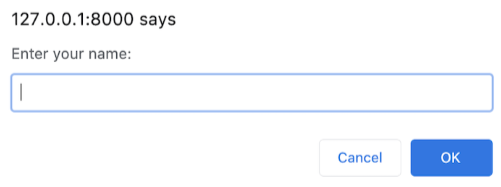
             

Type a greeting, then click OK to return the greeting.

             3.For example:
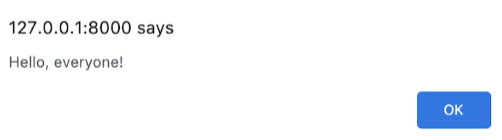
                         

             4.Click OK to close the alert pop-up window.

【Stop the local network】

After testing the application in the browser, you can stop the local Internet Computer network so that it doesn’t continue running in the background.


To stop the local network:


1.In the terminal that displays network operations, press Control-C to interrupt the local network process.

2.Stop the local Internet Computer network running on your local computer by running the following command:

dfx stop


【Start(Network)】

【检查与网络的连接】

1.先检查您是否位于项目的根目录中。

2.通过运行以下网络别名命令,检查Internet计算机网络ic的当前状态以及您连接到它的能力:

dfx ping ic

如果您在自己的计算机上修改了Internet Computer网络的网络别名 dfx.json文件,则替换ic网络别名,以及在此命令和后续命令中使用的别名。


【注册,构建和部署应用程序】

1.先检查您是否位于项目的根目录中。

2.确保node的状态,可以通过运行以下命令在项目的目录中使用模块:

npm install

3.通过运行以下命令注册,构建和部署您的应用程序:

dfx deploy --network=ic

之后会得到wallet canister的id、”hello”canister的id、”hello_assets”的id.

4.(可略)可用以下命令来调用预定义的greet函数来call “hello”canister:

dfx canister --network=ic call hello greet everyone

5.可用以下命令得到wallet canister identifier (id) :

dfx identity --network=ic get-wallet

6.可用以下命令查询wallet balance

dfx canister --network=ic call 钱包id wallet_balance

之后,会得到当前剩余的cycles数。


【测试应用程序前端】

1.打开浏览器

2.使用包含以下内容的URL导航到应用程序的前端:hello_assets标识符和

.ic0.app后缀。

例如,完整的URL应该类似以下内容:

https://embed-daaaa-aaaab-aachen-can.ic0.app/

导航到该URL将运行您的应用程序。

Dfinity教程 - 在本地部署一个IC计算副本与部署代码到IC 开发软件(操作均在dfx.json所在目录): 1.连上 IC-network (本地运行IC服务 其实是一个replica副本): ```bash dfx start || dfx start --clean (dfx start --clean命令启动 : 以clean状态启动 会清理掉在后台运行的可能会影响到操作的进程 比如: 其他IC网络) 2.在项目根目录(包含dfx.json的那个文件夹)创建罐 : dfx canister create --all 3.在罐中构建(编译)代码: df 阅读详情

相关推荐

dfinity-vue::seedling: Vue.js 与 DFINITY SDK bootstrap webpack 项目的集成

DFINITY-Vue 将与默认的 集成。 在它自己的分支中还与集成: 。 文档资源 我在各自的博客文章中记录了集成 Vue Vuetify 的过程: 请参阅以下在线文档: 如果文档没有帮助,您可以从以下其他资源中汲取灵感: 很棒的 DFINITY 存储库 DFINITY 示例 如果没有任何帮助并且您被卡住了,您可以在这些地方寻求指导: DFINITY论坛 DFINITY 开发者电报频道 故障排除 缺少节点签名公钥 使用以下命令重新启动 DFX 网络: dfx start --clean --clean选项从项目的缓存中删除检查点陈旧的状态信息,以便您可以在干净的状态下重新启动 Internet 计算机副本 Web 服务器进程。 如何升级SDK 要从以前的 SDK 版本升级,请运行: dfx upgrade 要进行全新安装而不是升级,请运行: ~/.

IC入门常用的几个命令记录

1.dfx sdk安装: sh -ci “$(curl -fsSL https://smartcontracts.org/install.sh)” 2.设置环境变量: export PATH=/usr/local/bin:$PATH 3.启动到前端:dfx start 4. 部署本地:dfx deploy 5. 部署主网:dfx deploy --network ic 6. 获取身份id:dfx identity get-principal 7. 创建项目: dfx new helloword 8.

liuliyun6的博客 384

IC-Deploy-Action:Github动作包装dfx命令以在推送时将容器部署Dfinity

IC部署行动 介绍 Fleek的IC部署操作包装了命令行工具中的命令,该工具将容器部署到。 当推送提交时,Github操作将触发对Internet计算机的新部署。 用法示例 使用以下配置在您的存储库中创建一个.github/workflows/deploy.yml工作流文件: on : [push] jobs : test-deploy : runs-on : ubuntu-latest name : A job to deploy canisters to the IC steps : - uses : actions/checkout@v2 - name : Install dependencies run : npm install - name : Deploy canisters

无人机部署

1.安装nodejs 2.安装npm镜像,安装vue-cli脚手架(https://www.jianshu.com/p/0c6678671635)参考链接第三.第四步骤 3.删除项目里的node_modules,然后执行命令npm install 4.项目目录打开命令行,执行npm run build,项目文件夹生成dist文件夹 5.把dist文件放到tomcat里的webapps下,把dist里的js文件夹css文件夹,拷贝出来放在webapps里,启动tomcat, 6.浏览器访问localhost

baidu_41909845的博客 493

Dfinity入门——配置环境并部署一个简易的网站

which dfx export PATH=/usr/local/bin:$PATH dfx new mysite dfx start 部署网页 dfx deploy http://ryjl3-tyaaa-aaaaa-aaaba-cai.localhost:8000

知来者逆的博客 3138

Dfinity (ICP)开发基本操作-4

Dfinity 开发基本操作 安装、升级或删除软件 直接从终端安装最新的 从终端 shell 下载安装: 在本地计算机上打开终端外壳。 例如,在 macOS 上打开 Applications 文件夹,然后打开 Utilities 并双击Terminal。 通过运行以下curl命令下载并安装 SDK 包: sh -ci "$(curl -fsSL https://sdk.dfinity.org/install.sh)" 从终端安装特定版本 如果要安装特定版本,例如,针对以前的版本进行测试,您可

lk2684753的博客 2577

Dfinity(ICP) 部署与开发-2

Dfinity 部署与开发 下载并安装 目前,DFINITY Canister SDK 仅在装有 macOS 或 Linux 操作系统的计算机上运行! 前提条件需要安装 nodejs 直接从本地计算机上的终端 shell 中下载最新版本的 DFINITY Canister 软件开发工具包 (SDK) sh -ci "$(curl -fsSL https://sdk.dfinity.org/install.sh)" 此命令会提示您在本地计算机上安装 DFINITY 执行命令行界面 (CLI) 及其依赖项之前

lk2684753的博客 1191

Ubuntu下DFINITY公链网络部署(一)

Ubuntu下DFINITY公链网络部署(一) 一、前提条件 1.1 安装nodejs $ sudo apt install nodejs $ sudo apt install npm 测试是否安装完成 $ node -v v10.19.0 $ npm -v 6.14.4 1.2 安装DFINITY Canister SDK软件包 浏览器输入以下网址下载sdk执行文件 https://sdk.dfinity.org/install.sh 然后把install.sh文件传入linux中或者新建install

qq_41831136的博客 1412

djangoproject本地部署

1. 下载源码:https://codeload.github.com/django/djangoproject.com/zip/master2. 本地解压3. 下载python2.7 install https://www.python.org/downloads/3.1 yum安装zlib-devel-1.2.3-29.el6.x86_64,修改Modules/Setup,开启zli...

weixin_30919571的博客 164

dfinity-vue-starter

vue_example_dfx VueJS + Tailwind Dfinity模板。 很多丑陋的代码...

关于ICP区块链技术细节(存储,介绍)等

前情提要: ICP技术介绍

QKL_Elite的博客 657

什么是DFINITY

文章目录什么是dfinity 什么是dfinity 官网:https://dfinity.org/ github:https://github.com/dfinity The Internet Computer is a public blockchain network so powerful that it can natively host hyperscale open internet services, pan-industry platforms, DeFi systems, secure e

西京刀客 2695

unity打不开的解决方法

** 打开unity出现缺少dll文件时的解决方法 当你打开unity时 软件不能正常打开,此时屏幕弹框显示缺少dll文件,此时你的电脑是缺少的dll文件 也就是缺少vc组件 最简单的办法就是下载电脑管家 打开工具箱 系统修复 里面有修复dll的程序 点击修复即可 以上就是dll文件缺失打不开unity的解决方法 ...

weixin_55639995的博客 1万+

DFINITY深度分析

前言:当市场上喧嚣声逐渐褪去的时候,价值创造者在孕育着下一波浪潮的黄金机会。对于真正的投资者来说,捕捉价值信息,布局未来正当时。TokenGazer“发现下一波投资圣杯系列”,带领投资人看懂、看透价值,一起出发,成为下一个浪潮的弄潮者。 本期项目:DFINITY DFINITY具有明显技术创新,是对于可扩展性、去中心化安全组合的一次全新尝试; DFINITY团队由核心技术的发明人或强关系者...

跨链技术践行者 2万+

Dfinity(icp)开发问题及解决方案-6

Dfinity开发问题及解决方案 本节提供的信息可帮助您对与以下任务相关的常见问题进行故障排除解决或变通: 下载并安装 DFINITY Canister SDK 创建、构建或部署容器 使用dfx命令行界面 在开发环境中本地运行 Internet 计算机网络 确保节点在项目中可用 因为项目依赖webpack为默认前端提供框架,所以你必须已经node.js安装在你的开发环境中并且可以在项目目录中访问。 如果您想在不使用默认 webpack 配置容器别名的情况下开发您的项目,您可以assets从dfx

lk2684753的博客 704

dfinity开发学习第4课

把 Message 类型改为一个记录结构,并在里面添加 time 字段,记录发消息的时间。 要求: 1)提交主程序源代码并部署应用到主网提交链接(2 分) 2)正确定义了新的 Message 的记录结构 (1 分) 3)在 post 方法中,创建了新 Message 并记录了当前时间 修改 posts timeline 方法,仅返回指定时间之后的内容: import Time “mo:base/Time”; func posts(since: Time.Time): async [Message] {…

fuckthatcode的博客 575

ubuntu12.04下libvirt-1.0.4qemu-1.4编译安装

之所以编译安装,主要是为了使用libvirtqemu的最新版本,测试其new features。 1. libvirt-1.0.4编译安装 (1)安装gcc以及依赖软件 sudo apt-get install libxml2-dev libgnutls-dev libdevmapper-dev python-dev libnl-dev libpciaccess-dev

少帅的天空 3029

DApp 前端开发指南:钱包连接与链上数据交互实践

与传统 Web 应用相比,DApp 前端最大的区别在于需要与区块链网络进行通信,并处理钱包连接、账户切换、网络切换、智能合约调用以及交易确认等流程。例如,用户点击转账之后,不应该一直显示“Loading”,而应该告诉用户钱包是否正在等待确认,以及交易是否已经提交到区块链。需要注意的是,区块链返回的数据通常是原始数值,例如代币余额可能以最小单位表示,因此前端需要根据代币精度进行格式化。例如,DApp 只支持某个测试网络,但用户当前钱包连接的是另外一个网络,此时前端应该及时检测并提示用户切换。

2601_96183616的博客 217

区块链开发全流程指南:从需求分析、智能合约到系统部署的完整解析

区块链开发全流程指南:从需求分析、智能合约到系统部署的完整解析:随着区块链技术逐渐从数字资产领域向供应链、金融、数字身份、数据存证、游戏以及企业服务等场景延伸,区块链开发已经从单纯的智能合约编写,发展为涵盖需求分析、架构设计、链上开发、前后端系统建设、安全测试部署运维在内的完整工程体系。对于企业而言,掌握一套清晰的区块链开发流程,有助于降低项目实施成本,提高系统稳定性与安全性。一、需求分析:明确区块链解决什么问题区块链开发的第一步并不是编写代码,而是进行业务需求分析。

2601_96183616的博客 169
下一篇: 【快速入门Dfinity】将C源文件编译为Wasm二进制文件
秋夜Dx
博客等级 码龄11年 19粉丝 28原创
评论
成就一亿技术人!
拼手气红包6.0元
还能输入1000个字符
 
 条评论被折叠 查看
添加红包

请填写红包祝福语或标题

红包个数最小为10个

红包金额最低5元

当前余额3.43前往充值 >
需支付:10.00
成就一亿技术人!
领取后你会自动成为博主和红包主的粉丝 规则
hope_wisdom
发出的红包
实付
使用余额支付
点击重新获取
扫码支付
钱包余额 0

抵扣说明:

1.余额是钱包充值的虚拟货币,按照1:1的比例进行支付金额的抵扣。
2.余额无法直接购买下载,可以购买VIP、付费专栏及课程。

余额充值