C# NLog的使用及解决NLog无法生成日志文件问题

C# Nlog库使用步骤 NLog 的详细使用实例,涵盖配置、基本用法和常见场景的示例代码 阅读详情
AI摘要

本文介绍如何使用NLog组件在C#中记录日志。通过配置NLog.config文件,可以灵活地指定日志输出路径和日志级别。同时提供了一个简单的Logger封装类,便于在项目中使用。

C# 使用NLog记录日志

跟log4net一样NLog,Nlog也是常用的记录日志组件

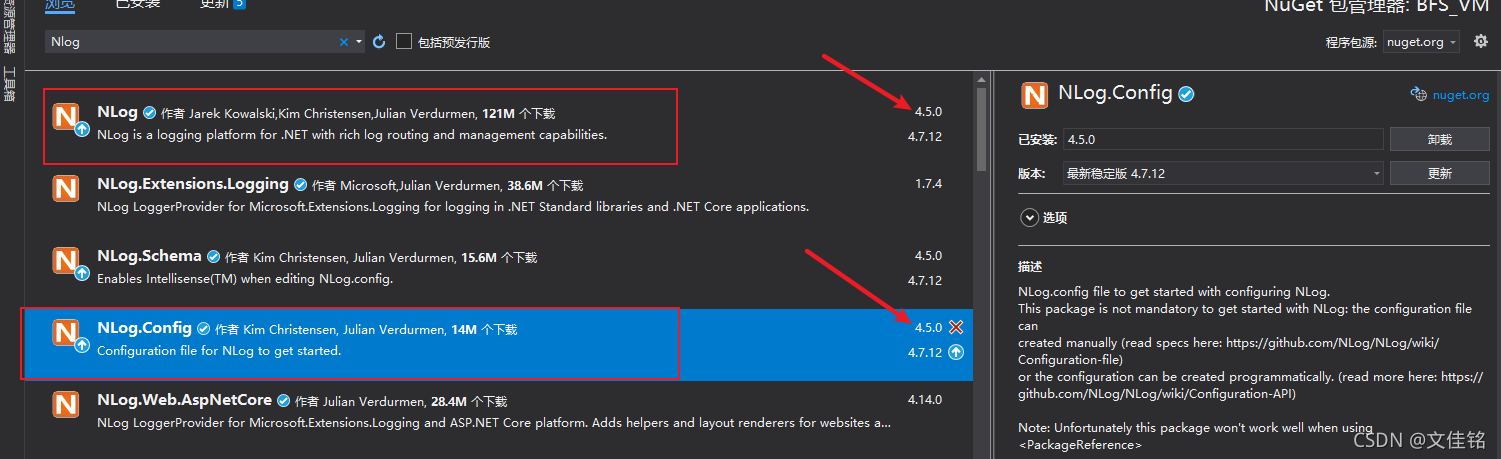
需要先下载好Nlog及Nlog.Config,注意我的版本号,我当前使用的4.5版本
在这里插入图片描述

下载完成后我们的项目根目录会生成Nlog.config配置文件

具体使用参考如下配置

<?xml version="1.0" encoding="utf-8" ?>
<nlog xmlns="http://www.nlog-project.org/schemas/NLog.xsd"
      xmlns:xsi="http://www.w3.org/2001/XMLSchema-instance"
      xsi:schemaLocation="http://www.nlog-project.org/schemas/NLog.xsd NLog.xsd"
      autoReload="true"
      throwExceptions="false"
      internalLogLevel="Off" internalLogFile="c:\temp\nlog-internal.log">

  <!-- optional, add some variables
  https://github.com/nlog/NLog/wiki/Configuration-file#variables
  -->
  <variable name="myvar" value="myvalue"/>

  <!--
  See https://github.com/nlog/nlog/wiki/Configuration-file
  for information on customizing logging rules and outputs.
   -->
  <targets>

    <!--
    add your targets here
    See https://github.com/nlog/NLog/wiki/Targets for possible targets.
    See https://github.com/nlog/NLog/wiki/Layout-Renderers for the possible layout renderers.
    -->

    <!--
    将事件写入文件名中包含日期的文件。
    <target xsi:type="File" name="f" fileName="${basedir}/logs/${shortdate}.log"
            layout="${longdate} ${uppercase:${level}} ${message}" />
    -->
    <target xsi:type="File" name="System" fileName="${basedir}/logs/${shortdate}System.log"
        layout="${longdate} ${uppercase:${level}} ${message}" />
        <!--【1】上面 意思是创建类型为System的文件log,basedir当前活动路径下logs.... 要创建其它日志可继续添加-->
  </targets>

  <rules>
    <!-- 在这里添加日志记录规则 -->

    <!--
    用最小级别的Debug(因此是Debug、Info、Warn、Error和Fatal,而不是Trace)写入所有事件到 "f"
    <logger name="*" minlevel="Debug" writeTo="f" />
    -->
    <logger name="System" minlevel="Debug" writeTo="System" />
    <!--【2】这里是添加日志类型,可自定义,【1】里面是定义输出路径,【2】是定义日志类型-->
  </rules>
</nlog>

之后我简单封装了一下Logger.cs

public class Logger
	{

		/// <summary>
		/// </summary>
		/// <param name="context">context</param>
		/// <param name="name">log operation</param>
		public static void Log(string context, string name, LogLevel lever)
		{
			try
			{
				var currentLogger = LogManager.GetLogger(name);
				if (currentLogger != null)
					currentLogger.Log(lever, context);
			}
			catch
			{

			}
		}

		public static void Log(string context, string name, LogLevel level, Exception ex)
		{
			try
			{
				var currentLogger = LogManager.GetLogger(name);
				if (currentLogger != null)
				{
					string exception = string.Empty;
					if (ex != null)
					{
						exception = "异常信息:" + ex.Message;
						if (ex.InnerException != null)
							exception += ex.InnerException.Message;
					}
					currentLogger.Log(level, context + exception);
				}
			}
			catch { }

		}

		public static void LogInfo(string context, string name)
		{
			try
			{
				var currentLogger = LogManager.GetLogger(name);
				if (currentLogger != null)
					currentLogger.Log(LogLevel.Info, context);
			}
			catch
			{

			}
		}
		public static void SystemInfo(string context)
		{
			LogInfo(context, "System");
		}
		//其它类型日志,自由添加,注意Nlog.Config也要配置好
		public static void SystemOther(string context)
		{
			LogInfo(context, "Other");
		}
	}

使用方法

SystemInfo("这是System日志")

注意,需要设置Nlog.config的属性否则无法生成日志文件

vs 解决方案中 选中Nlog.config右击 属性
在这里插入图片描述

C# 日志框架 NLog、log4net 和 Serilog对比 NLog、log4net 和 Serilog 是三个非常流行的 .NET 日志框架,它们各自有独特的优点和缺点。NLog:如果你需要一个功能丰富、性能优秀的日志框架,并且不介意稍微复杂的配置,NLog 是一个非常好的选择。log4net:如果你的项目已经使用了 log4net,或者你需要一个简单易用且广泛支持的日志框架,log4net 是一个不错的选择。Serilog:如果你需要一个现代、高性能且支持结构化日志记录的框架,Serilog 是一个很好的选择。 阅读详情

相关推荐

C#项目里NLog配置文件(NLog.config)的完整配置流程,从安装到写出第一个日志

本文详细介绍了在C#项目中配置NLog.config文件的完整流程,从安装NLog包到编写第一个日志记录。内容涵盖环境准备、NLog.config文件属性设置、配置文件结构解析以及高级配置技巧,帮助开发者快速构建可靠的日志系统。特别针对初学者常见问题提供了解决方案,确保日志记录高效稳定运行。

weixin_27330481的博客 408

关于Windows Service 中使用NLog无法生成日志文件的问题

最近在Windows Service中使用NLog来记录日志时发现,在service的安装目录下并没有日志文件,尽管在NLog的配置文件中指定了rules的writeTo为"file". 经过检查发现,service在安装后并没有在安装目录下,尽管在VS中将NLog.config的属性中"Copy to Output Directory"值设置为"Copy always",貌似其它人也有这样的问...

weixin_30583563的博客 1382

NLOG 记录 Entity Framework Core 的操作日志以及不生效原因排查

1、Nlog介绍 NLog是一个简单灵活的.NET日志记录类库。通过使用NLog,可以格式化记录日志并输出到不同的地方。 简单来说Nlog就是用来记录日志的组件。 2、EF core怎么记录sql日志 EF core 5.0提供了丰富的机制记录sql操作日志。 3、NLog标椎记录用法 在startup.cs中增加下列语句 public void Configure(IApplicationBuilder app, IWebHostEnvironment env, ILoggerFactory facto

网尘的技术专栏 1339

NLog日志的使用

文章目录1.NuGet安装NLog2.添加Nlog.config文件(新建项 --> 应用程序配置文件)3.数据库建表4.代码使用 1.NuGet安装NLog 2.添加Nlog.config文件(新建项 --> 应用程序配置文件) 注意文件属性 → 复制到输出目录 一定要选择始终复制,否则无法输出日志,并且找不到任何报错信息 <?xml version="1.0" encoding="utf-8" ?> <nlog xmlns="http://www.nlog-project

DotNeter-Hpf的博客 1860

使用网分对晶体ESR/L1/C1/C0进行测量计算

Use R&amp;S Vector Network Analyzer test XTAL ESR/L1/C1/C0 測量方法:使用儀器的Port1端口,測量XTAL的S11,通過諧振的參數計算出ESR/L1/C1/C0的值。 實際晶體的等效模型:通常方便晶體分析,使用下圖(b)的等效模型,但實際測量發現晶體存在多個串聯諧振點,實際等效模型更接近(c)。 儀器測量到的S11,其中M...

qq_39138630的博客 2090

C++游戏开发实战:从零构建局域网联机对战系统(附完整代码解析)

本文详细介绍了如何使用C++开发局域网联机对战游戏系统,涵盖从环境搭建到实战代码解析的全过程。重点讲解了Winsock库的应用、Socket通信原理、服务端与客户端开发技巧,以及性能优化和安全防护方案,帮助开发者快速掌握C++游戏开发的核心技术。

weixin_42524945的博客 453

C# 使用NLog记录日志

最近使用c#的一个程序,想写个日志文件,搜索了用nlog的比较多。 参考 https://www.cnblogs.com/hjsstudio/p/9683959.html 进行安装和使用 NLog.config文件配置使用下面这个 <?xml version="1.0" encoding="utf-8" ?> <nlog xmlns="http://www.nlog-...

sun007700的专栏 1115

Solidworks曲面建模学习(二)——3D草图

本文主要是演示有一些零件在solidworks中通过3D草来绘制会更加方便。

东东不熬夜的博客 9537

C# 使用Nlog记录日志文件 - 简易使用

目录导航 文章目录【C#】使用Nlog记录日志文件一、准备工作二、配置NLog.config三、写log读写类四、实际使用 【C#】使用Nlog记录日志文件 一、准备工作 1、安装Nlog和Nlog.config 右键项目 [外链图片转存失败,源站可能有防盗链机制,建议将图片保存下来直接上传(img-6BJc7ifz-1614307093248)(en-resource://database/3877:1)] 安装这两个内容 [外链图片转存失败,源站可能有防盗链机制,建议将图片保存下来直接上传(img-zK

Alina_catty的博客 4021

【深度学习】普通卷积、DWconv(逐深度卷积)与PWconv(逐点卷积)以及DSconv(深度可分离卷积)

深度可分离卷积(Depthwise Separable Convolution)通过将常规卷积分解为逐通道卷积(Depthwise)和逐点卷积(Pointwise)两步,显著减少了参数量和计算成本。常规卷积同时提取空间和通道特征,而深度可分离卷积先对每个通道单独进行空间卷积,再用1×1卷积调整通道数。以输入3通道、输出4通道的64×64图像为例,常规卷积需108个参数,而深度可分离卷积仅需39个参数,减少了约2/3。这种结构在轻量级网络(如MobileNet)中广泛应用,可在保持性能的同时降低计算资源需求。

猫天意的博客 4108

29. 如何通过 ABAP 代码给 SAP OData 元数据增添注解

我们先看下效果,在 MPC_EXT 类的 DEFINE 方法里编写 ABAP 代码之后,用 Postman 使用 url 访问 OData metadata,在返回的数据里,能看到我们用 ABAP 代码添加的自定义注解。你好,请问可以不可以在odata里面通过什么设置,从而自动给metadata.xml中加上注解,实现value help的功能,还是说每次需要在metadata.xml中修改?的词汇引用,然后为命名空间 com.sap.vocabularies.UI.v1 声明了一个别名。

2007 年 ~ 2025 年,深耕 SAP 技术 18 年 1669

C# 中使用NLog记录日志

C# 中使用NLog记录日志

bazinga_y的博客 4100

VMware Horizon 8 2111 部署系列(十一)准备RDS主机

RDS (Remote Desktop Service),即远程桌面服务。我们可以使用 Microsoft 远程桌面服务 (RDS) 提供 RDS 主机上的桌面会话并将应用程序传送给多个用户。

白昼的技术专栏 3475

ABAP CURR Data Type 深度解析与实战案例

CURR 数据类型是 SAP ABAP 中为处理货币金额而设计的一种特殊数据类型。CURR 数据类型能够自动根据关联的货币代码字段(例如 WAERS)确定小数位数,从而保证金额数据的精度与正确性。CURR 类型通常在 SAP 数据字典中使用,常见于各类业务数据表中,如会计凭证、销售订单等场景中,用于存储货币金额。CURR 数据类型底层实现上类似于 DEC 数据类型,但其特别之处在于与货币代码字段的绑定,这使得金额的格式化和显示可以自动匹配相应的货币规则。

2007 年 ~ 2025 年,深耕 SAP 技术 18 年 894

初探802.11协议(6)——Wi-Fi 6新特性简介

Wi-Fi 6新机制(特性)介绍

FanFF的博客 1525

在C#中使用 NLog 库进行日志记录

对于我们的项目,我们将使用最简单的方法在 NLog 的 LogManager 类中创建一个记录器。您可以通过按 CTRL + SHIFT + A,选择 XML 文件类型并在打开的窗口中输入名称 nlog.config 来完成,如图 1–3–1 所示。在打开的控制台中,在打开的控制台中运行图 1–1–2 (Install-Package NLog.Extensions.Logging) 中的命令。在图 1-3-3 中,我们的配置由两部分组成:设置日志记录目标和设置日志记录规则。然后,我们可以创建规则。

2401_82584055的博客 3130

全球国家地区城市数据

MySQL全球国家地区城市数据报。。。。。。。。。。。。

C#:NLog接入配置与简单使用

C#:NLog接入配置与简单使用

dbgo277的博客 3338

visio安装包

Microsoft Office Visio 是一款专业的制图软件。利用经过更新的形状、协作工具和数据链接图表,创建专业级图表以简化复杂的信息。

汉书HE8,好用的汇编代码编写工具

汉书HE8,好用的汇编代码编写工具早期编写汇编代码所用功能强大

C#日志库七(Nlog配置)

本文介绍了从Log4net迁移到Nlog的日志系统升级过程。首先回顾了Log4net存在的问题:日志杂乱、查找困难。然后详细讲解了Nlog的配置方法,包括安装Nlog.Config和NLog.Extensions.Logging两个依赖包,以及配置Nlog.config文件中的输出目标、规则等参数。文章重点解析了异步文件输出、日志路径设置、级别过滤等核心配置项,并提供了完整的配置示例。最后预告了下一章将介绍Nlog的具体实现。通过本次升级,可以有效解决日志管理效率低下的问题。

欢迎来到RaymondLeigh的知识共享基地 1498

深度学习工具包 DeepLearningToolbox

深度学习工具包Deprecation notice.-----This toolbox is outdated and no longer maintained.There are much better tools available for deep learning than this toolbox, e.g. [Theano](http://deeplearning.net/software/theano/), [torch](http://torch.ch/) or [tensorflow](http://www.tensorflow.org/)I would suggest you use one of the tools mentioned above rather than use this toolbox.Best, Rasmus.DeepLearnToolbox================A Matlab toolbox for Deep Learning.Deep Learning is a new subfield of machine learning that focuses on learning deep hierarchical models of data.It is inspired by the human brain's apparent deep (layered, hierarchical) architecture.A good overview of the theory of Deep Learning theory is[Learning Deep Architectures for AI](http://www.iro.umontreal.ca/~bengioy/papers/ftml_book.pdf)For a more informal introduction, see the following videos by Geoffrey Hinton and Andrew Ng.* [The Next Generation of Neural Networks](http://www.youtube.com/watch?v=AyzOUbkUf3M) (Hinton, 2007)* [Recent Developments in Deep Learning](http://www.youtube.com/watch?v=VdIURAu1-aU) (Hinton, 2010)* [Unsupervised Feature Learning and Deep Learning](http://www.youtube.com/watch?v=ZmNOAtZIgIk) (Ng, 2011)If you use this toolbox in your research please cite [Prediction as a candidate for learning deep hierarchical models of data](http://www2.imm.dtu.dk/pubdb/views/publication_details.php?id=6284)```@MASTERSTHESIS\{IMM2012-06284, author = "R. B. Palm", title = "Prediction as a candidate for learning deep hierarchical models of data", year = "2012",}```Contact: rasmusbergpalm at gmail dot comDirectories included in the toolbox-----------------------------------`NN/` - A library for Feedforward Backpropagation Neural Networks`CNN/` - A library for Convolutional Neural Networks`DBN/` - A library for Deep Belief Networks`SAE/` - A library for Stacked Auto-Encoders`CAE/` - A library for Convolutional Auto-Encoders`util/` - Utility functions used by the libraries`data/` - Data used by the examples`tests/` - unit tests to verify toolbox is workingFor references on each library check REFS.mdSetup-----1. Download.2. addpath(genpath('DeepLearnToolbox'));Example: Deep Belief Network---------------------```matlabfunction test_example_DBNload mnist_uint8;train_x = double(train_x) / 255;test_x = double(test_x) / 255;train_y = double(train_y);test_y = double(test_y);%% ex1 train a 100 hidden unit RBM and visualize its weightsrand('state',0)dbn.sizes = [100];opts.numepochs = 1;opts.batchsize = 100;opts.momentum = 0;opts.alpha = 1;dbn = dbnsetup(dbn, train_x, opts);dbn = dbntrain(dbn, train_x, opts);figure; visualize(dbn.rbm{1}.W'); % Visualize the RBM weights%% ex2 train a 100-100 hidden unit DBN and use its weights to initialize a NNrand('state',0)%train dbndbn.sizes = [100 100];opts.numepochs = 1;opts.batchsize = 100;opts.momentum = 0;opts.alpha = 1;dbn = dbnsetup(dbn, train_x, opts);dbn = dbntrain(dbn, train_x, opts);%unfold dbn to nnnn = dbnunfoldtonn(dbn, 10);nn.activation_function = 'sigm';%train nnopts.numepochs = 1;opts.batchsize = 100;nn = nntrain(nn, train_x, train_y, opts);[er, bad] = nntest(nn, test_x, test_y);assert(er < 0.10, 'Too big error');```Example: Stacked Auto-Encoders---------------------```matlabfunction test_example_SAEload mnist_uint8;train_x = double(train_x)/255;test_x = double(test_x)/255;train_y = double(train_y);test_y = double(test_y);%% ex1 train a 100 hidden unit SDAE and use it to initialize a FFNN% Setup and train a stacked denoising autoencoder (SDAE)rand('state',0)sae = saesetup([784 100]);sae.ae{1}.activation_function = 'sigm';sae.ae{1}.learningRate = 1;sae.ae{1}.inputZeroMaskedFraction = 0.5;opts.numepochs = 1;opts.batchsize = 100;sae = saetrain(sae, train_x, opts);visualize(sae.ae{1}.W{1}(:,2:end)')% Use the SDAE to initialize a FFNNnn = nnsetup([784 100 10]);nn.activation_function = 'sigm';nn.learningRate = 1;nn.W{1} = sae.ae{1}.W{1};% Train the FFNNopts.numepochs = 1;opts.batchsize = 100;nn = nntrain(nn, train_x, train_y, opts);[er, bad] = nntest(nn, test_x, test_y);assert(er < 0.16, 'Too big error');```Example: Convolutional Neural Nets---------------------```matlabfunction test_example_CNNload mnist_uint8;train_x = double(reshape(train_x',28,28,60000))/255;test_x = double(reshape(test_x',28,28,10000))/255;train_y = double(train_y');test_y = double(test_y');%% ex1 Train a 6c-2s-12c-2s Convolutional neural network %will run 1 epoch in about 200 second and get around 11% error. %With 100 epochs you'll get around 1.2% errorrand('state',0)cnn.layers = { struct('type', 'i') %input layer struct('type', 'c', 'outputmaps', 6, 'kernelsize', 5) %convolution layer struct('type', 's', 'scale', 2) %sub sampling layer struct('type', 'c', 'outputmaps', 12, 'kernelsize', 5) %convolution layer struct('type', 's', 'scale', 2) %subsampling layer};cnn = cnnsetup(cnn, train_x, train_y);opts.alpha = 1;opts.batchsize = 50;opts.numepochs = 1;cnn = cnntrain(cnn, train_x, train_y, opts);[er, bad] = cnntest(cnn, test_x, test_y);%plot mean squared errorfigure; plot(cnn.rL);assert(er<0.12, 'Too big error');```Example: Neural Networks---------------------```matlabfunction test_example_NNload mnist_uint8;train_x = double(train_x) / 255;test_x = double(test_x) / 255;train_y = double(train_y);test_y = double(test_y);% normalize[train_x, mu, sigma] = zscore(train_x);test_x = normalize(test_x, mu, sigma);%% ex1 vanilla neural netrand('state',0)nn = nnsetup([784 100 10]);opts.numepochs = 1; % Number of full sweeps through dataopts.batchsize = 100; % Take a mean gradient step over this many samples[nn, L] = nntrain(nn, train_x, train_y, opts);[er, bad] = nntest(nn, test_x, test_y);assert(er < 0.08, 'Too big error');%% ex2 neural net with L2 weight decayrand('state',0)nn = nnsetup([784 100 10]);nn.weightPenaltyL2 = 1e-4; % L2 weight decayopts.numepochs = 1; % Number of full sweeps through dataopts.batchsize = 100; % Take a mean gradient step over this many samplesnn = nntrain(nn, train_x, train_y, opts);[er, bad] = nntest(nn, test_x, test_y);assert(er < 0.1, 'Too big error');%% ex3 neural net with dropoutrand('state',0)nn = nnsetup([784 100 10]);nn.dropoutFraction = 0.5; % Dropout fraction opts.numepochs = 1; % Number of full sweeps through dataopts.batchsize = 100; % Take a mean gradient step over this many samplesnn = nntrain(nn, train_x, train_y, opts);[er, bad] = nntest(nn, test_x, test_y);assert(er < 0.1, 'Too big error');%% ex4 neural net with sigmoid activation functionrand('state',0)nn = nnsetup([784 100 10]);nn.activation_function = 'sigm'; % Sigmoid activation functionnn.learningRate = 1; % Sigm require a lower learning rateopts.numepochs = 1; % Number of full sweeps through dataopts.batchsize = 100; % Take a mean gradient step over this many samplesnn = nntrain(nn, train_x, train_y, opts);[er, bad] = nntest(nn, test_x, test_y);assert(er < 0.1, 'Too big error');%% ex5 plotting functionalityrand('state',0)nn = nnsetup([784 20 10]);opts.numepochs = 5; % Number of full sweeps through datann.output = 'softmax'; % use softmax outputopts.batchsize = 1000; % Take a mean gradient step over this many samplesopts.plot = 1; % enable plottingnn = nntrain(nn, train_x, train_y, opts);[er, bad] = nntest(nn, test_x, test_y);assert(er < 0.1, 'Too big error');%% ex6 neural net with sigmoid activation and plotting of validation and training error% split training data into training and validation datavx = train_x(1:10000,:);tx = train_x(10001:end,:);vy = train_y(1:10000,:);ty = train_y(10001:end,:);rand('state',0)nn = nnsetup([784 20 10]); nn.output = 'softmax'; % use softmax outputopts.numepochs = 5; % Number of full sweeps through dataopts.batchsize = 1000; % Take a mean gradient step over this many samplesopts.plot = 1; % enable plottingnn = nntrain(nn, tx, ty, opts, vx, vy); % nntrain takes validation set as last two arguments (optionally)[er, bad] = nntest(nn, test_x, test_y);assert(er < 0.1, 'Too big error');```[![Bitdeli Badge](https://d2weczhvl823v0.cloudfront.net/rasmusbergpalm/deeplearntoolbox/trend.png)](https://bitdeli.com/free "Bitdeli Badge")

C# winform使用Nlog库记录日志

然后使用 Logger 的方法来记录日志,如 Info()、Debug()、Error() 等。例如,在开发阶段可能会使用 Debug 级别来记录详细的调试信息,在生产环境中则可能主要使用 Info 和 Error 级别来记录应用程序的正常运行情况和错误情况。“rules”部分定义了日志的记录规则,例如将 Info 级别以上的日志写入文件,将 Debug 级别以上的日志输出到控制台。它是开源的,具有高度的可配置性,并且支持多种日志输出目标(targets),如文件、控制台、数据库、网络等。

qq_35491219的博客 1220

.Net日志组件之NLog的使用和配置

【代码】.Net日志组件之NLog的使用和配置。

Ling、bug 4283

C# 使用 NLog 输出日志到文件夹

通过设置 ·maxArchiveDays·,可以实现自动管理日志文件的归档和清理,避免日志文件过多导致存储空间的浪费。=“5242880”: 文件归档大小尺寸,如果单文凭超过 5242880,则重新创建一个新的文件。或者创建一个共用的写日志静态类,需要输出日志的代码逻辑处,通过调用当前静态类即可。: 这些设置确保文件可以在多个进程中安全写入,同时不保持文件句柄打开。: 日志文件归档使用滚动编号,避免创建大量的备份文件。: 这表示每天生成一个新的日志文件。的文件夹,并在其中创建。属性:日志内容输出的模板。

build2024 1495

C WinForm NLog 使用示例

C# WinForm NLog 使用示例 【下载地址】CWinFormNLog使用示例 本开源项目展示了如何在C# WinForm应用程序中集成NLog日志库,帮助开发者轻松记录应用运行信息。示例中,NLog配置为按天生成日志文件,并自动存档超过1000KB的日志文件,确保日志管理有序且高效。项目提供了详细的配置说明,适...

gitblog_06712的博客 353

修改NLog配置文件参数的方法

修改NLog.config文件内参数,修改日志文件保存位置

淳潜 的博客 1603

c# NLog日志的使用

NLog是一个记录日志组件,和log4net一样被广泛使用,它可以将日志保存到文本文件、CSV、控制台、VS调试窗口、数据库等。最近刚用到这个组件,觉得不错,水一篇。 下载 通过Nuget安装NLog,你也可以同时安装NLog.Config,它会在项目目录下帮你建立一个配置文件NLog.config,不过不需要,我们直接手动建立一个,你也可以将配置的信息写入到 App.config/Web.c...

weixin_30699443的博客 528
上一篇: winfrom企业微信扫码登录功能案例
下一篇: Winfrom实现微信扫码支付功能
大蘋果
博客等级 码龄11年 5274粉丝 26原创
评论 3
成就一亿技术人!
拼手气红包6.0元
还能输入1000个字符
 
 条评论被折叠 查看
添加红包

请填写红包祝福语或标题

个

红包个数最小为10个

元

红包金额最低5元

当前余额3.43元 前往充值 >
需支付:10.00元
成就一亿技术人!
领取后你会自动成为博主和红包主的粉丝 规则
hope_wisdom
发出的红包

打赏作者

大蘋果

你的鼓励将是我创作的最大动力!

¥1 ¥2 ¥4 ¥6 ¥10 ¥20
扫码支付:¥1
获取中
扫码支付

您的余额不足,请更换扫码支付或充值

打赏作者

实付元
使用余额支付
点击重新获取
扫码支付
钱包余额 0

抵扣说明:

1.余额是钱包充值的虚拟货币,按照1:1的比例进行支付金额的抵扣。
2.余额无法直接购买下载,可以购买VIP、付费专栏及课程。

余额充值