



1 \r和\n以及\r\n的区别
\r:将当前位置移到本行开头,又称为回车,对应键盘上的 return 键;
\n:将当前位置移到下一行,又称换行。
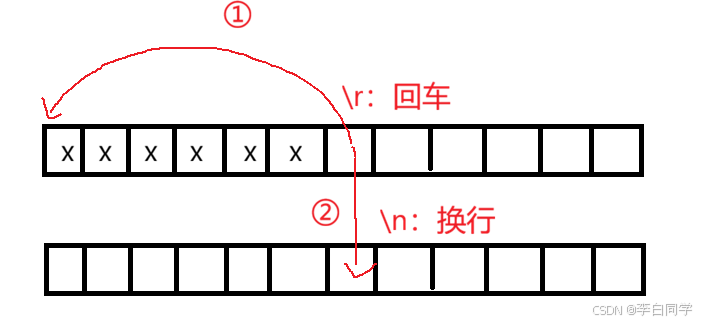
不同操作系统,对于换行的理解是不一样的:Linux 中 \n 表示回车并换行;Windows 中 \r\n 表示回车并换行; Mac 中 \r 表示回车并换行。需要注意的是 C 语言中 \n 也表示回车并换行。
2 行缓冲区
#include <stdio.h>
#include <unistd.h>

int main()
{
     printf("hello linux!\n");
     sleep(3);

     return 0;
}
可以观察到的现象:“hello Linux!”语句立即打印出来,3 秒之后命令行刷新。

#include <stdio.h>
#include <unistd.h>

int main()
{
     printf("hello linux!");
     sleep(3);

     return 0;
}
去掉 \n 又是什么现象?可以观察到:“hello Linux!”语句不会立即打印出来,3 秒之后语句才打印出来,然后是命令行刷新在同一行。

#include <stdio.h>
#include <unistd.h>

int main()
{
     printf("hello linux!");
     fflush(stdout);
     sleep(3);

     return 0;
}
加一句 fflush(stdout); 代码又是什么现象?可以观察到:现象和第二个一样。
3 demo
#include <stdio.h>
#include <string.h>
#include <unistd.h>

#define LENGTH 101
#define LABLE '#'

void Progress()
{
    const char* symb = "|/-\\";    // 光标
    int s_len = strlen(symb);
    char bar[LENGTH];
    //memset(bar, '\0', sizeof(bar) / sizeof(bar[0]);
    memset(bar, '\0', sizeof(bar));
    int cnt = 0;
    while(cnt <= 100)
    {
        printf("[%-100s][%d%%][%c]\r", bar, cnt, symb[cnt % s_len]);
        fflush(stdout); // 刷新缓冲区
        bar[cnt++] = LABLE;
        usleep(50000);
    }
    printf("\n");
}

int main()
{
    Progress();

    return 0;
}

4 进度条代码实现
// progress.h
#pragma once

#include <stdio.h>
#include <unistd.h>

void Progress();
void FlushProgress(double target, double current);
// progress.c

#include <stdio.h>
#include <string.h>
#include <unistd.h>

#define LENGTH 101
#define LABLE '#'

void FlushProgress(double target, double current)
{
    // step 0: 定义光标
    const static char* sym = "|/-\\";
    static int index = 0;
    int len = strlen(sym);

    // step 2: 更新出进度
    double rate = (current / target) * 100.0;   // 5.0 100.0 -> 0.05 -> 5.0%
    // step 2: 整数个进度递增,刷新一个#
    int cnt = (int)rate;
    // step 3: 构建缓冲区
    char bar[LENGTH];
    memset(bar, 0, sizeof(bar));
    for(int i = 0; i < cnt; ++i)
    {
        bar[i] = LABLE;
    }
    // step 4: 刷新
    printf("[%-100s][%.1lf%%][%c]\r", bar, rate, sym[index++]);
    index %= len;
    fflush(stdout);
    // step 5: 处理更新到100%
    if(rate >= 100.0)
        printf("\n");
}
// main.c
#include "progress.h"

// 场景
double target_file_size = 1024.0;  // M,目标文件大小
double speed = 1.0; // M

void DownLoad(double size, double split)
{
    double current_total = 0.0;
    while(current_total <= size)
    {
        FlushProgress(size, current_total);    // 进度条不能直接刷新完,需要根据具体的进度,来进行刷新
        if(current_total >= size) break;
        // 下载,用sleep来模拟
        usleep(10000); // 模拟一次下载时间
        current_total += split;
    }
}

int main()
{
    printf("下载中:\n");
    DownLoad(target_file_size, speed);
    printf("下载中:\n");
    DownLoad(100.0, 1.0);
    printf("下载中:\n");
    DownLoad(512.0, 2.0);

    return 0;
}
# makefile
BIN=progress
CC=gcc
SRC=$(wildcard *.c)
OBJ=$(SRC:.c=.o)
LFLAGS=-o
CFLAGS=-c
RM=rm -f

$(BIN):$(OBJ)
    @$(CC) $(LFLAGS) $@ $^
    @echo "链接$^ 成为 $@"
%.o:%.c
    @$(CC) $(CFLAGS) $<
    @echo "编译$< 成为 $@"

.PHONY:clean
clean:
    @$(RM) $(OBJ) $(BIN)
    @echo "清理工程完毕"
执行效果图:




 扫一扫
扫一扫


 3819
3819

 被折叠的 条评论
为什么被折叠?
被折叠的 条评论
为什么被折叠?
 到【灌水乐园】发言


