


 MyBatis是一个优秀的持久层框架,它支持定制化SQL、存储过程以及高级映射。MyBatis避免了几乎所有的JDBC代码和手动设置参数以及获取结果集。它使SQL映射文件与Java代码分离,提高了可维护性,并提供了对象关系映射标签,便于对象关系的建立和维护。此外,MyBatis还支持动态SQL,允许在XML标签内编写动态SQL。常用依赖包括MyBatis本身、MySQL驱动、JUnit、Lombok、Log4j和PageHelper等。在实际使用中,通过配置文件、Mapper接口和XML映射文件实现CRUD操作,同时具备日志记录和分页功能。MyBatis还支持注解方式简化开发,以及通过ResultMap处理属性名和字段名不一致的问题。其一级缓存和二级缓存机制提升了数据访问效率。
mybatis
帮助程序猿将数据存入到数据库中。
方便
传统的JDBC代码太复杂了。简化。框架。自动化。
不用Mybatis也可以。更容易上手。 技术没有高低之分
优点:
1.简单易学
2.灵活
3.sql和代码的分离,提高了可维护性。
4.提供映射标签,支持对象与数据库的orm字段关系映射
5.提供对象关系映射标签,支持对象关系组建维护
6.提供xml标签,支持编写动态sql。
常用依赖
mysql
 <dependency>
            <groupId>mysql</groupId>
            <artifactId>mysql-connector-java</artifactId>
            <version>8.0.12</version>
        </dependency>
mybatis
<dependency>
            <groupId>org.mybatis</groupId>
            <artifactId>mybatis</artifactId>
            <version>3.5.6</version>
        </dependency>
junit
 <dependency>
            <groupId>junit</groupId>
            <artifactId>junit</artifactId>
            <version>4.11</version>
            <scope>test</scope>
        </dependency>
lombok
 <dependency>
            <groupId>org.projectlombok</groupId>
            <artifactId>lombok</artifactId>
            <version>1.18.20</version>
            <scope>provided</scope>
        </dependency>
log4j
<dependency>
    <groupId>log4j</groupId>
    <artifactId>log4j</artifactId>
    <version>1.2.17</version>
</dependency>
pagehelp
<dependency>
    <groupId>com.github.pagehelper</groupId>
    <artifactId>pagehelper</artifactId>
    <version>5.3.0</version>
</dependency>
mybatis 核心配置
[外链图片转存失败,源站可能有防盗链机制,建议将图片保存下来直接上传(img-tYFe61YN-1659512776286)(C:\Users\黄伟辉\AppData\Roaming\Typora\typora-user-images\image-20220803145712755.png)]
<?xml version="1.0" encoding="UTF-8" ?>
<!DOCTYPE configuration
PUBLIC "-//mybatis.org//DTD Config 3.0//EN"
"http://mybatis.org/dtd/mybatis-3-config.dtd">
<!--configuration核心配置文件-->
<configuration>
<environments default="development">
<environment id="development">
<!-- 配置事务 -->
<transactionManager type="JDBC"/> <!-- 默认事物管理器 -->
<dataSource type="POOLED"> <!-- 连接池 -->
<property name="driver" value="com.mysql.cj.jdbc.Driver"/>
<property name="url" value="jdbc:mysql://localhost:3306/ums?serverTimezone=UTC&useSSL=false&useUnicode=true&characterEncoding=UTF-8"/>
<property name="username" value="root"/>
<property name="password" value="hx12345678"/>
</dataSource>
</environment>
<!-- 这里还可以配置其他连接 ,<environment id ="mysql12" -->
</environments>
</configuration>
编写Mybatis配置类
public class Mybatisutils {
  // 会话工厂 创建SqlSession对象,SqlSessionFactory是全局对象 static 保证全局唯一
  public static SqlSessionFactory sqlSessionFactory;

  static {
    try {
      // xml resource资源路径
      String resource = "mybatis.confing.xml";
      // 获得加载核心配置文件的inputStream流
      InputStream inputStream = Resources.getResourceAsStream(resource);
      // 通过SqlSessionFactoryBuilder对象的build方法创建SqlSessionFactory对象
      sqlSessionFactory = new SqlSessionFactoryBuilder().build(inputStream);
    } catch (IOException e) {
      e.printStackTrace();
    }
  }

  // 获得 sqlsession
  public static SqlSession getSqlSession() {
    SqlSession sqlSession = sqlSessionFactory.openSession();
    return sqlSession;
    // return sqlSessionFactory.openSession();
  }
}
mapper.xml
?xml version="1.0" encoding="UTF-8" ?>
<!DOCTYPE mapper
  PUBLIC "-//mybatis.org//DTD Mapper 3.0//EN"
  "http://mybatis.org/dtd/mybatis-3-mapper.dtd">
<mapper namespace="org.mybatis.example.BlogMapper">
  <select id="selectBlog" resultType="Blog">
    select * from Blog where id = #{id}
  </select>
</mapper>
db.properties
driver=com.mysql.cj.jdbc.Driver
jdbc.url =jdbc:mysql://localhost:3306/ums?serverTimezone=UTC&useSSL=false&useUnicode=true&characterEncoding=UTF-8
username=root
password=hx12345678
在 核心配置中
<properties resource="db.properties"/>

<environments default="development">
        <environment id="development">
            <!-- 配置事务 -->

            <transactionManager type="JDBC"/> <!-- 默认事物管理器 -->
            <dataSource type="POOLED">    <!-- 连接池 -->
                <property name="driver" value="${driver}"/>
                <property name="url" value="${jdbc.url}"/>
                <property name="username" value="${username}"/>
                <property name="password" value="${password}"/>
            </dataSource>
        </environment>
        <!-- 这里还可以配置其他连接 ,<environment id ="mysql12" -->
    </environments>
别名 在核心配置文件中
    <!--可以给实体类起别名-->
    <typeAliases>
        <typeAlias type="com.kuang.pojo.User" alias="User"/>
    </typeAliases>
        <!--可以给实体类起别名   使用第二种方便-->
     <typeAliases>
         <package name="com.kuang.pojo"/>
    </typeAliases>
日志 在核心配置 中
<settings>
    <setting name="logImpl" value="STDOUT_LOGGING"/>
</settings>
<!-- 标准日志工厂 -->


<!-- log4j 日志工厂-->
  <settings>
     <setting name="logImpl" value="STDOUT_LOGGING"/>
 </settings>
log4j.properties
#将等级为DEBUG的日志信息输出到console和file这两个目的地,console和file的定义在下面的代码
log4j.rootLogger=DEBUG,console,file
#控制台输出的相关设置
log4j.appender.console = org.apache.log4j.ConsoleAppender
log4j.appender.console.Target = System.out
log4j.appender.console.Threshold=DEBUG
log4j.appender.console.layout = org.apache.log4j.PatternLayout
log4j.appender.console.layout.ConversionPattern=[%c]-%m%n
#文件输出的相关设置
#log4j.appender.file = org.apache.log4j.RollingFileAppender
#log4j.appender.file.File=./log/rzp.log
#log4j.appender.file.MaxFileSize=10mb
#log4j.appender.file.Threshold=DEBUG
#log4j.appender.file.layout=org.apache.log4j.PatternLayout
#log4j.appender.file.layout.ConversionPattern=[%p][%d{yy-MM-dd}][%c]%m%n
日志输出级别
log4j.logger.org.mybatis=DEBUG
log4j.logger.java.sql=DEBUG
log4j.logger.java.sql.Statement=DEBUG
log4j.logger.java.sql.ResultSet=DEBUG
log4j.logger.java.sq1.PreparedStatement=DEBUG
lombok 使用 在实体类 ,不用get set tostring 构造函数
@Data
@AllArgsConstructor
@NoArgsConstructor
public class Film {
    private Integer id;

    private String name;

    private String director;

    private Double price;

    private String pubdate;

    private String company;
}
CRUD操作
public interface usermapper {
    List<User>getusers();

    User getoneuser(String id);

    int addusers(User user);

    /* 使用map */
    int addusers2(Map<String, Object> map);

    int updateusers(User user);

    int deleteusers(String id);
    }
使用xml
<!-- 绑定mapper -->
<!--namespace 要和mapper 同包绑定到指定mapper -->
<mapper namespace="com.powernode.mapper.usermapper">
    <!-- select 中的id 要和 mapper 里面的方法一致,绑定指定方法 -->
    <!-- resultType 是sql 语句执行的返回类型 -->
    <!-- parameterType=""  是参数类型 -->
    <select id="getusers" resultType="com.powernode.entity.User">
        select *
        from user
    </select>
    <select id="getoneuser" parameterType="String" resultType="User">
        select *
        from user
        where usercode = #{id}
    </select>
    <insert id="addusers" parameterType="com.powernode.mapper.usermapper">
        insert into user (usercode,fullname,age,sex,email,address) values(#{usercode},#{fullname},#{age},#{sex},#{email},#{address})
    </insert>

    <update id="updateusers" parameterType="com.powernode.mapper.usermapper" >
        update user set fullname = #{fullname} ,age = #{age} where usercode = #{usercode}
    </update>

    <delete id="deleteusers" parameterType="String" >
        delete from user where usercode = #{usercode}
    </delete>

    <!-- map key 值可以自定义 ,value 里面的和user  区别,就是user需要按照实体类写法 ,map不需要-->
    <insert id="addusers2" parameterType="map">
        insert into user (usercode,fullname,age,sex,email,address) values(#{usercode},#{fullname},#{age},#{sex},#{email},#{address})
    </insert>
mapper 绑定 在核心配置文件
<!-- xml  -->
<mappers>
    <mapper resource="com/powernode/mapper/usermapper.xml"/>
</mappers>

<!-- 注解 -->
<mappers>
        <mapper class="com.powernode.mapper.usermapper2"/>
  </mappers>
<!-- mapper 包下所有 mapper  注解和xml 都可以-->
<mappers>
        <mapper page="com.powernode.mapper.usermapper2"/>
  </mappers>
sql
<!--提取公共的sql 出来    sql id 和 include id 一致-->
    <sql id="commonFile">
        id,name,sex,age,email,address
    </sql>

    <select id="" resultType="" parameterType="">
        select <include refid="commonFile"/> from user
    </select>
解决属性名和字段名不一致的问题
数据库 id name password
实体类 id name psw
sql 语句 : select * from user where id = #{}
输出 psw = null
解决方法:
<select id="getUserById" resultType="User">
    select id,name,password as psw from user where id = #{id}
</select>
ResultMap
id   name   pwd
id   name   password
<!--结果集映射-->
<resultMap id="UserMap" type="User">
    <!--column数据库中的字段,property实体类中的属性-->
    <result column="id" property="id"/>
    <result column="name" property="name"/>
    <result column="pwd" property="password"/>
</resultMap>

<select id="getUserById" resultMap="UserMap">
    select * from user where id = #{id}
</select>
分页 :
使用Limit分页
SELECT * from user limit startIndex,pageSize
接口:
//分页
List<User> getUserByLimit(Map<String,Integer> map);
<!--分页查询-->
<select id="getUserByLimit" parameterType="map" resultMap="UserMap">
    select * from user limit #{startIndex},#{pageSize}
</select>
使用 插件PageHelper :
需要在核心配置文件 中 做 分页拦截
<plugins>
    <plugin interceptor="com.github.pagehelper.PageInterceptor"></plugin>
</plugins>
select * from user
@Test
public void getuser() {
  int pageNum = 1;
  int pageSize = 5;
  PageHelper.startPage(pageNum,pageSize);
  List<User> userList = usermapper.gerusers();

  PageInfo<User>pageInfo = new PageInfo<>(userList);
  System.out.println("总条数"+pageInfo.getTotal());
  System.out.println("总页数"+pageInfo.getPages());

  List<User> userList1 = pageInfo.getList();
  userList1.forEach(System.out::println);
  sqlSession.close();
}
mybatis 注解
@Delete("delete from user where id = ${uid}")
int deleteUser(@Param("uid") int id);

 @Select("selete * from user where usercode = #{id} and fullname = #{name}")
    User getoneuser2(@Param("id") String id,@Param("name") String name);
关于@Param( )注解
基本类型的参数或者String类型,需要加上
引用类型不需要加
如果只有一个基本类型的话,可以忽略,但是建议大家都加上
一对多处理
一个老师多个学生;
对于老师而言,就是一对多的关系;
@Data
public class Student {
    private int id;
    private String name;
    private int tid;
}
@Data
public class Teacher {
    private int id;
    private String name;

    //一个老师拥有多个学生
    private List<Student> students;
}
<!--按结果嵌套查询-->
<select id="getTeacher" resultMap="StudentTeacher">
    SELECT s.id sid, s.name sname,t.name tname,t.id tid FROM student s, teacher t
    WHERE s.tid = t.id AND tid = #{tid}
</select>
<resultMap id="StudentTeacher" type="Teacher">
    <result property="id" column="tid"/>
    <result property="name" column="tname"/>
    <!--复杂的属性,我们需要单独处理 对象:association 集合:collection
    javaType=""指定属性的类型!
    集合中的泛型信息,我们使用ofType获取
    -->
    <collection property="students" ofType="Student">
        <result property="id" column="sid"/>
        <result property="name" column="sname"/>
        <result property="tid" column="tid"/>
    </collection>
</resultMap>
关联 - association 【多对一】
集合 - collection 【一对多】
javaType & ofType
JavaType用来指定实体类中的类型
ofType用来指定映射到List或者集合中的pojo类型,泛型中的约束类型
动态SQL
if示例
<select id="queryBlogIF" parameterType="map" resultType="Blog">
    select * from mybatis.blog where 1=1
    <if test="title != null">
        and title = #{title}
    </if>
    <if test="author != author">
        and author = #{author}
    </if>
</select>
choose、when、otherwise 示例
<select id="queryBlogchoose" parameterType="map" resultType="Blog">
    select * from mybatis.blog
    <where>
        <choose>
            <when test="title != null">
                title = #{title}
            </when>
            <when test="author != null">
                and author = #{author}
            </when>
            <otherwise>
                and views = #{views}
            </otherwise>
        </choose>
    </where>
</select>
trim、where、set 示例
<update id="updateBlog" parameterType="map">
    update mybatis.blog
    <set>
        <if test="title != null">
            title = #{title},
        </if>
        <if test="author != null">
            author = #{author}
        </if>
    </set>
    where id = #{id}
</update>
for-each 示例
<!--ids是传的,#{id}是遍历的-->
<select id="queryBlogForeach" parameterType="map" resultType="Blog">
    select * from mybatis.blog
    <where>
        <foreach collection="ids" item="id" open="and ("
                 close=")" separator="or">
            id=#{id}
        </foreach>
    </where>
</select>
学习过程中需要注意的小问题:
无法加载配置文件?有可能是找不到这个配置文件
在 pom.xml 中加入
<build>
    <resources>
        <resource>
            <directory>src/main/resources</directory>
            <includes>
                <include>**/*.properties</include>
                <include>**/*.xml</include>
            </includes>
            <filtering>true</filtering>
        </resource>

        <resource>
            <directory>src/main/java</directory>
            <includes>
                <include>**/*.poroperties</include>
                <include>**/*.xml</include>
            </includes>
            <filtering>true</filtering>
        </resource>
    </resources>
</build>
在测试中 明明sql 语句都正确 执行也成功了,可是数据库数据没有变化 增删改
问题是 业务没有提交
在执行完mapper. 操作之后 加上
sqlSession.commit();
@Before @Ater 减少代码重复
public class mapperTest {
  private static SqlSession sqlSession = null;
  private static usermapper usermapper = null;
  private static FilmMapper filmMapper = null;
  @Before
  public void init() {
    sqlSession = Mybatisutils.getSqlSession();
    usermapper = sqlSession.getMapper(usermapper.class);
    filmMapper =sqlSession.getMapper(FilmMapper.class);
  }
  @After
  public void after(){
        sqlSession.commit();
        sqlSession.close();
    }
生命周期和作用域
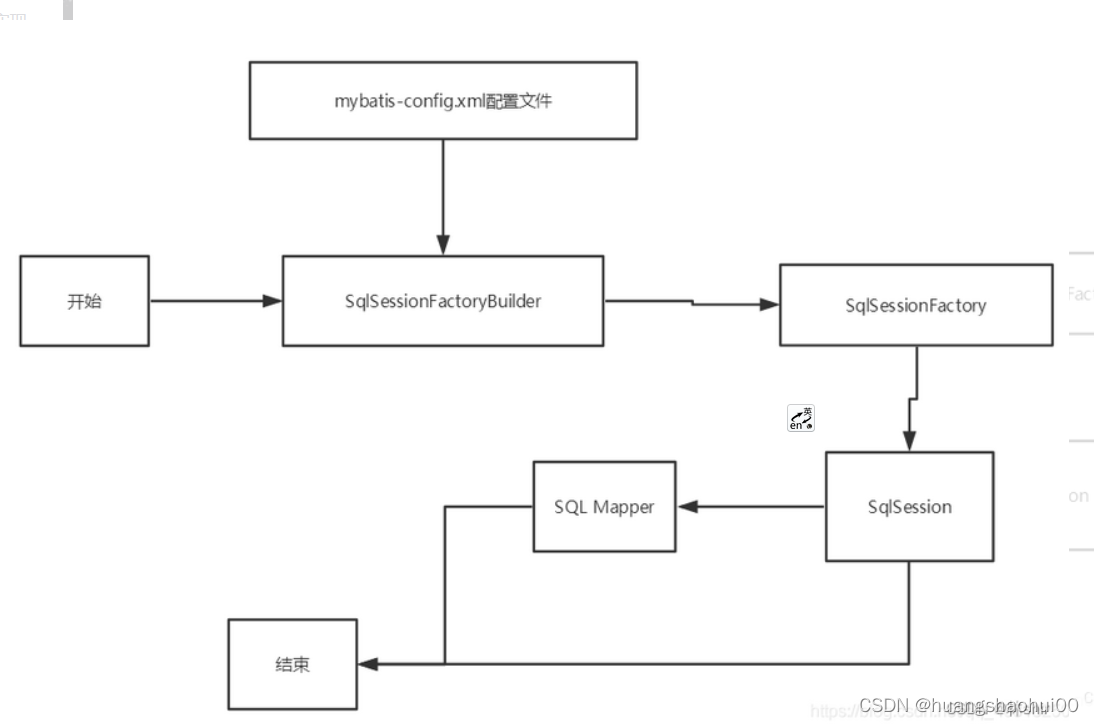
SqlSessionFactoryBuilder:
一旦创建了 SqlSessionFactory,就不再需要它了
局部变量
一旦创建了 SqlSessionFactory,就不再需要它了
局部变量
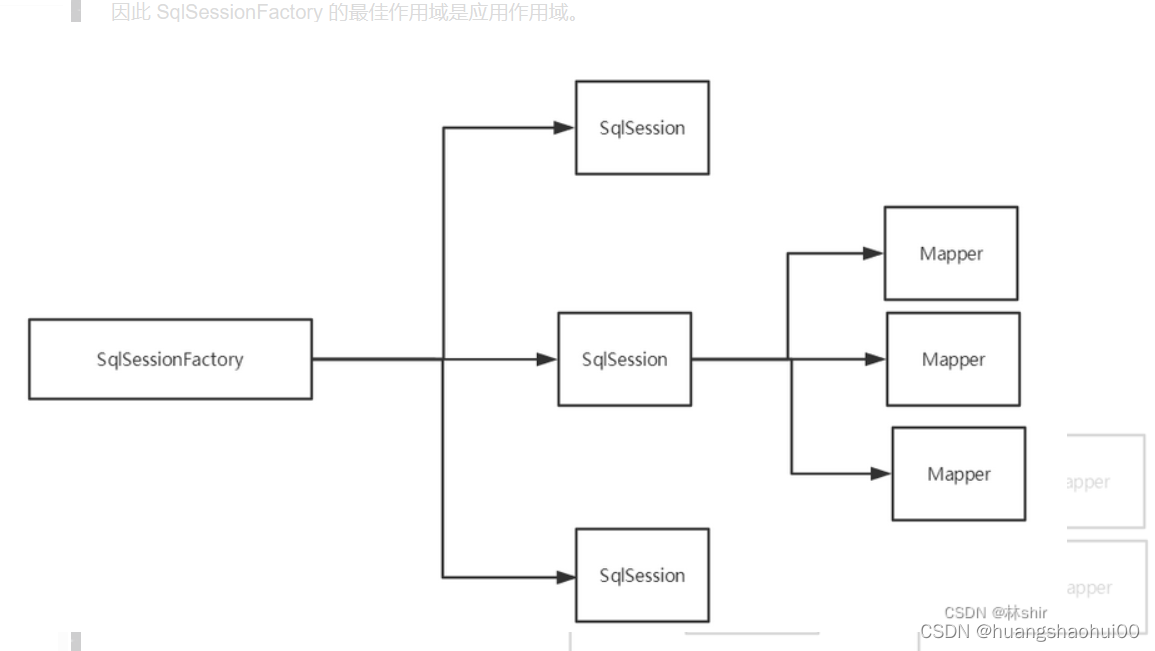
SqlSessionFactory:
说白了就是可以想象为 :数据库连接池
SqlSessionFactory 一旦被创建就应该在应用的运行期间一直存在,没有任何理由丢弃它或重新创建另一个实例。
因此 SqlSessionFactory 的最佳作用域是应用作用域。
最简单的就是使用单例模式或者静态单例模式。
SqlSession
连接到连接池的一个请求!
SqlSession 的实例不是线程安全的,因此是不能被共享的,所以它的最佳的作用域是请求或方法作用域。
用完之后需要赶紧关闭,否则资源被占用!
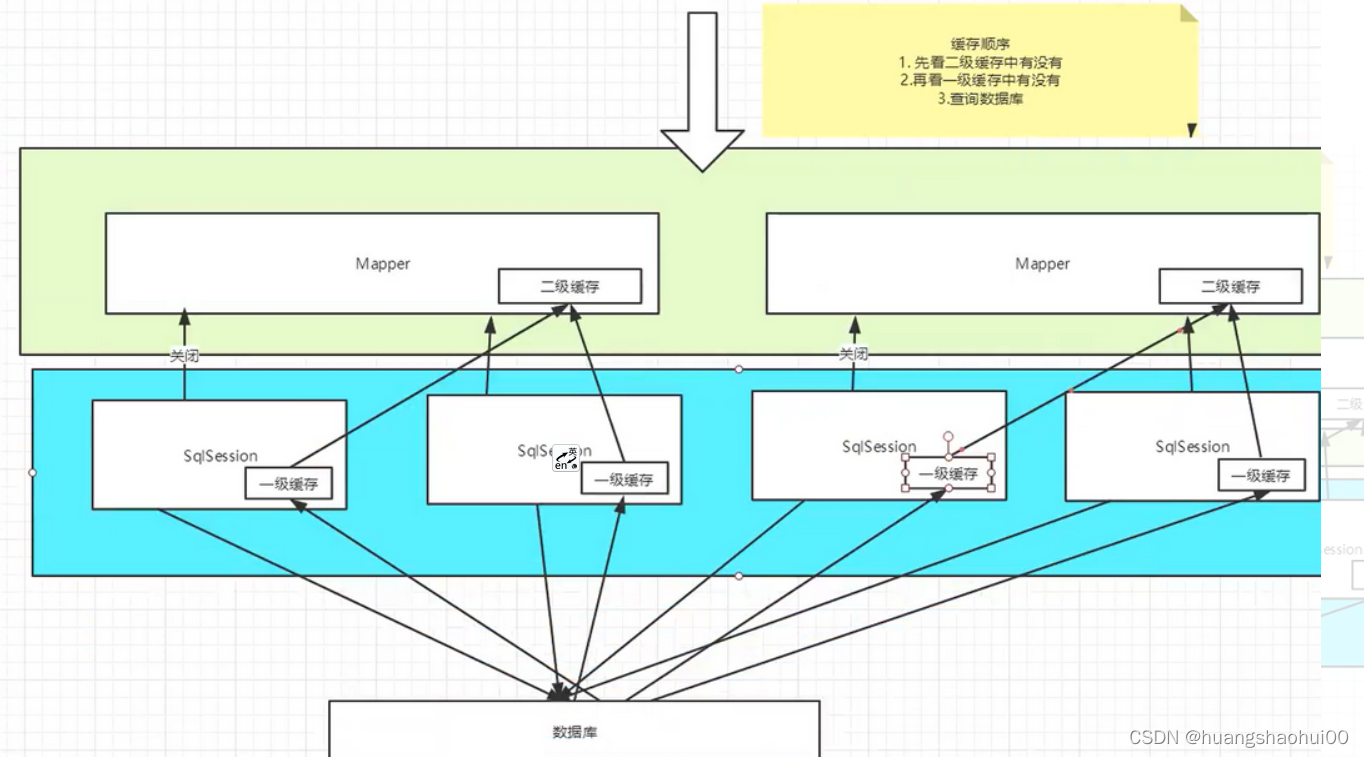
缓存原理
一级缓存
一级缓存也叫本地缓存:SqlSession
与数据库同一次会话期间查询到的数据会放在本地缓存中
以后如果需要获取相同的数据,直接从缓存中拿,没必要再去查询数据库
二级缓存
二级缓存也叫全局缓存,一级缓存作用域太低了,所以诞生了二级缓存
基于namespace级别的缓存,一个名称空间,对应一个二级缓存
工作机制
一个会话查询一条数据,这个数据就会被放在当前会话的一级缓存中
如果会话关闭了,这个会员对应的一级缓存就没了;但是我们想要的是,会话关闭了,一级缓存中的数据被保存到二级缓存中
新的会话查询信息,就可以从二级缓存中获取内容
不同的mapper查询出的数据会放在自己对应的缓存(map)中
 ````
````





 扫一扫
扫一扫


 1148
1148

 被折叠的 条评论
为什么被折叠?
被折叠的 条评论
为什么被折叠?
 到【灌水乐园】发言





