


Installation Phases and In-Script Execution Options for Custom Actions in Windows Installer
Abstract: When creating a custom action in InstallShield Professional - Windows Installer Edition you have several in-script execution options to choose from:
- Immediate execution
- Deferred execution
- Rollback execution
- Commit execution
- Deferred execution in System Context
This article explains what these options mean and how they affect in which phase your custom action is executed at installation run time. It also helps you to insert the custom action in the correct location in the user interface or execute sequence, in order to avoid error messages like "Cannot write script record. Transaction not started."
GERMAN: Deutsche Version dieses Artikels
RUSSIAN: Перевод на русский язык доступен по ссылке: http://www.installsite.ru/go/installationphases.htm
Installation User Interface Sequence
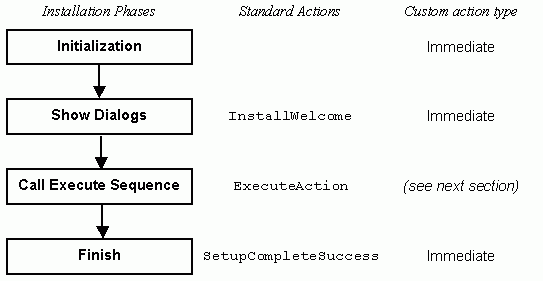
In the user interface sequence, you can use only immediate custom actions. This applies to the sequence table and DoAction control events as well.
The ExecuteAction standard action launches the execute sequence as a sub procedure.
After the execute actions are finished, the installer returns to the user interface sequence and executes any actions that may be specified after ExecuteAction. By default there is none, but you could insert an immediate execution custom action here, e.g. to launch another msi file.
Finally the SetupCompleteSuccess dialog is displayed, which is identified by its special sequence number of -1.
Installation Execute Sequence
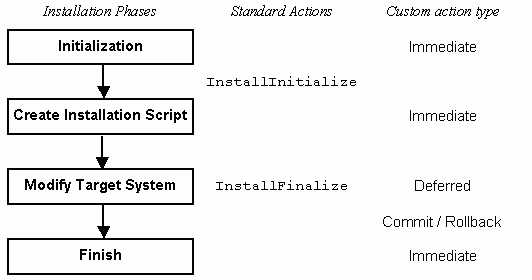
The part of the execute sequence between InstallInitialize and InstallFinalize is processed in two phases: First the installer goes through the actions (standard and custom actions) and notes them down in an installation script. Then it goes through the script and actually executes the commands. This second phase is where the target computer is modified, i.e. files are copied, registry entries are written, etc.
Because of these two phases it may look as if the installer went through the execute sequence twice: once building the script and once executing it. However that's not exactly true.
In addition to script creation and script execution there are two special installation phases, commit and rollback, that will be explained later in this section.
Immediate Execution during Script Creation
While the installer builds the script, only immediate execution custom actions are actually executed. All other actions (standard actions like InstallFiles and deferred execution custom actions) are only noted in the script.
All properties are stored in the script, and can no longer be changed until the script execution is finished.
Any conditions on actions are evaluated in this phase.
Deferred Execution during Script Execution
When the script is built (i.e. InstallFinalize is reached) the installer starts to execute the script. On NT based systems this phase runs in a separate process. All the script execution takes place "inside" the InstallFinalize action.
During this phase the deferred execution custom actions are executed, along with all the standard actions. They are executed in the order they have been written to the script in the script creation phase, and only if their condition was true at the time the script was built.
Because this phase runs in a separate process, deferred execution customs actions cannot directly access installer properties, and they cannot set the value of any property.
Rollback Execution
While the installer executes the installation script, it builds a rollback script. For any standard action in the installation script, a rollback command is added to the rollback script. The installer cannot automatically undo changes that custom actions make to the target system. Instead it adds any rollback custom actions to the rollback script.
In addition, backup copies of any files that the installer overwrites are stored in a temporary directory.
Rollback actions are added in the order they are encountered in the installation script, but only if their condition was true at the time the installation script was built.
If the installation is cancelled by the user or aborted because of an error during script execution, the rollback script is executed to undo any changes that have been made to the target system. This is when the rollback custom actions are executed.
The rollback script is processed from bottom up, i.e. most recent actions are undone first.
When the installer has finished to process the installation script without interruption, the rollback script and all backup files are deleted, and any commit custom actions are executed.
If Rollback has been disabled on the target computer, no rollback script is created, and no backup copies of replaced files are made.
Commit Execution
Commit custom actions are the opposite of rollback actions. They are added to a commit script while the installation script is executed, much in the same way that rollback custom actions are added to the rollback script.
Commit actions are added to the commit script only if their condition was true at the time the installation script was built.
The commit script is executed at the end of the InstallFinalize action, when the installation script has been processed, and only if installation has not been aborted.
The purpose of commit actions is to remove any backup information that had been created by a custom action.
A sample for the use of deferred, rollback and commit custom actionsImagine a custom action that would modify an existing file. This should be a deferred execution custom action, so that this change can be undone if the setup is cancelled. Therefore the custom action would first make a backup copy of the file and then modify it. The rollback custom action would delete the modified file and replace it with the backup copy. It would also delete the backup file. The commit custom action would delete the backup file, because it is no longer needed now that the installation has been completed successfully. |
If Rollback has been disabled on the target computer, no commit script is created. Commit is the counterpart of rollback. If rollback is disabled, your custom action should not create backup files, and therefore commit execution actions are ignored in this case.
Deferred Execution in System Context
This is a special sort of deferred custom action that is used to perform tasks with elevated privileges. On NT/2000 systems Windows Installer runs as a service and therefore would have full access to the system. However to restrict users from performing unauthorized tasks, Windows Installer uses Impersonation to perform any tasks with the privileges of the currently logged on user. However, if installation with elevated privileges is enabled by the system administrator, this type of custom action can run with system privileges. This custom action type is also called "deferred execution with no user impersonation" in the MSI documentation.
Except from the elevated privileges, this type is similar to the deferred execution custom action discussed above.
If installation with elevated privileges is not enabled, such custom actions run with user level privileges, similar to other deferred execution custom actions.
Some Rules You Should Follow
- Immediate execution custom actions should not modify the target system because they cannot be rolled back. They should only make changes that influence the installation process, e.g. set paths and properties, select features, verify passwords, and the like.
- Each deferred custom action should have a corresponding rollback custom action.
- The rollback custom action should be inserted directly in front of the deferred custom action so that it is added to the rollback script immediately before the deferred custom action is executed. This ensures proper rollback in case the installation is aborted during your custom action.
- The rollback custom action should have the same condition as the corresponding deferred custom action. This ensures that both actions are always added to the script together.
- Custom actions that should run with elevated privileges must be of type deferred in system context.
- Deferred, rollback and commit custom actions can only be placed between InstallInitialize and InstallFinalize. Not following this rule will result in error 2762: "Cannot write script record. Transaction not started."
- There is no rollback if setup is aborted during user interface sequence, in execute sequence before InstallInitialize or after InstallFinalize.
- Use commit custom actions with care. They will not be executed if rollback is disabled.
About the Author
Stefan Krueger is working as freelance setup consultant, offering support, custom programming and workshops independently from InstallShield Software Corporation. Besides his contract work, he answers questions in various newsgroups and maintains the InstallSite.org web site, a place where setup developers share resources and information among peers.
 5441


 扫一扫






 被折叠的 条评论
为什么被折叠?
 到【灌水乐园】发言


