




 本文介绍了CentOS7中firewalld的使用方法,包括firewalld的基本操作、firewall-cmd命令行工具的详细使用说明,以及如何通过命令行进行端口管理和状态查询等。
CentOS7默认的防火墙使用的是firewalld(http://www.firewalld.org/),其相关的使用方法如下:
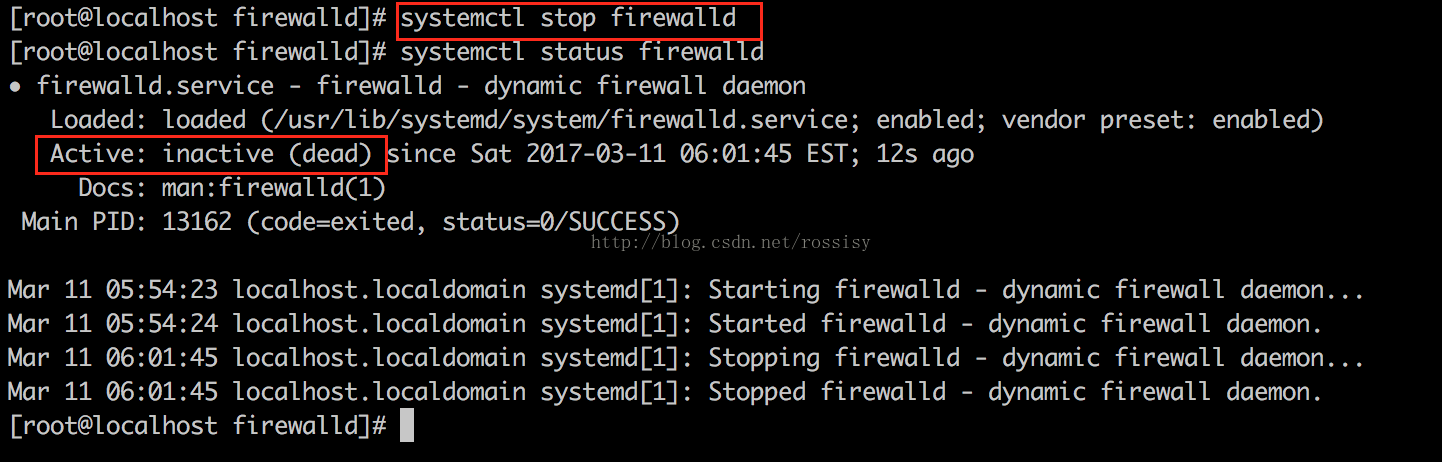
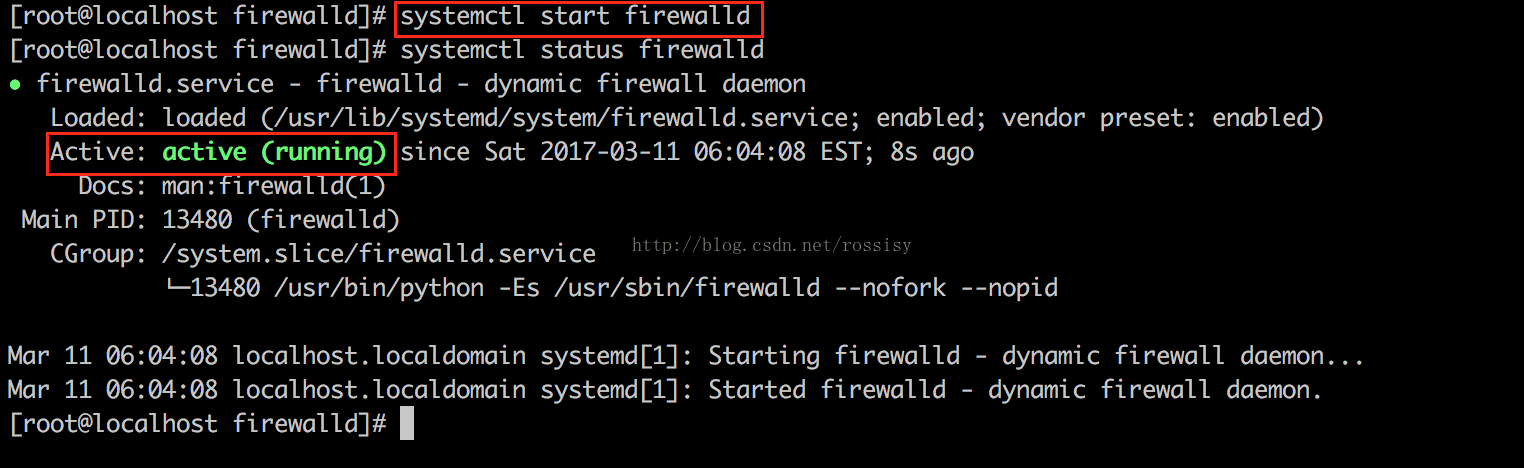
1. firewalld的启动与停止
停止:
启动:
查看运行状态:
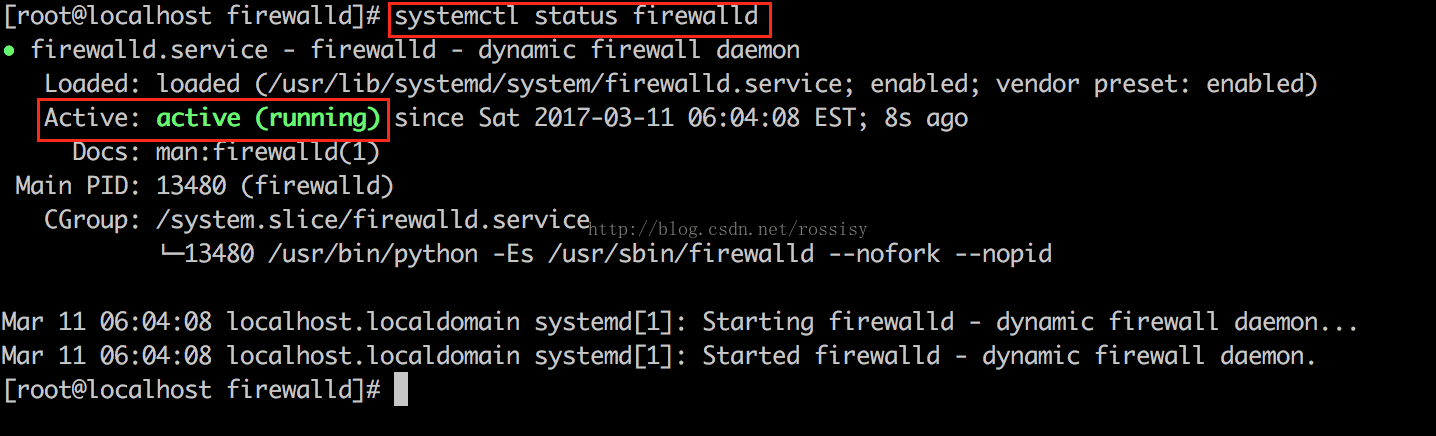
或

2. firewalld命令行工具firewall-cmd
firewall-cmd是firewalld的主要的命令行工具
查看firewalld版本:
[root@localhost firewalld]# firewall-cmd --version
0.4.3.2
查看firewall-cmd帮助:
[root@localhost firewalld]# firewall-cmd --help


Usage: firewall-cmd [OPTIONS...]


General Options
  -h, --help           Prints a short help text and exists
  -V, --version        Print the version string of firewalld
  -q, --quiet          Do not print status messages


Status Options
  --state              Return and print firewalld state
  --reload             Reload firewall and keep state information
  --complete-reload    Reload firewall and lose state information
  --runtime-to-permanent
                       Create permanent from runtime configuration


Log Denied Options
  --get-log-denied     Print the log denied value
  --set-log-denied=<value>
                       Set log denied value
  --get-ipset-types    Print the supported ipset types


Permanent Options
  --permanent          Set an option permanently
                       Usable for options marked with [P]


Zone Options
  --get-default-zone   Print default zone for connections and interfaces
  --set-default-zone=<zone>
                       Set default zone
  --get-active-zones   Print currently active zones
  --get-zones          Print predefined zones [P]
  --get-services       Print predefined services [P]
  --get-icmptypes      Print predefined icmptypes [P]
  --get-zone-of-interface=<interface>
                       Print name of the zone the interface is bound to [P]
  --get-zone-of-source=<source>[/<mask>]|<MAC>|ipset:<ipset>
                       Print name of the zone the source is bound to [P]
  --list-all-zones     List everything added for or enabled in all zones [P]
  --new-zone=<zone>    Add a new zone [P only]
  --new-zone-from-file=<filename> [--name=<zone>]
                       Add a new zone from file with optional name [P only]
  --delete-zone=<zone> Delete an existing zone [P only]
  --load-zone-defaults=<zone>
                       Load zone default settings [P only] [Z]
  --zone=<zone>        Use this zone to set or query options, else default zone
                       Usable for options marked with [Z]
  --get-target         Get the zone target [P only] [Z]
  --set-target=<target>
                       Set the zone target [P only] [Z]
  --info-zone=<zone>   Print information about a zone
  --path-zone=<zone>   Print file path of a zone [P only]


IPSet Options
  --get-ipset-types    Print the supported ipset types
  --new-ipset=<ipset> --type=<ipset type> [--option=<key>[=<value>]]..
                       Add a new ipset [P only]
  --new-ipset-from-file=<filename> [--name=<ipset>]
                       Add a new ipset from file with optional name [P only]
  --delete-ipset=<ipset>
                       Delete an existing ipset [P only]
  --load-ipset-defaults=<ipset>
                       Load ipset default settings [P only]
  --info-ipset=<ipset> Print information about an ipset
  --path-ipset=<ipset> Print file path of an ipset [P only]
  --get-ipsets         Print predefined ipsets
  --ipset=<ipset> --set-description=<description>
                       Set new description to ipset [P only]
  --ipset=<ipset> --get-description
                       Print description for ipset [P only]
  --ipset=<ipset> --set-short=<description>
                       Set new short description to ipset [P only]
  --ipset=<ipset> --get-short
                       Print short description for ipset [P only]
  --ipset=<ipset> --add-entry=<entry>
                       Add a new entry to an ipset [P]
  --ipset=<ipset> --remove-entry=<entry>
                       Remove an entry from an ipset [P]
  --ipset=<ipset> --query-entry=<entry>
                       Return whether ipset has an entry [P]
  --ipset=<ipset> --get-entries
                       List entries of an ipset [P]
  --ipset=<ipset> --add-entries-from-file=<entry>
                       Add a new entries to an ipset [P]
  --ipset=<ipset> --remove-entries-from-file=<entry>
                       Remove entries from an ipset [P]


IcmpType Options
  --new-icmptype=<icmptype>
                       Add a new icmptype [P only]
  --new-icmptype-from-file=<filename> [--name=<icmptype>]
                       Add a new icmptype from file with optional name [P only]
  --delete-icmptype=<icmptype>
                       Delete an existing icmptype [P only]
  --load-icmptype-defaults=<icmptype>
                       Load icmptype default settings [P only]
  --info-icmptype=<icmptype>
                       Print information about an icmptype
  --path-icmptype=<icmptype>
                       Print file path of an icmptype [P only]
  --icmptype=<icmptype> --set-description=<description>
                       Set new description to icmptype [P only]
  --icmptype=<icmptype> --get-description
                       Print description for icmptype [P only]
  --icmptype=<icmptype> --set-short=<description>
                       Set new short description to icmptype [P only]
  --icmptype=<icmptype> --get-short
                       Print short description for icmptype [P only]
  --icmptype=<icmptype> --add-destination=<ipv>
                       Enable destination for ipv in icmptype [P only]
  --icmptype=<icmptype> --remove-destination=<ipv>
                       Disable destination for ipv in icmptype [P only]
  --icmptype=<icmptype> --query-destination=<ipv>
                       Return whether destination ipv is enabled in icmptype [P only]
  --icmptype=<icmptype> --get-destinations
                       List destinations in icmptype [P only]


Service Options
  --new-service=<service>
                       Add a new service [P only]
  --new-service-from-file=<filename> [--name=<service>]
                       Add a new service from file with optional name [P only]
  --delete-service=<service>
                       Delete an existing service [P only]
  --load-service-defaults=<service>
                       Load icmptype default settings [P only]
  --info-service=<service>
                       Print information about a service
  --path-service=<service>
                       Print file path of a service [P only]
  --service=<service> --set-description=<description>
                       Set new description to service [P only]
  --service=<service> --get-description
                       Print description for service [P only]
  --service=<service> --set-short=<description>
                       Set new short description to service [P only]
  --service=<service> --get-short
                       Print short description for service [P only]
  --service=<service> --add-port=<portid>[-<portid>]/<protocol>
                       Add a new port to service [P only]
  --service=<service> --remove-port=<portid>[-<portid>]/<protocol>
                       Remove a port from service [P only]
  --service=<service> --query-port=<portid>[-<portid>]/<protocol>
                       Return whether the port has been added for service [P only]
  --service=<service> --get-ports
                       List ports of service [P only]
  --service=<service> --add-protocol=<protocol>
                       Add a new protocol to service [P only]
  --service=<service> --remove-protocol=<protocol>
                       Remove a protocol from service [P only]
  --service=<service> --query-protocol=<protocol>
                       Return whether the protocol has been added for service [P only]
  --service=<service> --get-protocols
                       List protocols of service [P only]
  --service=<service> --add-source-port=<portid>[-<portid>]/<protocol>
                       Add a new source port to service [P only]
  --service=<service> --remove-source-port=<portid>[-<portid>]/<protocol>
                       Remove a source port from service [P only]
  --service=<service> --query-source-port=<portid>[-<portid>]/<protocol>
                       Return whether the source port has been added for service [P only]
  --service=<service> --get-source-ports
                       List source ports of service [P only]
  --service=<service> --add-module=<module>
                       Add a new module to service [P only]
  --service=<service> --remove-module=<module>
                       Remove a module from service [P only]
  --service=<service> --query-module=<module>
                       Return whether the module has been added for service [P only]
  --service=<service> --get-modules
                       List modules of service [P only]
  --service=<service> --set-destination=<ipv>:<address>[/<mask>]
                       Set destination for ipv to address in service [P only]
  --service=<service> --remove-destination=<ipv>
                       Disable destination for ipv i service [P only]
  --service=<service> --query-destination=<ipv>:<address>[/<mask>]
                       Return whether destination ipv is set for service [P only]
  --service=<service> --get-destinations
                       List destinations in service [P only]


Options to Adapt and Query Zones
  --list-all           List everything added for or enabled in a zone [P] [Z]
  --list-services      List services added for a zone [P] [Z]
  --timeout=<timeval>  Enable an option for timeval time, where timeval is
                       a number followed by one of letters 's' or 'm' or 'h'
                       Usable for options marked with [T]
  --set-description=<description>
                       Set new description to zone [P only] [Z]
  --get-description    Print description for zone [P only] [Z]
  --set-short=<description>
                       Set new short description to zone [P only] [Z]
  --get-short          Print short description for zone [P only] [Z]
  --add-service=<service>
                       Add a service for a zone [P] [Z] [T]
  --remove-service=<service>
                       Remove a service from a zone [P] [Z]
  --query-service=<service>
                       Return whether service has been added for a zone [P] [Z]
  --list-ports         List ports added for a zone [P] [Z]
  --add-port=<portid>[-<portid>]/<protocol>
                       Add the port for a zone [P] [Z] [T]
  --remove-port=<portid>[-<portid>]/<protocol>
                       Remove the port from a zone [P] [Z]
  --query-port=<portid>[-<portid>]/<protocol>
                       Return whether the port has been added for zone [P] [Z]
  --list-protocols     List protocols added for a zone [P] [Z]
  --add-protocol=<protocol>
                       Add the protocol for a zone [P] [Z] [T]
  --remove-protocol=<protocol>
                       Remove the protocol from a zone [P] [Z]
  --query-protocol=<protocol>
                       Return whether the protocol has been added for zone [P] [Z]
  --list-source-ports  List source ports added for a zone [P] [Z]
  --add-source-port=<portid>[-<portid>]/<protocol>
                       Add the source port for a zone [P] [Z] [T]
  --remove-source-port=<portid>[-<portid>]/<protocol>
                       Remove the source port from a zone [P] [Z]
  --query-source-port=<portid>[-<portid>]/<protocol>
                       Return whether the source port has been added for zone [P] [Z]
  --list-icmp-blocks   List Internet ICMP type blocks added for a zone [P] [Z]
  --add-icmp-block=<icmptype>
                       Add an ICMP block for a zone [P] [Z] [T]
  --remove-icmp-block=<icmptype>
                       Remove the ICMP block from a zone [P] [Z]
  --query-icmp-block=<icmptype>
                       Return whether an ICMP block has been added for a zone
                       [P] [Z]
  --add-icmp-block-inversion
                       Enable inversion of icmp blocks for a zone [P] [Z]
  --remove-icmp-block-inversion
                       Disable inversion of icmp blocks for a zone [P] [Z]
  --query-icmp-block-inversion
                       Return whether inversion of icmp blocks has been enabled
                       for a zone [P] [Z]
  --list-forward-ports List IPv4 forward ports added for a zone [P] [Z]
  --add-forward-port=port=<portid>[-<portid>]:proto=<protocol>[:toport=<portid>[-<portid>]][:toaddr=<address>[/<mask>]]
                       Add the IPv4 forward port for a zone [P] [Z] [T]
  --remove-forward-port=port=<portid>[-<portid>]:proto=<protocol>[:toport=<portid>[-<portid>]][:toaddr=<address>[/<mask>]]
                       Remove the IPv4 forward port from a zone [P] [Z]
  --query-forward-port=port=<portid>[-<portid>]:proto=<protocol>[:toport=<portid>[-<portid>]][:toaddr=<address>[/<mask>]]
                       Return whether the IPv4 forward port has been added for
                       a zone [P] [Z]
  --add-masquerade     Enable IPv4 masquerade for a zone [P] [Z] [T]
  --remove-masquerade  Disable IPv4 masquerade for a zone [P] [Z]
  --query-masquerade   Return whether IPv4 masquerading has been enabled for a
                       zone [P] [Z]
  --list-rich-rules    List rich language rules added for a zone [P] [Z]
  --add-rich-rule=<rule>
                       Add rich language rule 'rule' for a zone [P] [Z] [T]
  --remove-rich-rule=<rule>
                       Remove rich language rule 'rule' from a zone [P] [Z]
  --query-rich-rule=<rule>
                       Return whether a rich language rule 'rule' has been
                       added for a zone [P] [Z]


Options to Handle Bindings of Interfaces
  --list-interfaces    List interfaces that are bound to a zone [P] [Z]
  --add-interface=<interface>
                       Bind the <interface> to a zone [P] [Z]
  --change-interface=<interface>
                       Change zone the <interface> is bound to [Z]
  --query-interface=<interface>
                       Query whether <interface> is bound to a zone [P] [Z]
  --remove-interface=<interface>
                       Remove binding of <interface> from a zone [P] [Z]


Options to Handle Bindings of Sources
  --list-sources       List sources that are bound to a zone [P] [Z]
  --add-source=<source>[/<mask>]|<MAC>|ipset:<ipset>
                       Bind the source to a zone [P] [Z]
  --change-source=<source>[/<mask>]|<MAC>|ipset:<ipset>
                       Change zone the source is bound to [Z]
  --query-source=<source>[/<mask>]|<MAC>|ipset:<ipset>
                       Query whether the source is bound to a zone [P] [Z]
  --remove-source=<source>[/<mask>]|<MAC>|ipset:<ipset>
                       Remove binding of the source from a zone [P] [Z]


Direct Options
  --direct             First option for all direct options
  --get-all-chains
                       Get all chains [P]
  --get-chains {ipv4|ipv6|eb} <table>
                       Get all chains added to the table [P]
  --add-chain {ipv4|ipv6|eb} <table> <chain>
                       Add a new chain to the table [P]
  --remove-chain {ipv4|ipv6|eb} <table> <chain>
                       Remove the chain from the table [P]
  --query-chain {ipv4|ipv6|eb} <table> <chain>
                       Return whether the chain has been added to the table [P]
  --get-all-rules
                       Get all rules [P]
  --get-rules {ipv4|ipv6|eb} <table> <chain>
                       Get all rules added to chain in table [P]
  --add-rule {ipv4|ipv6|eb} <table> <chain> <priority> <arg>...
                       Add rule to chain in table [P]
  --remove-rule {ipv4|ipv6|eb} <table> <chain> <priority> <arg>...
                       Remove rule with priority from chain in table [P]
  --remove-rules {ipv4|ipv6|eb} <table> <chain>
                       Remove rules from chain in table [P]
  --query-rule {ipv4|ipv6|eb} <table> <chain> <priority> <arg>...
                       Return whether a rule with priority has been added to
                       chain in table [P]
  --passthrough {ipv4|ipv6|eb} <arg>...
                       Pass a command through (untracked by firewalld)
  --get-all-passthroughs
                       Get all tracked passthrough rules [P]
  --get-passthroughs {ipv4|ipv6|eb} <arg>...
                       Get tracked passthrough rules [P]
  --add-passthrough {ipv4|ipv6|eb} <arg>...
                       Add a new tracked passthrough rule [P]
  --remove-passthrough {ipv4|ipv6|eb} <arg>...
                       Remove a tracked passthrough rule [P]
  --query-passthrough {ipv4|ipv6|eb} <arg>...
                       Return whether the tracked passthrough rule has been
                       added [P]


Lockdown Options
  --lockdown-on        Enable lockdown.
  --lockdown-off       Disable lockdown.
  --query-lockdown     Query whether lockdown is enabled


Lockdown Whitelist Options
  --list-lockdown-whitelist-commands
                       List all command lines that are on the whitelist [P]
  --add-lockdown-whitelist-command=<command>
                       Add the command to the whitelist [P]
  --remove-lockdown-whitelist-command=<command>
                       Remove the command from the whitelist [P]
  --query-lockdown-whitelist-command=<command>
                       Query whether the command is on the whitelist [P]
  --list-lockdown-whitelist-contexts
                       List all contexts that are on the whitelist [P]
  --add-lockdown-whitelist-context=<context>
                       Add the context context to the whitelist [P]
  --remove-lockdown-whitelist-context=<context>
                       Remove the context from the whitelist [P]
  --query-lockdown-whitelist-context=<context>
                       Query whether the context is on the whitelist [P]
  --list-lockdown-whitelist-uids
                       List all user ids that are on the whitelist [P]
  --add-lockdown-whitelist-uid=<uid>
                       Add the user id uid to the whitelist [P]
  --remove-lockdown-whitelist-uid=<uid>
                       Remove the user id uid from the whitelist [P]
  --query-lockdown-whitelist-uid=<uid>
                       Query whether the user id uid is on the whitelist [P]
  --list-lockdown-whitelist-users
                       List all user names that are on the whitelist [P]
  --add-lockdown-whitelist-user=<user>
                       Add the user name user to the whitelist [P]
  --remove-lockdown-whitelist-user=<user>
                       Remove the user name user from the whitelist [P]
  --query-lockdown-whitelist-user=<user>
                       Query whether the user name user is on the whitelist [P]


Panic Options
  --panic-on           Enable panic mode
  --panic-off          Disable panic mode
  --query-panic        Query whether panic mode is enabled


[root@localhost firewalld]#
查看firewalld状态:
[root@localhost firewalld]# firewall-cmd --state
running
打开80端口(只在当前的运行环境有效,当机器重启或firewalld服务重启后该端口默认未打开):
[root@localhost firewalld]# firewall-cmd --zone=public --add-port=80/tcp
success
打开80端口(永久生效):
[root@localhost firewalld]# firewall-cmd --permanent --zone=public --add-port=80/tcp
success
查看当前firewalld的端口状态
[root@localhost firewalld]# firewall-cmd --zone=public --list-ports
3306/tcp 80/tcp





 扫一扫
扫一扫


 1万+
1万+

 被折叠的 条评论
为什么被折叠?
被折叠的 条评论
为什么被折叠?
 到【灌水乐园】发言





