


更改pip源
考虑到使用esrally官方数据进行工具熟悉,需要下载一些json文件,而这些json文件又比较大,使用国外的源会下载很久,所以需要先更改pip源,详细操作方法,参考:https://gavin-wang-note.github.io/2020/05/05/change-pip-install-source/
install
shell
pip install --upgrade pip
pip3 install esrally
esrally configure
其中,esrally configure选择默认,一路下去就好:
shell
root@node244:~# esrally configure

    ____        ____
   / __ \____ _/ / /_  __
  / /_/ / __ `/ / / / / /
 / _, _/ /_/ / / / /_/ /
/_/ |_|\__,_/_/_/\__, /
                /____/

Running simple configuration. Run the advanced configuration with:

  esrally configure --advanced-config

* Setting up benchmark root directory in /root/.rally/benchmarks
* Setting up benchmark source directory in /root/.rally/benchmarks/src/elasticsearch

Configuration successfully written to /root/.rally/rally.ini. Happy benchmarking!

More info about Rally:

* Type esrally --help
* Read the documentation at https://esrally.readthedocs.io/en/1.4.1/
* Ask a question on the forum at https://discuss.elastic.co/c/elasticsearch/rally
root@node244:~#
执行pip3 install esrally时,报错:
shell
Successfully built py-cpuinfo thespian tabulate psutil pyrsistent
ERROR: awscli 1.18.21 has requirement botocore==1.15.21, but you'll have botocore 1.13.50 which is incompatible.
ERROR: awscli 1.18.21 has requirement s3transfer<0.4.0,>=0.3.0, but you'll have s3transfer 0.2.1 which is incompatible.
Installing collected packages: MarkupSafe, Jinja2, py-cpuinfo, elasticsearch, pyrsistent, attrs, zipp, importlib-metadata, jsonschema, thespian, tabulate, psutil, botocore, s3transfer, boto3, esrally
  Attempting uninstall: psutil
    Found existing installation: psutil 3.4.2
ERROR: Cannot uninstall 'psutil'. It is a distutils installed project and thus we cannot accurately determine which files belong to it which would lead to only a partial uninstall.
root@node244:~#
解决方法:
shell
root@node244:~# dpkg -l | grep psutil
ii  python-psutil                   3.4.2-1ubuntu0.1                           amd64        module providing convenience functions for managing processes
ii  python3-psutil                  3.4.2-1ubuntu0.1                           amd64        module providing convenience functions for managing processes (Python3)

root@node244:~# apt-get remove python3-psutil
安装git
忽略。
安装kibana
由于ES版本是7.6.0,所以要使用7.6.0版本的kibana,两者版本一定要一一对应。
直接从官网下载源码,放在ES集群的任意一个节点,或者非ES节点,进入config目录,修改kibana.yml
shell
root@node76:~/kibana-7.6.0-linux-x86_64/config# ll
total 20
drwxrwxr-x  2 root root 4096 May 28 17:00 ./
drwxr-xr-x 13 root root 4096 May 26 09:42 ../
-rw-r--r--  1 root root 3009 Feb  6 08:47 apm.js
-rw-r--r--  1 root root 5944 May 28 17:00 kibana.yml
root@node76:~/kibana-7.6.0-linux-x86_64/config#
增加如下内容:
shell
i18n.locale: "zh-CN"			                        # kibana默认文字是英文,变更成中文
server.port: 5601		        		                # 浏览器访问端口
server.host: "0.0.0.0"	                		        # 对外的服务地址
elasticsearch.hosts: ["http://10.16.172.75:9200"]       # 这里为你的elasticsearch集群的地址
kibana.index: ".kibana"                                 # 开启此选项
在tmux中,启动kibana:
root@node76:~/kibana-7.6.0-linux-x86_64# ./bin/kibana --allow-root
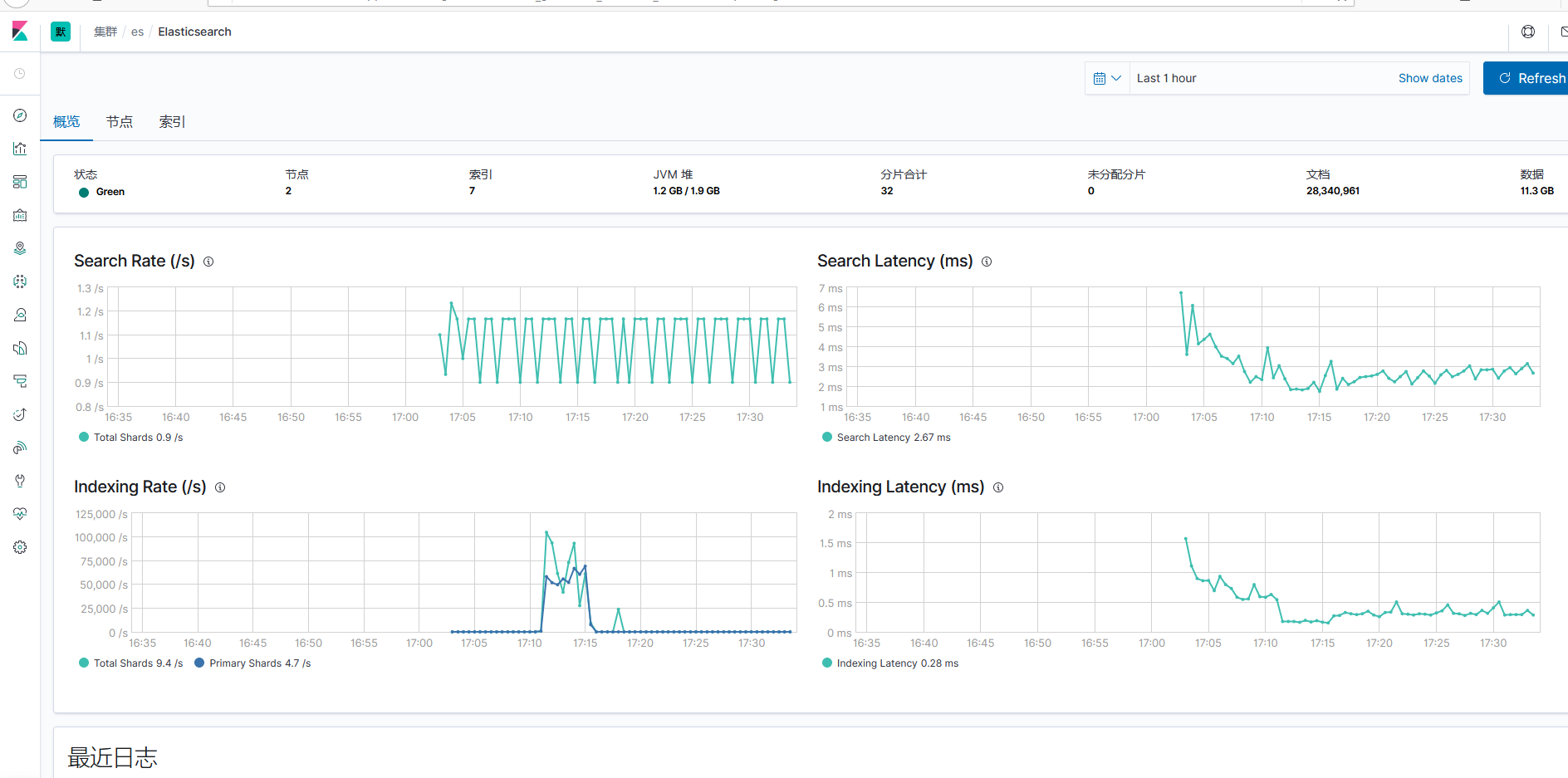
看看output是否无异常,然后通过浏览器,可以正常访问5601端口了:
如何创建自定义的track
获取产品index信息
由于产品在启用ES时,radosgw会创建出来一个index,命名格式如下:
rgw-pool_name-xxx
其中,pool_name为当前S3 pool的名称,xxx为一串随机字母和数字组合体,比如:rgw-default-0185294c。
知道了产品创建的index,通过Chrome插件elastic head,成功查询出该index的index information:
shell
{
    "state": "open",
    "settings": {
        "index": {
            "creation_date": "1590482452838",
            "number_of_shards": "6",
            "number_of_replicas": "1",
            "uuid": "ETvwijSKRjyyF93yeQ4PgA",
            "version": {
                "created": "7060099"
            },
            "provided_name": "rgw-default-0185294c"
        }
    },
    "mappings": {
        "_doc": {
            "properties": {
                "bucket": {
                    "type": "keyword"
                },
                "owner": {
                    "properties": {
                        "id": {
                            "type": "text",
                            "fields": {
                                "keyword": {
                                    "ignore_above": 256,
                                    "type": "keyword"
                                }
                            }
                        },
                        "display_name": {
                            "type": "text",
                            "fields": {
                                "keyword": {
                                    "ignore_above": 256,
                                    "type": "keyword"
                                }
                            }
                        }
                    }
                },
                "instance": {
                    "type": "keyword"
                },
                "meta": {
                    "properties": {
                        "expires": {
                            "type": "keyword"
                        },
                        "storage_class": {
                            "type": "keyword"
                        },
                        "content_encoding": {
                            "type": "keyword"
                        },
                        "cache_control": {
                            "type": "keyword"
                        },
                        "mtime": {
                            "type": "date"
                        },
                        "content_language": {
                            "type": "keyword"
                        },
                        "custom-date": {
                            "type": "nested",
                            "properties": {
                                "name": {
                                    "type": "keyword"
                                },
                                "value": {
                                    "type": "date"
                                }
                            }
                        },
                        "content_type": {
                            "type": "keyword"
                        },
                        "custom-int": {
                            "type": "nested",
                            "properties": {
                                "name": {
                                    "type": "keyword"
                                },
                                "value": {
                                    "type": "long"
                                }
                            }
                        },
                        "custom-string": {
                            "type": "nested",
                            "properties": {
                                "name": {
                                    "type": "keyword"
                                },
                                "value": {
                                    "type": "keyword"
                                }
                            }
                        },
                        "size": {
                            "type": "long"
                        },
                        "content_disposition": {
                            "type": "keyword"
                        },
                        "etag": {
                            "type": "keyword"
                        },
                        "tail_tag": {
                            "type": "text",
                            "fields": {
                                "keyword": {
                                    "ignore_above": 256,
                                    "type": "keyword"
                                }
                            }
                        }
                    }
                },
                "permissions": {
                    "type": "text",
                    "fields": {
                        "keyword": {
                            "ignore_above": 256,
                            "type": "keyword"
                        }
                    }
                },
                "name": {
                    "type": "keyword"
                },
                "versioned_epoch": {
                    "type": "long"
                }
            }
        }
    },
    "aliases": [

    ],
    "primary_terms": {
        "0": 2,
        "1": 2,
        "2": 3,
        "3": 2,
        "4": 2,
        "5": 2
    },
    "in_sync_allocations": {
        "0": [
            "2_0-lXLvSbyExIEMJzL1lA",
            "KPvnjrHgSy-AjEWVxj8sOA"
        ],
        "1": [
            "Hls3ybkQRRG8775SV-7rsA",
            "iZOWaQZ4TBCXYwazPSo38g"
        ],
        "2": [
            "hP40oioMSUOjOS8-NlWB2w",
            "Hef19xB1Ru2J9zbeDmZ4PQ"
        ],
        "3": [
            "jwu4T-z2RvKrupWGam4QWw",
            "ThRg4-UESYqwo5iKYzzJ4A"
        ],
        "4": [
            "a8R3KMiyRTenLI5jDC2wrw",
            "4e5LfW6SRPWyTkXU0xQPbQ"
        ],
        "5": [
            "6xcWh3JTTVGc8eHwChkmfw",
            "_Bzi1GwAS4G3J5kESmRMDw"
        ]
    }
}
重点关注“mappings”里的内容,其他信息不用关心。
根据产品index信息,构造自定义index.json
有了上面的mappings信息,就可以自定义track所需要的index了:
shell
root@node244:~/my_esrally_data/tracks/bigtera# ll
total 48
drwxr-xr-x 4 root root  4096 May 27 18:28 ./
drwxr-xr-x 3 root root  4096 May 27 10:07 ../
drwxr-xr-x 2 root root  4096 May 27 18:04 challenges/
-rw-r--r-- 1 root root    44 May 26 14:50 files.txt
-rw-r--r-- 1 root root  3559 May 27 17:51 index.json
drwxr-xr-x 2 root root  4096 May 27 15:14 operations/
-rw-r--r-- 1 root root  3224 May 26 14:50 README.md
-rw-r--r-- 1 root root   745 May 27 17:58 track.json
-rw-r--r-- 1 root root  3736 May 26 14:50 track.py
root@node244:~/my_esrally_data/tracks/bigtera#
自定义的index信息如下:
shell
root@node244:~/my_esrally_data/tracks/bigtera# cat index.json
{
  "settings": {
    "index.number_of_shards": {{number_of_shards | default(5)}},
    "index.number_of_replicas": {{number_of_replicas | default(0)}},
    "index.store.type": "{{store_type | default('fs')}}",
    "index.requests.cache.enable": false
  },
  "mappings": {
    "_source": {
      "enabled": {{ source_enabled | default(true) | tojson }}
    },
    "properties": {
        "bucket": {
            "type": "keyword"
            },
        "owner": {
            "properties": {
            "id": {
                "type": "text",
                "fields": {
                    "keyword": {
                       "ignore_above": 256,
                       "type": "keyword"
                    }
                }
            },
            "display_name": {
                "type": "text",
                "fields": {
                    "keyword": {
                        "ignore_above": 256,
                        "type": "keyword"
                        }
                     }
                 }
             }
        },
        "instance": {
            "type": "keyword"
        },
        "meta": {
            "properties": {
            "expires": {
                "type": "keyword"
                },
            "storage_class": {
                "type": "keyword"
                },
            "content_encoding": {
                "type": "keyword"
                },
             "cache_control": {
                 "type": "keyword"
                },
            "mtime": {
                "type": "date"
                },
            "content_language": {
                "type": "keyword"
                },
            "custom-date": {
                "type": "nested",
                "properties": {
                    "name": {
                        "type": "keyword"
                        },
                    "value": {
                         "type": "date"
                        }
                 }
             },
             "content_type": {
                 "type": "keyword"
                 },
             "custom-int": {
                 "type": "nested",
                 "properties": {
                     "name": {
                         "type": "keyword"
                     },
                     "value": {
                          "type": "long"
                     }
                 }
             },
             "custom-string": {
                 "type": "nested",
                 "properties": {
                     "name": {
                         "type": "keyword"
                         },
                      "value": {
                          "type": "keyword"
                          }
                  }
             },
            "size": {
                "type": "long"
                },
            "content_disposition": {
                "type": "keyword"
                },
            "etag": {
                "type": "keyword"
                },
            "tail_tag": {
                "type": "text",
                "fields": {
                    "keyword": {
                        "ignore_above": 256,
                        "type": "keyword"
                        }
                }
            }
   }
},
    "permissions": {
        "type": "text",
        "fields": {
            "keyword": {
                "ignore_above": 256,
                "type": "keyword"
                }
        }
    },
    "name": {
        "type": "keyword"
        },
    "versioned_epoch": {
        "type": "long"
        }
    }
  }
}
根据index信息,构造测试数据
有了index了,如何给esrally构造数据呢?依然使用elastic head插件,查询出产品生产的index里的数据(前提条件是写了部分数据,哪怕几条也行,可以通过cosbench写,也可以自己写个脚本put s3 object),如下图所示:
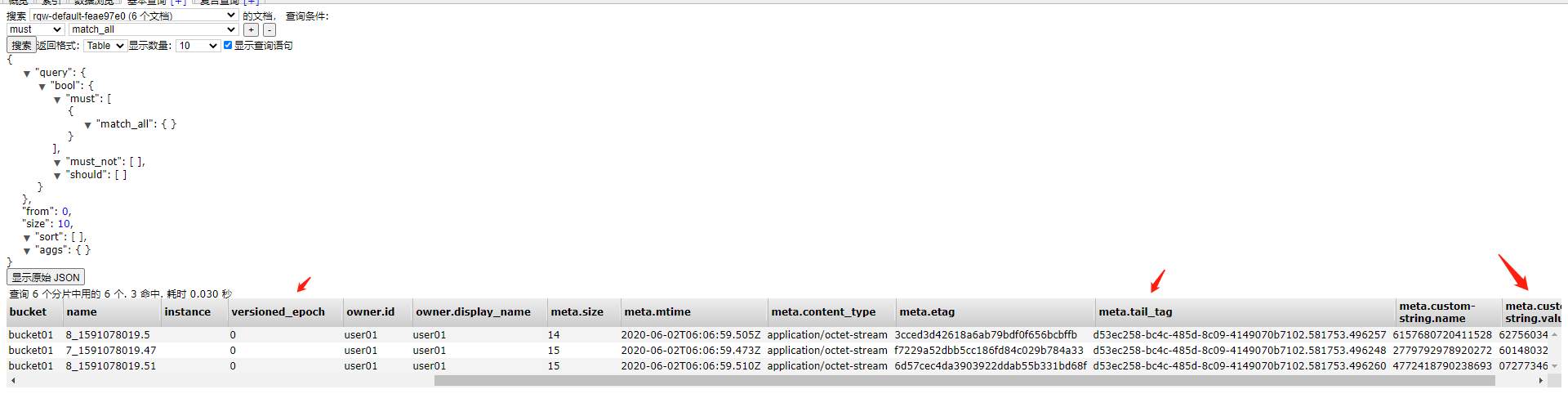
图中,可以看出,从“bucket开始,就是当前index的字段信息,没有子键值项;
owner.id,owner.display_nane,这说明owner是一级key,id 和 display_nane是二级key
meta.custom-string.name 和 meta.custom-string.value, 这说明meta是一级key, custom-string是二级key,name和value是三级key
分析到这里,就会知道,esrally工具需要什么样的数据结构的数据,一个完整的数据结构如下:
shell
{
    "bucket": "bucket01",
    "owner": {
        "id": "user01",
        "display_name": "user01"
    },
    "instance": "",
    "meta": {
        "expires": "",
        "storage_class": "",
        "content_encoding": "",
        "mtime": "2020-05-27T03:14:57.855Z",
        "content_language": "",
        "custom-date": {
            "name": "",
            "value": ""
        },
        "content_type": "application/octet-stream",
        "custom-int": {
            "name": "",
            "value": ""
        },
        "custom-string": {
            "name": "7385228445730524",
            "value": "8590745273515960"
        },
        "size": "10",
        "content_disposition": "",
        "etag": "e7b4c2f4a8153de9c7a070e5d6550ab1",
        "tail_tag": "a3a5cefd-376d-421b-9080-08b98962e7c1.4520.681216"
    },
    "permissions": "",
    "name": "25_1590549297.82",
    "versioned_epoch": "0"
}
比如上面的custom-int 和custom-date,可以不需要,我只需要custom-string类型的信息,那就可以忽略掉这两个键值,只生成必须的字典信息即可,参考如下:
shell
root@node244:~/my_esrally_data/data/bigtera# cat documents-2.json | head -n 6
{"name": "83_0916035289.68", "bucket": "bucket01", "instance": "null", "meta": {"custom-string": {"name": "2427603943521294", "value": "6309708009398746"}, "mtime": "2020-05-22T55:60:03.465Z", "etag": "e7b834f4a0650de9c7a070e5d8446ab1", "content_type": "application/octet-stream", "tail_tag": "a3a5cefd-376d-421b-2627-08b32656e7c1.4520.354058", "size": "315"}, "owner": {"display_name": "user01", "id": "user01"}, "versioned_epoch": "0"}
{"name": "83_0916035289.68", "bucket": "bucket01", "instance": "null", "meta": {"custom-string": {"name": "2427603943521294", "value": "6309708009398746"}, "mtime": "2020-05-22T55:60:03.465Z", "etag": "e7b834f4a0650de9c7a070e5d8446ab1", "content_type": "application/octet-stream", "tail_tag": "a3a5cefd-376d-421b-2627-08b32656e7c1.4520.354058", "size": "315"}, "owner": {"display_name": "user01", "id": "user01"}, "versioned_epoch": "0"}
这里产生的数据,通过python script来生成,script 内容参考如下:
python
root@node244:~# cat write_json_data.py
#!/usr/bin/env python

import os
import sys
from random import choice
from string import digits
from string import ascii_lowercase
from multiprocessing.pool import ThreadPool


# data like this:
"""
{
    "bucket": "bucket01",
    "owner": {
        "id": "user01",
        "display_name": "user01"
    },
    "instance": "",
    "meta": {
        "expires": "",
        "storage_class": "",
        "content_encoding": "",
        "mtime": "2020-05-27T03:14:57.855Z",
        "content_language": "",
        "custom-date": {
            "name": "",
            "value": ""
        },
        "content_type": "application/octet-stream",
        "custom-int": {
            "name": "",
            "value": ""
        },
        "custom-string": {
            "name": "7385228445730524",
            "value": "8590745273515960"
        },
        "size": "10",
        "content_disposition": "",
        "etag": "e7b4c2f4a8153de9c7a070e5d6550ab1",
        "tail_tag": "a3a5cefd-376d-421b-9080-08b98962e7c1.4520.681216"
    },
    "permissions": "",
    "name": "25_1590549297.82",
    "versioned_epoch": "0"
}
"""

def rand_low_ascii(length=10):
    return ''.join([choice(ascii_lowercase) for i in xrange(length)])


def rand_alpha(length=9):
    return ''.join([choice(digits) for i in xrange(length)])


def json_data():
    src = {"bucket":"bucket01","owner":{"id":"user01","display_name":"user01"},"instance":"null","meta":{"mtime":"2020-05-2{}T1{}:2{}:3{}.{}Z".format(rand_alpha(1), rand_alpha(1), rand_alpha(1), rand_alpha(1), rand_alpha(3)),"content_type":"application/octet-stream","custom-string":{"name":"{}".format(rand_alpha(16)),"value":"{}".format(rand_alpha(16))},"size":"{}".format(rand_alpha(3)),"etag":"e7b{}f4a{}de9c7a070e5d{}ab1".format(rand_alpha(3), rand_alpha(4), rand_alpha(4)),"tail_tag":"a3a5cefd-376d-421b-{}-08b{}e7c1.4520.{}".format(rand_alpha(4), rand_alpha(5), rand_alpha(6))},"name":"{}_{}.{}".format(rand_alpha(2), rand_alpha(10), rand_alpha(2)),"versioned_epoch":"0"}

    return src


def write_data():
    with open("./documents-2.json", 'a') as f:
        for i in xrange(10):
            src = json_data()
            # replace ' to "
            new_str = str(src).replace("'", '"')
            f.write(new_str)
            f.write('\n')


def thread_pool_input_object():
    results = []
    for i in xrange(20):
        results.append(pool.apply_async(write_data, ()))

    for (idx, result) in enumerate(results):
        try:
            r = result.get()
        except:
            print('[ERROR]  Failed to write data into file')


if __name__ == '__main__':
    # Suggest to set same as cpu processor : cat /proc/cpuinfo |grep "processor"|wc -l
    pool = ThreadPool(processes=32)
    thread_pool_input_object()
修改esrally配置文件
有构造数据的脚本了,通过修改esrally的配置文件以及track.json,读取指定目录下指定文件,共同完成一个rally job的运行。
修改track.json
shell
root@node244:~/my_esrally_data/tracks/bigtera# cat track.json
# {% import "rally.helpers" as rally with context %}
{
  "version": 2,
  "description": "POIs from bigtera",
  "data-url": "/root/my_esrally_data/tracks/bigtera/index.json",
  "indices": [
    {
      "name": "bigtera",
      "body": "index.json"
    }
  ],
  "corpora": [
    {
      "name": "bigtera",
      "base-url": "/root/my_esrally_data/tracks/bigtera/index.json",
      "documents": [
        {
          "source-file": "documents-2.json.bz2",
          "document-count": 761377675,
          "compressed-bytes": 36309135809,
          "uncompressed-bytes": 333483421650
        }
      ]
    }
  ],
  "operations": [
    {{ rally.collect(parts="operations/*.json") }}
  ],
  "challenges": [
    {{ rally.collect(parts="challenges/*.json") }}
  ]
}
root@node244:~/my_esrally_data/tracks/bigtera#
主要修改点:
-
data-url: 这个是自定义的index文件的位置
-
name: 请填写为待创建的index名称
-
source-file: 务必填写为压缩后的bz2文件名称,如 “documents-2.json.bz2”
-
document-count: 未压缩文件的行数,不能有错,如 761377675
-
compressed-bytes: documents-2.json文件压缩后的字节数,不能有错,如36309135809
-
uncompressed-bytes: documents-2.json文件未压缩时的字节数,不能有错,如333483421650
修改 .rally目录下rally.ini文件
ini
root@node244:~/.rally# cat rally.ini
[meta]
config.version = 17

[system]
env.name = local

[node]
root.dir = /root/.rally/benchmarks
src.root.dir = /root/.rally/benchmarks/src

[source]
remote.repo.url = https://github.com/elastic/elasticsearch.git
elasticsearch.src.subdir = elasticsearch

[benchmarks]
# local.dataset.cache = /root/.rally/benchmarks/data
# local.dataset.cache = /root/my_esrally_data/data
local.dataset.cache = /mnt/sata/700million
# local.dataset.cache = /mnt/sata/100million

[reporting]
datastore.type = in-memory
datastore.host =
datastore.port =
datastore.secure = False
datastore.user =
datastore.password =

[tracks]
default.url = https://github.com/elastic/rally-tracks

[teams]
default.url = https://github.com/elastic/rally-teams

[defaults]
preserve_benchmark_candidate = False

[distributions]
release.cache = true

root@node244:~/.rally#
[benchmarks]标签下,有个参数local.dataset.cache,这个路径是要运行当前track所需要的原始数据文件:
shell
root@node244:~/.rally# cd /mnt/sata/700million
root@node244:/mnt/sata/700million# ls -lR
.:
total 361125600
drwxr-xr-x 2 root root         4096 May 29 21:33 bigtera

./bigtera:
total 361125928
-rw-r--r-- 1 root root 333483421650 May 29 14:09 documents-2.json
-rw-r--r-- 1 root root  36309135809 May 29 11:05 documents-2.json.bz2
-rw-r--r-- 1 root root       342932 May 29 21:51 documents-2.json.offset
root@node244:/mnt/sata/700million#
其中,documents-2.json.offset为esrally工具运行时自动产生的,如下是运行时屏显信息:
[INFO] Preparing file offset table for [/root/my_esrally_data/data/bigtera/documents-2.json] ...
另外,bigtera为对应要创建的index名称,这个在track.json中有定义,所有的数据源,要放在与index同名的目录下。
修改challenges
可以参考官方示例,构造自己需要的challenges,如下challenges为参考了genonames的示例:
shell
root@node244:~/my_esrally_data/tracks/bigtera/challenges# cat default.json
    {
      "name": "append-no-conflicts",
      "description": "Indexes the whole document corpus using Elasticsearch default settings. We only adjust the number of replicas as we benchmark a single node cluster and Rally will only start the benchmark if the cluster turns green. Document ids are unique so all index operations are append only. After that a couple of queries are run.",
      "default": true,
      "schedule": [
        {
          "operation": "delete-index"
        },
        {
          "operation": {
            "operation-type": "create-index",
            "settings": \{\{index_settings | default(\{\}) | tojson}}
          }
        },
        {
          "name": "check-cluster-health",
          "operation": {
            "operation-type": "cluster-health",
            "index": "bigtera",
            "request-params": {
              "wait_for_status": "{{cluster_health | default('green')}}",
              "wait_for_no_relocating_shards": "true"
            }
          }
        },
        {
          "operation": "index-append",
          "warmup-time-period": 120,
          "clients": {{bulk_indexing_clients | default(8)}}
        },
        {
          "name": "refresh-after-index",
          "operation": "refresh"
        }
        ]
    },
    {
      "name": "append-no-conflicts-index-only",
      "description": "Indexes the whole document corpus using Elasticsearch default settings. We only adjust the number of replicas as we benchmark a single node cluster and Rally will only start the benchmark if the cluster turns green. Document ids are unique so all index operations are append only.",
      "schedule": [
        {
          "operation": "delete-index"
        },
        {
          "operation": {
            "operation-type": "create-index",
            "settings": \{\{index_settings | default(\{\}) | tojson}}
          }
        },
        {
          "name": "check-cluster-health",
          "operation": {
            "operation-type": "cluster-health",
            "index": "bigtera",
            "request-params": {
              "wait_for_status": "{{cluster_health | default('green')}}",
              "wait_for_no_relocating_shards": "true"
            }
          }
        },
        {
          "operation": "index-append",
          "warmup-time-period": 120,
          "clients": {{bulk_indexing_clients | default(8)}}
        },
        {
          "operation": {
            "operation-type": "force-merge",
            "request-timeout": 7200
          }
        },
        {
          "name": "wait-until-merges-finish",
          "operation": {
            "operation-type": "index-stats",
            "index": "_all",
            "condition": {
              "path": "_all.total.merges.current",
              "expected-value": 0
            },
            "retry-until-success": true,
            "include-in-reporting": false
          }
        }
      ]
    }
root@node244:~/my_esrally_data/tracks/bigtera/challenges#
说明:
如果只想跑"append-no-conflicts-index-only"下的向index中追加数据,可以删除"schedule": []中的除了"operation": "index-append"这个{},这样就只剩这个operation了。
修改operations
参考如下所示:
shell
root@node244:~/my_esrally_data/tracks/bigtera/operations# cat default.json
    {
      "name": "index-append",
      "operation-type": "bulk",
      "bulk-size": {{bulk_size | default(5000)}},
      "ingest-percentage": {{ingest_percentage | default(100)}}
    },
    {
      "name": "index-update",
      "operation-type": "bulk",
      "bulk-size": {{bulk_size | default(5000)}},
      "ingest-percentage": {{ingest_percentage | default(100)}},
      "conflicts": "{{conflicts | default('random')}}",
      "on-conflict": "{{on_conflict | default('index')}}",
      "conflict-probability": {{conflict_probability | default(25)}},
      "recency": {{recency | default(0)}}
    },
    {
      "name": "default",
      "operation-type": "search",
      "body": {
        "query": {
          "match_all": {}
        }
      }
    },
    {
      "name": "term",
      "operation-type": "search",
      "body": {
        "query": {
          "term": {
            "meta.etag": "9b7cabc0dbbdf9708cvtazfylkjkqaum"
          }
        }
      }
    },
    {
      "name": "phrase",
      "operation-type": "search",
      "body": {
        "query": {
          "match_phrase": {
            "name": "2_4409197807.1"
          }
        }
      }
    }
使用技巧
运行时携带参数
执行esrally -h ,查看具体的帮助信息,以及官方示例中的readme.md文档。
比如下列这个示例:
shell
esrally --pipeline=benchmark-only --target-hosts=10.16.172.243:9200 --track=geonames --challenge=append-no-conflicts-index-only --track-params="bulk_size:1,bulk_indexing_clients:2"
指定了只跑append-no-conflicts-index-only这个challenge,同时指定了bulk_size和bulk_indexing_clients,当然,可以携带其他参数了,比如number_of_replicas 和 number_of_shards,参考如下:
shell
esrally --pipeline=benchmark-only --track-path=/root/my_esrally_data/tracks/bigtera --target-hosts=10.16.172.76:9200 --offline --report-file=/root/my_esrally_data/report/427112_1Mmetadata_6shards_1rep.json --challenge=append-no-conflicts-index-only --track-params="number_of_shards:6,number_of_replicas:1"
esrally日志的查看
在esrally运行时,可以查看日志文件,来帮助定位工具运行中碰到的问题。
shell
root@node244:~# cd .rally/logs/
root@node244:~/.rally/logs# ll
total 51520
drwxr-xr-x 2 root root     4096 Jun  2 11:03 ./
drwxr-xr-x 4 root root     4096 Jun  2 11:03 ../
-rw-r--r-- 1 root root 52740698 Jun  2 13:54 rally.log
root@node244:~/.rally/logs#
来源: Transcendent
文章作者: Gavin Wang
文章链接: esrally实战 | Transcendent
本文章著作权归作者所有,任何形式的转载都请注明出处。
 2159
2159


 扫一扫
扫一扫


 被折叠的 条评论
为什么被折叠?
被折叠的 条评论
为什么被折叠?
 到【灌水乐园】发言


