CentOS 7 :Failed to start IPv4 firewall with iptables.

CentOS 7.2:Failed to start IPv4 firewall with iptables 这个问题整了我一天,真心没有感觉firewall有哪里好用了,除了麻烦还是麻烦,就像直接卸载掉,但是貌似不能卸载,只能禁用了,禁用后iptable也么有法用,直接报错:● iptables.service - IPv4 firewall with iptables   Loaded: loaded (/usr/lib/systemd/system/iptables.service; enabled... 阅读详情

    用iptables开启防火墙报错: Failed to start  IPv4 firewall with iptables.
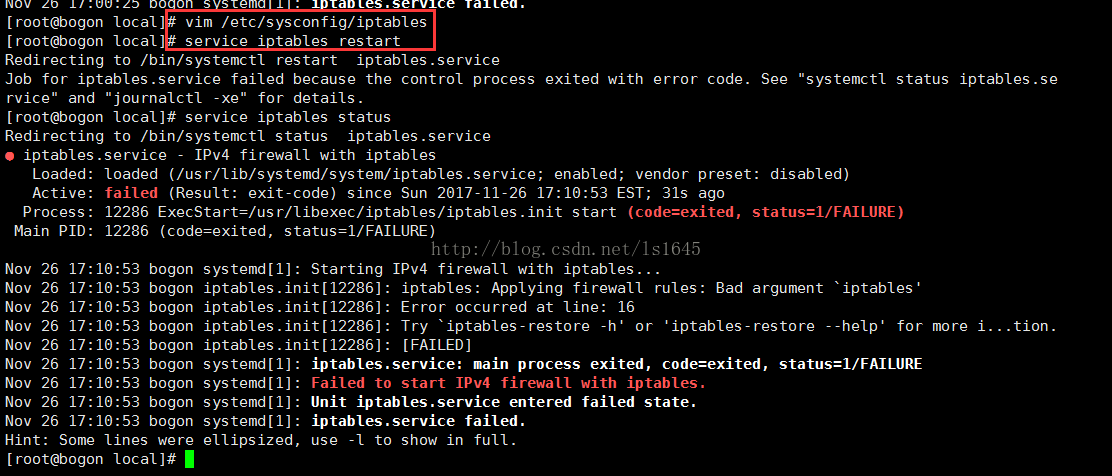
    错误原因:因为centos7.0默认不是使用iptables方式管理,而是firewalld方式。CentOS6.0防火墙用iptables管理。

        解决办法有两个:使用firewalld方式。或者关闭firewalld,然后安装iptables。

一、关闭firewalld,安装iptables过程:

停止并屏蔽firewalld:

systemctl stop firewalld
systemctl mask firewalld

安装iptables-services:

yum install iptables-services

设置开机启动:

systemctl enable iptables

停止/启动/重启 防火墙:

systemctl [stop|start|restart] iptables
#or
service iptables [stop|start|restart]


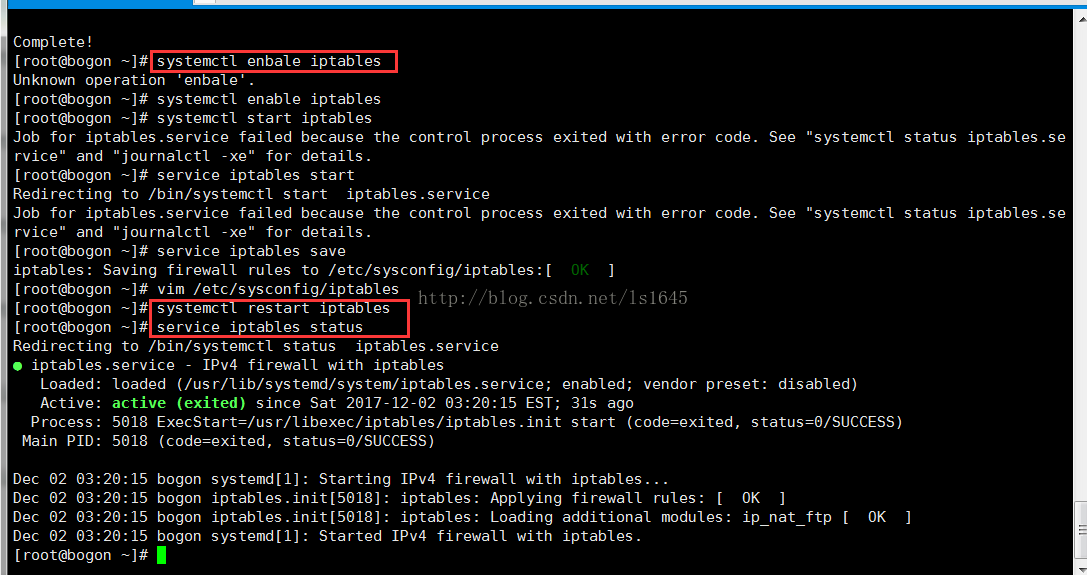
     按照上述命令配置后的界面:

二、从iptables切换回firewalld

    1、先看firewalld的状态:inactive
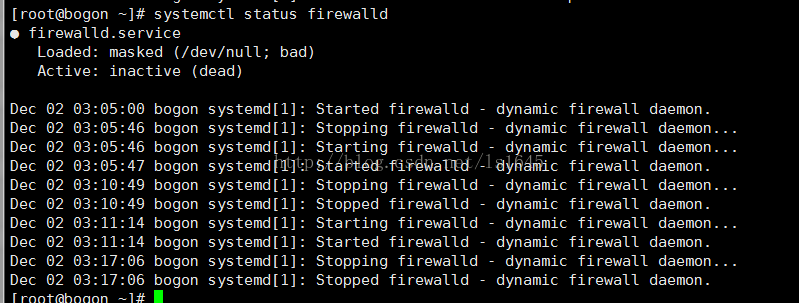
     

    2、安装firewalld

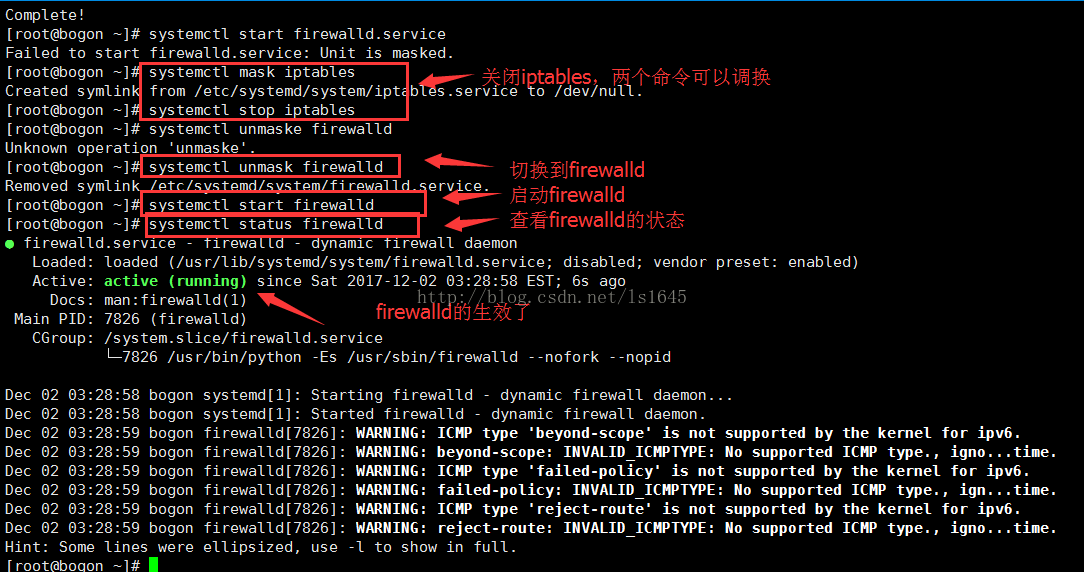
   3、切换到firewalld,切换过程与切换iptables一样

/************下面是iptables的一些命令*******************************/

查询防火墙状态:

[root@localhost ~]# service  iptables status

停止防火墙:

[root@localhost ~]# service  iptables stop 

启动防火墙:

[root@localhost ~]# service  iptables start 

重启防火墙:

[root@localhost ~]# service  iptables restart 

永久关闭防火墙:

[root@localhost ~]# chkconfig  iptables off 

永久关闭后启用:

[root@localhost ~]# chkconfig  iptables on

开启端口:

[root@localhost ~]# vim/etc/sysconfig/iptables


/**********下面是firewalld的一些命令*****************************/

#systemctl statusfirewalld  //查看状态,看电脑上是否已经安装firewalld

#yum installfirewalld  //安装firewalld防火墙

#systemctl startfirewalld.service   //开启防火墙

#systemctl stop firewalld.service  //关闭防火墙

#systemctl enable firewalld.service //设置开机自动启动

#systemctl disable firewalld.service  //设置关闭开机制动启动

#firewall-cmd--reload  //在不改变状态的条件下重新加载防火墙

启用某个服务

#firewall-cmd --zone=public --add-service=https  //临时

#firewall-cmd --permanent --zone=public --add-service=https  //永久

开启某个端口

#firewall-cmd--permanent --zone=public --add-port=8080-8081/tcp  //永久

#firewall-cmd  --zone=public --add-port=8080-8081/tcp   //临时

查看开启的端口和服务

#firewall-cmd--permanent --zone=public --list-services   //服务空格隔开 例如 dhcpv6-client https ss  

#firewall-cmd--permanent --zone=public --list-ports //端口空格隔开  例如 8080-8081/tcp 8388/tcp 80/tcp

#systemctl restartfirewalld.service  //修改配置后需要重启服务使其生效

#firewall-cmd--zone=public --query-port=8080/tcp //查看服务是否生效(例:添加的端口为8080)


/**********下面是systemctl的一些命令*******************************/

        观察iptables和firewalld使用的两组命令,发现三个常用的命令:service、chkconfig、systemctl。那么它们分别是做什么的呢?(去网上搜索了一下给出了答案)

        systemctl命令是系统服务管理器指令,它实际上将 service 和 chkconfig 这两个命令组合到一起。

任务

旧指令

新指令

使某服务自动启动

chkconfig --level 3 httpd on

systemctl enable httpd.service

使某服务不自动启动

chkconfig --level 3 httpd off

systemctl disable httpd.service

检查服务状态

service httpd status

systemctl status httpd.service(服务详细信息) 

systemctl is-active httpd.service(仅显示是否 Active)

显示所有已启动的服务

chkconfig --list

systemctl list-units --type=service

启动某服务

service httpd start

systemctl start httpd.service

停止某服务

service httpd stop

systemctl stop httpd.service

重启某服务

service httpd restart

systemctl restart httpd.service


总结:

        记是记不住的,实操才可以,熟能生巧。

        抓住一个问题,深入去挖,往往能挖出一片,从而扫清一片盲点。深挖能出清泉。


参考文章: 

https://www.vkilo.com/rhel-7-iptables-service.html

http://blog.csdn.net/Joe68227597/article/details/75207859 

http://www.linuxidc.com/Linux/2012-06/63111.htm

http://man.linuxde.net/systemctl


CentOS 7 从 firewalld 迁移 iptables 的四步实战指南 iptables 是 Linux 内核 netfilter 框架的原生命令行接口,其基于四表五链(filter/nat/mangle/raw;INPUT/OUTPUT/FORWARD 等)的规则模型,提供确定性、可审计性与毫秒级响应能力。相比 firewalld 的 zone/service 抽象层,iptables 直接操作内核规则,规避了 runtime 与 permanent 配置不一致、D-Bus 通信超时、自定义链隐式依赖等运维风险。它广泛应用于生产环境的容器网络治理(如修复 docker0 链缺 阅读详情

相关推荐

CentOS 7 从 firewalld 迁移到 iptables 的工程实践指南

iptables 是 Linux 内核 Netfilter 框架的命令行接口,通过直接操作四表五链(filter、nat、mangle、raw)实现细粒度网络包过滤与地址转换。其核心原理基于规则匹配顺序、连接状态跟踪(conntrack)及模块化扩展(如 xt_time、ipset),技术价值在于零抽象、高确定性与强可审计性,广泛应用于生产环境防火墙加固、Docker/KVM 网络协同、等保合规策略落地及 AI 工具链(如 Free-Claude-Code)的端口映射部署。本文聚焦 CentOS 7 平台,

diaoqu4574的博客 343

用iptables开启防火墙报错: Failed to start  IPv4 firewall with iptables.

用iptables开启防火墙报错: Failed to start IPv4 firewall with iptables. 解决办法有两个:使用firewalld方式。或者关闭firewalld,然后安装iptables。 一、关闭firewalld,安装iptables过程: 停止并屏蔽firewalld: systemctl stop firewalld syst...

weixin_39092584的博客 2562

别再手动抄表了!用MCGS触摸屏自动存数据到U盘,5分钟搞定报表导出

本文详细介绍了如何利用MCGS触摸屏实现工业数据自动记录与U盘导出,彻底告别传统手动抄表方式。通过昆仑通态MCGS系统,可构建零误差自动化报表系统,实现实时数据采集、双重备份及标准CSV格式导出,大幅提升数据准确性和工作效率。

weixin_30872157的博客 781

CentOS 7 :Failed to start IPv4 firewall with iptables.

用iptables开启防火墙报错:Failed to start IPv4 firewall with iptables. 转载于:https://blog.csdn.net/ls1645/article/details/78750561 错误原因:因为centos7.0默认不是使用iptables方式管理,而是firewalld方式。CentOS6.0防火墙用iptables...

weixin_34025151的博客 432

PTGui使用教程

PTGui使用教程为啥使用ptgui开始使用ptgui 为啥使用ptgui ptgui是一个全景拼接软件,在海思hi3559上做视频拼接的时候,需要拼接参数,这是就需要使用到ptgui,这里可以在该网站下下载ptgui:下载地址 开始使用ptgui 第一步,加载图片,我这里添加了三幅图 然后添加控制点(可以先多对准几次图像,这样会自动生成一些控制点,但是不保证准确),建议控制点不要太密集 点开镜头设置,勾选以下几个选项以及配置好镜头类型,如下图 点开优化器,在高级界面中配置如下参数,最后点

what_wrong的博客 1万+

百度新闻评论内容抓取

通过抓包分析发现,百家号手机app端文章评论内容接口为:https://ext.baidu.com/api/comment/v1/comment/getlist?appid=101&sid=1008524_2-1010050_1-1007549_23033-1007550_23035&cuid=01B5EAF73E8A83BB842BE04E4FB6C656|23200201047...

codingforhaifeng的博客 2414

用iptables开启防火墙报错 Failed to start IPv4 firewall with iptables.

错误原因:因为centos7.0默认不是使用iptables方式管理,而是firewalld方式。CentOS6.0防火墙用iptables管理。 解决办法有两个:使用firewalld方式。或者关闭firewalld,然后安装iptables。 安装iptables失败 采用另一种。 增加端口号 ①新增永久端口 firewall-cmd --zone=public --add-port=808...

vuvivian的博客 2439

高效复用PCB设计:Cadence Sub-Drawing跨项目复制技巧

本文详细介绍了Cadence Allegro中Sub-Drawing功能的应用技巧,帮助PCB工程师高效复用成熟设计模块。通过分步教学,从精准导出到完美导入,并提供了解决坐标错位与DRC冲突的实用避坑指南。掌握这一技巧能显著提升设计效率,实现团队知识的标准化积累与快速复用。

weixin_29172201的博客 378

linux7firewall限流,Centos7启动防火墙时报错Failed to start IPv4 firewall with iptables

今天在虚拟机的Linux系统(centos7)里安装Redis,准备学习一下布隆过滤器呢,安装完后使用Windows本机访问不了虚拟机里的Redis,telnet不通能够ping通。于是就去看防火墙,是否关闭或是否把6379端口放开了。于是就往这方面查问题,发现没有iptables文件,然后我启动iptables服务,报错。Centos 7在启动iptables(防火墙)时报错:Failed to...

weixin_31321157的博客 856

【OpenClaw】Edict 三省六部制部署与启动

文章摘要 本文聚焦Edict系统的本地部署与启动,提供三种安装方式:Docker快速体验、macOS/Linux原生安装和Windows生产仿真。核心目标是让用户能够独立完成系统启动和基础问题排查,确保看板、后端服务、同步脚本和网关正常运行。文章强调环境检查的重要性,并给出具体验收标准:浏览器能访问看板页面(http://127.0.0.1:7891)和接口返回JSON数据。同时提供一键启动/停止脚本和常见问题处理建议,帮助用户快速验证部署结果。配套系列教程涵盖部署启动、使用实战、二次开发和封装版本使用等内

Mr数据杨 2883

SA8295P QNX主机上电启动流程分析

嵌入式系统的启动过程对于确保系统正常运行至关重要。本文将详细分析SA8295P芯片在QNX主机上的上电启动流程,并提供相应的源代码示例。嵌入式系统的启动过程对于确保系统正常运行至关重要。本文将详细分析SA8295P芯片在QNX主机上的上电启动流程,并提供相应的源代码示例。以下是一个SA8295P QNX主机上电启动流程分析。

CodeMaven的博客 1223

转 CentOS 7.2:Failed to start IPv4 firewall with iptables

系统是centos7.2,且已经安装了iptables服务,但是在执行启动命令后,却报了iptables服务无法正常启动的错误。 启动命令如下: systemctl start iptables.service 报错如下: Job for iptables.service failed because the control process exited with error co...

球球博客 525

手把手教你学Simulink--基于飞轮储能系统的场景实例:飞轮储能与锂电池混合储能系统的协同控制

本文详细介绍了基于Simulink的飞轮储能与锂电池混合储能系统协同控制建模方法。通过高通/低通滤波器实现功率分配,使飞轮处理高频波动(±100kW),锂电池承担削峰填谷(50kW)。仿真结果表明,该系统效率达88%,锂电池循环次数减少90%,投资成本比纯电池方案节省200万美元。文章包含完整的建模步骤、控制策略设计和多场景仿真分析,为构建高效、长寿、经济的智能储能系统提供了实用解决方案。

MHD0815的博客 337

linux关闭防火墙1001无标题,CentOS 7 :Failed to start IPv4 firewall with iptables.

CentOS 7 :Failed to start IPv4 firewall with iptables.2017年12月08日 14:13:57李爽11阅读数:8491版权声明:本文为博主原创文章,未经博主允许不得转载。 https://blog.csdn.net/u013028876/article/details/78750561用iptables开启防火墙报错:Failed to ...

weixin_39593061的博客 348

【思考模型框架】前景理论(Prospect Theory),认为人们并不是完全理性的决策者,而是根据一些心理上的偏差来评估选项的价值

前景理论,是一种行为经济学理论。前景理论,描述了人们在不确定条件下如何作出决策。前景理论,认为人们并不是完全理性的决策者,而是根据一些心理上的偏差来评估选项的价值。

奶爸的编程之路,也就一周冷个三天 1633

visio安装包

Microsoft Office Visio 是一款专业的制图软件。利用经过更新的形状、协作工具和数据链接图表,创建专业级图表以简化复杂的信息。

CentOS 7 :Failed to start IPv4 firewall with iptables

关闭firewalld: systemctl stop firewalld systemctl mask firewalld 使用iptables服务: #开放443端口(HTTPS) iptables -A INPUT -p tcp --dport 443 -j ACCEPT #保存上述规则 service iptables save #开启服务 systemctl resta...

小妖666个人笔记 815

SIMATIC S7-1200, S7-1500 PID 控制[手册]

SIMATIC S7-1200, S7-1500 PID 控制[手册]

CentOS 7.2/7.3:Failed to start IPv4 firewall with iptables

开发十年,就只剩下这套架构体系了! >>> ...

小刚刚技术博客 155

Statistics and Machine Learning Toolbox

Statistics and Machine Learning Toolbox(带书签),MATLAB统计学习工具

蓝牙模块HM-10手册

蓝牙模块HM-10手册,该手册对蓝牙模块HM-10进行了详细的介绍和使用方法以及一些AT指令。

防火墙重启失败 Failed to start IPv4 firewall with iptables.

转载:https://blog.csdn.net/ls1645/article/details/78750561防火墙重启失败。Failed to start IPv4 firewall with iptables.用service iptables restart 开启防火墙报错: Failed to start  IPv4 firewall with iptables.    错误原因:因为c...

qq_38719039的博客 6616

解决:CentOS7中启用iptables报Failed to start IPv4错误

重启iptables时报错:Job for iptables.service failed because the control process exited with error code. See “systemctl status iptables.service” and “journalctl -xe” for details. 于是运行提示中的"systemctl status ip...

SunHongmin 1611
上一篇: jsonp解决Ajax跨域问题
下一篇: jconsole远程linux中的tomcat
技术小结-李爽
博客等级 码龄13年 259粉丝 218原创
评论 10
成就一亿技术人!
拼手气红包6.0元
还能输入1000个字符
 
 条评论被折叠 查看
添加红包

请填写红包祝福语或标题

个

红包个数最小为10个

元

红包金额最低5元

当前余额3.43元 前往充值 >
需支付:10.00元
成就一亿技术人!
领取后你会自动成为博主和红包主的粉丝 规则
hope_wisdom
发出的红包
实付元
使用余额支付
点击重新获取
扫码支付
钱包余额 0

抵扣说明:

1.余额是钱包充值的虚拟货币,按照1:1的比例进行支付金额的抵扣。
2.余额无法直接购买下载,可以购买VIP、付费专栏及课程。

余额充值