


最近项目中对图文混排有一定的需求,例如价格,文字链接,文字颜色变化等要求,翻了很多资料,咱们对这些属性做了如下的总结,希望能在方便自己查阅!
    NSFontAttributeName               设置字体大小和字体的类型 默认12 Helvetica(Neue)
    NSForegroundColorAttributeName    设置字体颜色,默认黑色 UIColor对象
    NSBackgroundColorAttributeName    设置字体所在区域的背景颜色,默认为nil,透明色
    NSLigatureAttributeName           设置连体属性,NSNumber对象 默认0 没有连体
    NSKernAttributeName               设置字符间距, NSNumber浮点型属性 正数间距加大,负数间距缩小
    NSStrikethroughStyleAttributeName 设置删除线,NSNumber对象
    NSStrikethroughColorAttributeName 设置删除线颜色,UIColor对象,默认是黑色
    NSUnderlineStyleAttributeName     设置下划线,NSNumber对象 NSUnderlineStyle枚举值
    NSUnderlineColorAttributeName     设置下划线颜色,UIColor对象,默认是黑色
    NSStrokeWidthAttributeName        设置笔画宽度,NSNumber对象 正数中空 负数填充
    NSStrokeColorAttributeName        设置填充部分颜色,不是指字体颜色,UIColor对象
    NSShadowAttributeName             设置阴影属性,取值为NSShadow对象
    NSTextEffectAttributeName         设置文本特殊效果 NSString对象 只有图版印刷效果可用
    NSBaselineOffsetAttributeName     设置基线偏移量,NSNumber float对象 正数向上偏移,负数向下偏移
    NSObliquenessAttributeName        设置字体倾斜度,NSNumber float对象,正数右倾斜,负数左倾斜
    NSExpansionAttributeName          设置文本横向拉伸属性,NSNumber float对象,正数横向拉伸文本,负数压缩
    NSWritingDirectionAttributeName   设置文字书写方向,从左向右或者右向左
    NSVerticalGlyphFormAttributeName  设置文本排版方向,NSNumber对象。0 横向排版,1 竖向排版
    NSLinkAttributeName               设置文本超链接,点击可以打开指定URL地址
    NSAttachmentAttributeName         设置文本附件,取值为NSTextAttachment对象,一般为图文混排
    NSParagraphStyleAttributeName     设置文本段落排版,为NSParagraphStyle对象
11.18新增NSParagraphStyleAttributeName的属性介绍
paragraphStyle.lineSpacing = 0.0;//增加行高
paragraphStyle.headIndent = 0;//头部缩进,相当于左padding
paragraphStyle.tailIndent = 0;//相当于右padding
paragraphStyle.lineHeightMultiple = 0;//行间距是多少倍
paragraphStyle.alignment = NSTextAlignmentLeft;//对齐方式
paragraphStyle.firstLineHeadIndent = 0;//首行头缩进
paragraphStyle.paragraphSpacing = 0;//段落后面的间距
paragraphStyle.paragraphSpacingBefore = 0;//段落之前的间距
效果图:
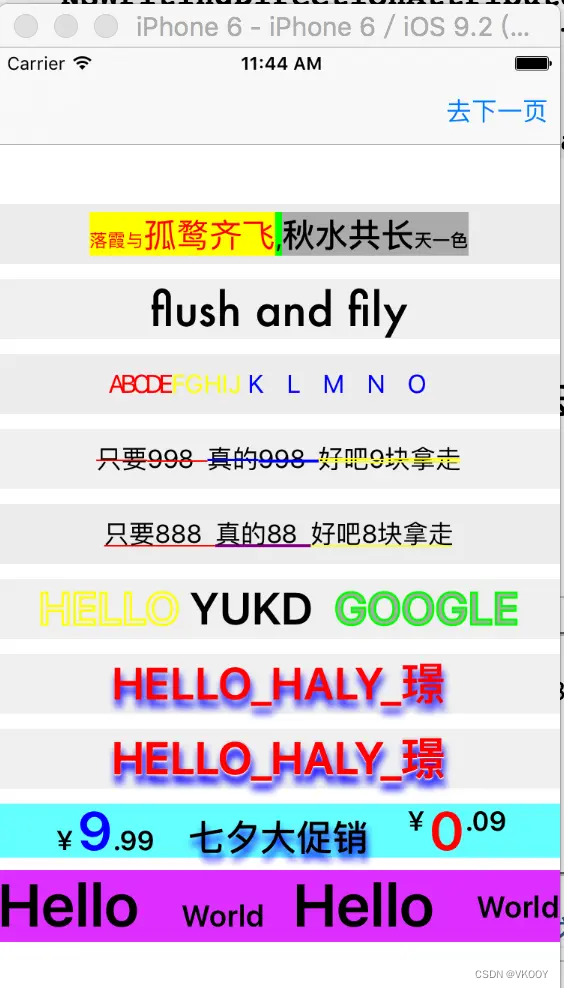
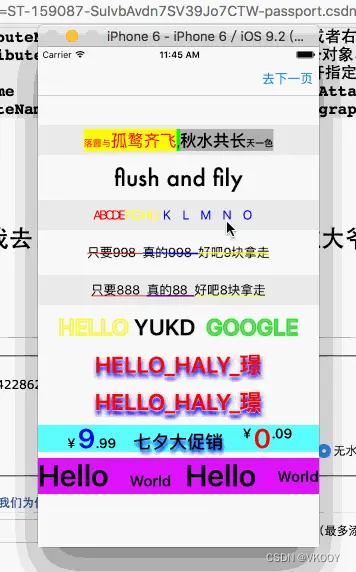
1.NSFontAttributeName
说明:该属性用于改变一段文本的字体。如果不指定该属性,则默认为12-point Helvetica(Neue)

2.NSForegroundColorAttributeName
说明:该属性用于指定一段文本的字体颜色。如果不指定该属性,则默认为黑色
3.NSBackgroundColorAttributeName
说明:设置文字背景颜色
NSString *string = @"落霞与孤鹜齐飞,秋水共长天一色";
    NSMutableAttributedString *mutableAttriteStr = [[NSMutableAttributedString alloc] init];
    NSAttributedString *attributeStr1 = [[NSAttributedString alloc] initWithString:[string substringWithRange:NSMakeRange(0, 3)] attributes:@{NSFontAttributeName :[UIFont fontWithName:@"futura" size:12],NSForegroundColorAttributeName : [UIColor redColor],NSBackgroundColorAttributeName : [UIColor yellowColor]}];
    NSAttributedString *attributeStr4 = [[NSAttributedString alloc] initWithString:[string substringWithRange:NSMakeRange(3, 4)] attributes:@{NSFontAttributeName :[UIFont fontWithName:@"futura" size:22],NSForegroundColorAttributeName : [UIColor redColor],NSBackgroundColorAttributeName : [UIColor yellowColor]}];
    NSAttributedString *attributeStr2 = [[NSAttributedString alloc] initWithString:[string substringWithRange:NSMakeRange(8, 4)] attributes:@{NSFontAttributeName : [UIFont boldSystemFontOfSize:22],NSForegroundColorAttributeName : [UIColor blackColor],NSBackgroundColorAttributeName : [UIColor lightGrayColor]}];
     NSAttributedString *attributeStr5 = [[NSAttributedString alloc] initWithString:[string substringWithRange:NSMakeRange(12, 3)] attributes:@{NSFontAttributeName : [UIFont boldSystemFontOfSize:12],NSForegroundColorAttributeName : [UIColor blackColor],NSBackgroundColorAttributeName : [UIColor lightGrayColor]}];
    NSAttributedString *attriteStr3 = [[NSAttributedString alloc] initWithString:[string substringWithRange:NSMakeRange(7, 1)] attributes:@{NSBackgroundColorAttributeName : [UIColor greenColor]}];
    [mutableAttriteStr appendAttributedString:attributeStr1];
    [mutableAttriteStr appendAttributedString:attributeStr4];
    [mutableAttriteStr appendAttributedString:attriteStr3];

    [mutableAttriteStr appendAttributedString:attributeStr2];
     [mutableAttriteStr appendAttributedString:attributeStr5];
    self.label1.attributedText = mutableAttriteStr;
4.NSLigatureAttributeName
连体字符是指某些连在一起的字符,它们采用单个的图元符号。0 表示没有连体字符。1
表示使用默认的连体字符。2表示使用所有连体符号。默认值为 1(注意,iOS 不支持值为 2)

// 连体艺术字,不是每个都能连起的,f和l  f和i就可以,其他各位可以自己去试试
    self.label2.attributedText = [[NSAttributedString alloc] initWithString:@"flush and fily" attributes:@{NSLigatureAttributeName : [NSNumber numberWithInt:1],NSFontAttributeName : [UIFont fontWithName:@"futura" size:30]}];

    NSMutableAttributedString *mutableAttributeStr2 = [[NSMutableAttributedString alloc] init];
    NSAttributedString *string6 = [[NSAttributedString alloc] initWithString:@"ABCDE " attributes:@{NSKernAttributeName : [NSNumber numberWithInt:-3],NSForegroundColorAttributeName : [UIColor redColor]}];
    NSAttributedString *string7 = [[NSAttributedString alloc] initWithString:@"FGHIJ " attributes:@{NSKernAttributeName : [NSNumber numberWithInt:0],NSForegroundColorAttributeName : [UIColor yellowColor]}];
    NSAttributedString *string8 = [[NSAttributedString alloc] initWithString:@"KLMNO " attributes:@{NSKernAttributeName : @(15),NSForegroundColorAttributeName : [UIColor blueColor]}];
    [mutableAttributeStr2 appendAttributedString:string6];
    [mutableAttributeStr2 appendAttributedString:string7];
    [mutableAttributeStr2 appendAttributedString:string8];
    self.label3.attributedText = mutableAttributeStr2;
5.NSKernAttributeName
字符间距正值间距加宽,负值间距变窄

NSMutableAttributedString *mutableAttributeStr2 = [[NSMutableAttributedString alloc] init];
    NSAttributedString *string6 = [[NSAttributedString alloc] initWithString:@"ABCDE " attributes:@{NSKernAttributeName : [NSNumber numberWithInt:-3],NSForegroundColorAttributeName : [UIColor redColor]}];
    NSAttributedString *string7 = [[NSAttributedString alloc] initWithString:@"FGHIJ " attributes:@{NSKernAttributeName : [NSNumber numberWithInt:0],NSForegroundColorAttributeName : [UIColor yellowColor]}];
    NSAttributedString *string8 = [[NSAttributedString alloc] initWithString:@"KLMNO " attributes:@{NSKernAttributeName : @(15),NSForegroundColorAttributeName : [UIColor blueColor]}];
    [mutableAttributeStr2 appendAttributedString:string6];
    [mutableAttributeStr2 appendAttributedString:string7];
    [mutableAttributeStr2 appendAttributedString:string8];
    self.label3.attributedText = mutableAttributeStr2;
6.NSStrikethroughStyleAttributeName 和 NSStrikethroughColorAttributeName
NSStrikethroughStyleAttributeName 设置删除线,取值为 NSNumber 对象(整数),
NSStrikethroughColorAttributeName 设置删除线颜色
枚举常量 NSUnderlineStyle中的值:
NSUnderlineStyleNone =0x00, 不设置
NSUnderlineStyleSingle =0x01, 设置单细删除线
NSUnderlineStyleThickNS_ENUM_AVAILABLE(10_0,7_0) = 0x02, 设置粗单删除线
NSUnderlineStyleDoubleNS_ENUM_AVAILABLE(10_0,7_0) = 0x09,双细删除线

NSMutableAttributedString *mutableAttributeStr3 = [[NSMutableAttributedString alloc] init];
    NSAttributedString *string9 = [[NSAttributedString alloc] initWithString:@"只要998  " attributes:@{NSStrikethroughStyleAttributeName : @(NSUnderlineStyleSingle),NSStrikethroughColorAttributeName : [UIColor redColor]}];
    NSAttributedString *string10 = [[NSAttributedString alloc] initWithString:@"真的998  " attributes:@{NSStrikethroughStyleAttributeName : @(NSUnderlineStyleThick),NSStrikethroughColorAttributeName : [UIColor blueColor]}];
    NSAttributedString *string11 = [[NSAttributedString alloc] initWithString:@"好吧9块拿走" attributes:@{NSStrikethroughStyleAttributeName : @(NSUnderlineStyleDouble),NSStrikethroughColorAttributeName : [UIColor yellowColor]}];

    [mutableAttributeStr3 appendAttributedString:string9];
    [mutableAttributeStr3 appendAttributedString:string10];
    [mutableAttributeStr3 appendAttributedString:string11];
    self.label4.attributedText = mutableAttributeStr3;
7.NSUnderlineStyleAttributeName 和 NSUnderlineColorAttributeName
给文字加下划线和更换下划线颜色,属性和上面的删除线都是一样用的

NSMutableAttributedString *mutableAttributeStr4 = [[NSMutableAttributedString alloc] init];
    NSAttributedString *string12 = [[NSAttributedString alloc] initWithString:@"只要888  " attributes:@{NSUnderlineStyleAttributeName : @(NSUnderlineStyleSingle),NSUnderlineColorAttributeName : [UIColor redColor]}];
    NSAttributedString *string13 = [[NSAttributedString alloc] initWithString:@"真的88  " attributes:@{NSUnderlineStyleAttributeName : @(NSUnderlineStyleThick),NSUnderlineColorAttributeName : [UIColor purpleColor]}];
    NSAttributedString *string14 = [[NSAttributedString alloc] initWithString:@"好吧8块拿走" attributes:@{NSUnderlineStyleAttributeName : @(NSUnderlineStyleDouble),NSUnderlineColorAttributeName : [UIColor yellowColor]}];

    [mutableAttributeStr4 appendAttributedString:string12];
    [mutableAttributeStr4 appendAttributedString:string13];
    [mutableAttributeStr4 appendAttributedString:string14];
    self.label5.attributedText = mutableAttributeStr4;
8.NSStrokeWidthAttributeName 和 NSStrokeColorAttributeName
设置文字描边颜色,需要和NSStrokeWidthAttributeName设置描边宽度,这样就能使文字空心.NSStrokeWidthAttributeName 这个属性所对应的值是一个 NSNumber 对象(小数)。该值改变笔画宽度(相对于字体 size 的百分比),负值填充效果,正值中空效果,默认为 0,即不改变。正数只改变描边宽度。负数同时改变文字的描边和填充宽度。例如,对于常见的空心字,这个值通常为 3.0。
同时设置了空心的两个属性,并且 NSStrokeWidthAttributeName 属性设置为整数,文字前景色就无效果了

NSMutableAttributedString *mutableAttributeStr5 = [[NSMutableAttributedString alloc] init];
    // 如果这个stroke的width正数的时候,字体就中空了,那么前景色就设置无效了
    NSAttributedString *string15 = [[NSAttributedString alloc] initWithString:@"HELLO " attributes:@{NSStrokeWidthAttributeName : @(5),NSStrokeColorAttributeName : [UIColor yellowColor],NSFontAttributeName : [UIFont boldSystemFontOfSize:30],NSForegroundColorAttributeName : [UIColor redColor]}];
    NSAttributedString *string16 = [[NSAttributedString alloc] initWithString:@"YUKD  " attributes:@{NSStrokeWidthAttributeName : @(0),NSStrokeColorAttributeName : [UIColor redColor],NSFontAttributeName : [UIFont boldSystemFontOfSize:30]}];
    NSAttributedString *string17 = [[NSAttributedString alloc] initWithString:@"GOOGLE" attributes:@{NSStrokeWidthAttributeName : @(-5),NSStrokeColorAttributeName : [UIColor greenColor],NSFontAttributeName : [UIFont boldSystemFontOfSize:30],NSForegroundColorAttributeName : [UIColor lightGrayColor]}];

    [mutableAttributeStr5 appendAttributedString:string15];
    [mutableAttributeStr5 appendAttributedString:string16];
    [mutableAttributeStr5 appendAttributedString:string17];
    self.label6.attributedText = mutableAttributeStr5;
9.NSShadowAttributeName
设置文字阴影,取值为NSShadow对象

// 设置阴影
    NSShadow *shadow = [[NSShadow alloc] init];
    shadow.shadowBlurRadius = 5.0f; // 模糊度
    shadow.shadowColor = [UIColor blueColor];
    shadow.shadowOffset = CGSizeMake(1, 5);
    NSAttributedString *string20 = [[NSAttributedString alloc] initWithString:@"HELLO_HALY_璟" attributes:@{NSFontAttributeName : [UIFont boldSystemFontOfSize:30],NSForegroundColorAttributeName : [UIColor redColor],NSShadowAttributeName : shadow}];

self.label7.attributedText = string20;10.NSTextEffectAttributeNam
NSTextEffectAttributeName //设置文本特殊效果,取值为NSString类型,目前只有一个可用效果 NSTextEffectLetterpressStyle(凸版印刷效果)

// 文本印刷,我也不知道是什么鬼
    // 设置阴影
    NSAttributedString *string21 = [[NSAttributedString alloc] initWithString:@"HELLO_HALY_璟" attributes:@{NSFontAttributeName : [UIFont boldSystemFontOfSize:30],NSForegroundColorAttributeName : [UIColor redColor],NSShadowAttributeName : shadow,NSTextEffectAttributeName : NSTextEffectLetterpressStyle}];

self.label8.attributedText = string21;11.NSBaselineOffsetAttributeName
文字基线偏移,想要达到以下图片的效果,就要设置需要的文字偏移,正数上移,负数下移

// 设置文本的基线 负数向下  正数向上  0不变
    UIFont *bigFont = [UIFont boldSystemFontOfSize:36];
    UIFont *smallFont = [UIFont boldSystemFontOfSize:bigFont.pointSize / 2];
    CGFloat capHeight = bigFont.pointSize - smallFont.pointSize;
    NSMutableAttributedString *attributeString6 = [[NSMutableAttributedString alloc] init];
    NSAttributedString *string22 = [[NSAttributedString alloc] initWithString:@"¥" attributes:@{NSFontAttributeName : smallFont,NSForegroundColorAttributeName : [UIColor blackColor],NSBaselineOffsetAttributeName : @(0)}];
    NSAttributedString *string23 = [[NSAttributedString alloc] initWithString:@"9" attributes:@{NSFontAttributeName : bigFont,NSForegroundColorAttributeName : [UIColor blueColor],NSBaselineOffsetAttributeName : @(0)}];
    NSAttributedString *string24 = [[NSAttributedString alloc] initWithString:@".99" attributes:@{NSFontAttributeName : smallFont,NSForegroundColorAttributeName : [UIColor blackColor],NSBaselineOffsetAttributeName : @(0)}];


    NSAttributedString *string28 = [[NSAttributedString alloc] initWithString:@"    七夕大促销    " attributes:@{NSFontAttributeName : [UIFont boldSystemFontOfSize:24],NSForegroundColorAttributeName : [UIColor blackColor],NSBaselineOffsetAttributeName : @(0),NSShadowAttributeName : shadow}];

    NSAttributedString *string25 = [[NSAttributedString alloc] initWithString:@"¥" attributes:@{NSFontAttributeName : smallFont,NSForegroundColorAttributeName : [UIColor blackColor],NSBaselineOffsetAttributeName : @(capHeight - 5)}];
    NSAttributedString *string26 = [[NSAttributedString alloc] initWithString:@"0" attributes:@{NSFontAttributeName : bigFont,NSForegroundColorAttributeName : [UIColor redColor],NSBaselineOffsetAttributeName : @(0)}];
    NSAttributedString *string27 = [[NSAttributedString alloc] initWithString:@".09" attributes:@{NSFontAttributeName : smallFont,NSForegroundColorAttributeName : [UIColor blackColor],NSBaselineOffsetAttributeName : @(capHeight - 5)}];
    [attributeString6 appendAttributedString:string22];
    [attributeString6 appendAttributedString:string23];
    [attributeString6 appendAttributedString:string24];
    [attributeString6 appendAttributedString:string28];
    [attributeString6 appendAttributedString:string25];
    [attributeString6 appendAttributedString:string26];
    [attributeString6 appendAttributedString:string27];
    self.label9.attributedText = attributeString6;

    NSMutableAttributedString *attributeString7 = [[NSMutableAttributedString alloc] init];

    NSAttributedString *string29 = [[NSAttributedString alloc] initWithString:@"Hello  " attributes:@{NSFontAttributeName : [UIFont boldSystemFontOfSize:40],NSForegroundColorAttributeName : [UIColor blackColor],NSBaselineOffsetAttributeName : @(0)}];
    NSAttributedString *string30 = [[NSAttributedString alloc] initWithString:@"  World    " attributes:@{NSFontAttributeName : [UIFont boldSystemFontOfSize:20],NSForegroundColorAttributeName : [UIColor blackColor],NSBaselineOffsetAttributeName : @(0)}];

    NSAttributedString *string31 = [[NSAttributedString alloc] initWithString:@"Hello  " attributes:@{NSFontAttributeName : [UIFont boldSystemFontOfSize:40],NSForegroundColorAttributeName : [UIColor blackColor],NSBaselineOffsetAttributeName : @(0)}];
    NSAttributedString *string32 = [[NSAttributedString alloc] initWithString:@"  World" attributes:@{NSFontAttributeName : [UIFont boldSystemFontOfSize:20],NSForegroundColorAttributeName : [UIColor blackColor],NSBaselineOffsetAttributeName : @(6)}];


    [attributeString7 appendAttributedString:string29];
    [attributeString7 appendAttributedString:string30];
    [attributeString7 appendAttributedString:string31];
    [attributeString7 appendAttributedString:string32];
self.label10.attributedText = attributeString7;12.NSObliquenessAttributeName
NSObliquenessAttributeName 设置字体倾斜度,取值为 NSNumber(float),正值右倾,负值左倾
13.NSExpansionAttributeName
NSExpansionAttributeName 设置字体的横向拉伸,取值为NSNumber (float),正值拉伸 ,负值压缩
14.NSVerticalGlyphFormAttributeNameNSVerticalGlyphFormAttributeName 设置文字排版方向,取值为NSNumber对象(整数),0表示横排文本,1表示竖排文本 在iOS中只支持0

//    说明:NSVerticalGlyphFormAttributeName 设置文字排版方向,取值为NSNumber对象(整数),0表示横排文本,1表示竖排文本 在iOS中只支持0
//说明:NSObliquenessAttributeName 设置字体倾斜度,取值为 NSNumber(float),正值右倾,负值左倾
//    NSExpansionAttributeName
//    说明:NSExpansionAttributeName 设置字体的横向拉伸,取值为NSNumber (float),正值拉伸 ,负值压缩
    NSMutableAttributedString *mutableAttriteStr = [[NSMutableAttributedString alloc] init];
    NSAttributedString *attributeStr1 = [[NSAttributedString alloc] initWithString:@"HeHe_XiXi_mm" attributes:@{NSFontAttributeName :[UIFont boldSystemFontOfSize:30],NSForegroundColorAttributeName : [UIColor redColor],NSShadowAttributeName : shadow,NSObliquenessAttributeName : @(1),NSExpansionAttributeName : @(1),NSVerticalGlyphFormAttributeName : @(1)}];
    [mutableAttriteStr appendAttributedString:attributeStr1];
    self.label1.attributedText = mutableAttriteStr;
15.NSWritingDirectionAttributeName
文字书写方向取值为以下组合为例 他是一个数组包含NSNumber 一般书写就是L ---R
那么我们多个需求也就是从R --- L
The values of the NSNumber objects should be 0, 1, 2, or 3, for LRE, RLE, LRO, or RLO respectively, and combinations of leftToRight and rightToLeft withNSTextWritingDirectionEmbedding or NSTextWritingDirectionOverride

     // 文字书写方向
//    The values of the NSNumber objects should be 0, 1, 2, or 3, for LRE, RLE, LRO, or RLO respectively, and combinations of leftToRight and rightToLeft with NSTextWritingDirectionEmbedding or NSTextWritingDirectionOverride, as shown in Table 1.
//    NSWritingDirectionLeftToRight | NSTextWritingDirectionEmbedding
//    NSWritingDirectionRightToLeft | NSTextWritingDirectionEmbedding
//    NSWritingDirectionLeftToRight | NSTextWritingDirectionOverride
//    NSWritingDirectionRightToLeft | NSTextWritingDirectionOverride
    NSMutableAttributedString *attributuStr2 = [[NSMutableAttributedString alloc] init];
    NSAttributedString *string1 = [[NSAttributedString alloc] initWithString:@"一切皆有可能" attributes:@{NSFontAttributeName : [UIFont boldSystemFontOfSize:24],NSForegroundColorAttributeName : [UIColor redColor],NSWritingDirectionAttributeName : @[@(3)]}];
    [attributuStr2 appendAttributedString:string1];
    self.label.attributedText = attributuStr2;
16.NSLinkAttributeName
这货有点奇葩,所以很多人用第三方例如YYLabel来做,这东西不能在UILabel和UITextField使用,只能用UITextView来进行,实现他的代理,在代理方法里面进行URL跳转
该方法返回YES就能打开URL,NO不做任何事情
- (BOOL)textView:(UITextView *)textView shouldInteractWithURL:(NSURL *)URL inRange:(NSRange)characterRange
注:
1.一定要实现UITextView的代理才能进行URL跳转
2.textView的editable属性修改为NO,在编辑时不可点击

//    把 NSLinkAttributeName 属性单独列出来,是因为在 UILabel 和 UITextField 中是无法使用该属性的。更准确点说是在UILabel 和 UITextField 中无法实现点击链接启动浏览器打开一个URL地址,因为在此过程中用到了一个代理函数。只能用在 UITextView 中
    self.textView.delegate = self;
    self.textView.scrollEnabled = NO;
    self.textView.editable = NO;
    self.textView.textContainer.lineFragmentPadding = 0;
    self.textView.textContainerInset = UIEdgeInsetsMake(0, 0, 0, 0);
    NSString *str = @"  跳转到宓珂璟的博客";
    NSMutableAttributedString *attrStr = [[NSMutableAttributedString alloc]initWithString:str];
    [attrStr addAttribute:NSLinkAttributeName value:[NSURL URLWithString:@"http://blog.csdn.net/deft_mkjing"] range:[str rangeOfString:@"宓珂璟的博客"]];
    [attrStr addAttribute:NSFontAttributeName value:[UIFont boldSystemFontOfSize:30] range:NSMakeRange(0, str.length)];
    self.textView.attributedText = attrStr;
17.NSTextAttachment
设置文本附件,取值为NSTextAttachment对象 常用于图文混排
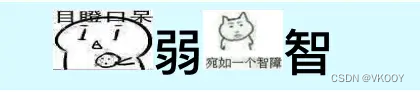
 NSString *words = @"天才";
    NSMutableAttributedString *strAtt = [[NSMutableAttributedString alloc] initWithString:words attributes:@{NSFontAttributeName : [UIFont boldSystemFontOfSize:25]}];
    NSTextAttachment *attatch = [[NSTextAttachment alloc] initWithData:nil ofType:nil];
    attatch.bounds = CGRectMake(0, 0, 40, 30);
    attatch.image = [UIImage imageNamed:@"$DCZ2WLN9RWI6JF(Q`P_(NH.jpg"];
    NSTextAttachment *attatch1 = [[NSTextAttachment alloc] initWithData:nil ofType:nil];
    attatch1.bounds = CGRectMake(0, 0, 50, 30);
    attatch1.image = [UIImage imageNamed:@"%5T@J(4WKWSOX2~~PY0{4M0.jpg"];
    NSAttributedString *string8 = [NSAttributedString attributedStringWithAttachment:attatch];
    NSAttributedString *string9 = [NSAttributedString attributedStringWithAttachment:attatch1];
    [strAtt insertAttributedString:string8 atIndex:1];
    [strAtt insertAttributedString:string9 atIndex:0];
    self.label3.attributedText = strAtt;
基本的就介绍到这里了,上面那些已经足够用了,而且可以任意组合出想要的图文混排,
如果遇到特殊的需求或者不能满足的,那么就需要各位去试试往上的第三方富文本了
给个好用的大家可以试试点击打开链接
本次Demo地址:Demo传送门
 1986


 扫一扫


 被折叠的 条评论
为什么被折叠?
 到【灌水乐园】发言


