


背景
现在项目需要实现根据关键词搜索实现扫描件的文本匹配,简单来说就是es 全文检索增加调用ocr接口的操作实现扫描件也能被搜索到的效果。
步骤
离线安装ik插件
IK 分词器的作用
IK 分词器是 Elasticsearch 在 倒排索引阶段使用的工具,它会将每个 text 字段里的内容进行中文词语的切分(不是切片!),例如:
原文:中华人民共和国国歌

IK 分词结果(ik_max_word):
["中华", "中华人民", "中华人民共和国", "人民", "共和国", "国歌"]
IK 是为了构建有效的关键词索引,让你搜索“共和国”时能命中整个段落内容。
下载插件:
ik插件git地址
- 查找和自己es对应的插件版本,进行下载对应的zip
- es安装目录下的plugin下,mkdir 创建一个文件夹 ik ,将zip放过去,然后进行解压
- 然后然后重启es
- 执行相关接口创建files索引
1、请求配置
方法: PUT

URL: http://localhost:9200/files

(确保你本地的 Elasticsearch 是运行在 9200 端口,如果不是请改成对应端口)

2. 设置 Headers
Key	Value
Content-Type	application/json
{

  "mappings": {
    "properties": {
      "filename": { "type": "keyword" },
      "text": {
        "type": "text",
        "analyzer": "ik_max_word",
        "search_analyzer": "ik_smart"
      },
      "type":{
       "type": "keyword"
      }

    }
  }
响应
{
  "acknowledged": true,
  "shards_acknowledged": true,
  "index": "files"
}
硬编码编写
// 项目结构: com.example.elasticsearchsearch
// ├── Application.java
// ├── config/ElasticsearchConfig.java
// ├── controller/FileUploadController.java
// ├── controller/SearchController.java
// ├── service/FileParserService.java
// ├── service/ElasticService.java
// ├── resources/application.yml
// ├── pom.xml

// ========== Application.java ==========
package com.example.elasticsearchsearch;

import org.springframework.boot.SpringApplication;
import org.springframework.boot.autoconfigure.SpringBootApplication;

@SpringBootApplication
public class Application {
    public static void main(String[] args) {
        SpringApplication.run(Application.class, args);
    }
}

// ========== config/ElasticsearchConfig.java ==========
package com.example.elasticsearchsearch.config;

import org.elasticsearch.client.RestClient;
import org.elasticsearch.client.RestHighLevelClient;
import org.elasticsearch.client.RestClientBuilder;
import org.springframework.context.annotation.Bean;
import org.springframework.context.annotation.Configuration;

@Configuration
public class ElasticsearchConfig {
    @Bean
    public RestHighLevelClient client() {
        RestClientBuilder builder = RestClient.builder(
            new org.apache.http.HttpHost("localhost", 9200, "http")
        );
        return new RestHighLevelClient(builder);
    }
}

// ========== controller/FileUploadController.java ==========
package com.example.elasticsearchsearch.controller;

import com.example.elasticsearchsearch.service.FileParserService;
import org.springframework.beans.factory.annotation.Autowired;
import org.springframework.core.io.Resource;
import org.springframework.core.io.UrlResource;
import org.springframework.http.ResponseEntity;
import org.springframework.web.bind.annotation.*;
import org.springframework.web.multipart.MultipartFile;

import java.io.IOException;
import java.nio.file.Path;
import java.nio.file.Paths;

@RestController
@RequestMapping("/files")
public class FileUploadController {

    @Autowired
    private FileParserService fileParserService;

    @PostMapping("/upload")
    public ResponseEntity<String> upload(@RequestParam("file") MultipartFile file) {
        try {
            fileParserService.saveFileToDisk(file);
            String content = fileParserService.parseFileWithFallback(file);
            fileParserService.indexFile(file.getOriginalFilename(), content);
            return ResponseEntity.ok("上传并索引成功");
        } catch (Exception e) {
            return ResponseEntity.status(500).body("上传失败: " + e.getMessage());
        }
    }

    @GetMapping("/download/{filename}")
    public ResponseEntity<?> download(@PathVariable String filename) throws IOException {
        Path path = Paths.get("upload-dir/original/" + filename);
        Resource resource = new UrlResource(path.toUri());
        return ResponseEntity.ok()
                .header("Content-Disposition", "attachment; filename=\"" + filename + "\"")
                .body(resource);
    }

    @GetMapping("/ocr-preview/{filename}")
    public ResponseEntity<?> downloadOcrWord(@PathVariable String filename) throws IOException {
        Path path = Paths.get("upload-dir/ocr-word/" + filename + ".docx");
        Resource resource = new UrlResource(path.toUri());
        return ResponseEntity.ok()
                .header("Content-Disposition", "inline; filename=\"" + filename + ".docx\"")
                .body(resource);
    }
}

// ========== controller/SearchController.java ==========
package com.example.elasticsearchsearch.controller;

import com.example.elasticsearchsearch.service.ElasticService;
import org.springframework.beans.factory.annotation.Autowired;
import org.springframework.web.bind.annotation.*;

import java.io.IOException;
import java.util.List;
import java.util.Map;

@RestController
@RequestMapping("/search")
public class SearchController {

    @Autowired
    private ElasticService elasticService;

    @GetMapping
    public List<Map<String, Object>> search(@RequestParam String keyword) throws IOException {
        return elasticService.search(keyword);
    }
}

// ========== service/FileParserService.java ==========
package com.example.elasticsearchsearch.service;

import org.apache.poi.xwpf.usermodel.XWPFDocument;
import org.apache.poi.xwpf.usermodel.XWPFParagraph;
import org.apache.tika.Tika;
import org.springframework.beans.factory.annotation.Autowired;
import org.springframework.http.ResponseEntity;
import org.springframework.stereotype.Service;
import org.springframework.util.FileCopyUtils;
import org.springframework.web.client.RestTemplate;
import org.springframework.web.multipart.MultipartFile;

import java.io.*;
import java.nio.file.*;
import java.util.*;

@Service
public class FileParserService {

    @Autowired
    private ElasticService elasticService;

    public String parseFileWithFallback(MultipartFile file) throws Exception {
        Tika tika = new Tika();
        try {
            return tika.parseToString(file.getInputStream());
        } catch (Exception e) {
            String textFromOcr = callOcrApi(file);
            saveAsWord(file.getOriginalFilename(), textFromOcr);
            return textFromOcr;
        }
    }

    public String callOcrApi(MultipartFile file) throws IOException {
        RestTemplate restTemplate = new RestTemplate();
        return restTemplate.postForObject("http://your-ocr-service/ocr", file.getBytes(), String.class);
    }

    public void saveAsWord(String originalFilename, String content) throws IOException {
        Path wordPath = Paths.get("upload-dir/ocr-word/" + originalFilename + ".docx");
        Files.createDirectories(wordPath.getParent());
        try (XWPFDocument doc = new XWPFDocument();
             FileOutputStream out = new FileOutputStream(wordPath.toFile())) {
            XWPFParagraph paragraph = doc.createParagraph();
            paragraph.createRun().setText(content);
            doc.write(out);
        }
    }

    public void saveFileToDisk(MultipartFile file) throws IOException {
        Path path = Paths.get("upload-dir/original/" + file.getOriginalFilename());
        Files.createDirectories(path.getParent());
        Files.copy(file.getInputStream(), path, StandardCopyOption.REPLACE_EXISTING);
    }

    public void indexFile(String filename, String content) throws IOException {
        Map<String, Object> doc = new HashMap<>();
        doc.put("filename", filename);
        doc.put("text", content);
        doc.put("type", filename.endsWith(".docx") ? "ocr" : "original");
        elasticService.indexDocument(doc);
    }
}

// ========== service/ElasticService.java ==========
package com.example.elasticsearchsearch.service;

import org.elasticsearch.action.index.IndexRequest;
import org.elasticsearch.action.search.SearchRequest;
import org.elasticsearch.action.search.SearchResponse;
import org.elasticsearch.client.RequestOptions;
import org.elasticsearch.client.RestHighLevelClient;
import org.elasticsearch.common.xcontent.XContentType;
import org.elasticsearch.index.query.MatchQueryBuilder;
import org.elasticsearch.search.SearchHit;
import org.elasticsearch.search.builder.SearchSourceBuilder;
import org.elasticsearch.search.fetch.subphase.highlight.HighlightBuilder;
import org.elasticsearch.search.fetch.subphase.highlight.HighlightField;
import org.springframework.beans.factory.annotation.Autowired;
import org.springframework.stereotype.Service;

import java.io.IOException;
import java.util.*;

@Service
public class ElasticService {

    @Autowired
    private RestHighLevelClient client;

    public void indexDocument(Map<String, Object> doc) throws IOException {
        IndexRequest request = new IndexRequest("files");
        request.source(doc, XContentType.JSON);
        client.index(request, RequestOptions.DEFAULT);
    }

    public List<Map<String, Object>> search(String keyword) throws IOException {
        SearchRequest request = new SearchRequest("files");
        SearchSourceBuilder builder = new SearchSourceBuilder();
        MatchQueryBuilder match = new MatchQueryBuilder("text", keyword);

        HighlightBuilder highlight = new HighlightBuilder()
                .field("text")
                .preTags("<span style='color:red'>")
                .postTags("</span>");

        builder.query(match).highlighter(highlight);
        request.source(builder);

        SearchResponse response = client.search(request, RequestOptions.DEFAULT);

        List<Map<String, Object>> results = new ArrayList<>();
        for (SearchHit hit : response.getHits()) {
            Map<String, Object> source = hit.getSourceAsMap();
            Map<String, HighlightField> hl = hit.getHighlightFields();
            if (hl.containsKey("text")) {
                source.put("highlight", hl.get("text").fragments()[0].string());
            }
            source.put("download_url", "/files/download/" + source.get("filename"));
            if ("ocr".equals(source.get("type"))) {
                source.put("ocr_preview_url", "/files/ocr-preview/" + source.get("filename"));
            }
            results.add(source);
        }
        return results;
    }
}

// ========== resources/application.yml ==========
spring:
  servlet:
    multipart:
      max-file-size: 100MB
      max-request-size: 100MB

# ========== pom.xml ==========
<!-- 请将下列依赖加入到你的 pom.xml 中 -->
<project xmlns="http://maven.apache.org/POM/4.0.0" xmlns:xsi="http://www.w3.org/2001/XMLSchema-instance"
         xsi:schemaLocation="http://maven.apache.org/POM/4.0.0 http://maven.apache.org/xsd/maven-4.0.0.xsd">
    <modelVersion>4.0.0</modelVersion>
    <groupId>com.example</groupId>
    <artifactId>elasticsearch-search</artifactId>
    <version>1.0.0</version>
    <dependencies>
        <dependency>
            <groupId>org.springframework.boot</groupId>
            <artifactId>spring-boot-starter-web</artifactId>
        </dependency>
        <dependency>
            <groupId>org.elasticsearch.client</groupId>
            <artifactId>elasticsearch-rest-high-level-client</artifactId>
            <version>7.9.3</version>
        </dependency>
        <dependency>
            <groupId>org.apache.tika</groupId>
            <artifactId>tika-core</artifactId>
            <version>2.9.0</version>
        </dependency>
        <dependency>
            <groupId>org.apache.tika</groupId>
            <artifactId>tika-parsers-standard-package</artifactId>
            <version>2.9.0</version>
        </dependency>
        <dependency>
            <groupId>org.apache.poi</groupId>
            <artifactId>poi-ooxml</artifactId>
            <version>5.2.3</version>
        </dependency>
    </dependencies>
</project>
小问题:
上述硬编码可能需要根据用户需求进行具体调试,比如编码格式
比如es设置了账号密码
@Configuration
public class ElasticsearchConfig {

    @Value("${elasticsearch.host:localhost}")
    private String host;

    @Value("${elasticsearch.port:9200}")
    private int port;

    @Value("${elasticsearch.username}")
    private String username;

    @Value("${elasticsearch.password}")
    private String password;

    @Bean
    public RestHighLevelClient client() {
        final CredentialsProvider credentialsProvider = new BasicCredentialsProvider();
        credentialsProvider.setCredentials(AuthScope.ANY,
                new UsernamePasswordCredentials(username, password));

        RestClientBuilder builder = RestClient.builder(new HttpHost(host, port, "http"))
                .setHttpClientConfigCallback(httpClientBuilder ->
                    httpClientBuilder.setDefaultCredentialsProvider(credentialsProvider)
                );

        return new RestHighLevelClient(builder);
    }
}
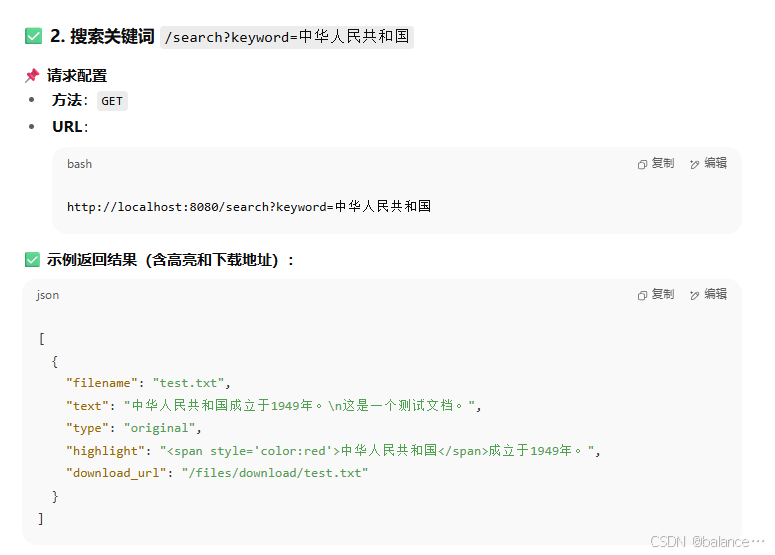
最终效果:
总结
最终展示到前端的是搜索框以及搜索出来的段落及高亮还有原版文档,这样就解决了扫描件无法被识别的问题,算是曲线救国啦~
深究背后原理倒排索引,下篇博客见啦~
参考文档如下:
安装单机es
还有chatgpt
注意点:
上传文档分片的时候报409 too many requests
去看es日志 发现es数据磁盘满了 所以会导致无法处理
解决方式:
换es的数据目录,改配置文件后重启
会报密码问题
这时候解决方式:
✅ 一、前提确认

假设你用的是标准安装版(systemctl 管理的 ES),路径如下:

配置文件:/etc/elasticsearch/elasticsearch.yml

数据目录:/data/elasticsearch(你改过)

安装目录:/usr/share/elasticsearch

服务名:elasticsearch

如果路径不同也没关系,我会标明每个步骤的可替代写法。

🧩 二、清空旧数据(从头开始)

我们不保留旧的索引或认证数据。

sudo systemctl stop elasticsearch
sudo rm -rf /data/elasticsearch/*
sudo mkdir -p /data/elasticsearch
sudo chown -R elasticsearch:elasticsearch /data/elasticsearch
sudo chmod -R 750 /data/elasticsearch

⚙️ 三、修改配置文件

编辑 /etc/elasticsearch/elasticsearch.yml,确保包含以下内容(可以复制追加到文件末尾):

path.data: /data/elasticsearch
path.logs: /data/elasticsearch/logs

cluster.name: es-cluster
node.name: node-1

network.host: 0.0.0.0
http.port: 9200

discovery.type: single-node

xpack.security.enabled: true


保存退出。

🚀 四、启动 Elasticsearch
sudo systemctl start elasticsearch


等待 30 秒左右(首次初始化较慢)。

🔐 五、初始化账户密码

执行:

sudo /usr/share/elasticsearch/bin/elasticsearch-setup-passwords interactive


如果系统提示:

Initiating the setup of passwords for reserved users.
You will be prompted to enter passwords as the process progresses.


✅ 表示集群是全新状态,可以设置密码。

当提示设置 elastic 用户时,输入:

elastic password: ****

 201


 扫一扫


 被折叠的 条评论
为什么被折叠?
 到【灌水乐园】发言


