


前端使用 Datatables + Bootstrap + JQuery,后台使用 SpringBoot + Mybatis
本代码旨在将 Datatables 的各个细节用法串联起来,因此前后端都没做非空验证。后台使用 SpringBoot + Mybatis,这里关于SpringBoot + Mybatis的整合就不详细说了,不懂的朋友可以参考:https://blog.csdn.net/wsjzzcbq/article/details/81563515
由于本文讲解的项目使用了本地静态资源,为方便大家学习,最后会将代码上传到码云,需要的朋友可以下载
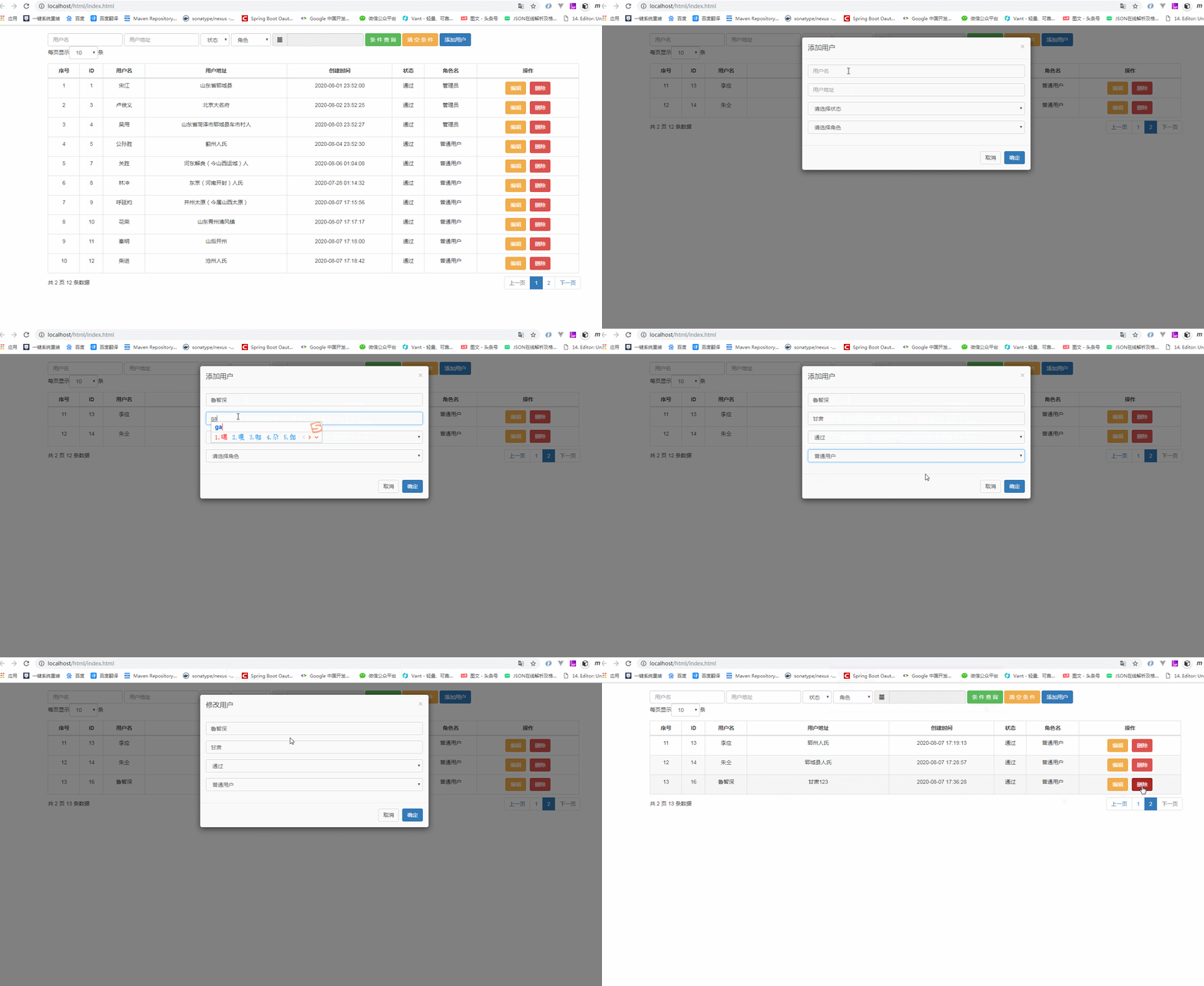
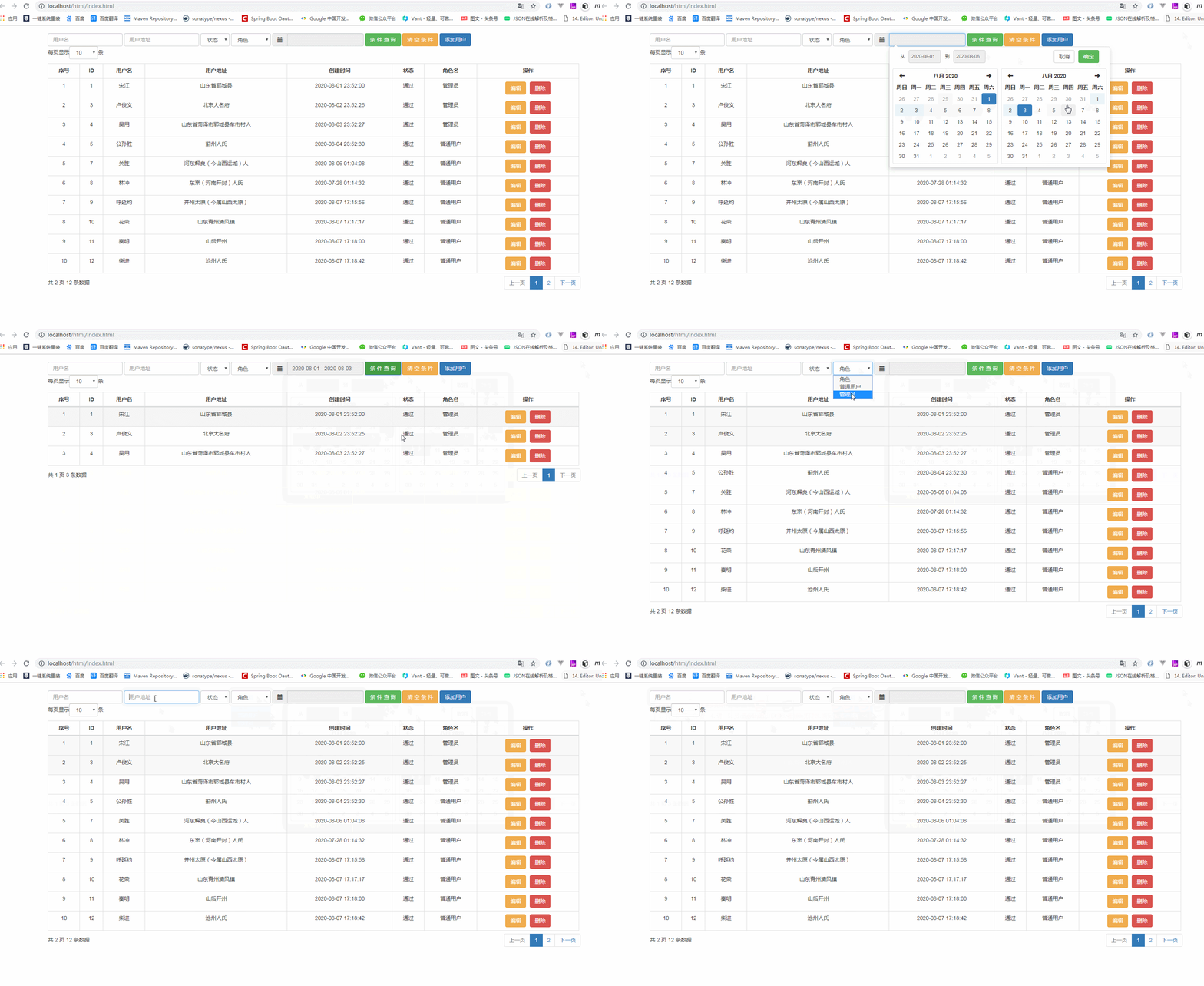
效果演示如下图
效果图 1
效果图 2
1、数据库建表
DROP TABLE IF EXISTS `user`;
CREATE TABLE `user`  (
  `user_id` int(11) NOT NULL AUTO_INCREMENT,
  `user_name` varchar(20) CHARACTER SET utf8 COLLATE utf8_general_ci NULL DEFAULT NULL,
  `user_addr` varchar(100) CHARACTER SET utf8 COLLATE utf8_general_ci NULL DEFAULT NULL,
  `create_date` datetime(0) NULL DEFAULT NULL,
  `status` int(11) NULL DEFAULT NULL,
  `role_id` int(11) NULL DEFAULT NULL,
  PRIMARY KEY (`user_id`) USING BTREE
) ENGINE = InnoDB AUTO_INCREMENT = 17 CHARACTER SET = utf8 COLLATE = utf8_general_ci ROW_FORMAT = Dynamic;

-- ----------------------------
-- Records of user
-- ----------------------------
INSERT INTO `user` VALUES (1, '宋江', '山东省郓城县', '2020-08-01 15:52:00', 1, 2);
INSERT INTO `user` VALUES (3, '卢俊义', '北京大名府', '2020-08-02 15:52:25', 1, 2);
INSERT INTO `user` VALUES (4, '吴用', '山东省菏泽市郓城县车市村人', '2020-08-03 15:52:27', 1, 2);
INSERT INTO `user` VALUES (5, '公孙胜', '蓟州人氏', '2020-08-04 15:52:30', 1, 1);
INSERT INTO `user` VALUES (7, '关胜', '河东解良(今山西运城)人', '2020-08-05 17:04:08', 1, 1);
INSERT INTO `user` VALUES (8, '林冲', '东京(河南开封)人氏', '2020-07-27 17:14:32', 1, 1);
INSERT INTO `user` VALUES (9, '呼延灼', '并州太原(今属山西太原)', '2020-08-07 09:15:56', 1, 1);
INSERT INTO `user` VALUES (10, '花荣', '山东青州清风镇', '2020-08-07 09:17:17', 1, 1);
INSERT INTO `user` VALUES (11, '秦明', '山后开州', '2020-08-07 09:18:00', 1, 1);
INSERT INTO `user` VALUES (12, '柴进', '沧州人氏', '2020-08-07 09:18:42', 1, 1);
INSERT INTO `user` VALUES (13, '李应', '郓州人氏', '2020-08-07 09:19:13', 1, 1);
INSERT INTO `user` VALUES (14, '朱仝', '郓城县人氏', '2020-08-07 09:28:57', 1, 1);
2、引入 maven 的 pom 依赖
<?xml version="1.0" encoding="UTF-8"?>
<project xmlns="http://maven.apache.org/POM/4.0.0" xmlns:xsi="http://www.w3.org/2001/XMLSchema-instance"
         xsi:schemaLocation="http://maven.apache.org/POM/4.0.0 https://maven.apache.org/xsd/maven-4.0.0.xsd">
    <modelVersion>4.0.0</modelVersion>
    <parent>
        <groupId>org.springframework.boot</groupId>
        <artifactId>spring-boot-starter-parent</artifactId>
        <version>2.3.2.RELEASE</version>
        <relativePath/> <!-- lookup parent from repository -->
    </parent>
    <groupId>com.datatables.demo</groupId>
    <artifactId>datatables-demo</artifactId>
    <version>0.0.1-SNAPSHOT</version>
    <name>datatables-demo</name>
    <description>Demo project for Spring Boot</description>

    <properties>
        <java.version>1.8</java.version>
    </properties>

    <dependencies>
        <dependency>
            <groupId>org.springframework.boot</groupId>
            <artifactId>spring-boot-starter</artifactId>
        </dependency>

        <dependency>
            <groupId>org.springframework.boot</groupId>
            <artifactId>spring-boot-starter-web</artifactId>
        </dependency>

        <dependency>
            <groupId>mysql</groupId>
            <artifactId>mysql-connector-java</artifactId>
        </dependency>

        <dependency>
            <groupId>org.mybatis.spring.boot</groupId>
            <artifactId>mybatis-spring-boot-starter</artifactId>
            <version>2.0.1</version>
        </dependency>

        <dependency>
            <groupId>com.alibaba</groupId>
            <artifactId>fastjson</artifactId>
            <version>1.2.7</version>
        </dependency>

        <dependency>
            <groupId>commons-lang</groupId>
            <artifactId>commons-lang</artifactId>
            <version>2.5</version>
        </dependency>

        <dependency>
            <groupId>org.springframework.boot</groupId>
            <artifactId>spring-boot-devtools</artifactId>
            <scope>runtime</scope>
            <optional>true</optional>
        </dependency>

        <dependency>
            <groupId>org.springframework.boot</groupId>
            <artifactId>spring-boot-starter-test</artifactId>
            <scope>test</scope>
            <exclusions>
                <exclusion>
                    <groupId>org.junit.vintage</groupId>
                    <artifactId>junit-vintage-engine</artifactId>
                </exclusion>
            </exclusions>
        </dependency>
    </dependencies>

    <build>
        <plugins>
            <plugin>
                <groupId>org.springframework.boot</groupId>
                <artifactId>spring-boot-maven-plugin</artifactId>
            </plugin>
        </plugins>
    </build>

</project>
3、配置 application.yml
server:
  port:  80

spring:
  datasource:
    url:  jdbc:mysql://192.168.0.110:3306/datatables_demo?useUnicode=true&characterEncoding=utf-8&useSSL=false
    driver-class-name:  com.mysql.cj.jdbc.Driver
    username:  root
    password:  123456

mybatis:
  mapper-locations:  classpath:mapper/*Mapper.xml
  config-location:  classpath:mapper/config/sqlMapConfig.xml

logging:
  level:
    com.datatables.demo.mapper: debug
4、实体类
package com.datatables.demo.bean;

import com.datatables.demo.common.page.Page;

import java.util.Date;

public class User extends Page {

    private Integer userId;

    private String userName;

    private String userAddr;

    private Date createDate;

    private Integer status;

    private Integer roleId;

    //日期范围查询条件
    private String date;

    public Integer getUserId() {
        return userId;
    }

    public void setUserId(Integer userId) {
        this.userId = userId;
    }

    public String getUserName() {
        return userName;
    }

    public void setUserName(String userName) {
        this.userName = userName;
    }

    public String getUserAddr() {
        return userAddr;
    }

    public void setUserAddr(String userAddr) {
        this.userAddr = userAddr;
    }

    public Date getCreateDate() {
        return createDate;
    }

    public void setCreateDate(Date createDate) {
        this.createDate = createDate;
    }

    public Integer getStatus() {
        return status;
    }

    public void setStatus(Integer status) {
        this.status = status;
    }

    public Integer getRoleId() {
        return roleId;
    }

    public void setRoleId(Integer roleId) {
        this.roleId = roleId;
    }

    public String getDate() {
        return date;
    }

    public void setDate(String date) {
        this.date = date;
    }

    @Override
    public String toString() {
        return "User{" +
                "userId=" + userId +
                ", userName='" + userName + '\'' +
                ", userAddr='" + userAddr + '\'' +
                ", createDate=" + createDate +
                ", status=" + status +
                ", roleId=" + roleId +
                '}';
    }
}
5、公共实体类
datatables 分页实体类
package com.datatables.demo.common.page;

public class Page {

    private int draw;

    private int offset;

    private int pageSize;

    public int getDraw() {
        return draw;
    }

    public void setDraw(int draw) {
        this.draw = draw;
    }

    public int getOffset() {
        return offset;
    }

    public void setOffset(int offset) {
        this.offset = offset;
    }

    public int getPageSize() {
        return pageSize;
    }

    public void setPageSize(int pageSize) {
        this.pageSize = pageSize;
    }
}
datatables 分页返回实体类
package com.datatables.demo.common.res;

/**
 * datatables 接收实体类
 */
public class R {

    public R() {
    }

    public R(int draw, int recordsTotal, int recordsFiltered, Object data) {
        this.draw = draw;
        this.recordsTotal = recordsTotal;
        this.recordsFiltered = recordsFiltered;
        this.data = data;
    }

    private int draw;

    private int recordsTotal;

    private int recordsFiltered;

    private Object data;

    public int getDraw() {
        return draw;
    }

    public void setDraw(int draw) {
        this.draw = draw;
    }

    public int getRecordsTotal() {
        return recordsTotal;
    }

    public void setRecordsTotal(int recordsTotal) {
        this.recordsTotal = recordsTotal;
    }

    public int getRecordsFiltered() {
        return recordsFiltered;
    }

    public void setRecordsFiltered(int recordsFiltered) {
        this.recordsFiltered = recordsFiltered;
    }

    public Object getData() {
        return data;
    }

    public void setData(Object data) {
        this.data = data;
    }
}
6、mapper 层
package com.datatables.demo.mapper;

import com.datatables.demo.bean.User;
import org.apache.ibatis.annotations.Mapper;
import org.apache.ibatis.session.RowBounds;
import java.util.List;
import java.util.Map;

@Mapper
public interface UserMapper {

    //查询分页数据
    List<User> getUserList(RowBounds rowBounds, Map<String, Object> map);

    //查询数据总条数
    int getUserListCount(RowBounds rowBounds, Map<String, Object> map);

    int insert(User user);

    int delete(Integer userId);

    User getById(Integer userId);

    int updateById(User user);
}
mapper 层 xml 文件
<?xml version="1.0" encoding="UTF-8"?>
<!DOCTYPE mapper PUBLIC "-//mybatis.org//DTD Mapper 3.0//EN" "http://mybatis.org/dtd/mybatis-3-mapper.dtd">
<mapper namespace="com.datatables.demo.mapper.UserMapper">
<resultMap id="BaseResultMap" type="com.datatables.demo.bean.User">
<id column="user_id" jdbcType="INTEGER" property="userId" />
<result column="user_name" jdbcType="VARCHAR" property="userName" />
<result column="user_addr" jdbcType="VARCHAR" property="userAddr" />
<result column="create_date" jdbcType="TIMESTAMP" property="createDate" />
<result column="status" jdbcType="INTEGER" property="status" />
<result column="role_id" jdbcType="INTEGER" property="roleId" />
</resultMap>
<sql id="Base_Column_List">
user_id, user_name, user_addr, role_id
</sql>
<!-- 查询分页数据 -->
<select id="getUserList" parameterType="com.datatables.demo.bean.User" resultMap="BaseResultMap">
select * from user where 1=1
<if test="userName != null ">
and INSTR(user_name, #{userName}) > 0
</if>
<if test="userAddr != null ">
and INSTR(user_addr, #{userAddr}) > 0
</if>
<if test="status != null ">
and status = #{status}
</if>
<if test="roleId != null ">
and role_id = #{roleId}
</if>
<if test="startDate != null and endDate != null ">
and DATE(create_date) BETWEEN #{startDate} AND #{endDate}
</if>
</select>
<!-- 查询数据总条数 -->
<select id="getUserListCount" resultType="int">
select count(*) from user where 1=1
<if test="userName != null ">
and INSTR(user_name, #{userName}) > 0
</if>
<if test="userAddr != null ">
and INSTR(user_addr, #{userAddr}) > 0
</if>
<if test="status != null ">
and status = #{status}
</if>
<if test="roleId != null ">
and role_id = #{roleId}
</if>
<if test="startDate != null and endDate != null ">
and DATE(create_date) BETWEEN #{startDate} AND #{endDate}
</if>
</select>
<insert id="insert" parameterType="com.datatables.demo.bean.User">
insert into user (user_name, user_addr, status,
role_id, create_date)
values ( #{userName,jdbcType=VARCHAR}, #{userAddr,jdbcType=VARCHAR},
#{status,jdbcType=INTEGER}, #{roleId,jdbcType=INTEGER}, #{createDate})
</insert>
<delete id="delete" parameterType="java.lang.Integer">
delete from user where user_id = #{userId}
</delete>
<select id="getById" parameterType="java.lang.Integer" resultMap="BaseResultMap">
select * from user where user_id = #{userId}
</select>
<update id="updateById" parameterType="com.datatables.demo.bean.User">
update user
set user_name = #{userName,jdbcType=VARCHAR},
user_addr = #{userAddr,jdbcType=VARCHAR},
status = #{status},
role_id = #{roleId,jdbcType=INTEGER}
where user_id = #{userId,jdbcType=INTEGER}
</update>
</mapper>
7、service 层
package com.datatables.demo.service;

import com.datatables.demo.bean.User;
import com.datatables.demo.common.res.R;

public interface UserService {

    R getPageUserList(User user);

    int insert(User user);

    int delete(Integer userId);

    User getById(Integer userId);

    int updateById(User user);
}
serviceimpl 层
package com.datatables.demo.service.impl;

import com.datatables.demo.bean.User;
import com.datatables.demo.common.res.R;
import com.datatables.demo.mapper.UserMapper;
import com.datatables.demo.service.UserService;
import org.apache.commons.lang.StringUtils;
import org.apache.ibatis.session.RowBounds;
import org.springframework.beans.factory.annotation.Autowired;
import org.springframework.stereotype.Service;
import java.util.Date;
import java.util.HashMap;
import java.util.List;
import java.util.Map;

@Service
public class UserServiceImpl implements UserService {

    @Autowired
    private UserMapper userMapper;

    @Override
    public R getPageUserList(User user) {
        //查询条件
        Map<String, Object> searchCondition = new HashMap<String, Object>();

        if(StringUtils.isNotBlank(user.getUserName())) {
            searchCondition.put("userName", user.getUserName());
        }else {
            searchCondition.put("userName", null);
        }

        if(StringUtils.isNotBlank(user.getUserAddr())) {
            searchCondition.put("userAddr", user.getUserAddr());
        }else {
            searchCondition.put("userAddr", null);
        }

        if (-1 != user.getStatus()) {
            searchCondition.put("status", user.getStatus());
        }else {
            searchCondition.put("status", null);
        }

        if (-1 != user.getRoleId()) {
            searchCondition.put("roleId", user.getRoleId());
        }else {
            searchCondition.put("roleId", null);
        }

        if (StringUtils.isNotBlank(user.getDate())) {
            String[] dates = user.getDate().split(" - ");
            searchCondition.put("startDate", dates[0]);
            searchCondition.put("endDate", dates[1]);
        }else {
            searchCondition.put("startDate", null);
            searchCondition.put("endDate", null);
        }


        List<User> list = userMapper.getUserList(new RowBounds(user.getOffset(), user.getPageSize()), searchCondition);
        int count = userMapper.getUserListCount(new RowBounds(user.getOffset(), user.getPageSize()), searchCondition);

        R r = new R(user.getDraw(), count, count, list);
        return r;
    }

    @Override
    public int insert(User user) {
        //设置创建时间
        user.setCreateDate(new Date());
        return userMapper.insert(user);
    }

    @Override
    public int delete(Integer userId) {
        return userMapper.delete(userId);
    }

    @Override
    public User getById(Integer userId) {
        return userMapper.getById(userId);
    }

    @Override
    public int updateById(User user) {
        return userMapper.updateById(user);
    }
}
8、controller 层
package com.datatables.demo.controller;

import com.datatables.demo.bean.User;
import com.datatables.demo.common.res.R;
import com.datatables.demo.service.UserService;
import org.springframework.beans.factory.annotation.Autowired;
import org.springframework.web.bind.annotation.GetMapping;
import org.springframework.web.bind.annotation.PostMapping;
import org.springframework.web.bind.annotation.RequestMapping;
import org.springframework.web.bind.annotation.RestController;

@RequestMapping("/user")
@RestController
public class UserController {

    @Autowired
    private UserService userService;

    @PostMapping("/list")
    public R list(User user) {
        R r = userService.getPageUserList(user);
        return r;
    }

    @PostMapping("/add")
    public String add(User user) {
        try {
            userService.insert(user);
            return "添加成功";
        }catch (Exception e){
            e.printStackTrace();
            return "添加失败";
        }
    }

    @GetMapping("/delete")
    public String delete(Integer userId) {
        try {
            userService.delete(userId);
            return "删除成功";
        }catch (Exception e){
            e.printStackTrace();
            return "删除失败";
        }
    }

    @GetMapping("/get")
    public User getById(Integer userId) {
        return userService.getById(userId);
    }

    @PostMapping("/update")
    public String update(User user) {
        try {
            userService.updateById(user);
            return "修改成功";
        }catch (Exception e){
            e.printStackTrace();
            return "修改失败";
        }
    }
}
9、springboot启动类
package com.datatables.demo;

import org.springframework.boot.SpringApplication;
import org.springframework.boot.autoconfigure.SpringBootApplication;

@SpringBootApplication
public class DatatablesDemoApplication {

    public static void main(String[] args) {
        SpringApplication.run(DatatablesDemoApplication.class, args);
    }

}
10、前端 html 页面
<!DOCTYPE html>
<html lang="en">
<head>
<meta charset="UTF-8">
<title>Title</title>
<link href="/bootstrap/css/bootstrap.min.css" rel="stylesheet" type="text/css" />
<link href="/DataTables/DataTables-1.10.18/css/dataTables.bootstrap.css" rel="stylesheet" type="text/css" />
<link rel="stylesheet" type="text/css" media="all" href="/css/daterangepicker-bs3.css"/>
<script type="text/javascript" src="/js/jquery-3.2.1.min.js"></script>
<script type="text/javascript" src="/DataTables/DataTables-1.10.18/js/jquery.dataTables.min.js" ></script>
<script type="text/javascript" src="/DataTables/DataTables-1.10.18/js/dataTables.bootstrap.js" ></script>
<script type="text/javascript" src="/bootstrap/js/bootstrap.js"></script>
<script type="text/javascript" src="/js/moment.js"></script>
<script type="text/javascript" src="/js/daterangepicker.js"></script>
</head>
<body>
<div class="row" style="margin-top:20px;">
<div class="col-lg-12 col-lg-offset-1">
<form class="form-inline">
<div class="form-group">
<input type="text" class="form-control" id="userName" placeholder="用户名">
</div>
<div class="form-group">
<input type="text" class="form-control" id="userAddr" placeholder="用户地址">
</div>
<div class="form-group">
<select id="status" class="form-control">
<option value="-1">状态</option>
<option value="1">通过</option>
<option value="0">驳回</option>
</select>
</div>
<div class="form-group">
<select id="roleId" class="form-control">
<option value="-1">角色</option>
<option value="1">普通用户</option>
<option value="2">管理员</option>
</select>
</div>
<div class="form-group">
<div class="controls">
<div class="input-prepend input-group">
<span class="add-on input-group-addon"><i class="glyphicon glyphicon-calendar fa fa-calendar"></i></span>
<input type="text" readonly style="width: 200px" name="reservation" id="reservation" class="form-control" value="" />
</div>
</div>
</div>
<button type=button class="btn btn-success" id="searchButton"> 条 件 查 询 </button>
<button type=button class="btn btn-warning" id="clearSearchButton"> 清 空 条 件 </button>
<button type=button class="btn btn-primary" id="addButton" >添加用户</button>
</form>
</div>
<div class="table-responsive col-lg-10 col-lg-offset-1" >
<table id="table_id" class="table table-bordered table-hover">
<thead>
<tr>
<th class="text-center">序号</th>
<th class="text-center">ID</th>
<th class="text-center">用户名</th>
<th class="text-center">用户地址</th>
<th class="text-center">创建时间</th>
<th class="text-center">状态</th>
<th class="text-center">角色名</th>
<th class="text-center">操作</th>
</tr>
</thead>
<tbody>
</tbody>
</table>
</div>
</div>
<!-- 添加模态框 -->
<div id="addModal" class="modal fade" tabindex="-1" role="dialog" aria-labelledby="myModalLabel">
<div class="modal-dialog" role="document">
<div class="modal-content">
<div class="modal-header">
<button type="button" class="close" data-dismiss="modal" aria-label="Close"><span aria-hidden="true">×</span></button>
<h4 class="modal-title">添加用户</h4>
</div>
<div class="modal-body">
<div class="form-group">
<input type="text" class="form-control" id="addUserName" placeholder="用户名">
</div>
<div class="form-group">
<input type="text" class="form-control" id="addUserAddr" placeholder="用户地址">
</div>
<div class="form-group">
<select id="addStatus" class="form-control">
<option value="-1">请选择状态</option>
<option value="1">通过</option>
<option value="0">驳回</option>
</select>
</div>
<div class="form-group">
<select id="addRole" class="form-control">
<option value="-1">请选择角色</option>
<option value="1">普通用户</option>
<option value="2">管理员</option>
</select>
</div>
</div>
<div class="modal-footer">
<button type="button" class="btn btn-default" data-dismiss="modal">取消</button>
<button type="button" class="btn btn-primary" data-dismiss="modal" onclick="addUser()">确定</button>
</div>
</div>
</div>
</div>
<!-- 修改模态框 -->
<div id="updateModal" class="modal fade" tabindex="-1" role="dialog" aria-labelledby="myModalLabel">
<div class="modal-dialog" role="document">
<div class="modal-content">
<div class="modal-header">
<button type="button" class="close" data-dismiss="modal" aria-label="Close"><span aria-hidden="true">×</span></button>
<h4 class="modal-title">修改用户</h4>
</div>
<div class="modal-body">
<div class="form-group">
<input type="text" class="form-control" id="updateUserName" placeholder="用户名">
</div>
<div class="form-group">
<input type="text" class="form-control" id="updateUserAddr" placeholder="用户地址">
</div>
<div class="form-group">
<select id="updateStatus" class="form-control">
<option value="-1">请选择状态</option>
<option value="1">通过</option>
<option value="0">驳回</option>
</select>
</div>
<div class="form-group">
<select id="updateRole" class="form-control">
<option value="-1">请选择角色</option>
<option value="1">普通用户</option>
<option value="2">管理员</option>
</select>
</div>
</div>
<div class="modal-footer">
<button type="button" class="btn btn-default" data-dismiss="modal">取消</button>
<button type="button" class="btn btn-primary" data-dismiss="modal" onclick="updateUser()">确定</button>
</div>
</div>
</div>
</div>
<script type="text/javascript">
var datatables_options = {
language : {
"lengthMenu" : '每页显示<select class="form-control input-xsmall">' + '<option value="10">10</option>'
+ '<option value="20">20</option>'
+ '<option value="30">30</option>'
+ '<option value="40">40</option>'
+ '<option value="50">50</option>' + '</select>条',
"paginate" : {
"first" : "首页",
"last" : "尾页",
"previous" : "上一页",
"next" : "下一页"
},
"processing" : "加载中...", //DataTables载入数据时,是否显示‘进度’提示
"emptyTable" : "暂无数据",
"info" : "共 _PAGES_ 页 _TOTAL_ 条数据 ",
"infoEmpty" : "暂无数据",
"emptyTable" : "暂无要处理的数据...", //表格中无数据
"search": "搜索:",
"infoFiltered" : " —— 从 _MAX_ 条数据中筛选",
"zeroRecords": "没有找到记录"
},
ordering: false,//排序显示控制
searching : false,
paging: true,//开启分页
processing : true,
serverSide : true,//是否开启服务器模式
ajax : {
url: '/user/list',
type: 'post',
cache: false,
data : function(d){
var user = {};
user.userName = $("#userName").val();
user.userAddr = $("#userAddr").val();
user.status = $("#status").val();
user.roleId = $("#roleId").val();
user.date = $("#reservation").val();
user.pageSize = d.length;
user.draw = d.draw;
user.offset = d.start;
return user;
},
dataFilter : function(json){
json = JSON.parse(json);
var returnData = {};
returnData.draw = json.draw;
returnData.recordsTotal = json.recordsTotal; //返回数据全部记录
returnData.recordsFiltered = json.recordsFiltered; //后台不实现过滤功能,每次查询均视作全部结果
returnData.data = json.data; //返回的数据列表
return JSON.stringify(returnData); //这几个参数都是datatable需要的,必须要
}
},
columns: [
{
"data" : null,
"orderable" : false,
"sClass": "text-center"
},
{
"data": "userId",
"name" : "id",
"orderable" : true,
"sDefaultContent":"", //默认空字符串
"sClass": "text-center"
},
{
"orderable" : false,
"data": "userName",
'sClass': "text-center"
},
{
"orderable" : false,
"data": "userAddr",
'sClass': "text-center"
},
{
"orderable" : false,
"data": "createDate",
'sClass': "text-center",
"render": function ChangeDateFormat(date) {
var dateee = new Date(date).toJSON();
return new Date(+new Date(dateee) + 8 * 3600 * 1000).toISOString().replace(/T/g, ' ').replace(/\.[\d]{3}Z/, '')
}
},
{
"orderable" : false,
"data": "status",
'sClass': "text-center",
'render': function (data, type,row,meta){
var status = row.status
var str = ''
if(status == 1){
str = '通过'
}
if(status == 0){
str = '驳回'
}
return str
}
},
{
"orderable" : false,
"data": "roleId",
'sClass': "text-center",
'render': function (data, type,row,meta){
var roleId = row.roleId
var str = ''
if(roleId == 1){
str = '普通用户'
}
if(roleId == 2){
str = '管理员'
}
return str
}
},
{
"orderable" : false,
"targets" : 2,//操作按钮目标列
"data" : null,
"sWidth" :"250px",
'sClass': "text-center",
"render" : function(data, type,row,meta) {
var id = '"' + row.userId + '"';
var html = "";
html += "<button onclick='edit("+ id +")' style='margin-right:10px;' class='up btn btn-warning '>编辑</button>"
html += "<a href='javascript:void(0);' onclick='deleteData("+id+ ")' class='down btn btn-danger '> 删除</a>"
return html;
}
}
],
fnDrawCallback :function () {
let api = this.api();
let startIndex = api.context[0]._iDisplayStart;//获取本页开始的条数
api.column(0).nodes().each(function(cell, i) {
cell.innerHTML = startIndex + i + 1;
});
}
};
var firstTable;
firstTable = $('#table_id').DataTable(datatables_options);
$("#addButton").click(function(){
$("#addModal").modal()
})
function addUser() {
$.ajax({
type:"post",
url:"/user/add",
async:true,
data:{
userName: $("#addUserName").val(),
userAddr: $("#addUserAddr").val(),
status: $("#addStatus").val(),
roleId: $("#addRole").val()
},
success:function(res){
// 刷新表格数据,分页信息不会重置
firstTable.ajax.reload(null,false);
//清空添加表单数据
clearAddData();
alert(res)
}
});
}
function clearAddData(){
$("#addUserName").val('')
$("#addUserAddr").val('')
$("#addStatus").val(-1)
$("#addRole").val(-1)
}
/**
* 删除
*/
function deleteData(id) {
$.ajax({
type:"get",
url:"/user/delete",
async:true,
data:{
userId: id
},
success:function(res){
// 刷新表格数据,分页信息不会重置
firstTable.ajax.reload(null,false);
alert(res)
}
});
}
//全局用户id
var userId;
function edit(id) {
$.ajax({
type:"get",
url:"/user/get",
async:true,
data:{
userId: id
},
success:function(res){
//设置回显用户数据
userId = res.userId //赋值给全局id,方便修改后使用
$("#updateUserName").val(res.userName)
$("#updateUserAddr").val(res.userAddr)
$("#updateStatus").val(res.status)
$("#updateRole").val(res.roleId)
$("#updateModal").modal()
}
});
}
function updateUser() {
$.ajax({
type:"post",
url:"/user/update",
async:true,
data:{
userId: userId,
userName: $("#updateUserName").val(),
userAddr: $("#updateUserAddr").val(),
status: $("#updateStatus").val(),
roleId: $("#updateRole").val()
},
success:function(res){
// 刷新表格数据,分页信息不会重置
firstTable.ajax.reload(null,false);
alert(res)
}
});
}
$("#searchButton").click(function(){
firstTable.ajax.reload(null,false);
firstTable.draw(false);
});
$("#clearSearchButton").click(function(){
$("#userName").val('');
$("#userAddr").val('');
$("#status").val(-1);
$("#roleId").val(-1);
$("#reservation").val('')
});
//日期范围选择器
$('#reservation').daterangepicker(null, function(start, end, label) {
console.log(start.toISOString(), end.toISOString(), label);
});
</script>
</body>
</html>
码云地址:https://gitee.com/wsjzzcbq/datatables-demo
 1657


 扫一扫


 被折叠的 条评论
为什么被折叠?
 到【灌水乐园】发言


