


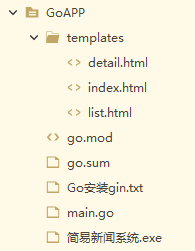
本系统采用Go 1.26版和gin1.12框架制作,Go版本必须大于1.22。先安装Go,再在Go中安装gin1.22。项目的代码在3个文件中,main.go是程序文件,templates目录下的list.html和detail.html是列表页和内容页的模板文件。gorm框架用于访问MySQL 数据库。
项目结构如下:
安装gin的命令如下:
E:\GoAPP> go env -w GO111MODULE=on
E:\GoAPP> go env -w GOPROXY=https://goproxy.cn,direct
E:\GoAPP> go get -u github.com/gin-gonic/gin
E:\GoAPP>go mod edit -require github.com/gin-gonic/gin@latest
E:\GoAPP>go mod tidy
安装gorm的命令如下:
go get -u github.com/gin-gonic/gin
go get -u gorm.io/gorm
go get -u gorm.io/driver/mysql
main.go的程序代码如下:
// main.go - 简易新闻系统主程序
// 功能:基于Gin框架开发的Web应用,实现新闻列表展示和新闻详情查看
// 数据源:MySQL数据库 test1 的 news 表
// 运行端口:3000
package main

// 导入依赖包
import (
	// html/template 用于处理HTML模板,提供 template.HTML 类型防止HTML内容被转义
	"html/template"
	// net/http 提供HTTP状态码常量
	"net/http"
	// strconv 用于字符串和数字之间的转换
	"strconv"
	// time 提供日期时间处理功能
	"time"

	// github.com/gin-gonic/gin 是Go语言流行的Web框架,提供路由、中间件等功能
	"github.com/gin-gonic/gin"
	// gorm.io/driver/mysql 是GORM的MySQL数据库驱动
	"gorm.io/driver/mysql"
	// gorm.io/gorm 是Go语言的ORM库,提供数据库操作的抽象层
	"gorm.io/gorm"
)

// db 是全局数据库连接对象,在 init() 函数中初始化,供整个应用使用
var db *gorm.DB

// News 结构体对应数据库 test1.news 表的完整字段定义
// 使用 gorm:"column:xxx" 标签映射数据库列名
type News struct {
	ID           int       `gorm:"column:ID"`           // 新闻ID,主键自增
	Title        string    `gorm:"column:title"`        // 新闻标题
	Content      string    `gorm:"column:content"`      // 新闻内容(HTML格式)
	BigClassName string    `gorm:"column:BigClassName"` // 新闻所属大类名称
	InfoTime     time.Time `gorm:"column:infotime"`     // 新闻发布时间
	User         string    `gorm:"column:user"`         // 新闻发布人
	Hits         int       `gorm:"column:hits"`         // 新闻浏览次数
}

// NewsList 结构体用于新闻列表页面的数据传输
// 只包含列表页需要的字段,减少数据传输量
type NewsList struct {
	ID           int    `json:"id"`             // 新闻ID
	Title        string `json:"title"`          // 新闻标题
	InfoTime     string `json:"infotime"`       // 发布时间(格式化后的字符串)
	BigClassName string `json:"big_class_name"` // 大类名称
}

// NewsDetail 结构体用于新闻详情页面的数据传输
type NewsDetail struct {
	ID       int           `json:"id"`       // 新闻ID
	Title    string        `json:"title"`    // 新闻标题
	Content  template.HTML `json:"content"`  // 新闻内容(template.HTML类型,允许HTML渲染)
	InfoTime string        `json:"infotime"` // 发布时间(格式化后的字符串)
	User     string        `json:"user"`     // 发布人
	Hits     int           `json:"hits"`     // 浏览次数
}

// TableName 方法指定 News 结构体对应的数据库表名
// GORM默认会将结构体名转为小写复数形式,这里显式指定为 "news"
func (News) TableName() string {
	return "news"
}

// init() 函数在 main() 函数之前执行,用于初始化数据库连接
// DSN格式:用户名:密码@tcp(主机:端口)/数据库名?charset=utf8mb4&parseTime=True&loc=Local
func init() {
	// 数据库连接字符串
	// 用户名:root,密码:111,主机:127.0.0.1,端口:3306,数据库:test1
	dsn := "root:111@tcp(127.0.0.1:3306)/test1?charset=utf8mb4&parseTime=True&loc=Local"

	var err error
	// 使用GORM打开MySQL连接,传入DSN和配置选项
	db, err = gorm.Open(mysql.Open(dsn), &gorm.Config{})
	if err != nil {
		// 如果连接失败,直接panic退出程序
		panic("failed to connect database: " + err.Error())
	}
}

// main() 函数是程序的入口点
func main() {
	// 创建Gin引擎实例,gin.Default() 会自动添加 Logger 和 Recovery 中间件
	r := gin.Default()

	// 加载templates目录下的所有HTML模板文件
	r.LoadHTMLGlob("templates/*")

	// 注册首页路由 GET /
	// 功能:展示新闻列表,分为"学生工作"和"德育园地"两个栏目,每栏显示6条最新新闻
	r.GET("/", func(c *gin.Context) {
		// 查询"学生工作"栏目下的最新6条新闻
		// 条件:BigClassName = '学生工作',按发布时间倒序排列,限制6条
		var studentWorkNews []News
		if err := db.Where("BigClassName = ?", "学生工作").Order("infotime DESC").Limit(6).Find(&studentWorkNews).Error; err != nil {
			// 查询失败,返回500错误
			c.String(http.StatusInternalServerError, "查询学生工作新闻失败: "+err.Error())
			return
		}

		// 查询"德育园地"栏目下的最新6条新闻
		var moralEducationNews []News
		if err := db.Where("BigClassName = ?", "德育园地").Order("infotime DESC").Limit(6).Find(&moralEducationNews).Error; err != nil {
			// 查询失败,返回500错误
			c.String(http.StatusInternalServerError, "查询德育园地新闻失败: "+err.Error())
			return
		}

		// 将数据库查询结果转换为列表页需要的 NewsList 类型
		// 主要处理:日期格式化(time.Time -> string)
		var studentWorkList []NewsList
		for _, n := range studentWorkNews {
			studentWorkList = append(studentWorkList, NewsList{
				ID:           n.ID,
				Title:        n.Title,
				InfoTime:     n.InfoTime.Format("2006-01-02"), // 日期格式化为 YYYY-MM-DD
				BigClassName: n.BigClassName,
			})
		}

		// 转换"德育园地"新闻列表
		var moralEducationList []NewsList
		for _, n := range moralEducationNews {
			moralEducationList = append(moralEducationList, NewsList{
				ID:           n.ID,
				Title:        n.Title,
				InfoTime:     n.InfoTime.Format("2006-01-02"),
				BigClassName: n.BigClassName,
			})
		}

		// 获取两个栏目的名称(从第一条记录中提取)
		var studentWorkBigClassName string
		if len(studentWorkList) > 0 {
			studentWorkBigClassName = studentWorkList[0].BigClassName
		}

		var moralEducationBigClassName string
		if len(moralEducationList) > 0 {
			moralEducationBigClassName = moralEducationList[0].BigClassName
		}

		// 渲染list.html模板,传入模板数据
		c.HTML(http.StatusOK, "list.html", gin.H{
			"title":                      "简易新闻系统首页",                 // 页面标题
			"studentWorkNews":            studentWorkList,            // 学生工作栏目新闻列表
			"studentWorkBigClassName":    studentWorkBigClassName,    // 学生工作栏目名称
			"moralEducationNews":         moralEducationList,         // 德育园地栏目新闻列表
			"moralEducationBigClassName": moralEducationBigClassName, // 德育园地栏目名称
		})
	})

	// 注册新闻详情路由 GET /show/:id
	// 功能:根据新闻ID查询并展示新闻详情
	r.GET("/show/:id", func(c *gin.Context) {
		// 获取URL参数中的新闻ID
		idStr := c.Param("id")
		// 将字符串ID转换为整数
		id, err := strconv.Atoi(idStr)
		if err != nil {
			// ID格式错误,返回400错误
			c.String(http.StatusBadRequest, "新闻ID格式错误")
			return
		}

		// 根据ID查询新闻详情
		var news News
		if err := db.Where("ID = ?", id).First(&news).Error; err != nil {
			if err == gorm.ErrRecordNotFound {
				// 新闻不存在,返回404错误
				c.String(http.StatusNotFound, "该新闻不存在")
			} else {
				// 查询失败,返回500错误
				c.String(http.StatusInternalServerError, "查询新闻失败: "+err.Error())
			}
			return
		}

		// 将数据库查询结果转换为详情页需要的 NewsDetail 类型
		// 注意:Content 字段使用 template.HTML 类型,确保HTML内容能正确渲染
		newsDetail := NewsDetail{
			ID:       news.ID,
			Title:    news.Title,
			Content:  template.HTML(news.Content),        // 转换为template.HTML类型
			InfoTime: news.InfoTime.Format("2006-01-02"), // 日期格式化
			User:     news.User,
			Hits:     news.Hits,
		}

		// 渲染detail.html模板,传入模板数据
		c.HTML(http.StatusOK, "detail.html", gin.H{
			"news":  newsDetail, // 新闻详情数据
			"title": news.Title, // 页面标题(使用新闻标题)
		})
	})

	// 启动HTTP服务,监听3000端口
	// 等价于 http.ListenAndServe(":3000", r)
	r.Run(":3000")
}
list.html代码如下:
<div class="news">
<div class="title">
<h2>{{.studentWorkBigClassName}}</h2>
<span class="more"><a href="more.htm">更多>></a></span>
</div>
<ul class="list_one">
{{range .studentWorkNews}}
<li><a href="/show/{{.ID}}">{{.Title}}</a><b>{{.InfoTime}}</b></li>
{{end}}
</ul>
</div>
<div class="news">
<div class="title">
<h2>{{.moralEducationBigClassName}}</h2>
<span class="more"><a href="more.htm">更多>></a></span>
</div>
<ul class="list_one">
{{range .moralEducationNews}}
<li><a href="/show/{{.ID}}">{{.Title}}</a><b>{{.InfoTime}}</b></li>
{{end}}
</ul>
</div>
detail.html代码如下:
<div class="container">
<a href="/" class="back">← 返回新闻列表</a>
<h1>{{.news.Title}}</h1>
<div class="meta">
发布人:{{.news.User}} 发布时间:{{.news.InfoTime}} 浏览量:{{.news.Hits}}
</div>
<hr>
<div class="content">
{{.news.Content}}
</div>
</div>
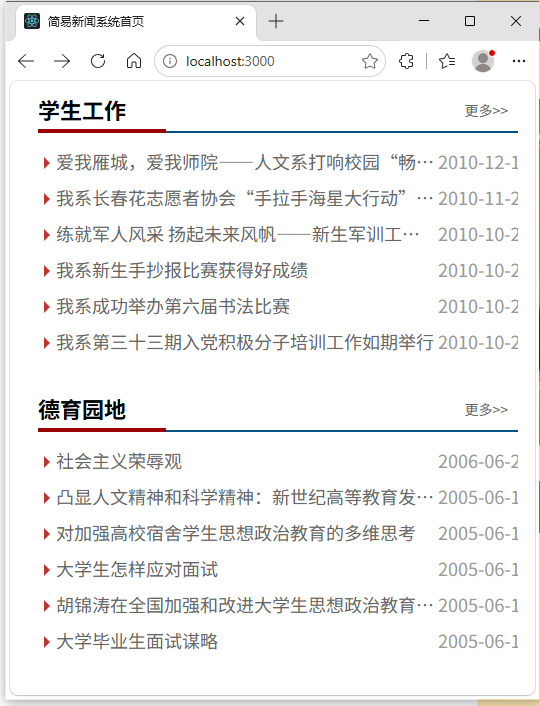
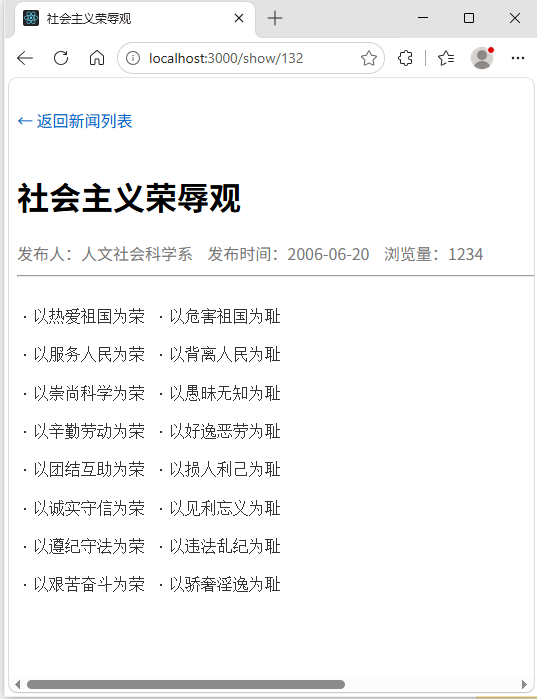
运行效果如下图所示:


 扫一扫
扫一扫


 188
188

 被折叠的 条评论
为什么被折叠?
被折叠的 条评论
为什么被折叠?
 到【灌水乐园】发言


